Where this sits
Last class set up the project and recorded a first test with Codegen. Today the instructor asked who had done the homework, most had, and then set expectations for the month: whatever you learn each day, post it on LinkedIn. Not as a nicety, as a habit; one learner had already posted three interview questions the night before. The class was asked for a "pinky promise" on it.
Two scoping decisions, stated up front:
- Codegen is now a secondary tool. It still records sessions, but the recording workflow the batch will actually use is Playwright MCP, coming next week together with the Playwright CLI and the AI agent features.
- No Cypress. Every comparison in this track is against Selenium only.
And a warning that the architecture is the part interview questions come from. Draw it yourself when you rewatch the recording; the instructor drew it live on the iPad rather than showing a slide, on purpose.
Selenium first: one request per command
To see why something is better you need the thing it improved on. In Selenium:
- You write source code in Java, C#, JavaScript, Python or another binding.
- A Selenium server (a Java utility) sits between your code and the browser.
- Every command you write,
driver.get(url)for instance, looks like a function call but is really an API request to that server, which forwards it to Chrome or Firefox. - The channel between the server and the browser is the W3C WebDriver protocol, a standard that every modern browser implements. Being a standard is the good part.
The problem is step 3. Those requests are HTTP, and HTTP is stateless: one request, one response, connection gone. The next command starts from zero. Every step of your test pays that round trip, which is the structural reason Selenium feels slow.
The cashier. You stand in a bank queue, reach the counter after fifteen minutes, show the passbook, withdraw 1,000 rupees, leave. Your partner phones: we need 500 more. Back in the queue, and when you reach the counter the cashier asks for the passbook again. He does not remember you. That is a stateless connection: nothing carries over between requests.
A learner asked whether Selenium's protocol is the JSON Wire Protocol or W3C. Both, in sequence: Selenium 3 spoke the JSON Wire Protocol, Selenium 4 speaks the W3C WebDriver protocol. Either way it is a fresh HTTP request per command.
The Playwright picture
Playwright kept the client-server shape and changed the wire. Drawn left to right:
- Client libraries. Your test, in JavaScript or TypeScript for this batch, but the same architecture holds for Java, Python and C#.
page.goto()is a client API: a function in the library that turns into a message. - WebSocket. The moment a run starts, the library opens a persistent, bidirectional connection to the Playwright server (
ws://). It stays open until the spec file finishes. Every command goes out over it; every response and every browser event comes back over it. - Playwright server. Some diagrams call it the Playwright driver, some the browser server. It is a Node.js server, and it understands what
page.gotomeans. One learner asked whether this is a library the way the Selenium server is: yes, that is the right mental slot for it. - Protocols to the engines. The server drives Chromium over CDP, the Chrome DevTools Protocol. It drives Firefox and WebKit over Playwright's own protocol. Some diagrams label that second channel "CDP+". Read it as not CDP.
The message format on the socket is JSON-RPC (JSON Remote Procedure Call): your goto becomes a JSON message naming the procedure and its arguments, and the reply is JSON too. That is the "JSON" item in the five-part interview answer below.
The family, not the cashier. Ask someone at home for one roti and they remember you asked, they answer, and they bring things up later without being asked. Stateful and two-way. The instructor's version of the analogy was sharper than that and got a laugh; the point is that the Playwright server keeps the conversation, while the cashier forgets you the moment you leave the counter.
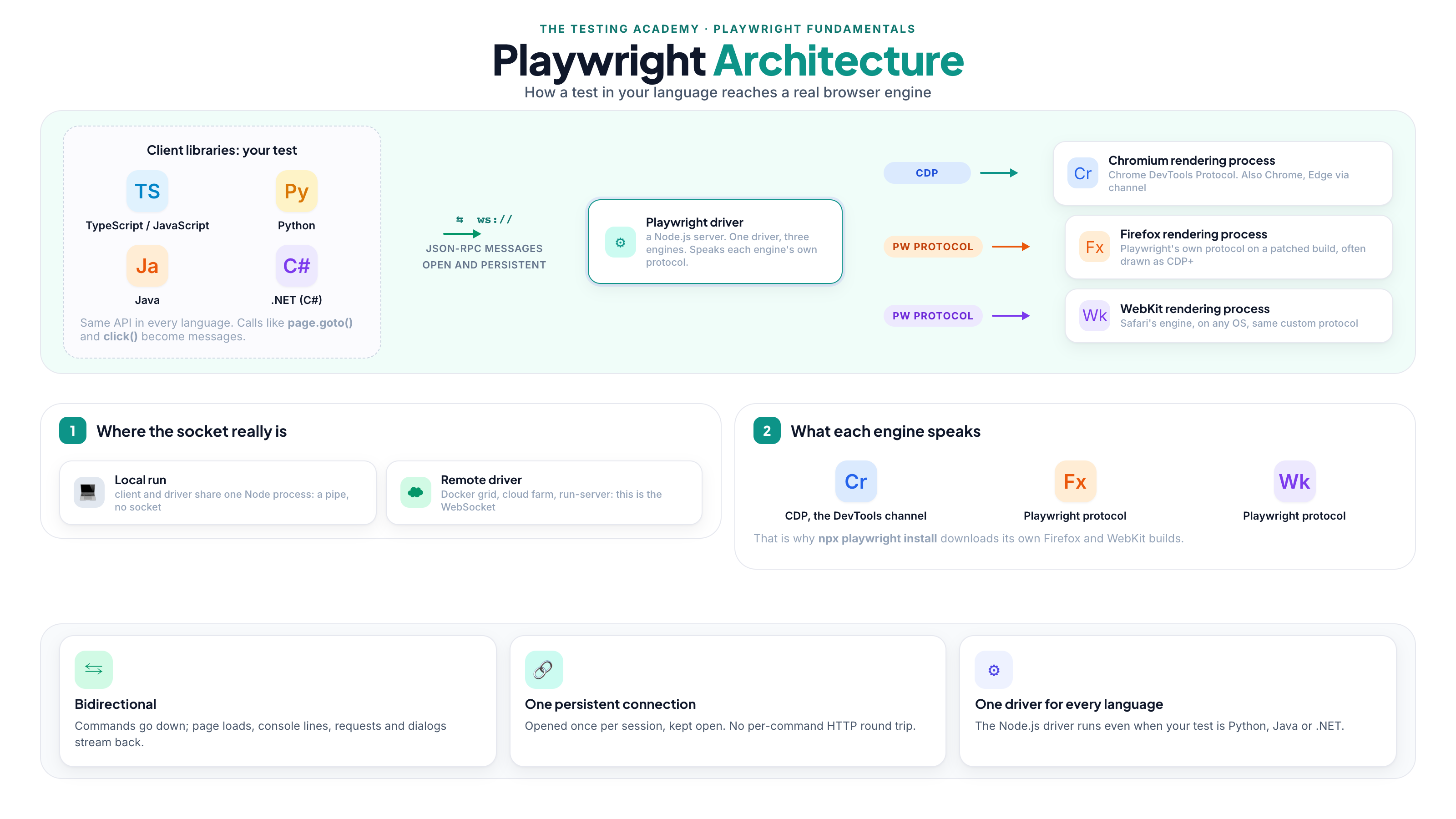
The rejection story. A student from an earlier batch was asked in an interview whether Firefox has CDP, said yes, and was rejected for it. Firefox and WebKit do not have the Chrome DevTools Protocol; CDP was built for the Chromium project. Playwright drives both of them through its own protocol, and it ships its own builds of them for exactly that reason. If a diagram you found online writes "CDP" on all three arrows, the diagram is wrong. Say Playwright protocol, or "CDP+" if you must, and be able to explain that the plus means not CDP.
One precision the diagram hides. The WebSocket is the honest picture whenever the driver runs somewhere other than your machine: a Docker grid, a cloud browser farm, a run-server. When client and driver run in the same Node process on your laptop, they talk over a pipe rather than a socket; the class called it a "pipe connection" at one point, which is exactly right. The interview answer is unchanged: one persistent, bidirectional channel opened once per run. The overview page shows both cases.
WebSocket, REST, JSON-RPC and GraphQL, sorted
The class paused to sort the vocabulary, because "Playwright uses APIs too" is true and confuses people.
WebSocket is a bidirectional, full-duplex channel between a client and a server over one TCP connection. It starts with a handshake, then stays open, then both sides close it when they are done. Unlike HTTP, where the client must ask for every piece of data, either side can push in real time. TCP, if you want the expansion, is the Transmission Control Protocol underneath both.
REST is also client-server, over HTTP, and stateless: the server forgets you after each request. The cashier. Selenium's WebDriver is REST-shaped; that is what "one HTTP request per command" means.
Both of these are types of API. SOAP, REST and WebSockets all sit under that umbrella. So the correct sentence is not "Selenium uses APIs and Playwright does not"; it is Selenium uses REST over HTTP, Playwright uses a WebSocket. Proper REST comes later in the track when the batch reaches API testing.
JSON-RPC is the message format on Playwright's socket: JSON, naming a remote procedure and its arguments. "What is JSON?" was asked and parked; it gets its own session.
GraphQL came up as "is that another one?" and the answer is no: it is a query language, not an API protocol. With a normal REST endpoint you ask for student 1 and get the fixed shape back, name, age and address. With GraphQL the client writes a query: give me student 1 but only the address, and the server returns only "Bangalore"; give me every student older than 65. The shape of the response is decided by the query, on the client side. It is similar in spirit to SQL, but it is not SQL and it is only used for APIs.
Asked in class: "In Selenium the server talks to the browser over the JSON Wire Protocol, and Playwright uses CDP for the same thing, right?" Not quite, on both halves. Selenium 3 used the JSON Wire Protocol and Selenium 4 uses W3C WebDriver; both are HTTP. And the thing Playwright uses in that position is the WebSocket to its server. CDP is one step further along, between the server and Chromium only.
The deep dive, and the six stages
The instructor also opened the architecture blueprint on the practice site, a replica of the flow the Playwright team publishes in their own repository. It is deliberately deeper than anything an interviewer asks, "for the crazy people":
test file -> the SDK (a library, whatever the diagram calls it) -> the driver server -> a dispatcher that routes the call -> the auto-wait mechanism -> the protocol layer (CDP for Chromium) -> the browser process (Chromium, Firefox or WebKit) -> the rendering engine -> the DOM tree. Network requests are captured on the way, and the trace viewer collects screenshots, video and the rest. Pick a command on that page (page.locator, expect, click) and it highlights the path that command takes.
The simpler stepper on the overview page is the one to explain in an interview, in this order:
npm init playwright@latestcreates the project,example.spec.tsincluded.npx playwright teststarts the runner; runner and workers readplaywright.config.tsand decide which browser to start.- A browser context is created for the test.
- The test navigates and acts.
expectchecks the results.npx playwright show-reportopens the HTML report.
Stage 3 is the one the previous class had skipped over, so the rest of the session was about it.
Chromium, Chrome, channel and Chrome for Testing
Four questions from the room, taken together because they share an answer.
Why Chromium and not Chrome? Chromium is the open-source project: the rendering engine plus enough browser to be, in the instructor's words, about 90 percent of one, or a browser without the finished UI. Chrome, Edge and Opera are all built from it. If your application works in Chromium, it will work in Chrome with something like 99 percent confidence, the way someone who could swim in class 10 can still swim in class 12. And Chromium is lightweight; Chrome carries Gemini and everything else Google adds, which a tester does not need.
A learner offered "Chromium is the class, Chrome is an instance". The instructor accepted it as an analogy and then said, twice, do not say that in an interview. It is a picture for your own head, not a technical claim. "Chromium is the base, the browsers are the pizzas made on it" is the same idea in safer words.
Where do the engines come from? Playwright does not use the Chrome or Firefox on your machine. npm init playwright@latest (and npx playwright install) downloads its own builds of Chromium, Firefox and WebKit into a cache: on macOS ~/Library/Caches/ms-playwright, on Windows %USERPROFILE%\AppData\Local\ms-playwright. The instructor listed the folder live: several Chromium versions, Firefox and WebKit builds, one per Playwright release that needed them. That is also why "does Firefox have CDP" has the answer it has: Playwright ships a Firefox it can drive its own way.
Does Playwright support real browsers? An interview question, and the answer is yes. channel: 'chrome' in the config runs the system Chrome, a true real browser; browserName: 'chromium' runs the bundled, deterministic engine. This is what "channeling" means when the class says it: the same test, pointed at a real installed browser instead of the bundled engine.
What is CFT? Chrome for Testing. Google did not want its product browser used as a test target, so it publishes a separate, testable build called Chrome for Testing and says: use that, or use Chromium. The analogy from class: the father with the Lamborghini does not hand the keys to the son who is learning to drive; there is a WagonR (Chromium) for that, or he buys him an i10 (Chrome for Testing). Selenium can use CFT too. For this batch the practical rule is: test on the bundled engines first, and use channel when you need the real browser.
Browser, Context, Page
Playwright hands you three things, BCP: a Browser, a Context inside it, and a Page inside that.
- Browser. The application itself, Chrome, Firefox or Safari. Launched once, because launching a browser is the heaviest and most expensive operation in the whole run, like opening the Chrome app on your desktop.
- Context. A fresh, isolated profile inside that one browser, its own cookies, storage and session. The class's analogies: a sandbox, a Chrome profile (the instructor switched between two of his profiles on screen: one browser, two contexts), a private window, and, from a learner, "a private window where any tab is a page", which the instructor called very close. Contexts never share state and never fight with each other.
- Page. One tab inside a context. A context can hold as many pages as you like.
Put the counts on the test you wrote last class:
| Object | What it is | Across two tests in one run |
|---|---|---|
browser |
one engine instance per configured project | same object, reused, launched once |
context |
an isolated profile: cookies, storage, session | new one per test |
page |
one tab inside that context | new one per test |
So test('viewer', async ({ page }) => ...) alone is one browser, one context, one page, and the page is fresh. Add test('admin', ...) and you have one browser, two contexts, one page each. Why the browser is reused: launching is heavy. Why the context is fresh: isolation, the way two profiles never mix. Why pages exist at all: you can open more than one tab in the same session.
The raw library, and why you will not write it
To show what the page fixture is hiding, the instructor wrote the whole thing by hand. This is the library, imported from playwright, not the test runner from @playwright/test:
import { chromium, Browser, BrowserContext, Page } from "playwright";

async function run() {
        let browser: Browser = await chromium.launch( {headless :false});
        let context: BrowserContext = await browser.newContext();
        let page = await context.newPage();

         await page.goto("https://example.com");
         console.log("Title:", await page.title());

        // Cleanup - reverse order
        await page.close();
        await context.close();
        await browser.close();
}

run();
Output:
Title: Example Domain
Browser, then context from the browser, then page from the context; navigate; then close in reverse order, page, context, browser. The room caught a bug as it was typed: the await in front of browser.newContext() was missing, which is why the editor "was crying", and it went in.
The file is tests/normal_pw.ts, and it is a plain .ts, not .spec.ts, on purpose: the runner's testMatch only picks up spec files, so npx playwright test ignores it (the run lists three tests in two files and neither library script is among them). Run it directly with a TypeScript executor:
npx tsx tests/normal_pw.ts
Library (playwright) |
Test runner (@playwright/test) |
|
|---|---|---|
| You create the browser | yes, by hand | no, fixtures do it |
| Assertions | bring your own | expect with auto-retry |
| Parallelism, retries, report | you build it | built in |
| Use it for | scraping, scripts, demos | actual test suites |
Everything in run() is what the runner does for you before your test body starts. That is what a fixture is: something pre-made and handed to you, the pizza base you do not knead yourself, or, in the instructor's Hindi, bana banaya, ready-made. "We have saved ourselves all this garbage." You ask for page and it is already a fresh page in a fresh context in a running browser.
Two logged-in users in one browser. The second script, tests/multiple_context.ts, opens two contexts side by side, an admin and a viewer, both on the same login page, sharing nothing:
import { chromium } from "playwright";
async function multiUserTest() {
    let browser = await chromium.launch({ headless: false });
    // Admin
    let adminContext = await browser.newContext();
    let adminPage = await adminContext.newPage();
    await adminPage.goto("https://app.vwo.com/login");
    console.log("Admin: on login page");

    // Viewer
    let viewerContext = await browser.newContext();
    let viewerPage = await viewerContext.newPage();
    await viewerPage.goto("https://app.vwo.com/login");
    console.log("Viewer: on login page");

    await adminContext.close();
    await viewerContext.close();
    await browser.close();
}
multiUserTest();
Admin: on login page
Viewer: on login page
Will they fight? No. Will they share anything? No: 100 percent isolated, the admin can never leak a cookie into the viewer's session. Which is exactly why the runner version is simply two tests. tests/example.spec.ts now has viewer and admin, each asking for page, each getting its own context:
import { test, expect } from '@playwright/test';

test('viewer', async ({ page }) => {
  await page.goto('https://playwright.dev/');
  await expect(page).toHaveTitle("Fast and reliable end-to-end testing for modern web apps | Playwright");
});

test('admin', async ({ page }) => {
  await page.goto('https://playwright.dev/');
  await expect(page).toHaveTitle("Fast and reliable end-to-end testing for modern web apps | Playwright");
});
Run separately or together, they never touch each other. How to run and debug them properly, and what happens when they run in parallel, is the next session.
The README pushed after class adds the runner-side shape of the two-user script, test('...', async ({ browser }) => ...) with two browser.newContext() calls, and points ahead to storageState for skipping the login UI. Stored logins were named in class as an upcoming topic, not taught today.
Interview questions
Set by the instructor for this session. A short model answer follows each one; the section in brackets has the long version.
- What is the Playwright protocol, and how is it different from CDP? (sections 3 and 6) CDP is Chromium's own remote-control protocol, the channel DevTools uses, and Playwright drives Chromium over it. Firefox and WebKit have no CDP, so Playwright ships its own builds of both and drives them over its own protocol. Diagrams label that arrow "CDP+"; it is not CDP. Your test cannot tell the difference, because the Playwright server does the translating.
- Explain your Playwright framework architecture. (section 3 for the five things, section 5 for the six stages) Five parts: the test code in a client library, one persistent bidirectional WebSocket carrying JSON-RPC messages, the Playwright server (a Node.js process) that understands those calls, JSON as the message format, and the engine protocol on the far side, CDP for Chromium and Playwright's protocol for Firefox and WebKit. A run flows through six stages: the project from
npm init playwright@latest,npx playwright testreadingplaywright.config.tsand picking the browser, a fresh browser context per test, navigation and actions,expectchecking results with auto-retry, and the HTML report.- Why did you choose Playwright over Selenium? (sections 2 and 3) Selenium sends one stateless HTTP request per command over W3C WebDriver; Playwright opens one WebSocket at the start and keeps it for the whole run, so every command is cheaper and the browser can push events back. Add auto-waiting instead of implicit, explicit and fluent waits, isolated contexts that make multi-user and parallel tests cheap, one driver for every language, bundled Chromium, Firefox and WebKit, and tracing and reports built in. The honest caveat from the kickoff class: Selenium's protocol is a W3C standard and still covers legacy browsers, Playwright's is its own.
- What is channeling in Playwright? (section 6) The
channeloption points Playwright at a real installed browser instead of the engine it bundles:channel: 'chrome'runs your system Chrome,'msedge'runs Edge. With no channel,browserName: 'chromium'runs the bundled, deterministic Chromium. The class rule: test on the bundled engines first, channel to the real browser when you need to prove it there.- What is CDP? (sections 3 and 6) The Chrome DevTools Protocol: the set of commands and events Chromium exposes for controlling and inspecting itself, navigation, DOM, network capture, console, screenshots. DevTools uses it, and so does the Playwright server when it drives Chromium, Chrome or Edge. It belongs to the Chromium project only.
- What is the "CDP+" protocol? (section 3, the rejection story) Not a protocol name. It is the label some diagrams put on the Firefox and WebKit arrows, and it stands for Playwright's own protocol to the patched builds it downloads. Read the plus as "not CDP", say "Playwright protocol", and be ready to explain why the label exists.
- Explain "CDP+", and how the W3C protocol differs from the JSON Wire Protocol, from WebSockets and from GraphQL. (sections 2, 3 and 4) Layer them. The JSON Wire Protocol was Selenium 3's command protocol, JSON over HTTP, before there was a standard. W3C WebDriver is its standardised successor, what Selenium 4 speaks, still one stateless HTTP request per command, implemented by every browser vendor. A WebSocket is not a browser-automation protocol at all but a transport: one TCP connection, opened with a handshake, kept open, full duplex; it is Playwright's channel from the client library to its server, carrying JSON-RPC. GraphQL is neither: a query language for APIs, where the client writes the shape of the response it wants. And CDP+ is the diagram label for Playwright's own protocol to Firefox and WebKit, on the far side of the server, where Chromium gets CDP.
Asked or answered live, and worth having ready:
- Does Playwright support real browsers? Yes.
channel: 'chrome'runs the installed Chrome; the default without a channel is the bundled Chromium engine.- Why is Chromium the default, not Chrome? Chromium is the open-source project Chrome, Edge and Opera are built from, so what works there works in Chrome with near certainty, and it is lightweight: no Gemini, none of the extras a tester does not need.
- Does Firefox have CDP? No. Neither does WebKit. CDP was built for Chromium; Playwright drives Firefox and WebKit through its own protocol on the builds it ships.
- Two tests in one spec file: how many browsers, contexts and pages? One browser, launched once; two contexts, one per test; two pages, one per context. Each test's
pageis fresh.- What does a new context reset, and what does it not? Cookies, localStorage, sessionStorage, permissions and cache all start clean. The browser process itself is not restarted, which is why a new context costs milliseconds and a new browser costs seconds.
- In what order do you close page, context and browser, and why? The reverse of creation: page, then context, then browser. Skip
browser.close()and the engine process stays alive after your script exits.
Tasks and announcements
Before the next class
- Research the Playwright architecture, deeply. Write it up as an HTML page or a Markdown file (a Google Doc is acceptable), include a screenshot, and submit it on GitHub. Meeti is posting the task to the class.
- Try both library scripts,
normal_pw.tsandmultiple_context.ts, from the repository. - Post your learnings and interview questions on LinkedIn, daily.
Doubt thread
- Puneet's question, what the Playwright protocol is and how it differs from CDP, and Sidesh's question were both logged for a fuller answer. Post the rest in the SDET club thread.
- "What is JSON?" and "what is auto-wait?" were parked for their own sessions.
Coming up: how to run and debug the two tests, test hooks, test isolation, auto-wait, and stored logins. Next week: Playwright MCP, the Playwright CLI and the AI agent features, which is what the batch will use instead of Codegen for recording.
Repository: LearningPlaywrightFundamentals3x received tests/normal_pw.ts, tests/multiple_context.ts, the two-test example.spec.ts, and README sections 8 and 9 (the object model and multiple contexts, with their own Q&A) at the end of the session.