What this class covered
- Interfaces for the request and the response
- Capital F: what an interface catches
- Serial mode for tests that share state
- The login moves to process.env
- ApiHelper: one class for every HTTP call
- buildUrl, callApi and the retry
- Level 2: create and update with ApiHelper
- Can these tests run in parallel?
- BookingApi: every booking call as a function
- The booker fixture and the end-to-end spec
- Tasks, and what comes next
- An interface is a contract for an object's keys and types. A capital F in
FirstNameis an error before the test runs, in the editor or fromtsc, and not while it runs. json() as SomeInterfacechecks nothing when the test runs. Only theexpectlines check the real response.- Tests that hand values to each other, such as a token and a booking ID, need
test.describe.serial. In this framework they otherwise run in parallel, in different workers. - Keep logins out of the code: read them from
process.env, and set them in.env. - ApiHelper wraps every HTTP call (
api.post(url, data),isSuccess,parseJsonResponse), and it takes apageor therequestfixture. callApiWithRetrytries at most 3 times, 5 seconds apart, and returns the last response without failing, so assert on it.- The booker fixture hands each test a
BookingApi, which gets the token itself, caches it, and gets a new one on a 403.
Interfaces for the request and the response
Last class wrote the restful-booker tests raw. This class adds three things, the instructor said: interfaces in the API request and response, the API helper, and fixtures, which will complete the API testing overall. We are in the endgame right now.
For the PUT last time, the class first created the token and stored it, then created a booking and stored its ID, and in the third step injected the booking ID and the token. Now come the interfaces.
What an interface is. An interface describes a contract, the instructor said: the properties and methods an object should provide. An interface is like a shape, and the shape should not be changed. For a user, the contract can say that the ID is a number and the name a string. Right now the specs use plain JavaScript objects, but we are in the territory of TypeScript, so ideally we should use interfaces. The batch first met them in the 3 September class.
Why create one? A very important interview question, the instructor said. The object now follows all the rules: in the example, the ID is read-only, the name a string and the email a string. One answer in the chat, restrictions, was right. You get a type check and restrictions, so the payload and its keys do not change; the name is required, the email optional, and there is a read-only block. An interface makes sure that objects follow strict rules, and that is the only thing you need to remember.
For a booking. A booking has a booking ID, a first name, a last name, and these keys must not change. If somebody has written a capital F and somebody else a small f, they will not match. That is why the interface has to be created first, and then an object of a booking that follows all its rules. To write it, the class opened the create booking request in Postman and read its keys.
The interfaces went into a new spec, 05, at the top of the file:
// Crud operation
import { test, expect } from '@playwright/test';
import { logger } from '@utils/logger';

interface BookingPayload {
    firstname: string;
    lastname: string;
    totalprice: number;
    depositpaid: boolean;
    bookingdates: BookingDates;
    additionalneeds: string;
}

interface BookingDates {
    checkin: string;
    checkout: string;
}

interface AuthTokenResponse {
    token: string;
}

interface CreateBookingResponse {
    bookingid: number;
    booking: BookingPayload;
}

interface BookingFlowState {
    token?: string;
    bookingId?: number;
}

test.describe.serial('Restful Booker CRUD API', () => {

    const headers = {
        'Accept': 'application/json',
        'Content-Type': 'application/json',
    };

    const payload : BookingPayload = {
        firstname: 'Pramod',
        lastname: 'Dutta',
        totalprice: 111,
        depositpaid: true,
        bookingdates: {
            checkin: '2018-01-01',
            checkout: '2019-01-01',
        },
        additionalneeds: 'Breakfast',
    };

    const bookingFlowState: BookingFlowState = {};
BookingPayload, lines 5 to 12. The first name is a string, the total price a number.bookingdatesis itself another interface,BookingDates, so two interfaces are created side by side.AuthTokenResponse, lines 19 to 21. The response of the token request: a token, as a string. Everything will be an interface now, the instructor said: you can create an unlimited number of them.CreateBookingResponse, lines 23 to 26. The response of create booking, with the booking ID and the booking.BookingFlowState, lines 28 to 31. The token and the booking ID, both optional. So this is just a type check that has been added, the instructor said.
The headers stay as they are. The payload, line 40, used to be created directly; now it is checked to be a BookingPayload.
Asked to explain the relationship between the interface and the API request one more time: the payload has the first name, the last name, the total price, and it should follow a proper contract and proper types, the instructor said. The types should not change either, so the payload follows an interface. In a nutshell, the operations are the ones already done, with interfaces added in front of them. We cannot use plain JavaScript objects; we are using TypeScript objects.
Capital F: what an interface catches
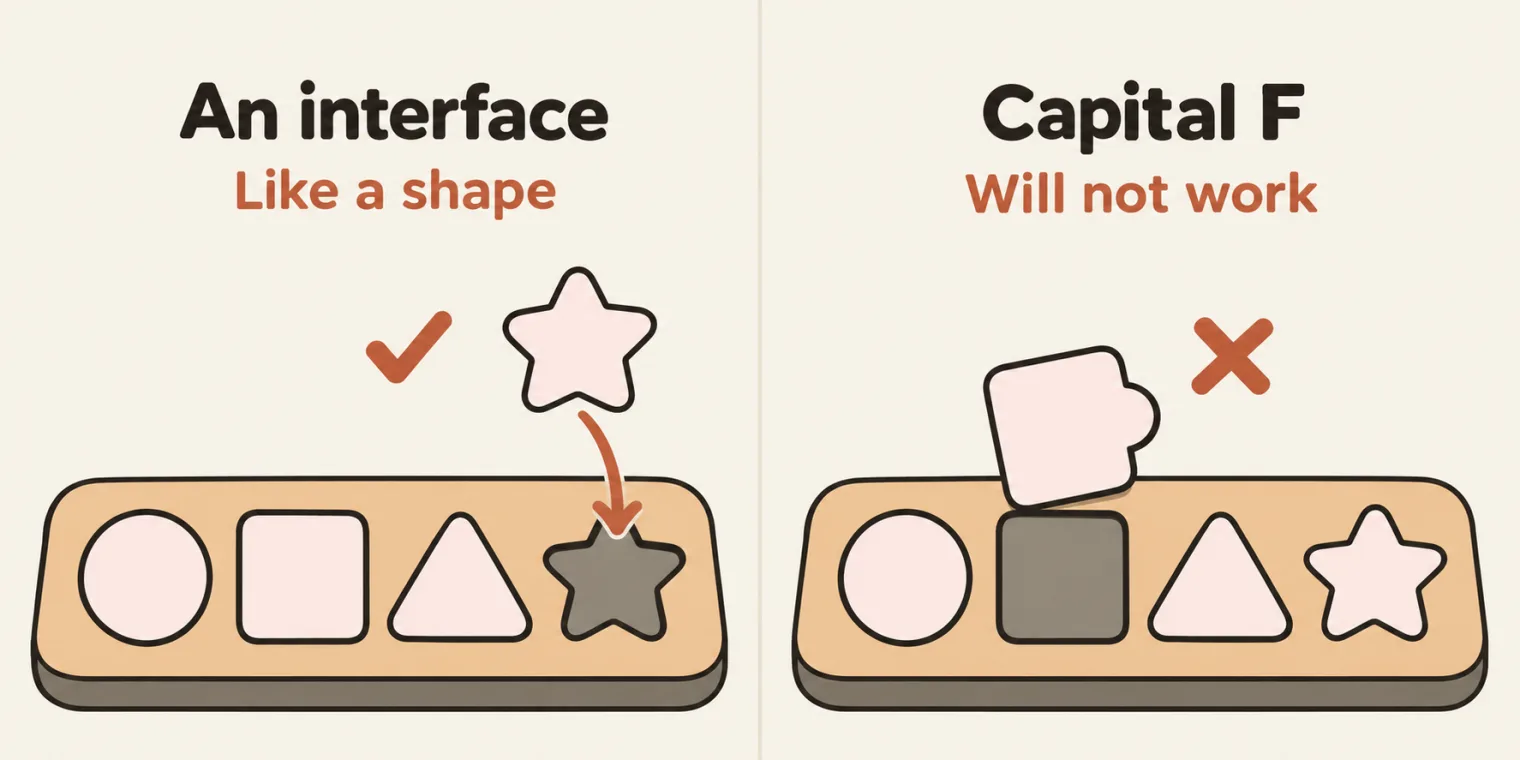
If somebody writes a capital F, will it work? It will not work, the instructor said, because the booking payload wants the first name to be the same. The interface gives the object its mandatory details, and the object follows the type check.
For these notes, line 41 of a copy of the spec was changed to a capital F:
const payload : BookingPayload = {
    FirstName: 'Pramod',
    lastname: 'Dutta',
notes/05_crud_capital_f.spec.ts(41,9): error TS2561: Object literal may only specify known properties, but 'FirstName' does not exist in type 'BookingPayload'. Did you mean to write 'firstname'?
That is TypeScript 6.0.2, checking the copy. The deck's note for this class says the editor flags such mistakes before the test ever runs.
Playwright itself does not run this check: it runs TypeScript without checking the types. The same copy, run with npx playwright test, sent the capital F to restful-booker anyway, and the API answered 500:
  ✘  1 [chromium] › notes/05_crud_capital_f.spec.ts:74:10 › Restful Booker CRUD API › TC#2 @p0 - Create booking (687ms)


  1) [chromium] › notes/05_crud_capital_f.spec.ts:74:10 › Restful Booker CRUD API › TC#2 @p0 - Create booking › Create booking

    Error: expect(received).toBe(expected) // Object.is equality

    Expected: 200
    Received: 500

      80 |             });
      81 |
    > 82 |             expect(responseData.status()).toBe(200);
         |                                           ^
      83 |             const data = await responseData.json() as CreateBookingResponse;
      84 |             expect(data.bookingid).toBeTruthy();
      85 |             expect(data.booking.firstname).toBe(payload.firstname);
        at notes/05_crud_capital_f.spec.ts:82:43
        at notes/05_crud_capital_f.spec.ts:76:9

  1 failed
So it did not work either way: the type check catches it first, and the API refuses the payload if it is sent.
The responses. When you request a token, you get an authentication type response: a token, as a string. So line 66 of the spec reads the JSON as AuthTokenResponse. Why? To make sure the data that comes back follows the same structure, the instructor said: a token, as a string. Then the token goes into the booking flow state, line 68.
as does not look at the JSON. It tells TypeScript what to expect. The deck's note for this class gives the catch: interfaces only exist at compile time, and at runtime they disappear, so they will not notice if the API sends back a different shape; the expect assertions check the real response. Run for these notes: GET /booking/{id} answers with the booking alone, not { bookingid, booking }, and reading it as CreateBookingResponse raised nothing.
// GET /booking/{id} answers with the booking alone, not { bookingid, booking }
const data = await (await api.get(`/booking/${bookingid}`)).json() as CreateBookingResponse;
console.log(Object.keys(data).join(', '));
console.log(data.bookingid);
console.log(data.booking);
firstname, lastname, totalprice, depositpaid, bookingdates
undefined
undefined
In the spec, the line that would catch a wrong answer is the expect after the cast: expect(data.token).toBeTruthy(), line 67.
Serial mode for tests that share state
The rest of 05_crud.spec.ts is the token, the booking and the update from last class, written as three tests that hand values to each other through bookingFlowState:
     test('TC#1 @p0 - Create token', async ({ request }) => {
        await test.step('Create token', async () => {
            const responseData = await request.post('/auth', {
                headers,
                data: {
                    username: process.env.BOOKER_USERNAME,
                    password: process.env.BOOKER_PASSWORD,
                },
            });


        expect(responseData.status()).toBe(200);
        const data = await responseData.json() as AuthTokenResponse;
        expect(data.token).toBeTruthy();
        bookingFlowState.token = data.token;

        });
    });


     test('TC#2 @p0 - Create booking', async ({ request }) => {

        await test.step('Create booking', async () => {
            const responseData = await request.post('/booking', {
                headers,
                data: payload,
            });

            expect(responseData.status()).toBe(200);
            const data = await responseData.json() as CreateBookingResponse;
            expect(data.bookingid).toBeTruthy();
            expect(data.booking.firstname).toBe(payload.firstname);
            expect(data.booking.lastname).toBe(payload.lastname);

            bookingFlowState.bookingId = data.bookingid;
            logger.info(`Created booking id for CRUD flow: ${bookingFlowState.bookingId}`);
        });
    });

    test('TC#3 @p0 - Update booking', async ({ request }) => {


        await test.step('Update booking', async () => {

            const token = bookingFlowState.token;
            const bookingId = bookingFlowState.bookingId;
            if (!token || !bookingId) {
                throw new Error('Create token and create booking tests must pass before update booking.');
            }

             const responseData = await request.put(`/booking/${bookingId}`, {
                headers: {
                    ...headers,
                    Cookie:`token=${token}`
                },
                data: payload,
            });

            expect(responseData.status()).toBe(200);
            const data = await responseData.json() as BookingPayload;
            expect(data.firstname).toBe(payload.firstname);
            expect(data.lastname).toBe(payload.lastname);

            logger.info(`Updated booking id ${bookingId}: ${data.firstname} ${data.lastname}`);

        });
   });

});
TC#1 saves the token, line 68. TC#2 reads its response as a CreateBookingResponse and saves the booking ID, line 88. TC#3, the update, takes the token and the booking ID from the booking flow state, with the same URL as before.
What does serial do? A learner asked. They run in a serial manner, the instructor said: first this one runs, then this one, and then this one. I do not want them to run in parallel. If you run them in parallel, the booking ID will be created first, the PUT request second and the token last, and that is what we do not want.
Why parallel breaks it here. The batch config sets fullyParallel: true, line 39 of playwright.config.ts, so without serial the three tests of this file can run at once, in different workers, and each worker has its own bookingFlowState. On a stand-in server on the local machine, a copy with test.describe in place of test.describe.serial passed with one worker; with three workers, TC#3 stopped at its guard, line 101.
The class ran the file and opened the custom report: first the token was created, then the booking, then the update.
Run for these notes, TC#2 alone, which needs no login:
BASE_URL=https://restful-booker.herokuapp.com npx playwright test src/tests/apiTests/01_restfulbooker_raw/05_crud.spec.ts -g "TC#2" --reporter=list
Running 1 test using 1 worker

YYYY-MM-DD 14:26:59 [info] Created booking id for CRUD flow: 3219
  ✓  1 [chromium] › src/tests/apiTests/01_restfulbooker_raw/05_crud.spec.ts:74:10 › Restful Booker CRUD API › TC#2 @p0 - Create booking (820ms)

  1 passed (1.4s)
And TC#3 alone. Nothing has filled bookingFlowState, so it stops at its guard before it sends anything:
BASE_URL=https://restful-booker.herokuapp.com npx playwright test src/tests/apiTests/01_restfulbooker_raw/05_crud.spec.ts -g "TC#3" --reporter=list
  ✘  1 [chromium] › src/tests/apiTests/01_restfulbooker_raw/05_crud.spec.ts:93:9 › Restful Booker CRUD API › TC#3 @p0 - Update booking (9ms)


  1) [chromium] › src/tests/apiTests/01_restfulbooker_raw/05_crud.spec.ts:93:9 › Restful Booker CRUD API › TC#3 @p0 - Update booking › Update booking

    Error: Create token and create booking tests must pass before update booking.

       99 |             const bookingId = bookingFlowState.bookingId;
      100 |             if (!token || !bookingId) {
    > 101 |                 throw new Error('Create token and create booking tests must pass before update booking.');
          |                       ^
      102 |             }
      103 |
      104 |              const responseData = await request.put(`/booking/${bookingId}`, {
        at src/tests/apiTests/01_restfulbooker_raw/05_crud.spec.ts:101:23
        at src/tests/apiTests/01_restfulbooker_raw/05_crud.spec.ts:96:9

  1 failed
Not run for these notes: TC#1, and so the whole flow. It sends the login to POST /auth, and these notes never send a login to any site. On the stand-in server, with made-up login values, the three tests passed in order.
One gap in TC#3, as pushed. It sends the same payload that TC#2 created, so its two checks pass even if the PUT changed nothing: the gap the 5 November notes found in 04's Step 3. On a stand-in server whose PUT changes nothing, all three tests still passed. TC#3 does check the status first, line 112, which 04 did not. The end-to-end spec below changes the last name and the price, and reads the booking back.
Can we use a step here too? Yes, the instructor said, and every test here already has a step. You can divide the flow into several tests, or keep one test with steps. Either one test with several steps, or several tests in a serial way: both are the same.
The login moves to process.env
One problem was still there: TC#1 had the login written in the code. Can we replace it with the process.env values? The class asked the AI. In the environment file you can already add these details, the instructor said. The AI read the code and added two entries, the booker username and the booker password, and lines 59 and 60 now read process.env.BOOKER_USERNAME and process.env.BOOKER_PASSWORD. Now it is much more secure: we are not hardcoding the username and password, and nothing is hardcoded.
In the repo, .env.example gained the two keys, and the README says they have no default, so they must be set: copy them into your .env. The login details are in the task post.
Till here, everything is good, the instructor said: this CRUD can also be used in production. But the interesting thing happens when you introduce an API helper.
ApiHelper: one class for every HTTP call
Right now, the instructor said, you are not leveraging reusability or maintainability. This code is very common: request.post is everywhere. Why don't we write our own methods? So in the utilities comes an API helper: a simple class with generic functions, which makes the different types of HTTP request. The instructor called the file api.helper.ts; in the repo it is src/utils/ApiHelper.ts. When you showcase it to your interviewer, or add it to your framework, a lot of people will love it, the instructor said.
Asked whether it is AI or API: API, the instructor said. AI is not added yet; when the API part is finished, the AI comes in.
Asked whether the UI side has a helper too: yes, exactly. The util element locator gives you inbuilt methods like click, double click, right click, fill and type. This is the API one, a brother of that.
On the iPad, the instructor walked through a diagram of the helper: a reusable class to make HTTP requests in Playwright. It supports all the methods and adds common features: headers, query parameters, timeout, retries and JSON parsing. It can be used in any test case, UI or API. The key takeaway: a generic utility that supports all the HTTP methods, keeps JSON responses clean, and lets you mix your UI and API test cases.
/**
 * ## API Helper Ts
 * - APIs Helper is a **simple type of a class**
 * - which can help you to make a different type of HTTP
 * - GET, POST, PATCH,PUT, DELETE
 * - Generic Fn, which can used by any TestCase
 */

import { Page, APIRequestContext, APIResponse } from '@playwright/test';

export type ApiContext = Page | APIRequestContext;
export type HttpMethod = 'GET' | 'POST' | 'PUT' | 'DELETE' | 'PATCH';

// Request Modifiction
export interface ApiRequestOptions {
    url: string;
    method: HttpMethod;
    headers?: Record<string, string>;
    data?: unknown; // payload, body
    params?: Record<string, string>;
    timeout?: number;
}

export interface RetryOptions {
    condition: (response: APIResponse) => Promise<boolean> | boolean
    pollingInterval?: number;
    retryCount?: number;
}


export class ApiHelper {
    private context: ApiContext;

    constructor(context: ApiContext) {
        this.context = context;
    }


    private getRequest(): APIRequestContext {
        if ('request' in this.context) {
            return this.context.request;
        }
        return this.context;
    }
- Lines 1 to 7 describe the file. The deck's 7 November section has the same four bullets, under the heading API Helper Ts.
- Line 11,
ApiContext. The context can be aPageor anAPIRequestContext. - Line 12,
HttpMethod. Get, post, put, delete and patch. If you work with more, add more here. - Lines 15 to 22,
ApiRequestOptions. A request can take a URL, a method, headers, data, parameters and a timeout. The timeout, parameters, data and headers are optional, but the URL and the method are very important. - Lines 24 to 28,
RetryOptions. How many times to retry, because an API request sometimes fails and sometimes passes. - Line 31. The class is exported because it is used in other files.
- Lines 32 to 36. The context is private, and the constructor sets it.
- Lines 39 to 44,
getRequest(). Ifrequestis in the context, usethis.context.request; otherwise use the context itself.
Why a page, when this is an API? Asked why a page is used instead of request when dealing with APIs: the API context can be a page or an API request context, both, the instructor said. In a UI test case you can pass the page; in an API test, the request context. The OR condition makes sure that whichever one the user wants, they can use. Like one person who is a husband and also a father, or a son, the instructor said: both of them.
Run for these notes, with a probe that asks the same question getRequest() asks:
console.log("'request' in request:", 'request' in request);
console.log("'request' in page:", 'request' in page);
const viaPage = await new ApiHelper(page).get('/ping');
console.log('through page.request:', viaPage.status());
'request' in request: false
'request' in page: true
through page.request: 201
The request fixture has no request property, so it is used as it is; a page has one, and its page.request sent the GET. The README adds that through a page the requests share the browser's cookies.
An interface or a type? Asked about the difference: an interface makes sure an object follows the rules, the instructor said, and a type is just the type that you mention. A plain JavaScript object does not follow any rules, and the interface makes sure that it follows the rules and the types.
Both check an object's shape. On the capital F copy, with BookingPayload written as type BookingPayload = { instead of an interface, TypeScript gave the same error for FirstName. Where the two differ shows on lines 11 and 12: ApiContext and HttpMethod are types because each names a choice between options, Page | APIRequestContext or 'GET' | 'POST' | ..., and an interface cannot do that.
buildUrl, callApi and the retry
// example1 - https://example.com
// example2 - https://example.com/ param : param1=abc¶m2=xyz return-. https://example.com/param1=abc¶m2=xyz
// exmaple3 - https://example.com/, params : /student/1 -> https://example.com/student/1
// builturl(example1)
private buildUrl(url: string, params?: Record<string, string>): string {
if (!params) return url;
const searchParams = new URLSearchParams(params);
return `${url}?${searchParams.toString()}`;
}
/**
* Perform an HTTP API request
*/
async callApi(options: ApiRequestOptions): Promise<APIResponse> {
const { url, method, headers, data, params, timeout } = options;
const request = this.getRequest();
const fullUrl = this.buildUrl(url, params);
switch (method) {
case 'GET':
return await request.get(fullUrl, { headers, timeout });
case 'POST':
return await request.post(fullUrl, { headers, data, timeout });
case 'PUT':
return await request.put(fullUrl, { headers, data, timeout });
case 'DELETE':
return await request.delete(fullUrl, { headers, timeout });
case 'PATCH':
return await request.patch(fullUrl, { headers, data, timeout });
default:
// `method` is `never` here: the switch above is exhaustive over HttpMethod.
throw new Error(`Unsupported HTTP method: ${String(method)}`);
}
}
buildUrl. Build URL supports all the examples in its comments, the instructor said. Pass a URL alone and it comes back simple. Pass parameters, a record, which means key-value pairs, and whatever you pass is appended, and the whole is returned. Of the examples, one is a path parameter and one a query parameter. Write it one time, and you do not have to write it again and again.
Run for these notes, with the comment's first two examples and a real GET with parameters:
const api = new ApiHelper(request);
const buildUrl = (api as any).buildUrl.bind(api);
console.log(buildUrl('https://example.com'));
console.log(buildUrl('https://example.com/', { param1: 'abc', param2: 'xyz' }));

const res = await api.get('/booking', { params: { firstname: 'Helper', lastname: 'Creator' } });
console.log(res.status(), res.url());
https://example.com
https://example.com/?param1=abc¶m2=xyz
200 https://restful-booker.herokuapp.com/booking?firstname=Helper&lastname=Creator
buildUrl only adds a query string, after a ?. Line 47's comment leaves the ? out, and line 48's path parameter is not something buildUrl does: a path parameter goes into the URL itself, as BookingApi does with /booking/${id}.
callApi takes the request options and returns a promise of the response, the instructor said: the URL, the method, the headers, the data, the parameters and the timeout. It gets the request, builds the full URL, then chooses: for a GET it uses get, for a POST post, for a PUT put, for a DELETE delete, for a PATCH patch. For anything else, the default throws an error.
    /**
     * Call API with retry logic
     */

    async callApiWithRetry(
        options: ApiRequestOptions,
        retryOptions: RetryOptions,
    ): Promise<APIResponse> {
        const { condition, pollingInterval = 5000, retryCount = 3 } = retryOptions;
        let lastResponse: APIResponse | null = null;

        for (let attempt = 1; attempt <= retryCount; attempt++) {
            lastResponse = await this.callApi(options);

            if (await condition(lastResponse)) {
                return lastResponse;
            }

            if (attempt < retryCount) {
                await new Promise(resolve => setTimeout(resolve, pollingInterval));
            }
        }

        return lastResponse!;
    }
The retry. The number of retries is 3 and the timeout 5000, the instructor said: it calls the same callApi three times, in a for loop. If the condition is a success, good; if the attempts fail, the test case fails. This code has to be written one time, the instructor said, and you can use AI for that.
In the code, the 3 is retryCount, the most attempts in all, and the 5000 is pollingInterval, the wait in milliseconds between two attempts (line 89). When every attempt fails, it returns the last response, line 104, and the test does not fail by itself: the README's ApiHelper section gives this as its gotcha, so the spec still has to assert on the result. Run for these notes, against a booking that does not exist:
test('probe: callApiWithRetry on a booking that does not exist', async ({ request }) => {
    const api = new ApiHelper(request);
    const start = Date.now();
    let attempt = 0;
    const response = await api.callApiWithRetry(
        { url: '/booking/999999999', method: 'GET' },
        {
            condition: (res) => {
                attempt++;
                console.log(`attempt ${attempt}: status ${res.status()} after ${Date.now() - start} ms`);
                return res.ok();
            },
        },
    );
    console.log(`returned status ${response.status()} after ${attempt} attempts, no error thrown`);
});
Running 2 tests using 1 worker

attempt 1: status 404 after 692 ms
attempt 2: status 404 after 5919 ms
attempt 3: status 404 after 11143 ms
returned status 404 after 3 attempts, no error thrown
  ✓  1 [chromium] › notes/probe_retry.spec.ts:4:5 › probe: callApiWithRetry on a booking that does not exist (11.2s)
returned status 201 after 1 attempt
  ✓  2 [chromium] › notes/probe_retry.spec.ts:21:5 › probe: callApiWithRetry when the first answer is right (722ms)

  2 passed (12.4s)
| Attempt | Status | Time since the start | The condition | Then |
|---|---|---|---|---|
| 1 | 404 | 692 ms | false | waits 5000 ms, then calls again |
| 2 | 404 | 5919 ms | false | waits 5000 ms, then calls again |
| 3 | 404 | 11143 ms | false | returns this 404, no error |
The probe passed, because nothing in it asserts. The second probe in the file asked for a 201 from /ping, got it the first time, and returned after 1 attempt.
Asked whether the retry logic is for CI: you are right, the instructor said. Whenever you use CI/CD and an API fails the first time, you can use the retry logic.
/**
     * Convenience method for GET requests
     */
    async get(url: string, options?: Omit<ApiRequestOptions, 'url' | 'method'>): Promise<APIResponse> {
        return this.callApi({ url, method: 'GET', ...options });
    }
    /**
     * Convenience method for POST requests
     */
    async post(url: string, data?: unknown, options?: Omit<ApiRequestOptions, 'url' | 'method' | 'data'>): Promise<APIResponse> {
        return this.callApi({ url, method: 'POST', data, ...options });
    }

    /**
     * Convenience method for PUT requests
     */
    async put(url: string, data?: unknown, options?: Omit<ApiRequestOptions, 'url' | 'method' | 'data'>): Promise<APIResponse> {
        return this.callApi({ url, method: 'PUT', data, ...options });
    }

    /**
     * Convenience method for DELETE requests
     */
    async delete(url: string, options?: Omit<ApiRequestOptions, 'url' | 'method'>): Promise<APIResponse> {
        return this.callApi({ url, method: 'DELETE', ...options });
    }

    /**
     * Convenience method for PATCH requests
     */
    async patch(url: string, data?: unknown, options?: Omit<ApiRequestOptions, 'url' | 'method' | 'data'>): Promise<APIResponse> {
        return this.callApi({ url, method: 'PATCH', data, ...options });
    }

    /**
     * Parse JSON response with type safety
     */
    async parseJsonResponse<T>(response: APIResponse): Promise<T> {
        return await response.json() as T;
    }

    /**
     * Check if response is successful (2xx status)
     */
    isSuccess(response: APIResponse): boolean {
        const status = response.status();
        return status >= 200 && status < 300;
    }
    /**
     * Check if response is successful (2xx status)
     */
    isFailureClient(response: APIResponse): boolean {
        const status = response.status();
        return status >= 400 && status < 500;
    }
The rest are convenience methods. get calls callApi with the method GET, post with POST, and so on, and parseJsonResponse gives you the JSON. For success it checks for 200, the instructor said, and for failure for 400 and 500. Run for these notes, one real answer of each kind from restful-booker; the last two columns are what isSuccess and isFailureClient returned:
| The call | Status | Success | Client failure |
|---|---|---|---|
POST /booking |
200 | true |
false |
GET /ping |
201 | true |
false |
PUT /booking/{id}, no token |
403 | false |
true |
GET /booking/999999999 |
404 | false |
true |
POST /booking, empty body |
500 | false |
false |
2xx and 4xx. isSuccess is true for every status from 200 to 299, the 201 of /ping included. isFailureClient checks 400 to 499 only, so the 500 is neither a success nor a client failure. Its comment, line 156, is a copy of isSuccess's.
Level 2: create and update with ApiHelper
Now things will be super easy, the instructor said. The specs move to a second folder, 02_restfulbooker_apiHelper:
import { test, expect } from '@playwright/test';
import { ApiHelper } from '@utils/ApiHelper';
import { createLogger } from '@utils/logger';


const log = createLogger('create-booking');

interface CreateBookingResponse {
    bookingid: number;
    booking: {
        firstname: string;
        lastname: string;
        totalprice: number;
        depositpaid: boolean;
    };
}

interface BookingPayload {
    firstname: string;
    lastname: string;
    totalprice: number;
    depositpaid: boolean;
    bookingdates: BookingDates;
    additionalneeds: string;
}

interface BookingDates {
    checkin: string;
    checkout: string;
}

test.describe('@P0 @regression Level 2 (ApiHelper) - POST create booking', () => {
    test('POST /booking creates a booking and echoes it back', async ({ request }, testInfo) => {

        const api = new ApiHelper(request);

        const payload: BookingPayload = {
            firstname: 'Helper',
            lastname: 'Creator',
            totalprice: 640,
            depositpaid: false,
            bookingdates: { checkin: '2026-04-01', checkout: '2026-04-10' },
            additionalneeds: 'Breakfast',
        };

        let body: CreateBookingResponse;

            // Step 1 - send the create request
        await test.step('POST /booking with a new booking payload', async () => {
            log.info(`Step 1: POST /booking for ${payload.firstname} ${payload.lastname} (price ${payload.totalprice})`);
            const response = await api.post('/booking', payload);

            log.info(`Step 1: server responded with status ${response.status()}`);
            expect(api.isSuccess(response)).toBe(true);
            body = await api.parseJsonResponse<CreateBookingResponse>(response);
        });

         // Step 2 - verify the server echoed the booking back
        await test.step('Verify the created booking is echoed back', async () => {
            log.info(`Step 2: verifying booking id ${body.bookingid} echoes the payload`);
            expect(body.bookingid).toBeGreaterThan(0);
            expect(body.booking.firstname).toBe(payload.firstname);
            expect(body.booking.totalprice).toBe(payload.totalprice);
            log.info(`Step 2: booking ${body.bookingid} verified OK`);
        });


    })
});
- Lines 1 to 30. The imports, the logger and the interfaces. An interface has to be created, the instructor said: the create booking interface, made one time.
- Line 35. The test passes
requestto the helper: it supports a request, so a request can be used. - Line 37. The payload is the same as before. If you want to force it, add the interface: the payload is a booking.
- Line 51.
api.post, with the URL and the payload. We are not usingrequest.post:apiis nothing but the API helper. - Lines 50, 53, 60 and 64 are only for logging. If you do not want them, remove them.
- Lines 54 and 55.
isSuccesscomes from the helper too, and the JSON is parsed as a create booking response, the body. - Lines 59 to 65. Step two is the verification: with the body, the booking ID should be greater than zero, and the values should match the payload.
The code is much cleaner now, the instructor said: api.post, isSuccess, parse it, and you get a body.
In class the spec also attached the body to the report. Then the instructor removed the attachment, because a lot of people were getting confused by it. The pushed file has no attachment; its testInfo, on line 33, is not used.
The class also asked the AI whether this code could move into a visual step, instead of test.step. Asked what a visual step is: a utility made long back, a wrapper of test.step that attaches your screenshots, traces and video to every step, the instructor said. Then: let it be, we will keep it as it is. In the repo, visualStep() takes a page and attaches a screenshot to the step when ATTACH_SCREENSHOTS is true; the 27 October notes cover it.
Run for these notes:
BASE_URL=https://restful-booker.herokuapp.com npx playwright test src/tests/apiTests/02_restfulbooker_apiHelper/create-booking.spec.ts --reporter=list
Running 1 test using 1 worker

YYYY-MM-DD 14:27:03 [info] [create-booking] Step 1: POST /booking for Helper Creator (price 640)
YYYY-MM-DD 14:27:04 [info] [create-booking] Step 1: server responded with status 200
YYYY-MM-DD 14:27:04 [info] [create-booking] Step 2: verifying booking id 3263 echoes the payload
YYYY-MM-DD 14:27:04 [info] [create-booking] Step 2: booking 3263 verified OK
  ✓  1 [chromium] › src/tests/apiTests/02_restfulbooker_apiHelper/create-booking.spec.ts:33:9 › @P0 @regression Level 2 (ApiHelper) - POST create booking › POST /booking creates a booking and echoes it back (712ms)

  1 passed (1.5s)
The class saw the post booking and the verify booking steps in the custom report, with the booking ID and the logs, and in the traces all the data, the instructor said. Is there a screenshot for this? No. A video? No, because it is an API request.
Update booking is almost the same: the code was copied. It makes a POST request to auth and gets an authentication response, takes the token from the parsed response, creates a booking and gets its ID, then sends the update with the booking ID and checks it with isSuccess. Only the functions are replaced, the instructor said: to parse the JSON, to make the PUT request, to check the success.
import { test, expect } from '@playwright/test';
import { ApiHelper } from '@utils/ApiHelper';

test.describe('@P0 @regression Level 2 (ApiHelper) - PUT update booking', () => {
    test('PUT /booking/{id} replaces the booking with a Cookie token', async ({ request }) => {
        const api = new ApiHelper(request);
        // 1. Token.
        const authRes = await api.post('/auth', { username: '<username>', password: '<password>' });
        const { token } = await api.parseJsonResponse<{ token: string }>(authRes);
        expect(token).toBeTruthy();

         // 2. Create something to update.
        const created = await api.post('/booking', {
            firstname: 'Before',
            lastname: 'Helper',
            totalprice: 100,
            depositpaid: false,
            bookingdates: { checkin: '2026-05-01', checkout: '2026-05-05' },
        });
        const { bookingid } = await api.parseJsonResponse<{ bookingid: number }>(created);
        // 3. PUT with the Cookie header.
        const response = await api.put(
            `/booking/${bookingid}`,
            {
                firstname: 'After',
                lastname: 'Helper',
                totalprice: 880,
                depositpaid: true,
                bookingdates: { checkin: '2026-05-02', checkout: '2026-05-09' },
                additionalneeds: 'Extra bed',
            },
            { headers: { Cookie: `token=${token}` } },
        );

        expect(api.isSuccess(response)).toBe(true);
        const updated = await api.parseJsonResponse<{ firstname: string; totalprice: number }>(
            response,
        );
        expect(updated.firstname).toBe('After');
        expect(updated.totalprice).toBe(880);
    });
});
The login on line 8 is masked, shown as <username> and <password>; the login details are in the task post. Unlike 05_crud, this spec still has the login in the code. Not run for these notes against restful-booker, because it sends the login to POST /auth. On the stand-in server, with made-up login values, it passed. The recording does not mention a run of it.
Can these tests run in parallel?
Can create and update run in parallel? Asked in class: yes, the instructor said. Update and create can run in parallel, because they are two independent test cases.
If update runs before create, won't that be a problem? Both work on a different booking ID. If they worked on the same booking ID, there would be a problem. In parallel, make sure that test cases do not depend on each other: they must not work on the same booking ID or the same token.
Doesn't update take the booking ID that create made? No, they are independent, the instructor said: update creates its own booking first. Here the booking ID is XYZ, and there it is ABC.
That is the difference from 05_crud, whose three tests share one token and one booking ID, and so run in serial.
Several hosts for QA. Asked how to configure multiple host entries for QA: use environment variables, the instructor said, and add each configuration as a case in the environments, as discussed in the Playwright configuration last class. The last class's notes show that switch in playwright.config.ts.
BookingApi: every booking call as a function
Now it is time to introduce the fixture, the instructor said, and this is what we really wanted: enough of the token creation and the booking ID creation. I want to reuse my booking ID, I want to reuse my token. So whatever is common goes into a booker fixture.
First, the common things go into the API folder: all the payloads, and every interface. Why not put them in a single file, wherever a test needs create booking, the booking payload or the booking dates? The file also has booking filters, and the JSON header, a common utility. Then a class, which has the common functions.
// All the payloads which we have
// create
// How you can serialize or deserialize your responses
// You can perform a JSON schema validation.
// How you can basically perform the json path plus
// Now you can similarly use auth or even JWT token, whatever

import { APIResponse } from '@playwright/test';
import { ApiHelper, ApiContext } from '@utils/ApiHelper';

export interface BookingDates {
    checkin: string;
    checkout: string;
}

export interface Booking {
    firstname: string;
    lastname: string;
    totalprice: number;
    depositpaid: boolean;
    bookingdates: BookingDates;
    additionalneeds?: string;
}
export interface CreateBookingResponse {
    bookingid: number;
    booking: Booking;
}

export interface BookingFilters {
    firstname?: string;
    lastname?: string;
    checkin?: string;
    checkout?: string;
}

export interface BookingId {
    bookingid: number;
}

const JSON_HEADERS = { 'Content-Type': 'application/json', Accept: 'application/json' };
const TOKEN_REJECTED = 403;
The filters on lines 29 to 34 are the four that restful-booker's API documentation lists for GET /booking: first name, last name, check-in and check-out.
The number one common thing. What is common between all these restful-booker requests? It is not the booking ID, the instructor said: it is the token. It is used in the PUT, PATCH and DELETE requests, everywhere. So it belongs in the booking API utility, and the fixture should give the token automatically.
export class BookingApi {

    private apiHelper: ApiHelper;
    private baseUrl: string;
    private username: string;
    private password: string;
    private cachedToken?: string;


    constructor(
        context: ApiContext,
        baseUrl = 'https://restful-booker.herokuapp.com',
        credentials: { username?: string; password?: string } = {},
    ) {
        this.apiHelper = new ApiHelper(context);
        this.baseUrl = baseUrl;
        this.username = credentials.username ?? '<username>';
        this.password = credentials.password ?? '<password>';
    }


    private authHeaders(token: string): Record<string, string> {
        return { ...JSON_HEADERS, Cookie: `token=${token}` };
    }

    /** Managed token, minted on first use. Pass `true` to force a re-auth. */
    async getToken(forceRefresh = false): Promise<string> {
        if (forceRefresh) this.invalidateToken();
        return (this.cachedToken ??= await this.auth());
    }

     /** Drop the cached token so the next managed call mints a new one. */
    invalidateToken(): void {
        this.cachedToken = undefined;
    }

    /**
     * Send an authenticated request. An explicit token goes out as-is so a negative
     * test can still assert a 403; the managed token re-auths once and retries.
     */
    private async sendAuthed(
        send: (token: string) => Promise<APIResponse>,
        explicitToken?: string,
    ): Promise<APIResponse> {
        if (explicitToken !== undefined) return send(explicitToken);
        const res = await send(await this.getToken());
        return res.status() === TOKEN_REJECTED ? send(await this.getToken(true)) : res;
    }
- Lines 46 to 50. An API helper, a base URL, a username, a password and a cached token, kept so that the cache is ready.
- Lines 53 to 62. In the constructor the URL is hardcoded, but it is just optional: the base URL can be replaced anytime. The username and password are kept hardcoded for now, just to show, the instructor said; you can get them from
process.env, and they will be replaced later. On this page they are masked as<username>and<password>, and the login details are in the task post. - Lines 65 to 67. If somebody needs the authentication headers, they get them with the token.
- Lines 69 to 78. Get token checks whether the cached token is there: it uses it, or creates the token automatically.
- Lines 80 to 91. Send authenticated: if the token is rejected, this is not a token we want. A rejected token means a 403, line 41.
In the code, a call with no token uses the managed one, and on a 403 it asks for a new token, getToken(true), and sends once more, line 90. A token passed in goes out as it is, so that a negative test can still see its 403. On a stand-in server on the local machine that refused the first token, the update asked for a new one once and passed.
    async getAllBookings(filters?: BookingFilters): Promise<BookingId[]> {
        const response = await this.apiHelper.get(`${this.baseUrl}/booking`, {
            params: filters as Record<string, string> | undefined,
        });
        if (!this.apiHelper.isSuccess(response)) {
            throw new Error(`[BookingApi] GET /booking failed: ${response.status()}`);
        }
        return this.apiHelper.parseJsonResponse<BookingId[]>(response);
    }


      async getBooking(id: number): Promise<Booking> {
        const response = await this.getBookingResponse(id);
        if (!this.apiHelper.isSuccess(response)) {
            throw new Error(`[BookingApi] GET /booking/${id} failed: ${response.status()}`);
        }
        return this.apiHelper.parseJsonResponse<Booking>(response);
    }


    /** GET /booking/{id} -> raw response, so callers can assert status (e.g. 404). */
    async getBookingResponse(id: number): Promise<APIResponse> {
        return this.apiHelper.get(`${this.baseUrl}/booking/${id}`);
    }

     /**
     * POST /auth -> token. Note restful-booker answers bad credentials with
     * **200** and `{ reason: "Bad credentials" }`, so the status alone is not
     * enough: the body has to be checked for a token.
     */
     async auth(username = this.username, password = this.password): Promise<string> {
        const response = await this.apiHelper.post(`${this.baseUrl}/auth`, { username, password }, {
            headers: JSON_HEADERS,
        });
        if (!this.apiHelper.isSuccess(response)) {
            throw new Error(`[BookingApi] POST /auth failed: ${response.status()}`);
        }
        const body = await this.apiHelper.parseJsonResponse<{ token?: string; reason?: string }>(response);
        if (!body.token) {
            throw new Error(`[BookingApi] /auth returned no token. Reason: ${body.reason ?? 'unknown'}`);
        }
        return body.token;
    }
Everything is now a function, the instructor said. To get all bookings: this.apiHelper.get on the base URL and /booking, and if it is a success, you get the response. From creating the token onwards, this full part has now become a function.
     /** POST /booking -> raw response, so callers can assert a rejection (e.g. 500). */
    async createBookingResponse(payload: unknown): Promise<APIResponse> {
        return this.apiHelper.post(`${this.baseUrl}/booking`, payload, { headers: JSON_HEADERS });
    }

     /** POST /booking -> { bookingid, booking }. No auth required. */
    async createBooking(payload: Booking): Promise<CreateBookingResponse> {
        const response = await this.createBookingResponse(payload);
        if (!this.apiHelper.isSuccess(response)) {
            throw new Error(`[BookingApi] POST /booking failed: ${response.status()}`);
        }
        return this.apiHelper.parseJsonResponse<CreateBookingResponse>(response);
    }

    /** PUT /booking/{id} -> raw response, so callers can assert a 403. */
    async updateBookingResponse(id: number, payload: unknown, token?: string): Promise<APIResponse> {
        return this.sendAuthed(
            (t) => this.apiHelper.put(`${this.baseUrl}/booking/${id}`, payload, {
                headers: this.authHeaders(t),
            }),
            token,
        );
    }
    /** Omit `token` to use the managed one, which renews itself on a 403. */
    async updateBooking(id: number, payload: Booking, token?: string): Promise<Booking> {
        const response = await this.updateBookingResponse(id, payload, token);
        if (!this.apiHelper.isSuccess(response)) {
            throw new Error(`[BookingApi] PUT /booking/${id} failed: ${response.status()}`);
        }
        return this.apiHelper.parseJsonResponse<Booking>(response);
    }

     async patchBooking(id: number, partial: Partial<Booking>, token?: string): Promise<Booking> {
        const response = await this.sendAuthed(
            (t) => this.apiHelper.patch(`${this.baseUrl}/booking/${id}`, partial, {
                headers: this.authHeaders(t),
            }),
            token,
        );
        if (!this.apiHelper.isSuccess(response)) {
            throw new Error(`[BookingApi] PATCH /booking/${id} failed: ${response.status()}`);
        }
        return this.apiHelper.parseJsonResponse<Booking>(response);
    }

     async deleteBooking(id: number, token?: string): Promise<number> {
        const response = await this.sendAuthed(
            (t) => this.apiHelper.delete(`${this.baseUrl}/booking/${id}`, {
                headers: this.authHeaders(t),
            }),
            token,
        );
        return response.status();
    }
The list, as the instructor read it out: delete booking, patch booking, update booking, update booking with response, create booking, create booking with response, authentication, get booking, get booking by ID, get all bookings, and send authenticated, which makes sure the token is not rejected. The repo's README adds two gotchas: /auth answers bad credentials with 200 and a reason, so auth() checks the body for a token (lines 130 to 133), and DELETE returns 201, not 204, as the API documentation also says.
The booker fixture and the end-to-end spec
What is a fixture? An interview question the instructor asked. The answers from the chat: before doing any action, something is ready (yes); fixtures are used for different personas (yes); injecting into the page (an okay, not a clear yes); and like a before test (yes, you can say that also). The 27 October notes cover fixtures from the start.
import { test as base, expect } from '@playwright/test';
import { BookingApi } from '../api/BookingApi';

export type BookerFixtures = {
    bookingApi: BookingApi;
    bookerToken: string;
};

export const test = base.extend<BookerFixtures>({
    // Build the service object once and hand it to the test.
    bookingApi: async ({ request }, use) => {
        await use(new BookingApi(request));
    },

    // Generate a token via POST /auth and expose it to the test. This is the
    // "token generation lives in a fixture" requirement.
    //
    // A fixture resolves once, before the test body runs, so it cannot react to a
    // token that expires mid-test. That recovery lives in BookingApi.sendAuthed():
    // omit the token argument on a mutating call and it re-auths on a 403 and
    // retries. Use this fixture when you want the token value itself (to log it,
    // to pass it on, or to assert on it).
    bookerToken: async ({ bookingApi }, use) => {
        await use(await bookingApi.getToken());
    },
});

export { expect };
The fixture imports BookingApi, the utility just created, exports the fixture types, the API and the token, and extends the base, the instructor said. The booker token makes sure the token is already created: instead of the request fixture, you use the booker token, which has the token ready.
In the pushed file, the fixture gives two values. bookingApi is a new BookingApi(request), line 12. bookerToken calls bookingApi.getToken(), line 24, only for a test that asks for it. Its comment, lines 15 to 22, says why: a fixture resolves once, before the test body runs, so it cannot react to a token that expires mid-test; that recovery lives in sendAuthed(), and you ask for bookerToken when you want the token value itself.
The test data. Like the login test data, there is now a booking test data, booking.data.ts, created from the data generator. Ask it for buildBookingFromGenerator and it gives you dummy data automatically. You can create the data, or not; hardcode it for some scenarios; or fetch it from an Excel file, the instructor said, as in the 13 October class.
/**
 * A random booking, built entirely through `@utils/DataGenerator` so every spec
 * draws its randomness from one utility.
 *
 * Check-out is derived from check-in, so the stay is always in the right order,
 * and check-in is relative to today, so a booking never ages into the past.
 *
 * @param overrides fields to pin; anything omitted is generated.
 * @param stayNights nights between check-in and check-out (default 3).
 */
export function buildBookingFromGenerator(
    overrides: Partial<Booking> = {},
    stayNights = 3,
): Booking {
    const checkin = DataGenerator.dateOffset(1);

    return {
        firstname: DataGenerator.firstName(),
        lastname: DataGenerator.lastName(),
        totalprice: DataGenerator.number(100, 1000),
        depositpaid: DataGenerator.bool(),
        bookingdates: {
            checkin,
            checkout: DataGenerator.dateOffset(stayNights, new Date(checkin)),
        },
        additionalneeds: DataGenerator.oneOf(ADDITIONAL_NEEDS),
        ...overrides,
    };
}
ADDITIONAL_NEEDS, on line 5, lists Breakfast, Late checkout and Extra bed. Run for these notes, with Faker seeded so that the names stay the same:
test('probe: what buildBookingFromGenerator gives', async () => {
    faker.seed(7); // the same names on every run of this probe
    const booking = buildBookingFromGenerator({ firstname: 'E2E', lastname: 'Journey' });
    const { bookingdates, ...rest } = booking;
    console.log(JSON.stringify(rest));

    const day = 24 * 60 * 60 * 1000;
    const today = new Date(new Date().toISOString().slice(0, 10)).getTime();
    const checkin = new Date(bookingdates.checkin).getTime();
    const checkout = new Date(bookingdates.checkout).getTime();
    console.log(`checkin: ${(checkin - today) / day} day after today`);
    console.log(`checkout: ${(checkout - checkin) / day} days after checkin`);
});
{"firstname":"E2E","lastname":"Journey","totalprice":164,"depositpaid":true,"additionalneeds":"Late checkout"}
checkin: 1 day after today
checkout: 3 days after checkin
The end-to-end spec goes in a third folder, 03_restfulbooker_fixture_e2e:
import { test, expect } from '@fixtures/booker.fixture';
import { buildBookingFromGenerator } from '@testdata/booking.data';

test.describe.serial('@e2e @P0 Level 3 - Booking lifecycle (token from fixture)', () => {
    let bookingId: number;
     test('create a booking', async ({ bookingApi }) => {
        const { bookingid, booking } = await bookingApi.createBooking(
            buildBookingFromGenerator({ firstname: 'E2E', lastname: 'Journey' }),
        );
        expect(bookingid).toBeGreaterThan(0);
        expect(booking.firstname).toBe('E2E');
        bookingId = bookingid;

    });

    test('update the booking, then read it back', async ({ bookingApi }) => {
        const updated = await bookingApi.updateBooking(
            bookingId,
            buildBookingFromGenerator({ firstname: 'E2E', lastname: 'Updated', totalprice: 950 }),
        );
        expect(updated).toMatchObject({ lastname: 'Updated', totalprice: 950 });
        expect((await bookingApi.getBooking(bookingId)).lastname).toBe('Updated');
    });

    test('delete the booking and confirm it is gone', async ({ bookingApi }) => {
        expect(await bookingApi.deleteBooking(bookingId)).toBe(201); // booker returns 201, not 204
        expect((await bookingApi.getBookingResponse(bookingId)).status()).toBe(404);
    });


});
Test describe is where the test starts. We are not using the request fixture, the instructor said: we are using the booking API fixture. Call bookingApi.createBooking with the first name E2E and the last name Journey, and the create booking function is called with the booking payload automatically: you get a booking ID and a booking. If you do not want the data generator, skip it, but you have to pass a payload.
Do we have to create a token? No: the booking API already has the token. The update sets the last name to Updated, and then you match that the values are updated. And you can delete the booking: there is a delete function directly. Now this is much cleaner, the instructor said, because everything is available in the utilities and in the fixture.
Not run for these notes against restful-booker: the update and delete get a token from POST /auth with the login in BookingApi. On a stand-in server on the local machine, with made-up login values, the three tests passed, with two calls to POST /auth, one from the update test and one from the delete test, because the fixture builds a new BookingApi for each test. On a stand-in whose PUT changes nothing, the update test failed, as it should, and the delete test was skipped. The recording does not mention a run of this spec.
An XML payload. Asked how to send an XML payload: the instructor will show it, once the fixture is finished.
This was the high level first, the instructor said. Each and every part will be explained again in the next class, in depth.
Tasks and announcements
- Homework check. The task from last time was to practise the full CRUD operation and upload it. A few had done it, one with the basic operations, POST, PUT, a new context and negative scenarios too; a lot of others had not. This is very, very important, the instructor said: we cannot be slow at the last. Even with very little time, take out at least 1 hour for it.
- Watch and replicate. Watch the video, and try to replicate this by your own, the instructor said. Do not worry about it: it will all be explained again.
- Next class: all of this code again, each and every part, in depth. Today's concepts were a little heavy, the instructor said, and the same things will be repeated next class.
- Promised: an XML payload, once the fixture is finished.
- Later: the hardcoded login in BookingApi to be replaced, from
process.env; and the AI, once the API part is finished. - The code: 05_crud.spec.ts and the two new folders,
02_restfulbooker_apiHelperand03_restfulbooker_fixture_e2e, are in the batch repo.
Task. Watch the recording and try to replicate this class's code by your own: the interfaces of 05_crud.spec.ts, ApiHelper and the two specs that use it, then BookingApi, the booker fixture and the end-to-end spec. And if your full CRUD practice is not uploaded yet, try to do it: take out at least 1 hour.
What is the advantage of creating an interface? And what is a fixture?
Worth practising too: Your spec reads a response with as AuthTokenResponse: what does that check while the test runs? Three tests share a token and a booking ID through a variable in the file: what do they need, and why? What does callApiWithRetry return when every attempt fails?
Show the answer
Answer. An interface makes the object follow strict rules: its keys and their types, with optional fields marked ?. You get a type check, so a payload's keys cannot change, and a capital F is an error in the editor or from tsc, before the test runs; at runtime the interface disappears. A fixture is something that is ready before the test does anything, like a before test, and it can serve different personas; here the booker fixture hands each test a ready BookingApi. An as cast checks nothing while the test runs, so only the expect lines check the real response. Tests that share state need test.describe.serial: with fullyParallel: true they could otherwise run in different workers, each with its own copy of the variable. And callApiWithRetry returns the last response without throwing, so the spec has to assert on it.