What this class covered
- Fixtures: setup and teardown around a test, the job TestNG's before and after hooks did
- The built-in fixtures: page, context, browser, browserName and request
- Custom fixtures: ready-made states, and the pizza base
- Without a fixture and with one: the deck's admin dashboard
- test-base.ts: a fixture for every page object
- The login test data, the LoginRecord type and the state types
- Four state fixtures: valid login, invalid login, inventory and a selected item
- credentials.ts, env.ts and a Faker data generator
- The end-to-end checkout, logging in with beforeEach
- Its first run, and last class's four slips checked again
- Visual steps: a screenshot for every step
- The valid login fixture in place of beforeEach, and a locked-out user
- The Ponytail review
- Tasks: finish today's work, and rebuild the framework
- A fixture is setup and teardown around a test: in a fixture, the code before
await use(value)runs first, then the test body, then the code after it. page,context,browser,browserNameandrequestare built-in fixtures. Every test so far has usedpage.test-base.tsextends Playwright'stestwithbase.extend. A spec importstestfrom it and asks for page objects by name instead of writingnew LoginPage(page).- A fixture runs only for a test that lists it in its parameters, and a listed fixture runs even when the body never uses it.
- State fixtures chain: asking for
loginWithSelectedItemsets uploginPage,validLogin,inventoryPageandloginWithInventoryfirst, and tears them all down in reverse. visualStep()istest.stepplus a screenshot taken when the step ends, attached only whenATTACH_SCREENSHOTS=true.- Run a Ponytail review on code an AI agent wrote. Here it removed comments and one variable, and every test still passed.
What a fixture is
await use(value) splits the two halves: the code before it is setup, the code after it is teardown, and the test body runs in between.Last class left the framework with page objects, a logger and an element utility, and an empty test-base.ts waiting for its fixtures. Before the end-to-end tests, the class took the last important concept: fixtures.
Fixtures are not new. Asked where the batch had already used one, the room answered: page. browser and context are fixtures too. Run any test, and before its first line an isolated page has already been started for it. That is a fixture at work.
A fixture is Playwright's way of providing setup and teardown for a test: the things that must happen before a test runs and after it finishes. If you come from Selenium, TestNG's before and after hooks did this job. Before the test: the browser has been opened, the page is ready, maybe you are already logged in. After the test: you log out, clean up, and close every open connection.
The class's example: a test that logs in, adds an item to the cart and verifies it. Before the add to cart, you must already be logged in on a page. After the verification, you exit and close the page. Both halves, the before and the after, can go into a fixture.
The built-in fixtures
Playwright ships fixtures that the batch has used since day one: page, a fresh page for each test; context; browser, the browser instance; browserName, which browser is running; and request, for API calls. The deck's example asks for all five and prints something from each:
import { test } from "@playwright/test";

test("see all built-in fixtures", async ({ page, context, browser, browserName, request }) => {
    console.log("Browser:", browserName);
    console.log("Browser connected:", browser.isConnected());
    console.log("Page URL:", page.url());

    // API call without opening a browser page
    let response = await request.get("https://jsonplaceholder.typicode.com/posts/1");
    console.log("API status:", response.status());

    // Read cookies from context
    let cookies = await context.cookies();
    console.log("Cookies:", cookies.length);
});
Browser: chromium
Browser connected: true
Page URL: about:blank
API status: 200
Cookies: 0
page starts at about:blank, because nothing has opened a URL yet. request called an API without opening a browser page, and the fresh context holds no cookies. These are the built-in, or default, fixtures. The class is not much interested in them: you get them without writing anything.
Custom fixtures and the pizza base
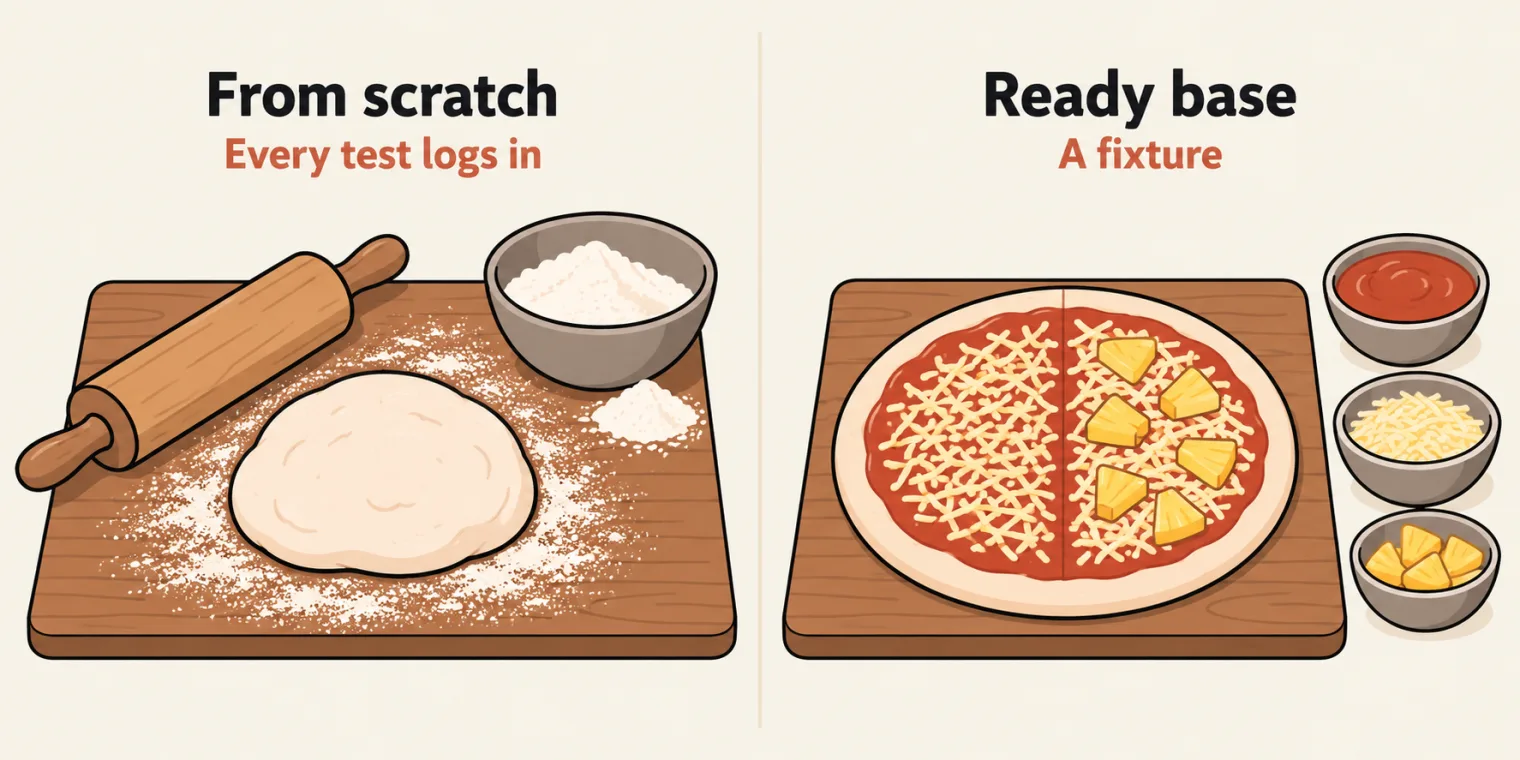
The real change is in custom fixtures. Every TTACart scenario starts the same way: open the page, then log in. Add to cart needs a login, and so do checkout step one, checkout step two, the order confirmation and the order that goes wrong. The inventory page is needed every time, and an item's page most of the time.
So move the login into a fixture. It hands the test a browser that is already started and a fresh page that is already logged in, and the test begins at add to cart, which also makes it faster. A fixture can just as well hand over a page that is already at checkout. Writing these takes code: they are pre-made templates, written once, bane banaye (ready-made) in the instructor's Hindi.
The deck puts it this way: built-in fixtures give you a raw page, but in real projects you don't want every test to create page objects by hand, log in, set up test data and clean up. You want to say: give me a logged-in admin page with the dashboard ready, and the fixture does the work. At the instructor's company the suite has more than 12,000 tests; some need more than 72 steps after the login, and 3,000 to 4,000 of them start from the same point. That shared start is what a fixture is for.
The analogy from class: asked to cook a pizza, do you make everything from scratch, or take a ready pizza base and add the toppings and cheese? The ready base. Some people like pineapple and some do not: those are the different tests, built on the same base. A custom fixture is that ready base. You start already logged in, already at checkout, already on an item's page.
Two questions from the room:
- Can hooks do the same, and what is the difference? The same concept as the hooks you know; Playwright's form of it is the fixture.
- Can Cucumber reuse the same thing? Yes: Cucumber can work with fixtures too.
Without a fixture and with one
The deck's example has two tests on an admin dashboard. Without a fixture, both start with the same four lines (the login shown as placeholders):
// test1.spec.ts
test("admin dashboard test 1", async ({ page }) => {
    let loginPage = new LoginPage(page);           // repeated
    await loginPage.navigate();                     // repeated
    await loginPage.login("<username>", "<password>");     // repeated
    let dashboardPage = new DashboardPage(page);    // repeated

    // actual test starts HERE - everything above is boilerplate
    await dashboardPage.expectWelcome("admin");
});
// test2.spec.ts
test("admin dashboard test 2", async ({ page }) => {
    let loginPage = new LoginPage(page);           // same boilerplate
    await loginPage.navigate();                     // same boilerplate
    await loginPage.login("<username>", "<password>");     // same boilerplate
    let dashboardPage = new DashboardPage(page);    // same boilerplate

    // actual test starts HERE
    let count = await dashboardPage.getStatsCardCount();
    expect(count).toBeGreaterThan(0);
});
Only the last lines differ. Logging in again and again, once in each test, is not a good approach. With a fixture, the repeated lines move into one place, which the deck calls adminDashboard.ts:
let loginPage = new LoginPage(page);           // same boilerplate
await loginPage.navigate();                     // same boilerplate
await loginPage.login("<username>", "<password>");     // same boilerplate
let dashboardPage = new DashboardPage(page);
and each test asks for the ready dashboard by name:
test("admin dashboard test 1", async ({ adminDashboard }) => {
    await adminDashboard.expectWelcome("admin");
});

test("admin dashboard test 2", async ({ adminDashboard }) => {
    let count = await adminDashboard.getStatsCardCount();
    expect(count).toBeGreaterThan(0);
});
Whatever is common, duplicated or set-up code goes into a separate file. It is very like a utility, but here it is called a fixture.
test-base.ts: a fixture for every page object
The framework's fixtures live in src/fixtures/test-base.ts, the file last class created empty. The deck shows the spec it replaces, one that builds its own page objects:
test('add to cart', async ({ page }) => {
    const loginPage = new LoginPage(page);
    const inventoryPage = new InventoryPage(page);
    const cartPage = new CartPage(page);
    // ...finally, the actual test
});
test-base is the custom fixture, pre-wired with the TTACart page objects. Instead of new LoginPage(page) in every spec, you ask for the page you need and it is handed over. The file's header says how:
// Inbuilt fixtures are already available in this case.

/**
 * test-base - the project's custom Playwright `test`,
 * pre-wired with a fixture
 * for every TTACart Page Object.
 *
 * Instead of `new LoginPage(page)` in each spec, ask for the page you need and
 * it's handed over already constructed against the test's `page`:
 *
 *   import { test, expect } from '@fixtures/test-base';
 *
 *   test('add to cart', async ({ inventoryPage, cartPage }) => {
 *       await inventoryPage.open();
 *       await inventoryPage.addToCart('tta-bike-light');
 *       await cartPage.open();
 *       expect(await cartPage.rowCount()).toBe(1);
 *   });
 *
 * Plain page-object fixtures hand over constructed objects without navigating.
 * State fixtures (`invalidLogin`, `validLogin`, `loginWithInventory`, and
 * `loginWithSelectedItem`) perform reusable setup only when a test requests one.
 */
Then its imports:
import { test as base, expect } from '@playwright/test';
import { LoginPage } from '@pages/LoginPage';
import { InventoryPage } from '@pages/InventoryPage';
import { ItemDetailPage } from '@pages/ItemDetailPage';
import { CartPage } from '@pages/CartPage';
import { CheckoutStepOnePage } from '@pages/CheckoutStepOnePage';
import { CheckoutStepTwoPage } from '@pages/CheckoutStepTwoPage';
import { CheckoutCompletePage } from '@pages/CheckoutCompletePage';

import loginTestData from '@testdata/logintestdata.json';
Line 26 imports Playwright's own test under a new name, base, along with expect. Lines 27 to 33 import the seven page objects through the @pages alias, and line 35 the login test data through @testdata; both aliases have been in tsconfig.json since the setup class. The fixtures themselves:
export type TestFixture = {

    // Page Objects
    loginPage: LoginPage;
    inventoryPage: InventoryPage;
    itemDetailPage: ItemDetailPage;
    cartPage: CartPage;
    checkoutStepOnePage: CheckoutStepOnePage;
    checkoutStepTwoPage: CheckoutStepTwoPage;
    checkoutCompletePage: CheckoutCompletePage;

    // Ready-to-use application states
    invalidLogin: InvalidLoginState;
    validLogin: LoginPage;
    loginWithInventory: InventoryPage;
    loginWithSelectedItem: SelectedItemState;
};

export const test = base.extend<TestFixture>({

    loginPage: async ({ page }, use) => {
        await use(new LoginPage(page));
    },
    inventoryPage: async ({ page }, use) => {
        await use(new InventoryPage(page));
    },
    cartPage: async ({ page }, use) => {
        await use(new CartPage(page));
    },
    checkoutStepOnePage: async ({ page }, use) => {
        await use(new CheckoutStepOnePage(page));
    },
    checkoutStepTwoPage: async ({ page }, use) => {
        await use(new CheckoutStepTwoPage(page));
    },
    checkoutCompletePage: async ({ page }, use) => {
        await use(new CheckoutCompletePage(page));
    },
TestFixture, lines 64 to 80, is a type listing every fixture and what it hands over: the page objects, then four ready-to-use application states.base.extend<TestFixture>({...}), line 82.baseis Playwright'stest, which has only the built-in fixtures;extendreturns a newtestwith these added, and the file exports it astest. Line 136 exportsexpecttoo, so a spec imports both from test-base.- Each fixture is an async function. Its first parameter asks for other fixtures, here
page. Its second,use, is a function Playwright passes in:await use(new LoginPage(page))hands the test a constructedLoginPage. If somebody needs a login page, they get one already initialised. Constructed, not opened: these fixtures do not navigate.
use was called a keyword in class. It is not one: it is the function every fixture receives as its second parameter, and what it waits for is shown with the state fixtures below.
So where does a spec's loginPage come from? From test-base, line 85, which is nothing but new LoginPage(page). You have two options, the instructor said: create the page object in the spec, or ask for the fixture. And it is not a singleton class, just a normal fixture.
Declared, not registered. The type lists itemDetailPage on line 69, but no fixture provides it, and the type check does not object. Ask for it, and the test never starts:
Test has unknown parameter "itemDetailPage".

   at unknown.spec.ts:4

  2 |
  3 | // Diagnostic, not class code: itemDetailPage is in the TestFixture type, so TypeScript accepts it.
> 4 | test('asks for itemDetailPage', async ({ itemDetailPage }) => {
    |     ^
  5 |     console.log(`itemDetailPage: ${itemDetailPage.constructor.name}`);
  6 | });
  7 |
The repo's README says the same: itemDetailPage is declared in the fixture type but not registered yet. No spec asks for it today. Registering it takes one more entry, in the shape of lines 90 to 92.
The test data and the types
The users for the login fixtures come from a new file, src/testdata/logintestdata.json: sample usernames and passwords for TTACart. The first two records, shown as placeholders (the login details are in the task post):
[
  {
    "username": "<username>",
    "password": "<password>"
  },
  {
    "username": "<locked-out username>",
    "password": "<password>"
  },
Four more records follow in the same shape, six TTACart users in all. test-base reads them like this:
type LoginRecord = {
    username: string;
    password: string;
};

export type InvalidLoginState = {
    loginPage: LoginPage;
    username: string;
};

export type SelectedItemState = {
    inventoryPage: InventoryPage;
    itemId: string;
};


const users = loginTestData as LoginRecord[];
const validUser = users.find(({ username }) => username === '<username>');
const invalidUser = users.find(({ username }) => username === '<locked-out username>');
const SELECTED_ITEM_ID = 'test-allthethings-tshirt-red';

if (!validUser || !invalidUser) {
    throw new Error('Required <username> and <locked-out username> test data is missing');
}
LoginRecord, lines 38 to 41. Every login has a username and a password, so the class made a type for that structure. The instructor compared it to a class, a structured class; the difference is that a type only describes a shape for the type checker, and creates nothing when the code runs.InvalidLoginStateandSelectedItemState, lines 43 to 51, are what two of the state fixtures hand over: a login page with the username that was refused, and the inventory page with the id of the item put in the cart.- Lines 54 to 57 read the JSON as an array of
LoginRecord, pick the valid user and the locked-out user by username, and fix the item:test-allthethings-tshirt-red, hardcoded for now. It is the first product card, Test.allTheThings() T-Shirt (Red), as a check for these notes confirmed. Lines 59 to 61 stop the file at once if either user is missing.
Asked how the checkout complete page can be a fixture when nothing comes after it, the instructor's answer: a fixture's job is not only to give you the page. It gives you the page with every step before it already done, the login and the inventory and the rest initialised. The pizza base comes with everything; you only bake it.
Four state fixtures
test-base.ts as a tree. The browser column and the order at the bottom come from a logged run of the class's own fixtures, shown in this section.Page objects are half of test-base. The other half covers independent scenarios: a user already logged in, or turned away at the login. These are state fixtures:
    // Independent negative state: the locked-out account remains on login.
    invalidLogin: async ({ page, loginPage }, use) => {
        await loginPage.open();
        await loginPage.loginAs(invalidUser.username, invalidUser.password);
        await expect(page.locator('[data-test="error"]')).toBeVisible();
        await use({ loginPage, username: invalidUser.username });
    },
    // Successful authentication state.
    validLogin: async ({ loginPage }, use) => {
        await loginPage.open();
        await loginPage.loginAs(validUser.username, validUser.password);
        await loginPage.waitForLoginButtonHidden();
        await use(loginPage);
    },
    // Depends on validLogin and guarantees that inventory is loaded.
    loginWithInventory: async ({ validLogin, inventoryPage }, use) => {
        void validLogin;
        await inventoryPage.assertLoaded();
        await use(inventoryPage);
    },

    // Depends on inventory and guarantees that one item is in the cart.
    loginWithSelectedItem: async ({ loginWithInventory }, use) => {
        await loginWithInventory.addToCart(SELECTED_ITEM_ID);
        await use({
            inventoryPage: loginWithInventory,
            itemId: SELECTED_ITEM_ID,
        });
    },


})

export { expect };
validLogin, lines 111 to 116, is the valid login, step by step: open the login page, log in as the valid user, wait for the login button to disappear, then hand over theLoginPage.invalidLogin, lines 104 to 109, logs in as the locked-out user and waits for the error box. This is not a wrong password. The password is the right one, and the site keeps that account locked out; its error readsEpic sadface: Sorry, this user has been locked out..loginWithInventory, lines 118 to 122, asks forvalidLoginandinventoryPage, then checks the inventory has loaded.loginWithSelectedItem, lines 125 to 131, asks forloginWithInventoryand adds the first item to the cart.
So a test can choose its starting point, several pizza bases rather than one: only a login page, only an inventory page, a refused login for a negative scenario, a valid login, a login with the inventory loaded, or a login with one item already in the cart.
What happens when a test asks for the last one? Logged for these notes, with a diagnostic spec (not class code) that wraps each of the class's fixtures: the wrapper prints a line once the fixture is ready, another once the test has finished, and where the browser is at the time. Three tests ask for loginWithSelectedItem, for invalidLogin, and for cartPage alone:
Running 3 tests using 1 worker

ready     loginPage              about:blank
YYYY-MM-DD 11:29:01 [info] [LoginPage] Open login page
YYYY-MM-DD 11:29:02 [info] [LoginPage] loginAs <username>
ready     validLogin             ttacart/inventory
ready     inventoryPage          ttacart/inventory
ready     loginWithInventory     ttacart/inventory
ready     loginWithSelectedItem  ttacart/inventory, cart badge 1
test body                        ttacart/inventory, item test-allthethings-tshirt-red
teardown  loginWithSelectedItem
teardown  loginWithInventory
teardown  inventoryPage
teardown  validLogin
teardown  loginPage
  ✓  1 [chromium] › zz_diag/lifecycle.spec.ts:43:1 › asks for loginWithSelectedItem (1.9s)
ready     loginPage              about:blank
YYYY-MM-DD 11:29:03 [info] [LoginPage] Open login page
YYYY-MM-DD 11:29:04 [info] [LoginPage] loginAs <locked-out username>
ready     invalidLogin           ttacart/, error: Epic sadface: Sorry, this user has been locked out.
test body                        ttacart/
teardown  invalidLogin
teardown  loginPage
  ✓  2 [chromium] › zz_diag/lifecycle.spec.ts:47:1 › asks for invalidLogin (1.1s)
test body                        about:blank
  ✓  3 [chromium] › zz_diag/lifecycle.spec.ts:51:1 › asks for cartPage only (34ms)

  3 passed (3.6s)
The first test, line by line:
| Order | What printed | The browser |
|---|---|---|
| 1 | loginPage ready |
about:blank |
| 2 | validLogin ready, after the page object logs Open login page and loginAs <username> |
ttacart/inventory |
| 3 | inventoryPage ready |
ttacart/inventory |
| 4 | loginWithInventory ready |
ttacart/inventory |
| 5 | loginWithSelectedItem ready, cart badge 1 |
ttacart/inventory |
| 6 | the test body | ttacart/inventory |
| 7 to 11 | teardown, from loginWithSelectedItem back to loginPage |
the test has ended |
Setup runs from the fixture everything depends on, loginPage, outwards to the one the test asked for. The test body runs with one item in the cart. Then the teardown lines print in the reverse order: each await use(...) returned only after the test body had finished, which is why code placed after it is teardown. The second test sets up only loginPage and invalidLogin, and the third, which asks for nothing but a page object, logs in nowhere and stays on about:blank. Each test also got its own loginPage.
credentials.ts, env.ts and the DataGenerator
The end-to-end spec needs a login and a customer too. The credentials first: src/config/credentials.ts keeps the standard username and password, loaded from the .env file (shown as placeholders):
import { envOr } from './env';

export const credentials = {
    standardUser: envOr('STANDARD_USER', '<username>'),
    password: envOr('TTA_SECRET', '<password>'),
} as const;
envOr reads a value from .env and falls back to the demo login when the key is unset or blank. It comes from src/config/env.ts, the one file that reads .env:
/** Reads `.env` values. Importing this module loads `.env` into process.env once. */
import dotenv from 'dotenv';

// quiet silences dotenv v17's banner; override stays false so shell/CI vars win.
dotenv.config({ quiet: true });

function read(key: string): string | undefined {
    return process.env[key]?.trim() || undefined;
}

/** Required value; throws when unset or blank. */
export function requireEnv(key: string): string {
    const value = read(key);
    if (!value) {
        throw new Error(`Missing required env var ${key}. Set it in .env (see .env.example)`);
    }
    return value;
}

/** Optional value with a fallback. */
export function envOr(key: string, fallback: string): string {
    return read(key) ?? fallback;
}

/** Asserts keys exist without returning them; reports all missing keys at once. */
export function assertEnv(...keys: string[]): void {
    const missing = keys.filter((key) => !read(key));
    if (missing.length > 0) {
        throw new Error(`Missing required env var(s) ${missing.join(', ')}. Set them in .env (see .env.example)`);
    }
}
This file was missing on the first run in class: credentials.ts imported it before it existed, and the AI added it. The instructor called it a ready-made file that you can copy. requireEnv is for a value a test cannot do without, envOr for one with a safe default, and assertEnv checks several keys at once and names every missing one. The keys changed too: .env.example swaps USERNAME and PASSWORD for STANDARD_USER and TTA_SECRET, because Windows always sets USERNAME to your own login name, and dotenv does not overwrite a variable that already exists. Asked whether the file can have any other name: it is always .env.
Then the customer. Checkout step one needs a first name, a last name and a postal code. Last class left an empty DataGenerators.ts for this; it is deleted in this commit ("not with s", in class), and src/utils/DataGenerator.ts takes its place, built on Faker:
import { faker } from '@faker-js/faker';
import { envOr } from '@config/env';

export interface Credentials {
    username: string;
    password: string;
}

export interface CheckoutCustomer {
    firstName: string;
    lastName: string;
    postalCode: string;
}

export interface UserProfile extends Credentials, CheckoutCustomer {
    email: string;
    fullName: string;
    phone: string;
}
Three interfaces: Credentials, a username and a password; CheckoutCustomer, a first name, a last name and a postal code; and UserProfile, both of those plus contact details, which is for the future. The DataGenerator class only holds static functions that return fake values. The one the checkout uses:
    /** Customer info for the TTACart checkout step-one form. */
    static checkoutCustomer(): CheckoutCustomer {
        return {
            firstName: DataGenerator.firstName(),
            lastName: DataGenerator.lastName(),
            postalCode: DataGenerator.postalCode(),
        };
    }

    /** Checkout customer, `.env` first, Faker for any field left unset. */
    static checkoutCustomerFromEnv(): CheckoutCustomer {
        const generated = DataGenerator.checkoutCustomer();
        return {
            firstName: envOr('CHECKOUT_FIRST_NAME', generated.firstName),
            lastName: envOr('CHECKOUT_LAST_NAME', generated.lastName),
            postalCode: envOr('CHECKOUT_POSTAL_CODE', generated.postalCode),
        };
    }
Called three times for these notes, it gives a new customer each time:
{"firstName":"Elwin","lastName":"Schneider","postalCode":"34615"}
{"firstName":"Marc","lastName":"Mohr","postalCode":"24982-4164"}
{"firstName":"Raphaelle","lastName":"Lind","postalCode":"86862-0845"}
If you do not want a data generator, you can write the values directly; the instructor prefers the function. checkoutCustomerFromEnv() takes any CHECKOUT_* value set in .env and fakes the rest. This is also the module CheckoutStepOnePage has imported CheckoutCustomer from since last class, so that import now resolves.
The end-to-end checkout with beforeEach
With the fixtures, the credentials and the generator in place, the first end-to-end test, as the class wrote it first: the page objects come from test-base, and the login is still in a beforeEach. src/tests/e2e/e2e-checkout.spec.ts, with the login in its header comment shown as placeholders:
/**
 * End-to-end checkout flow:
 *   1. Log in as a standard user (<username> / <password>).
 *   2. Navigate to the inventory page.
 *   3. Add the first item to the cart.
 *   4. Navigate to the cart page.
 *   5. From the cart, proceed through checkout step one and checkout step two.
 *   6. Enter the customer details and complete the order.
 */

// DataGenerated
// Fixture. - loginPage

import { test, expect } from '@fixtures/test-base';
import { credentials } from '@config/credentials';
import { createLogger } from '@utils/logger';
import { DataGenerator } from '@utils/DataGenerator';

// First product card on the TTACart inventory page.
const FIRST_ITEM_ID = 'test-allthethings-tshirt-red';
const log = createLogger('e2e-checkout');

test.describe('@P0 @Regression E2E @Checkout Checkout Feature', () => {
    // Step 1 - every test in this suite starts already logged in.

    test.beforeEach(async ({ loginPage }) => {
        log.info(`Step 1: logging in as ${credentials.standardUser}`);
        await loginPage.open();
        await loginPage.loginAs(credentials.standardUser, credentials.password);
    });

    test('should complete checkout successfully', async ({
        page,
        inventoryPage,
        cartPage,
        checkoutStepOnePage,
        checkoutStepTwoPage,
        checkoutCompletePage,
    }) => {
        const customer = DataGenerator.checkoutCustomer();


        await inventoryPage.open();
        await inventoryPage.addToCart(FIRST_ITEM_ID);
        await cartPage.open();
        expect(await cartPage.rowCount()).toBe(1);
        await cartPage.checkout();
        await checkoutStepOnePage.assertLoaded();
        await checkoutStepOnePage.fillGuest(customer);
        await checkoutStepOnePage.continue();
        await checkoutStepTwoPage.assertLoaded();
        await checkoutStepTwoPage.finish();
        await checkoutCompletePage.assertOrderComplete();

    });
});
- Line 14 imports
testandexpectfrom test-base, not from@playwright/test. - Lines 26 to 30, the
beforeEach, log in before every test in the block: a log line from the spec's own logger, scopede2e-checkouton line 21, then open the login page and log in withcredentials. - The test asks for five page objects, and none is created in the spec. Then the journey: open the inventory, add the first item, open the cart and check it has one row, check out, fill in the customer, continue, finish, and assert the order is complete.
This is the normal flow, the instructor said: before each test, open the page and enter the login. It uses the loginPage fixture, but not a login fixture yet. Run as pushed:
Running 1 test using 1 worker

YYYY-MM-DD 11:27:28 [info] [e2e-checkout] Step 1: logging in as <username>
YYYY-MM-DD 11:27:28 [info] [LoginPage] Open login page
YYYY-MM-DD 11:27:29 [info] [LoginPage] loginAs <username>
  ✓  1 [chromium] › src/tests/e2e/e2e-checkout.spec.ts:32:9 › @P0 @Regression E2E @Checkout Checkout Feature › should complete checkout successfully (3.5s)

  1 passed (4.2s)
The first run, and last class's four slips
On the first run in class, the terminal showed "Cannot find module", and the AI was asked to fix it. It found three things: the environment file that credentials.ts imports was missing, so it added env.ts; the logger used a LOG_LEVEL nobody had declared, so it gave the level a default of info; and the login page logged Open login pgae, now Open login page. What was left were warnings, not errors, and the test ran. The logger's line 27 now reads:
export const logger = winston.createLogger({
    level: process.env.LOG_LEVEL || 'info',
    format: combine(
That was the first of four slips on last class's page: with LOG_LEVEL undeclared, no spec could load. Where each of the four stands in this commit:
| Last class's slip | In this commit | Checked for these notes |
|---|---|---|
logger.ts line 27 used an undeclared LOG_LEVEL, so no spec could load |
Fixed: the level now defaults to info |
all four end-to-end specs load, and six tests pass |
CheckoutStepOnePage imported a @utils/DataGenerator that did not exist |
Fixed: DataGenerator.ts exports CheckoutCustomer |
the type check is clean, exit code 0 |
login.spec.ts never opens its page |
Still open: the spec is unchanged | times out after 15 s; passes with last class's fix |
ItemDetailPage expects .html in a URL the site serves without it |
Still open: the page object is unchanged | times out after 5 s; passes with last class's fix |
Last class's page restored the line as const LOG_LEVEL = process.env.LOG_LEVEL ?? 'info';, and the repo's fix uses || instead. The two differ only when .env holds a blank LOG_LEVEL= line: ?? keeps the empty string, and || replaces it with info. Which levels print, with each version:
| Set to | This commit | Last class's page |
|---|---|---|
| not set | error, warn, info | error, warn, info |
blank: LOG_LEVEL= |
error, warn, info | all seven, down to silly |
debug |
six, from error to debug |
six, from error to debug |
With an empty level, Winston printed every line, so the ?? version shows all seven levels.
The login spec has not changed, so it still never opens its page, and its first fill waits out the utility's 15 seconds on about:blank:
  ✘  1 [chromium] › src/tests/login.spec.ts:5:9 › POM with Login Page Simple › Login with valid credns (15.1s)

TimeoutError: locator.fill: Timeout 15000ms exceeded.
Call log:
  - waiting for locator('[data-test="username"]')
The fix on last class's page still applies, await loginPage.open(); before loginAs(), and with it the spec passes. The fixtures make the same point: validLogin calls open() first.
ItemDetailPage has not changed either, and no spec uses it. Its URL check still expects .html, which the site drops. Run for these notes after validLogin:
Error: expect(page).toHaveURL(expected) failed

Expected pattern: /inventory-item\.html\?id=test-allthethings-tshirt-red/
Received string:  "https://app.thetestingacademy.com/playwright/ttacart/inventory-item?id=test-allthethings-tshirt-red"
Timeout: 5000ms
Last class's one-line fix, (\.html)? in the pattern, still makes it pass.
Visual steps: a screenshot for every step
e2e-checkout-with-visualStep.spec.ts with step screenshots on. Each of the six screenshots was opened and checked for these notes.The custom report showed a problem: the whole checkout was one test name, with its steps not visible. Two answers: divide the test with test.step, or use a utility the instructor had already made, visual steps. src/utils/visualSteps.ts:
/**
 * visualStep - like `test.step`. When ATTACH_SCREENSHOTS=true, it also grabs
 * a screenshot at the end of the step and attaches it to the TTA report.
 *
 *   await visualStep(page, 'Open the cart', async () => {
 *       await cartPage.open();
 *   });
 *
 * The reporter (CustomReporter.ts) matches an attachment named
 * `step-<index>-...` to the step at that index. We keep a per-test counter
 * (the steps run sequentially, so the order matches the reporter's own step
 * numbering) and attach the PNG under that exact name.
 */

import { test, type Page, type TestInfo } from '@playwright/test';

const ATTACH_SCREENSHOTS = process.env.ATTACH_SCREENSHOTS?.toLowerCase() === 'true';

// Per-test step counter. WeakMap so it's scoped to each TestInfo and never
// leaks across tests (each test gets a fresh TestInfo → fresh count from 0).
const stepCounters = new WeakMap<TestInfo, number>();

function slugify(title: string): string {
    return title
        .toLowerCase()
        .replace(/[^a-z0-9]+/g, '-')
        .replace(/(^-|-$)/g, '');
}

export async function visualStep(
    page: Page,
    title: string,
    body: () => Promise<void>,
): Promise<void> {
    await test.step(title, async () => {
        await body();

        const info = test.info();
        const index = stepCounters.get(info) ?? 0;
        stepCounters.set(info, index + 1);

        if (ATTACH_SCREENSHOTS) {
            await info.attach(`step-${index}-${slugify(title)}`, {
                body: await page.screenshot(),
                contentType: 'image/png',
            });
        }
    });
}
visualStep(page, title, body)runsbodyinsidetest.step(title, ...), so the report gets a named step.- When the body ends, it counts the step, lines 38 to 40, and if
ATTACH_SCREENSHOTSistrueit takes a screenshot of the page and attaches it asstep-plus the step's index and its title in lowercase with hyphens. That is the name the TTA report matches to put the picture beside its step. - Line 17 reads
ATTACH_SCREENSHOTSonce, when the file loads, and.env.examplesets it tofalse. Withfalse, no screenshot is attached, which saves storage.
The class made a copy of the spec, e2e-checkout-with-visualStep.spec.ts, and asked the AI to wrap each page's actions in a visual step. Lines 1 to 23 match the first spec, plus the visualStep import:
test.describe('@P0 @Regression E2E @Checkout Checkout Feature', () => {
    // Step 1 - every test in this suite starts already logged in.

    test.beforeEach(async ({ page, loginPage }) => {
        await visualStep(page, 'Login page: sign in as standard user', async () => {
            log.info(`Step 1: logging in as ${credentials.standardUser}`);
            await loginPage.open();
            await loginPage.loginAs(credentials.standardUser, credentials.password);
        });
    });

    test('should complete checkout successfully', async ({
        page,
        inventoryPage,
        cartPage,
        checkoutStepOnePage,
        checkoutStepTwoPage,
        checkoutCompletePage,
    }) => {
        const customer = DataGenerator.checkoutCustomer();

        await visualStep(page, 'Inventory page: add first item to cart', async () => {
            await inventoryPage.open();
            await inventoryPage.addToCart(FIRST_ITEM_ID);
        });

        // visualStep screenshots when its body ends, so each step opens its own
        // page first and leaves the click to the next page for the following step.
        await visualStep(page, 'Cart page: verify one item in cart', async () => {
            await cartPage.open();
            expect(await cartPage.rowCount()).toBe(1);
        });

        await visualStep(page, 'Checkout step one: enter customer details', async () => {
            await cartPage.checkout();
            await checkoutStepOnePage.assertLoaded();
            await checkoutStepOnePage.fillGuest(customer);
        });

        await visualStep(page, 'Checkout step two: review order overview', async () => {
            await checkoutStepOnePage.continue();
            await checkoutStepTwoPage.assertLoaded();
        });

        await visualStep(page, 'Checkout complete: finish and verify confirmation', async () => {
            await checkoutStepTwoPage.finish();
            await checkoutCompletePage.assertOrderComplete();
        });
    });
});
Lines 50 and 51 explain the boundaries. A visual step takes its screenshot when its body ends, so each step opens its own page first and leaves the click to the next page for the following step. In class the AI noticed exactly this: the first screenshots were out of order, and the repo's learnings folder has its note on the fix.
What the report receives, from a diagnostic reporter written for these notes that lists every step and every step screenshot. The plain spec first:
STEPS 0 in "should complete checkout successfully"
ATTACHMENTS 0
The visual-step spec, as configured by default:
STEPS 6 in "should complete checkout successfully"
STEP 0 Login page: sign in as standard user
STEP 1 Inventory page: add first item to cart
STEP 2 Cart page: verify one item in cart
STEP 3 Checkout step one: enter customer details
STEP 4 Checkout step two: review order overview
STEP 5 Checkout complete: finish and verify confirmation
ATTACHMENTS 0
And with ATTACH_SCREENSHOTS=true:
STEPS 6 in "should complete checkout successfully"
STEP 0 Login page: sign in as standard user
STEP 1 Inventory page: add first item to cart
STEP 2 Cart page: verify one item in cart
STEP 3 Checkout step one: enter customer details
STEP 4 Checkout step two: review order overview
STEP 5 Checkout complete: finish and verify confirmation
ATTACHMENTS 6
ATTACH step-0-login-page-sign-in-as-standard-user image/png 1920x1080
ATTACH step-1-inventory-page-add-first-item-to-cart image/png 1920x1080
ATTACH step-2-cart-page-verify-one-item-in-cart image/png 1920x1080
ATTACH step-3-checkout-step-one-enter-customer-details image/png 1920x1080
ATTACH step-4-checkout-step-two-review-order-overview image/png 1920x1080
ATTACH step-5-checkout-complete-finish-and-verify-confirmation image/png 1920x1080
Before, there was only one test name; now the report shows each step, one by one. By default the six steps are there and the screenshots are not; with the variable on, every step carries a 1920 × 1080 screenshot. It takes more storage, but it keeps the proof that the test ran properly. Each picture was opened for these notes, and the figure at the top of this section says what each one shows.
Can a fixture be used for every step? No: a visual step is a custom utility, just a wrapper of test.step, a better version of it.
The valid login fixture replaces beforeEach
So far no login fixture has been used. The final version asks: to run a valid scenario, does the test still need the beforeEach? No. It needs only the valid login, because validLogin already does the setup. e2e-checkout_validFixture.spec.ts, from the describe on:
test.describe('@P0 @Regression E2E @Checkout Checkout Feature', () => {
    test('should complete checkout successfully', async ({
        page,
        validLogin,
        inventoryPage,
        cartPage,
        checkoutStepOnePage,
        checkoutStepTwoPage,
        checkoutCompletePage,
    }) => {
        void validLogin;
        const customer = DataGenerator.checkoutCustomer();

        // validLogin already lands on inventory, so assert it instead of reloading.
        await visualStep(page, 'Inventory page: add first item to cart', async () => {
            await inventoryPage.assertLoaded();
            await inventoryPage.addToCart(FIRST_ITEM_ID);
        });

        // visualStep screenshots when its body ends, so each step opens its own
        // page first and leaves the click to the next page for the following step.
        await visualStep(page, 'Cart page: verify one item in cart', async () => {
            await cartPage.open();
            expect(await cartPage.rowCount()).toBe(1);
        });

        await visualStep(page, 'Checkout step one: enter customer details', async () => {
            await cartPage.checkout();
            await checkoutStepOnePage.assertLoaded();
            await checkoutStepOnePage.fillGuest(customer);
        });

        await visualStep(page, 'Checkout step two: review order overview', async () => {
            await checkoutStepOnePage.continue();
            await checkoutStepTwoPage.assertLoaded();
        });

        await visualStep(page, 'Checkout complete: finish and verify confirmation', async () => {
            await checkoutStepTwoPage.finish();
            await checkoutCompletePage.assertOrderComplete();
        });
    });

    // invalidLogin submits <locked-out username> and waits for the error box, so the
    // test only has to check what the user sees and that they never got in.
    test('should reject login for a locked-out user', async ({ page, invalidLogin }) => {
        const { loginPage, username } = invalidLogin;

        await visualStep(page, `Login page: ${username} sees locked-out error`, async () => {
            await loginPage.expectErrorContains('locked out');
            await expect(page).not.toHaveURL(/inventory/);
        });
    });
});
- Line 24 lists
validLoginamong the fixtures, and there is nobeforeEach. Line 34's comment: the valid login already lands on the inventory, so the first step asserts it instead of reloading. - The second test, lines 66 to 73, asks for
invalidLogin, which has already submitted the locked-out user and waited for the error box. It checks that the error sayslocked out, with a methodLoginPagegained in this commit, and that the URL never reached the inventory.
    async expectErrorContains(text: string): Promise<void> {
        await expect(this.errorBox).toBeVisible();
        await expect(this.errorBox).toContainText(text);
    }
Run as pushed:
Running 2 tests using 1 worker

YYYY-MM-DD 11:27:37 [info] [LoginPage] Open login page
YYYY-MM-DD 11:27:38 [info] [LoginPage] loginAs <username>
  ✓  1 [chromium] › src/tests/e2e/e2e-checkout_validFixture.spec.ts:22:9 › @P0 @Regression E2E @Checkout Checkout Feature › should complete checkout successfully (3.4s)
YYYY-MM-DD 11:27:41 [info] [LoginPage] Open login page
YYYY-MM-DD 11:27:42 [info] [LoginPage] loginAs <locked-out username>
  ✓  2 [chromium] › src/tests/e2e/e2e-checkout_validFixture.spec.ts:66:9 › @P0 @Regression E2E @Checkout Checkout Feature › should reject login for a locked-out user (1.2s)

  2 passed (5.2s)
Both pass, and every further test can start from the same fixture: that is what the instructor meant by an unlimited number of test cases. When would you still use beforeEach? Now that the fixture exists, it is not needed.
What void validLogin; does. In class, line 31 was read as calling the fixture, with void meaning that nothing is returned. The fixture runs for another reason: the test lists validLogin in its parameters, and Playwright sets up every fixture a test lists before the body starts. void is a JavaScript operator that evaluates a value and throws it away, so the line only marks validLogin as used, which stops the editor greying it out. Checked for these notes: in one block with a beforeEach, a test that lists validLogin and never mentions it is already on the inventory at its first line, and a test that does not list it is still on about:blank. The beforeEach runs for both.
Running 2 tests using 1 worker

beforeEach: about:blank
YYYY-MM-DD 11:29:05 [info] [LoginPage] Open login page
YYYY-MM-DD 11:29:06 [info] [LoginPage] loginAs <username>
first line of the body: https://app.thetestingacademy.com/playwright/ttacart/inventory
  ✓  1 [chromium] › zz_diag/listed.spec.ts:11:9 › one block, one beforeEach › lists validLogin, never uses it (1.8s)
beforeEach: about:blank
first line of the body: about:blank
  ✓  2 [chromium] › zz_diag/listed.spec.ts:15:9 › one block, one beforeEach › does not list validLogin (37ms)

  2 passed (2.3s)
The Ponytail review
Is this the final code? Not yet. A lot of it was generated with AI, and AI agents add things you do not want, comments among them, so the best practice is a Ponytail review. Ponytail, which the batch met in the data-driven class, trims that extra code. The request: run a Ponytail review for this file, make it more readable and simple, and say what you changed. The result went into a new file beside the original, e2e-checkout_validFixture_PonyTail_Review.spec.ts. The difference between the two files, with the logins as placeholders:
diff --git a/src/tests/e2e/e2e-checkout_validFixture.spec.ts b/src/tests/e2e/e2e-checkout_validFixture_PonyTail_Review.spec.ts
index 52cc559..81b805c 100644
--- a/src/tests/e2e/e2e-checkout_validFixture.spec.ts
+++ b/src/tests/e2e/e2e-checkout_validFixture_PonyTail_Review.spec.ts
@@ -1,14 +1,7 @@
 /**
- * End-to-end checkout flow:
- *   1. Log in as a standard user (<username> / <password>).
- *   2. Navigate to the inventory page.
- *   3. Add the first item to the cart.
- *   4. Navigate to the cart page.
- *   5. From the cart, proceed through checkout step one and checkout step two.
- *   6. Enter the customer details and complete the order.
+ * Checkout E2E built on the login fixtures from test-base:
+ *   - validLogin:   <username> buys one item and completes checkout.
+ *   - invalidLogin: <locked-out username> is stopped at the login page.
  */

-// DataGenerated
-// Fixture. - loginPage
-
 import { test, expect } from '@fixtures/test-base';
@@ -21,5 +14,6 @@ const FIRST_ITEM_ID = 'test-allthethings-tshirt-red';
 test.describe('@P0 @Regression E2E @Checkout Checkout Feature', () => {
+    // Each step ends on the page in its title, so its screenshot shows that page.
     test('should complete checkout successfully', async ({
         page,
-        validLogin,
+        validLogin, // logs in as <username> before the test body runs
         inventoryPage,
@@ -30,6 +24,2 @@ test.describe('@P0 @Regression E2E @Checkout Checkout Feature', () => {
     }) => {
-        void validLogin;
-        const customer = DataGenerator.checkoutCustomer();
-
-        // validLogin already lands on inventory, so assert it instead of reloading.
         await visualStep(page, 'Inventory page: add first item to cart', async () => {
@@ -39,4 +29,2 @@ test.describe('@P0 @Regression E2E @Checkout Checkout Feature', () => {

-        // visualStep screenshots when its body ends, so each step opens its own
-        // page first and leaves the click to the next page for the following step.
         await visualStep(page, 'Cart page: verify one item in cart', async () => {
@@ -49,3 +37,3 @@ test.describe('@P0 @Regression E2E @Checkout Checkout Feature', () => {
             await checkoutStepOnePage.assertLoaded();
-            await checkoutStepOnePage.fillGuest(customer);
+            await checkoutStepOnePage.fillGuest(DataGenerator.checkoutCustomer());
         });
@@ -63,7 +51,5 @@ test.describe('@P0 @Regression E2E @Checkout Checkout Feature', () => {

-    // invalidLogin submits <locked-out username> and waits for the error box, so the
-    // test only has to check what the user sees and that they never got in.
     test('should reject login for a locked-out user', async ({ page, invalidLogin }) => {
+        // invalidLogin has already submitted the form and waited for the error box.
         const { loginPage, username } = invalidLogin;
-
         await visualStep(page, `Login page: ${username} sees locked-out error`, async () => {
- The header comment became three lines naming the two tests, and the leftover
// DataGeneratedand// Fixture. - loginPagelines went. void validLogin;went, and a comment on line 18 says what the fixture does instead.- The
customervariable went:fillGuesttakesDataGenerator.checkoutCustomer()directly. - The two comments about step boundaries became one, on line 15.
Nothing major changed, as the instructor said: 74 lines became 60, and both tests still pass, the first one without its void line:
Running 2 tests using 1 worker

YYYY-MM-DD 11:27:43 [info] [LoginPage] Open login page
YYYY-MM-DD 11:27:44 [info] [LoginPage] loginAs <username>
  ✓  1 [chromium] › src/tests/e2e/e2e-checkout_validFixture_PonyTail_Review.spec.ts:16:9 › @P0 @Regression E2E @Checkout Checkout Feature › should complete checkout successfully (3.4s)
YYYY-MM-DD 11:27:46 [info] [LoginPage] Open login page
YYYY-MM-DD 11:27:47 [info] [LoginPage] loginAs <locked-out username>
  ✓  2 [chromium] › src/tests/e2e/e2e-checkout_validFixture_PonyTail_Review.spec.ts:52:9 › @P0 @Regression E2E @Checkout Checkout Feature › should reject login for a locked-out user (1.2s)

  2 passed (5.3s)
Code that a review barely touches was simple already, and simple code is easier for an AI agent to work with too. When to use a Ponytail review: when you want to be sure an AI agent has not generated extra code.
The four specs side by side:
| Spec | Logs in with | Visual steps | Tests |
|---|---|---|---|
| beforeEach | beforeEach and credentials |
none | 1 passed |
| with visual steps | beforeEach, in a visual step |
6 | 1 passed |
| valid fixture | validLogin, and invalidLogin |
5, and 1 | 2 passed |
| after Ponytail | the same two fixtures | 5, and 1 | 2 passed |
Run together three times over for these notes, the four specs gave 18 passes out of 18.
Tasks and announcements
- Today's task: finish this session's work,
test-base.tswith its page-object and state fixtures, the test data,credentials.ts,env.ts, theDataGenerator,visualSteps.tsand the end-to-end specs, and get them passing. - Rebuild the framework from scratch, three to four times. Many folders were created today; watch the video two or three times and practise until the steps stick.
- Next class: web fundamentals for API testers, then API tests added to this framework. The deck's plan:
.envsupport, the fundamentals of APIs, Postman for manual API testing, the restful-booker API docs, automating it in the same framework, and a fixture for the APIs. - The certification link will be shared.
- The notes: today's fixture notes are in the class notes, and the logger notes that were missing last time have been added.
- The Allure report is one line in
playwright.config.ts, the instructor said.allure-playwrighthas been installed since the setup class. - The AI sections of the TTA report need an API key in
.env. A DeepSeek key came up in class, but the pushedproviders.tsreads onlyANTHROPIC_API_KEY,OPENAI_API_KEYorGOOGLE_API_KEY; with none set, the report is still complete and leaves those sections out. - Doubts go in the doubt session.
- The repo: AdvancePlaywrightFramework3x, pushed as the class ended.
Task. Finish today's framework work and get all four end-to-end specs passing. Then rebuild the framework from scratch, three to four times.
Interview questions. What is a fixture in Playwright, and how is it different from beforeEach? Name the built-in fixtures. What does await use(value) do inside a fixture? Why does a test that lists validLogin log in even when its body never mentions it? In what order do chained fixtures set up and tear down?
Show the answer
Answer. A fixture is Playwright's setup and teardown for a test, written once and handed to any test that asks for it. A beforeEach runs before every test in its block; a fixture runs only for the tests that list it, as the last note on the void line shows. The built-in fixtures are page, context, browser, browserName and request. await use(value) hands the value to the test and waits until the test ends, so the code before it is setup and the code after it is teardown. Playwright sets up every fixture a test lists before the body starts, used or not; void validLogin; only marks the name as used. Chained fixtures set up from the one the others depend on outwards (loginPage, validLogin, inventoryPage, loginWithInventory, loginWithSelectedItem), and tear down in the reverse order.