What this class covered
- Scrolling to an element with scrollIntoViewIfNeeded
- Scrolling with JavaScript: page.evaluate, scrollBy and scrollTo, to the bottom and back to the top
- Lazy loading: scrolling to the last item and polling the count with expect.poll
- Cancelling a wait with an AbortSignal, new in Playwright 1.62
- Soft and hard assertions
- Value assertions: toBe, toEqual, toStrictEqual and the rest
- Locator and page assertions, and which assertions retry
- Test hooks and the order they run in
- Splitting a test into test.step blocks
- Annotations: test.skip, test.slow, test.fixme and test.fail
- Serial and parallel runs, and priority tags with --grep
- Chromium launch arguments
- Tasks: practice, the student login task, and Sunday's test or QA battle
Scrolling to an element
All three scroll files use the scroll practice page: one long page with a hero, a middle section, a deeply nested anchor, a lazy-loaded list and a button at the bottom. They also use the structure the batch writes specs in now: a test.describe block, with the navigation in test.beforeEach.
The simplest way to scroll is to find the element and call scrollIntoViewIfNeeded() on it. It scrolls only when the element is not already fully visible. It takes two options: a timeout, and a signal for cancelling the wait, covered below.
await page.getByTestId("deep-anchor").scrollIntoViewIfNeeded();
await page.getByTestId('deep-anchor').click();
You rarely need it before an action. click(), fill() and check() scroll the element into view themselves, as part of their checks before acting. Explicit scrolling matters when the scroll itself is what you are testing, such as a lazy list, or when you assert on something below the fold. To watch a scroll happen during a run, the class added page.pause(); otherwise it is over too fast to see.
Scrolling with JavaScript
page.evaluate() runs a function inside the page, the same JavaScript you could type into the browser console. That gives three more ways to move the page:
import { test, expect } from '@playwright/test';

test.describe('Scroll to Element - TestingAcademy', () => {

   test.beforeEach(async ({ page }) => {
      await page.goto('https://app.thetestingacademy.com/playwright/widgets/scroll');

   });
   test('scroll to view', async ({ page }) => {

      // 1
      // await page.getByTestId("deep-anchor").scrollIntoViewIfNeeded();
      // await page.getByTestId('deep-anchor').click();

      // 2 - JS execute
      // await page.evaluate(() => window.scrollBy(0, 1000));

      // // 3) jump to bottom
      await page.evaluate(() => window.scrollTo(0, document.body.scrollHeight));


       //    // // 4) jump back to top
      await page.evaluate(() => window.scrollTo(0, 0));


      await page.pause();


   });

});
Running 1 test using 1 worker

  ✓  1 [chromium] › tests/16_Scroll_toElement/267_Scroll_TC.spec.ts:9:8 › Scroll to Element - TestingAcademy › scroll to view (4.2s)

  1 passed (3.0s)
| Way | Code | What it does |
|---|---|---|
| 1 | locator.scrollIntoViewIfNeeded() |
Scrolls until that element is in view |
| 2 | window.scrollBy(0, 1000) |
Scrolls 1000 pixels down from where you are |
| 3 | window.scrollTo(0, document.body.scrollHeight) |
Jumps to the bottom: x stays at 0, y goes to the page height |
| 4 | window.scrollTo(0, 0) |
Jumps back to the top |
Pagination is not scrolling. A table with page numbers is handled by clicking the next-page button, not by scrolling.
Lazy loading and expect.poll
On the practice page, the lazy list shows 10 items. Scroll to its end and more load, the way a product list does on a shopping site. The class's approach does not hardcode a count, because on a real page you do not know how many items there are at runtime:
- Scroll the lazy section into view and read how many items there are.
- Scroll the last item that exists into view. Item 11 does not exist yet, so
nth(10)would just wait until the test times out. - Poll the count until it is greater than the starting count, with a message and a 10 second timeout.
expect.poll() is for values that are not locators. It re-runs the function you give it until the matcher passes or the timeout runs out.
import { test, expect } from '@playwright/test';

test.describe('Scroll to Element - TestingAcademy', () => {

   test.beforeEach(async ({ page }) => {
      await page.goto('https://app.thetestingacademy.com/playwright/widgets/scroll');

   });
   test('scroll to view', async ({ page }) => {


      // 5) lazy list grows past 10 once visible

      await page.getByTestId('section-lazy').scrollIntoViewIfNeeded();
      await page.getByTestId('lazy-list').scrollIntoViewIfNeeded();

      const list = page.getByTestId('lazy-list').locator('li');
      const initialCount = await list.count();

      // scroll the LAST existing item into view - item 11 does not exist yet,
      // so nth(10) would just wait until the test times out.
      await list.last().scrollIntoViewIfNeeded();


      await expect.poll(async () => list.count(), {
         message: "expected_itmes > 10",
         timeout: 10_000
      }).toBeGreaterThan(initialCount);

      const finalCount = await list.count();
      console.log(finalCount);

      await page.waitForTimeout(5000);

   });

});
Running 1 test using 1 worker

10
  ✓  1 [chromium] › tests/16_Scroll_toElement/268_Lazy_Scroll_TC.spec.ts:9:8 › Scroll to Element - TestingAcademy › scroll to view (7.0s)

  1 passed (7.4s)
It passes, but it prints 10, not the 15 the class saw when scrolling by hand. Logging the count at each step shows why. The page fills the list with an IntersectionObserver: 400 ms after the section, or the "Loading more…" element under the list, comes within 200 px of the screen, it adds 5 items, up to 30. Both come into range together, so the first load is 5 + 5 = 10.
| Viewport | Starting count, as the spec reads it | Count after scrolling to the last item |
|---|---|---|
| 1920 × 1080, the batch config | 0 | 10: the list already fits, so the page moves 5 px and nothing loads |
| 1280 × 720 | 0 | 15 |
The starting count is read before the first batch has landed, so the check is really "more than 0", and it passes whether or not the scroll loads anything. The second test in file 269, below, has the scroll line commented out, and it passes the same way, printing 10. The class put the missing items down to page.pause(), but a headless run, where page.pause() does nothing, gives the same 10. The cause is the timing and the viewport.
The fix keeps the class's idea and changes two things: wait for the first load before reading the count, then bring the loader back into view so the observer fires again. It is now file 268 in the repo:
import { test, expect } from '@playwright/test';

test.describe('Scroll to Element - TestingAcademy', () => {

   test.beforeEach(async ({ page }) => {
      await page.goto('https://app.thetestingacademy.com/playwright/widgets/scroll');

   });
   test('scroll to view', async ({ page }) => {


      // 5) lazy list grows past 10 once visible

      await page.getByTestId('section-lazy').scrollIntoViewIfNeeded();
      await page.getByTestId('lazy-list').scrollIntoViewIfNeeded();

      const list = page.getByTestId('lazy-list').locator('li');

      // wait for the first load to land (two batches of 5) before reading the count:
      // read too early, initialCount is 0 and the poll below passes without any scroll.
      await expect(list).toHaveCount(10);
      const initialCount = await list.count();

      // the next batch loads when the loader comes back into view. At 1920x1080 the
      // whole list already fits, so scrolling to the last item alone loads nothing.
      await page.evaluate(() => window.scrollTo(0, 0));
      await page.getByTestId('lazy-loader').scrollIntoViewIfNeeded();


      await expect.poll(async () => list.count(), {
         message: "expected_itmes > 10",
         timeout: 10_000
      }).toBeGreaterThan(initialCount);

      const finalCount = await list.count();
      console.log(finalCount);

      await page.waitForTimeout(5000);

   });

});
Running 1 test using 1 worker

20
  ✓  1 [chromium] › tests/16_Scroll_toElement/268_Lazy_Scroll_TC.spec.ts:9:8 › Scroll to Element - TestingAcademy › scroll to view (8.5s)

  1 passed (9.0s)
It passed 10 runs out of 10, five at 1920 × 1080 and five at 1280 × 720. It goes to 20 because both observed elements come back into range together, so two batches load.
Cancelling a wait with an AbortSignal
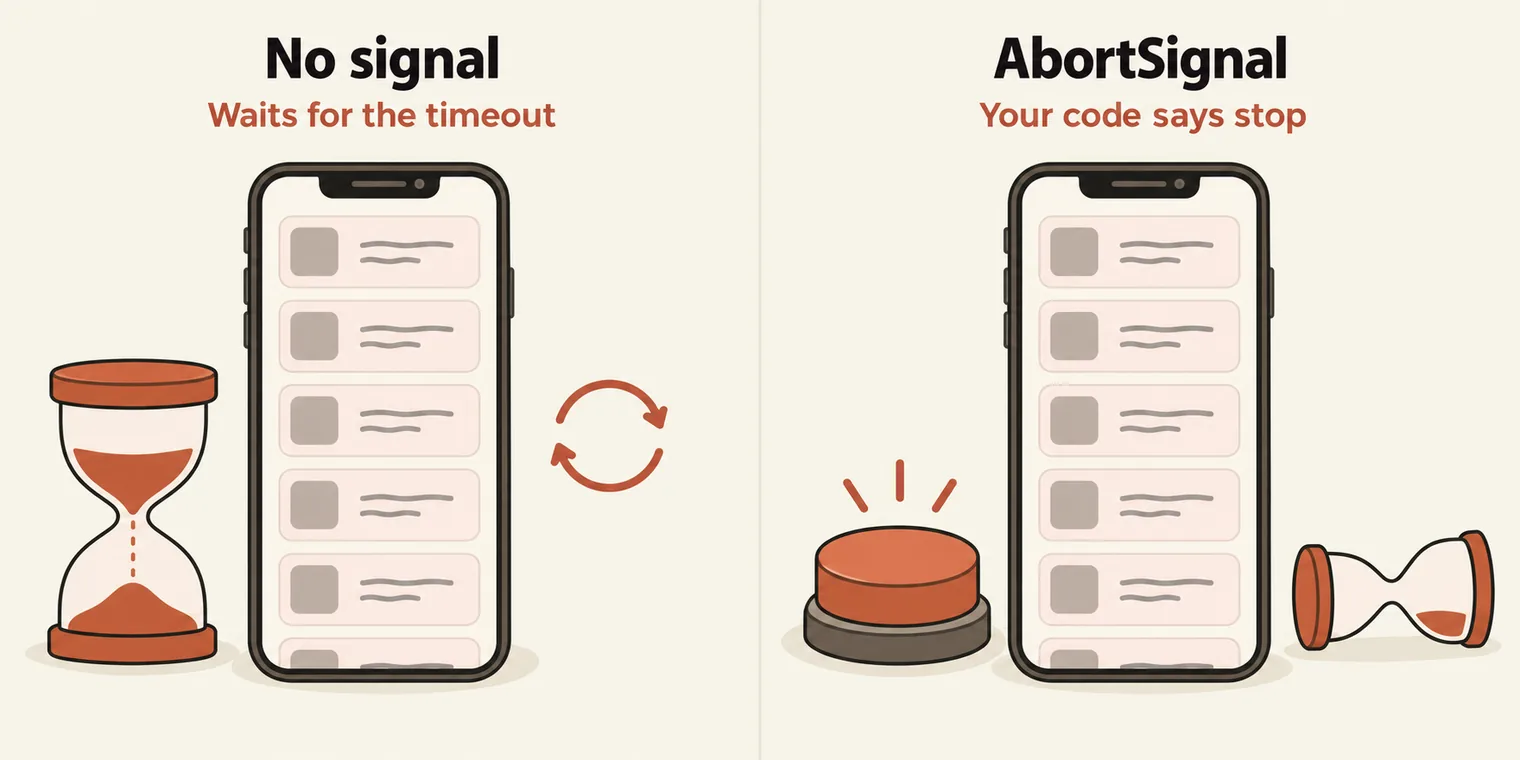
Playwright 1.62 added a signal option to most actions and assertions; the latest release is 1.64, and the batch repo uses 1.63. It takes an AbortSignal from an AbortController. When your code calls controller.abort(), the action stops waiting and throws.
test('Pramod: cancel the wait with an AbortSignal (v1.62+)', async ({ page }) => {
  await page.setContent('<button style="display:none">Hidden</button>');
  const controller = new AbortController();
  setTimeout(() => controller.abort(), 500);

  await expect(
    page.locator('button').scrollIntoViewIfNeeded({ signal: controller.signal })   // option 2: signal
  ).rejects.toThrow('aborted');
});
Running 2 tests using 2 workers

  ✓  1 [chromium] › tests/16_Scroll_toElement/269_Abort_Signal_Scroll_TC.spec.ts:43:5 › Scroll to Element - TestingAcademy › Pramod: cancel the wait with an AbortSignal (v1.62+) (1.3s)
10
  ✓  2 [chromium] › tests/16_Scroll_toElement/269_Abort_Signal_Scroll_TC.spec.ts:9:8 › Scroll to Element - TestingAcademy › scroll to view (6.8s)

  2 passed (7.2s)
- page.setContent() replaces the page's whole HTML with the HTML you pass, here a single hidden button. The class used it to make a page where the element can never become visible.
- scrollIntoViewIfNeeded() waits for the button to be visible, which never happens. After 500 ms,
controller.abort()cancels the wait, and the action fails with "This operation was aborted". That is whatrejects.toThrow('aborted')matches. - Timeout versus signal, in the class's words: a timeout is hard-coded, while an abort can be based on a condition. The same hidden button with
{ timeout: 500 }fails with "Timeout 493.164ms exceeded." instead.
The class's picture: a shop such as Amazon with 3 lakh products, and a scroll to an item that never turns up. Playwright does not keep scrolling; it waits for the element to become visible. In the test runner an action has no time limit of its own, so that wait lasts until the test's timeout, 30 seconds by default. A signal lets your code end it sooner, on whatever condition you choose. Providing a signal does not switch off the default timeout.
Soft and hard assertions
There are two kinds of assertion:
- Hard assertion, plain
expect: if it fails, the next line does not run and the test stops there. - Soft assertion,
expect.soft: if it fails, the failure is recorded and the following lines still run. The test is marked failed at the end.
It is the same idea as soft and hard asserts in TestNG. Use soft assertions when you check several independent things on one page and want every failure from a single run. Use a hard assertion for anything the rest of the test depends on.
import { test, expect} from '@playwright/test';

 test('3 soft assertions & Negation', async ({ page }) => {

        await page.goto('https://app.thetestingacademy.com/playwright/tables/practice.html');
        let firstName = await page.getByTestId('first-name');

        // Soft : Each line records its own failure. test continue either way.
        await expect.soft(firstName).toHaveAttribute('id','first-name');
        await expect.soft(firstName).toBeVisible();
        await expect.soft(firstName).toHaveValue('');


        // Hard
         // Final hard assertion still runs after the soft block.
        await expect(firstName).toBeEnabled();
        // this line will not be executed if the above line is fails)
        await page.goto('https://app.thetestingacademy.com/playwright/webtable.html');
        await expect(page.locator('#error')).not.toBeVisible();

        let title = await page.title();
        expect(title).not.toContain('error');


    });
Running 1 test using 1 worker

  ✓  1 [chromium] › tests/17_Expect_Assertions/272_Expect3.spec.ts:3:6 › 3 soft assertions & Negation (1.8s)

  1 passed (2.2s)
Every assertion passes here, so the soft ones never show their behaviour. Change one soft line so it fails, and both console.log lines after it still print:
import { test, expect } from '@playwright/test';

test('a failing soft assertion', async ({ page }) => {
    await page.goto('https://app.thetestingacademy.com/playwright/tables/practice.html');
    const firstName = page.getByTestId('first-name');

    await expect.soft(firstName).toHaveValue('Pramod');   // fails: the field is empty
    console.log('still running after the soft failure');

    await expect(firstName).toBeEnabled();
    console.log('reached the last line');
});
still running after the soft failure
reached the last line
  ✘  1 [chromium] › a failing soft assertion (6.2s)

    Error: expect(locator).toHaveValue(expected) failed
    Locator:  getByTestId('first-name')
    Expected: "Pramod"
    Received: ""
    Timeout:  5000ms

  1 failed
The await in front of page.getByTestId('first-name') does nothing: a locator is not a promise, so there is nothing to wait for. It is harmless, but the assertions are what need await.
Value assertions: toBe, toEqual and toStrictEqual
A value assertion checks a plain value: a number, a string, an array or an object. It runs once, immediately, with no await and no retry.
import { test, expect } from '@playwright/test';

test.describe('Scroll to Element - TestingAcademy', () => {

   test.beforeEach(async ({ page }) => {
      await page.goto('https://app.thetestingacademy.com/playwright/widgets/scroll');

   });
   test('Expect', async ({ page }) => {
      expect(1 + 2).toBe(3);
      let ac = false;
      expect(ac).toBeFalsy();
      expect(true).toBeTruthy();
      expect(null).toBeNull();
      expect(34).toBeGreaterThan(11);
      expect([1, 2, 3]).toEqual([1, 2, 3]);
      expect({ role: 'admin' }).toEqual({ role: 'admin' });
      expect({ age: 20, role: 'admin' }).toEqual({ role: 'admin', age: 20 });


   });

});
Running 1 test using 1 worker

  ✓  1 [chromium] › tests/17_Expect_Assertions/270_Expect1.spec.ts:9:8 › Scroll to Element - TestingAcademy › Expect (1.1s)

  1 passed (1.6s)
There are three versions of equality: toBe, toEqual and toStrictEqual. Each row below was run:
| Assertion | Result | Why |
|---|---|---|
expect({ a: 1 }).toBe({ a: 1 }) |
Fails | toBe is strict: it checks identity, like ===, and these are two separate objects |
expect({ a: 1 }).toEqual({ a: 1 }) |
Passes | toEqual is deep equality: same keys, same values |
expect({ a: 1, b: 2 }).toEqual({ a: 1 }) |
Fails | An extra property with a value fails toEqual too |
expect({ a: 1, b: undefined }).toEqual({ a: 1 }) |
Passes | toEqual ignores properties set to undefined |
expect({ a: 1, b: undefined }).toStrictEqual({ a: 1 }) |
Fails | toStrictEqual does not ignore them, and it also checks the type |
expect(0.1 + 0.2).toBe(0.3) |
Fails | The sum is 0.30000000000000004 |
expect(0.1 + 0.2).toBeCloseTo(0.3, 5) |
Passes | toBeCloseTo compares floating-point numbers to a number of digits, here 5 |
So toBe is for single values, toEqual for objects and arrays, and toStrictEqual when the object must match exactly. On type: an instance of a class with role: 'admin' passes toEqual against the plain object { role: 'admin' }, and fails toStrictEqual.
The rest of the family, which you look up rather than memorise: toBeTruthy, toBeFalsy, toBeNull, toBeUndefined, toBeNaN, toBeGreaterThan, toBeLessThan and their "or equal" forms, toContain, toContainEqual, toHaveLength, toMatch for a regular expression, toMatchObject and toThrow. The class's expect cheat sheet has one example of each.
Locator and page assertions, and which ones retry
A locator assertion checks an element: toBeVisible, toBeHidden, toBeEnabled, toBeDisabled, toBeEditable, toBeEmpty, toBeChecked, toBeFocused, toBeAttached, toBeInViewport, toHaveText, toContainText, toHaveValue, toHaveValues, toHaveAttribute, toHaveClass, toHaveCount, toHaveCSS, toHaveId, toHaveJSProperty, toHaveScreenshot, toHaveAccessibleName and more. A page assertion checks the page: toHaveTitle, toHaveURL, toHaveScreenshot. For APIs there is toBeOK, which comes later. Selenium has no assertion library of its own and relies on TestNG or JUnit. Playwright ships one.
import { test, expect } from '@playwright/test';

test.describe('Scroll to Element - TestingAcademy', () => {

   test.beforeEach(async ({ page }) => {
        await page.goto('https://app.thetestingacademy.com/playwright/multiple_element_filter.html');

   });
   test('Expect', async ({ page }) => {


        const heading = page.getByText('multiple element filters', { exact: true });
        await expect(heading).toBeVisible();
        await expect(heading).toContainText('filter', { timeout: 10000 });

        const email = page.getByRole('textbox', { name: 'Email Address' });
        await expect(email).toHaveAttribute('id', 'email');
        await expect(email).toHaveAttribute('type', 'email');
        await expect(email).toHaveAttribute('placeholder', 'student@thetestingacademy.com');


        const footerLinks = page.locator('footer a');
        await expect(footerLinks).toHaveCount(16);


   });

});
Running 1 test using 1 worker

  ✓  1 [chromium] › tests/17_Expect_Assertions/271_Expect2.spec.ts:9:8 › Scroll to Element - TestingAcademy › Expect (1.5s)

  1 passed (1.9s)
The heading is visible, the email box has the right id, type and placeholder, and the footer holds 16 links.
The rule of thumb from class:
- Locator and page assertions retry until they pass or the timeout runs out, so they need
await. Value assertions run once. - Use expect.soft only when you want the test to carry on after a failure.
- Use expect.poll when there is no locator to assert on, only a value that a function returns.
- Prefer toHaveCount on the locator to reading the count yourself and comparing it, which would not retry.
Interview question: where does expect come from? From the @playwright/test package, in the same import as test.
The next file has a slip:
import { test, expect } from '@playwright/test';

test('Visible · enabled · disabled · checked', async ({ page }) => {
    await page.goto('https://app.thetestingacademy.com/playwright/tables/practice.html');
    const automationCheckBox = page.getByRole('checkbox', { name: /UFT/ });
    await automationCheckBox.check();
    await expect(automationCheckBox).not.toBeChecked();

    const submitBtn = page.getByTestId('profile-submit');
    await expect(submitBtn).toBeVisible();
    await expect(submitBtn).toBeEnabled();

     await expect(page).toHaveTitle(/QA Profile/);

    const appUrl = page.url();
    expect(appUrl).toContain('thetestingacademy');


    await page.pause();


});
  ✘  1 [chromium] › tests/17_Expect_Assertions/273_Expect4.spec.ts:3:5 › Visible · enabled · disabled · checked (6.5s)

    Error: expect(locator).not.toBeChecked() failed
    Locator:  getByRole('checkbox', { name: /UFT/ })
    Expected: not checked
    Received: checked
    Timeout:  5000ms

  1 failed
The test checks the UFT box, then asserts that it is not checked, which can never pass. The assertion should match the action just taken:
await automationCheckBox.check();
await expect(automationCheckBox).toBeChecked();
That one change is now in the repo, and the test passes, title and URL checks included.
Test hooks and the order they run in
The four hooks run code around your tests: beforeAll, beforeEach, afterEach and afterAll. The order, which the class asked everyone to remember for good:
import { test, expect } from '@playwright/test';

test.beforeAll(async () => {
    // run once per worker - e.g. seed test data, spin a docker container
    console.log('beforeAll - server is up');
});

test.beforeEach(async ({ page }) => {
    // run before every test - e.g. log in, seed cookies
    await page.goto('https://app.thetestingacademy.com/playwright/');
});

test('practice index has 25 cards', async ({ page }) => {
    await expect(page.locator('.index-card')).toHaveCount(29);
});

test('sidebar collapse button works', async ({ page }) => {
    await page.getByLabel('Toggle sidebar').first().click();
    await expect(page.locator('.tta-shell')).toHaveAttribute('data-sidebar-collapsed', 'true');
});

test.afterEach(async ({ page }, testInfo) => {
    if (testInfo.status !== testInfo.expectedStatus) {
        await page.screenshot({ path: `out/fail-${testInfo.title}.png`, fullPage: true });
    }
});

test.afterAll(async () => {
    console.log('afterAll - tear down');
});
Running 2 tests using 2 workers

beforeAll - server is up
beforeAll - server is up
afterAll - tear down
  ✓  2 [chromium] › tests/18_Test_hooks/277_Tk.spec.ts:17:5 › sidebar collapse button works (1.1s)
afterAll - tear down
  ✘  1 [chromium] › tests/18_Test_hooks/277_Tk.spec.ts:13:5 › practice index has 25 cards (6.8s)

    Error: expect(locator).toHaveCount(expected) failed
    Locator:  locator('.index-card')
    Expected: 29
    Received: 47
    Timeout:  5000ms

  1 failed
  1 passed (7.3s)
- beforeAll ran twice. The batch config sets
fullyParallel: true, so the two tests ran in two workers, and each worker ran its own beforeAll and afterAll. That is what "once per worker" means. - The count test fails. Its title says 25, its code says 29, and the practice index has 47 cards today. A count tied to a growing page goes stale every time a page is added. The repo now asserts
toHaveCount(47), and the test passes. - afterEach takes a screenshot only when a test ends unexpectedly. Comparing
testInfo.statuswithtestInfo.expectedStatus, rather than checking for "failed", stays right for tests markedtest.fail().
The class's hooks cheat sheet lists the rest of the test API: test.only, test.setTimeout, test.info(), test.describe.only and so on.
Splitting a test into steps
A test written as one long block reports one opaque failure. test.step() splits it into named steps, which makes the report, the logs and debugging better, because a failure names the step it happened in. The class's advice: break tests into baby steps where you can.
//https://app.thetestingacademy.com/playwright/multiple_element_filter.html

import { test, expect } from '@playwright/test';

test('login form is reachable via steps', async ({ page }) => {
     await test.step('open practice page', async () => {
        await page.goto('https://app.thetestingacademy.com/playwright/multiple_element_filter.html');
     });

    await test.step('fields are visible', async () => {
        await expect(page.getByRole('textbox', { name: 'Email Address' })).toBeVisible();
        await expect(page.getByRole('textbox', { name: 'Password' })).toBeVisible();
    });

    await test.step('submit + assert validation', async () => {
        await page.getByRole('button', { name: /Login/i }).click();
        await expect(page.getByText(/required|invalid/i)).toBeVisible();
    });
});
  ✘  1 [chromium] › tests/18_Test_hooks/276_Test.spec.ts:5:5 › login form is reachable via steps (6.6s)
  1) [chromium] › tests/18_Test_hooks/276_Test.spec.ts:5:5 › login form is reachable via steps › submit + assert validation

    Error: expect(locator).toBeVisible() failed
    Locator: getByText(/required|invalid/i)
    Expected: visible
    Timeout: 5000ms
    Error: element(s) not found

  1 failed
The failure points straight at the third step, which is what steps are for. The step itself expects a validation message, but this login form has none: nothing is required, and submitting it sends the form to #login-success, with empty email and password values in the URL. Asserting what the page actually does makes the test pass. The repo now has this version, with the step renamed to match:
await page.getByRole('button', { name: /Login/i }).click();
await expect(page).toHaveURL(/#login-success$/);
Annotations: skip, slow, fixme and fail
import { test, expect } from '@playwright/test';
const URL = 'https://app.thetestingacademy.com/playwright/multiple_element_filter.html';


test('title test',async ({ page, browserName})=>{
    test.skip(browserName === 'firefox', 'Feature not yet supported on Firefox');
    await page.goto(URL);
    await expect(page).toHaveTitle(/Multiple Element Filter/, { timeout: 15000 });
});

test('email is visible (slow on firefox)', async ({ page, browserName }) => {
    test.slow(browserName === 'firefox', 'firefox is slow on this layout');
    await page.goto(URL);
    await expect(page.getByRole('textbox', { name: 'Email Address' })).toBeVisible();
});


test.fixme('password is visible - broken in Safari, fix me', async ({ page }) => {
    await page.goto(URL);
    await expect(page.getByRole('textbox', { name: 'Password' })).toBeVisible();
});

test('expected to fail until backend ships', async ({ page }) => {
    test.fail();
    await page.goto(URL);
    await expect(page.getByText('New customer area', { exact: true })).toBeVisible();
});
Running 4 tests using 4 workers

  -  1 [chromium] › tests/18_Test_hooks/274_Test.spec.ts:18:6 › password is visible - broken in Safari, fix me
  ✓  4 [chromium] › tests/18_Test_hooks/274_Test.spec.ts:5:5 › title test (1.4s)
  ✓  3 [chromium] › tests/18_Test_hooks/274_Test.spec.ts:11:5 › email is visible (slow on firefox) (1.4s)
  ✘  2 [chromium] › tests/18_Test_hooks/274_Test.spec.ts:23:5 › expected to fail until backend ships (6.3s)

  1 skipped
  3 passed (7.1s)
| Annotation | What it does | In this run |
|---|---|---|
test.skip(condition, reason) |
Skips the test when the condition is true, here on Firefox | Ran, since this is Chromium |
test.slow(condition, reason) |
Triples the test's timeout when the condition is true | Ran normally |
test.fixme(title, ...) |
Marks a known broken test, and skips it | Skipped, shown with - |
test.fail() |
Says the test is expected to fail | Failed as expected, so it counts as passed |
The ✘ next to the last test is the reporter showing that it failed; the summary counts it as passed, because test.fail() said it would fail. The fixme title mentions Safari, but written this way it is skipped on every browser. To skip it only on WebKit, call test.fixme(browserName === 'webkit', 'reason') inside the test, the same way the first two tests use their condition. browserName is a fixture Playwright passes to every test.
Serial and parallel runs, and tags
import { test, expect } from '@playwright/test';

test.describe.serial('Checkout suite - must run in order', () => {
    test('open landing', async () => { console.log('1'); });
    test('search product', async () => { console.log('2'); });
    test('add to cart', async () => { console.log('3'); });
    test('go to checkout', async () => { console.log('4'); });
});


// These two run in parallel - independent of the serial suite above.
test('standalone A', async () => { console.log('A'); });
test('standalone B', async () => { console.log('B'); });
Running 6 tests using 3 workers

B
  ✓  1 [chromium] › tests/18_Test_hooks/278.td.spec.ts:13:5 › standalone B (1ms)
1
  ✓  2 [chromium] › tests/18_Test_hooks/278.td.spec.ts:4:9 › Checkout suite - must run in order › open landing (1ms)
A
2
  ✓  3 [chromium] › tests/18_Test_hooks/278.td.spec.ts:12:5 › standalone A (1ms)
  ✓  4 [chromium] › tests/18_Test_hooks/278.td.spec.ts:5:9 › Checkout suite - must run in order › search product (0ms)
3
  ✓  5 [chromium] › tests/18_Test_hooks/278.td.spec.ts:6:9 › Checkout suite - must run in order › add to cart (0ms)
4
  ✓  6 [chromium] › tests/18_Test_hooks/278.td.spec.ts:7:9 › Checkout suite - must run in order › go to checkout (0ms)

  6 passed (312ms)
Serial means one by one: 1, 2, 3, then 4. Tests outside the serial group are independent and run in parallel, each separately. In the output, A and B print in among the serial steps, because they ran in other workers at the same time.
The last file adds priority tags: words starting with @ in a test's title, which you can run on their own.
import { test, expect } from '@playwright/test';

test('TC01 - Login should work', async ({ page }) => {
  await page.goto('https://app.vwo.com');
});

test('TC02 - Dashboard should open', async ({ page }) => {
  await page.goto('https://app.vwo.com');
});


test.describe.configure({ mode: 'serial' });

test('Priority 1 - Login test', async ({ page }) => {
  await page.goto('https://app.vwo.com');
});

test('Priority 2 - Dashboard test', async ({ page }) => {
  await page.goto('https://app.vwo.com');
});

test('Priority 3 - Logout test', async ({ page }) => {
  await page.goto('https://app.vwo.com');
});


test('Login test @p1 @smoke', async ({ page }) => {
  await page.goto('https://app.vwo.com');
});

test('Profile test @p2', async ({ page }) => {
  await page.goto('https://app.vwo.com');
});

test('Settings test @p3', async ({ page }) => {
  await page.goto('https://app.vwo.com');
});

// npx playwright test --grep @p1
npx playwright test --grep @p1
Running 1 test using 1 worker

  ✓  1 [chromium] › tests/18_Test_hooks/279.tp.spec.ts:27:5 › Login test @p1 @smoke (3.8s)

  1 passed (4.8s)
Run from the repo root, it picks one test out of the whole suite.
- Only real tags match.
--grep @p1picks only the test with@p1in its title. "Priority 1 - Login test" is just a title. - describe.configure applies to the whole file. All eight tests ran one at a time in a single worker ("Running 8 tests using 1 worker"), including TC01 and TC02 written above the
test.describe.configure({ mode: 'serial' })line. To make only some tests serial, put that line, ortest.describe.serial, inside a describe block that holds just those tests.
Chromium launch arguments
Chrome accepts hundreds of command-line switches: start maximized, disable the GPU, guest or incognito mode, disable extensions, ignore certificate errors. In Playwright they go in the config, under launchOptions.args. The class shared a list of the useful ones, which starts with where to put them:
projects: [
  {
    name: 'chromium',
    use: {
      ...devices['Desktop Chrome'],
      viewport: { width: 1920, height: 1080 },
      launchOptions: {
        args: ['--start-maximized', '--disable-gpu'],
      },
    },
  },
],
Playwright already launches Chromium with its own default arguments; yours are added to them.
Tasks and announcements
- No masterclass this week. The instructor was travelling; it will be rescheduled. Masterclasses are optional, and about 92 earlier ones are available to watch, still valid.
- Next class: data-driven testing. After that, everything so far goes into a real project framework, built end to end from zero.
- Doubts go in the doubt thread shared in the group.
Task 1, practice. Run today's examples yourself, from scrolling to hooks, and post any doubts in the doubt thread.
Task 2, the student login. Automate the full Student Login scenario on the multiple element filter page, and add as many expectations as you know.
Task 3, Sunday's test. A test or a QA battle for Playwright 3x is released automatically on SDET Club on Sunday at 7:00 AM. You have 12 hours to finish it; complete it before the next class and share your results.