What this class covered
- The five steps of an API test, and where each one lives
- The Ponytail review of the lifecycle spec
- JSONPath Plus: a path to every field
- The 04 spec: every booking field by its path
- Do we verify every field?
- A JSON schema: the shape of the response
- Ajv in the 05 spec: the schema check goes first
- Tasks, and what comes next
- Request and response payloads get TypeScript interfaces, not plain JS objects, so the keys and their types stay fixed.
- An API test has five steps. Setup lives in the fixture, the payload in the data generator, the request and the response in BookingApi and ApiHelper. The spec keeps only the verification.
- JSONPath Plus reads a field by its path:
$is the whole response, and each dot goes one level down. Withwrap: false, a plain path gives back the value itself. - For a big response, check a few values, about 10 at most, and check the structure of all of it with a JSON schema.
- A schema checks which fields exist, their types, which are required and which values are allowed. A changed key, type or structure fails; a new value passes.
- The schema is the tester's job. AI or an online converter can draft it; keep it in
src/testdata/jsonschemaand run it as the topmost check. - Read what a Ponytail review changed: the first one made the spec cleaner, the second put the checks in a loop and was undone.
The five steps of an API test
We are in the endgame, the instructor said: last class built the API helper, the booking API and the framework. The class opened with a check on who had the level 3 fixture working, because the fixture is very, very important, and then a recap of how the pieces fit.
Interfaces first. Whenever we make a request or get a response, the instructor said, you cannot use the objects directly: there might be a chance the keys are different. To overcome this, the class created interfaces. An interface makes sure your JavaScript object follows the types. That is the first rule, and it covers the response too: the response data has to be an interface as well.
Where each step went. Making a POST request, the instructor said, is a five-step process: the setup of the request, the payload, the creation of the request, the response, and the verification. In the end-to-end spec, every step but the last has moved somewhere else:
- Setup has gone to the fixture.
- The payload has gone to the data generator.
- The request and the response have gone to the booking API, whose functions make their calls through the API helper.
- The verification has only remained in the spec file.
This is more modular, the instructor said. In the repo, the pieces are src/fixtures/booker.fixture.ts, src/testdata/booking.data.ts (which builds the booking with src/utils/DataGenerator.ts and Faker), src/api/BookingApi.ts and src/utils/ApiHelper.ts.
The data generator. Asked to see it: the data generator is a small utility, in the utilities folder, that can generate a username, a password, credentials, or a customer with a first name and a last name. If you do not want to use it, you can create your own booking, with a payload that follows the interface. That also can be done, the instructor said, but the generator function is more optimized.
Data from a database. Asked how this works when the data comes from a database: it is not that difficult, and only this part will change. You create a DB reader client and replace only one function. The repo already reads login data from a database that way, with readLoginDataFromDB() in src/utils/dbReader.ts, from the data-driven class. Similarly, another function would give you a booking from the database, with something like SELECT * FROM booking WHERE id=1, and you use that function in place of the generator: a minor change.
The same in UI tests. Asked whether this is specific to the API framework: the concept is the same for the end-to-end tests, the instructor said. First the fixtures, then some steps, and in the end the validation. This is common in UI and common in API.
Fixtures from AI. Asked whether a fixture can be created with AI: yes, and the class's fixture was. Now that you know the concepts, the instructor said, you can use AI heavily.
Fixtures in an interview. A learner said that interviews ask the candidate to create a fixture scenario. A valid question, the instructor said, and you may not be able to code it fully, in your company or in an interview. But you can explain the small part. A fixture is a reusable resource: page is a fixture too, and so are context, request and browser. In the UI framework, the class took the page object, initialized it in the test fixture, and then called its functions. The booker fixture does the same with the booking API. Multiple people have cleared interviews, the instructor said: you will not build 100% of it, but you can explain the small part.
The ELI5 map. For a picture of all of this, the instructor asked the AI agent for an ELI5 diagram of how each file is used in the test, and suggested you can do the same. The diagram tells the 7 November spec as a hotel: the test books a room, changes it and cancels it. booker.fixture.ts is the concierge, BookingApi.ts the hotel phone, ApiHelper.ts the messenger, Playwright's request the post truck, booking.data.ts the fill-in form and DataGenerator.ts the dice. Changing or cancelling needs a room key, the token; booking and looking do not. It was exported as a PDF, Booking CRUD File Map.pdf, for the repo's learnings folder. When these notes were checked, it had not been pushed.
The Ponytail review of the lifecycle spec
With the concepts in place, the instructor asked the AI agent for a Ponytail review of last class's lifecycle spec: a new file in the same folder, with minimum, proper code. A learner put it as clearing out unnecessary code and comments, and the instructor agreed. It is very important right now, the instructor said, because when AI agents create something, they create a lot of comments and code that is not needed, and they can create libraries and utilities that are already in your source code. The Ponytail review makes sure that does not happen.
/**
 * Booking lifecycle against restful-booker, through the BookingApi fixture:
 *   1. Create a booking.
 *   2. Update it, then read it back.
 *   3. Delete it, then confirm a GET returns 404.
 *
 * No token code here: BookingApi fetches one from POST /auth on the first
 * update or delete, and fetches a fresh one if the API answers 403.
 */

import { test, expect } from '@fixtures/booker.fixture';
import { buildBookingFromGenerator } from '@testdata/booking.data';

test.describe.serial('@e2e @P0 Level 3 - Booking lifecycle (BookingApi fixture)', () => {
    let bookingId: number;

    test('create a booking', async ({ bookingApi }) => {
        const payload = buildBookingFromGenerator({ firstname: 'E2E', lastname: 'Journey' });

        const { bookingid, booking } = await bookingApi.createBooking(payload);

        expect(bookingid).toBeGreaterThan(0);
        expect(booking).toEqual(payload); // the API stores exactly what we sent
        bookingId = bookingid;
    });

    test('update the booking, then read it back', async ({ bookingApi }) => {
        const payload = buildBookingFromGenerator({
            firstname: 'E2E',
            lastname: 'Updated',
            totalprice: 950,
        });

        expect(await bookingApi.updateBooking(bookingId, payload)).toEqual(payload);
        // A separate GET proves the change was saved, not just echoed by the PUT.
        expect(await bookingApi.getBooking(bookingId)).toEqual(payload);
    });

    test('delete the booking and confirm it is gone', async ({ bookingApi }) => {
        expect(await bookingApi.deleteBooking(bookingId)).toBe(201); // restful-booker answers 201, not 204
        expect((await bookingApi.getBookingResponse(bookingId)).status()).toBe(404);
    });
});
What did it change? Only a few minor things, the instructor said, nothing major. The same generator builds a payload, createBooking takes it directly, and the test verifies the payload and sets the booking ID. The AI's own summary, read out: the title changed, stronger checks added, comments removed, the indentation improved. The code is a little cleaner, and this is the final version you are free to use.
Here is every change, from the two files in the repo:
| Part | The 7 November file | After the review |
|---|---|---|
| The title | (token from fixture) |
(BookingApi fixture) |
| Create | checks booking.firstname |
toEqual(payload): the whole booking |
| Update | toMatchObject on two fields |
toEqual(payload) |
| Read back | checks lastname |
toEqual(payload) on a separate GET |
| Comments | one inline comment | a nine-line header and three inline comments |
| The end of the file | five blank lines | none |
Comments went up, not down. In class, the review was said to have removed the comments, and the summary read out says so too. In the repo it is the other way round: the reviewed file has a nine-line header and three inline comments, where the 7 November file has one inline comment. What went are five blank lines at the end of the file.
Run for these notes. Only the first test sends no login, so only it ran:
npx playwright test src/tests/apiTests/03_restfulbooker_fixture_e2e/booking-crud.e2e_PonyTail_Review.spec.ts -g "create a booking" --reporter=list
Running 1 test using 1 worker

  ✓  1 [chromium] › src/tests/apiTests/03_restfulbooker_fixture_e2e/booking-crud.e2e_PonyTail_Review.spec.ts:17:9 › @e2e @P0 Level 3 - Booking lifecycle (BookingApi fixture) › create a booking (768ms)

  1 passed (1.6s)
The other two tests update and delete, and BookingApi fetches their token from POST /auth with a login, so they were not run against restful-booker. The recording does not mention a run of this file. Checked only against a stand-in server on the local machine, written from restful-booker's API docs, both versions passed all three tests, and the update and the delete each fetched their own token. When the stand-in silently dropped the optional additionalneeds field, the 7 November file still passed all three tests, and the reviewed one failed its first test, because it compares the whole booking. That is what the stronger checks buy.
JSONPath Plus: a path to every field
With a booking created, how do you verify it? The response holds the ID and a booking object with a first name, a last name and more. You could check each and every field with expect, one by one. For that case, the instructor said, there is a very interesting library: JSONPath Plus.
It is a library that extracts fields from your JSON and gives them to you for your API assertions. The deck's cheat sheet says the same: JSONPath selects values from nested JSON using a path expression, to extract fields, filter arrays and prepare values for API assertions. You install it, the instructor said, then import JSONPath from it:
npm install jsonpath-plus
In this repo there is nothing to install. jsonpath-plus, ajv and ajv-formats have been in package.json since the framework commit of 20 October (the deck's framework setup, step 2, installs all three), so npm ci brings them.
The symbols. Dollar means everything, the root, the instructor said, and dot means a further child: $.bookingid gives you the booking ID. Star means all. For the check-in, go down through booking and bookingdates. Square brackets work in place of a dot too. And there is support for conditions: you can ask for only the items whose price is greater than 12. The reference the instructor read out lists dollar for the root element, dot for a child, double dot for a recursive child, n for an index, star for all, minus one for the last element, slices, and filter expressions.
Here is the deck's sample, with the deck's path first and one path for each symbol after it, run for these notes:
import { JSONPath } from 'jsonpath-plus';

const data = {
  users: [
    { id: 1, name: 'Asha', active: true },
    { id: 2, name: 'Ravi', active: false },
    { id: 3, name: 'Mia', active: true }
  ],
  meta: {
    total: 3
  }
};

for (const path of [
  '$.users[*].name',
  '$.meta.total',
  "$['meta']['total']",
  '$..name',
  '$.users[0].name',
  '$.users[-1].name',
  '$.users[-1:].name',
  '$.users[0:2].name',
  '$.users[?(@.active)].name',
]) {
  console.log(path.padEnd(27), JSON.stringify(JSONPath({ path, json: data })));
}
$.users[*].name             ["Asha","Ravi","Mia"]
$.meta.total                [3]
$['meta']['total']          [3]
$..name                     ["Asha","Ravi","Mia"]
$.users[0].name             ["Asha"]
$.users[-1].name            []
$.users[-1:].name           ["Mia"]
$.users[0:2].name           ["Asha","Ravi"]
$.users[?(@.active)].name   ["Asha","Mia"]
Star gives you all the users and their names, Asha, Ravi and Mia, in an array, as the instructor said.
The last element is [-1:] here. The reference read out in class gives minus one for the last element, and JSONLint's JSONPath page, whose reference table lists the same symbols in the same order, writes it [-1]. In jsonpath-plus, the library the specs use (version 11.2.1 in the repo), a bare [-1] finds nothing: the sixth line returns []. Write the slice [-1:], as the seventh line does.
Sites that write the path for you. The deck links three. jsonpath.com runs a path against your JSON. On JSON Path Finder you select a field and it gives you the path automatically, so you do not type anything at all: the instructor finds it very easy. And JSONLint's JSONPath page, which the instructor really likes for its extra content: its example queries are the kind the class ran on a store of books, from every price to the first and last book and the books priced over 12, and its reference table lists the symbols.
The 04 spec: every booking field by its path
Where is it used? After the Ponytail review, the instructor created a new folder for JSONPath Plus and copied the reviewed file into it. The delete was not needed here, the instructor said: the point was to test the create booking thoroughly. The AI agent installed the library, and the class worked out the first path. What is the path of the first name? $.booking.firstname. Can you expect it? Yes, and you compare it with the payload, because the payload also has a first name. Then the AI agent was asked to verify all the fields of the booking using JSONPath, the same way.
/**
 * Booking lifecycle against restful-booker, through the BookingApi fixture:
 *   1. Create a booking.
 *   2. Update it, then read it back.
 *   3. Delete it, then confirm a GET returns 404.
 *
 * No token code here: BookingApi fetches one from POST /auth on the first
 * update or delete, and fetches a fresh one if the API answers 403.
 */

import { test, expect } from '@fixtures/booker.fixture';
import { buildBookingFromGenerator } from '@testdata/booking.data';
import { JSONPath } from 'jsonpath-plus';

test.describe.serial('@e2e @P0 Level 3 - Booking lifecycle (BookingApi fixture)', () => {
    let bookingId: number;

    test('create a booking', async ({ bookingApi }) => {
        const payload = buildBookingFromGenerator({ firstname: 'E2E', lastname: 'Journey' });
        const response = await bookingApi.createBooking(payload);
        const { bookingid, booking } = response;


        expect(bookingid).toBeGreaterThan(0);
        expect(booking).toEqual(payload);

        const firstname = JSONPath({ path: '$.booking.firstname', json: response, wrap: false });
        const lastname = JSONPath({ path: '$.booking.lastname', json: response, wrap: false });
        const totalprice = JSONPath({ path: '$.booking.totalprice', json: response, wrap: false });
        const depositpaid = JSONPath({ path: '$.booking.depositpaid', json: response, wrap: false });
        const checkin = JSONPath({ path: '$.booking.bookingdates.checkin', json: response, wrap: false });
        const checkout = JSONPath({ path: '$.booking.bookingdates.checkout', json: response, wrap: false });
        const additionalneeds = JSONPath({ path: '$.booking.additionalneeds', json: response, wrap: false });

        expect(firstname).toBe(payload.firstname);
        expect(lastname).toBe(payload.lastname);
        expect(totalprice).toBe(payload.totalprice);
        expect(depositpaid).toBe(payload.depositpaid);
        expect(checkin).toBe(payload.bookingdates.checkin);
        expect(checkout).toBe(payload.bookingdates.checkout);
        expect(additionalneeds).toBe(payload.additionalneeds);


    });

});
Each JSONPath() call takes the path and the JSON to read, here the whole response. The repo's README explains wrap: false: JSONPath returns an array of matches by default, and with wrap: false a single match comes back as the value itself, so toBe can compare it. Then first name, last name, total price, deposit paid, check-in, check-out and additional needs are each checked against the payload.
Now the real test has only assertions, the instructor pointed out: the booking comes from the fixture, and the rest is validation. The spec file will only have the expectations.
Lines 1 to 9 and line 16 are left over. The file is a copy of the lifecycle spec: its header still lists the update and the delete, and bookingId is declared and never used. Only the create test is here, so this spec never fetches a token.
Run for these notes:
npx playwright test src/tests/apiTests/04_jsonpathplus/booking-crud.e2e.spec.ts --reporter=list
Running 1 test using 1 worker

  ✓  1 [chromium] › src/tests/apiTests/04_jsonpathplus/booking-crud.e2e.spec.ts:18:9 › @e2e @P0 Level 3 - Booking lifecycle (BookingApi fixture) › create a booking (704ms)

  1 passed (1.4s)
It needs no BASE_URL. The README says the specs in 03_, 04_ and 05_ go through BookingApi, which defaults to the full restful-booker URL.
The response it reads. This one comes from a run of the class's same create call, made for these notes. The year in the two dates is masked:
{
  "bookingid": 4307,
  "booking": {
    "firstname": "E2E",
    "lastname": "Journey",
    "totalprice": 570,
    "depositpaid": false,
    "bookingdates": {
      "checkin": "YYYY-11-11",
      "checkout": "YYYY-11-14"
    },
    "additionalneeds": "Extra bed"
  }
}
wrap: false, checked. Run for these notes on that response, saved as create-booking.response.json in the repo folder:
import { readFileSync } from 'node:fs';
import { JSONPath } from 'jsonpath-plus';

const response = JSON.parse(readFileSync('create-booking.response.json', 'utf8'));

console.log(JSONPath({ path: '$.booking.firstname', json: response }));
console.log(JSONPath({ path: '$.booking.firstname', json: response, wrap: false }));
console.log(JSONPath({ path: '$.booking.firstname', json: response.booking }));
console.log(JSONPath({ path: '$..firstname', json: response, wrap: false }));
[ 'E2E' ]
E2E
[]
[ 'E2E' ]
The first line is the default, an array. The second is wrap: false on a plain path: the value itself. The third passes response.booking with a path that starts at $.booking, and finds nothing: the README's answer to "why does my path return []?" is that the path starts from whatever you pass as the JSON. The fourth is a recursive path, and even with wrap: false and a single match it keeps the array: jsonpath-plus unwraps only when the path has no .., * or filter. The spec's seven paths are all plain, so each gives back its value.
How is it different? A learner asked: we are already verifying that value, so how is this different? There are two ways, the instructor said. The first gets the value directly, like the booking ID. Right now this is a very simple response, and you can get it directly. But what happens with a complex response? The instructor asked ChatGPT for a complex JSON: a made-up company with departments and employees, courses with prices and students, project test results and LLM metrics. A huge response like that is very difficult to verify by hand, and for that case it is good to use JSONPath: you can get all the employee names, all the active employees, the employees earning 1 lakh rupees, the course price of 5000 rupees, the test failures, the LLM accuracy, everything.
The JSON and its query table were exported as a PDF, complex_json_jsonpath_playwright_guide.pdf, for the learnings folder, so that you can still reach it if the ChatGPT conversation goes. When these notes were checked, it had not been pushed. Six of its queries are the ones named in class, run on its data for these notes:
| Named in class | JSONPath, from the PDF | Matches, run for these notes |
|---|---|---|
| all the employee names | $.company.departments[*].employees[*].name |
3 |
| all the active employees | $..employees[?(@.active == true)] |
2 |
| earning 1 lakh rupees | $..employees[?(@.salary > 100000)] |
2 |
| course price 5000 rupees | $.company.courses[?(@.price > 5000)] |
1 |
| test failure | $..testResults.failed |
1, the value 20 |
| LLM accuracy | $..metrics.accuracy |
1, the value 0.94 |
Each result is an array, so its .length is the count. That is also the answer the instructor gave when asked how to verify the count of employee records: put them in an array, and use dot length.
Do we verify every field?

In a complex response, do we need to verify each field? A very important question, the instructor said, and the reason for the next concept. If you want to verify each field, that can be done with the same concepts. But generally you will not, for a complex scenario. We verify something called a JSON schema.
If it is one object, you can verify that the booking ID is 4779. With 10 responses you can verify, and with 100 you still can. But the moment it becomes 10,000 records, can you verify, or should you even verify? This is not testing, the instructor said: this is craziness. Verify only one or two values, and verify the structure of the rest. The booking ID should be present in all 10,000 records. The first name should be there, and should be a string. This one should be a number, this a boolean, this an object, this a date.
Can we test everything? If that were testing, the instructor said, we would not be testers, we would be robots. So verify a few fields, let's suppose 10 at the most, plus the JSON schema for the structure of the rest, and say it is good. A learner put it in one line: in a complex response too, verify the structure rather than each and every field. Absolutely right, the instructor said.
Asked about a project where every field of a nested JSON has to be verified: each field can be verified by the same method, the instructor said, and asked for the response, to be posted in the SDET Club too.
A JSON schema: the shape of the response
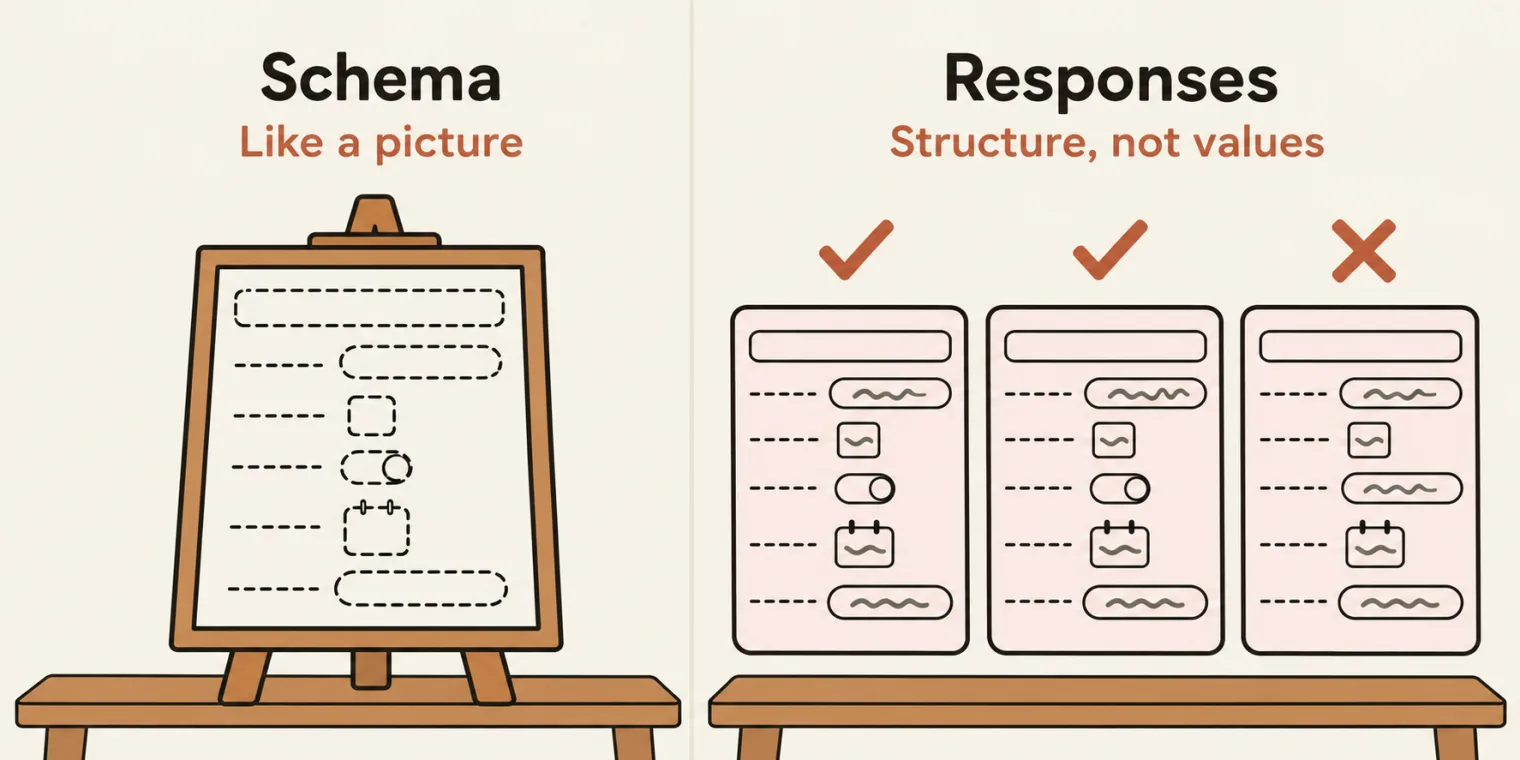
A JSON schema is a JSON document that describes the shape of the document, the instructor said. When the response is huge, we verify its shape: whether the fields exist, their data types, whether they are required, and whether the values are allowed values. The deck's note adds formats to that list, and says that validation is checking an actual response body against the schema, and getting a pass or a fail plus a list of what is wrong.
Schema is like a picture, the instructor said. The instructor showed how to put the create-booking response into an online JSON to schema converter, the one the deck links from Liquid Technologies, click through its data security warning, and generate a schema. Read beside the response, it says that the type of the whole thing is object. There is a property named bookingid, of type integer, and a booking, whose first name is a string and whose last name is a string, through boolean and object. Required means the field cannot be missing, and the schema listed first name, last name, total price, deposit paid and the rest as required.
Then the class tried it in an online JSON schema validator. With the response as it was, it passed. Then the developer makes a mistake, a capital F, and the schema fails immediately. Another mistake: it fails again. A response that comes back as a string: it fails. If the developer makes any mistake, it will fail. But the ID does not matter, the instructor said: it can be any number. We are not concerned with the value. We are concerned with the structure.
The schema in the repo was created by the AI agent, when the class asked it to add the validation (next section), and it lives in the test data folder:
{
  "$schema": "http://json-schema.org/draft-07/schema#",
  "title": "POST /booking response",
  "type": "object",
  "required": ["bookingid", "booking"],
  "additionalProperties": false,
  "properties": {
    "bookingid": { "type": "integer", "minimum": 1 },
    "booking": {
      "type": "object",
      "required": ["firstname", "lastname", "totalprice", "depositpaid", "bookingdates"],
      "additionalProperties": false,
      "properties": {
        "firstname": { "type": "string", "minLength": 1 },
        "lastname": { "type": "string", "minLength": 1 },
        "totalprice": { "type": "number", "minimum": 0 },
        "depositpaid": { "type": "boolean" },
        "bookingdates": {
          "type": "object",
          "required": ["checkin", "checkout"],
          "additionalProperties": false,
          "properties": {
            "checkin": { "type": "string", "format": "date" },
            "checkout": { "type": "string", "format": "date" }
          }
        },
        "additionalneeds": { "type": "string" }
      }
    }
  }
}
Field by field, from the file:
| Field | Type | Rule | Must be there |
|---|---|---|---|
bookingid |
integer |
minimum: 1 |
yes |
booking |
object |
no other fields | yes |
firstname |
string |
minLength: 1 |
yes |
lastname |
string |
minLength: 1 |
yes |
totalprice |
number |
minimum: 0 |
yes |
depositpaid |
boolean |
none | yes |
bookingdates |
object |
no other fields | yes |
checkin |
string |
format: date |
yes |
checkout |
string |
format: date |
yes |
additionalneeds |
string |
none | no |
additionalProperties: false appears at all three levels. The README says it rejects any field the schema does not list, and puts the point of the whole check this way: value checks confirm that what you sent came back, while a schema check also catches a changed contract, such as a renamed field or a number turned into a string, on fields you never assert on.
The same kinds of mistake, run for these notes with Ajv, against this schema and the saved response:
import { readFileSync } from 'node:fs';
import Ajv from 'ajv';
import addFormats from 'ajv-formats';

const schema = JSON.parse(readFileSync('src/testdata/jsonschema/create-booking.schema.json', 'utf8'));
const response = JSON.parse(readFileSync('create-booking.response.json', 'utf8'));

const ajv = new Ajv({ allErrors: true });
addFormats(ajv);
const validate = ajv.compile(schema);

const { booking } = response;
const { firstname, bookingdates, ...rest } = booking;
const cases = {
  'as received': response,
  'another bookingid': { ...response, bookingid: 4779 },
  'key: Firstname': { ...response, booking: { ...rest, bookingdates, Firstname: firstname } },
  'type: totalprice as text': { ...response, booking: { ...booking, totalprice: String(booking.totalprice) } },
  'structure: no bookingdates': { ...response, booking: { ...rest, firstname } },
};

for (const [name, body] of Object.entries(cases)) {
  console.log(name.padEnd(27), validate(body) ? 'valid' : ajv.errorsText(validate.errors));
}
as received                 valid
another bookingid           valid
key: Firstname              data/booking must have required property 'firstname', data/booking must NOT have additional properties
type: totalprice as text    data/booking/totalprice must be number
structure: no bookingdates  data/booking must have required property 'bookingdates'
A new booking ID passes. A key with a capital F, a number sent as text and a missing object all fail, each with its reason.
Who writes the schema? You do, the instructor said: it is your task. Asked whether the schema is provided by the developer: they can provide it, but it is your responsibility. And since we are using AI, it can create the schema automatically by making the request, but ideally, the instructor said, you should have done it manually.
Why a schema, when the response already has an interface? The deck's 7 November note on interfaces answers it. Interfaces exist only at compile time and disappear at runtime, so they will not notice if the API sends back a different shape. Your expect assertions, or a schema library, are what check the real response.
Ajv in the 05 spec: the schema check goes first
To do this in code, the class used Ajv, a JSON schema validator. It is 100% free and open source, the instructor said. In its guide, under getting started, you store the schema, and there is a function called ajv.compile that you verify with. The schema is what you create, and the data comes from your response.
The prompt, read out in class: add the Ajv validation to this file, and store the JSON schema in the test data, in a schema folder. Asked whether the library was installed by hand: the instructor just asked the AI, and it was installed automatically. In the repo, ajv and ajv-formats have been listed in package.json since the framework commit of 20 October, so a fresh npm ci installs them.
/**
 * Booking lifecycle against restful-booker, through the BookingApi fixture:
 *   1. Create a booking.
 *   2. Update it, then read it back.
 *   3. Delete it, then confirm a GET returns 404.
 *
 * No token code here: BookingApi fetches one from POST /auth on the first
 * update or delete, and fetches a fresh one if the API answers 403.
 */

import { test, expect } from '@fixtures/booker.fixture';
import { buildBookingFromGenerator } from '@testdata/booking.data';
import { JSONPath } from 'jsonpath-plus';
import Ajv from 'ajv';
import addFormats from 'ajv-formats';
import createBookingSchema from '@testdata/jsonschema/create-booking.schema.json';

// Compile the schema once for the whole file. allErrors reports every broken
// field, not just the first; ajv-formats adds the "date" format the schema uses.
const ajv = new Ajv({ allErrors: true });
addFormats(ajv);
const validateCreateBooking = ajv.compile(createBookingSchema);

test.describe.serial('@e2e @P0 Level 3 - Booking lifecycle (BookingApi fixture)', () => {
    let bookingId: number;

    test('create a booking', async ({ bookingApi }) => {
        const payload = buildBookingFromGenerator({ firstname: 'E2E', lastname: 'Journey' });
        const response = await bookingApi.createBooking(payload);
        const { bookingid, booking } = response;

        const isValid = validateCreateBooking(response);
        expect(isValid, ajv.errorsText(validateCreateBooking.errors)).toBe(true);

        expect(bookingid).toBeGreaterThan(0);
        expect(booking).toEqual(payload);

        const firstname = JSONPath({ path: '$.booking.firstname', json: response, wrap: false });
        const lastname = JSONPath({ path: '$.booking.lastname', json: response, wrap: false });
        const totalprice = JSONPath({ path: '$.booking.totalprice', json: response, wrap: false });
        const depositpaid = JSONPath({ path: '$.booking.depositpaid', json: response, wrap: false });
        const checkin = JSONPath({ path: '$.booking.bookingdates.checkin', json: response, wrap: false });
        const checkout = JSONPath({ path: '$.booking.bookingdates.checkout', json: response, wrap: false });
        const additionalneeds = JSONPath({ path: '$.booking.additionalneeds', json: response, wrap: false });


        expect(firstname).toBe(payload.firstname);
        expect(lastname).toBe(payload.lastname);
        expect(totalprice).toBe(payload.totalprice);
        expect(depositpaid).toBe(payload.depositpaid);
        expect(checkin).toBe(payload.bookingdates.checkin);
        expect(checkout).toBe(payload.bookingdates.checkout);
        expect(additionalneeds).toBe(payload.additionalneeds);


    });

});
Lines 20 to 22 compile the schema once for the whole file: Ajv with allErrors, plus ajv-formats for the date format, as the comment on lines 18 and 19 says. Line 32 validates the response, and line 33 fails the test with Ajv's error text if it is not valid. The instructor moved this check up, above the others: it is the topmost verification, the most important one. Then you can verify further with the expectations.
The advantage, in the instructor's words: if there is any change in keys, any change in data type, any change in the structure of the JSON, it will immediately fail.
Run for these notes:
npx playwright test src/tests/apiTests/05_ajv_jsonschema_validator/booking-crud.e2e.spec.ts --reporter=list
Running 1 test using 1 worker

  ✓  1 [chromium] › src/tests/apiTests/05_ajv_jsonschema_validator/booking-crud.e2e.spec.ts:27:9 › @e2e @P0 Level 3 - Booking lifecycle (BookingApi fixture) › create a booking (768ms)

  1 passed (1.5s)
What lines 18 to 22 buy. The README says that allErrors: true reports every broken field in one run instead of only the first, and that without ajv-formats, compiling this schema throws unknown format "date". Run for these notes, on one response with three slips:
import { readFileSync } from 'node:fs';
import Ajv from 'ajv';
import addFormats from 'ajv-formats';

const schema = JSON.parse(readFileSync('src/testdata/jsonschema/create-booking.schema.json', 'utf8'));
const response = JSON.parse(readFileSync('create-booking.response.json', 'utf8'));

// One response, three slips: lastname renamed, totalprice sent as text, check-in written with slashes.
const { lastname, ...booking } = response.booking;
const broken = {
  ...response,
  booking: {
    ...booking,
    lastName: lastname,
    totalprice: String(booking.totalprice),
    bookingdates: { ...booking.bookingdates, checkin: booking.bookingdates.checkin.replaceAll('-', '/') },
  },
};

for (const allErrors of [true, false]) {
  const ajv = new Ajv({ allErrors });
  addFormats(ajv);
  const validate = ajv.compile(schema);
  validate(broken);
  console.log(`allErrors: ${allErrors} -> ${validate.errors.length} error(s)`);
  console.log(ajv.errorsText(validate.errors));
}

try {
  new Ajv({ allErrors: true }).compile(schema);
} catch (e) {
  console.log(`no ajv-formats -> ${e.message}`);
}
allErrors: true -> 4 error(s)
data/booking must have required property 'lastname', data/booking must NOT have additional properties, data/booking/totalprice must be number, data/booking/bookingdates/checkin must match format "date"
allErrors: false -> 1 error(s)
data/booking must have required property 'lastname'
no ajv-formats -> unknown format "date" ignored in schema at path "#/properties/booking/properties/bookingdates/properties/checkin"
With allErrors, four errors, the same four as the README's example; without it, only the first. And with no ajv-formats, ajv.compile throws before any test runs.
A second Ponytail review, undone. The instructor then asked for one more Ponytail review, to remove some of the code if possible, such as the booking ID this file does not need. It did not do much, the instructor said, and what it did was not what was wanted: it put the expectations in a for loop. Sometimes a Ponytail review can also mess things up, so make sure you follow it properly. The instructor removed it: this is much easier to understand, the instructor said. The pushed file has the seven separate checks, and bookingId on line 25 is still declared and never used.
Two more questions. Asked how to automate when the test-case document is updated: if there is an update, you have to change the test case, the instructor said. Asked about a project that prints JSON in the console after an order is submitted: you can verify it the same way, the instructor said. Get the value, get its JSON path, and verify. When the learner added that they do not get the API response, because the dev team prints the JSON, the instructor asked for the question to be posted in the SDET Club.
Tasks and announcements
- The API part is done. This marks your API test case, the instructor said: you now have JSONPath, JSON schema validation, a fixture and the API response, everything in the API.
- Next: the AI agent factory, over two classes, Thursday and Saturday. AI is added into this framework: a self-healing one, an RCA bot, a flaky test case bot, and more.
- Jenkins. Jenkins sessions are going to be started, the instructor said.
- Cucumber BDD. Two sessions of Cucumber BDD are going to be added. In the instructor's words: "in the next class, we are going to add that also".
- Regex. There is already a recorded session on regex. It had not been added yet, and the instructor said "we will be adding" it.
- Doubts: learners with a question about their own project's responses were asked to post it in the SDET Club, with the response, and the instructor will see what can be done.
- Tester Town is new: a space the instructor added, in beta, where you can roam around and chat with other people in a public chat. A few challenges are being added.
- The code: the 04 folder and the 05 folder in the batch repo, with the schema in
src/testdata/jsonschema. The two PDFs, the ELI5 file map and the complex JSON, had not been pushed when these notes were checked.
Task. One thing you can do too, the instructor said: ask your AI agent for an ELI5 diagram of how each file is used in your booking test, the way the class did.
Show the answer
Answer. The class's diagram maps the five steps. Setup is the fixture, booker.fixture.ts, which hands the test a ready bookingApi. The payload comes from buildBookingFromGenerator() in booking.data.ts, which draws its values from DataGenerator and Faker. The request and the response go through BookingApi.createBooking(), which calls ApiHelper and Playwright's request, and the response is typed by the CreateBookingResponse interface. The spec keeps only the verification. In the diagram's hotel, changing or cancelling a booking needs a room key, the token from POST /auth; booking and looking do not.
In a complex response, do we need to verify each field?
Worth practising too: What does a JSON schema check that a TypeScript interface cannot? In jsonpath-plus, what does wrap: false change, and when does a single match still come back as an array? Where should the schema check sit in a spec, and why?
Show the answer
Answer. Generally no. Check a few values, about 10 at most, and check the structure of everything with a JSON schema: which fields exist, their types, which are required and which values are allowed. Checking every value of 10,000 records is not testing; the schema catches a changed key, type or structure on fields you never assert on, while a new value such as another booking ID still passes. An interface exists only at compile time, so it cannot see what the API really sends; the schema check runs on the real response. With wrap: false, a plain path such as $.booking.firstname gives back the value itself instead of a one-item array, but a path with .., * or a filter still returns an array. Put the schema check first, as the topmost verification: with allErrors: true and ajv.errorsText() as the message, a broken shape fails the test with every problem named, before any value is checked.
Interviews ask the candidate to create a fixture scenario. What can you show?
Worth practising too: Where does each of the five steps of an API test live in this framework? What changes when the test data comes from a database?
Show the answer
Answer. You may not code all of it, but you can explain the small part. A fixture is a reusable resource, as page, context, request and browser are. In the UI framework, the page object is initialized in the test fixture and the test calls its functions; in the API framework, booker.fixture.ts hands the test a ready BookingApi. The five steps: setup in the fixture, the payload in the data generator, the request and the response in BookingApi through ApiHelper, and the verification in the spec. With data from a database, only the payload step changes: a DB reader function, such as one that runs SELECT * FROM booking WHERE id=1, takes the generator's place.