What this class covered
- API tests join the framework, and the plan for the API part
- The two web fundamentals videos
- What an API is: three layers, and a login request in the network tab
- Client and server, and the API as the middleman
- REST, HTTP and the URL
- Query parameters and path parameters
- GET, POST, PUT, PATCH and DELETE, with a students example
- What the login request carried: a URL, a JSON payload, an unauthorized response
- API testing with Playwright, and the request fixture
- Why Playwright instead of Postman or REST Assured
- The API testing process, from the requirement to the test closure
- Automating only the stable test cases, in the base framework
- Tasks, and what comes next
- An API is the middleman between a client and a server: the client sends a request, and the server sends back a response, over HTTP.
- A query parameter comes after a question mark, as in
?a=b; a path parameter is part of the path, as in/login/1. - GET fetches, POST creates and sends a payload (the body), PUT is a full update, PATCH a partial one, and DELETE deletes.
- API testing means hitting a service's HTTP endpoints directly: no browser, no DOM.
- Playwright's built-in
requestfixture is anAPIRequestContext: it makes the HTTP request, and the response comes back to the test. - In Playwright, API tests and UI tests share one runner, one reporter and one language, and they can sit in the same file.
- API testing follows the manual testing process, and only test cases that were executed manually and are stable get automated, in the base framework.
What an API is
Last class completed the framework: the fixtures, the logs, and an end-to-end test with fixtures for a positive and a negative scenario, made smaller with a Ponytail review. Now APIs join it. The reason, as the instructor put it: in any company you work for, you have to mix API test cases with UI test cases.
Asked who had never worked with APIs, the instructor put it at almost 20 to 30 percent of the learners, so the fundamentals came first. The plan for the API part, from the deck:
- The fundamentals of APIs.
- Postman, for manual API testing, on the restful-booker API docs.
- Automating it in the same framework.
- A fixture for the APIs.
Covering the web fundamentals from the very basics would take a lot of class time, so two lectures are already in the course for anyone who has never worked with APIs: Web Fundamentals For API Testers, Part 1 and Part 2. They cover HTTP, client and server, resources, the base URL, parameters, the payload, REST and SOAP, the basics of each request method, and what an API is and how to test one manually. Watching both before the next class is today's task. These are web fundamentals, the instructor said, not API fundamentals. The instructor gave a very high-level, easy version, and tried to explain it as if to a complete beginner.
One point before the definitions: with Playwright, API testing is all about automation, never about manual testing. Manual testing is generally not done in Playwright.
So what is an API? The definition you may already know: an application programming interface. To see what that means in practice, start with the layers. Every application, the instructor said, has a UI layer, a business layer and a database layer.
To show them at work, the instructor opened the login page of VWO, a real web app (its domain has changed to wingify.com, the class noted), entered a sample username and password, cleared the browser's network tab and clicked sign in. The request went out, and the response was invalid user. "This is the whole concept of API testing," the instructor said: everything is present there.
On the iPad, the same login as a drawing. The UI layer is what is presented to the user. It can be built in any language, but generally it is mostly HTML, JavaScript and CSS. The username and password go to a URL endpoint, /login, and through it to the database, where they are checked. That first step is the request. The check finds that they are not a valid username and password, and the answer that comes back is the response.
Client and server, and the API as the middleman
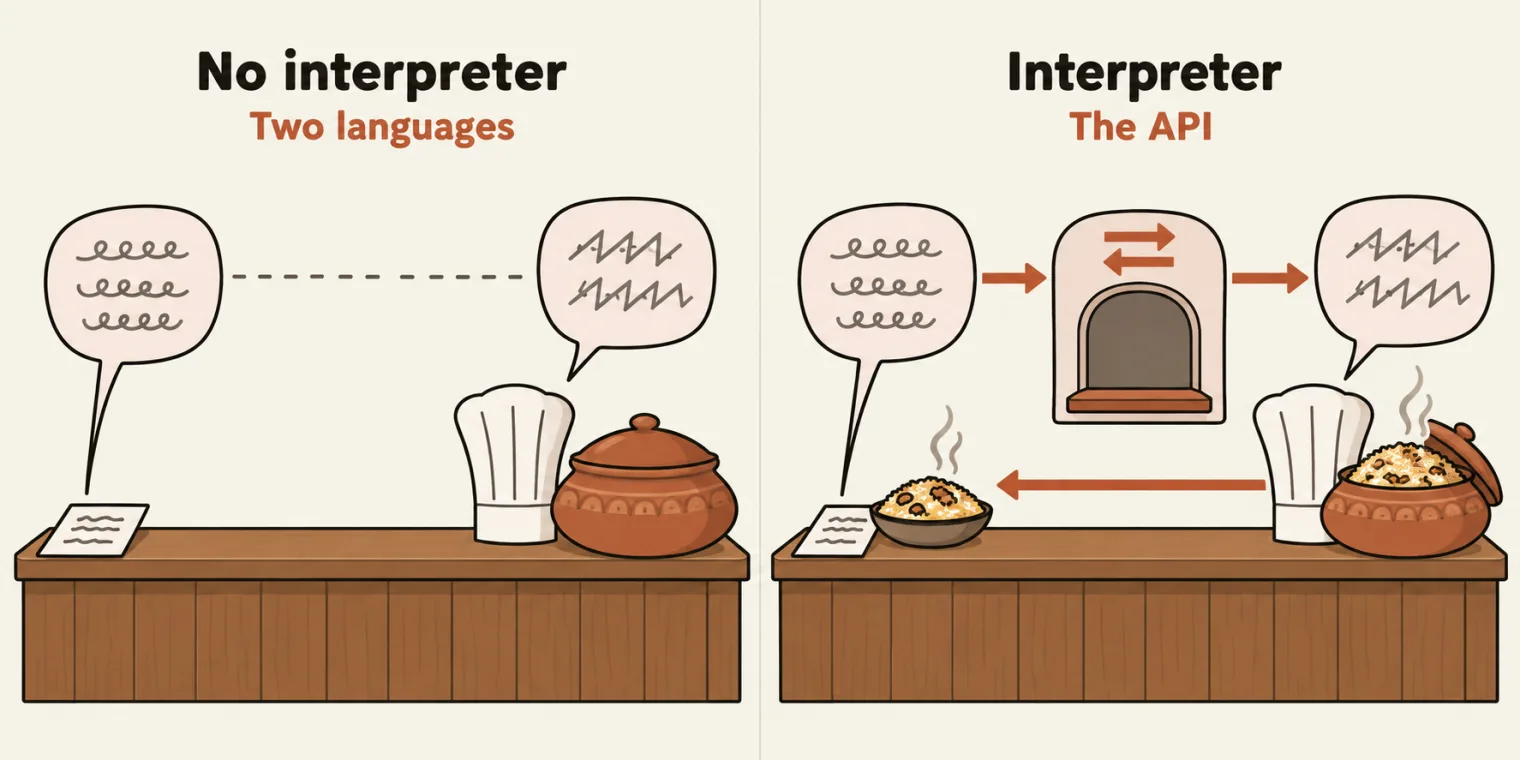
In a nutshell, everything is a client and a server. The client requests something, and the server responds. The two are different, and they can speak different languages, which is why they need a middleman that understands the request and passes it on.
The instructor's favourite example: a biryani shop where the chef understands only Kannada, and a customer who does not know Kannada and speaks English, maybe Hindi or Punjabi. Talking to the chef directly is the problem. They need a middleman, an interpreter, who takes what one says and gives it to the other. That middleman is the API.
So API means application programming interface: two applications communicate with each other through it. For now, only one type of API is covered: REST, a type of API that follows certain rules, six of them, which the web fundamentals videos cover.
HTTP, the URL and two kinds of parameter
The client always sends a request, and the server always gives a response: the traditional client-server architecture. They talk over HTTP, the Hypertext Transfer Protocol, and a request goes to a URL, a Uniform Resource Locator, such as https://app.wingify.com/login.
A URL can carry two types of parameter:
- A query parameter comes after a question mark. In
https://app.wingify.com/login?a=b,ais equal tob. - A path parameter is part of the path. In
/login/1, the1is the ID.
GET, POST, PUT, PATCH and DELETE
The class's example of what a client can ask for: a server with a database of 100 students, each with a name, an age and a phone number.
| Method | What it does | The class's example |
|---|---|---|
| GET | fetches information | fetch student one, or all the students |
| POST | creates something | create student 101, sending a name, an age and a phone number |
| PUT | a full update | replace all of student 101's values |
| PATCH | a partial update | change only the name of student 1, one key |
| DELETE | deletes something | delete student 101 |
GET, the instructor said, is an HTTP method created to fetch information. To create something, the client has to send the information to the server, and what it sends is the payload, which some people call the body. Sending something to create is the POST method: like a postman, who also posts something. An update has two choices: a full update with PUT, which replaces every value, or a partial update with PATCH, which changes only part of it, in the example one key, the name.
To make any of these requests you need the URL, and the payload: what the client wants to do.
What the login request carried
Back to the login. The instructor had taken a snapshot for this login page: when sign in is clicked, the UI makes a request to the login URL and sends a JSON payload with the username and the password. What came back was an error, unauthorized, a status code: a wrong username and password.
Who sent it? The server. It checked its database, did not find the user, and answered that the client is unauthorized. It is a client-side error, but the server sent it.
Unauthorized is the name of status code 401, and every status from 400 to 499 is a client error.
API testing with Playwright: the request fixture
So what does API testing mean with Playwright? The deck's definition, which the instructor read out:
API testing means hitting a service's HTTP endpoints directly - no browser, no DOM. You POST JSON, GET resources, assert status codes, validate response shapes, then move on.
For that, Playwright provides a built-in fixture, the request fixture, automatically. It can make any kind of HTTP request: GET, POST, PUT, PATCH, DELETE, everything.
The structure, from the diagram on screen: you have a Playwright test file, and it uses the request fixture. The request fixture uses something called the API request context, which makes the HTTP request, and whatever data comes back is given to you as a response.
In Playwright's own type definitions (1.64.1, the version the framework installs), the fixture is declared as request: APIRequestContext, and that context has a method for each of the five: get(), post(), put(), patch() and delete(). request is also one of the built-in fixtures from last class: the deck's example there called an API with request.get(...) without opening a page, and printed status 200.
Asked for a demonstration of the PATCH method, the instructor's answer: everything will be shown, slowly; wait and watch.
Why Playwright instead of Postman or REST Assured
Postman can already do manual and automated API testing, and Java has the REST Assured library. So why learn API testing in Playwright? The reasons given in class:
- The same runner and the same reporter.
- The same language. It is native to TypeScript.
- The trace viewer works for API tests too.
- UI tests in the same tool. Postman has no UI test cases, and REST Assured has none either. Playwright already has them, so you can mix your API and UI test cases.
- Authentication: you can authenticate.
- CI/CD, free of cost.
Asked whether an API test case and a UI test case can be in the same file: yes. The reasons follow the comparison on The Testing Academy's Playwright API Testing page, which the deck links.
No built-in JSON schema validator. The list in class also had "a built-in JSON schema validator". Playwright has none: the comparison table on that page says Playwright does schema validation via Ajv, a separate library, and Playwright 1.64.1's type definitions have no matcher or method that checks a response against a schema. A response's shape can still be validated in a Playwright test, with Ajv.
The API testing process
What does it mean when somebody says API testing? They give you a project with some kind of API documentation, and the same approach as manual testing is followed. In manual testing, a project goes through a requirement analysis, a test plan, test cases, the execution, the bugs and a test closure, and API testing is done in a very similar manner. From the next class, the project is restful-booker, a public playground API, and its API documentation is what such a requirement can look like.
Step by step, from the deck:
- The requirement, and its analysis. It can come as API documentation like restful-booker's, a Google Doc, a Confluence doc, a Google Sheet, a Jira ticket or a Swagger link. Confluence is Atlassian's documentation tool. Asked about SharePoint: yes, SharePoint and Teams too; there are many more.
- A test plan for the API. The instructor showed a test plan for restful-booker.
- Test cases. The instructor had also prepared example test cases, with cases such as create booking.
- Manual execution, with Postman, Swagger, Bruno or any other tool. Swagger, the instructor said, is another type of tool, similar to Postman, that can perform API testing. The instructor also opened Postman on the web to show what its structure looks like.
- Raise the bugs, and once they are closed, the test closure.
Both documents are examples for now: how to write a test plan and test cases for an API is the next class.
When there is no documentation. Asked as an interview question: when an API service has no documentation, how do you test it? You create your own high-level requirement and gather the information; there are companies with no requirement at all. The instructor shared a template for writing that requirement, and will also show how to create one. Asked whether the documentation is mandatory: yes, absolutely important. And asked whether a Postman collection can be made without any documentation: yes, that can be done too.
Automating only the stable test cases
Where does the real work start? When the APIs are automated. The manual steps are a manual tester's work; one person can do both manual and automation, as the instructor has, or a company can have two different people. Automation starts when the test cases are ready and properly written, and they are automated into the base framework, which has to be ready first. For this batch that is AdvancePlaywrightFramework3x, the framework the deck names as ready.
Not every test case gets automated. The cases are executed manually first, and only those that are running and stable in nature are automated. When learning API testing with Playwright, you should know which test cases to automate and which not to. The deck's summary of the whole process:
Project -> Req Ana -> Test Plan -> Test Exe (postman) -> Automate them
Tasks and announcements
- Today's task: watch Web Fundamentals For API Testers, Part 1 and Part 2, before the next class. Both are already in the course, and Meeti, the TA, was asked to note the task down. The instructor called the two videos very, very important and wants everyone to finish them; if you have questions such as REST versus SOAP, or what RESTful means, these are the videos to watch.
- Next class, on Saturday: how the requirement is given, then a test plan and test cases for restful-booker, written in class; the test cases go into Postman (web), with all the endpoints; and then a start on automating them in Playwright, one by one.
- Held over for the next class: what analysing a requirement means, and how to debug when an API test passes with status 200 but the function does not work properly on the backend.
- ReadyAPI: asked how to automate it, the instructor said: not right now, but after the next class.
- Postman: asked whether it is a licensed tool, the answer was yes: it is not free nowadays. Some of it is free, and some is not.
Task. Watch Web Fundamentals For API Testers, Part 1 and Part 2, before the next class.
Interview question. When an API service has no documentation, how do you test it?
Worth practising too: What is an API? What is the difference between PUT and PATCH? What is the difference between a query parameter and a path parameter? Why use Playwright for API testing instead of Postman or REST Assured?
Show the answer
Answer. With no documentation, you create your own high-level requirement and gather the information; the instructor shared a template for writing it. An API, an application programming interface, is the middleman through which two applications communicate: the client sends a request, and the server sends back a response, over HTTP. PUT is a full update that replaces every value; PATCH is a partial update, such as changing only one key, the name. A query parameter comes after a question mark, as in ?a=b; a path parameter is part of the path, as in /login/1, where 1 is the ID. Playwright keeps API and UI tests in one runner, one reporter and one language, so the two can be mixed, even in one file, and its built-in request fixture makes the HTTP requests.