What this class covered
- Playwright's AI tools, and agents inside the framework
- Open-source or closed-source models
- An LLM client, and free models on Groq and Ollama
- An AI agent: brain, memory and tools
- Test data from AI instead of Faker
- LLMGateway.ts: one entry point for five providers
- The checkout test, with its customer from AI
- Tasks, and what comes next
- Use an open-source model for a task in bulk, and a closed-source one when the task must be specific or accurate, such as code generation.
- An AI agent has a brain, memory and tools. The class's first agents are not fully agents yet: they become agents when they use memory and tools.
- AI agents can sit before a Playwright run, to generate the test data, or after it, to work on the results: RCA, flaky tests, healing.
- Use AI for test data Faker cannot make, data specific to your company and close to real data, and ask for JSON only.
- LLMGateway is one entry point: the code, then
LLM_PROVIDER, then the first key found decide the provider, andLLM_ALLOWED_PROVIDERSrefuses any other. - Keep the prompt in a file, and vary it on every call: the class's prompt gets random initials and a state from Faker each time.
- No key? The gateway spec skips its LLM test. Groq has a free model, and Ollama runs one on your own machine for free.
Playwright's AI tools, and agents inside the framework
Already in the recordings. Before the agents, the instructor listed three things the course has covered in recorded sessions. Playwright MCP helps you generate a test case, or build one. Playwright's AI agents are a test planner, a generator and a healer. The planner plans the app and generates the code later, the generator is fine, and the healer, to be honest, is very bad: it can help you heal a test, but it is not good. Playwright CLI is an alternate to MCP, a much cheaper version. The TA was asked to find the three recordings and pin them in the group, if possible, and everyone was asked to take out this Saturday and Sunday to watch them.
Today: agents inside the framework. The last class closed the API part of the framework. This one showed something different, the instructor said: how to add independent AI agents into the Playwright framework itself. The deck's 12 November section lists the same three tools with the same verdicts and, further on, the plan for the framework: pre and post Playwright agents.
Open-source or closed-source models
Remember, the instructor said: large language models come in two kinds, open source and closed source. The rule the class gave: when you want to do a task in bulk, go with open source. When you want a task done specifically, or more accurately, use closed source.
The instructor's own examples:
| Model named in class | Used for, in the instructor's examples |
|---|---|
| Mistral, open source | OCR, PDF to text: more than 3,000 of almost 12,000 test cases verify a PDF's text, which would be very costly with a closed-source model. Also some basic AI agents. |
| Claude Opus 5.5, closed source | Code generation, which always gets a closed-source model. Also some specific agentic QA. |
| DeepSeek V4 Flash | Bulk operations, much cheaper, installed locally in some companies: RCA agents and a flaky test case finder. |
| GPT-5 Mini | Small things, like RCA. |
Mistral is a European open-source model, the instructor added. The deck's note on these models has the same split: open source for a task in bulk, with the OCR and the DeepSeek examples, and closed source for a specific or accurate task, with Claude Opus 5.5 for code generation.
OpenRouter, a curator. OpenRouter is a curator, the instructor said: through it you can use open-source and closed-source models, both of them, and you can select free ones. The instructor's example of what it costs: a credit of about $500 a month, somewhere around $500 to $1,000 the instructor thought, added to OpenRouter and used on some part of Mistral, some part of Opus 5.5 or some part of GPT-5 Mini. The deck lists the same three under OpenRouter.
An LLM client, and free models on Groq and Ollama
To bring AI into your automation framework, you need to add an LLM client, the instructor said. Most LLM clients follow the same OpenAI API specification, and OpenRouter's API, for example, follows the same thing. The deck lists OpenAI's chat completions API: POST, GET and DELETE on /v1/chat/completions.
The client takes an input, a model and data, makes a POST request, and returns an output, which the automation code then uses: that is the deck's note on the LLM gateway. Call it an LLM gateway or a client, as you like. The instructor generally calls it a client, because it helps you make a request and return an output.
Groq, free. Apart from OpenRouter, there is a very famous website that is free of cost: groq.com, spelled G-R-O-Q. Create a free account and use it. The instructor generally prefers a free open-source model, and Groq has one: OpenAI's open-source GPT, the 120 billion one, openai/gpt-oss-120b in the deck. To be honest, the instructor said, it is one of the best models, and it can do most of your things.
The request, as the deck has it: a POST to Groq's URL, with your key and a question.
curl "https://api.groq.com/openai/v1/chat/completions" \
-X POST \
-H "Content-Type: application/json" \
-H "Authorization: Bearer ${GROQ_API_KEY}" \
-d '{
       "messages": [
         {
           "role": "user",
           "content": "what is 2+2?"
         },
        ],
       "model": "openai/gpt-oss-120b",
       "temperature": 1,
       "max_completion_tokens": 2048,
       "top_p": 1,
       "stream": true,
       "reasoning_effort": "medium",
       "stop": null
     }'
The key comes from the GROQ_API_KEY environment variable, so it is never typed into the command.
One comma too many. In the deck's request body, a comma follows the only message, just before the ]. JSON allows no comma after the last item, so a strict parser rejects the body as written. Remove that comma before you send it.
Checked for these notes, offline, with Node's JSON.parse:
// The -d body of the deck's Groq curl, exactly as written, then with the comma after the message removed.
const asWritten = `{
       "messages": [
         {
           "role": "user",
           "content": "what is 2+2?"
         },
        ],
       "model": "openai/gpt-oss-120b",
       "temperature": 1,
       "max_completion_tokens": 2048,
       "top_p": 1,
       "stream": true,
       "reasoning_effort": "medium",
       "stop": null
     }`;
const commaRemoved = asWritten.replace('},\n        ]', '}\n        ]');

for (const [name, body] of [['as written', asWritten], ['comma removed', commaRemoved]]) {
  try {
    JSON.parse(body);
    console.log(`${name}: valid JSON`);
  } catch (e) {
    console.log(`${name}: ${e.message}`);
  }
}
as written: Unexpected token ']', ...",
        ],
       "... is not valid JSON
comma removed: valid JSON
What can you ask? Anything, the instructor said: your logs, your failures, your automation results. After Playwright has run, you can pass the results and ask what the output is, or what the failure count is.
Ollama, free and local. If you have access to Ollama, in your company or on a machine where it runs, you can ask it the same way: it is 100% free, and you can make an unlimited number of requests. It is available as an API, so a curl request works too, and it can be used in your automation. Ollama is free, the instructor confirmed in answer to the chat, and LM Studio can be used too; there you use open-source models only. Every model reply in these notes was made that way, with Ollama on a local machine and no key, as the LLMGateway section shows.
An AI agent: brain, memory and tools
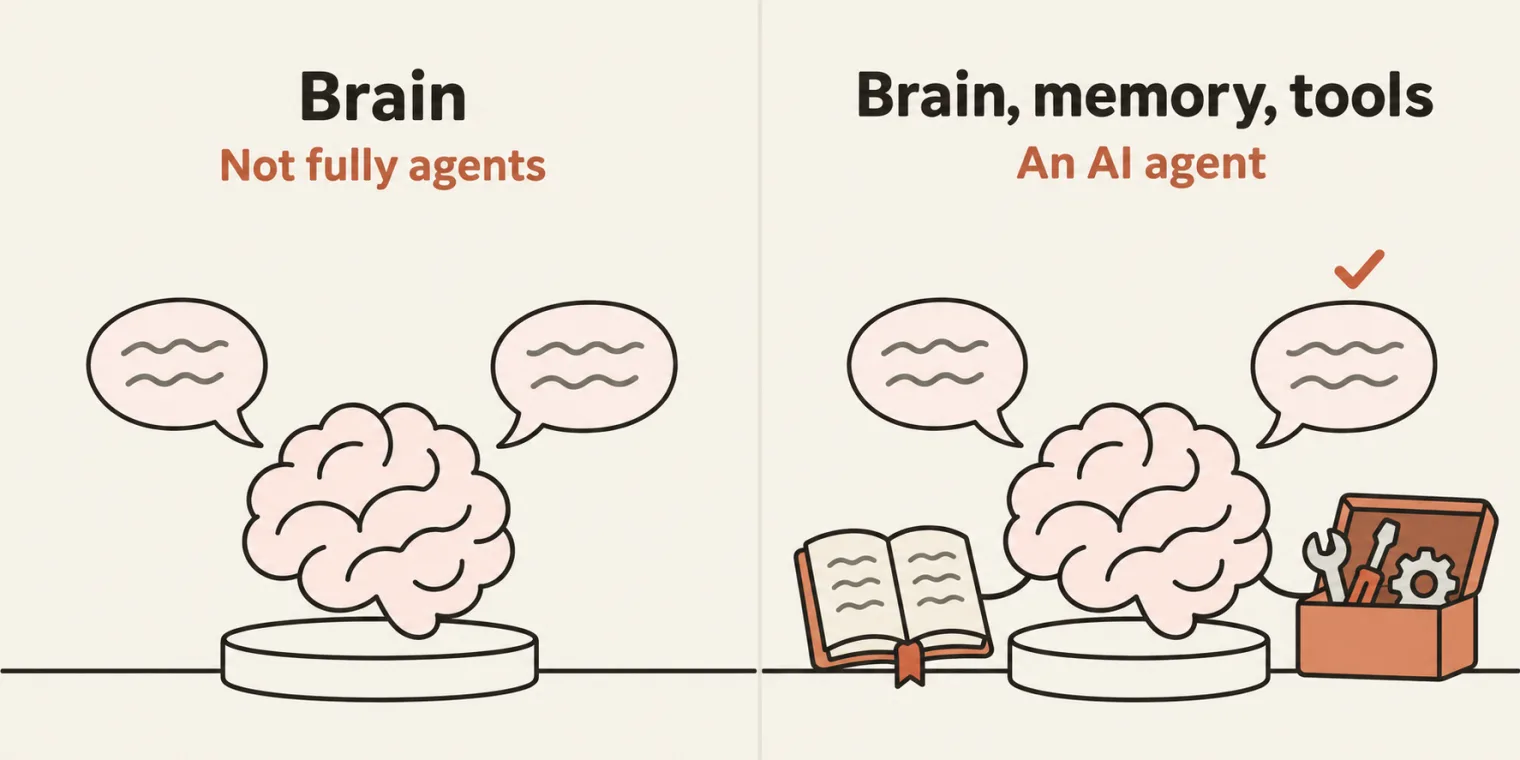
Before going further, remember this, the instructor said: an AI agent has a brain, it has memory, and it has access to tools. The deck lists the same three. The agents built in this class are called agents, but to be honest, they are not fully agents yet: they become agents when they start using memory as well as tools.
An agent can be an independent system, a part of your framework, or a separate file. And it can sit anywhere. Before the automation runs, it can generate the test data with AI. After the run, it can call the LLM client with the results and the logs, say there are failures, and ask why. You stick these calls together, before or after the Playwright run, and let them do their task. The deck's heading for this is "Pre and Post Playwright Agents".
Test data from AI instead of Faker
The first agent the class adds is a data generator. The framework makes its test data with FakerJS, as in the data-driven class. What if you do not want to use Faker? Suppose Faker is not allowed in your company, or you want data specific to your company: Faker always creates fake data, which looks similar.
The instructor's example: test data for cars. Every car has a VIN number and a chassis number, and there are internal numbers such as the engine number, all of which should be very close to real data. That is very difficult with FakerJS. Another of the instructor's examples: a very specific customer detail, or a very specific bank account number.
The plan, as the class put it: create a structured file that says how you want the data, make a request to the LLM client through the LLM gateway, and it generates the data, according to your project, for the test cases to use. The deck draws it as a structure file in Markdown, then the LLMGateway, then the generated data, in a file it calls AIDataGenutil.ts. In the repo, that last step became a method of DataGenerator, in the checkout section below.
In Groq's playground. The instructor asked for close-to-real data for an Indian car, a Hyundai i10, in a given format, and got it back: a VIN for a car from India, a Hyundai i10 hatchback. Then the prompt was made more structured, so that the model always replies with only the JSON, no extra things, because that JSON is what the automation consumes. The model was OpenAI's open-source GPT, the 120 billion version, with a maximum number of tokens and a user prompt, and an API key is required, of course.
The same on Ollama. The instructor then showed the same kind of request answered by Ollama: 100% free, with unlimited requests, if you have a machine where Ollama is running. Asked whether it will generate a credit card or IBAN number, the kind net banking uses: absolutely yes. The instructor asked for one, in JSON format only, and got it: data specific to your company, where FakerJS is not useful.
LLMGateway.ts: one entry point for five providers
A new branch. Back in the framework, the class worked on a new branch, to be merged later. If you are lazy, you can ask the AI to create it, but why waste your tokens? git checkout -b does it. In the repo the branch is llm-aiagents, merged into main as the class ended.
The prompt. The instructor gave the AI coding agent one prompt, and said it would be shared with the class. The deck holds it:
there is an AI folder that we have created in the source directory. I want you to do one thing: I want you to add an LLM gateway for this. The LLM gateway is a TS file or a utility file that is available in the AI folder. It will provide us access to groq.com, OpenRouter, OpenAI, Claude AI (all free), plus DeepSeek direct API access also. Depending upon my company: - If my company allows using OpenRouter, I will use OpenRouter. - If my company allows using groq.com, I will use that one. - If my company allows OpenAI, I will use OpenAI. - If my company allows direct Anthropic access to Claude, I will use that also, right? Create multiple LLM gateway access that will take a prompt and give us an output as a JSON file or JSON as a response directly.
What the agent built. src/ai/LLMGateway.ts. The beauty of it, the instructor said, is that it has one entry point: whichever provider your company is using, you just tell it which provider you want, and it uses that one. It is totally vibe-coded: the instructor did not code anything in it. Its header says how it works:
/**
 * LLMGateway: one entry point for every LLM provider your company allows.
 *
 * Supported providers (pick whichever your company has approved):
 *   - groq        -> https://api.groq.com          (free tier, OpenAI-compatible)
 *   - openrouter  -> https://openrouter.ai         (free ":free" models, OpenAI-compatible)
 *   - openai      -> https://api.openai.com
 *   - anthropic   -> https://api.anthropic.com     (Claude, Messages API)
 *   - deepseek    -> https://api.deepseek.com      (direct API, OpenAI-compatible)
 *
 * Choosing a provider (first match wins):
 *   1. new LLMGateway({ provider: 'groq' })      explicit in code
 *   2. LLM_PROVIDER=groq                         in .env
 *   3. the first provider that has an API key, in the order of PROVIDER_ORDER
 *
 * Company policy: set LLM_ALLOWED_PROVIDERS=groq,openrouter and the gateway
 * refuses to call anything outside that list, even if a key for it is set.
 *
 * Usage:
 *   const llm = new LLMGateway();                           // auto from .env
 *   const { data } = await llm.askJson<{ cases: string[] }>(
 *       'Give 3 negative test cases for a login form as {"cases": [...]}',
 *   );
 *   await llm.askJsonToFile('...prompt...', 'reports/ai/login-cases.json');
 *   const text = await llm.ask('Explain this error: ...');   // plain text
 *
 * Uses Node's built-in fetch, so it needs no extra npm packages.
 */
The only thing to be concerned about, the instructor said, is the model. Each provider has a default model, and you can change the model when you make a request. Here is the provider registry, lines 124 to 170, with the cost column from the README:
| Provider | Request shape | JSON mode | Default model | Cost, from the README |
|---|---|---|---|---|
Groq, groq |
OpenAI | yes | llama-3.3-70b-versatile |
free tier |
OpenRouter, openrouter |
OpenAI | no | meta-llama/llama-3.3-70b-instruct:free |
free :free models |
DeepSeek, deepseek |
OpenAI | yes | deepseek-chat |
paid, low cost |
OpenAI, openai |
OpenAI | yes | gpt-4o-mini |
paid |
Anthropic, anthropic |
Anthropic | no | claude-haiku-5-5 |
paid |
The prompt calls them all free. The README's table is more exact: Groq has a free tier and OpenRouter has free :free models, while DeepSeek is paid, at low cost, and OpenAI and Anthropic are paid. The deck's free Groq model is not the gateway's Groq default either. Line 121 shows how to pick it: GROQ_MODEL=openai/gpt-oss-120b in .env.
Groq, OpenRouter, OpenAI and DeepSeek take the same request shape, OpenAI's chat completions, and Claude takes Anthropic's messages API. So the gateway needs two request builders, not five clients. The repo's learnings note, which the agent also wrote, starts there: count the wire formats.
The keys go in .env. The environment is where your OpenRouter key or DeepSeek key goes, the instructor thought, whichever you want to use. The commit added this block to .env.example:
# ---- LLM Gateway (src/ai/LLMGateway.ts) ----
# Pick the provider your company allows: groq | openrouter | openai | anthropic | deepseek
# Leave empty to auto-pick the first provider that has a key (groq, openrouter, deepseek, openai, anthropic).
LLM_PROVIDER=
# Company allowlist. The gateway refuses any provider not listed here. Empty = all allowed.
# LLM_ALLOWED_PROVIDERS=groq,openrouter
# LLM_TIMEOUT_MS=60000
# LLM_MAX_RETRIES=2

# Keys (only the ones you use). Models are optional overrides of the built-in defaults.
# GROQ_API_KEY=            # free: https://console.groq.com/keys
# GROQ_MODEL=llama-3.3-70b-versatile
# OPENROUTER_API_KEY=      # free ":free" models: https://openrouter.ai/keys
# OPENROUTER_MODEL=meta-llama/llama-3.3-70b-instruct:free
# OPENAI_MODEL=gpt-4o-mini
# ANTHROPIC_MODEL=claude-haiku-5-5
# DEEPSEEK_API_KEY=        # https://platform.deepseek.com/api_keys
# DEEPSEEK_MODEL=deepseek-chat
LLM_ALLOWED_PROVIDERS is the company allowlist: as the header's lines 16 and 17 say, the gateway refuses anything outside the list, even when a key for it is set.
The agents folder. src/ai/agents/ already held an RCA agent and a flaky analyzer, and the instructor wondered how the flaky test case analyzer got there: maybe the AI copied them from earlier work, the instructor guessed, and set them aside for now. In the repo they came with the framework commit of 20 October, as helpers for the TTA report.
The spec. The agent also wrote llm-gateway.spec.ts, a basic file to test that the results come back. It asks for three negative test cases for a login form:
import { test, expect } from '@playwright/test';
import { LLMGateway, availableProviders, extractJson } from '../../ai/LLMGateway';

/**
 * LLM Gateway demo. Uses whichever provider .env selects (LLM_PROVIDER or the
 * first key found). Skips cleanly when no LLM key is configured.
 *
 *   npx playwright test src/tests/aiTests --project=chromium
 *   LLM_PROVIDER=groq npx playwright test src/tests/aiTests --project=chromium
 */

interface LoginCases {
    cases: { title: string; username: string; password: string; expected: string }[];
}

test.describe('LLM Gateway', () => {
    test('extractJson tolerates fences and chatter', () => {
        expect(extractJson('```json\n{"a":1}\n```')).toEqual({ a: 1 });
        expect(extractJson('Sure! Here it is: {"b":[1,2]} Hope that helps.')).toEqual({ b: [1, 2] });
        expect(extractJson('[{"c":"}"}]')).toEqual([{ c: '}' }]);
    });

    test('generates login test data as JSON and saves it', async () => {
        test.skip(availableProviders().length === 0 && !process.env.LLM_PROVIDER, 'No LLM API key in .env');
        test.setTimeout(120_000);

        const llm = new LLMGateway();
        const res = await llm.askJson<LoginCases>(
            'Generate 3 negative test cases for a login form. Return ' +
                '{"cases":[{"title":string,"username":string,"password":string,"expected":string}]}',
            { system: 'You are a senior QA engineer.', temperature: 0, saveTo: 'reports/ai/login-cases.json' },
        );

        console.log(`${res.provider}/${res.model} in ${res.latencyMs}ms`, res.data);
        expect(Array.isArray(res.data.cases)).toBeTruthy();
        expect(res.data.cases.length).toBeGreaterThan(0);
        expect(res.savedTo).toContain('login-cases.json');
    });
});
Run for these notes as pushed, with no key: the first test passes, and the second skips itself, as line 24 says it should. The first test is the gateway's JSON parser at work: extractJson() finds the JSON inside a json code fence, inside a sentence of chatter, and with a } inside a string. The README puts the whole of askJson() this way: it asks for JSON only, uses the provider's JSON mode where it is reliable, then pulls the first valid JSON block out of the reply, and if there is none, it throws LLMGatewayError with the raw reply attached.
npx playwright test src/tests/aiTests/llm-gateway.spec.ts --reporter=list --workers=1
Running 2 tests using 1 worker

  ✓  1 [chromium] › src/tests/aiTests/llm-gateway.spec.ts:17:9 › LLM Gateway › extractJson tolerates fences and chatter (5ms)
  -  2 [chromium] › src/tests/aiTests/llm-gateway.spec.ts:23:9 › LLM Gateway › generates login test data as JSON and saves it

  1 skipped
  1 passed (469ms)
Which provider? Run for these notes, offline, with no key set anywhere: what the gateway picks, or the error it gives, for a few settings.
import { test } from '@playwright/test';
import { LLMGateway, resolveProvider, availableProviders, type LLMProvider } from '../../ai/LLMGateway';

// Which provider does the gateway pick? Each row sets the environment, asks, and prints the answer or the error.
// No API key is set in any row, and nothing is sent anywhere.
const ROWS: [string, Record<string, string>, LLMProvider?][] = [
    ['nothing set', {}],
    ['LLM_PROVIDER=deepseek', { LLM_PROVIDER: 'deepseek' }],
    ["LLM_PROVIDER=deepseek, and the code asks for 'groq'", { LLM_PROVIDER: 'deepseek' }, 'groq'],
    ['LLM_PROVIDER=ollama', { LLM_PROVIDER: 'ollama' }],
    ['LLM_ALLOWED_PROVIDERS=groq,openrouter, LLM_PROVIDER=deepseek', { LLM_ALLOWED_PROVIDERS: 'groq,openrouter', LLM_PROVIDER: 'deepseek' }],
    ['LLM_ALLOWED_PROVIDERS=groq,openrouter, nothing else', { LLM_ALLOWED_PROVIDERS: 'groq,openrouter' }],
];

function setEnv(env: Record<string, string>) {
    delete process.env.LLM_PROVIDER;
    delete process.env.LLM_ALLOWED_PROVIDERS;
    Object.assign(process.env, env);
}

test('which provider the gateway picks', () => {
    console.log(`keys found: [${availableProviders().join(', ')}]`);
    for (const [label, env, explicit] of ROWS) {
        setEnv(env);
        try {
            console.log(`${label}\n  -> ${resolveProvider(explicit)}`);
        } catch (e) {
            console.log(`${label}\n  error: ${(e as Error).message}`);
        }
    }
    setEnv({ LLM_PROVIDER: 'deepseek' });
    try {
        new LLMGateway();
    } catch (e) {
        console.log(`new LLMGateway() with LLM_PROVIDER=deepseek\n  error: ${(e as Error).message}`);
    }
});
Running 1 test using 1 worker

keys found: []
nothing set
  error: No LLM provider configured. Set one of GROQ_API_KEY, OPENROUTER_API_KEY, DEEPSEEK_API_KEY, OPENAI_API_KEY, ANTHROPIC_API_KEY in .env (and optionally LLM_PROVIDER).
LLM_PROVIDER=deepseek
  -> deepseek
LLM_PROVIDER=deepseek, and the code asks for 'groq'
  -> groq
LLM_PROVIDER=ollama
  error: Unknown LLM provider "ollama". Valid: groq, openrouter, openai, anthropic, deepseek
LLM_ALLOWED_PROVIDERS=groq,openrouter, LLM_PROVIDER=deepseek
  error: Provider "deepseek" is not in LLM_ALLOWED_PROVIDERS (groq, openrouter).
LLM_ALLOWED_PROVIDERS=groq,openrouter, nothing else
  error: No LLM provider configured. Set one of GROQ_API_KEY, OPENROUTER_API_KEY in .env (and optionally LLM_PROVIDER).
new LLMGateway() with LLM_PROVIDER=deepseek
  error: DEEPSEEK_API_KEY is not set. Add it to .env to use provider "deepseek".
  ✓  1 [chromium] › src/tests/aiTests/resolve.spec.ts:21:5 › which provider the gateway picks (1ms)

  1 passed (318ms)
The code comes first, then LLM_PROVIDER, then the first provider that has a key, and the allowlist refuses the rest. A provider without its key stops at the constructor, line 312. That is also what the spec's second test meets when LLM_PROVIDER is set without its key: line 24 skips the test only when there is no key and no LLM_PROVIDER either. Ollama is not one of the five names.
With a local model, and no key. The gateway's baseUrl option, lines 49 and 50, is there for a proxy or a self-hosted mirror, and Ollama answers OpenAI's request shape on your own machine. So for these notes a copy of the spec, llm-gateway.local.spec.ts, changes line 27 and nothing else:
const llm = new LLMGateway({ provider: 'openai', baseUrl: 'http://127.0.0.1:11434/v1', apiKey: 'ollama', model: 'gpt-oss:20b' });
Ollama needs no key, but the gateway will not start without one (line 312), so any word fills the slot. The model is gpt-oss:20b, a smaller size of the same gpt-oss model the deck names for Groq: 20.9 billion parameters, as Ollama reports it. Run with LLM_PROVIDER set, so that line 24 does not skip the test:
LLM_PROVIDER=openai npx playwright test src/tests/aiTests/llm-gateway.local.spec.ts --reporter=list --workers=1
Running 2 tests using 1 worker

  ✓  1 [chromium] › src/tests/aiTests/llm-gateway.local.spec.ts:17:9 › LLM Gateway › extractJson tolerates fences and chatter (4ms)
09:00:13 [info] [LLMGateway] -> openai/gpt-oss:20b (138 chars, json)
09:00:19 [info] [LLMGateway] <- openai/gpt-oss:20b 6254ms (in 430 / out 85 tokens)
09:00:19 [info] [LLMGateway] saved JSON -> reports/ai/login-cases.json
openai/gpt-oss:20b in 6254ms {
  cases: [
    {
      title: 'Empty username',
      username: '',
      password: 'somePassword123',
      expected: 'Error: Username cannot be empty.'
    },
    {
      title: 'Wrong password',
      username: 'validUser',
      password: 'wrongPass!',
      expected: 'Error: Invalid credentials.'
    },
    {
      title: 'SQL injection attempt',
      username: "' OR '1'='1",
      password: "' OR '1'='1",
      expected: 'Error: Invalid credentials.'
    }
  ]
}
  ✓  2 [chromium] › src/tests/aiTests/llm-gateway.local.spec.ts:23:9 › LLM Gateway › generates login test data as JSON and saves it (6.3s)

  2 passed (6.7s)
The logger's dates are removed. Every request the run made was logged, and there was one: a POST to Ollama's /v1/chat/completions on 127.0.0.1. The same three cases went to reports/ai/login-cases.json, as line 31 asks.
The checkout test, with its customer from AI
The prompt. Then an end-to-end test. After the Ponytail review, the e2e checkout spec builds its customer with DataGenerator.checkoutCustomer(), which Faker fills. Now the data was to be generated via AI, and wiring is important here, the instructor said. The second prompt, also in the deck:
in this file, replace the DataGenerator.checkoutCustomer(), to the AI Gnerated Part, Make the prompt avaiable outside in the /src/ai/prompts folder for the datageneration, you can add a extra method which will use the LLMGateway and create the data and run it to verify, I am adding the key for the deepseek api in the env variable, make a ponytail review and minium code changes.
For the run, the instructor created a DeepSeek key on screen and added it to the environment, said it would be deleted and not to use it, and later in the class said it would be deleted.
One line changed. The new spec, src/tests/aiTests/e2e-checkout_DataGenAI.spec.ts, is the reviewed spec with one line different, line 38:
        await visualStep(page, 'Checkout step one: enter customer details', async () => {
            await cartPage.checkout();
            await checkoutStepOnePage.assertLoaded();
            await checkoutStepOnePage.fillGuest(await DataGenerator.checkoutCustomerAI());
        });
In e2e-checkout_validFixture_PonyTail_Review.spec.ts the same line passes DataGenerator.checkoutCustomer(). Now the function name has changed, as the instructor pointed out, to checkoutCustomerAI(), in DataGenerator.ts:
    /** Customer info for the TTACart checkout step-one form. */
    static checkoutCustomer(): CheckoutCustomer {
        return {
            firstName: DataGenerator.firstName(),
            lastName: DataGenerator.lastName(),
            postalCode: DataGenerator.postalCode(),
        };
    }

    /**
     * Customer info generated by an LLM (provider from .env, see src/ai/LLMGateway.ts).
     * The prompt lives in src/ai/prompts/checkoutCustomer.prompt.md.
     */
    static async checkoutCustomerAI(): Promise<CheckoutCustomer> {
        // Random placeholders stop the model returning the same person on every call.
        const prompt = fs
            .readFileSync(path.resolve(__dirname, '../ai/prompts/checkoutCustomer.prompt.md'), 'utf8')
            .replace('{{FIRST_INITIAL}}', faker.string.alpha({ casing: 'upper' }))
            .replace('{{LAST_INITIAL}}', faker.string.alpha({ casing: 'upper' }))
            .replace('{{STATE}}', faker.location.state());
        const { data } = await new LLMGateway().askJson<CheckoutCustomer>(prompt, { temperature: 1 });
        for (const key of ['firstName', 'lastName', 'postalCode'] as const) {
            if (typeof data?.[key] !== 'string' || !data[key].trim()) {
                throw new Error(`[DataGenerator] AI customer is missing "${key}": ${JSON.stringify(data)}`);
            }
        }
        return { firstName: data.firstName, lastName: data.lastName, postalCode: data.postalCode };
    }
Lines 132 to 136 read the prompt from src/ai/prompts and fill its three placeholders with Faker. Line 137 asks the gateway for JSON at temperature 1. Lines 138 to 142 throw if any of the three fields is missing or empty. This is how the first name, last name and postal code are created now, the instructor said: by AI, from this prompt.
Generate one realistic, unique customer for an e-commerce checkout form.

Rules:
- firstName: a real-looking first name starting with "{{FIRST_INITIAL}}", letters only, 2-20 characters.
- lastName: a real-looking last name starting with "{{LAST_INITIAL}}", letters only, 2-20 characters.
- postalCode: a valid-looking ZIP code in {{STATE}}, exactly 5 digits, as a string.
- Avoid common placeholder names like John Doe.

Return exactly this JSON shape and nothing else:
{"firstName": "string", "lastName": "string", "postalCode": "string"}
The class's run. The instructor had the agent run the spec and open the report: the first name and last name were now created by AI. That run, at 07:57, is in the test results left in the instructor's local folder. Both tests passed: the checkout, and the check that a locked-out user is refused. The trace keeps the gateway's two log lines, here with the date removed:
07:57:47 [info] [LLMGateway] -> deepseek/deepseek-chat (508 chars, json)
07:57:48 [info] [LLMGateway] <- deepseek/deepseek-chat 1004ms (in 168 / out 25 tokens)
The customer it typed into the form was Vanessa Galloway, with the ZIP code 40203.
Change the prompt. The beauty of it, the instructor said: you only have to create a prompt. If you want something different, you change the prompt, and the rest of the things remain the same. So this AI agent generates the data response using an LLM client, the instructor said: absolutely yes.
The prompt changes the values, not the fields. The prompt decides what the customer looks like: the names, their style, the ZIP code's state. The fields are fixed in code: lines 138 to 143 check and return exactly firstName, lastName and postalCode, the three that the checkout form takes. To get other fields, the method and the form code must change too. Ask the model for other fields and nothing else, and checkoutCustomerAI() throws, as the second check below shows.
Run for these notes, offline: the class's method with no key at all, then a copy whose gateway gets a fixed reply with other fields, so no model is called.
import { test } from '@playwright/test';
import { LLMGateway } from '../../ai/LLMGateway';
import { DataGenerator } from '../../utils/DataGenerator';
import { DataGenerator as LocalDataGenerator } from '../../utils/DataGenerator.local';

test('checkoutCustomerAI with no key, and with a reply in other fields', async () => {
    // 1. The class's method as pushed, with no key in the environment.
    try {
        await DataGenerator.checkoutCustomerAI();
    } catch (e) {
        console.log(`no key:\n  ${(e as Error).message}`);
    }

    // 2. A prompt asking for other fields: the model's reply replaced by a fixed one, so no model is called.
    LLMGateway.prototype.askJson = async function () {
        return { data: { fullName: 'Sample Customer', pinCode: '400001' } } as never;
    };
    try {
        await LocalDataGenerator.checkoutCustomerAI();
    } catch (e) {
        console.log(`a reply with other fields:\n  ${(e as Error).message}`);
    }
});
Running 1 test using 1 worker

no key:
  No LLM provider configured. Set one of GROQ_API_KEY, OPENROUTER_API_KEY, DEEPSEEK_API_KEY, OPENAI_API_KEY, ANTHROPIC_API_KEY in .env (and optionally LLM_PROVIDER).
a reply with other fields:
  [DataGenerator] AI customer is missing "firstName": {"fullName":"Sample Customer","pinCode":"400001"}
  ✓  1 [chromium] › src/tests/aiTests/checkout-ai.checks.spec.ts:6:5 › checkoutCustomerAI with no key, and with a reply in other fields (1ms)

  1 passed (482ms)
The first error is what the checkout spec meets at checkout step one when there is no key. The README warns about the same: the checkout test now fails if the LLM is unreachable, so use DataGenerator.checkoutCustomer() where that is not acceptable.
Why the placeholders. The README's gotcha: the same prompt gives the same answer, even at temperature 1, and three calls once returned "Marisol, 63108" every time. So the prompt has {{FIRST_INITIAL}}, {{LAST_INITIAL}} and {{STATE}}, which Faker fills before each call. Run for these notes against the local model, through a copy of DataGenerator.ts whose line 137 passes the local options shown above, three calls in a row:
import { test } from '@playwright/test';
import { LLMGateway } from '../../ai/LLMGateway';
import { DataGenerator } from '../../utils/DataGenerator.local';

// DataGenerator.local.ts is the class's DataGenerator.ts with line 137 changed, so its gateway calls a local model.
// This wrapper prints what each filled-in prompt asked for, then lets the call go ahead.
const askJson = LLMGateway.prototype.askJson;
LLMGateway.prototype.askJson = function (this: LLMGateway, prompt: string, opts?: object) {
    const first = prompt.match(/first name starting with "(\w)"/)?.[1];
    const last = prompt.match(/last name starting with "(\w)"/)?.[1];
    const state = prompt.match(/ZIP code in (.+?), exactly/)?.[1];
    console.log(`asked: first name ${first}..., last name ${last}..., a ZIP code in ${state}`);
    return askJson.call(this, prompt, opts);
} as typeof askJson;

test('three AI customers from a local model', async () => {
    test.setTimeout(300_000);
    for (let call = 1; call <= 3; call++) {
        const customer = await DataGenerator.checkoutCustomerAI();
        console.log(`got:   ${JSON.stringify(customer)}`);
    }
});
Running 1 test using 1 worker

asked: first name P..., last name K..., a ZIP code in Massachusetts
09:00:22 [info] [LLMGateway] -> openai/gpt-oss:20b (513 chars, json)
09:00:27 [info] [LLMGateway] <- openai/gpt-oss:20b 4565ms (in 444 / out 20 tokens)
got:   {"firstName":"Piper","lastName":"Kavanaugh","postalCode":"02115"}
asked: first name A..., last name I..., a ZIP code in Vermont
09:00:27 [info] [LLMGateway] -> openai/gpt-oss:20b (507 chars, json)
09:00:34 [info] [LLMGateway] <- openai/gpt-oss:20b 7196ms (in 623 / out 22 tokens)
got:   {"firstName":"Arielle","lastName":"Iversen","postalCode":"05332"}
asked: first name C..., last name C..., a ZIP code in Montana
09:00:34 [info] [LLMGateway] -> openai/gpt-oss:20b (507 chars, json)
09:00:40 [info] [LLMGateway] <- openai/gpt-oss:20b 6082ms (in 506 / out 20 tokens)
got:   {"firstName":"Cassandra","lastName":"Cooper","postalCode":"59014"}
  ✓  1 [chromium] › src/tests/aiTests/checkout-ai.local.spec.ts:16:5 › three AI customers from a local model (17.8s)

  1 passed (18.4s)
| Call | The prompt asked for | The model gave | Initials and five digits |
|---|---|---|---|
| 1 | P, K, a ZIP code in Massachusetts | Piper Kavanaugh, 02115 |
yes |
| 2 | A, I, a ZIP code in Vermont | Arielle Iversen, 05332 |
yes |
| 3 | C, C, a ZIP code in Montana | Cassandra Cooper, 59014 |
yes |
Each prompt asked for other initials and another state. Each customer's initials matched the prompt, and each ZIP code had five digits; whether a ZIP code belongs to its state was not checked.
Faker or AI? Asked what the benefit of generating via AI is over the Faker library, the instructor pointed back to the data just shown: can you generate this kind of data with FakerJS? To be honest, it is very difficult, or even not possible, to generate very specific data for your company.
Tasks and announcements
- Homework: a TTA bank test. TTA bank is a project website the instructor is giving to everyone. You sign in (the login details are in the task post) to a balance of 50,000 rupees, and send money from Send money; the dashboard balance should then be less. Write an end-to-end test for it: in the end-to-end tests, create a folder named TTA bank, and add the test there. The important part: in Send money, you can generate the note with AI. Check both entries, the amount debited and the amount credited, as the instructor answered a learner. Then add the task to your repository.
- The TA will share the task today, with a video or a voice explanation if possible.
- Making a key is very simple, the instructor said: sign in on the provider's site and create one on its API keys page. The
.env.exampleblock above names the pages for Groq, OpenRouter and DeepSeek. - Watch the three recordings this weekend: Playwright MCP, Playwright's AI agents and Playwright CLI. The TA was asked to pin them in the group.
- Next class: agents after the Playwright run. An RCA agent, which can do the RCA for you, and a flaky test case finder, both added to this framework. The class will also create a self-healer AI agent, which will try to heal a test whenever it fails, and rerun it. The deck's 12 November section ends with the same three.
- Jenkins and GitHub Actions: sessions on running this framework in CI/CD, on Jenkins and on GitHub Actions, start next week, the instructor thinks. Everyone was asked to attend them.
- Extra sessions: there might be some certification sessions too, this week or next. The timings will be shared.
- New on the platform for this batch: a public chat for Playwright 3x in Tester Town, QA battles, the Bug Bash cafe, interview questions and answers by years of experience, and a resume builder.
- The code: LLMGateway.ts, the prompt and the aiTests folder in the batch repo.
Task. The TTA bank homework: an end-to-end test that sends money with a note generated by AI, checks both entries, and goes into your repository.
Show the answer
Answer. Build it from the class's own pieces. In the end-to-end tests, make a folder named TTA bank and write the test there. Sign in with the details from the task post, and send money from Send money. Ask the LLM for the transfer's note through the class's gateway, the way checkoutCustomerAI() asks for a customer: a prompt, then ask() for plain text or askJson() for JSON, then a check on what comes back. Then check both entries, as the instructor asked: the amount debited and the amount credited, and the balance on the dashboard, which should be less. Push the folder to your repository.
What is the benefit of generating test data via AI over the Faker library?
Worth practising too: When would you pick an open-source model, and when a closed-source one? What makes an AI agent more than a single call to an LLM? Where can an AI agent sit around a Playwright run?
Show the answer
Answer. Faker always creates fake data that only looks similar. AI can generate data specific to your company and close to real data, such as a car's VIN, chassis and engine numbers, or a bank account or IBAN number, which is very difficult, or even not possible, with Faker. You describe the data in a prompt and ask for JSON only. Pick an open-source model for a task in bulk, where cost matters, such as the OCR for 3,000 test cases that verify a PDF's text, and a closed-source one when the task must be specific or accurate, such as code generation. An AI agent has a brain, memory and tools; the class's data generator is called an agent, but it is not fully one yet: it becomes one when it uses memory and tools. Agents can sit before a run, to generate the test data, or after it, to work on the results: an RCA agent, a flaky test finder, a self-healer.
Will it generate a credit card or IBAN number, the kind net banking uses?
Worth practising too: Your company has approved only Groq and OpenRouter: how does the class's gateway enforce that? A model wraps its JSON in a fence and adds a sentence: what does askJson() do? Why does checkoutCustomerAI() fill placeholders before every call? You have no API key: how can you still try the gateway?
Show the answer
Answer. Absolutely yes, the instructor said, and asked Ollama for one in JSON only. For the allowlist, set LLM_ALLOWED_PROVIDERS=groq,openrouter: the gateway then refuses any other provider, even one named in LLM_PROVIDER, with an error such as Provider "deepseek" is not in LLM_ALLOWED_PROVIDERS (groq, openrouter). For JSON, askJson() asks for JSON only, and extractJson() takes the JSON out of a fence or from between the chatter; if there is no JSON at all, askJson() throws LLMGatewayError with the raw reply attached. The placeholders get random initials and a state from Faker, because the same prompt gave the same customer every time. Without a key, the gateway spec skips its LLM test; to try it anyway, point the gateway at a local model with its baseUrl option, as these notes did with Ollama.