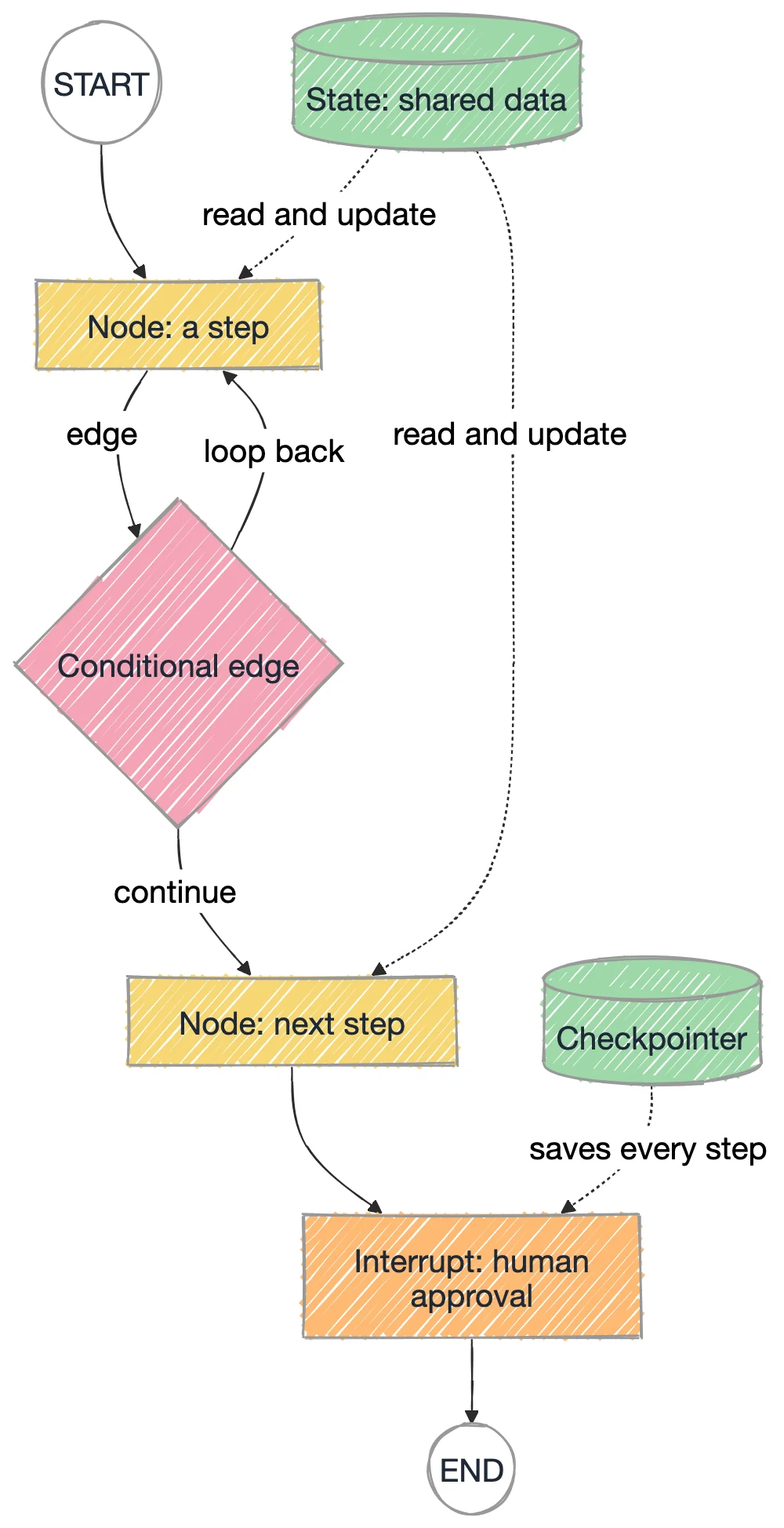
LangChain's create_agent decides the path for you. LangGraph lets you draw it: nodes do the work, edges set the order, routers decide, a checkpointer remembers, and an interrupt waits for a person. Eleven lessons build from a one-node graph to a pipeline that turns a Jira ticket into a tested, triaged report.
Every output on these pages was produced on this version.
01Why a graph
An agent built with create_agent (chapter 17) is a loop the model drives: it decides when to call a tool and when to stop. That is fine until a test pipeline needs a fixed path, a retry cap, a step that runs in parallel, or a pause for a person to approve. LangGraph is the engine underneath create_agent, and it lets you declare that path yourself.
LangFlow (ch 5)
LangChain create_agent (ch 17)
LangGraph (ch 18)
You build it by
dragging boxes
calling one function
declaring nodes and edges
Loops
awkward
hidden inside the agent
first class
Who decides the path
the flow
the model
you, with the model's help where you choose
Pause for a human
no
no
interrupt()
Memory between runs
per session
via LangGraph
checkpointer + thread_id
Nodes do the work, edges set the order, conditional edges decide, and the state carries data through the graph.
02The vocabulary
Eight words cover the whole library. Each lesson adds one of them.
Concept
What it is
In a test suite
State
A typed dict every node can read and update
The test-run record shared across steps
Node
A Python function that does one job and returns what it changed
"run the test", "parse the report"
Edge
Where to go next
setup, then execute, then teardown
Conditional edge
A router function that returns the next node's name
passed to log, failed to Jira, flaky to quarantine
Loop
An edge that points back to an earlier node
retry a failed test, at most three times
Reducer
How parallel writes to one key are merged
API, UI and perf results joined into one list
Checkpointer
Saves the state after each step, per thread_id
nightly and smoke keep separate histories
Interrupt
Pauses the graph until a person answers
a QA lead approves before tests are quarantined
One rule to remember: a node never returns the whole state. It returns only the keys it changed, and LangGraph merges them in.
03Live demo: run a graph step by step
This is lessons 4, 6 and 7 in one graph. run_test loops until the test passes or the cap is reached. A test that passed only after failing is flaky, so the graph pauses at approve and waits for you. Every step is saved as a checkpoint you can rewind to. Use Step to move one node at a time.
Test-result graph: retry, route, approveNo API key needed
A condensed sheet of the calls the lessons use, in the order you write them. It runs as is.
cheatsheet.py
from typing import Literal, TypedDict
from langgraph.graph import StateGraph, START, END
from langgraph.checkpoint.memory import InMemorySaver
classState(TypedDict, total=False): # 1. the shared state
status: str
action: str
defcheck(state: State) -> dict: # 2. a node returns only what it changedreturn {}
defroute(state: State) -> Literal["fix", "done"]: # 3. a router names the next nodereturn"fix"if state["status"] == "failed"else"done"
builder = StateGraph(State)
builder.add_node("check", check)
builder.add_node("fix", lambda s: {"action": "filed a bug"})
builder.add_node("done", lambda s: {"action": "green"})
builder.add_edge(START, "check") # 4. plain edges
builder.add_conditional_edges("check", route, ["fix", "done"]) # 5. a fork
builder.add_edge("fix", END)
builder.add_edge("done", END)
app = builder.compile(checkpointer=InMemorySaver()) # 6. memory per thread_id
cfg = {"configurable": {"thread_id": "run-1"}}
print(app.invoke({"status": "failed"}, cfg)) # {'status': 'failed', 'action': 'filed a bug'}
flowchart LR
  S((START)) --> C[check]
  C -->|route: failed| F[fix]
  C -->|route: passed| D[done]
  F --> E((END))
  D --> E
The cheat sheet as a graph: one node, one router, two leaves.
06Set up and run
One virtual environment for the whole chapter. Python 3.12 and langgraph==1.2.12 are what the outputs on these pages came from.
terminal
cd chapter_18_LangGraph
python3 -m venv .venv && .venv/bin/pip install -r requirements.txt
cp .env.sample .env # only needed for 008, 009 and the LLM notes in 010cd src/chapters
../../.venv/bin/python 001_Hello_Graph.py
The capstone has its own requirements (Playwright and a browser):
terminal
.venv/bin/pip install -r capstone/requirements.txt
.venv/bin/python -m playwright install chromium
cd capstone && ../.venv/bin/python check.py   # offline: should print all checks passed
07Gotchas on langgraph 1.2.12
Cap every loop yourself. The default recursion limit is 10007 steps, not 25. Pass {"recursion_limit": N} or keep a counter in state.
Parallel writers need a reducer. Without one: InvalidUpdateError: At key 'results': Can receive only one value per step.
Type hints are read as input schemas. A node typed with a narrower state only sees those keys. Leave a fan-in node untyped or give it the full state.
Interrupts need a checkpointer and the same thread_id. Resume on another thread and the graph simply starts over.
A resumed node runs again from the top. Put side effects after interrupt(), or make them safe to repeat.
Model output is untrusted input. The capstone checks every LLM-written step against the real app before Playwright runs it.
DDrills for the chapter
Code drills use the scripts in chapter_18_LangGraph/src/chapters. Playwright drills target the live demo on this page: every control has a data-testid (turn on Show locator badges to see them).
Read a graph before you run it
Run 001_Hello_Graph.py and 003_Conditional_Edge.py, paste the printed Mermaid into mermaid.live, and predict each output first.
Expected result
003 prints three lines: green, a Jira bug, and quarantine for login_redirect.
Route an unplanned status
In 003, what happens to status="skipped"? Then give it its own log_skip node.
Expected result
It falls to quarantine through the router's default until you add the branch.
Find the cap
In 004 set MAX_ATTEMPTS = 2.
Expected result
login_redirect becomes REAL FAILURE: failed all 2 attempts.
Break the reducer
In 005 remove operator.add from the state.
Expected result
InvalidUpdateError: At key 'results': Can receive only one value per step.
Separate two test sessions
In 006 add a release thread and invoke it twice.
Expected result
['run #1', 'run #2'] while nightly keeps its three runs.
Decline the approval
Run python 007_Human_In_The_Loop.py no.
Expected result
Resumed with 'no' -> left as is, nothing changed
Automate the approval pathPlaywright
Write a Playwright test for the demo: pick the flaky scenario, run, assert the graph pauses at approve, approve, and assert the verdict.
Verdict FLAKY: passed on attempt 3 after 2 failure(s) and "quarantined": true in lg-state.
Assert the retry capPlaywright
Pick the broken scenario, set max attempts to 2, run, and count the failed attempts in the event log.
Hint
Log rows are li elements with data-kind set to ok, bad, edge, node or human.
Expected result
Two failed run_test rows and REAL FAILURE: failed all 2 attempts.
Rewind a checkpointPlaywright
Run the flaky scenario, click checkpoint 2, and assert the state went back to one attempt.
Expected result
"attempts": 1 in the state and run_test active again.
SSolutions: test the graph, then test the demo
Two ways to test a LangGraph: call the compiled app from pytest (fast, no browser), or drive a UI built on it with Playwright. Both are copy-paste ready and pass as written.
test_retry_graph.py
# test_retry_graph.py: run from chapter_18_LangGraph/src/chapters# pip install pytest && python -m pytest test_retry_graph.pyimport importlib
retry = importlib.import_module("004_Loop_Retry")
defrun(outcomes):
return retry.app.invoke({"test_name": "t", "scripted_outcomes": outcomes,
"attempts": 0, "history": [], "verdict": ""})
deftest_flaky_passes_on_the_third_attempt():
out = run(["failed", "failed", "passed"])
assert out["verdict"] == "FLAKY: passed on attempt 3 after 2 failure(s)"assert out["attempts"] == 3deftest_broken_test_stops_at_the_cap():
out = run(["failed"] * 5)
assert out["attempts"] == retry.MAX_ATTEMPTS
assert out["verdict"] == "REAL FAILURE: failed all 3 attempts"deftest_stable_test_runs_once():
out = run(["passed"])
assert out["history"] == ["passed"]
assert out["verdict"] == "STABLE PASS"
Expected: three passing tests. The attempt N lines are the script's own prints, which pytest captures.
tests/langgraph-demo.spec.ts
import { test, expect } from'@playwright/test';
const URL = 'https://app.thetestingacademy.com/ai/blueprint/learn/langgraph.html';
test('a flaky test pauses for approval, then is quarantined', async ({ page }) => {
await page.goto(URL);
await page.getByTestId('lg-scenario').selectOption('flaky');
await page.getByTestId('lg-run').click();
awaitexpect(page.getByTestId('lg-node-approve')).toHaveClass(/is-wait/);
awaitexpect(page.getByTestId('lg-status')).toContainText('Graph paused');
await page.getByTestId('lg-approve-yes').click();
awaitexpect(page.getByTestId('lg-verdict'))
.toHaveText('FLAKY: passed on attempt 3 after 2 failure(s)');
awaitexpect(page.getByTestId('lg-state')).toContainText('"quarantined": true');
});
test('a broken test stops at the retry cap', async ({ page }) => {
await page.goto(URL);
await page.getByTestId('lg-scenario').selectOption('broken');
await page.getByTestId('lg-max').fill('2');
await page.getByTestId('lg-max').dispatchEvent('change');
await page.getByTestId('lg-run').click();
const attempts = page.getByTestId('lg-log').locator('li[data-kind="bad"]', { hasText: 'run_test' });
awaitexpect(attempts).toHaveCount(2);
awaitexpect(page.getByTestId('lg-verdict')).toHaveText('REAL FAILURE: failed all 2 attempts');
});
test('rewinding to a checkpoint restores the earlier state', async ({ page }) => {
await page.goto(URL);
await page.getByTestId('lg-run').click(); // flaky scenario, pauses at approveawait page.getByTestId('lg-checkpoint-2').click(); // right after attempt 1awaitexpect(page.getByTestId('lg-state')).toContainText('"attempts": 1');
awaitexpect(page.getByTestId('lg-node-run_test')).toHaveClass(/is-active/);
});
003_Conditional_Edge.py
"""003 - A fork in the road: route a test result to the right next step.
add_conditional_edges(source, router, destinations)
The router is a normal function that reads state and returns the NAME of the
next node. That one function is where an "agent" makes decisions.
"""from typing import Literal, TypedDict
from langgraph.graph import END, START, StateGraph
classState(TypedDict, total=False):
test_name: str
status: str # passed | failed | flaky
action: str
defread_result(state: State) -> dict:
return {} # in real life: parse a Playwright report heredefroute_by_status(state: State) -> Literal["log_pass", "file_bug", "quarantine"]:
return {"passed": "log_pass", "failed": "file_bug"}.get(state["status"], "quarantine")
deflog_pass(state: State) -> dict:
return {"action": "logged as green"}
deffile_bug(state: State) -> dict:
return {"action": f"Jira bug filed for {state['test_name']}"}
defquarantine(state: State) -> dict:
return {"action": f"{state['test_name']} moved to quarantine, rerun nightly"}
builder = StateGraph(State)
builder.add_node("read_result", read_result)
builder.add_node("log_pass", log_pass)
builder.add_node("file_bug", file_bug)
builder.add_node("quarantine", quarantine)
builder.add_edge(START, "read_result")
builder.add_conditional_edges("read_result", route_by_status,
["log_pass", "file_bug", "quarantine"])
for leaf in ("log_pass", "file_bug", "quarantine"):
builder.add_edge(leaf, END)
app = builder.compile()
if __name__ == "__main__":
for name, status in [("cart_total", "passed"),
("checkout_pay", "failed"),
("login_redirect", "flaky")]:
out = app.invoke({"test_name": name, "status": status})
print(f"{name:<15} {status:<7} -> {out['action']}")
print("\n" + app.get_graph().draw_mermaid())
007_Human_In_The_Loop.py
"""007 - Human in the loop: pause the graph and ask before doing something risky.
interrupt(payload) freezes the graph and hands `payload` to the caller.
You resume it later with Command(resume=answer) on the SAME thread_id.
A checkpointer is required: the pause has to be saved somewhere.
python 007_Human_In_The_Loop.py # asks you
python 007_Human_In_The_Loop.py yes # answers for you (CI / demos)
"""import sys
from typing import Literal, TypedDict
from langgraph.checkpoint.memory import InMemorySaver
from langgraph.graph import END, START, StateGraph
from langgraph.types import Command, interrupt
classState(TypedDict, total=False):
flaky_tests: list[str]
approved: bool
outcome: str
defdetect(state: State) -> dict:
return {"flaky_tests": ["login_redirect", "search_autocomplete"]}
defask_approval(state: State) -> dict:
answer = interrupt({
"question": "Quarantine these tests? (yes/no)",
"tests": state["flaky_tests"],
})
return {"approved": str(answer).strip().lower() in ("y", "yes")}
defroute(state: State) -> Literal["quarantine", "skip"]:
return"quarantine"if state["approved"] else"skip"defquarantine(state: State) -> dict:
return {"outcome": f"quarantined {len(state['flaky_tests'])} tests"}
defskip(state: State) -> dict:
return {"outcome": "left as is, nothing changed"}
builder = StateGraph(State)
builder.add_node("detect", detect)
builder.add_node("ask_approval", ask_approval)
builder.add_node("quarantine", quarantine)
builder.add_node("skip", skip)
builder.add_edge(START, "detect")
builder.add_edge("detect", "ask_approval")
builder.add_conditional_edges("ask_approval", route, ["quarantine", "skip"])
builder.add_edge("quarantine", END)
builder.add_edge("skip", END)
app = builder.compile(checkpointer=InMemorySaver())
if __name__ == "__main__":
cfg = {"configurable": {"thread_id": "flaky-review-1"}}
first = app.invoke({}, cfg)
pause = first["__interrupt__"][0].value
print("Graph paused. It is asking:")
print(" ", pause["question"])
for t in pause["tests"]:
print(" -", t)
print("Paused before node:", app.get_state(cfg).next)
answer = sys.argv[1] iflen(sys.argv) > 1elseinput("\nYour answer: ")
final = app.invoke(Command(resume=answer), cfg)
print("\nResumed with", repr(answer), "->", final["outcome"])