01Real-world example
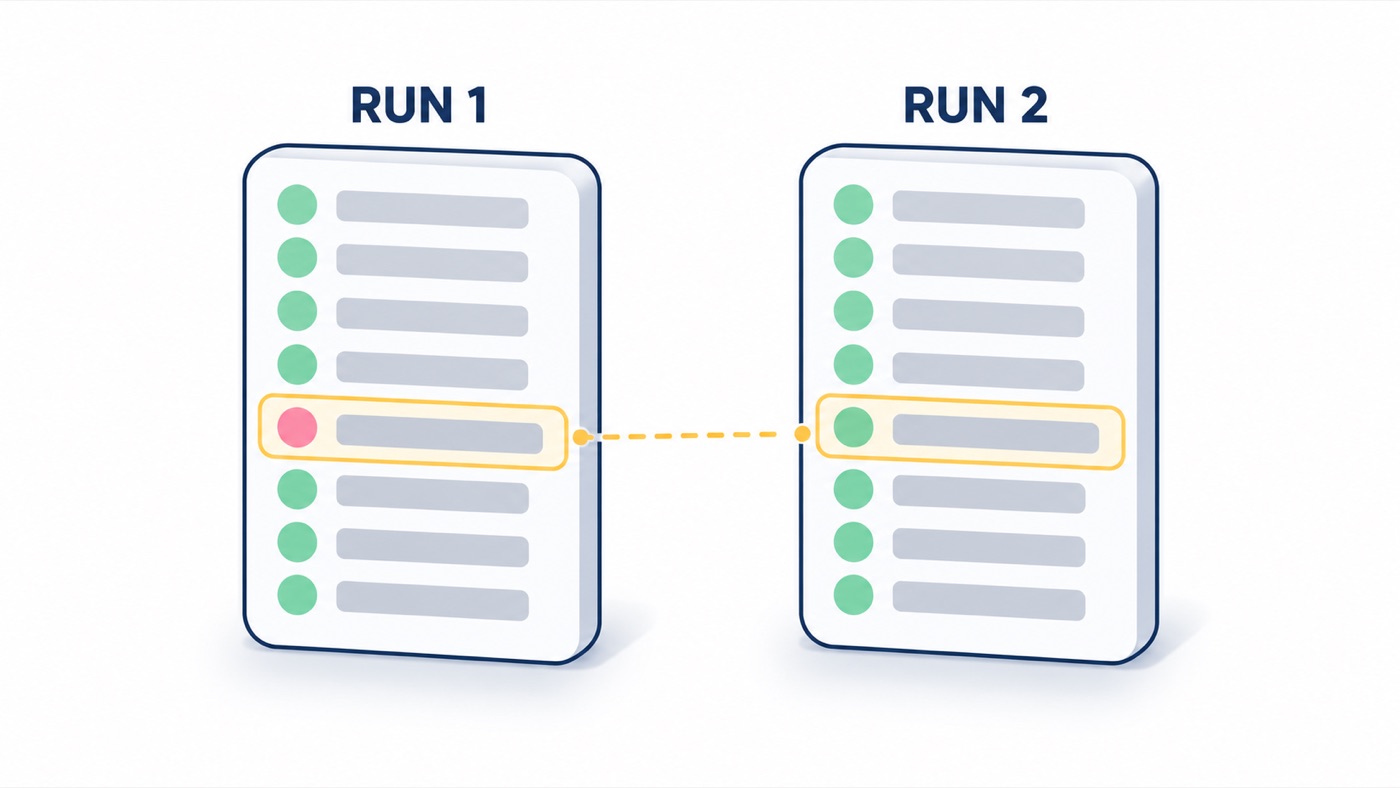
Chapter 5's flaky test finder, rebuilt with a decision, an approval pause and an optional LLM explanation.
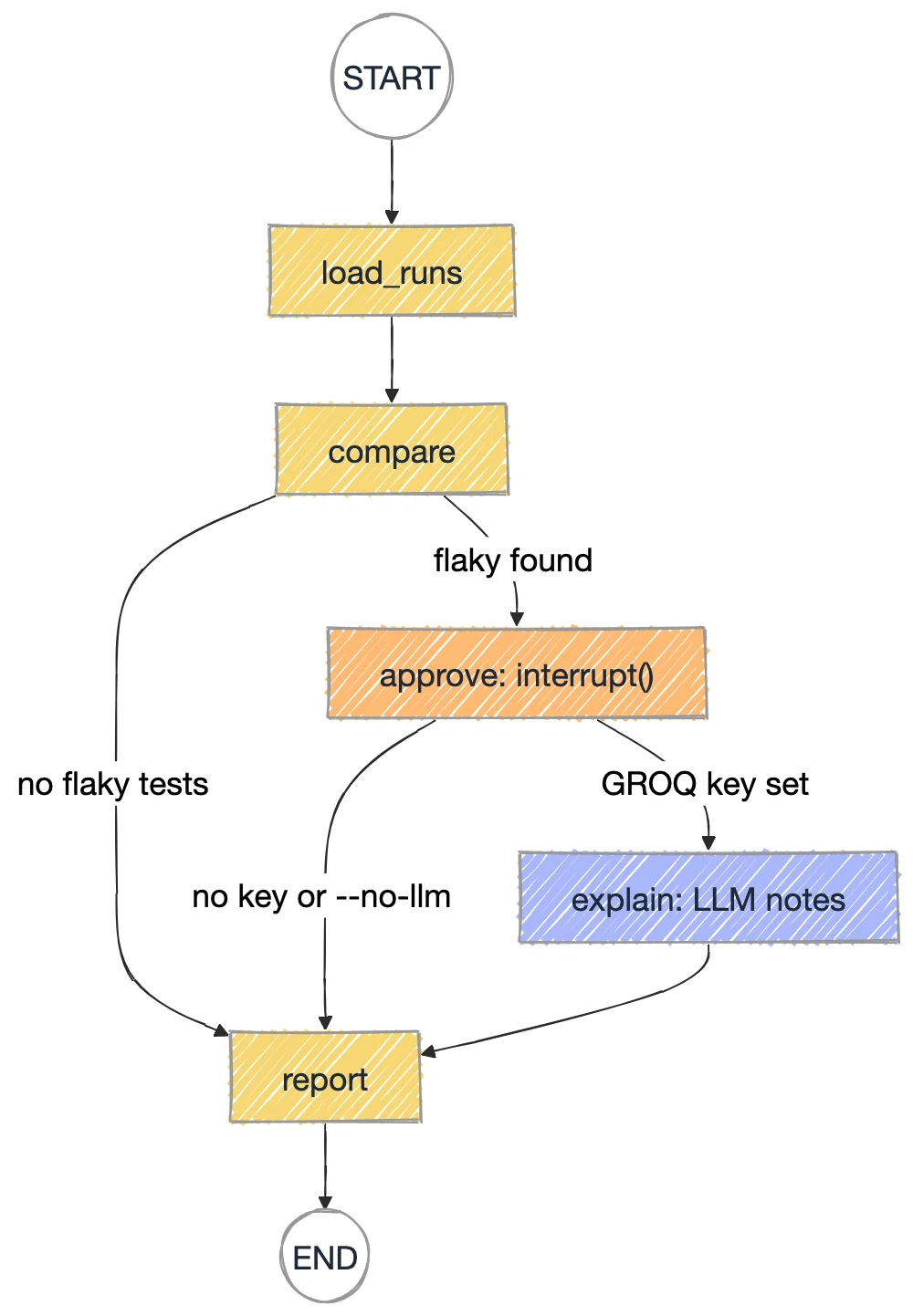
load_runs reads result1.json and result2.json, two Playwright JSON reports, with playwright_results.load_report.compare: a test is flaky if its verdict flipped between runs or it was retried inside a run; tests that failed in both runs are real bugs.after_compare skips the approval when nothing is flaky; after_approve runs explain only when a key is set.cd chapter_18_LangGraph/src/chapters
python 010_Flaky_Analyzer_Graph.py --yesQuarantine these flaky tests? (yes/no)
- loginTests/auth.spec.ts > @P0 Login > redirects to dashboard after successful login
FLAKY TEST COUNT: 1
Compared 50 tests present in both runschapter_18_LangGraph/.env.sample to .env and add a free Groq key from console.groq.com. Without one the script still runs and skips the LLM notes.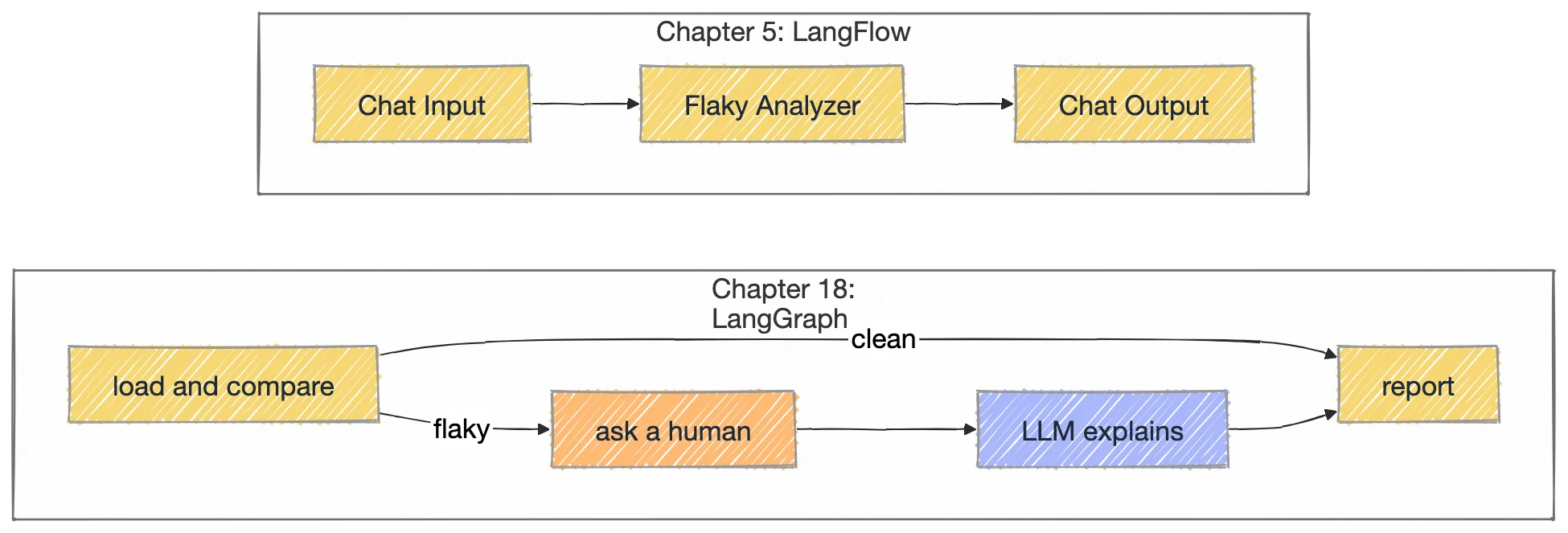
Work in chapter_18_LangGraph/src/chapters. Change one thing, run it, and compare with the expected result.
Run with --no.
QUARANTINE: declined, nothing moved.With a key set, run with --yes --no-llm.
LLM NOTES section: the explain node is skipped.Point it at a folder with your own result1.json and result2.json.
The exact file from the course repo, plus the output it printed when this page was written.
"""010 - Capstone: the chapter 5 flaky-test analyzer, rebuilt as a LangGraph.

Same deterministic answer as the LangFlow flow, plus the things a one-way flow
can't do: a fork on the result, a human approval pause before quarantining,
and an optional LLM node that only runs when a key is configured.

    load_runs -> compare --(no flaky)--> report
                         --(flaky)----> approve (interrupt) --(llm key?)--> explain -> report
                                                             --(no key)---> report

    python 010_Flaky_Analyzer_Graph.py                 # chapter 5 sample, asks you
    python 010_Flaky_Analyzer_Graph.py --yes           # auto-approve
    python 010_Flaky_Analyzer_Graph.py <folder> --no   # your own result1/result2.json
    add --no-llm to skip the explain node even when a key is set
"""
import sys
from pathlib import Path
from typing import Literal, TypedDict

from langgraph.checkpoint.memory import InMemorySaver
from langgraph.graph import END, START, StateGraph
from langgraph.types import Command, interrupt

from llm import get_llm, has_llm
from playwright_results import load_report

REPO = Path(__file__).resolve().parents[3]
DEFAULT_FOLDER = REPO / "chapter_05_AI_Agents_LangFlow" / "flaky_test_analyzer_ai_Agent"


class State(TypedDict, total=False):
    folder: str
    use_llm: bool
    run_a: dict
    run_b: dict
    flaky: list[str]
    consistent: list[str]
    approved: bool
    explanation: str
    report: str


def load_runs(state: State) -> dict:
    folder = Path(state["folder"])
    a, b = folder / "result1.json", folder / "result2.json"
    if not (a.exists() and b.exists()):
        raise FileNotFoundError(f"need result1.json and result2.json in {folder}")
    return {"run_a": load_report(a), "run_b": load_report(b)}


def compare(state: State) -> dict:
    a, b = state["run_a"], state["run_b"]
    shared = set(a) & set(b)
    flipped = {t for t in shared if a[t] != b[t]}
    retry = {t for t in shared if "flaky-in-run" in (a[t], b[t])}
    return {
        "flaky": sorted(flipped | retry),
        "consistent": sorted(t for t in shared if a[t] == b[t] == "failed"),
    }


def after_compare(state: State) -> Literal["approve", "report"]:
    return "approve" if state["flaky"] else "report"


def approve(state: State) -> dict:
    answer = interrupt({"question": "Quarantine these flaky tests? (yes/no)",
                        "tests": state["flaky"]})
    return {"approved": str(answer).strip().lower() in ("y", "yes")}


def after_approve(state: State) -> Literal["explain", "report"]:
    return "explain" if state.get("use_llm") else "report"


def explain(state: State) -> dict:
    a, b = state["run_a"], state["run_b"]
    lines = "\n".join(f"- {t}: run1={a[t]}, run2={b[t]}" for t in state["flaky"])
    msg = get_llm().invoke(
        "These Playwright tests changed verdict between two identical CI runs:\n"
        f"{lines}\n"
        "In at most 3 bullet points, give the most likely causes of this kind of "
        "flakiness and one concrete fix to try first. Be specific to the test names."
    )
    return {"explanation": msg.content}


def report(state: State) -> dict:
    out = [f"FLAKY TEST COUNT: {len(state['flaky'])}",
           f"Compared {len(set(state['run_a']) & set(state['run_b']))} tests present in both runs", ""]
    out.append(f"FLAKY ({len(state['flaky'])}):")
    out += [f"  - [{state['run_a'][t]} -> {state['run_b'][t]}] {t}" for t in state["flaky"]] or ["  - none"]
    out.append(f"CONSISTENT FAILURES ({len(state['consistent'])}):  real bugs, fix them")
    out += [f"  - {t}" for t in state["consistent"]] or ["  - none"]
    if state["flaky"]:
        out.append("QUARANTINE: " + ("approved" if state.get("approved") else "declined, nothing moved"))
    if state.get("explanation"):
        out += ["", "LLM NOTES:", state["explanation"]]
    return {"report": "\n".join(out)}


builder = StateGraph(State)
for name, fn in [("load_runs", load_runs), ("compare", compare), ("approve", approve),
                 ("explain", explain), ("report", report)]:
    builder.add_node(name, fn)
builder.add_edge(START, "load_runs")
builder.add_edge("load_runs", "compare")
builder.add_conditional_edges("compare", after_compare, ["approve", "report"])
builder.add_conditional_edges("approve", after_approve, ["explain", "report"])
builder.add_edge("explain", "report")
builder.add_edge("report", END)
app = builder.compile(checkpointer=InMemorySaver())


def main(argv):
    flags = {a for a in argv if a.startswith("--")}
    args = [a for a in argv if not a.startswith("--")]
    folder = args[0] if args else str(DEFAULT_FOLDER)
    use_llm = has_llm() and "--no-llm" not in flags

    cfg = {"configurable": {"thread_id": "flaky-analysis"}}
    result = app.invoke({"folder": folder, "use_llm": use_llm}, cfg)

    if "__interrupt__" in result:
        ask = result["__interrupt__"][0].value
        print(ask["question"])
        for t in ask["tests"]:
            print("  -", t)
        if "--yes" in flags:
            answer = "yes"
        elif "--no" in flags:
            answer = "no"
        else:
            answer = input("> ")
        result = app.invoke(Command(resume=answer), cfg)
        print()

    print(result["report"])


if __name__ == "__main__":
main(sys.argv[1:])"""Shared LLM factory for scripts 008-010. Reads chapter_18_LangGraph/.env."""
import os
from pathlib import Path
from dotenv import load_dotenv
CHAPTER_ROOT = Path(__file__).resolve().parents[2]
load_dotenv(CHAPTER_ROOT / ".env")
load_dotenv()
def has_llm() -> bool:
return bool(os.getenv("GROQ_API_KEY"))
def get_llm(**settings):
if not has_llm():
raise SystemExit(
"GROQ_API_KEY is not set. Copy chapter_18_LangGraph/.env.sample to .env "
"and add a free key from https://console.groq.com/keys"
)
from langchain_groq import ChatGroq
return ChatGroq(model=os.getenv("LLM_MODEL", "openai/gpt-oss-120b"), temperature=0, **settings)Quarantine these flaky tests? (yes/no)
- loginTests/auth.spec.ts > @P0 Login > redirects to dashboard after successful login
FLAKY TEST COUNT: 1
Compared 50 tests present in both runs