01Real-world example
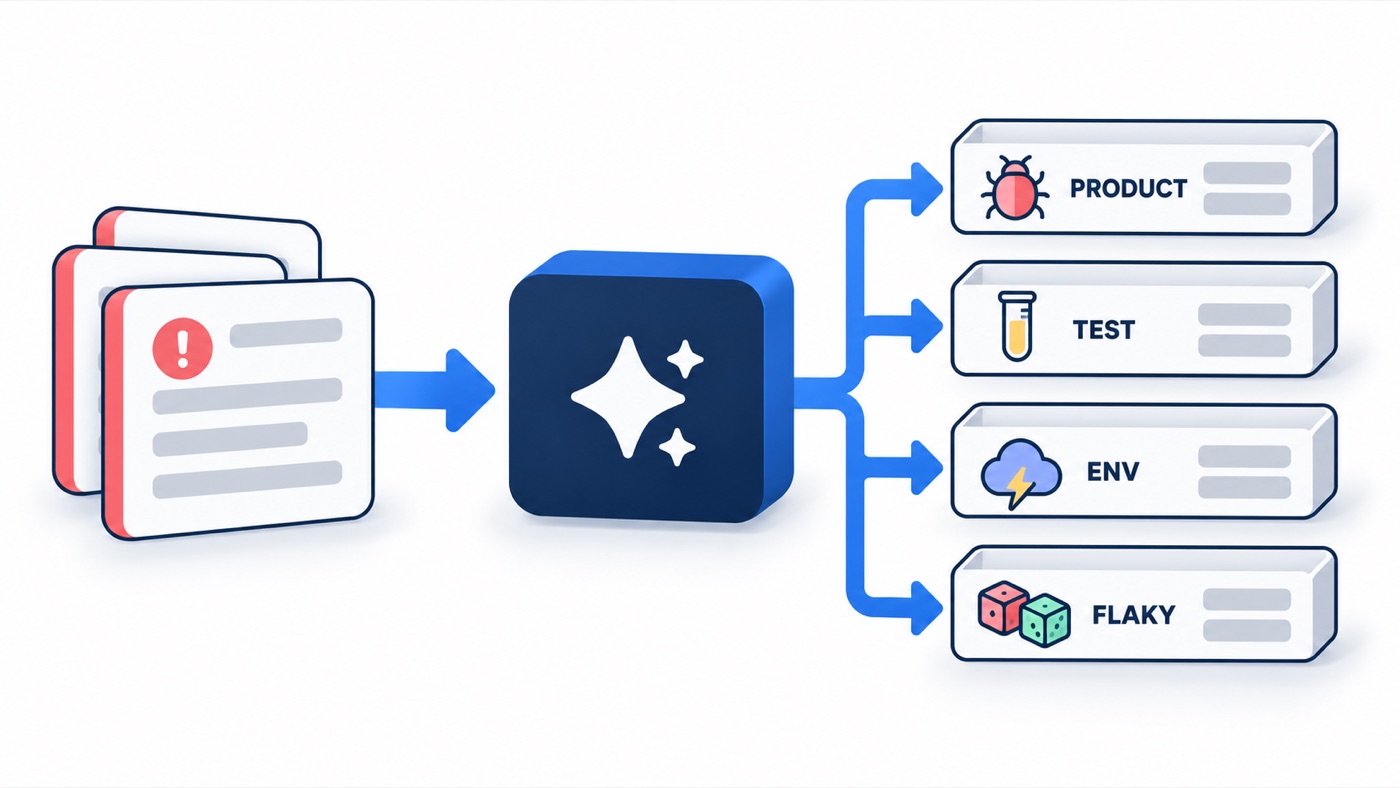
A node can call an LLM. Its structured answer decides which edge the graph takes next.
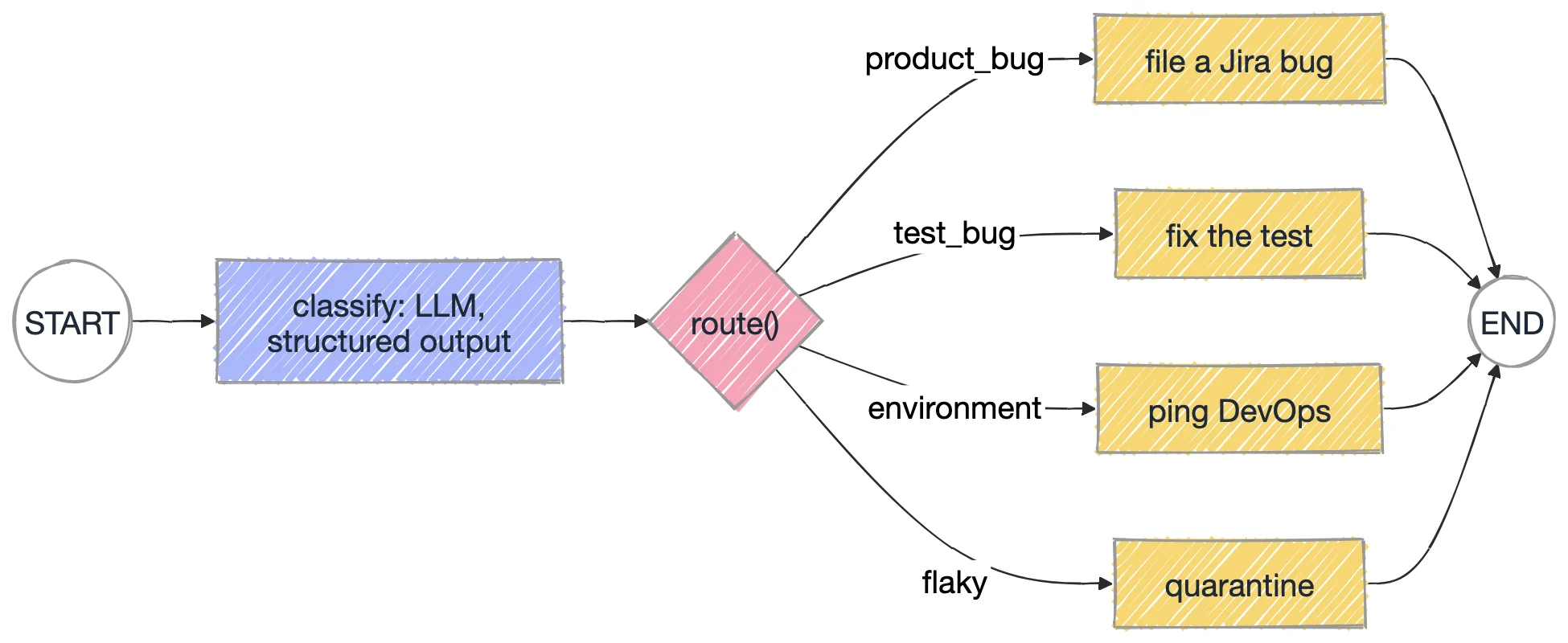
with_structured_output(Triage) forces the answer into the Pydantic shape: category must be one of four literals.route() only reads triage.category: the model decides, plain Python routes, and the graph stays in control.make_action(cat) builds one node per category in a loop, so adding a category is one dict entry.get_llm() stops with a clear message when GROQ_API_KEY is missing.cd chapter_18_LangGraph/src/chapters
python 008_LLM_Node.pycheckout_pay -> product_bug | file a Jira bug for the dev team
login_button -> test_bug | fix the test code (locator / assertion)
search_results -> environment | ping DevOps, rerun when the env is healthychapter_18_LangGraph/.env.sample to .env and add a free Groq key from console.groq.com.Work in chapter_18_LangGraph/src/chapters. Change one thing, run it, and compare with the expected result.
Add a fourth failure whose log shows it passed on retry with no code change.
flaky and gets quarantine and rerun nightly.Set LLM_MODEL in .env to another Groq model and run again.
What happens if the model tries to answer "unknown"?
Literal, so an out-of-range label fails validation instead of picking a branch.The exact file from the course repo, plus the output it printed when this page was written.
"""008 - An LLM inside a node, and its answer driving the fork.

The LLM classifies a failure log into a fixed category (structured output, so
it's a real enum, not prose). A normal Python router then reads that category
and picks the next node. The model decides, the graph stays in control.
"""
from typing import Literal, TypedDict

from langgraph.graph import END, START, StateGraph
from pydantic import BaseModel, Field

from llm import get_llm


class Triage(BaseModel):
    category: Literal["product_bug", "test_bug", "environment", "flaky"]
    reason: str = Field(description="one sentence")


class State(TypedDict, total=False):
    test_name: str
    log: str
    triage: Triage
    action: str


classifier = get_llm().with_structured_output(Triage)


def classify(state: State) -> dict:
    t = classifier.invoke(
        "You triage failed UI tests. Classify this failure.\n"
        f"Test: {state['test_name']}\nLog:\n{state['log']}"
    )
    return {"triage": t}


def route(state: State) -> str:
    return state["triage"].category


ACTIONS = {
    "product_bug": "file a Jira bug for the dev team",
    "test_bug": "fix the test code (locator / assertion)",
    "environment": "ping DevOps, rerun when the env is healthy",
    "flaky": "quarantine and rerun nightly",
}


def make_action(category):
    return lambda state: {"action": ACTIONS[category]}


builder = StateGraph(State)
builder.add_node("classify", classify)
for cat in ACTIONS:
    builder.add_node(cat, make_action(cat))
    builder.add_edge(cat, END)
builder.add_edge(START, "classify")
builder.add_conditional_edges("classify", route, list(ACTIONS))
app = builder.compile()

FAILURES = [
    ("checkout_pay",
     "AssertionError: expected order total '$120.00' but got '$0.00'. API /cart returned 200 with total=0."),
    ("login_button",
     "TimeoutError: locator('#login-btn') not found. Page has button[data-test=login] instead."),
    ("search_results",
     "net::ERR_CONNECTION_REFUSED at https://staging.example.com - staging DB container restarting."),
]

if __name__ == "__main__":
    for name, log in FAILURES:
        out = app.invoke({"test_name": name, "log": log})
        t = out["triage"]
        print(f"{name:<15} -> {t.category:<12} | {out['action']}")
print(f"{'':<15} why: {t.reason}")"""Shared LLM factory for scripts 008-010. Reads chapter_18_LangGraph/.env."""
import os
from pathlib import Path
from dotenv import load_dotenv
CHAPTER_ROOT = Path(__file__).resolve().parents[2]
load_dotenv(CHAPTER_ROOT / ".env")
load_dotenv()
def has_llm() -> bool:
return bool(os.getenv("GROQ_API_KEY"))
def get_llm(**settings):
if not has_llm():
raise SystemExit(
"GROQ_API_KEY is not set. Copy chapter_18_LangGraph/.env.sample to .env "
"and add a free key from https://console.groq.com/keys"
)
from langchain_groq import ChatGroq
return ChatGroq(model=os.getenv("LLM_MODEL", "openai/gpt-oss-120b"), temperature=0, **settings)checkout_pay -> product_bug | file a Jira bug for the dev team
login_button -> test_bug | fix the test code (locator / assertion)
search_results -> environment | ping DevOps, rerun when the env is healthy