What this class covered
- Abstraction: expose what, hide how
- Interfaces: the shape of an object
- readonly: properties that cannot change
- Interfaces that extend interfaces
- Optional properties: an API response
- Functions in an interface: a calculator and a test hook
- A test config for local and CI runs
- A class that implements an interface
- Enums: named constants
- Enums for environments, browsers and HTTP methods
- Tasks: two interview questions to try, and live tests soon
- Abstraction hides the complex internal details and shows only what the user needs: expose what, hide how, like an accelerator that moves the car without showing the engine. Encapsulation hides data behind private fields with getters and setters: the two are not the same.
- An interface is the shape of an object, a contract: an object typed with it must have every required property, or tsc names the missing one (
TS2741). Interfaces exist at compile time only: tsc writes no JavaScript for them. constfixes the object reference, not its properties:point.x = 15works on a const object.readonlymakes tsc refuse the change (TS2540), which is why locators get it.- An interface can extend another, and an object must then fill the inherited properties too: five for
LoginPAGE. A?makes a property optional, and a missing one reads asundefined. - An interface can describe methods, or a function itself; whatever follows it must give the full definitions, and a class does so with
implements(TS2420if a method is missing). - An enum is a set of named constants:
TestStatus.Passgives"PASS"with no object made, a parameter typed with the enum takes only its members, and tsc turns the enum into a real JavaScript object. - Name TypeScript files
.ts: the project build skips a.TSfile, and Node and ts-node take it for plain JavaScript.
Abstraction: expose what, hide how
This class went on from the 18 November notes, whose TypeScript agenda listed interfaces, enums and abstract classes.
Before the class moves on to Playwright, the instructor said, comes abstraction, learnt with TypeScript, because that is where it is properly implemented; it is very similar to Java. Abstraction means hiding the complex internal details and showing only what the user sees: you expose what and hide how. This is one thing you need to remember, the instructor said, and the deck's note says the same.
Do not confuse abstraction with encapsulation, the instructor said: encapsulation is binding, binding your data variables with the methods, or member functions, while abstraction means hiding your internal details. Think of a car: you press the accelerator and the car moves, but you do not know how the fuel engine works, how the engine works or how the pistons work. The deck tells the same story: the car abstracts all that complexity behind a simple pedal.

This can be achieved with interfaces, enums and abstract classes in TypeScript, the instructor said, and that is what the class is learning; the deck lists the same three. Interfaces come first, the instructor said a little later, and then abstract classes.
Remember one rule, the instructor said: abstraction and encapsulation are not the same. In encapsulation, we are hiding the data, making our fields private and accessing them only through getters and setters, while abstraction is complexity hiding, which can be achieved with an abstract class, an interface or a well-designed method. Then the instructor set the two side by side: hiding of the data against hiding of the complexity; private variables with getters and setters against abstract classes, interfaces and simple methods; who can access against what should be visible. Encapsulation is like a lock, and with abstraction the engine and gearbox are not visible at all. The deck's note draws the same line: encapsulation is about data hiding, with #private fields and public getters and setters, and abstraction about complexity hiding, with abstract classes, interfaces and well-designed methods.
Interfaces: the shape of an object
Abstraction can be achieved with an interface, the instructor said. Whenever you hear interface, you remember only Java, where there is the class and, similar to the class, the interface; in TypeScript, things are a little different. Here, the interface provides the shape of the object: it forces the object to have that shape, with the properties it must have. It is like a contract, which says: I will follow this. The deck's note puts it the same way: an interface defines the shape of an object, the properties it must have and their types, and an object that says it follows the interface must have all the required properties.
Previously, the instructor said, an object was just key-value pairs, such as a name, an age of 30 and an email. How do we make sure that it follows all the keys, with a name, an age and an email present? We give it a structure, the interface, and the object is then a type of that interface. File 219.TS:
interface User{
    name:string,
    age: number,
    email : string
}

let user1:User = {
    name: "Prmaod",
    age : 100,
    email : "abcaa@gmail.com"
}

const user2:User = {
    name: "Prmaod",
    age: 90,
    email : "abcaa@gmail.com"
}

const user3: User = {
    name: "John3",
    age : 23,
    email: "abc@gmail.com"
}
All three objects follow the structure, a string name, a number age and a string email, so there is no error, and the file prints nothing: it only makes the objects. But what happens if you create another one and do not use age, the instructor asked? You get an error. With line 21 taken out of user3:
const user3: User = {
    name: "John3",
    email: "abc@gmail.com"
}
32_Abstraction_OOPs/00_Interface/219.TS:19:7 - error TS2741: Property 'age' is missing in type '{ name: string; email: string; }' but required in type 'User'.

19 const user3: User = {
         ~~~~~

  32_Abstraction_OOPs/00_Interface/219.TS:3:5
    3     age: number,
          ~~~
    'age' is declared here.


Found 1 error in 32_Abstraction_OOPs/00_Interface/219.TS:19
Property age is missing, the instructor said, because the interface defines the shape of the object, as a class, which is also a blueprint, does. It is like a contract: if the object says it follows the interface, it must have all the properties, so to make the error go, age should be there. You can create an unlimited number of objects, and all of them will follow the same structure.
A capital .TS is not .ts. Files 219 and 227 end in a capital .TS, which the project build, Node and ts-node do not take for TypeScript. So on this page those two are compiled by name, with --ignoreConfig, as the deck's command from the last class does. Each way of running 219.TS in this repo:
| Command | What happens to 219.TS |
|---|---|
tsc -p ., the repo's tsconfig.json |
skipped: the build matches .ts, not .TS, so even a 219.TS with an error in it passes |
tsc 32_Abstraction_OOPs/00_Interface/219.TS --ignoreConfig |
checked, then written out as 219.TS.js |
node 32_Abstraction_OOPs/00_Interface/219.TS |
stops at line 1: SyntaxError: Unexpected identifier 'User' |
ts-node 32_Abstraction_OOPs/00_Interface/219.TS |
the same SyntaxError: ts-node hands the file to Node as plain JavaScript |
Renamed to 219.ts and 227_Class_VS_iNTERFACE.ts, in copies kept outside the repo, both files join the project build, and tsc -p . checks them with the rest and finds no errors.
A learner asked what the purpose of this is. The purpose is similar to a class, the instructor said: a class gives a structure, with attributes and behaviour, and then you create objects from it. The problem with a class is that if it has 100 attributes, one object can have 100, another 80, another 70: some of them can be optional. But if an interface has the attributes A1, A2 and A3, every object you create with it has to follow A1, A2 and A3: a proper contract has to be followed. And this is a concept of abstraction too, the instructor said: abstraction does not only mean hiding the implementation; it also means following rules.
In Playwright, an API response is where this will be used: you receive something, make sure that it matches your interface, and only then verify it. It will be used in API automation, and with web elements too, the instructor said. Can let be used instead of const, a learner asked? Yes, the instructor said: there is no problem in that, and not much difference.
An interface does not generate any JavaScript code, the instructor said: interfaces exist at compile time only, for type checking. TypeScript wants you to follow the types, and this provides that; an interface is just rules, like a signature. The deck's note says the same: after compilation, interfaces completely disappear from the output. The file tsc wrote for 219.TS keeps the three objects, and the interface is gone:
"use strict";
let user1 = {
    name: "Prmaod",
    age: 100,
    email: "abcaa@gmail.com"
};
const user2 = {
    name: "Prmaod",
    age: 90,
    email: "abcaa@gmail.com"
};
const user3 = {
    name: "John3",
    age: 23,
    email: "abc@gmail.com"
};
readonly: properties that cannot change
const stops a new object for point, but only readonly stops point.x = 15.Then comes something called readonly, the instructor said, with examples that are used in Playwright. Take an interface for a point, whose x and y are numbers, and a constant point with 10 and 10. Can you change x to 15? File 220_Readonly.ts:
// Readonly

interface Point{
     x:number;
     y:number;
}

const point : Point = {
    x:10,
    y:10,
}
console.log(point)

point.x = 15
console.log(point)
{ x: 10, y: 10 }
{ x: 15, y: 10 }
Previously it was 10, 10, and now it is 15: with the object reference, dot x, you can change the value, absolutely. Do not get confused because it is a constant, the instructor said: the constant is the object reference, and x and y are not constant. The object reference should not change, but x and y can. A line 16 that gives point a new object shows the difference:
point = { x: 20, y: 20 };
32_Abstraction_OOPs/00_Interface/220_Readonly.ts:16:1 - error TS2588: Cannot assign to 'point' because it is a constant.

16 point = { x: 20, y: 20 };
   ~~~~~


Found 1 error in 32_Abstraction_OOPs/00_Interface/220_Readonly.ts:16
To make x and y not change, there is readonly, the instructor said: apply the readonly keyword, and you start getting an error, because once a value is assigned, when the object is created, it will not be changed again. File 221_Readonly_Applied.ts keeps that change commented out:
// Readonly

interface Point{
    readonly x:number;
    readonly y:number;
}

const point : Point = {
    x:10,
    y:10,
}
console.log(point)

// point.x = 15
console.log(point)
{ x: 10, y: 10 }
{ x: 10, y: 10 }
Switched on, line 14 is refused:
point.x = 15
32_Abstraction_OOPs/00_Interface/221_Readonly_Applied.ts:14:7 - error TS2540: Cannot assign to 'x' because it is a read-only property.

14 point.x = 15
         ~


Found 1 error in 32_Abstraction_OOPs/00_Interface/221_Readonly_Applied.ts:14
This is helpful in Playwright, the instructor said. Suppose you create an interface of locators: once a locator is assigned, do you want it to change? No, and that is why you will use readonly, so that your locators do not get changed. Does readonly work only with interfaces, a learner asked? It works with classes too, the instructor said, and the class will see that.
The README adds that readonly blocks the change only at compile time. Line 14 switched on, run two ways:
| Run with | Line 14 switched on |
|---|---|
tsc -p ., the repo's tsconfig.json |
error TS2540: the change is refused before anything runs |
node 32_Abstraction_OOPs/00_Interface/221_Readonly_Applied.ts |
runs, and the second line it prints is { x: 15, y: 10 }: Node strips the types without checking them |
Interfaces that extend interfaces
In real life, the instructor said, this is how it will be used: a base page, with a URL and a title, and an interface for the login page. Can it extend the base page? Absolutely: interfaces can extend each other. File 222_Interaface_Ob.ts:
interface BasePage{
    url:string
    title:string
}
interface LoginPAGE extends BasePage{
    usernameSelector: string;
    passwordSelector: string;
    loginButtonSelector: string;
}

interface FreeTrailPage extends BasePage {
    usernameSelector: string;
    submitButtonSelector: string;
}

const loginPage:LoginPAGE = {
    url: "/login",
    title: "Login Page",
    usernameSelector: "#username",
    passwordSelector: "#password",
    loginButtonSelector: "#login-btn"
}
let freeTrialPage: FreeTrailPage = {
    url: "/free-trial",
    title: "Free Page",
    usernameSelector: "#username",
    submitButtonSelector: "#submit",
}

console.log("URL:", loginPage.url);
console.log("Title:", loginPage.title);
console.log("Username field:", loginPage.usernameSelector);
URL: /login
Title: Login Page
Username field: #username
What type of inheritance is this, the instructor asked? The login page extending the base page is single inheritance, and a second interface that also extends the base page makes it one father with two children: not multiple, but hierarchical. If an object follows the login page, does it need three fields, or five? Five, the instructor said: because you extend the base, you have to do all five. The free trial page has four, two of its own and two from the base. TypeScript's own compiler, asked for each interface's properties, lists the same:
| Interface | Its own properties | From BasePage | An object needs |
|---|---|---|---|
LoginPAGE |
usernameSelector, passwordSelector, loginButtonSelector |
url, title |
5 |
FreeTrailPage |
usernameSelector, submitButtonSelector |
url, title |
4 |
Leave one out, and tsc names it. With line 20 taken out of loginPage:
const loginPage:LoginPAGE = {
    url: "/login",
    title: "Login Page",
    usernameSelector: "#username",
    loginButtonSelector: "#login-btn"
}
32_Abstraction_OOPs/00_Interface/222_Interaface_Ob.ts:16:7 - error TS2741: Property 'passwordSelector' is missing in type '{ url: string; title: string; usernameSelector: string; loginButtonSelector: string; }' but required in type 'LoginPAGE'.

16 const loginPage:LoginPAGE = {
         ~~~~~~~~~

  32_Abstraction_OOPs/00_Interface/222_Interaface_Ob.ts:7:5
    7     passwordSelector: string;
          ~~~~~~~~~~~~~~~~
    'passwordSelector' is declared here.


Found 1 error in 32_Abstraction_OOPs/00_Interface/222_Interaface_Ob.ts:16
The file prints values too: the login page's URL, title and username field.
Optional properties: an API response
How is an interface used in API testing, the instructor asked. What do we get in a response? First a status code, a number; a body, or payload, a string; headers, an object; and a response time. If you are from an API background, the instructor said, in a GET the body is optional, and headers can be optional too; something optional gets a question mark. The file's comments on lines 10 and 11 add that in a POST, the body is important. File 223_API_Response.ts:
// interface. used in API Testing

interface APIReponse{
    statusCode: number;
    body?: string;
    headers?: object;
    responseTime:number;
}

//  GET -> body optional
// POST -> important

const responseDataGET: APIReponse = {
    statusCode:200,
    responseTime: 200
}

const responseDataPOST: APIReponse = {
    statusCode:200,
    body : "{'name':'pramod'}",
    responseTime: 200,
    headers : {}
}
It compiles with no errors and prints nothing: it only builds two objects. The GET response leaves out the body and the headers; in the POST one, a hypothetical example and not a real one, the instructor said, a body can be there. A question mark means optional: the property can be present, or not. TypeScript's own list for APIReponse:
| Property | Type | Optional |
|---|---|---|
statusCode |
number |
no |
body |
string |
yes, ? |
headers |
object |
yes, ? |
responseTime |
number |
no |
In class, the headers were first given a string, and they needed a proper object. With line 22's {} swapped for a string:
headers : ""
32_Abstraction_OOPs/00_Interface/223_API_Response.ts:22:5 - error TS2322: Type 'string' is not assignable to type 'object'.

22     headers : ""
       ~~~~~~~

  32_Abstraction_OOPs/00_Interface/223_API_Response.ts:6:5
    6     headers?: object;
          ~~~~~~~
    The expected type comes from property 'headers' which is declared here on type 'APIReponse'


Found 1 error in 32_Abstraction_OOPs/00_Interface/223_API_Response.ts:22
Functions in an interface: a calculator and a test hook
Interfaces can also have functions, the instructor said, and this is where things get crazy: a calculator, whose functions take a, a number, and b, a number, and return a number. These are incomplete functions in the interface, and any object that follows it has to give their full definitions, here as arrow functions. File 224_Interface_Fn.ts:
interface Calculator{
    add(a:number,b:number):number;
    subtract(a: number, b: number): number;
}

const calc: Calculator = {
    add: (a,b) => a+b,
    subtract: (a, b) => a - b,
}

calc.add(3,4);
It compiles with no errors and prints nothing: line 11 works out calc.add(3,4) but does not print it. Printed, as the README's copy of the file does:
console.log(calc.add(3,4));
7
Is it possible to give a complete method in an interface too, a learner asked? No, the instructor said: an interface takes only incomplete methods, structures. Interface is all about rules. An object that leaves a function out is refused. With line 8 taken out of calc:
const calc: Calculator = {
    add: (a,b) => a+b,
}
32_Abstraction_OOPs/00_Interface/224_Interface_Fn.ts:6:7 - error TS2741: Property 'subtract' is missing in type '{ add: (a: number, b: number) => number; }' but required in type 'Calculator'.

6 const calc: Calculator = {
        ~~~~

  32_Abstraction_OOPs/00_Interface/224_Interface_Fn.ts:3:5
    3     subtract(a: number, b: number): number;
          ~~~~~~~~~~~~~~~~~~~~~~~~~~~~~~~~~~~~~~~
    'subtract' is declared here.


Found 1 error in 32_Abstraction_OOPs/00_Interface/224_Interface_Fn.ts:6
The README adds that the arrow functions need no types of their own: with the interface in place, a and b are already numbers.
Then a test hook, which the instructor really likes: an anonymous function, a function without a name, which takes a test name, a string, and returns void. Void means it does not return anything at all. File 225_Interface_Hook.ts:
interface TestHook{
    (testName:string) : void;
}

let beforeEachHook: TestHook = function (testName: string): void {
    console.log("[BEFORE] Setting up: " + testName);
}

let afterEachHook: TestHook = function (testName: string): void {
    console.log("[AFTER] Tearing down: " + testName);
};

beforeEachHook("Login Test");
[BEFORE] Setting up: Login Test
The beauty of this, the instructor said, is that it can be used as a hook, and a hook means run it before something: you pass the test name, it goes in as the argument, and the function runs. Here beforeEachHook and afterEachHook are both of the type TestHook, and only beforeEachHook is called, so only its line prints. TestHook describes the function itself: TypeScript lists no properties for it, only the call signature (testName: string): void. Some people will use this as a hook, the instructor said, but not everywhere.
A test config for local and CI runs
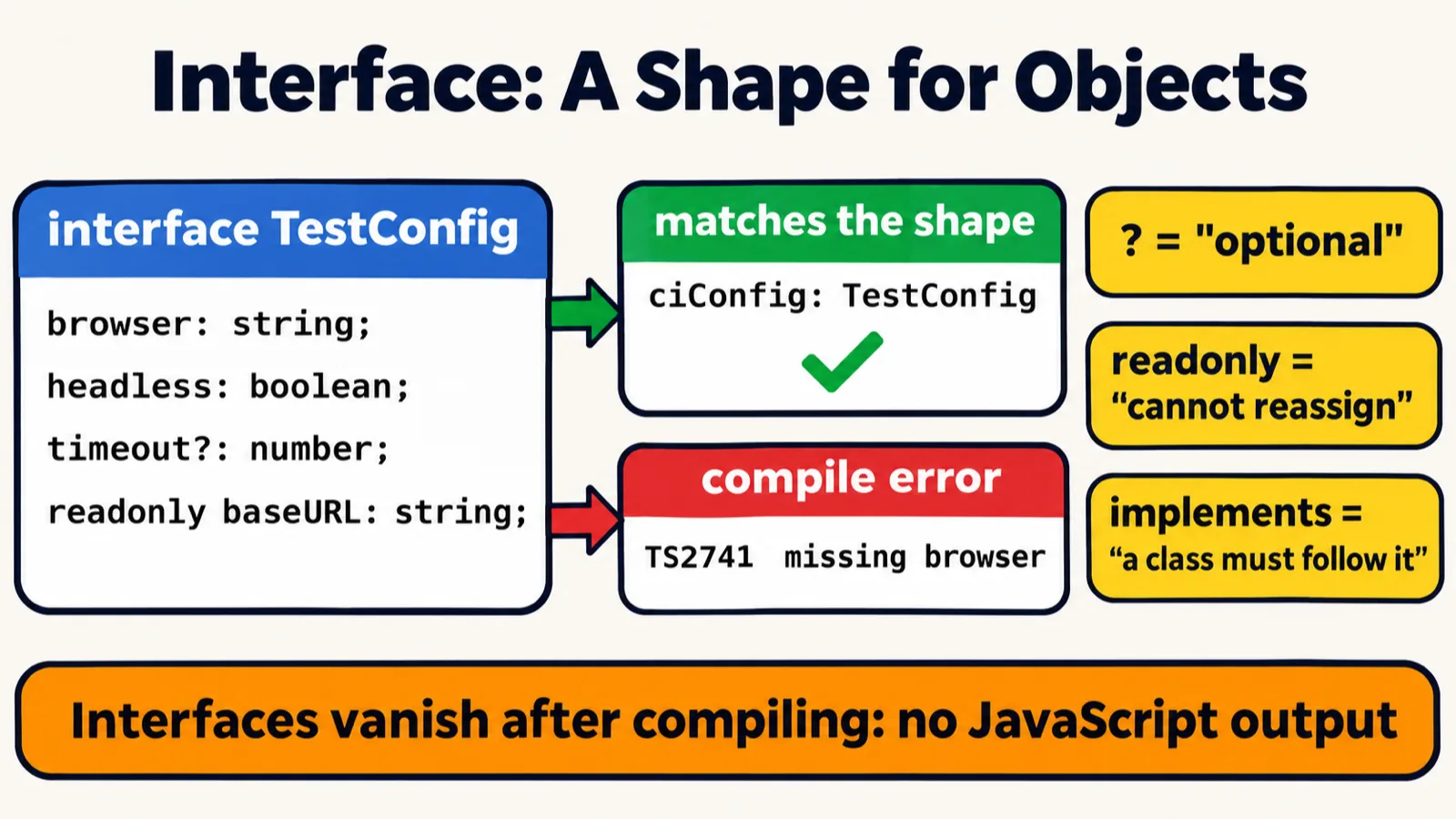
TestConfig, with baseURL made readonly and retries left out; its missing-browser error is shown below as tsc prints it.Then the real use case of an interface, the instructor said: a test configuration, with a browser, headless, a base URL, a timeout and retries, of which two are optional. Then a local configuration, and a CI/CD one. File 226_REAL.ts:
interface TestConfig {
    browser: string;
    headless: boolean;
    baseURL: string;
    timeout?: number;
    retries?: number;
}

let localConfig: TestConfig = {
    browser: "Chrome",
    headless: true,
    baseURL: "http://localhost:3000"
};


let ciConfig : TestConfig = {
    browser: "Firefox",
    headless: false,
    baseURL: "https://staging.app.com",
    timeout: 10000,
    retries: 3
};


console.log("CI:", ciConfig.browser, "| timeout:", ciConfig.timeout);
console.log("Local:", localConfig.browser, "| timeout:", localConfig.timeout);
CI: Firefox | timeout: 10000
Local: Chrome | timeout: undefined
The local configuration has Chrome, true and a base URL, and no timeout and no retries; the CI/CD one has retries as well as a timeout. Running in CI means running on Jenkins, the instructor said, not on our own machine. The second line of the output shows what a missing optional property reads as, as the README notes: undefined.
The cheat sheet's red box, a TestConfig with no browser, is a real error. With line 17 taken out of ciConfig:
let ciConfig : TestConfig = {
    headless: false,
    baseURL: "https://staging.app.com",
    timeout: 10000,
    retries: 3
};
32_Abstraction_OOPs/00_Interface/226_REAL.ts:16:5 - error TS2741: Property 'browser' is missing in type '{ headless: false; baseURL: string; timeout: number; retries: number; }' but required in type 'TestConfig'.

16 let ciConfig : TestConfig = {
       ~~~~~~~~

  32_Abstraction_OOPs/00_Interface/226_REAL.ts:2:5
    2     browser: string;
          ~~~~~~~
    'browser' is declared here.


Found 1 error in 32_Abstraction_OOPs/00_Interface/226_REAL.ts:16
A class that implements an interface
Class versus interface, the instructor said: this is where the real things come in. You can create an interface, say executable, with a property and functions. A class does not extend it; it implements it, very similar to Java. If a class implements the executable, the name goes in the constructor, of course, and the two functions have to be created: if a class implements an interface, it has to complete those functions. File 227_Class_VS_iNTERFACE.TS, which spells the interface Excetable:
interface Excetable{
    name: string;
    run(): void;
    getStatus(): string;
}

class TestCase implements Excetable{
    name: string;
    constructor(name: string) {
        this.name = name;
    }
    run(): void {
        console.log("[RUN] " + this.name);
    }
    getStatus(): string {
        return "PASS";
    }
}
Like 219.TS, it ends in a capital .TS, so here it is compiled by name: it has no errors, and it prints nothing, because nothing makes a TestCase. The README's copy of the file adds three lines that make one and call both methods:
const t = new TestCase("Login Test");
t.run();                      // [RUN] Login Test
console.log(t.getStatus());   // PASS
[RUN] Login Test
PASS
Leave one function out, and the class is refused. With getStatus(), lines 15 to 17, taken out:
class TestCase implements Excetable{
    name: string;
    constructor(name: string) {
        this.name = name;
    }
    run(): void {
        console.log("[RUN] " + this.name);
    }
}
32_Abstraction_OOPs/00_Interface/227_Class_VS_iNTERFACE.TS:7:7 - error TS2420: Class 'TestCase' incorrectly implements interface 'Excetable'.
  Property 'getStatus' is missing in type 'TestCase' but required in type 'Excetable'.

7 class TestCase implements Excetable{
        ~~~~~~~~

  32_Abstraction_OOPs/00_Interface/227_Class_VS_iNTERFACE.TS:4:5
    4     getStatus(): string;
          ~~~~~~~~~~~~~~~~~~~~
    'getStatus' is declared here.


Found 1 error in 32_Abstraction_OOPs/00_Interface/227_Class_VS_iNTERFACE.TS:7
And unlike the interface, the class is real JavaScript: the file tsc wrote for 227 keeps the class and drops Excetable:
"use strict";
class TestCase {
    name;
    constructor(name) {
        this.name = name;
    }
    run() {
        console.log("[RUN] " + this.name);
    }
    getStatus() {
        return "PASS";
    }
}
So abstraction has been achieved through the interface, the instructor said.
Enums: named constants
TestStatus.Pass, and gets its value, PASS; the value is not a key, so TestStatus.PASS is refused.Then enum, the instructor said, in a new file, 228. An enum is nothing but key-value pairs: key-value constants, also known as named constants. You can create an enum of test statuses, with Pass equal to "PASS", and use it directly. File 228_ENUM.ts:
enum TestStatus{
    Pass = "PASS",
    Fail = "FAIL",
    Skip = "SKIP",
    Pending = "PENDING",
    Blocked = "BLOCKED"
}

console.log(TestStatus.Pass);
PASS
You use it with its name and a dot, the instructor said: you do not have to create an object for this, and you get the value automatically. Why use this? Part two, file 229_ENUM.ts: suppose a value is a different word. In Spanish, the instructor said, medium is mediana, so if the language is Spanish, the value of medium is mediana: the key-value pairs are stored as they are.
enum SeverityLevels {
    LOW = "low",
    MEDIUM = "mediana",
    HIGH = "high",
    CRITICAL = "critical",
    BLOCKING = "blocking"
}

// id spanish
console.log(SeverityLevels.MEDIUM);
mediana
There is only one job for it, the instructor said: to keep the key-value pairs properly. The deck's note on enums: an enum is a set of named constants, defined once and used everywhere, instead of magic strings like "pass", "fail" and "skip" scattered through your test code; numeric enums count up from 0, while string enums, like every enum in this class, have explicit values; and an enum prevents typos, since TestStatus.PASS causes a compile error. It does: the key is Pass, and "PASS" is only its value. With a line 10 added to file 228:
console.log(TestStatus.PASS);
32_Abstraction_OOPs/01_ENUM/228_ENUM.ts:10:24 - error TS2551: Property 'PASS' does not exist on type 'typeof TestStatus'. Did you mean 'Pass'?

10 console.log(TestStatus.PASS);
                          ~~~~

  32_Abstraction_OOPs/01_ENUM/228_ENUM.ts:2:5
    2     Pass = "PASS",
          ~~~~
    'Pass' is declared here.


Found 1 error in 32_Abstraction_OOPs/01_ENUM/228_ENUM.ts:10
Unlike an interface, an enum becomes a real JavaScript object, as the README and the class's enum cheat sheet say. The file tsc wrote for 228 builds it, key by key:
"use strict";
Object.defineProperty(exports, "__esModule", { value: true });
var TestStatus;
(function (TestStatus) {
    TestStatus["Pass"] = "PASS";
    TestStatus["Fail"] = "FAIL";
    TestStatus["Skip"] = "SKIP";
    TestStatus["Pending"] = "PENDING";
    TestStatus["Blocked"] = "BLOCKED";
})(TestStatus || (TestStatus = {}));
console.log(TestStatus.Pass);
//# sourceMappingURL=228_ENUM.js.map
That is also why Node 22 cannot run file 228 by itself, as the README notes:
| Run with | What happens |
|---|---|
tsc -p ., then node 32_Abstraction_OOPs/01_ENUM/228_ENUM.js |
prints PASS |
node 32_Abstraction_OOPs/01_ENUM/228_ENUM.ts |
stops: ERR_UNSUPPORTED_TYPESCRIPT_SYNTAX, TypeScript enum is not supported in strip-only mode |
node --experimental-transform-types 32_Abstraction_OOPs/01_ENUM/228_ENUM.ts |
prints PASS, with an ExperimentalWarning |
Enums for environments, browsers and HTTP methods
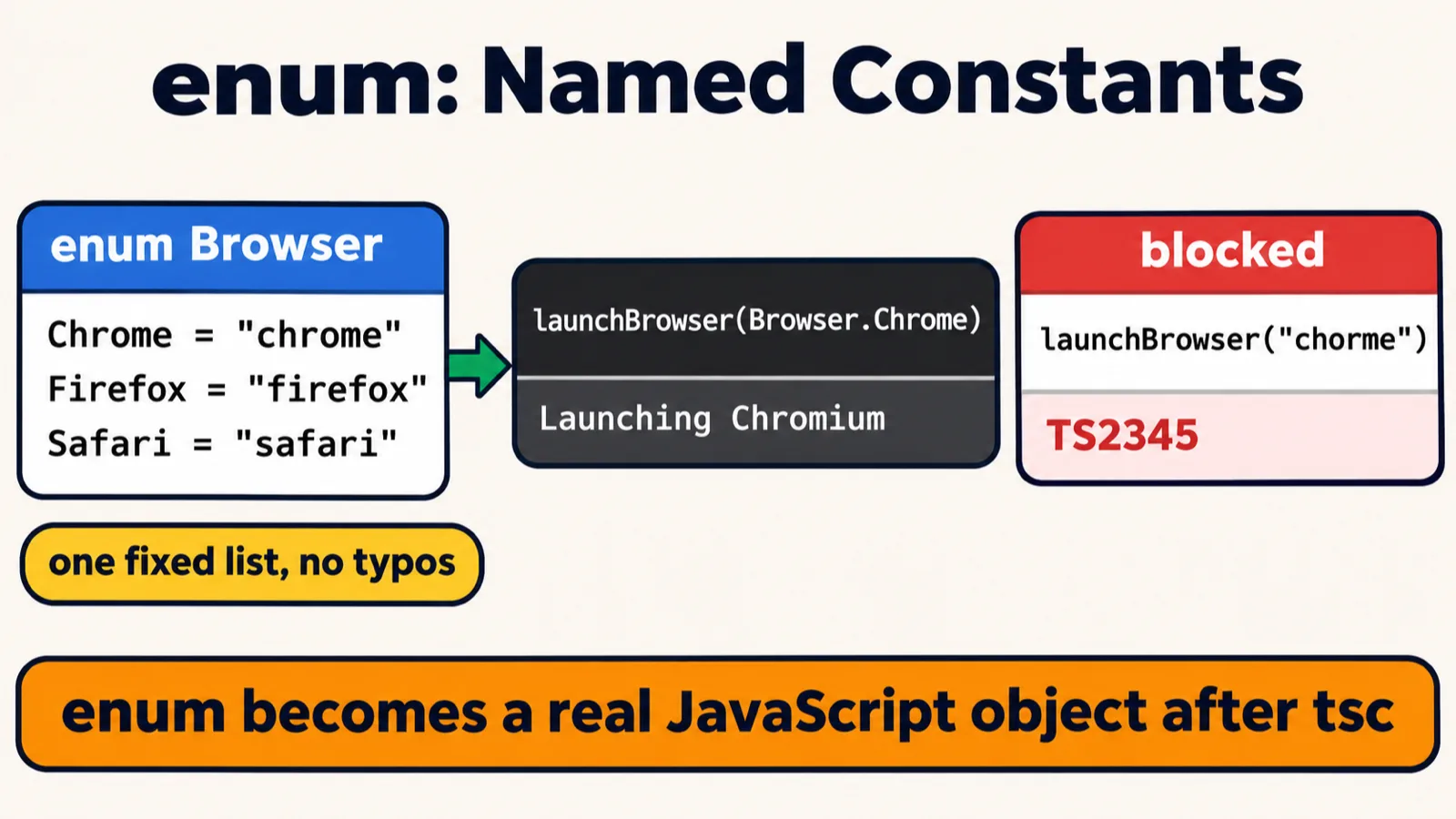
Browser enum, without its Edge member; the real run prints Launching Chromium (Chrome v120), and the blocked call is shown below as tsc prints it.The instructor will keep enums only for configuration: if somebody says the dev environment, it is this URL; staging, this URL; QA, this URL; prod, this URL; and you access them with a dot. An enum is a named constant, the instructor said. File 230_ENUM.ts:
enum Environment {
    Dev = "https://dev.api.com",
    Staging = "https://staging.api.com",
    QA = "https://qa.api.com",
    Prod = "https://api.com"
}
console.log(Environment.QA);
https://qa.api.com
If an interviewer asks what an enum is, what is the answer, the instructor asked the class. A learner said it is like declaring a constant variable, and another said a named constant, which the instructor confirmed: these are just named constants.
Then the Playwright configuration, the instructor said: an enum of browsers, Chrome, Firefox and Safari, used with a switch statement in a function that launches the browser, with the browser passed directly. If the browser is Browser.Chrome, it launches Chrome. This same code will be used in Playwright, the instructor said. File 231_PW_REAL.ts:
enum Browser {
    Chrome = "chrome",
    Firefox = "firefox",
    Safari = "safari",
    Edge = "edge"
}
function launchBrowser(browser: Browser): void {
    switch (browser) {
        case Browser.Chrome:
            console.log("Launching Chromium (Chrome v120)");
            break;
        case Browser.Firefox:
            console.log("Launching Gecko (Firefox v115)");
            break;
        case Browser.Safari:
            console.log("Launching WebKit (Safari v17)");
            break;
        case Browser.Edge:
            console.log("Launching Chromium (Edge v120)");
            break;
    }
}

launchBrowser(Browser.Chrome);
Launching Chromium (Chrome v120)
It is just a constant that has been kept, the instructor said: if somebody says Chrome, Chrome is used. The file's enum has a fourth member, Edge. A plain string is refused, even the right one, as the cheat sheet and the README show. With two calls added at the end:
launchBrowser("chorme");
launchBrowser("chrome");
32_Abstraction_OOPs/01_ENUM/231_PW_REAL.ts:25:15 - error TS2345: Argument of type '"chorme"' is not assignable to parameter of type 'Browser'.

25 launchBrowser("chorme");
                 ~~~~~~~~

32_Abstraction_OOPs/01_ENUM/231_PW_REAL.ts:26:15 - error TS2345: Argument of type '"chrome"' is not assignable to parameter of type 'Browser'.

26 launchBrowser("chrome");
                 ~~~~~~~~


Found 2 errors in the same file, starting at: 32_Abstraction_OOPs/01_ENUM/231_PW_REAL.ts:25
One more example in the API, the instructor said, and a perfect example of Spanish: in this Spanish, we do not have GET, but alternate names, which file 231.API.ts spells with an o on the end (Geto for GET, and so on), while their real meaning, which the code understands, is GET, POST, PUT and DELETE. If somebody uses the alias for GET, they mean GET. These are just alternate names, constant in nature. File 231.API.ts:
enum HTTPMethod {
    Geto = "GET",
    posto = "POST",
    puto = "PUT",
    deleto = "DELETE"
}

function sendRequest(method: HTTPMethod, endpoint: string): void {
    console.log(method + " " + endpoint + " → 200 OK");
}

sendRequest(HTTPMethod.Geto, "/api/users");
sendRequest(HTTPMethod.posto, "/api/users");
sendRequest(HTTPMethod.deleto, "/api/users/1");
GET /api/users → 200 OK
POST /api/users → 200 OK
DELETE /api/users/1 → 200 OK
Each call passes an alias, and sendRequest() gets its value: HTTPMethod.Geto arrives as "GET", which is what it prints. Nothing is sent anywhere: the function only prints the line, 200 OK included.
Generally, do not change them, the instructor said: they can't be changed; generally, they are not changed. tsc refuses a change, with a line 10 added to file 228:
TestStatus.Pass = "OK";
32_Abstraction_OOPs/01_ENUM/228_ENUM.ts:10:12 - error TS2540: Cannot assign to 'Pass' because it is a read-only property.

10 TestStatus.Pass = "OK";
              ~~~~


Found 1 error in 32_Abstraction_OOPs/01_ENUM/228_ENUM.ts:10
Tasks and announcements
- Today's task. Two interview questions that were recently asked, the instructor said, in one of the companies, which the instructor would not name: remove duplicates from a sorted array, and the longest substring without repeating characters. Just give them a try. The instructor asked Meeti, the TA, to note both down, and the class will try them as a problem statement too, if possible soon. And of course, the instructor said, the task has already been given.
- Live tests. A test will be organized, and Meeti will let you know when it will be. There are a lot of live tests the class has not done, so a lot of them are going to happen soon: next month will be very crucial, and very, very intense.
- The regex video: if it is done, it can be uploaded, the instructor said.
- Diagrams have been added, RICE-POT among them, the instructor said: today's named constants diagram has been added, and one of interfaces, and more extra diagrams are being added soon. Both of today's are on this page, from the repo's README.
- Doubts: the doubt thread for this class is already created: use it, the instructor said.
- The code: the instructor started the push in class with a go command, and the repo has the files: files 219 to 227 are in the repo's 32_Abstraction_OOPs/00_Interface folder, and 228 to 231 in 32_Abstraction_OOPs/01_ENUM.
- Tester Town: use it afterwards too, if possible, the instructor said: the instructor and Meeti are there, and the instructor is trying to answer a lot of questions.
- File 214: a learner reported a problem in file 214, and the instructor will check it and let the learner know.
- Next class: its topic was not named at the close. Earlier, the instructor said interfaces come first and abstract classes after them, and the README's Coming Up list says Chapter 24, Playwright, and Chapter 32, Interfaces and Enums, continue, then more TypeScript: abstract classes, generics and type aliases.
Task. Give two interview questions that were recently asked a try: remove duplicates from a sorted array, and the longest substring without repeating characters.
If an interviewer asks what an enum is, what is the answer?
Worth practising too: How is abstraction different from encapsulation? Does const stop point.x = 15, and what does readonly change? What does a ? after a property name mean? Can an interface hold a complete method? What must a class do when it implements an interface? What does tsc write for an interface, and for an enum?
Show the answer
Answer. A named constant: an enum keeps key-value pairs under one name, written once and used everywhere with a dot, so TestStatus.Pass gives "PASS" with no object made. Abstraction hides complexity, exposing what and hiding how, through interfaces, enums and abstract classes; encapsulation hides data, behind private fields with getters and setters. const fixes only the reference, so point.x = 15 works; readonly makes tsc refuse it (TS2540), though only at compile time. A ? makes a property optional: it may be left out, and then reads as undefined. No: an interface takes only incomplete methods, and whatever follows it writes them in full. A class that implements an interface must write every property and method it lists, or tsc reports TS2420. tsc writes no JavaScript for an interface, while an enum becomes a real JavaScript object, which the file tsc writes builds key by key.