What this class covered
- Import and export: borrowing from another file
- Renaming with as, and a file name slip
- Default and named exports
- Works or error, and import star
- Playwright's import line, and import versus require
- Why OOPS
- A class is the mould, an object the glass
- class Person in code
- Object versus object reference
- What Playwright is
- Rendering engines and real browsers
- Installing Playwright
- Running the example tests
- What Playwright cannot automate
- Tasks: set up Playwright before next week
- Only what a file exports can be imported:
fnameintestutils.jshas noexport, so asking for it is aSyntaxError. - Named exports come in curly braces, by their exact, case-sensitive name, and
asgives one a new name. A file has one default export at most, and it comes in without braces, under any name. - The path must match the file exactly: file 173 asks for
./testutil.js, so it stops withERR_MODULE_NOT_FOUNDbefore it prints anything. - In this course, always import: require is the old way.
- A class is a blueprint with attributes and behaviour (CAB); an object is a real instance of it, in memory (OIC).
- In
const pramod = new Person();,new Person()is the object andpramodis the object reference. npm init playwrightsets up a project with a config and an example test, and installs the browsers. Playwright can emulate a phone, but it cannot automate a native mobile app or a desktop app.
Import and export: borrowing from another file
This class opened chapter 22 in the repo; the latest notes are the 4 November notes, and the files of the 6 November class, 162 to 171 on async and await, are in the repo's 21_Async_Await folder.
export decides what another file may import.Import and export, the instructor said, means using a variable or a function from one JS file in another JS file. In school, we used to borrow pens, pencils and rubbers from each other; similarly, you can borrow variables and functions in JavaScript.

testutils.js has a variable, BASE_URL, and a function that returns whatever string it is given in uppercase. Write export in front of them, the instructor said, and you can import both in another file:
export let BASE_URL = "https://app.vwo.com";

export function formatUpperCaseString(sname){
    return sname.toUpperCase();
}

let fname = "Pramod";
On its own, testutils.js prints nothing: it only shares. File 172 uses the keyword import to take the two exported names from it:
import { BASE_URL, formatUpperCaseString} from './testutils.js';

console.log(BASE_URL);

let result = formatUpperCaseString("Pramod");
console.log(result);
https://app.vwo.com
PRAMOD
There are the outputs, the URL as well as the uppercase, as the class saw them. Node also prints a warning after these two lines; it is harmless, as the repo's README says, and the section on import versus require below explains it.
Wherever export is written, we can import it and use it, the instructor said, and if the export is not written, you will not be able to import. Line 7 of testutils.js, fname, has no export. Ask file 172 for it as well:
import { BASE_URL, formatUpperCaseString, fname } from './testutils.js';
22_Export_Import/172_IE.js:1
import { BASE_URL, formatUpperCaseString, fname } from './testutils.js';
                                          ^^^^^
SyntaxError: The requested module './testutils.js' does not provide an export named 'fname'
The file stops on line 1, before anything prints. In the future you can export a class too, the instructor said, once the OOPS concepts are done; utils.js already sketches one in its comments, as the README notes.
Renaming with as, and a file name slip
utils.js has functions that format a test case's name, and a BASE_URL of its own:
export let BASE_URL = "https://api.example.com";

export function formatTestName(name) {
    return "TC_" + name.toUpperCase();
}

export function formatTestName2(name) {
    return "TC_" + name.toUpperCase();
}

// export class LoginPage {
//   constructor(page) { this.page = page; }
//   async login(u, p) { /* ... */ }
//   async openBrowser(u, p) { /* ... */ }
//   async closerBrowser(u, p) { /* ... */ }
//    async clickElement(u, p) { /* ... */ }
// }
File 173 imports from both. You can use whatever you want, the instructor said, and use a short form too. Both files export a BASE_URL, so as gives each one a local name, and both can be used in one file, as the repo's README explains:
import { BASE_URL as bul_util, formatTestName } from "./utils.js";
import { BASE_URL as bul_testtul } from "./testutil.js";

console.log(bul_util);
console.log(bul_testtul);
console.log(formatTestName("login"));
Error [ERR_MODULE_NOT_FOUND]: Cannot find module '22_Export_Import/testutil.js' imported from 22_Export_Import/173.js
Line 2 names a file that does not exist. It imports from ./testutil.js, but the file is testutils.js, with an s. Node resolves every import before it runs any line, so file 173 prints nothing at all, not even the URL from utils.js, whose import on line 1 is fine. The repo's README points this out too.
With the name corrected, in a copy kept outside the repo, file 173 prints all three:
import { BASE_URL as bul_util, formatTestName } from "./utils.js";
import { BASE_URL as bul_testtul } from "./testutils.js";

console.log(bul_util);
console.log(bul_testtul);
console.log(formatTestName("login"));
https://api.example.com
https://app.vwo.com
TC_LOGIN
| Name in file 173 | Comes from | Prints |
|---|---|---|
bul_util |
BASE_URL in utils.js |
https://api.example.com |
bul_testtul |
BASE_URL in testutils.js |
https://app.vwo.com |
formatTestName("login") |
utils.js |
TC_LOGIN |
Default and named exports
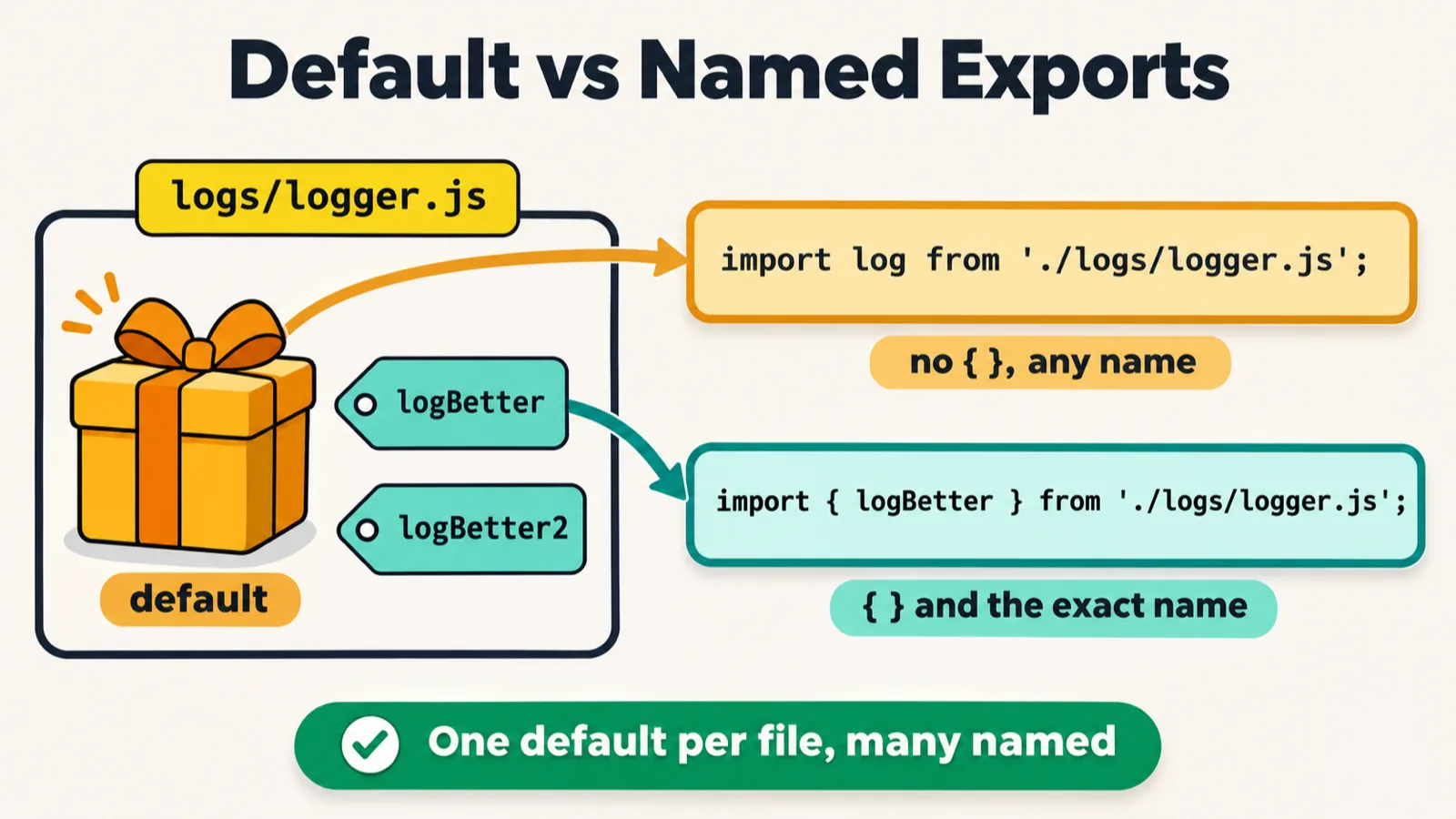
Can we import from another folder too, a learner asked. Yes, the instructor said: we can import from anywhere. The example was a folder named logs, and a file in it, logger.js, with one thing called a default export:
// Default Export -> Export One Main Thing

export default function log(message) {
    console.log("[LOG] " + message);
}


export function logBetter(message) {
    console.log("-----------");
    console.log("[LOGS] " + message);
    console.log("-----------");
}

export function logBetter2(message) {
    console.log("-----------");
    console.log("[LOGS] " + message);
    console.log("-----------");
}
The commit's message adds that the repo's root .gitignore ignores every logs/ folder, so this file had to be force-added, because file 174 imports it. File 174 takes the default and two named exports:
import log from './logs/logger.js';
import { logBetter, logBetter2 } from './logs/logger.js';

log('Starting');


logBetter("Starting the TC of the app.vwo.com");
[LOG] Starting
-----------
[LOGS] Starting the TC of the app.vwo.com
-----------
If you use the default keyword, you do not have to use curly braces, the instructor said: that is line 1. With a non-default, you have to import it with the curly braces: line 2, the named exports. logBetter2 is imported but never called, so only one dashed block prints.
Can we import an asynchronous function, a learner asked. Absolutely, the instructor said: there is no problem with asynchronous or synchronous, and you can import any function.
Is there any advantage of using a default, a learner asked. The instructor compared it with Java's main function: if a file has several functions and you want at least one of them imported, make that one the default, the way a Java program has at least one main function; the rest you import with braces. The default still needs its own import line, import log from ..., only without braces. And it will be only one default, the instructor said: generally, multiple defaults will not be there.
It is like importing a package, a learner said. Yes, the instructor said, and asked whether anyone from a Java background remembered doing the same in Java.
Works or error, and import star
During the class, the instructor made a learning document on default versus named exports, and put it in the repo's learning folder as a PDF, default_vs_named_export_eli5.pdf, only for your notes. Its rules, as read out in class: a default is one per file, with no curly braces, and you can call it any name you like; named exports use the curly braces, and the exact name must match. The PDF adds that a named export can be renamed with as. Parts of its "Works or error?" list were read out too; here each line is run against the class's logs/logger.js:
| Line | Node | The PDF's note |
|---|---|---|
import log from './logs/logger.js'; |
Works | |
import anything from './logs/logger.js'; |
Works | The default can have any name |
import { logBetter } from './logs/logger.js'; |
Works | |
import { logbetter } from './logs/logger.js'; |
SyntaxError: does not provide an export named 'logbetter' |
Names are case-sensitive |
import { log } from './logs/logger.js'; |
SyntaxError: does not provide an export named 'log' |
log is the default, so no braces |
export default 1; export default 2; |
SyntaxError: Identifier '.default' has already been declared |
Only one default per file |
The "works" lines were each run with a call after them, which printed as expected. Both kinds can come in one line, the PDF adds: default first, then the named ones in braces. File 174 with its first two lines joined prints the same:
import log, { logBetter, logBetter2 } from './logs/logger.js';
[LOG] Starting
-----------
[LOGS] Starting the TC of the app.vwo.com
-----------
Can we import all the functions of a particular file, a learner asked. We can, the instructor said, by using import star; there are rules to follow, though, and not everything can be done. In a snippet written for these notes, import * as collects every export of logger.js in one object, with the default under the name default:
import * as logger from './logs/logger.js';

logger.logBetter2("Every export, in one object");
console.log(Object.keys(logger));
-----------
[LOGS] Every export, in one object
-----------
[ 'default', 'logBetter', 'logBetter2' ]
Playwright's import line, and import versus require
Every Playwright test file starts with an import. This is the first line of the class's example test:
import { test, expect } from '@playwright/test';
Is it a default import or a non-default import, the instructor asked. A non-default import, the instructor said, and a multiple import: two names in one line. What is the @? It means the import is in a package, the instructor said, a proper library folder, and the package is a separate discussion. In the class's Playwright project, it is the folder node_modules/@playwright/test. How many imports come in Playwright, a learner asked. That is not the right question, the instructor said: it depends on how many you want to use.
The ELI5 PDF adds that Playwright also has a default export, and it is test again. Checked in the class's Playwright project:
import test, { test as namedTest } from '@playwright/test';

console.log(test === namedTest);
true
Import or require? People have this confusion too, the instructor said: sometimes people use require, and sometimes import. Please remember, we are working with TypeScript: we will always use import. Require is in Node.js; it is a JavaScript concept, but we will not use it, and we will avoid it. Importing is the new way, and require is the old way. The repo has the old way in chapter 8: the prompt-sync lesson in the 14 October notes starts with const prompt = require("prompt-sync")();.
That is where the warning after file 172's output comes from. The repo's package.json does not say which kind of module its .js files are, so Node first reads file 172 the old way, as CommonJS, finds import, and reads it again as an ES module. Without its process number, the warning reads:
[MODULE_TYPELESS_PACKAGE_JSON] Warning: Module type of 22_Export_Import/172_IE.js is not specified and it doesn't parse as CommonJS.
Reparsing as ES module because module syntax was detected. This incurs a performance overhead.
To eliminate this warning, add "type": "module" to package.json.
The warning is harmless, the README says, and adding "type": "module" to package.json would break the require lessons of chapter 8. In a copy of the repo with that line added, chapter 8's 62_FS_readFile.js stops at its require:
node 08_chapter_UserInput/62_FS_readFile.js
Enter the number!
08_chapter_UserInput/62_FS_readFile.js:2
const data = require('fs').readFileSync(0, 'utf8');
             ^

ReferenceError: require is not defined in ES module scope, you can use import instead
Why OOPS
Till here, the class had all the JavaScript concepts that are good to know, the instructor said; now comes the interesting part, the OOPS concept, and how to use it with TypeScript. It is the last important concept of TypeScript before jumping into Playwright, in the instructor's words.
Not theory, more practical, the instructor said, but a little theory first: why was OOPS introduced? Before it, there was procedural programming, where everything was a function: function one, function two and function three, calling each other. That is not a real way of solving a problem, because we live in real life: we are not functions, we are classes and objects.
Earlier, the class discussed objects in JavaScript (the 30 October notes): those were just key-value pairs. The class and object of OOPS are totally different, the instructor stressed: do not get confused.
This concept will be useful for you mostly in Playwright, the instructor said, because in the Playwright framework we will be using all the concepts of OOPS: classes and objects, encapsulation, polymorphism, inheritance, abstraction and the constructor. Interface is a part of abstraction, as well as the abstract class. They are the same concepts of Java you have probably heard about. So if somebody asks whether you have used the OOPS concept in your Playwright framework, the answer will always be yes.
A class is the mould, an object the glass

A class is like a blueprint, and an object is an instance of a class, the instructor said: a lot of people know the concept, but they are not able to relate it to real life. Everything which is created has a blueprint.
The first example was a steel glass, held up to the camera. How was this glass created? First of all, a mould was created: a design, a blueprint of the mould. Put the stainless steel into the mould, and it becomes a glass. The mould itself has nothing; it is just a structure. The real glass that comes out is called the object.
The second was the blueprint of a building. It has two things, A and B, the instructor said. A is for attributes: its lines, how many bathrooms there are, the colour of the building. B is for behaviour: the building can have a lift, and you can have a party in it. That is a class.
A person is a class too, with attributes such as name, age, gender and occupation, and functionality such as walk, eat, sleep and work. On the iPad, the instructor's example was a dog: breed, size, age and colour are its attributes; eat, sleep, sit and run its behaviour; and real dogs, such as a Maltese and a Chow Chow, are the objects.
Objects are real, the instructor said: they are present in your memory. A class is not real; it is just a blueprint to create an object, and objects are allocated memory space when they are created. Two rules to remember, as the deck writes them: class, a blueprint containing attributes and behaviours (CAB); object, a real entity, an instance of the class (OIC).
class Person in code
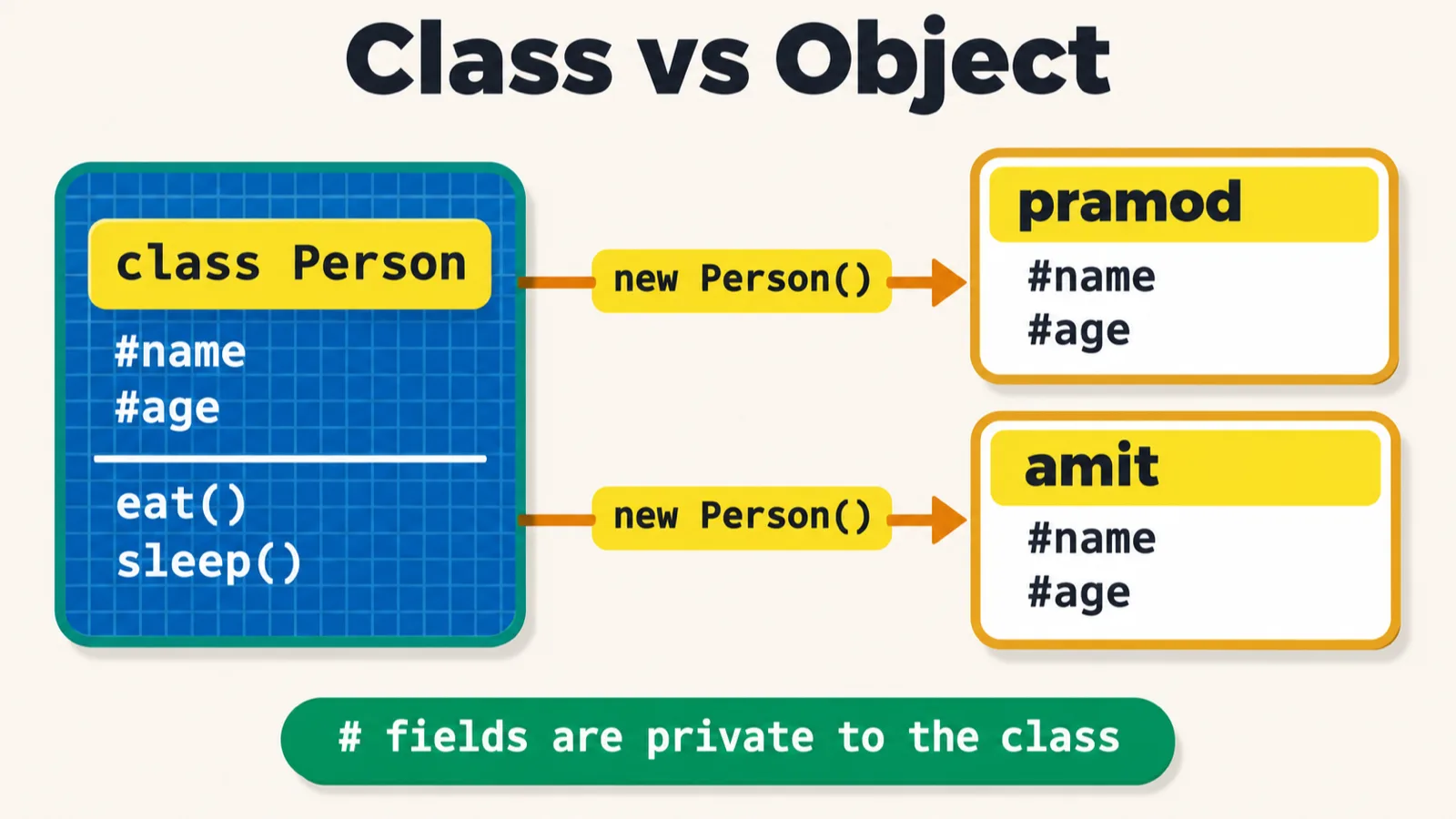
new, each with its own fields.File 175 is a class in code: the keyword class, the name Person, and curly braces.
class Person{
    // Attributes | Instance variables |  Data members | Properties
    #name;
    #age;
    #rollNo;
    #phoneNo;

    // Behaviour | Methods | Members Functions |
    eat(){}
    sleep(){}
}


// # and we are not using function key in class for the f(n)

// CAB -> Class has the A, B

const pramod = new Person();
// Object -> new Person();
// Object Ref -> pramod

const amit = new Person();
It prints nothing: it only creates two objects. A class has attributes and behaviour, the instructor said, and people call them by other names too, all of them alternate names. Lines 2 and 8 list them:
| The class has | Also called | In file 175 |
|---|---|---|
| Attributes | instance variables, data members, properties | #name, #age, #rollNo, #phoneNo |
| Behaviour | methods, member functions | eat(), sleep() |
What attributes can a person have? Everyone has a name, the instructor said, and an age, a roll number, a phone number; the behaviour is eat, sleep and so on. Two things to notice, as line 14's comment says: in a class, the functions do not use the function keyword, and the attributes start with #. What # is will be explained with the constructor and encapsulation in the upcoming class; by the way, # basically means private, the instructor said.
Log the two objects, and Node shows two Person objects that are not the same:
console.log(pramod);
console.log(amit);
console.log(pramod === amit);
Person {}
Person {}
false
Node prints Person {} for each: it does not show the private # fields.
Object versus object reference
Class Person is just a blueprint, not a real person, the instructor said: the real person is created with the keyword new, as in new Person(). Then came one of the important interview questions: in line 18, which one is the object, and which one is the object reference? If you think pramod is the object, you are wrong, the instructor said: new Person() is the object, and pramod is the object reference. Lines 19 and 20 of the file say the same.
new Person() creates a new memory, and pramod gets a reference to it, the instructor said; a second object gets a different memory. Drawing the memory, the instructor stored values in each: pramod.name is Pramod and amit.name is Amit, pramod.age is 69 and amit.age is 71. Both objects are different, the instructor said, but their core structure is the same. Those values, added to file 175:
pramod.name = "Pramod";
amit.name = "Amit";
pramod.age = 69;
amit.age = 71;

console.log(pramod);
console.log(amit);
Person { name: 'Pramod', age: 69 }
Person { name: 'Amit', age: 71 }
These are new public properties. pramod.name = "Pramod" adds a property called name from outside the class; it does not touch the private #name field, which only code inside the class can reach. How a class fills its own fields comes with the constructor.
The README adds that pramod.#name outside the class is a SyntaxError:
console.log(pramod.#name);
23_Class_Objects/175_Class.js:24
console.log(pramod.#name);
                  ^

SyntaxError: Private field '#name' must be declared in an enclosing class
Person is the mould, and pramod and amit are the glasses, a learner summed up. Absolutely right, the instructor said.
In JavaScript we do not have the Java form, Person pramod = new Person(), the instructor said: that is a Java concept. In JavaScript it is const pramod, a reference. Why const, and can we use let? Absolutely, you can use let, the instructor said: const makes sure that the object reference is stored only one time. Each row below is file 175 with one change, run here:
| You write | Node |
|---|---|
Person pramod = new Person(); in line 18, the Java way |
SyntaxError: Unexpected identifier 'pramod' |
pramod = amit; at the end, with const in line 18 |
TypeError: Assignment to constant variable. |
pramod = amit; at the end, with let in line 18 |
Works: pramod === amit is now true |
What Playwright is
While learning the OOPS concept, the class also did the installation of Playwright, in parallel. First, what is Playwright? A tool, for web automation, the instructor said. Its home page says that Playwright "enables reliable web automation for testing, scripting, and AI agents"; the AI agents part is a new line they have added, the instructor pointed out.
The deck's definition: Playwright is a Node.js library which can help you to automate the browser and rendering engine. Its features, which the class went through, are in the deck as:
- cross-browser testing (Chromium, Firefox, WebKit)
- auto-wait for elements
- network interception
- mobile emulation
- parallel test execution
- a built-in test runner
- a trace viewer for debugging
Rendering engines and real browsers
Why does Playwright say Chromium, Firefox and WebKit? Where is Safari, where is Chrome? To understand this, the instructor explained the rendering engine. Chromium is an open source project, used by Google, and it is a rendering engine: almost 90% of a browser, you can say, and the remaining 10% you can customise according to your needs. Companies took the Chromium project and added the last 10%, their customisations: from Chromium, Microsoft Edge was created, Google Chrome, Opera and the Brave browser. These are the real browsers. The advantage of the engine is that it is very lightweight.
Mozilla has its own rendering engine, Gecko, from which come Firefox and the Tor browser. WebKit is the rendering engine Safari was created from, mostly taken care of by Apple.
Why does Playwright use the engines? If you have 12,000 test cases that you want to run daily, let's suppose, do you need Chrome or Chromium? If you use Chrome, it will be slow, the instructor said, and if you use Chromium, it will be fast. When you add more customisation, your car gets slow, the instructor said: change the tyres or part of the hood, and it becomes slow, especially the mileage. A better example, the instructor added, is our operating system.

Does that mean Playwright does not support the real browsers? It supports them, the instructor said. The class's config has them ready, commented out:
    /* Test against branded browsers. */
    // {
    //   name: 'Microsoft Edge',
    //   use: { ...devices['Desktop Edge'], channel: 'msedge' },
    // },
    // {
    //   name: 'Google Chrome',
    //   use: { ...devices['Desktop Chrome'], channel: 'chrome' },
    // },
Playwright's page on browsers says the same: it can run tests on Chromium, WebKit and Firefox, as well as branded browsers such as Google Chrome and Microsoft Edge.
The class's questions about the engines:
- Edge and Chrome are based on Chromium, so ideally we do not run them separately? Mostly yes, the instructor said, but you can still run them separately, in Edge or Chrome, if your company demands.
- Is Chromium like a class, and the other browsers its instances? Not exactly, the instructor said: Chromium is also a real entity, so class and object will not work here. It is almost a browser, but not a ready browser, and you can also run Chromium by yourself.
- Any reason to prefer Firefox? It depends on your company, the instructor said.
Installing Playwright
How do you install Playwright? It is very simple, the instructor said: you just have to run one command, npm init playwright. In class, that was a new folder, 24 (the repo's 24_Playwright), a terminal opened in it, and four questions: TypeScript, the tests folder, no GitHub Actions for now, and yes to installing the browsers.
The same command was run for these notes, in a new, empty folder, with the class's four answers. What the terminal showed:
npm init playwright
Need to install the following packages:
create-playwright@1.17.139
Ok to proceed? (y) y


> npx
> create-playwright

Getting started with writing end-to-end tests with Playwright:
Initializing project in '.'
✔ Do you want to use TypeScript or JavaScript? · TypeScript
✔ Where to put your end-to-end tests? · tests
✔ Add a GitHub Actions workflow? (Y/n) · false
✔ Install Playwright browsers (can be done manually via 'npx playwright install')? (Y/n) · true
Initializing NPM project (npm init -y)…
Wrote to 24_Playwright/package.json:

{
  "name": "24_playwright",
  "version": "1.0.0",
  "description": "",
  "main": "index.js",
  "scripts": {
    "test": "echo \"Error: no test specified\" && exit 1"
  },
  "keywords": [],
  "author": "",
  "license": "ISC"
}


Installing Playwright Test (npm install --save-dev @playwright/test)…

added 3 packages, and audited 4 packages in 2s

found 0 vulnerabilities
Installing Types (npm install --save-dev @types/node)…

added 2 packages, and audited 6 packages in 1s

found 0 vulnerabilities
Writing playwright.config.ts.
Writing tests/example.spec.ts.
Writing package.json.
Downloading browsers (npx playwright install)…
✔ Success! Created a Playwright Test project at 24_Playwright

Inside that directory, you can run several commands:

  npx playwright test
    Runs the end-to-end tests.

  npx playwright test --ui
    Starts the interactive UI mode.

  npx playwright test --project=chromium
    Runs the tests only on Desktop Chrome.

  npx playwright test example
    Runs the tests in a specific file.

  npx playwright test --debug
    Runs the tests in debug mode.

  npx playwright codegen
    Auto generate tests with Codegen.

We suggest that you begin by typing:

    npx playwright test

And check out the following files:
  - ./tests/example.spec.ts - Example end-to-end test
  - ./playwright.config.ts - Playwright Test configuration

Visit https://playwright.dev/docs/intro for more information. ✨

Happy hacking! 🎭
Two things differ from a quick run of Enter, Enter, Enter, Enter. npm first asks "Ok to proceed?" when it has not fetched create-playwright before: answer y. And the GitHub Actions question now defaults to yes, (Y/n): for the class's "not right now", type n. A first run here with Enter alone wrote a workflow file as well.
It creates the folder structure for you, the instructor said, with files you can use directly. They are the files the repo holds, and the run above wrote the same five, byte for byte:
24_Playwright/
├── .gitignore
├── package-lock.json
├── package.json
├── playwright.config.ts
└── tests/
    └── example.spec.ts
{
  "name": "24_playwright",
  "version": "1.0.0",
  "description": "",
  "main": "index.js",
  "scripts": {},
  "keywords": [],
  "author": "",
  "license": "ISC",
  "devDependencies": {
    "@playwright/test": "^1.65.0",
    "@types/node": "^26.6.6"
  }
}
In the tests folder, a spec file was already created, with its test cases written in it, the instructor pointed out:
import { test, expect } from '@playwright/test';

test('has title', async ({ page }) => {
  await page.goto('https://playwright.dev/');

  // Expect a title "to contain" a substring.
  await expect(page).toHaveTitle(/Playwright/);
});

test('get started link', async ({ page }) => {
  await page.goto('https://playwright.dev/');

  // Click the get started link.
  await page.getByRole('link', { name: 'Get started' }).click();

  // Expects page to have a heading with the name of Installation.
  await expect(page.getByRole('heading', { name: 'Installation' })).toBeVisible();
});
The browsers were already on this machine, so the run above downloaded none. On a first install it downloads them, and it takes time, the instructor said, so get the setup ready early. In class it was downloading Chrome for Testing, and was going to download Firefox and Safari too, all of them, the instructor said. For Playwright 1.65.0, the version in the class's package.json, this lists what the install step fetches (the first line of each entry; their folders and download links are left out):
npx playwright install --dry-run
Chrome for Testing 158.0.8127.18 (playwright chromium v1254)
Chrome Headless Shell 158.0.8127.18 (playwright chromium-headless-shell v1254)
Firefox 159.0 (playwright firefox v1572)
WebKit 27.2 (playwright webkit v2388)
FFmpeg (playwright ffmpeg v1013)
The class's other questions about the setup:
- For any language, is it npm? We will be using npm only, the instructor said.
- Do we create a new project and run the command inside it? Yes, the instructor said.
- Will we cover TypeScript too? Yes, the instructor said: wait and watch.
- npx and npm: npx is used for execution, and npm is for libraries, the instructor said; it will be explained, so do remind the instructor.
Running the example tests
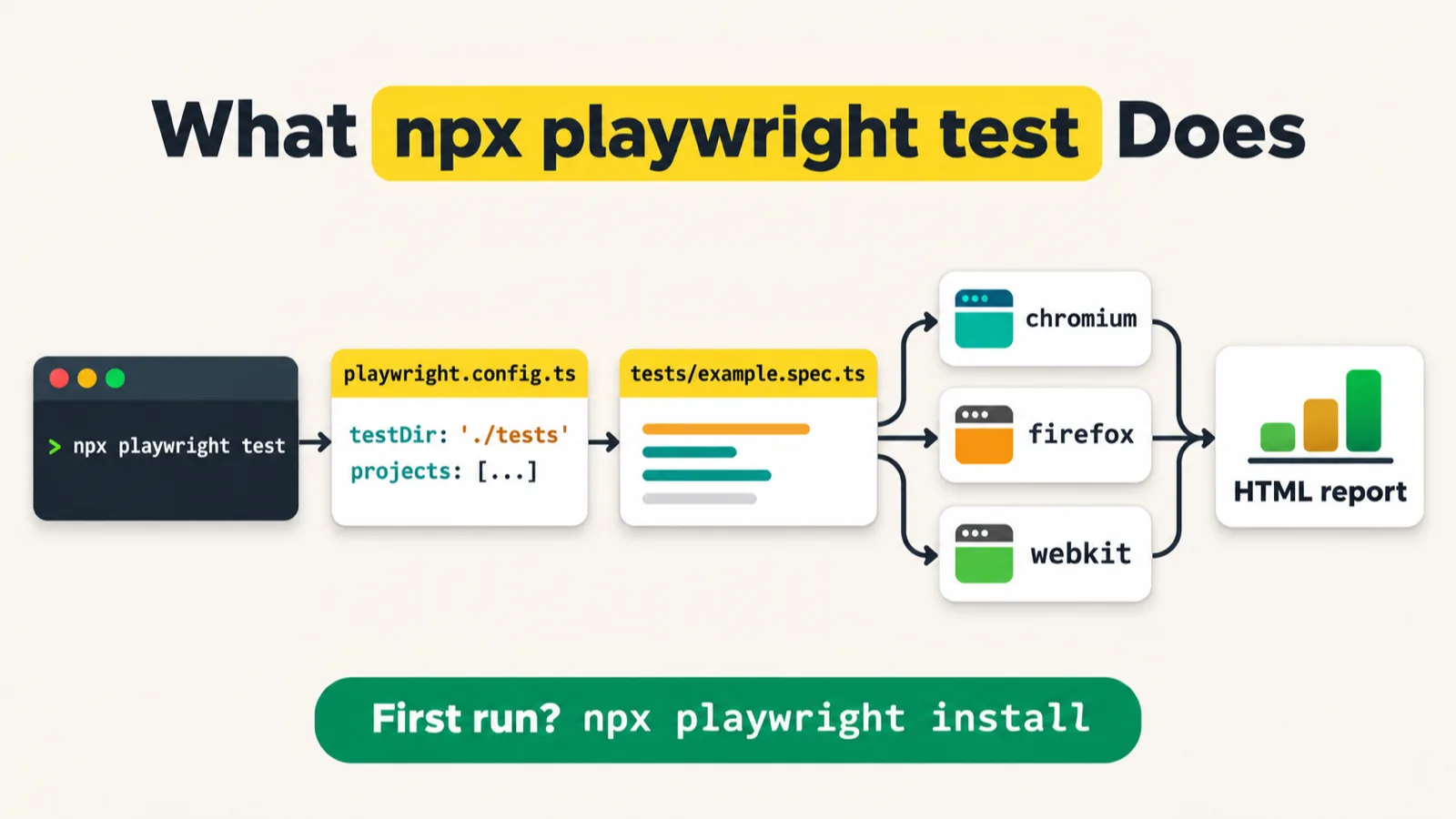
The class stopped at the install: we will not go further, the instructor said. The repo's README gives the commands to run the project, and the config says what they run: three browser projects, so the two tests run six times.
export default defineConfig({
  testDir: './tests',
  /* Run tests in files in parallel */
  fullyParallel: true,
  /* Fail the build on CI if you accidentally left test.only in the source code. */
  forbidOnly: !!process.env.CI,
  /* Retry on CI only */
  retries: process.env.CI ? 2 : 0,
  /* Opt out of parallel tests on CI. */
  workers: process.env.CI ? 1 : undefined,
  /* Reporter to use. See https://playwright.dev/docs/test-reporters */
  reporter: 'html',
  /* Shared settings for all the projects below. See https://playwright.dev/docs/api/class-testoptions. */
  use: {
    /* Base URL to use in actions like `await page.goto('')`. */
    // baseURL: 'http://localhost:3000',

    /* Collect trace when retrying the failed test. See https://playwright.dev/docs/trace-viewer */
    trace: 'on-first-retry',
  },

  /* Configure projects for major browsers */
  projects: [
    {
      name: 'chromium',
      use: { ...devices['Desktop Chrome'] },
    },

    {
      name: 'firefox',
      use: { ...devices['Desktop Firefox'] },
    },

    {
      name: 'webkit',
      use: { ...devices['Desktop Safari'] },
    },
Run for these notes in the class's project folder, with the list reporter so each test shows on its own line, and one worker so the order stays the same:
npx playwright test --reporter=list --workers=1
Running 6 tests using 1 worker

  ✓  1 [chromium] › tests/example.spec.ts:3:1 › has title (916ms)
  ✓  2 [chromium] › tests/example.spec.ts:10:1 › get started link (375ms)
  ✓  3 [firefox] › tests/example.spec.ts:3:1 › has title (973ms)
  ✓  4 [firefox] › tests/example.spec.ts:10:1 › get started link (483ms)
  ✓  5 [webkit] › tests/example.spec.ts:3:1 › has title (760ms)
  ✓  6 [webkit] › tests/example.spec.ts:10:1 › get started link (473ms)

  6 passed (5.9s)
Without those two options, the config's html reporter writes a report instead, and npx playwright show-report opens it, as the README says. The test file uses what the JavaScript chapters built up: imports, arrow functions, and async and await, as the README puts it. Its test body is a callback, as the 4 November notes showed.
What Playwright cannot automate
Can we handle mobile app automation using Playwright, a learner asked. Mobile emulation you can do, the instructor said, but proper native mobile application automation you cannot. Desktop automation using Playwright is still not supported either: for that, we have to use certain different libraries. The emulation is in the class's config, commented out:
    /* Test against mobile viewports. */
    // {
    //   name: 'Mobile Chrome',
    //   use: { ...devices['Pixel 5'] },
    // },
    // {
    //   name: 'Mobile Safari',
    //   use: { ...devices['iPhone 12'] },
    // },
Playwright's installation page puts it the same way: native mobile emulation for Chrome (Android) and Mobile Safari.
Tasks and announcements
- Today's task: set up Playwright in one of your folders, with
npm init playwright. The instructor asked Meeti to add it as a task in the chat. It takes time to download all the browsers, so make sure the setup is ready for the upcoming classes: next week, the instructor wants everyone to be ready. - Next class: the difference between Selenium, Cypress and Playwright, and the Playwright architecture, the instructor said. What
#means, with the constructor and encapsulation, is to be explained in the upcoming class too. - Towards Playwright: the journey starts probably from Friday or so; next Friday, the instructor thinks.
- Separate Playwright notes: the instructor has a separate set of notes for Playwright, to be given to the batch.
- Interview practice questions: there are almost 1500, and the instructor wants all of you to start completing them. When you have understood a question, mark it done, and you will earn points.
- Recordings on your phone: there is an Android app; download it, log in with your own username and password, and you can access the recordings through mobile. It is also available on iOS, the instructor said, adding: "I hope so."
- Tester Town: it is still in alpha, with only a few students; its 24 by 7 chat, with a game mode, will be enabled for everyone soon, probably this week, if everything works fine.
- Extra sessions: a lot of people did not attend the GitHub session, which was important, the instructor said: if you missed it, watch the recording. Whenever there is a session, you will be invited, so make sure you attend.
- The code is pushed: files 172 to 175 and the Playwright project are in the repo's 22_Export_Import, 23_Class_Objects and 24_Playwright folders, and the two PDFs in 00_learning.
Task. Set up Playwright in a project folder with npm init playwright, before next week: TypeScript, the tests folder, no GitHub Actions workflow for now, and yes to the browsers.
Show the answer
Answer. Make a new folder, open a terminal in it and run npm init playwright. Answer y if npm asks to fetch create-playwright, press Enter for TypeScript and for the tests folder, type n for the GitHub Actions workflow, which now defaults to yes, and press Enter to install the browsers. You get the five files of the repo's 24_Playwright: package.json, package-lock.json, playwright.config.ts, tests/example.spec.ts and .gitignore. Then npx playwright test --reporter=list should report 6 passed: two tests in three browsers.
In const pramod = new Person();, which one is the object, and which one is the object reference?
Worth practising too: What is the difference between a default export and a named export? Why does file 173 print nothing at all? What does # in front of a field mean? Why does Playwright use rendering engines such as Chromium, and can it still run Chrome? Can Playwright automate a native mobile app, or a desktop app?
Show the answer
Answer. new Person() is the object, created in memory, and pramod is the object reference that points to it; a second new Person() is a different object, so pramod === amit is false. A file has one default export at most, imported without braces under any name; it can have many named exports, imported in braces by their exact name, or renamed with as. File 173 imports from ./testutil.js, a file that does not exist, and Node resolves every import before it runs any line, so it stops with ERR_MODULE_NOT_FOUND first. # basically means private: pramod.#name outside the class is a SyntaxError. A rendering engine is almost a browser and very lightweight: with 12,000 tests a day, Chrome would be slow and Chromium fast, as the instructor put it. Playwright still supports the real browsers, and the config has Google Chrome and Microsoft Edge ready, commented out. It can emulate a phone, but it cannot automate a native mobile app or a desktop app.