What this class covered
- Hoisting with var: declared before the code runs, set to undefined
- let before its line: ReferenceError
- Hoisting inside a function
- var in a block, and redeclaring var
- The temporal dead zone
- Functions, arrow functions and classes before their line
- typeof and the temporal dead zone
- Closures: an inner function keeps its outer variables
- Strings: quotes, String(), character codes, indexes and searching
- Tasks, and what comes next
- Hoisting sets up every declaration before the first line runs; values arrive only when their line does.
- A
varread early givesundefined. Alet,constor class read early throwsReferenceError: it is in the temporal dead zone. - Function declarations can be called before their line; function expressions and arrow functions cannot.
varcan be declared again with the same name;letcannot.typeofan undeclared name is"undefined", buttypeofaletin its dead zone throws.- A closure is an inner function that keeps using its outer function's variables after the outer function has returned.
- Strings are indexed from 0, and
indexOfreturns -1 when the text is not there.
Hoisting with var
Today's first topic is an interview favourite: hoisting, and with it the temporal dead zone.
Lab 121:
console.log(greeting);
var greeting = "Hello";
console.log(greeting);


// Behind the scenes:
// var greeting;              <-- hoisted with undefined
// console.log(greeting);    <-- undefined
// greeting = "Hello!";      <-- assignment stays in place
// console.log(greeting);    <-- "Hello!"
undefined
Hello
The first line reads greeting before the line that declares it, and gets undefined, not an error. (The comments, copied from the class notes, write the value as Hello!; the code prints Hello.)
What happened is the engine's two phases. When JavaScript runs your code, it first does memory creation: it scans the whole scope, finds every declaration and sets it up. A var is set up with the value undefined. Only then comes execution, line by line, and the assignment happens when its line runs. So in the engine's view, var greeting already exists, as undefined, when line 1 runs. From the class notes: hoisting does not physically move your code; it is a way to picture what the engine does with declarations before it runs anything.
Why does the engine do this first? The instructor's comparison: the first thing checked when you come to class is your homework, because it tells the teacher straight away who is ready. The engine's first job is the same kind of check: what is declared in this scope.

var arrives with a value, undefined.The name comes from hoisting a flag, as on Independence Day: the declaration is raised to the top of its scope before anything else happens.
let before its line
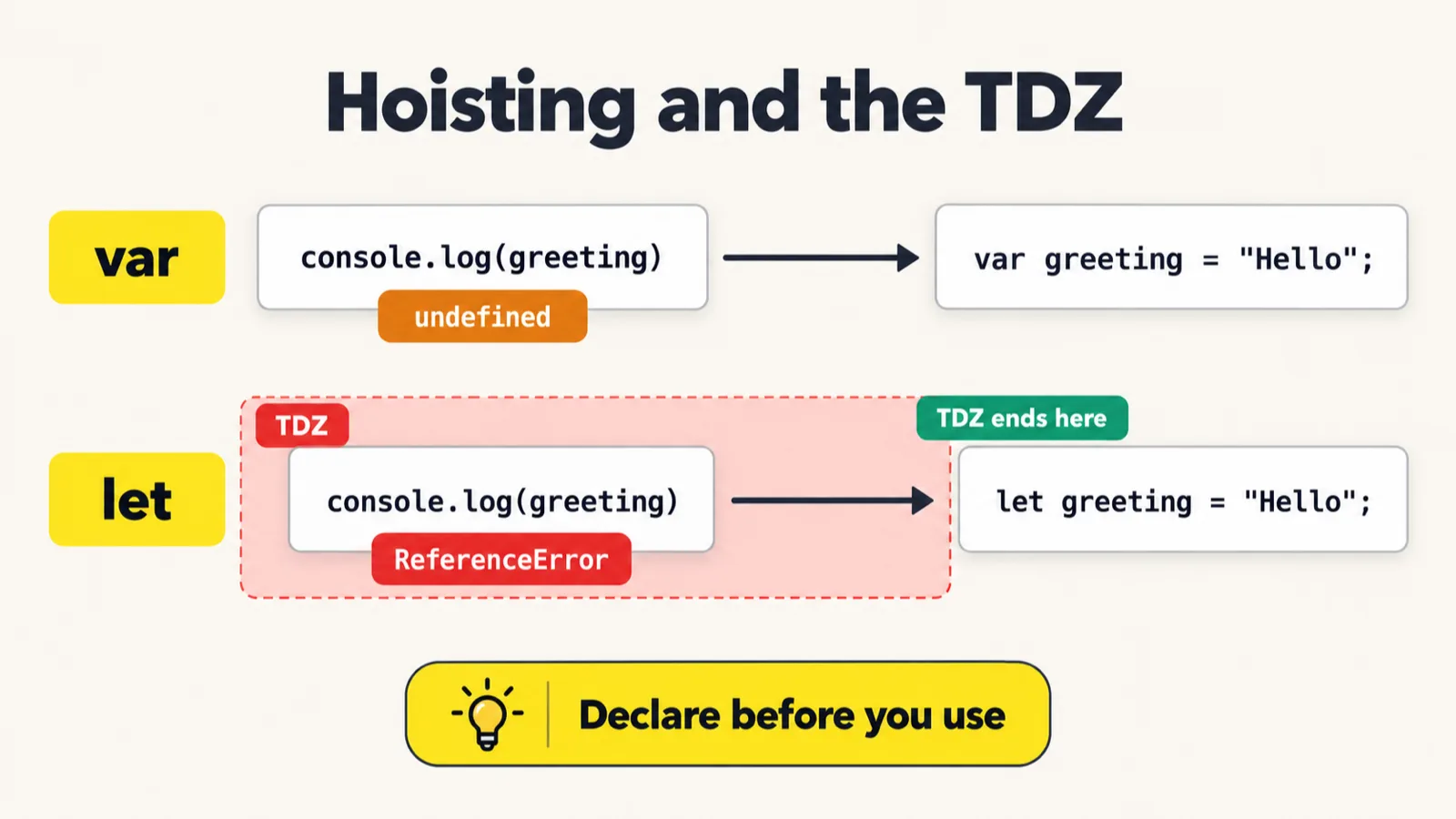
var and with let.Lab 122, the same idea with let:
// console.log(greeting); // Error
let greeting = "Hello";
console.log(greeting);
Hello
The early read on line 1 is commented out. Switch it on and the file stops at once:
122_Let_Hoisting.js:1
console.log(greeting); // Error
            ^

ReferenceError: Cannot access 'greeting' before initialization
With var the early read gave undefined; with let it is an error. That is why let is preferred: a value used before it exists is a bug, and let reports it instead of hiding it.
let is hoisted too. Early in class, let was described as not hoisted at all. The class's own comparison table, later on, says it is hoisted but not initialized, and that is the accurate version: the engine knows about greeting from the start of the scope, but gives it no value until its line runs. That gap is the temporal dead zone, below.
Hoisting inside a function
Lab 123:
function getUserStatus(){
    // var status_code; => hoisted
    console.log(status_code); // undefined!
    var status_code = "200";
    console.log(status_code);
}

getUserStatus();
undefined
200
The same thing, one level down. A var inside a function is hoisted to the top of that function, not to the top of the file, so status_code is undefined on line 3 and "200" after line 4, as the comment on line 2 shows.
var in a block, and redeclaring var
Lab 124:
var a = "Pramod";
// 10,0000 lines
if(true){
    console.log(a);
    var a = "temp";
    console.log(a);
}
Pramod
temp
Picture 10,000 lines between the first var a and the if block, as the class did. Inside the block, var a = "temp" is not a new variable: var ignores blocks, so it is the same a as on line 1, and it overwrites it. Line 4 prints Pramod, line 6 prints temp, and the outer a is now temp too.
Despite its name, the file uses var, as the repo's README notes. With let inside the block, the block gets its own a, and line 4 now falls in its temporal dead zone:
if(true){
    console.log(a);
    let a = "temp";
    console.log(a);
}
124_Let_TDZ.js:4
    console.log(a);
                ^

ReferenceError: Cannot access 'a' before initialization
Redeclaring. Lab 126:
var testName = "Login Test";
var testName = "Signup Test";    // No error! Re-declaration allowed with var
var testName = "Search Test";    // Still no error!
console.log(testName);
Search Test
var lets you declare the same name three times with no error, and the last value wins. In a big codebase that silently overwrites someone else's variable. let refuses:
let testName = "Login Test";
let testName = "Signup Test";
redeclare.js:2
let testName = "Signup Test";
    ^

SyntaxError: Identifier 'testName' has already been declared
The temporal dead zone
let line. Reading the variable inside it is an error, not a silent undefined.From the class notes: the temporal dead zone (TDZ) is the time when a variable exists but you are not allowed to use it yet. It runs from the start of the block to the line that declares a let or const. Lab 125:
{
    console.log(a);
    let a = 10;
}
// ReferenceError: Cannot access 'a' before initialization

// Enter Block
//  ↓
// a is created ✅
// if a -> var-> undefined
// if a -> let -> no value
// a has NO value yet ❌

// console.log(a) // Error TDZ (let, const), Var => undefined

// let a = 10;
//     ↓
// a = 10 ✅
125_let_tds.js:2
    console.log(a);
                ^

ReferenceError: Cannot access 'a' before initialization
The block starts, a is created, and line 2 tries to read it before line 3 gives it a value. Inside the dead zone the only answer is ReferenceError. Once line 3 runs, the zone ends and a is 10, as the comments at the bottom of the file show.
var has no dead zone. The class described var as sitting in the TDZ with the value undefined. Strictly, var has no TDZ: it is set to undefined the moment its scope starts, which is exactly why it can be read early. The dead zone belongs to let, const and classes, as the last row of the class's table says.
Functions, arrow functions and classes before their line
The class asked the same question of every kind of declaration: can you use it before its line? The answers, run one at a time, using the examples from the class notes:
| Declared with | Used before its line | Result |
|---|---|---|
var x = 1; |
console.log(x) |
undefined |
let x = 1; |
console.log(x) |
ReferenceError: Cannot access 'x' before initialization |
const x = 1; |
console.log(x) |
ReferenceError: Cannot access 'x' before initialization |
function sayHello() {...} |
sayHello() |
works: prints Hello, World! |
var greet = function() {...} |
greet() |
TypeError: greet is not a function |
const runTest = () => {...} |
runTest() |
ReferenceError: Cannot access 'runTest' before initialization |
class User {...} |
new User("Dev") |
ReferenceError: Cannot access 'User' before initialization |
- Function declarations are hoisted whole, name and body, so you can call them before they appear. The last class used that already.
- A function expression assigned with
varis hoisted like anyvar: asundefined. Callingundefinedis aTypeError. - An arrow function in a
constfollows theconstrule, so it is in the dead zone until its line. - Classes are hoisted but stay in the dead zone too. Classes come with object-oriented programming, later in the course.
The class's comparison table, from the notes:
| Feature | var | let | const | function | class |
|---|---|---|---|---|---|
| Hoisted? | Yes | Yes | Yes | Yes, fully | Yes |
| Initialized during hoisting? | Yes, as undefined | No (TDZ) | No (TDZ) | Yes, the whole body | No (TDZ) |
| Used before its line | undefined | ReferenceError | ReferenceError | works | ReferenceError |
| Scope | function | block | block | function | block |
| Can be declared again? | Yes | No | No | Yes | No |
| Can be reassigned? | Yes | Yes | No | Yes | Yes |
| Must be initialized? | No | No | Yes | not applicable | not applicable |
| Has a TDZ? | No | Yes | Yes | No | Yes |
typeof and the temporal dead zone
Lab 127:
typeof missingName;

// var missingName= "undefined";
typeof missingName;
It prints nothing: typeof works out an answer and nothing prints it. With the first line wrapped in console.log:
undefined
missingName was never declared anywhere, yet typeof answers "undefined" with no error. Read the name directly, though, and it fails:
console.log(typeof missingName);
console.log(missingName);
undefined
typeof_missing.js:2
console.log(missingName);
            ^

ReferenceError: missingName is not defined
Inside a dead zone, even typeof throws:
{
    console.log(typeof score);
    let score = 100;
}
typeof_tdz.js:2
    console.log(typeof score);
            ^

ReferenceError: Cannot access 'score' before initialization
So typeof is not a safe check: for a name that does not exist it quietly says "undefined", and for a let that is not ready yet it throws. The class's conclusion: an undefined name should be an error, not a quiet "undefined".
typeof creates nothing. In class, the quiet "undefined" was explained as JavaScript creating the variable by default. Strictly, it creates nothing: typeof is the one operator allowed to touch a name that was never declared, and it returns "undefined" for it. The second line above proves it, because missingName is still not defined after the typeof.
Closures
startBrowser is over by the time runTc() runs, yet name is still there: the returned function took it along. That is a closure.From the class notes: a closure is when an inner function remembers and can access variables from its outer function, even after the outer function has finished executing. Lab 128:
function startBrowser() {
    let name = "edge";

    function installBrowser() {
        console.log(name);
    }

    return installBrowser;
}

const runTc = startBrowser();
runTc();
edge
startBrowser creates name and an inner function, installBrowser, and returns the inner function without calling it. By the time runTc() runs, startBrowser has finished. Yet installBrowser still prints edge: it kept access to name. Asked whether let being block-scoped stops this, the answer was no. The inner function only reads name; it does not change it, and the closure keeps it reachable.

The instructor's analogy: in a family, the children can use the parents' car. A normal function's local variables vanish when it ends; an inner function holds on to its outer function's variables.
What closures are for, from the class list: data privacy, function factories, callbacks, and modules. Why put a function inside a function at all? Privacy: if the inner function is never shown, nobody outside even knows it exists. Can you call installBrowser directly from outside? No:
const runTc = startBrowser();
runTc();
installBrowser();
edge
128_Closure.js:13
installBrowser();
^

ReferenceError: installBrowser is not defined
runTc() still prints edge; the direct call fails, because the name installBrowser exists only inside startBrowser.
Strings
![A cheat sheet titled Strings: Index, length and at(). let str = "Hello"; with the letters H, e, l, l and o in five yellow cells, indexes 0 to 4 below and -5 to -1 above. To the right: str.length gives 5, str[0] gives "H", str.at(-1) gives "o". A banner at the bottom reads: Strings can't be changed in place.](/class/images/javascript-hoisting-tdz-closures-strings-strindex.webp)
Now the course moves into strings, then objects and object-oriented programming. From the class notes: a string is a sequence of characters, and in testing strings are everywhere: URLs, selectors, assertions, response messages, log parsing. Lab 129:
let url = "https://app.vwo.com";
let status = 'pass';
let message = `Test completed in ${320}ms`;
console.log(message);


// Single quotes
let a = 'hello';

// Double quotes
let b = "world";

// Template literals (backticks) - allows expressions & multiline
let name1 = "Alice";
let msg = `Hello, ${name1}! 2 + 2 = ${2 + 2}`;
console.log(msg);


// Multiline
let report = `
  Test: Login
  Status: Pass
  Duration: 320ms
`;


console.log(String(200));
String(true); //  "true"
String(null); // "null"
String([1, 2]); // "[1,2]"
Test completed in 320ms
Hello, Alice! 2 + 2 = 4
200
- Single and double quotes make the same kind of string.
- Backticks make a template literal:
${...}is replaced by the value of what is inside, here 320 and 2 + 2. Asked why the dollar is there: without it, the braces are plain text. - Backticks also allow several lines, as
reportshows. String()turns other values into text. Lines 29 to 31 print nothing; withconsole.logadded they give:
Test completed in 320ms
Hello, Alice! 2 + 2 = 4
200
true
null
1,2
String([1, 2]) is 1,2, without the brackets the comment on line 31 shows; the repo's README makes the same correction.
Character codes. Behind the scenes every character has a number: JavaScript uses ASCII and Unicode codes. From the class notes:
console.log("A".charCodeAt(0)); // 65
console.log("Z".charCodeAt(0)); // 90
console.log("a".charCodeAt(0)); // 97
console.log("z".charCodeAt(0)); // 122
65
90
97
122
Uppercase A to Z are 65 to 90, and lowercase a to z are 97 to 122.
Length and indexes. Lab 130:
// String Properties & Basic Access

let a = "dasdadas\nadasd";
let a2 = 'dasdad "a"sdsa\ndasd';

let str = "Hello, World!";
console.log(str.length); // start 1
console.log(str[0]); // index = 0
console.log(str[7]);
console.log(str.at(-1));
console.log(str.at(-6));

// charAt()
str.charAt(0);
str.charCodeAt(0);  // 72
13
H
W
!
W
"Hello, World!" has 13 characters, at indexes 0 to 12, so str[0] is H and str[7] is W. at() counts from the end with a negative number, as with arrays: at(-1) is ! and at(-6) is W. The two calls at the bottom work out answers without printing them; printed, charAt(0) gives H and charCodeAt(0) gives 72, the code for H:
13
H
W
!
W
H
72
Searching. Lab 131:
// Searching & Checking

let url = "https://staging.vwo.com/api/login?retry=true";
// includes()
url.includes("staging");
url.includes("production");

// startsWith / endsWith
url.startsWith("https");
url.startsWith("http://");
url.endsWith("true");

// indexOf / lastIndexOf
console.log(url.indexOf("a"));
console.log(url.lastIndexOf("a"));
console.log(url.indexOf("nothere"));

// ASCII -> A -> 65
10
24
-1
Only the three indexOf lines print. The class noticed in class: the includes, startsWith and endsWith lines answer true or false, but nothing prints them. Printed, they give:
true
false
true
false
true
10
24
-1
as sit at 10 and 24, the answers indexOf and lastIndexOf give in file 131.| Expression | Value |
|---|---|
url.length |
44 |
url[0] |
"h" |
url[8] |
"s" |
url.indexOf("a") |
10 |
url.lastIndexOf("a") |
24 |
url.slice(0, 5) |
"https" |
url.slice(8, 23) |
"staging.vwo.com" |
url[url.length - 1] |
"e" |
A learner asked whether lastIndexOf("a") should be 21. It is 24: the second a is the one in api, at index 24. indexOf works with any text, not just one character: "nothere" is not in the URL, so the answer is -1, as with arrays.
Tasks and announcements
- The 120 exercises: finish at least 120 and push them to your GitHub before Friday's class. Many have; some have not. From here the pace picks up, into TypeScript and Playwright, and the exercises on GitHub are what make you confident.
- Push today's files too: the strings chapter is in the batch repo.
- Doubts go in the doubt thread, which Meeti has posted.
- Recordings or sign-in problems: the support team will contact you and help.
- Next class: more string methods, then multi-dimensional arrays; after that objects and object-oriented programming, with TypeScript. Higher-order functions are dropped from this batch, because they are rarely used in Playwright automation; the earlier batches' videos still cover them.
- Why JavaScript first: Playwright in this course uses TypeScript, a bigger brother of JavaScript. As the instructor put it, you learn ABCD before you learn to make words.
Task. Finish at least 120 exercises and push them to GitHub before Friday's class.
Interview questions. What is hoisting? What does a var give if you read it before its line, and what does a let do? Can you call a function expression before its line? What does typeof give for a name that was never declared, and for a let in its dead zone? What is a closure?
Show the answer
Answer. Hoisting sets up every declaration in a scope before the code runs: the declarations, not the values. A var read early gives undefined; a let throws ReferenceError, because it is in the temporal dead zone until its line. A function declaration can be called early, but a function expression cannot: as a var it is still undefined, and calling it is a TypeError. typeof a name that was never declared is "undefined"; typeof a let in its dead zone throws ReferenceError. A closure is an inner function that keeps access to its outer function's variables after the outer function has returned, the way runTc() still prints edge in lab 128.