What this class covered
- Arrays of arrays: 1D and 2D
- Rows and columns on a test-data sheet
- Reading a cell: row first, then column
- Nested loops over a test matrix
- Printing without a new line
- Row sums with map and reduce
- Pattern 1: the right-hand triangle
- Pattern 2: the left-hand triangle, and ELI5
- Pattern 3: the pyramid
- Tasks: practise the three patterns
- A 2D array is an array of arrays: each inner array is a row, and each item inside a row is a column.
grid[row][col]reads the row first, then the column, and both indexes start at 0.grid.lengthgives the number of rows, andgrid[0].lengththe number of columns.- Reading a row that does not exist,
grid[7][7]on a 3 by 3 grid, throws aTypeError. - In nested loops, the outer loop (
i) walks the rows and the inner loop (j) walks the columns. process.stdout.writeprints without a new line, soconsole.log("")ends each row.- In a star pattern, the inner loop's condition sets the stars on row
i:j <= iin files 144 and 145.
Arrays of arrays: 1D and 2D
The last class covered string methods and objects (the 30 October notes); this one took up multidimensional arrays, chapter 18 in the repo.
When a learner asked whether callbacks were due to start, the instructor said multidimensional arrays were still remaining and would come first, because a lot of important interview questions come from this topic; callbacks follow after. It is a very small topic, in the instructor's words, but one to cover.
The deck's definition, which the instructor read out: a normal (1D) array is a single list, and a multi-dimensional array is an array of arrays, like a table with rows and columns. The most common is the 2D array. File 140 is the 1D example from the deck, a plain list:
// 1D array,list - duplicate element
let results = ["pass", "fail", "pass"];
It only creates the list, so it prints nothing. A 2D array puts arrays inside an array, and the deck adds the rule to remember: each inner array is a row, and each item inside a row is a column. The examples, the instructor said, all come from the class notes.
Rows and columns on a test-data sheet
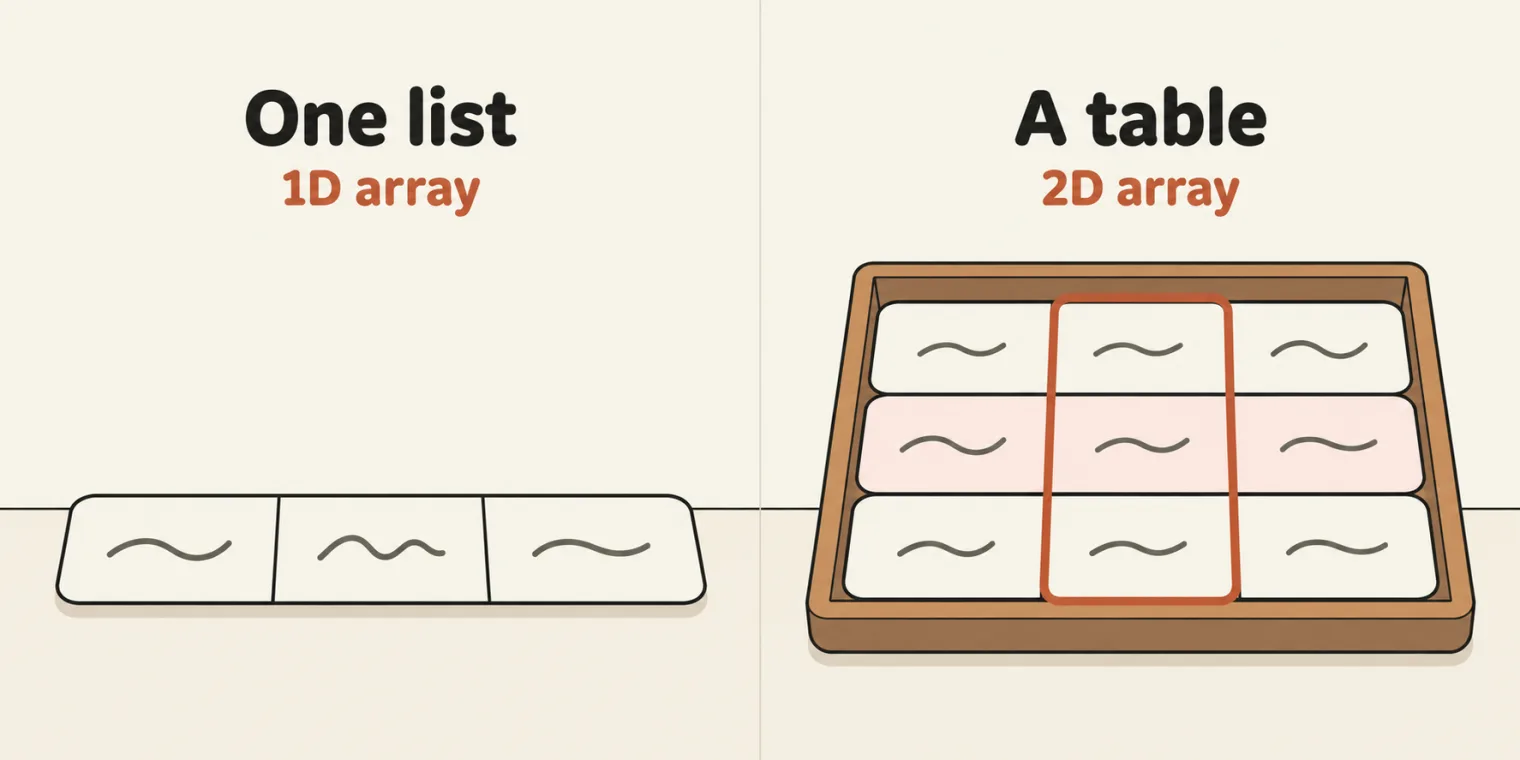
To show rows and columns, the instructor opened a Google Sheet of test data for a Playwright login page, a perfect example of a two-dimensional array in the instructor's words. Each line of cells across is a row, row 1, row 2 and so on, and the green line of cells down the sheet is a column. Rows and columns are totally different, so do not confuse them. The deck links the sheet: TestData_PW_Login.
The instructor then selected blocks of cells and asked how many rows and how many columns each one has. Each block still carries its label on the sheet:
| Label on the sheet | Rows | Columns | Read out in class as |
|---|---|---|---|
3x3 |
3 | 3 | 3 rows and 3 columns, a 3-by-3 matrix |
9x2 |
9 | 2 | 9 by 2 |
4x1 |
4 | 1 | 4 rows and 1 column |
1x4 |
1 | 4 | 1 row and 4, 1 by 4 |
With only one row, the instructor said, it is almost similar to a 1D array, and when a learner asked whether one row or one column makes it 1D, the answer was yes. In code, a one-row table written with two pairs of brackets is still an array of arrays: [[10, 20, 30, 40]].length is 1, and each item takes two indexes, such as [0][3].
Reading a cell: row first, then column
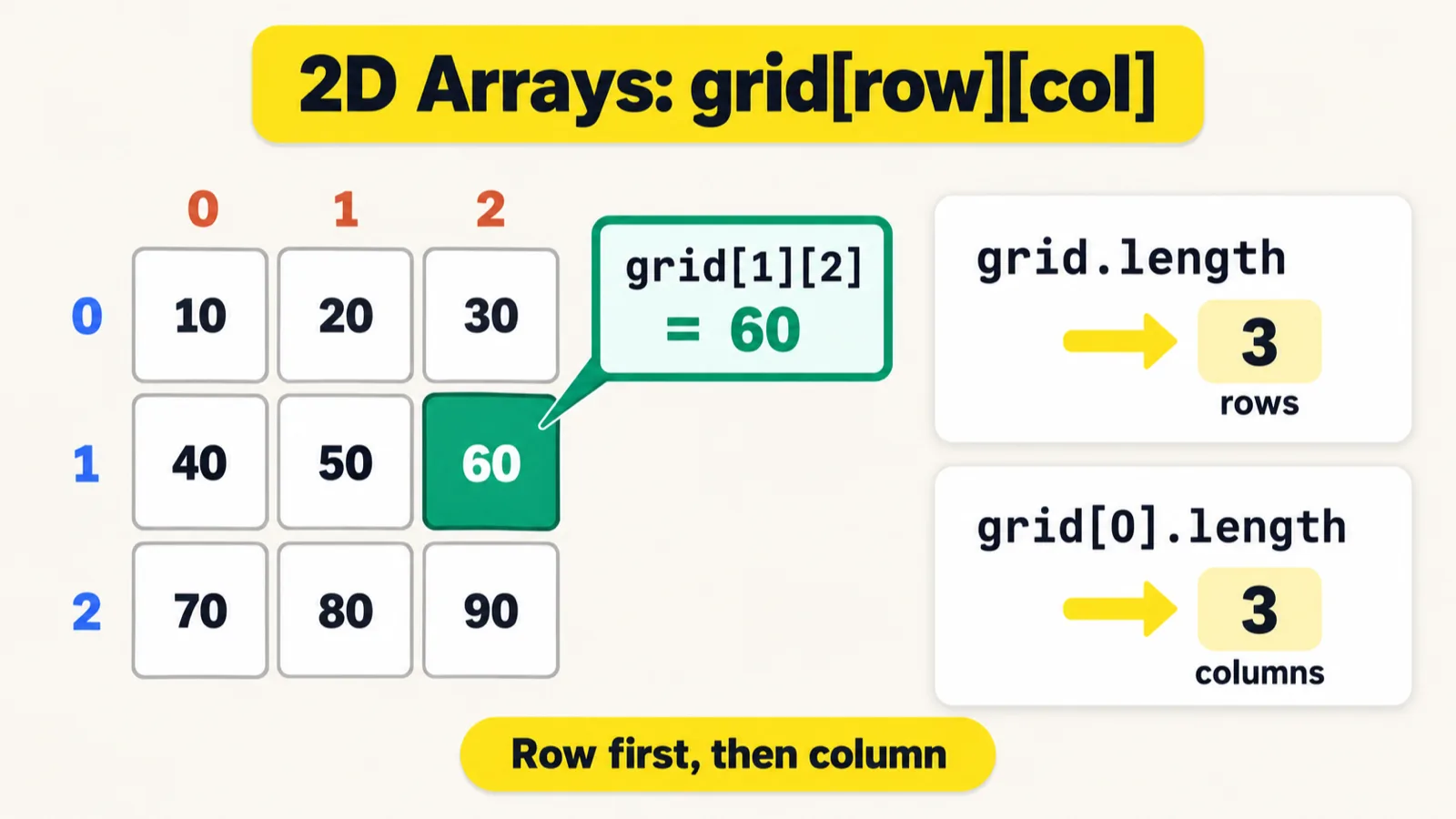
grid[1][2] is row 1, then column 2.On the iPad, the instructor drew a 3 by 3 matrix of the numbers 1 to 9, the same values as the deck's matrix. The advice: always draw the rows first, row 0, row 1 and row 2, then the columns 0, 1 and 2. A lot of people have a confusion here, the instructor said, and drawing this diagram gives you the clarity. Two cells were then fetched by hand: 0, 0 gives 1, and 2, 1 gives 8. The deck's matrix, with those two lookups added and printed:
let matrix = [
[1, 2, 3],
[4, 5, 6],
[7, 8, 9]
];
console.log(matrix[0][0]);
console.log(matrix[2][1]);
1
8
File 141 reads, changes and measures a grid of the numbers 10 to 90, the grid on the cheat sheet:
let grid = [
    [10, 20, 30],
    [40, 50, 60],
    [70, 80, 90]
];

console.log(grid[0][0]);
// console.log(grid[7][7]);

grid[0][0] = 99;
console.log(grid);

console.log(grid.length); // Row -> 3
console.log(grid[0].length); // Columns -> 3
10
[ [ 99, 20, 30 ], [ 40, 50, 60 ], [ 70, 80, 90 ] ]
3
3
- Line 7,
grid[0][0], is row 0, then column 0: it prints 10. - Line 8 reads outside the grid. The instructor asked it as an interview question: what will happen? It gives an error, cannot read the property of undefined. With line 8 switched on, the file prints 10, then stops:
console.log(grid[7][7]);
10
141_2D.js:8
console.log(grid[7][7]);
                   ^

TypeError: Cannot read properties of undefined (reading '7')
There is no row 7, so grid[7] is undefined, and reading [7] from undefined throws. The repo's README adds the other half: a column that does not exist, on a row that does, only gives undefined. Run after lines 1 to 5 of the file:
console.log(grid[1][2]);
console.log(grid[0][7]);
60
undefined
grid[1][2] is the cheat sheet's 60: row 1, then column 2. grid[0][7] is undefined, with no error.
- Line 10 changes a value. Can the grid change? Of course it will change, the instructor said: it is mutable in nature. So line 11 prints 99 where 10 was.
grid.lengthalways gives you the rows, 3, and a row's length gives the columns:grid[0].length, also 3. In this grid, everything is 3.
Nested loops over a test matrix
To visit every cell, you need a loop inside a loop. On the iPad, the instructor drew it over the 3 by 3 grid: i starts at 0 and runs while i < 3, going in the row direction, and j starts at 0 and runs while j < 3, going in the column direction. Printing the value at i, j then visits the cells in order, row by row. A learner put it as: the first loop goes through the rows and the next one through the columns, and the instructor agreed.
Where is this useful? Two-dimensional arrays are also helpful in test data, the instructor said, and there are a lot of coding interview questions on them: the pattern programs. When a learner asked for a real example, the instructor showed a test matrix: each row holds a test case, its status and its status code.
let testMatrix = [
    ["login", "pass", 200],
    ["checkout", "fail", 404],
    ["search", "pass", 180]
];

for(let i=0;i< testMatrix.length;i++){
    for(let j=0;j< testMatrix[i].length;j++){
        process.stdout.write(testMatrix[i][j]+" ");
    }
    console.log("");
}

console.log(" --------- ");
login pass 200
checkout fail 404
search pass 180
 ---------
The outer loop runs once per row, i < testMatrix.length, and the inner loop once per cell of that row, j < testMatrix[i].length. The same file, with every pass and every check of the inner loop logged:
| Row | Column | Cell | Written |
|---|---|---|---|
| 0 | 0 | "login" |
"login " |
| 0 | 1 | "pass" |
"pass " |
| 0 | 2 | 200 |
"200 " |
| 0 | 3 | none: 3 < 3 is false |
console.log("") ends the line |
| 1 | 0 | "checkout" |
"checkout " |
| 1 | 1 | "fail" |
"fail " |
| 1 | 2 | 404 |
"404 " |
| 1 | 3 | none: 3 < 3 is false |
console.log("") ends the line |
| 2 | 0 | "search" |
"search " |
| 2 | 1 | "pass" |
"pass " |
| 2 | 2 | 180 |
"180 " |
| 2 | 3 | none: 3 < 3 is false |
console.log("") ends the line |
process.stdout.write adds each cell and a space to the current line, which is why every printed line ends with a space, and console.log("") ends the line once the row is done. Line 14 then prints the divider. The deck's copy of this loop prints each cell with console.log(testMatrix[i][j] + " ") instead, so every cell lands on a line of its own, nine lines in all; the repo's version, above, keeps each row on one line.
Printing without a new line
From the deck:
process.stdout.write -> print without the new line
console.log() ->we will print with a new line
console.log adds a new line after what it prints; process.stdout.write does not, so the next output carries on along the same line. When a learner asked what without a new line means, the instructor showed it with two words, first with console.log:
console.log("hi");
console.log("bye");
hi
bye
Then with process.stdout.write:
process.stdout.write("hi");
process.stdout.write("bye");
hibye
No new line: both words land in the same row. Asked to explain it, the instructor said process.stdout.write is a function, and process a library already present, used to write to the console through standard input and output.
process comes from Node.js. process is an object that Node.js provides, not part of the JavaScript language: in a browser's console, typeof process is "undefined", so process.stdout.write fails there. The repo's README makes the same point, and adds that file 146's way, building each row as a string and printing it with console.log(row), also works in a browser console.
Row sums with map and reduce
map keeps one total for each row.Before the patterns came a couple of array functions. File 143 holds a student score matrix, one row per student:
let scores = [
    [85, 90, 78],   // student 0 , 253
    [60, 45, 70],   // student 1,  175
    [95, 88, 92]    // student 2, 275
];

// Matrix -> Row = Col ->

let rowsSum = scores.map(row => row.reduce((a,b) => a+b));
console.log(rowsSum);
[ 253, 175, 275 ]
To get the sum of each row, the instructor called scores.map with an arrow function, and reduce inside it, a crazy feature in the instructor's words. The sums of the rows are 253, 175 and 275, as the comments on lines 2 to 4 say.
How it works, as the instructor explained it: map takes one row at a time, and reduce takes the first two elements and adds them, 85 plus 90 gives 175, then takes 175 plus 78, which gives 253. Asked how it moves from one row to the next, the instructor said: automatically, because the arrow function is given each row in turn, row 0, row 1 and row 2. When a learner remarked that only two variables are used, the instructor said two inputs are taken, a plus b, an output comes out, and then another two are taken. The same file, with every addition logged:
| Row | Step | Running total | Next cell | Sum |
|---|---|---|---|---|
| 0 | 1 | 85 | 90 | 175 |
| 0 | 2 | 175 | 78 | 253 |
| 1 | 1 | 60 | 45 | 105 |
| 1 | 2 | 105 | 70 | 175 |
| 2 | 1 | 95 | 88 | 183 |
| 2 | 2 | 183 | 92 | 275 |
a starts as the row's first cell and b as the second; after that, a is the sum so far. map keeps each row's last sum, so rowsSum is [ 253, 175, 275 ]. map itself came up in the 19 October notes.
A matrix does not have to be square. Line 7's comment reads Matrix -> Row = Col, and in class a matrix was described as rows and columns being almost equal. That fits this file, 3 rows by 3 columns. A 2D array can have any number of rows and columns, like the 9 by 2 selection on the sheet, and in JavaScript its rows can even have different lengths, as the repo's README notes.
Pattern 1: the right-hand triangle
j <= i, in both files. File 144 counts i up from 0; file 145 starts i at n and counts down, so the long row comes first.Pattern programs come up in interviews: this question sometimes will come in your interview, the instructor warned, so pay attention. The first pattern prints one star, then two, then three. It resembles a triangle: a kind of right-hand triangle, the instructor said, or a 90-degree right triangle, a left triangle, whatever you call it. A learner called it a right-angle triangle, and the instructor agreed.
The instructor's way in starts with a drawing of what the instructor calls favourite lines: a 3 by 3 grid with every cell labelled by its row and column, from 0, 0 to 2, 2. The stars sit at 0, 0; at 1, 0 and 1, 1; and at 2, 0, 2, 1 and 2, 2. The pattern behind them: a star wherever j is less than or equal to i, and a space the moment j is greater than i. That is the core logic, so the inner loop runs only while j <= i:
// n = 3
// *
// * *
// * * *

let n = 3;

for(let i=0;i<n;i++){
    for(let j=0;j<=i;j++){
        // console.log("*");
        process.stdout.write("*");
    }
    console.log("");
}
*
**
***
The same file, with every loop check logged:
| Outer loop | Stars printed at | Stars | Inner loop stops at | Line |
|---|---|---|---|---|
i = 0 |
j = 0 |
1 | j = 1: 1 <= 0 is false |
* |
i = 1 |
j = 0, 1 |
2 | j = 2: 2 <= 1 is false |
** |
i = 2 |
j = 0, 1, 2 |
3 | j = 3: 3 <= 2 is false |
*** |
i = 3 |
outer check 3 < 3 is false: the loop ends |
So row i gets i + 1 stars. The code never prints the spaces from the drawing: the inner loop stops at the first j above i, and nothing more is written on that line.
Why process.stdout.write. Line 10 is the console.log("*") the class tried first. With it switched back on, and line 11 commented out:
console.log("*");
// process.stdout.write("*");
*

*
*

*
*
*
console.log adds a new line after every star, so the stars stack up one per line, with a blank line from console.log("") after each row. That new line is not wanted, so line 11 writes each star with process.stdout.write, and a new line is added only when one row has finished. Leave out line 13, console.log(""), and everything ends up on the same line:
// console.log("");
******
Any n. You can replace the 3 in the loop with n, the instructor said, and it works the same; change n to 5 and it prints 5 rows. With line 6 changed to this:
let n = 5;
*
**
***
****
*****
With let n = 1; it prints a single star. Whatever n the user gives, the logic works.
The comment draws spaces that the code does not print. Lines 2 to 4 draw the triangle as * * *, with a space between the stars. The code writes "*" on its own, so the rows print as *, ** and ***. The repo's README points this out too.
Pattern 2: the left-hand triangle
The logic of the first triangle will not work for another one, the instructor said: the left-hand triangle, which is the reverse, upside down. Described for n equal to 5, it has five stars, then four, three, two and one. To work it out, the class took a smaller example, n equal to 3, because 3 is easy to work with, and drew the favourite lines again: three stars, then two, then one.
The logic: start i from n and go in reverse, i--, for as long as i >= 1. j starts normally, from 1, and runs while j <= i, so that j never goes beyond i. Each row ends with a new line, as before.
// *****
// ****
// ***
// **
// *


let n = 3;
for(let i=n;i>=1;i--){
    for(let j=1;j<=i;j++){
        process.stdout.write("*");
    }
    console.log("");
}
***
**
*
The same file, with every loop check logged:
| Outer loop | Stars printed at | Stars | Inner loop stops at | Line |
|---|---|---|---|---|
i = 3 |
j = 1, 2, 3 |
3 | j = 4: 4 <= 3 is false |
*** |
i = 2 |
j = 1, 2 |
2 | j = 3: 3 <= 2 is false |
** |
i = 1 |
j = 1 |
1 | j = 2: 2 <= 1 is false |
* |
i = 0 |
outer check 0 >= 1 is false: the loop ends |
With i at 3, j goes 1, 2, 3 and three stars print; then i becomes 2 and j prints only two; then only one. The comment on lines 1 to 5 draws the five-row triangle the instructor first described. With line 8 changed to this, the file prints exactly that:
let n = 5;
*****
****
***
**
*
With let n = 1; it prints one star. If the logic does not click yet, the instructor's advice was to remember it: even if you are not able to work it out, you can still remember it, and remember the logic too. That also works.
ELI5. For a better explanation, the instructor pointed to the ELI5 skill from the last class: ask it to explain the program. Later in the class, the instructor showed an ELI5 explanation of this triangle, a page you step through with a play button and next steps: with i at 3, j goes 1, 2, 3 and prints three stars, then 1, 2, then 1. Best for understanding, in the instructor's words, and the instructor made the page public so the class could see it. Asked whether ELI5 needs Claude's paid version, the instructor said the free version also works, though without being certain of it. Asked whether it works in Copilot too, the instructor hoped so, but had not tested it.
Pattern 3: the pyramid
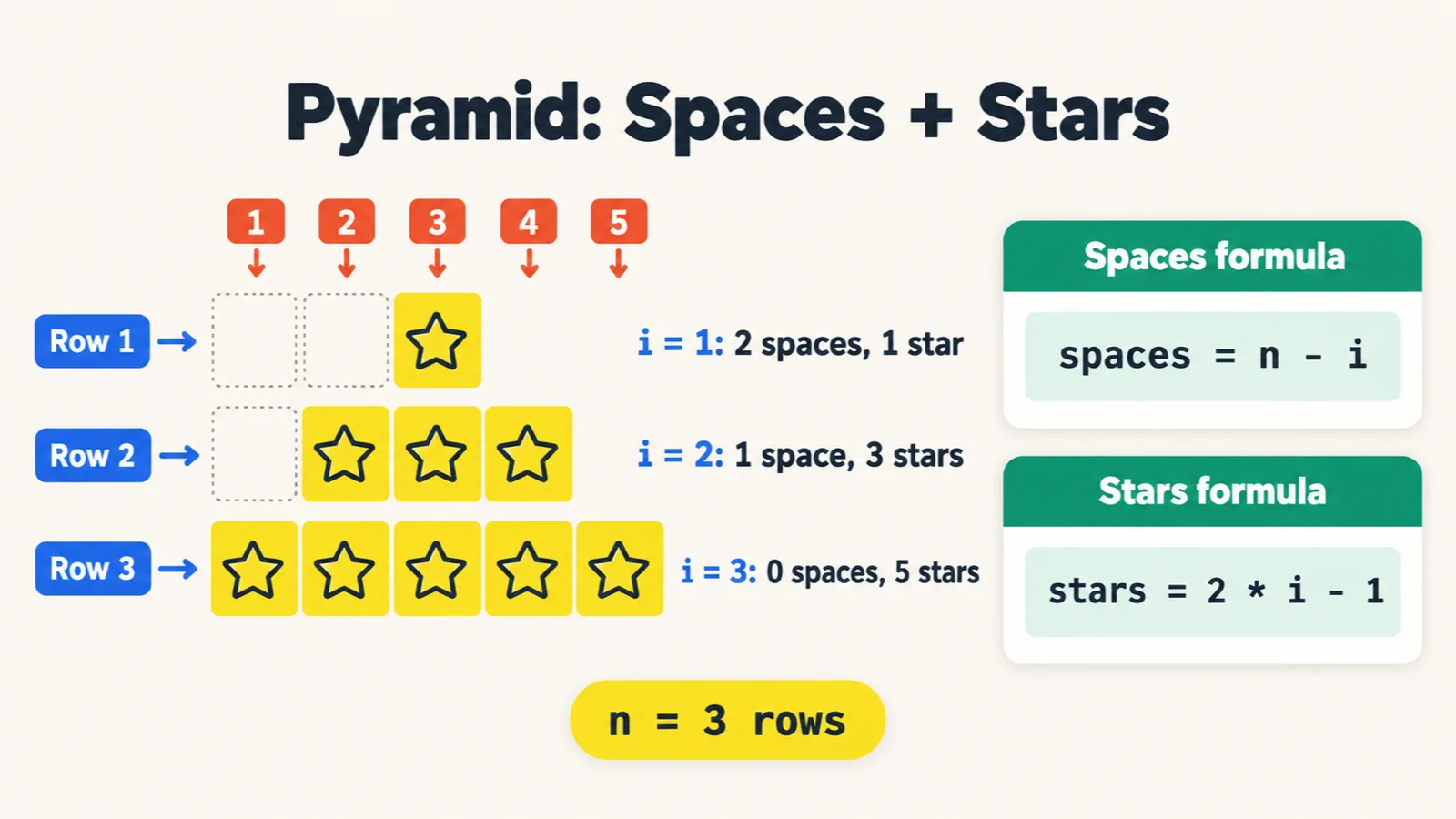
n - i spaces, then 2 * i - 1 stars.A third pattern also comes up a lot of times: the pyramid. The instructor called it a little complex, and then very complex: one star, then three, then five, like a pyramid. Look at the rows and there are spaces before the stars too; on the iPad the instructor marked each one with an O, O or space, whatever you want to call it.
The logic puts two loops inside the row loop. i goes from 1 to n, top to bottom. Each row starts as an empty string; the first inner loop adds the spaces, and the second adds the stars, 2 * i - 1 of them: 1 star for the first row, 3 for the second, and 5 for the third, 6 minus 1.
//   *
//  ***
// *****

let n = 3;

for(let i=1;i<=n;i++){
        let row = "";
        for(let j=1;j<=n-i;j++){
               row += " ";
        }
        for(let j=1;j<=2*i-1;j++){
            row = row + "*";
        }
        console.log(row);
}
  *
 ***
*****
The same file, with every space and every star logged:
| Outer loop | Spaces | Stars | Row length |
|---|---|---|---|
i = 1 |
3 - 1 = 2 |
2 * 1 - 1 = 1 |
3 |
i = 2 |
3 - 2 = 1 |
2 * 2 - 1 = 3 |
4 |
i = 3 |
3 - 3 = 0 |
2 * 3 - 1 = 5 |
5 |
The spaces come only before the stars: nothing is added after them, so the rows are 3, 4 and 5 characters long. With line 15 printing JSON.stringify(row) and the length instead, the quotes show where each row starts and ends:
console.log(JSON.stringify(row), row.length);
"  *" 3
" ***" 4
"*****" 5
With line 5 changed to this, the same loops build five rows:
let n = 5;
    *
   ***
  *****
 *******
*********
With let n = 1;, they build a single star and no spaces.
Take your time with this one. The instructor asked everyone to rewatch the recording: it is a little difficult to understand as a beginner.
Tasks and announcements
- Practise the three patterns: in coding practice, on your own. Today the class did them, but you have to practise them yourself, and the instructor asked Meeti to add the three there as questions.
- Finish the last class's coding practice. A lot of the class had done it, and a lot had not; the instructor asked everyone to complete it today, if possible. The five string problems are in the 30 October notes.
- Rewatch the recording if the pyramid is not clear yet.
- Doubts go in the doubt thread for multi-dimensional arrays in JavaScript, which is already created.
- The code is pushed: files 140 to 146 and the two cheat sheets went into the repo's 18_Multi_Dimensions_Array folder just after the class.
- What comes next: callbacks, once multidimensional arrays are done, as the instructor said at the start; the repo's README still lists chapter 18 as in progress. JavaScript is not finished either: asked whether this was its last topic, the instructor said no, there is no last topic, and callbacks, sync and async are still to come. The plan, as the class opened: complete a couple of important JavaScript topics, then TypeScript and Playwright side by side.
Task. Practise the three pattern programs on your own: the right-hand triangle (one, two, then three stars), the left-hand triangle (three, two, then one) and the pyramid (one, three, then five stars, with spaces before them).
Interview questions. What happens when you read outside a 3 by 3 grid, as line 8 of file 141 does with grid[7][7]? And the pattern programs: print the right-hand triangle, the left-hand triangle and the pyramid.
Also worth revising from today: how do you get the number of rows and of columns? Why does a pattern use process.stdout.write, and why console.log("") after each row? What does scores.map(row => row.reduce((a,b) => a+b)) give for the class's scores?
Show the answer
Answer. grid[7] is undefined, because there is no row 7, so reading [7] from it throws TypeError: Cannot read properties of undefined (reading '7'); a missing column on a real row, grid[0][7], only gives undefined. The patterns are files 144, 145 and 146 above: a star wherever j <= i; the same with i counting down from n; and n - i spaces, then 2 * i - 1 stars. grid.length gives the rows and grid[0].length the columns, 3 and 3 for the class's grid. process.stdout.write keeps a row's stars on one line, and console.log("") adds the new line once the row is done. For the class's scores, map and reduce give [ 253, 175, 275 ], one total per row.