What this class covered
- Multilevel inheritance: a chain of parents
- Multiple inheritance and mixins
- Hierarchical and hybrid inheritance
- Polymorphism: overriding, not overloading
- Interview questions: a super chain and a counter
- TypeScript: JavaScript plus rules
- Type annotations
- tsc, tsconfig.json and a compiled file
- ts-node runs a .ts file
- Basic types, any and unknown
- Typed functions and objects
- void and never
- Tasks: push the 200-plus exercises, and make notes with AI
- JavaScript supports single, multilevel and hierarchical inheritance. A class extends only one parent:
class Son extends F1, F2is aSyntaxError, and TypeScript refuses it too, so multiple and hybrid inheritance are possible only through mixins. - An object reaches every level of its chain:
admin.open()runsBasePage's method from two levels up, and a class with no constructor passessuper(...)'s argument on to its parent's. - Polymorphism in JavaScript is runtime only: when a parent and a child have the same method, the object decides which one runs. There is no method overloading: a second method with the same name silently replaces the first.
- A method that ends with
return thiscan be chained:new Counter().increment().increment(). - TypeScript is JavaScript plus rules: a type after a colon on variables, parameters and return values, which
tscchecks before the code runs and then removes, so plain JavaScript runs. tsccompiles a.tsfile into a.jsfile fornode; in a repo with atsconfig.json, compiling one file needs--ignoreConfig.ts-nodecompiles and runs in one step and leaves no.jsfile.- Prefer
unknowntoany:anyswitches checking off, whileunknownmust be checked first.voidmeans a function returns nothing;nevermeans it never returns.
Multilevel inheritance: a chain of parents
This class went on from the 16 November notes, which listed five types of inheritance and left for today which of them JavaScript supports.
admin finds open() two levels up, and AdminPage's super("Admin Panel") passes through AuthPage, which has no constructor, to BasePage's.Last time was single inheritance, the instructor said; today, let's see whether multilevel, multiple and hierarchical are supported, starting with multilevel. Multilevel means that a grandfather gives everything to the father, and the father gives everything to the son. The simplest example is a base class with a constructor, which Playwright will have too: it sets this.name, and it has an open function. That is the grandfather. The father is an auth page, which extends the base page, and last comes an admin page, which manages user roles; in the file, it extends the auth page. File 203:
// Grand Father -> Father -> Son

class BasePage{
    constructor(name){
        this.name = name;
    }
    open() {
        console.log("[OPEN] " + this.name);
    }
}
class AuthPage extends BasePage {
    login(user) {
        console.log("[LOGIN] " + user);
    }
}
class AdminPage extends AuthPage {
    constructor() {
        super("Admin Panel");
    }

    manageUsers() {
        console.log("[ADMIN] Managing users");
    }
}

let admin = new AdminPage();
admin.open();
admin.login("superadmin");
admin.manageUsers();
[OPEN] Admin Panel
[LOGIN] superadmin
[ADMIN] Managing users
If you create an object of the admin page, where is open present, the instructor asked? At the top. Making the object calls the constructor automatically, and super means calling the parent's constructor. Where a class has no constructor, the search goes up, the instructor said: do you have a constructor? No. Let me go above: do you have a constructor? Yes. In file 203, the auth page is the class with no constructor of its own. So open, login and manage users are all called, automatically. It is not difficult at all, the instructor said: with an object, you can call your grandfather, your father, and yourself too.
With a line logged in each constructor, the run shows that path: AdminPage's constructor starts, BasePage's receives Admin Panel, and AdminPage's ends with Admin Panel as its name. AuthPage logs nothing, because it has no constructor of its own: it passes the name straight on. Each call then finds its method by going up the chain:
| Line | Call | Found on | Prints |
|---|---|---|---|
| 27 | admin.open() |
BasePage, two levels up |
[OPEN] Admin Panel |
| 28 | admin.login("superadmin") |
AuthPage, one level up |
[LOGIN] superadmin |
| 29 | admin.manageUsers() |
AdminPage itself |
[ADMIN] Managing users |
The README's advice for this chapter: keep chains short, two or three levels, because a method found deep in a long chain is hard to trace.
Multiple inheritance and mixins
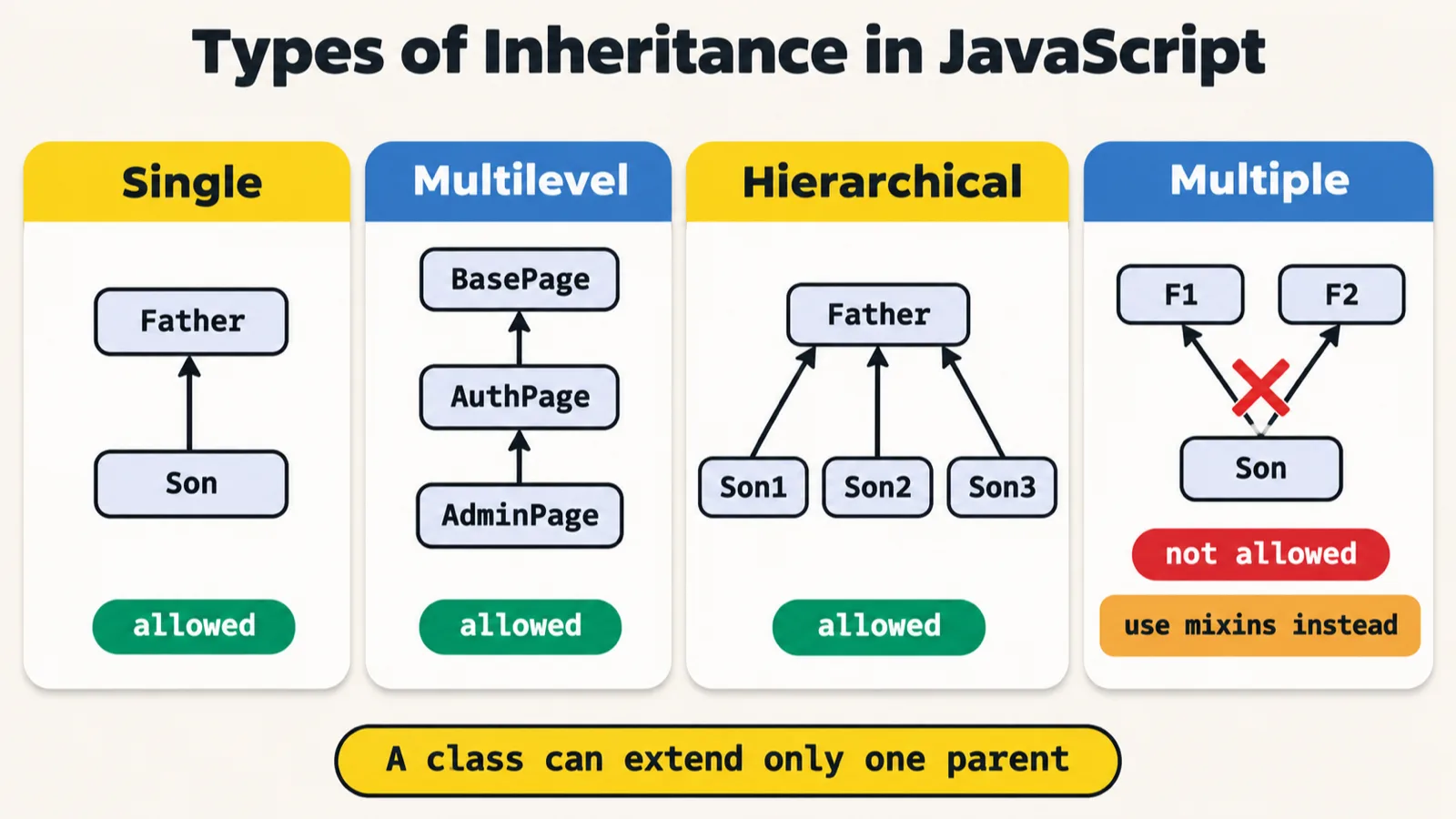
Does JavaScript support multiple inheritance? The answer is no, the instructor said: suppose you have two fathers; you cannot extend the two fathers, and it is absolutely not possible. A son cannot have two fathers. File 204 keeps the attempt commented out, with the class's notes beside it:
class F1{
}
class F2{
}

// class Son extends F1, F2{ // class Son extends F1, F2{

// }

// Multiple inheritance is not allowed in the case of Javascript.

// ------
// // Mixin concept can help you to perform the multiple inheritance.
As pushed, it prints nothing: only two empty classes run. Switched on, lines 6 and 8 stop the file before anything runs, with the error the README notes for it:
class Son extends F1, F2{ // class Son extends F1, F2{

}
27_OOPs_Inheritance/03_Multiple_Inheritance/204_Multipe.js:6
class Son extends F1, F2{ // class Son extends F1, F2{
                    ^

SyntaxError: Unexpected token ','
But there is a concept called mixin, the instructor said, and through mixins it is possible. It is a very strange concept that nobody uses, shown so that you know it is possible: you create a function and return the class which extends the base, automatically. The syntax looks very strange, the instructor said: a little controversial, and very difficult even to remember. In the README's words, a mixin is a function that takes a class and returns a new class that extends it with extra methods. File 205:
// Mixin concept can help you to perform the multiple inheritance.

// Mixin 1: Adds logging ability

let LoggerMixin = function (Base) {
    return class extends Base {
        log(msg) {
            console.log("[Log] " + msg);
        }
    }
}

let ScreenshotMixin = function (Base) {
    return class extends Base {
        takeScreenshot() {
            console.log("[SCREENSHOT] captured");
        }
    };
};

// Base class
class TestCase {
    constructor(name) {
        this.name = name;
    }

    run() {
        console.log("Running: " + this.name);
    }
}

// Apply BOTH mixins
class SmartTest extends ScreenshotMixin(LoggerMixin(TestCase)) {
    constructor(name) {
        super(name);
    }
}

let t = new SmartTest("Login Flow");
t.run();
t.log("Test started");
t.takeScreenshot();
Running: Login Flow
[Log] Test started
[SCREENSHOT] captured
The test class has a constructor and a run method, and it is the parent, the instructor said. The smart test extends the screenshot mixin, which is a function, and that also extends the logger: so it gets from the screenshot mixin as well as the logger, both of them, and it is a type of test case. Two functions that return something, extended by giving the parent class: so now you have two fathers. Listed level by level, a SmartTest object's chain shows how that works. The two mixins stack one on the other, so every class in it still has one parent, as the README's diagram of file 205 draws it:
| Levels up from the object | Class | Its own methods |
|---|---|---|
| 1 | SmartTest, line 33 |
none of its own |
| 2 | the class ScreenshotMixin returns, line 14 |
takeScreenshot() |
| 3 | the class LoggerMixin returns, line 6 |
log() |
| 4 | TestCase, line 22 |
run() |
But this is something we never use in automation, the instructor said, nor in Playwright, and the instructor does not think it will come up in an interview: in the last one and a half or two years, the instructor has never seen anyone ask a question about mixins. So the overall answer: multiple inheritance is not supported, except through mixin functions. Do not take this seriously, the instructor said: it is not useful, to be honest.
Hierarchical and hybrid inheritance
Hierarchical inheritance means one father and two children, the instructor said, and that can be: a son can extend from the father, a second son can, and a third son can too. It is absolutely possible. File 206:
class Father {

}
class Son1 extends Father {

}
class Son2 extends Father {

}
class Son3 extends Father {

}
It makes no objects, so it prints nothing. The README's copy of the file adds a method and two calls:
// 27_OOPs_Inheritance/04_Hierarchial_Inheritance/206_HI.js (with a method added)
class Father {
    eat() { console.log("eating"); }
}
class Son1 extends Father {}
class Son2 extends Father {}
class Son3 extends Father {}

new Son1().eat();   // eating
new Son3().eat();   // eating
eating
eating
Hybrid is not possible, the instructor said. Why? Look for the pattern inside it: two fathers and one child. That is multiple, so hybrid is possible only through mixins, which the class will not learn, and not as normal classes. In an interview, too, the ideal answer is that it is not possible. File 207_Hybird.js holds that note:
// Not Possible as Normal

JS -> TS X + (PW)
27_OOPs_Inheritance/05_Hybrid_Inheritance/207_Hybird.js:3
JS -> TS X + (PW)
    ^

SyntaxError: Unexpected token '>'
A note, not code. Line 3 is not a comment, so Node refuses the whole file: it reads JS - as a subtraction and then meets >. The README says the same: the file holds a note, not code. In a copy kept outside the repo, line 3 gets // in front, and Node then runs the file, which prints nothing:
// JS -> TS X + (PW)
Why does this matter? In Playwright we are mostly using TypeScript, the instructor said, and TypeScript does not allow you to have multiple or hybrid inheritance. File 204's two lines, in a .ts copy compiled with tsc, get TypeScript's own error:
class Son extends F1, F2{ // class Son extends F1, F2{

}
27_OOPs_Inheritance/03_Multiple_Inheritance/204_Multipe.ts:6:23 - error TS1174: Classes can only extend a single class.

6 class Son extends F1, F2{ // class Son extends F1, F2{
                        ~~


Found 1 error in 27_OOPs_Inheritance/03_Multiple_Inheritance/204_Multipe.ts:6
Polymorphism: overriding, not overloading
Polymorphism is a Greek word, the instructor said: poly means many and morph means forms, so it means many forms, and an object can perform many forms, behaving differently in different conditions. The deck's note says the same. There are two types, runtime and compile time, and compile-time polymorphism is not supported in JavaScript: that is the good news, the instructor said. JavaScript has no method overloading, only method overriding; the deck's list marks method overloading as not supported in JS.
Runtime polymorphism means that a parent class and a child class both have the same function, the instructor said, and which one is called depends on whose object is created, so it is decided at runtime. File 207_RTP.js, whose code the deck holds too (the repo numbers it 207, like the hybrid note):
class BaseTest {
    setup() {
        console.log("Base: open browser");
    }
}
class APIPage extends BaseTest{

    setup() {
        console.log("APITest: open browser");
    }
}
let btest = new BaseTest();
let test = new APIPage();
test.setup();
btest.setup();
APITest: open browser
Base: open browser
On the iPad: two objects are created in memory, and each reference points to its own, btest to a base test and test to an API page, each with its own setup(). So test.setup() calls the API page's, and btest.setup() the base test's: at runtime, when the objects are created, it is decided which one to use. It is file 198's question from the last class, with an object of each class.
A learner asked about a base-class reference creating a child-class object. Here, the instructor said, btest is a base-class reference creating a base-class object, and test a reference creating an API test. In Java, you can have something like this, the instructor said, but it is not supported in JavaScript, so do not get confused with Java. Why use extends for overriding, asked another learner, when we can write it directly? extends makes both of them available, the instructor said, and which one is called is decided by the object created.
Compile time is this, the instructor said: a class A with a function add, and another function add, two functions with the same name. This is generally called method overloading: the same function name, with a different argument, in the same class, as the instructor put it for a learner later. JavaScript says do not use this, and we will not use it. TypeScript has a way of doing it, but generally we will not, the instructor said. The repo's Compile_Time folder holds file 208, which is empty, and the README says why: JavaScript has no overloading, and two methods with the same name raise no error, because the last one silently replaces the first. The README's example:
// No overloading in JavaScript: the last add() wins
class Calc {
    add(a, b) { return a + b; }
    add(a) { return "three"; }
}
console.log(new Calc().add(1, 2));   // three
three
Interview questions: a super chain and a counter
who() logged: the calls start at C, A returns first, and the string is built back up to C>B>A.Then some interview questions, the instructor said. The first, file 209, is the Bug class, which the instructor thought the class had done already, in the last class; the repo's file 209 is indeed the last class's file 192 again. Critical comes first, then low.
One more, a very important question, or a confusing one, which was asked in a couple of interviews. Class A has who(), returning A; class B extends A and has who() too; class C extends B, with its own who(). An object of C calls who(), and each who() also calls super.who(). Is the answer A, B, C or C, B, A? First of all C, then B, and then A, the instructor said: that is the answer. It was an interview question, the instructor remembers, from one of the students. File 210:
class A {
    who() {
        return "A";
    }
}
class B extends A {
    who() {
        return "B>" + super.who();
    }
}
class C extends B {
    who() {
        return "C>" + super.who();
    }
}
console.log(new C().who());
C>B>A
With each who() logging when it starts and what it returns, the run shows why the answer reads C first. The calls go down the chain, A finishes first, and each level puts its own letter in front of what came back:
| Step | Method | What happens |
|---|---|---|
| 1 | C's who(), line 13 |
starts, and calls super.who() before it can return |
| 2 | B's who(), line 8 |
starts, and calls super.who() before it can return |
| 3 | A's who(), line 3 |
starts |
| 4 | A's who(), line 3 |
returns A |
| 5 | B's who(), line 8 |
returns B>A |
| 6 | C's who(), line 13 |
returns C>B>A |
A very similar question next, file 211: take your time, the instructor said, and do not give a wrong answer. The real code starts with new Counter(), which creates the object; the constructor sets the count to zero, and each increment() increases it, to one, two and three. If you call display(), what is the answer? Three or four? Three, the instructor said: this was an interview question too.
class Counter {
    constructor() {
        this.count = 0;
    }
    increment() {
        this.count++;
        return this;
    }
    display() {
        console.log("Count:", this.count);
        return this;
    }
}
new Counter().increment().increment().increment().display();
Count: 3
Logged after each call, the count goes up by one, and every call hands back the same object, which is why the next call can follow it:
| Call | Count after it | Returns |
|---|---|---|
new Counter() |
0 | the new object |
.increment() |
1 | the same object, this |
.increment() |
2 | the same object, this |
.increment() |
3 | the same object, this |
.display() |
3 (prints Count: 3) |
the same object, this |
The README calls this method chaining: a method that ends with return this gives its caller the same object back. Its catch: forget return this once, and the next call runs on undefined. With line 7 taken out of increment():
    increment() {
        this.count++;
    }
29_IQ/211.js:13
new Counter().increment().increment().increment().display();
                         ^

TypeError: Cannot read properties of undefined (reading 'increment')
TypeScript: JavaScript plus rules
A quick recap first, the instructor said: callbacks, callback hell, promises, promise chains, classes, the this keyword, static, inheritance, multilevel, polymorphism, mixins, method overriding and private are all JavaScript, also known as ES6-plus concepts. From today, the class enters the territory of TypeScript: congratulations, the instructor said.
TypeScript is not a perfectly new language, the instructor said: it is JavaScript with a couple of important concepts. Type annotations, interfaces, enums, generics, the private, public and protected keywords, readonly, abstract classes, type assertions, override, decorators, namespaces and tuple types all fall into TypeScript; the deck lists the same features as its TypeScript agenda. Interfaces and abstract classes are on that list, which means abstraction is not a part of JavaScript, the instructor said: it comes with TypeScript.
On the iPad: this is JavaScript, and a layer has been added on top of it. That layer is TypeScript, and it is what Playwright uses. TypeScript is nothing but JavaScript plus rules, the instructor said, and that is the only thing to remember. Microsoft created it, having figured out that JavaScript does not follow rules, so TypeScript is a strict version of JavaScript. If you do not follow traffic rules, the instructor said, you are a criminal, and you make a criminal a normal person by having them follow rules. TypeScript is nothing but JavaScript plus types, and types are rules.
Type annotations
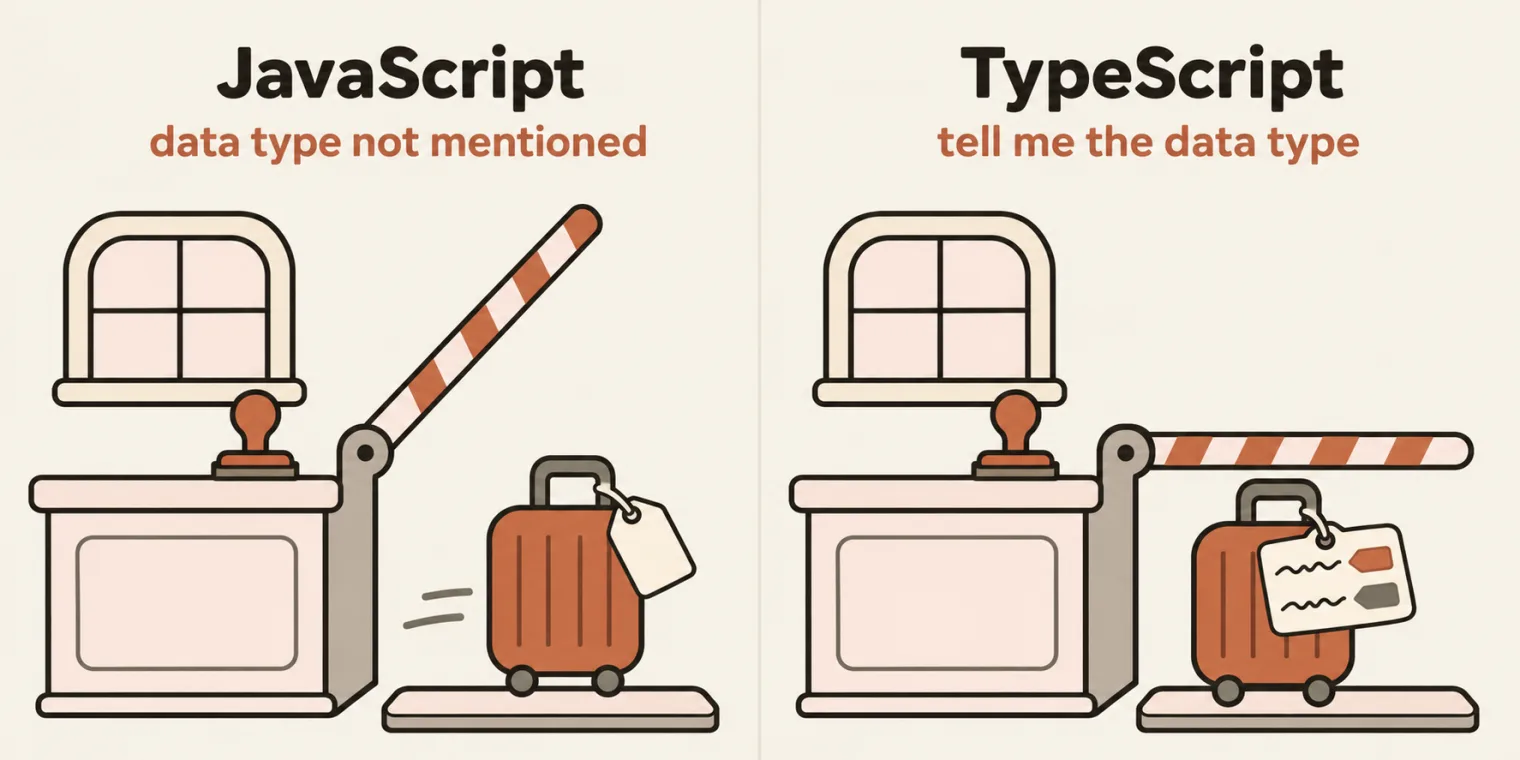
The first TypeScript concept is type annotation, the instructor said. Previously we were lenient: we never mentioned a variable's data type. From now on, after the name, you put a colon and say that it is a string. A function, such as a print function that takes a name and returns hello, gets a type for the name and a return type, here string too. Everywhere, you will now mention the types. A learner called it a civilized version of JavaScript. File 212 keeps those lines, commented out, in a .js file:
// let name:string = "pramod";

// function printFunction(name:string) : string{
//     return "hello";
// }
Switched on, they are not JavaScript, and Node stops at the first colon:
let name:string = "pramod";

function printFunction(name:string) : string{
    return "hello";
}
29_IQ/212.js:1
let name:string = "pramod";
        ^

SyntaxError: Unexpected token ':'
The deck's note on type annotations: they tell TypeScript exactly what type a variable, a parameter or a return value should be, and a wrong type is caught before you run the code, at compile time. Its example, compiled with tsc:
let timeout: number = "five"
timeout.ts:1:5 - error TS2322: Type 'string' is not assignable to type 'number'.

1 let timeout: number = "five"
      ~~~~~~~


Found 1 error in timeout.ts:1
tsc, tsconfig.json and a compiled file
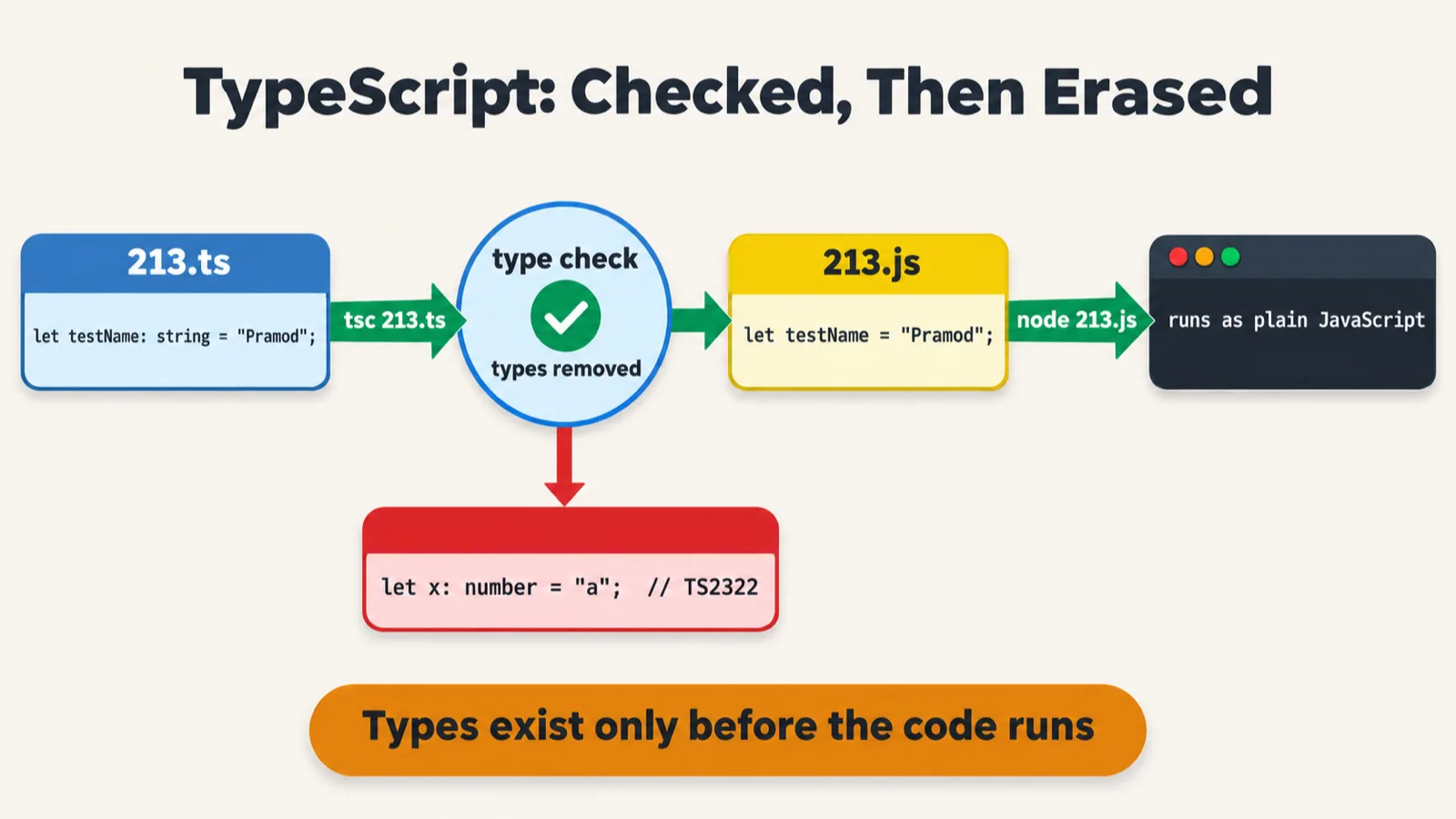
tsc, then run by node (the sheet leaves out the "use strict" line the real 213.js starts with, and its tsc 213.ts needs --ignoreConfig in this repo).Do we need to change anything? The answer is yes, the instructor said: first of all, install TypeScript in the project. The easiest way is to ask Claude to install TypeScript, or you can install it manually. The deck's commands install it, check the version and create the configuration:
npm install -g typescript
tsc --version
tsc --init
The class's TypeScript compiler reported version 6.0.2. tsc --init creates the TypeScript configuration file, tsconfig.json. Ignore all of it for now, the instructor said, except that strictness is set to true; the rest will be explained slowly, later. In the repo's tsconfig.json:
    // Recommended Options
    "strict": true,
Now you need to write a .ts file, the instructor said. File 213, in a new folder, 30_Typescript:
let testName:string = "Pramod";
The class compiled it with the TypeScript compiler, ignoring the configuration for now, as the deck's command does with --ignoreConfig, then ran the result with Node. Both commands print nothing: tsc only writes the file, and the file only declares a variable.
tsc 30_Typescript/213.ts --ignoreConfig
node 30_Typescript/213.js
A JavaScript file has been created, the instructor said: TypeScript has been converted into JavaScript. The file tsc writes is the repo's 213.js, byte for byte:
"use strict";
let testName = "Pramod";
Remember this, the instructor said: TypeScript will always be converted back to JavaScript in the end. The compiled file also has a keyword added at the top, use strict, which means the code compiled from TypeScript follows the strictness.
The flag matters in this repo: with its tsconfig.json at the root, TypeScript 6.0.2 refuses to compile one file without it, and writes nothing:
tsc 30_Typescript/213.ts
error TS5112: tsconfig.json is present but will not be loaded if files are specified on commandline. Use '--ignoreConfig' to skip this error.
The cheat sheet above and the README write that command as tsc 213.ts; in this repo, even from inside 30_Typescript, it needs --ignoreConfig, as the deck has it. And you will not compile like this every time, the instructor said: you will write a .ts file and run it.
ts-node runs a .ts file
tsc leaves a .js file for node, and ts-node leaves none.Click the run button, the instructor said, and it runs the TypeScript code with no compilation you can see: the command has changed, and it is now ts-node. File 214, in 31_Typescript, run with ts-node as the deck writes it:
console.log("Hi TS");

let name:string = "pramod";
console.log(name);
ts-node 31_Typescript/214.ts
Hi TS
pramod
If you do not want to see the compiled .js file, use ts-node, the instructor said: it converts your file, runs it, and deletes the JS file afterwards. The deck's note says the same. Run in the repo's folder, it leaves no 214.js beside 214.ts.
No .js file at all. With every file that ts-node wrote or deleted logged, the run never wrote 214.js, or anything else in the project: ts-node compiles the file in memory and runs it. So the point stands, and no .js file is left behind.
ts-node and TypeScript 7. The class's TypeScript was 6.0.2. With TypeScript 7.0.2 installed, ts-node 10.9.2 stops before it runs a line of the file:
TypeError: Cannot read properties of undefined (reading 'fileExists')
    at readConfig (node_modules/ts-node/dist/configuration.js:91:33)
With TypeScript 6.0.2, it runs 214.ts as in class. The README gives another way: Node 22 runs a .ts file by itself, stripping the types without checking them.
node 31_Typescript/214.ts
Hi TS
pramod
Basic types, any and unknown
Now you can happily see which data type everything belongs to, the instructor said: that is the beauty of TypeScript. File 215_Basic.ts:
// Primitive types


let name: string = "John";
let age: number = 30;
let pi: number = 3.14;
let distance_to_moon: number = 398765434567;

let isActive: boolean = true;
let nothing: null = null;
let notDefined: undefined = undefined;

//let pi: float = 3.14;

// Arrays
let numbers: number[] = [1, 2, 3];
let names: Array<string> = ["John", "Jane"];

let message: string = "Hello, TypeScript!";
let count: number = 42;


// Any (avoid when possible)
let anything: any = "hello";

// Unknown (safer than any)
let unknown: unknown = "hello";
It compiles with no errors, and it prints nothing: it only declares. Name is a string; age, pi and distance are numbers; is active is a boolean; nothing is null, and not defined is undefined, the instructor said. Do we have float, in TypeScript or JavaScript? We don't. Line 13 keeps that attempt commented out. Switched on, the line fails for two reasons, since it also declares pi a second time:
let pi: float = 3.14;
31_Typescript/215_Basic.ts:6:5 - error TS2451: Cannot redeclare block-scoped variable 'pi'.

6 let pi: number = 3.14;
      ~~

31_Typescript/215_Basic.ts:13:5 - error TS2451: Cannot redeclare block-scoped variable 'pi'.

13 let pi: float = 3.14;
       ~~

31_Typescript/215_Basic.ts:13:9 - error TS2552: Cannot find name 'float'. Did you mean 'GLfloat'?

13 let pi: float = 3.14;
           ~~~~~


Found 3 errors in the same file, starting at: 31_Typescript/215_Basic.ts:6
The README puts it plainly: there is no float or int, only number. Arrays have types too, the instructor said: numbers is an array of numbers, and names an array of strings. Then message is a string and count is a number.
And we have any: any type of data, the instructor said. Avoid it; we do not use any, which means we are not concerned about the data type as of now. TypeScript also has unknown, which means we do not know the type as of now. The instructor said this would go in the learning folder, as a table, and the repo's note, any vs unknown, puts the difference this way: any switches type checking off, while unknown must be checked before you use it. Two lines added after line 27, one call on each:
anything.toUpperCase();
unknown.toUpperCase();
31_Typescript/215_Basic.ts:29:1 - error TS18046: 'unknown' is of type 'unknown'.

29 unknown.toUpperCase();
   ~~~~~~~


Found 1 error in 31_Typescript/215_Basic.ts:29
Only the unknown line is refused; any lets its call through unchecked, so a mistake there would show up only when the code runs, as the note says.
Typed functions and objects
user: { name: string; age: number } does in file 217.Do you think functions will also change? The answer is yes, the instructor said: the parameter gets its type, here a string, and you also say the return type. Just this much change. File 216_Fn.ts:
function greet(name:string):string {
    return "Hello";
}

function greet2(name:string):number {
    return 123
}

function greet3(name:boolean):boolean {
    return true
}
greet() returns a string, greet2() returns 123, a number, and greet3() returns true, a boolean. Everything will now follow the type, the instructor said: everything will be strict. If you declare a string and pass a number, it will give you a compilation error: TypeScript will say no, not possible. The README's example, greet(42), printed, in a line added after line 11:
console.log(greet(42));
31_Typescript/216_Fn.ts:12:19 - error TS2345: Argument of type 'number' is not assignable to parameter of type 'string'.

12 console.log(greet(42));
                     ~~


Found 1 error in 31_Typescript/216_Fn.ts:12
That check comes before the code runs. The same file, run three ways:
| Run with | What happens |
|---|---|
tsc, the repo's tsconfig.json |
reports error TS2345: the check happens before anything runs |
ts-node 31_Typescript/216_Fn.ts |
stops before running: TSError: ⨯ Unable to compile TypeScript |
node 31_Typescript/216_Fn.ts |
runs it and prints Hello: Node strips the types without checking them |
Arrow functions get types too, the instructor said: number for a, number for b, and number for the result. So do objects: each key now has a data type attached. Whenever you are entering my country, the instructor said, you have to tell me which key is a string and which key is a number. File 217.ts:
// Arrow function annotations
const multiply = (a: number, b: number): number => a * b;

// Object annotations
let user: { name: string; age: number } = {
    name: "John",
    age: 30
};

function sayHello(msg: string): void {
    console.log(msg);
}

// Function annotations
function greet(name: string): string {
    return `Hello, ${name}!`;
}
Can we return void, somebody asked? Yes, the instructor said: here we are not returning anything, so it is void. And a template literal? A template literal is a string, so the return type is string, as greet() has it here. Like files 215 and 216, 217 compiles with no errors and prints nothing: nothing calls its functions.
void and never
Then something very controversial, the instructor said: a function that returns never. File 218.ts:
function infiniteLoop(): never {
    while (true) { }
}

// never - function never returns (throws or infinite loop)

function throwError(message: string): never {
    throw new Error(message);
}
An infinite loop will not return anything, so its return type is never, the instructor said, and when a function throws an exception, it will also not return. Why never, when we have void, a learner asked? Void means empty, the instructor said, and never means you are never going to return. 218.ts compiles with no errors and prints nothing, since neither function is called. tsc holds never to its word: take the loop out of infiniteLoop(), and the function could finish:
function infiniteLoop(): never {
}
31_Typescript/218.ts:1:26 - error TS2534: A function returning 'never' cannot have a reachable end point.

1 function infiniteLoop(): never {
                           ~~~~~


Found 1 error in 31_Typescript/218.ts:1
In Playwright, we will very rarely use never, the instructor said, and these things will only make sense when you start using them.
Tasks and announcements
- Today's task. All the concepts of OOP learnt so far, TypeScript included: push all the content, with the 200-plus exercises, to your GitHub repo. Also create notes for the 200-plus exercises with AI: give it a prompt such as "using these 200 lab exercises, prepare a notes for me to remember", and it will prepare a simple PDF or docs file. Keep the notes handy, the instructor said, because they will be useful. Can you do this exercise today, the instructor asked.
- The last task, the different types of inheritance: a lot of people have done it, the instructor said.
- Coding questions and tests. This week, the plan is also for live coding exercises, the instructor said: JavaScript is covered, so it is time to jump into coding questions, and the instructor has added around 10 important questions. Tests will now be scheduled side by side: there are around 10 tests related to JavaScript, and there will be JavaScript coding tests as well as normal tests soon, so be ready.
- Interview series: interview questions have been added for one to three, three to five and five to eight years of experience.
- Tester Town: the JavaScript gate in its game tab has JavaScript questions; keep answering them, and you will earn a lot of points.
- Exceptions will become a part of Playwright automatically, the instructor told a learner: Playwright tests already use all these concepts, exceptions and everything.
- Hackathon. The hackathon is only for the AI batch, the instructor said; for Playwright, something will probably be planned too: "Playwright also we will see."
- Next class: its topic was not named in class. The README's Coming Up list says Chapter 24, Playwright, and Chapter 31, TypeScript basics, continue.
- The code: files 203 to 207_Hybird are in the repo's 27_OOPs_Inheritance folder, 207_RTP and 208 in 28_OOPs_Polymorphism, 209 to 212 in 29_IQ, 213 in 30_Typescript and 214 to 218 in 31_Typescript.
Task. Push all the OOP concepts learnt so far, TypeScript included, with the 200-plus exercises, to your GitHub repo, and use AI to prepare notes from the 200-plus lab exercises, as a simple PDF or docs file to keep handy.
Class A has who(), B extends A and C extends B, each with its own who() that also calls super.who(). When an object of C calls who(), is the answer A, B, C or C, B, A?
Worth practising too: Which types of inheritance does JavaScript support, and how do mixins get round the one-parent rule? What does file 211 print, and why can its calls be chained? What is method overloading, and does JavaScript have it? What does tsc do with a .ts file, and what does ts-node do? How are any and unknown different? And void and never?
Show the answer
Answer. C, then B, then A: file 210 prints C>B>A. The calls start at C and go down the chain, A returns first, and each level puts its own letter in front of what came back. JavaScript supports single, multilevel and hierarchical inheritance; a class extends only one parent, so multiple and hybrid inheritance need mixins, functions that take a class and return a new class that extends it, stacked one on another. File 211 prints Count: 3: every increment() ends with return this, so each call hands the same object to the next. Method overloading is the same function name with a different argument in one class; JavaScript has none, and a second method with the same name silently replaces the first. tsc checks the types and writes a .js file for node to run; ts-node compiles and runs in one step and leaves no .js file. any switches checking off, while unknown must be checked first: calling a method on it is error TS18046. void means a function returns nothing; never means it never returns, because it loops forever or throws.