What this class covered
- Encapsulation: hide the data, expose methods
- A setter that checks first
- A private static count
- Public fields: three interview questions
- Inheritance: the child gets everything
- Single inheritance with extends
- A BasePage for every page
- super() and super.method()
- The same method in both classes
- super.setup() and super.teardown()
- One call, three classes
- Tasks: research the types of inheritance
- Encapsulation keeps an object's data inside it and lets outside code in only through methods: a
#field is private, a getter reads it, and a setter changes it. - Outside the class, a
#field cannot be named at all:tesla.#engine = "V10";stops the whole file with aSyntaxErrorbefore anything runs. Inside the class, it always needsthis.in front. - A setter can check before it changes: file 190 changes the balance only when
isCashieristrue, and printsNot allowedotherwise. - A field without a
#is public: any code can read it and change it. class Son extends Fathergives everySonobject the parent's methods as well as its own; aFatherobject does not get the child's, sof.walk()is aTypeError.super(name)calls the parent's constructor andsuper.foo()calls a parent's method; a child's constructor must callsuper()before it usesthisor returns.- When the parent and the child both have a method of the same name, the object decides: whose object it is, that class's method runs.
Encapsulation: hide the data, expose methods
This class went on from the 13 November notes, which brought in private # fields and static members; this time they serve encapsulation, and then inheritance.
#engine only through the two methods, and a line that names it outside the class stops the whole file.We are finishing up the last part of the OOPS concepts in JavaScript, and some part of TypeScript also, the instructor said, so that we can immediately jump into Playwright. The list for the day was encapsulation, inheritance, polymorphism and abstraction; this class covered the first two.
What is encapsulation? Showing only the essential things, rather than the actual implementation, a learner offered: no, that is abstraction, the instructor said. Wrapping of data, offered another: very close to it. Encapsulation is used for security purposes, the instructor said: it means hiding the internal data and exposing a controlled behaviour, keeping the data and the methods that work on it together inside one object. Hiding the internal details and allowing only controlled access is the very important part, and outside code should use only public methods, not directly change the important details.
Encapsulation says that you have to hide your data variables, the instructor said, and allow them only through the doors, and the doors are the functions: binding the data variables with the functions is called encapsulation. The deck's note for the class puts it the same way: encapsulation basically means hiding the internal details and only allowing you through the doors, or wrapping the data by using the functions.
The class's first example, file 188, is described here rather than shown, because its sample values are personal names. It is a Person class with a public name and two private # fields, all three set in its constructor, plus a getter that returns the first private field and a setter that changes it. this.name = name is public in nature, the instructor said, and the private ones get a hash in front of them. Can outside code read a private field? No, only through the getter; and it can change it only through the setter. Line 21 keeps an attempt to read the field from outside commented out: switched on, it is a SyntaxError, and Node runs nothing at all. Lines 22 to 25 read the field through the getter, change it through the setter and read it again, so the run prints the old value, then the new one.
But the name is available outside directly, without any getter or setter, the instructor said, and it can even be changed: that should not happen, encapsulation says, so ideally your variables should be private in nature. File 188 ends on that very point: line 27 prints the public name, and line 28 gives it a new value directly.
Another diagram on screen made the same point. If a constructor sets the data directly, anyone can access it: the data and the behaviour are living together, but this is not encapsulation, the instructor said. To hide a bank balance, you can only get it with a get balance method, and set it with a function such as deposit; the name can be anything, as long as the setting and the getting go only through functions. And an employee's salary, private in nature, is used only through set salary and get salary: the getter returns it, and the setter sets it only on a certain condition. Without a setter, can you change the salary? No, because it is private. Without a getter, can you get it? No.
Encapsulation in JavaScript means keeping the data inside the object, hiding the internals, and exposing them only through safe methods, the instructor summed up. In a car, the engine is something to safeguard, the instructor said: do you want anyone to change the engine? File 189, whose code the deck holds too:
class Car {
        #engine; // #private
        constructor(name, engineName) {
        this.name = name;
        this.#engine = engineName;
    }
    getEngine() {
        return this.#engine;
    }
    setEngine(nameEngine) {
        this.#engine = nameEngine;
    }


}

let tesla = new Car("Tesla", "V8");
console.log(tesla.getEngine());
tesla.setEngine("V9");
console.log(tesla.getEngine());
V8
V9
this.name on line 4 is a public variable, the instructor said; the engine, on line 2, is # private, as its comment says. The car is a Tesla, with a V8 engine. Can you change its name? The name is allowed. Can you change the engine from outside? No: changing it is allowed only through a function named set engine, and get engine just returns this.#engine. Lines 19 and 20 change it to V9 through the setter and read it back. Change it directly, in a line added after line 20, and Node refuses the whole file before it runs:
tesla.#engine = "V10";
26_OOPs_Encapsulation/189.js:21
tesla.#engine = "V10";
     ^

SyntaxError: Private field '#engine' must be declared in an enclosing class
The function's name can be anything, the instructor said; generally we keep set engine and get engine, with the same name, as a reference: it is a good practice. This is the perfect example of encapsulation, where the engine is encapsulated.
Back at file 188's getter, a learner asked why it returns the field with this. in front: can we return it directly? this. makes sure we are using the current object, the instructor said, and we cannot return it directly; the instructor added that even if you do, the compiler will put it back automatically. JavaScript does not. File 189's getter is the same: written as return #engine;, its line 8 stops the file before it runs:
return #engine;
26_OOPs_Encapsulation/189.js:8
        return #engine;
               ^^^^^^^

SyntaxError: Unexpected identifier '#engine'
A setter that checks first
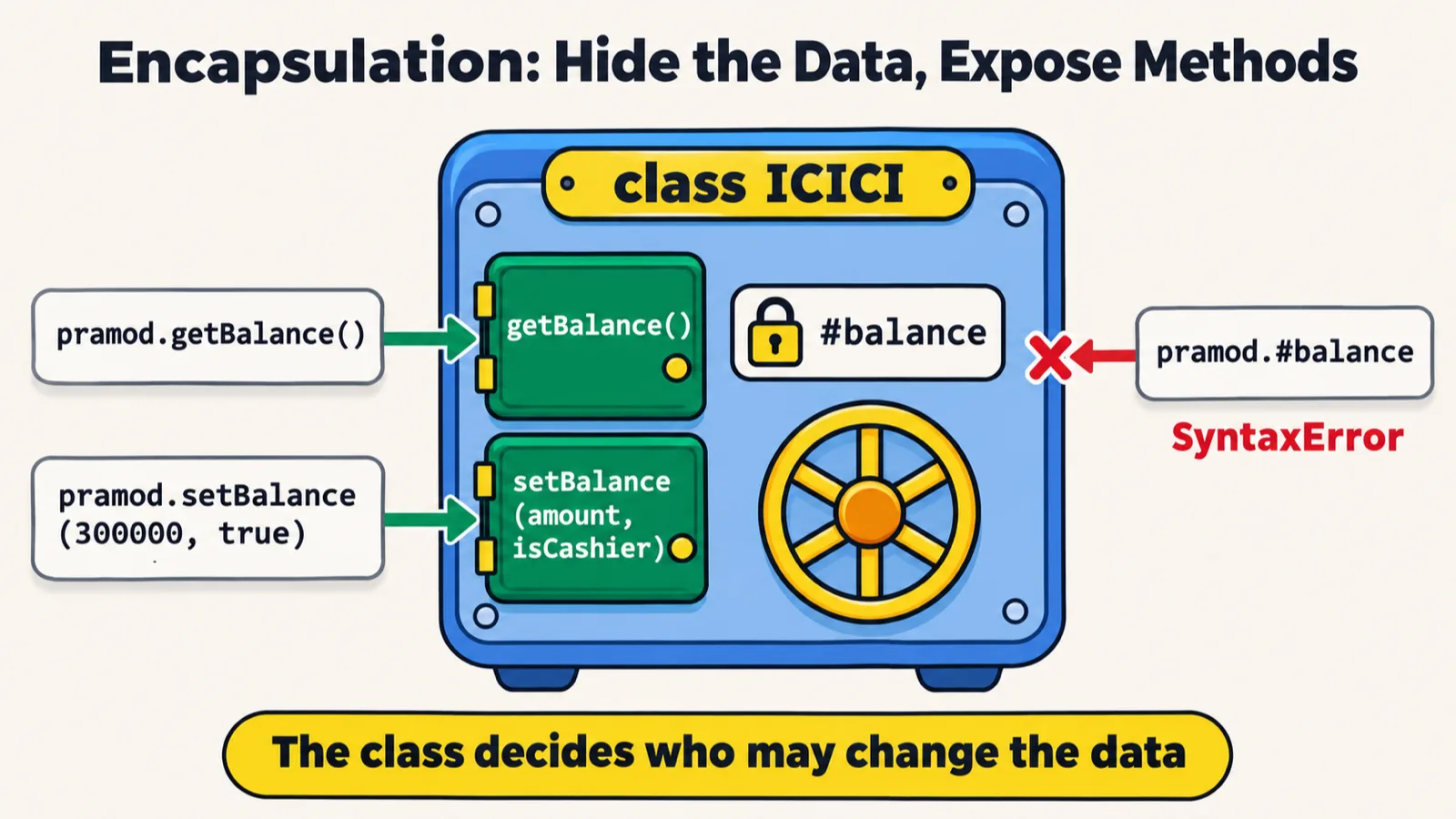
#balance inside, and the getter and the setter are its only doors (the sheet calls the setter's first parameter amount, and sets 300000 with true on the first account, where the file does it on the second).The same encapsulation goes into a bank balance, the instructor said. Do you want your balance to be public or private? Private, absolutely: the name can be public in nature, but the balance should be private, and it can be accessed only through a setter and a getter. And the setter adds a controlled behaviour: setting the balance is done only if you are a cashier. File 190, with its second account's variable shown as account2:
class ICICI {
    #balance;
    constructor(name, balance) {
        this.#balance = balance;
        this.name = name;
    }
    getBalance() {
        return this.#balance;
    }
    setBalance(balance, isCashier) {
        if (isCashier) {
            this.#balance = balance;
        } else {
            console.log("Not allowed")
        }
    }
}
let pramod = new ICICI("Pramod", 1000);
console.log(pramod.getBalance());
pramod.setBalance(10000000, false);
console.log(pramod.getBalance());

let account2 = new ICICI("Pramod", 2000);
console.log(account2.getBalance());
account2.setBalance(300000, true);
console.log(account2.getBalance());
1000
Not allowed
1000
2000
300000
The account starts with a balance of 1000, and the getter returns 1000. Line 20 sets 10000000 with isCashier false: if you are not a cashier, you are not allowed to change it, the instructor said, and the balance stays the same, so the run prints Not allowed, then 1000 again. When it is true, as on line 25, it is allowed, and the balance changes: 2000 becomes 300000. So by using the setter and the getter, we can control who can access the balance, the instructor said, with true and false, or permissions, or a role.
The README adds the catch: the check is only as strong as its input, since passing true for isCashier is enough to change the balance.
A private static count
An interview question on encapsulation, the instructor said: what is the answer? Here there is a static keyword too. File 191:
class TestCase {
    #status = "not run";
    static #count = 0;
    constructor(name) {
        this.name = name;
        TestCase.#count++;
    }
    run(pass) {
       this.#status = pass ? "PASSED" : "FAILED";
    }
    getStatus() { return this.#status; }
    static getCount() { return TestCase.#count; }
    static setCount(v) {
        TestCase.#count = v;
    }
}
const tc = new TestCase("login");
tc.run(true);
console.log(tc.getStatus());
new TestCase("login");
new TestCase("login");
new TestCase("login");
console.log(TestCase.getCount())
PASSED
4
Execution starts at line 17: a new test case, login, so the constructor is called, and the name's value is login, the instructor said. The count is static in nature, so it increases to one; it was zero before. Line 18 passes true, so in the ternary the status becomes passed, and getting the status prints it. Then the same test case is made again, and the count goes to 2, then 3. Will it be 3 or 4? Four: how many objects do we have? One, two, three, four. So the answer is passed, and 4. Logged after each of those lines:
| After line | Statement | Count | Status of the first test |
|---|---|---|---|
| 17 | const tc = new TestCase("login") |
1 | not run |
| 18 | tc.run(true) |
1 | PASSED |
| 20 | new TestCase("login") |
2 | PASSED |
| 21 | new TestCase("login") |
3 | PASSED |
| 22 | new TestCase("login") |
4 | PASSED |
In the README's words, # works on static fields too: each test keeps its own private #status, and the class keeps one private static #count, which static getCount() reads.
A setter with no check undoes the protection. File 191 also has static setCount(v) on lines 13 to 15, which sets the count to any value: the README points out that it lets any code overwrite the count anyway. Called after line 23:
TestCase.setCount(0);
console.log(TestCase.getCount());
PASSED
4
0
Public fields: three interview questions
Next, a very important question, the instructor said: it came in one of Infosys's interview questions, and somebody asked it in Cognizant too, the instructor thinks. File 192:
class Bug {
  constructor(title, severity) {
    this.title = title;
    this.severity = severity;
  }
  display() {
    console.log("[" + this.severity + "] " + this.title);
  }
}
let b1 = new Bug("Login crash", "Critical");
let b2 = new Bug("Typo in footer", "Low");

b1.display();
b2.display();
[Critical] Login crash
[Low] Typo in footer
The code starts at line 10: an object with login crash and critical, then another with a typo and low, the instructor said. display() prints the severity and then the title, so critical and login crash come first, then low and the typo. And the debugger, a learner asked? It will be shown in Playwright, the instructor said: in Playwright, you can use a debugger.
A small example with a very simple answer, the instructor said, and three minutes for everyone to answer it. File 193:
class Environment {
  constructor(name = "staging", port = 3000) {
    this.name = name;
    this.port = port;
  }
  getURL() {
    return "http://" + this.name + ":" + this.port;
  }
}
let env1 = new Environment();
let env2 = new Environment("production", 8080);
console.log(env1.getURL());
console.log(env2.getURL());
http://staging:3000
http://production:8080
If you use the constructor without arguments, the default values are used, the instructor said: first staging, with the port 3000. When you pass production, the production value is used. The parameters' default values are used because you are not passing anything at all.
One more before inheritance, file 194:
class User {
  constructor(name) {
    this.name = name;
  }
  greet() {
    console.log("Hi, I am " + this.name);
  }
}
let u1 = new User("Alice");
let u2 = new User("Bob");
u1.greet();
u2.greet();
Hi, I am Alice
Hi, I am Bob
There is no hash here, a learner pointed out: then they are public in nature, the instructor said. The answer is very simple: I am Alice, I am Bob. All these examples have public variables, a learner noticed. Right, the instructor said: they are not encapsulation, they are just interview questions.
Inheritance: the child gets everything
Now comes the important part, the instructor said: inheritance, which you will be using everywhere; inheritance is used everywhere in Playwright.
Inheritance basically means that the child gets everything from the parents, the instructor said: all the properties or data variables plus the methods, the attributes and the behaviour, both. The child can add new stuff, and change the existing stuff too. The deck's note reads the same: a child class gets everything from its parent class, all properties and methods, the attributes and behaviour also, for free, and the child can then add new stuff or change existing stuff.
Inheritance is very popular in the page object model, the instructor said: when we are working with a web UI in Playwright, every page has a function to open and close, from the base page. The deck's real QA example: in the Page Object Model, every page has open() and close(); instead of writing these in every page class, write them once in BasePage, and let all pages inherit.
Inheritance has only two concepts, the instructor said: a parent class and a child class. The child extends the parent, and super calls the parent's constructor.
How many types of inheritance are supported in JavaScript, the instructor asked. The class listed five, and it is very much the same as in Java, the instructor said:
| Type | As the class put it |
|---|---|
| Single | from a parent to a child |
| Multilevel | from C to A to B |
| Hierarchical | one father and two children |
| Multiple | two fathers and one child: actually not possible, but possible through mixins, which the instructor will explain |
| Hybrid | one father, two children, and then the two children make one: really scary; is it possible or not? |
Which of them JavaScript supports, the next class will show with examples. The class set up folders for the types, starting with single inheritance; the repo has that one, 01_Single_Inheritance, with files 195 to 202.
Single inheritance with extends

Son has eat() and walk(), and a Father has only eat(), so f.walk() is a TypeError.Single inheritance, with a simple example, the instructor said: a father, with an eat function that just says hi, eating, and a son that extends the father, with a walk function. File 195:
class Father{
    eat(){
        console.log("Hi eating")
    }
}
class Son extends Father{
    walk(){
        console.log("Hi walking")
    }
}

const s = new Son();
const f = new Father();
s.walk()
s.eat();

f.eat();
// f.walk();
Hi walking
Hi eating
Hi eating
With s, a Son, can we access walk, or eat, or both? Both of them, the instructor said: walk as well as eat. With f, a Father, can we access eat? Yes. But walk, the son's function? No, this is not allowed, because the father cannot access it: when the father was getting created, the son was not born. Line 18 keeps that call commented out; switched on:
f.walk();
Hi walking
Hi eating
Hi eating
27_OOPs_Inheritance/01_Single_Inheritance/195_SI.js:18
f.walk();
  ^

TypeError: f.walk is not a function
Single inheritance is very widely used in the page object model, the instructor said.
A BasePage for every page
LoginPage has no methods of its own, and its object still opens and closes the page.The real example, the instructor said: in Playwright you will use a base page, with certain common functions, such as opening and closing a page, and a constructor. File 196:
class BasePage{
    constructor(pageName) {
        this.pageName = pageName;
    }
    open() {
        console.log("Opening the page ");
    }
    close() {
        console.log("Closing the page ");
    }
}
class LoginPage extends BasePage {
}

let page = new LoginPage();
page.open();
page.close();
Opening the page
Closing the page
The login page does not have anything at all, the instructor said; but if it extends the base page, it automatically has both functions. The login page is a direct child of the base page, so it can use open and close automatically: 100%, it can do that.
The login page has no name. BasePage's constructor keeps a pageName, but line 15 makes the login page without one, so it is undefined, as the repo's README points out; nothing in the file prints it. Printed after line 17:
console.log(page.pageName);
Opening the page
Closing the page
undefined
With a name passed on line 15, in a copy kept outside the repo:
let page = new LoginPage("Login");

console.log(page.pageName);
Opening the page
Closing the page
Login
super() and super.method()
One more example, file 197, whose code the deck holds too: an animal with a constructor, eat(), sleep() and foo(), and a dog that extends it. Here there is a concept of super too, the instructor said:
class Animal {
    constructor(name) {
        this.name = name;
    }
    eat() {
        console.log(this.name + " is eating");
    }
    sleep() {
        console.log(this.name + " is sleeping");
    }
    foo(){
        console.log("Foo Called!");
    }
}
class Dog extends Animal {
    constructor(name, breed) {
        super(name); //. It is used for the parent constructor.
        this.breed = breed;
    }
    bark() {
        super.foo();
        console.log(this.name, " is barking!")
    }
}
let dog = new Dog("Rex", "Labrador");
dog.eat();
dog.sleep();
dog.bark();
console.log(dog.breed);
Rex is eating
Rex is sleeping
Foo Called!
Rex  is barking!
Labrador
The animal is the father, the instructor said, and single inheritance is going on. Whenever you say super, it means we are calling the parent constructor, by passing the name: whatever name comes here, super is called with it. The code starts at line 25: the name Rex comes to the dog's constructor, super(name) calls the animal's constructor with it, and Labrador, a breed, goes into breed. In dog.eat(), this.name is Rex, so Rex is eating. bark() calls super.foo() first, so foo is called, and then Rex is barking too, because the name was already set. Last, dog.breed prints Labrador. With a line logged at the start of each constructor and at the end of the dog's, the run starts with the dog's constructor, then the animal's, then the end of the dog's:
| Line | Call | What runs |
|---|---|---|
| 25 | new Dog("Rex", "Labrador") |
Dog's constructor; its super(name) runs Animal's, which sets the name, then line 18 sets the breed |
| 26 | dog.eat() |
Animal's eat(), inherited: Rex is eating |
| 27 | dog.sleep() |
Animal's sleep(), inherited: Rex is sleeping |
| 28 | dog.bark() |
Dog's own bark(): super.foo() first prints Foo Called!, then line 22 its own line |
| 29 | dog.breed |
the field set on line 18: Labrador |
Super basically means my father, the instructor said. So remember two things: with super(), the brackets, you call the parent's constructor, and with super. you call the parent's function, as super.foo() does.
Two spaces before is barking. Line 22 passes two values to console.log, which prints them with a space between, and the second already starts with a space. Joined into one string, in a copy kept outside the repo:
bark() {
    super.foo();
    console.log(this.name + " is barking!")
}
Rex is eating
Rex is sleeping
Foo Called!
Rex is barking!
Labrador
The same method in both classes

APITest and BaseTest both have setup(), and the object made decides which one runs.An interview question, the instructor said: the real problem comes when the same name is available in both, the parent and the child. File 198:
class BaseTest {
    setup() {
        console.log("Base: open browser");
    }
}
class APITest extends BaseTest {
    setup() {
        console.log("APITest: open browser");
    }
}

let test = new APITest();
test.setup();
APITest: open browser
Which one will be called, the child's own or the father's? The answer lies here, the instructor said: whose object is created? The object is created for APITest, so it calls its own setup() only. There is a Hindi saying for this, jiski lathi, uski bhains: whoever has the stick, the buffalo is theirs. Here, jiska object, uska function: whoever's object is created, that class's function is called, automatically. So do not get confused when the same function is in both. Make an object of the parent, in a line added after line 13, and the parent's own runs:
new BaseTest().setup();
APITest: open browser
Base: open browser
A learner pointed out that super.setup() can be called too: right, the instructor said. File 199 does it.
super.setup() and super.teardown()
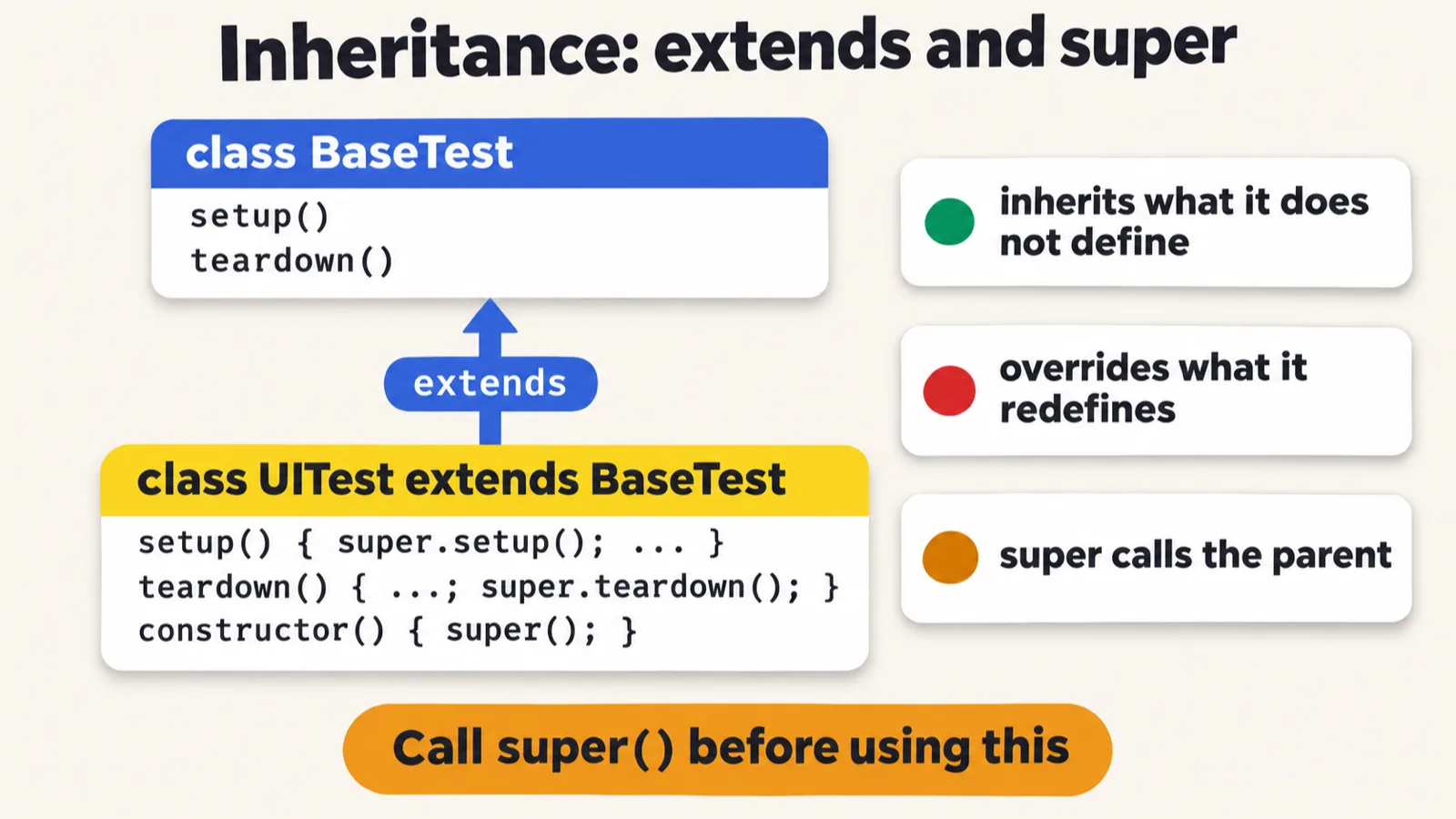
UITest extends BaseTest and calls the parent with super (the sheet leaves out BaseTest's constructor).One more real example, the instructor said: a base test, with a constructor, a setup function and a teardown function, and a UI test that again calls super. File 199:
class BaseTest {
    constructor(){
        console.log("Parent!")
    }
    setup() {
        console.log("Base: open browser");
    }
    teardown() {
        console.log("Base: close browser");
    }
}
class UITest extends BaseTest {
    constructor(){
        super();
    }
    setup() {
        super.setup(); // UITest will help you to call your parent function. super() - Constrcutor, super.fname() - functions name
        console.log("UI: maximize window");
    }

    teardown() {
        console.log("UI: take screenshot");
        super.teardown();
    }

}
As pushed, it prints nothing: it never makes an object, so nothing is called. Super will call which function, the instructor asked: the constructor. super.setup() calls the base test's setup, and super.teardown() the teardown function. The README's copy of the file adds three calls, so that it prints:
const t = new UITest();
t.setup();
t.teardown();
Parent!
Base: open browser
UI: maximize window
UI: take screenshot
Base: close browser
| Call | Prints | Which method |
|---|---|---|
new UITest() |
Parent! |
BaseTest's constructor, called by super() on line 14 |
t.setup() |
Base: open browser |
BaseTest's setup(), called by super.setup() on line 17 |
UI: maximize window |
UITest's own setup(), line 18 |
|
t.teardown() |
UI: take screenshot |
UITest's own teardown(), line 22 |
Base: close browser |
BaseTest's teardown(), called by super.teardown() on line 23 |
A child's constructor calls super() first. The sheet's banner says to call super() before using this, and the README gives the error. Take line 14 out of UITest's constructor, keep the three calls, and making the object fails:
class UITest extends BaseTest {
    constructor(){
    }
27_OOPs_Inheritance/01_Single_Inheritance/199.js:13
    constructor(){
               ^

ReferenceError: Must call super constructor in derived class before accessing 'this' or returning from derived constructor
One call, three classes
execute() call, three different lines, and the parent's version never runs.200 exercises, the instructor said: congratulations, the second century, 200 exercises related to JavaScript. File 200, an interview question, with its three em dashes shown as hyphens:
class TestCase {
    execute() {
        console.log("Running generic test");
    }
}
class UnitTest extends TestCase {
    execute() {
        console.log("Running unit test - checking one function");
    }
}
class APITest extends TestCase {
    execute() {
        console.log("Running API test - sending HTTP request");
    }
}
class E2ETest extends TestCase {
    execute() {
        console.log("Running E2E test - opening browser");
    }
}
let tests = [new UnitTest(), new APITest(), new E2ETest()];
tests.forEach(function (test) {
    test.execute();
});
Running unit test - checking one function
Running API test - sending HTTP request
Running E2E test - opening browser
This is also single inheritance, the instructor said: all of them are. You can create the objects in one go, store them in a list, and execute them one by one with a forEach loop: nothing new, just calling the execute function of each.
One more, file 201: a base page with verify, extended by a login page, a dashboard page and a cart page, with an object of each, called with a forEach loop. Absolutely the same, the instructor said, and it is the shape of a real project, TTACart, the Testing Academy's practice shop: its login page, its dashboard or inventory page, and, after add to cart, its cart page. Are we creating objects here, the instructor asked? Yes, an array of objects, the instructor said, and a learner who said so was absolutely right.
class BasePage {
    verify() {
        console.log("Verifying base page");
    }
}

class LoginPage extends BasePage {
    verify() {
        console.log("Verify: username field exists");
        console.log("Verify: password field exists");
        console.log("Verify: login button is visible");
    }
}

class DashboardPage extends BasePage {
    verify() {
        console.log("Verify: welcome message shown");
        console.log("Verify: sidebar menu loaded");
    }
}

class CartPage extends BasePage {
    verify() {
        console.log("Verify: cart items displayed");
        console.log("Verify: total price is correct");
    }
}

let pages = [new LoginPage(), new DashboardPage(), new CartPage()];

pages.forEach(function (page) {
    page.verify();
    console.log("---");
});
Verify: username field exists
Verify: password field exists
Verify: login button is visible
---
Verify: welcome message shown
Verify: sidebar menu loaded
---
Verify: cart items displayed
Verify: total price is correct
---
Reports can be done the same way, the instructor said: a parent report that can generate the data, and an HTML report, a JSON report and a text report that extend it; then create the objects and execute them. File 202:
class Report {
    generate(data) {
        console.log("Raw data: " + data);
    }
}

class HTMLReport extends Report {
    generate(data) {
        console.log("<html><body>" + data + "</body></html>");
    }
}

class JSONReport extends Report {
    generate(data) {
        console.log('{"report": "' + data + '"}');
    }
}

class TextReport extends Report {
    generate(data) {
        console.log("=== REPORT ===\n" + data + "\n==============");
    }
}

let reports = [new HTMLReport(), new JSONReport(), new TextReport()];

reports.forEach(function (r) {
    r.generate("5 tests passed, 1 failed");
    console.log("---");
});
<html><body>5 tests passed, 1 failed</body></html>
---
{"report": "5 tests passed, 1 failed"}
---
=== REPORT ===
5 tests passed, 1 failed
==============
---
Tasks and announcements
- Today's task. "This is 16th, by the way," the instructor said: research the different types of inheritance in JavaScript, complete the 200 exercises, and push them to GitHub. The instructor is pretty much sure everyone can do this.
- Next class: whether multilevel, multiple, hierarchical and hybrid inheritance are supported, the instructor will show.
- Doubts: Meeti, the TA, had already created the doubt thread for this class: add your questions and doubts there. The Playwright 4X group in Tester Town is a 24 by 7 chat where you can ask an unlimited number of questions and chat with your peers; it is a public group. If you do not have access, let the team know, and you will get an invite. The instructor and Meeti will be there, helping with the interview questions and everything. Do not just say hi, the instructor said: ask your question directly, because the more conversation you have, the more replies you get. You need to add your LinkedIn profile, the instructor said: that would be good, because we follow guidelines.
- Exceptions, a learner asked: they will come directly with Playwright, the instructor said, covered with TypeScript in Playwright.
- Tester Town's game tab now has a Playwright Park, with questions related to Playwright, and a JavaScript gate, with questions such as why
==and===give different answers. - The code: files 188 to 194 are in the repo's 26_OOPs_Encapsulation folder, and files 195 to 202 in 27_OOPs_Inheritance/01_Single_Inheritance.
Task. Research the different types of inheritance in JavaScript, complete the 200 exercises, and push them to GitHub.
When the parent and the child both have a method with the same name, as setup() in file 198, and the object is made from the child, which one is called?
Worth practising too: What is encapsulation, and how is it different from abstraction? What do a getter and a setter do, and what happens when outside code names a # field? Why does a getter need this. in front of a # field? What does file 191 print, and why 4? What do super() and super.foo() each call? Can a parent object call a method that only its child has?
Show the answer
Answer. The object decides, the instructor said: whose object is created, that class's function is called, so test.setup() prints APITest: open browser, and an object of BaseTest prints Base: open browser. Encapsulation hides the internal data and exposes a controlled behaviour: the data stays in # fields, and outside code reaches it only through methods; showing only the essential things, rather than the actual implementation, is abstraction. A getter returns the field, and a setter changes it, and can check first, as file 190's does with isCashier; naming a # field outside the class, as in tesla.#engine = "V10";, is a SyntaxError, and Node refuses the whole file. Inside the class, a # field always needs this.: return #engine; is SyntaxError: Unexpected identifier '#engine'. File 191 prints PASSED, from the ternary in run(true), and 4, because the constructor adds one to the static count for each of the four objects. super(name) calls the parent's constructor, and super.foo() calls the parent's foo(). No: a Father object has only its own methods, so f.walk() is TypeError: f.walk is not a function.