What this class covered
- What a callback is: the restaurant table
- Three ways to pass a callback
- Playwright's test body is a callback
- Sync and async callbacks
- Callback hell: the login flow
- The pyramid of doom
- What a promise is: the food order
- then, catch and finally
- Chaining: the login flow again
- Promise.all and allSettled
- Promise.race and a misplaced bracket
- Interview drills on promises
- A first look at async and await
- Why interviews still ask
- Tasks: research callback versus promise
- A callback is a function you give to another function, which calls it when its work is done.
- Named, anonymous or arrow, it works the same way, and
callbackis just a name. - A synchronous callback, as in
forEach, finishes before the next line. An asynchronous one, as insetTimeout, runs later, and the next line carries on. - One callback nested in another for every step is callback hell, the pyramid of doom: very hard to read, and error handling is a nightmare.
- A promise is pending, then fulfilled by
resolveand handled bythen, or rejected byrejectand handled bycatch.finallyalways runs. Promise.allfails if any promise rejects,allSettledreports every result, andracegives whichever finishes first.- The delay goes inside the brackets:
setTimeout(fn, 100). File 160 as pushed hassetTimeout(fn), 100, so its timers do not wait.
What a callback is
The last class covered 2D arrays and star patterns (the 2 November notes); this one opened chapter 19 in the repo, callbacks.
placeOrder finishes its own work first, then calls back the function you gave it.There are a few more topics before TypeScript and Playwright, the instructor said, starting with a couple of important ones around callbacks: why a callback, what callback hell is and why we do not use callbacks nowadays, then promises and sync versus async.
A callback is simply a function that you give to another function, saying: hey, when you are done, run this. That is the deck's line, and the instructor's.
For a perfect example of a callback, in the instructor's words, go to a restaurant. The tables are full, so you give a phone number and say: call me when the table is ready. You do not want to wait at the door, so you can go shopping. When the table is ready, the waiter calls you, and that is a callback.
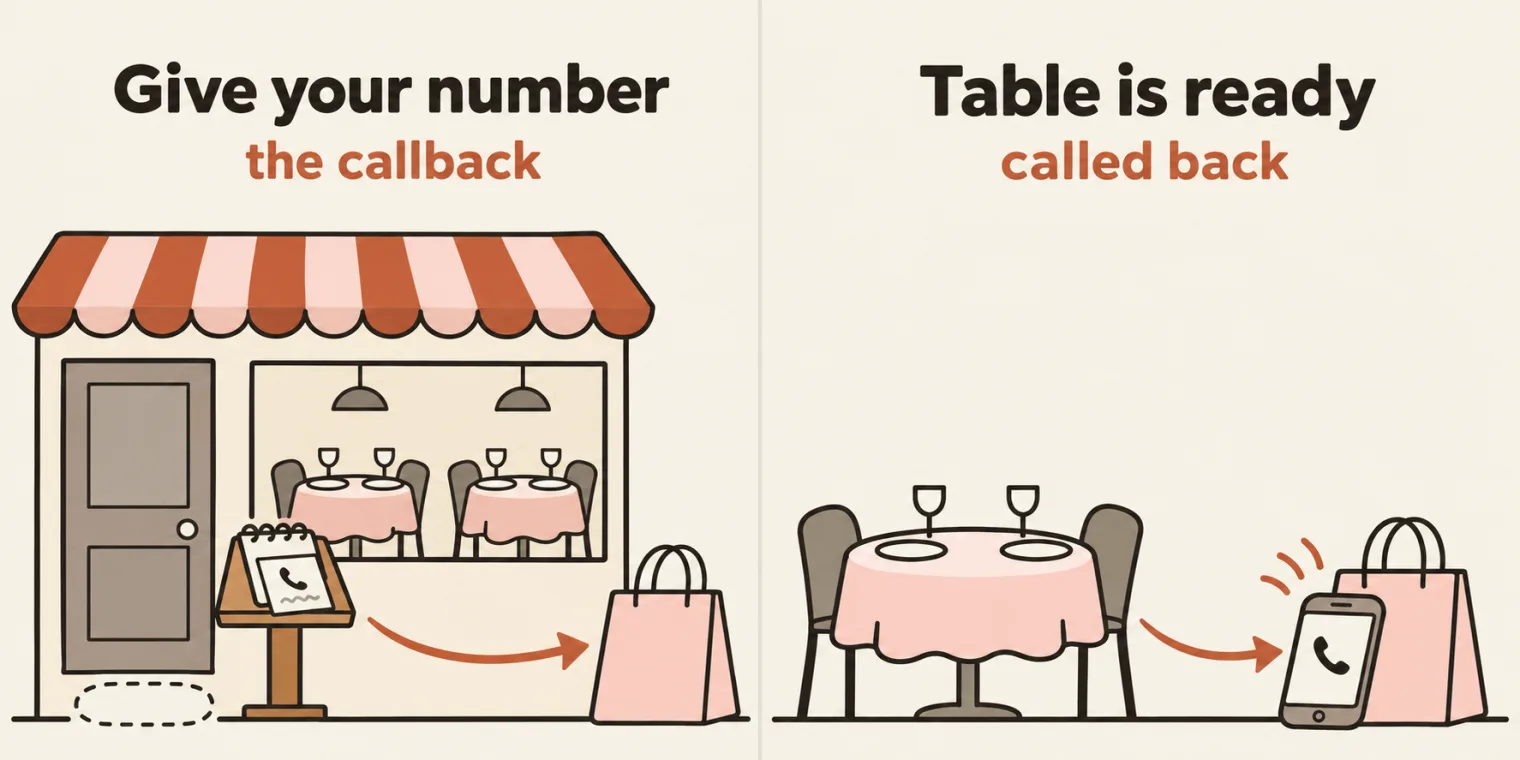
We are QA, the instructor said, so the question is how this is useful to us, and callbacks are everywhere: whenever Playwright clicks a button, it waits for the page to load, then runs your assertions. The deck's note calls that assertion a callback. How Playwright writes this in practice comes at the end of this page, with async and await.
The syntax comes from file 147. placeOrder takes an item and a function, does its work, and calls the function last:
function placeOrder(item, callback){
    console.log("Placing an order");
    console.log("Order Placed", item);
    callback();
}
When the work is done, at line 4, it calls the function it was given. Asked whether callback in this example is the name of the function, the instructor said it is just a name. Later in the class came the reminder that the name can be anything.
Three ways to pass a callback
placeOrder takes two things, the instructor said: your item, plus which function to call. File 147 passes that function three ways, and in the repo the first two are commented out:
function placeOrder(item, callback){
    console.log("Placing an order");
    console.log("Order Placed", item);
    callback();
}


// // First Way
// function CompleteOrderPrint(){
//     console.log("Normal Fn");
// }

// placeOrder("Burger", CompleteOrderPrint);


// // Sencond Way Anoy
// placeOrder("Burger", function(){
//     console.log("Order is ready!, pick it up!");
// });


// Third Way - Arrow Fn
placeOrder("Burger", () => {
    console.log("Arrow Fn, I am also a function wihtout name!")
});

test('has title', async ({ page }) => {

});


// test('has title', async ({ page }) => {
//   await page.goto('https://playwright.dev/');
//   await expect(page).toHaveTitle(/Playwright/);
// });
Placing an order
Order Placed Burger
Arrow Fn, I am also a function wihtout name!
147_Callback.js:28
test('has title', async ({ page }) => {
^

ReferenceError: test is not defined
Line 28 stops the file. Lines 28 to 30 are the start of a Playwright test, there to compare shapes (see the next section). test only exists inside the Playwright runner, as the repo's README says, so under plain Node the file prints its three lines, then stops with a ReferenceError.
With lines 28 and 30 commented out, and the first two ways switched on, the file runs all three:
function CompleteOrderPrint(){
    console.log("Normal Fn");
}

placeOrder("Burger", CompleteOrderPrint);

placeOrder("Burger", function(){
    console.log("Order is ready!, pick it up!");
});

// test('has title', async ({ page }) => {

// });
Placing an order
Order Placed Burger
Normal Fn
Placing an order
Order Placed Burger
Order is ready!, pick it up!
Placing an order
Order Placed Burger
Arrow Fn, I am also a function wihtout name!
| Way | What is passed | In the file | The callback prints |
|---|---|---|---|
| First | A named function | CompleteOrderPrint |
Normal Fn |
| Second | An anonymous function | function(){ ... } |
Order is ready!, pick it up! |
| Third | An arrow function | () => { ... } |
Arrow Fn, I am also a function wihtout name! |
The first way, a separate named function, is the easiest to understand, the instructor said. The second shows that the function can be anonymous, so you do not have to give it a name. The third uses an arrow function, because there is no argument. placeOrder does the same work each time, and calls whatever it was given.
Playwright's test body is a callback
To relate this to Playwright, the instructor went to playwright.dev, opened Get started, said to make sure you are in Node.js, and pointed at the first test under Writing tests. File 147 ends with a copy of it, commented out:
// test('has title', async ({ page }) => {
//   await page.goto('https://playwright.dev/');
//   await expect(page).toHaveTitle(/Playwright/);
// });
test is the name of the function, 'has title' is the argument, and the function after it is nothing but a callback, the instructor said: actually, Playwright code is nothing but a callback. It is the same arrow function as before, and the only differences are async and page as an argument. Ignore async for now, the instructor said: it will be explained.
File 148 writes out the part you are not shown. The instructor's point: the test function you call in Playwright is present like this, in the Playwright test file, which the class will see later.
function test(item, callMeWhenDone) {
    console.log("Hi start the Testcase", item);
    callMewhenDone();
}

test("Verify the login page is working", async (page) =>{
});
Hi start the Testcase Verify the login page is working
148_More_CB.js:3
    callMewhenDone();
    ^

ReferenceError: callMewhenDone is not defined
Line 3 has a typo. Line 1 names the parameter callMeWhenDone, and line 3 calls callMewhenDone, with a small w, so the file prints its first line and stops with a ReferenceError. Names must match exactly. The repo's README points this out too.
Asked what line 3 calls, the instructor said: this function, the one passed in, is called automatically. Here is the file with the name corrected, and one line added to the empty test body so you can see it run:
function test(item, callMeWhenDone) {
    console.log("Hi start the Testcase", item);
    callMeWhenDone();
}

test("Verify the login page is working", async (page) =>{
    console.log("The test body runs");
});
Hi start the Testcase Verify the login page is working
The test body runs
The test's name goes in as item, and the arrow function as callMeWhenDone. test prints its line, then calls the function.
The instructor then showed a diagram of the idea, in simple words: a function passed to another function, which calls it back later, commonly used for asynchronous tasks. The common uses it listed are timers, event handling, API calls and asynchronous operations in Playwright.
A function passed as an argument is a callback. A learner said an earlier class had already used a callback function on an array, for adding numbers. You can say that also, the instructor said, but that was not a callback function at the time: it was a function as an argument. It fits the definition all the same: Mozilla's glossary calls a function passed into another function as an argument a callback, and the deck's note lists forEach, map and filter as sync callbacks.
Sync and async callbacks
forEach runs its callback now, and setTimeout runs its callback later.Callbacks have two types, the instructor said: synchronous and asynchronous.
Synchronous basically means one by one, line by line, the instructor said. File 149 is an array of test results, the kind you get from a Playwright test case, and forEach also has a callback:
let testResults = ["Pass","Fail","Pass","Skip"];

testResults.forEach(function(result,index){
        console.log("Test", index, result);
});

// "All done" prints LAST because forEach is synchronous - it finishes all 4 iterations first, then moves on.
Test 0 Pass
Test 1 Fail
Test 2 Pass
Test 3 Skip
It takes the first item and runs the callback, then the second, the third and the fourth. It finishes all four iterations, then moves on. Line 7's comment says All done prints last, but the file has no such line. Add it after line 5, as the repo's README does, and it does print last:
console.log("All done");
Test 0 Pass
Test 1 Fail
Test 2 Pass
Test 3 Skip
All done
The deck's note adds that the program waits for it to finish before moving to the next line, and that every forEach, map and filter you have used is a sync callback.
Asynchronous is something that runs after some time, the instructor said: "I'll do this later, you carry on", as the deck puts it. File 150 uses setTimeout, a function in JavaScript that takes a function, and a time: after how long to run it.
console.log("Test 1 : Started!");

setTimeout(function(){
    console.log("Test 2 : Started!");
}, 5000);

console.log("Test 3 : Started!");
Test 1 : Started!
Test 3 : Started!
Test 2 : Started!
Test 3 prints before Test 2. Here is the same file, with every console.log and setTimeout timed:
| Time since the start | Line | What happens |
|---|---|---|
| about 0 ms | 1 | Prints Test 1 : Started! |
| about 0 ms | 3 | setTimeout takes the function and 5000, and the file carries on |
| about 0 ms | 7 | Prints Test 3 : Started! |
| about 5000 ms | 4 | The time is up, so the function runs: prints Test 2 : Started! |
That 5000 is milliseconds, the instructor said, equal to five seconds. On the iPad, the instructor went through the order: line 1 runs, then line 7, and the function runs after five seconds. The earlier callbacks came after an item, as in placeOrder("Burger", ...). This one has no item before it and takes no argument: it is used directly. Who calls it? setTimeout is pre-made code in JavaScript, the instructor said, which calls automatically after the time.
The deck's real-world QA example is an API request: it goes out, your code continues, and when the response arrives, the callback runs. setTimeout(callback, milliseconds), the deck says, is how plain JavaScript simulates that.
In Playwright, you are never going to use setTimeout, the instructor said, and we will try to avoid it, if possible. This is just an example to show that asynchronous also exists.
Callback hell: the login flow
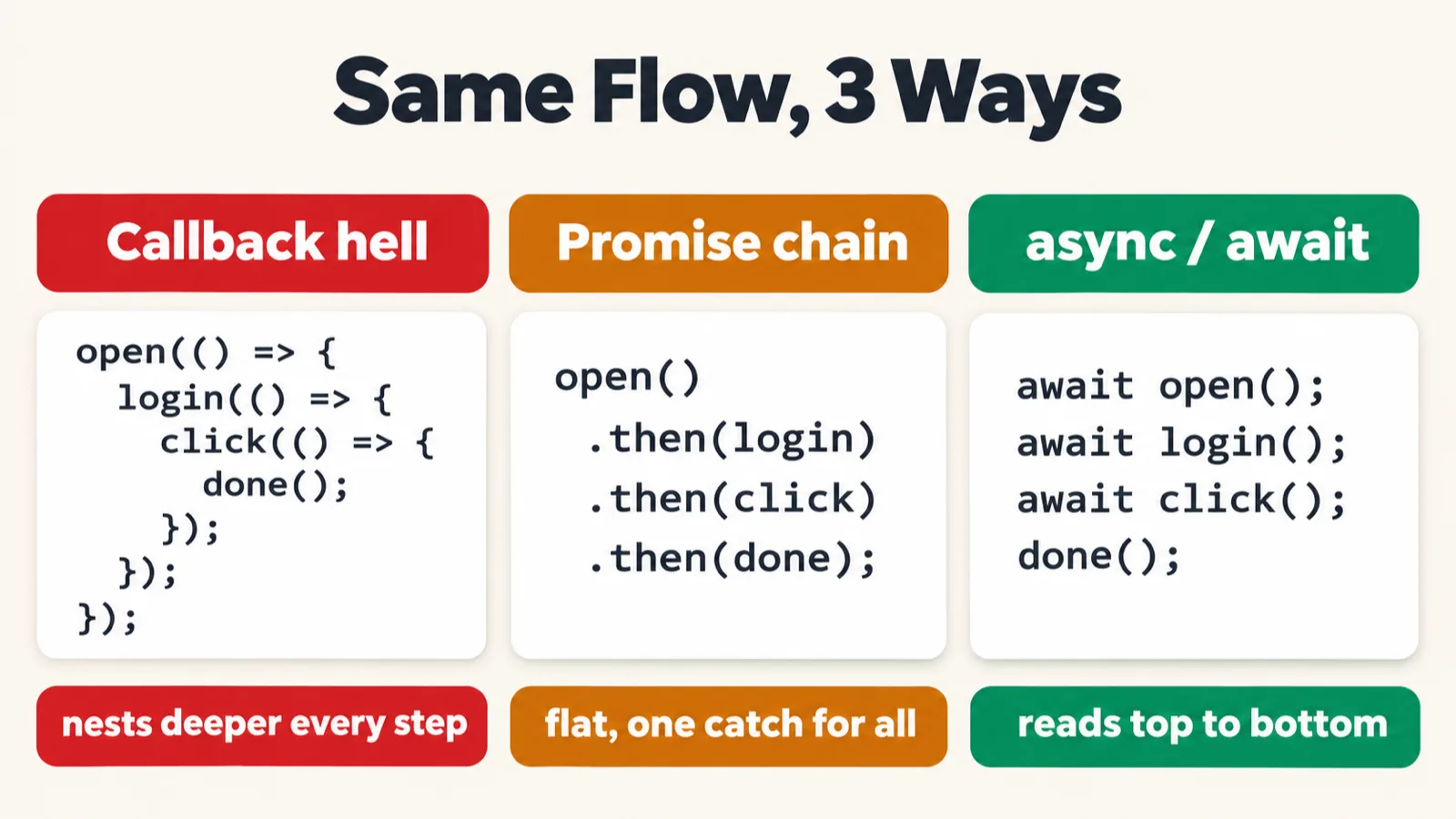
There is a problem with callbacks, the instructor said, and it is why people do not prefer them: callback hell. The real example is a login flow, on app.vwo.com according to the file's first line: open the browser, go to the login page, enter the credentials, click the login button. Each step is set to take 500 milliseconds.
// Real QA Scenario: E2E Login Flow app.vwo.com

function openBrowser(callback){
    console.log("opening the browser");
    setTimeout(function () {
        console.log("Step 1 - browser starting...");
        callback();
    }, 500);
}

function goToLoginPage(callback) {
    setTimeout(function () {
        console.log("Step 2: Login page loaded");
        callback();
    }, 500);
}


function enterCredentials(callback) {
    setTimeout(function () {
        console.log("Step 3: Credentials entered");
        callback();
    }, 500);
}

function clickLogin(callback) {
    setTimeout(function () {
        console.log("Step 4: Login button clicked");
        callback();
    }, 500);
}

// // THIS IS CALLBACK HELL 👇
openBrowser(function(){
    goToLoginPage(function(){
        enterCredentials(function(){
            clickLogin(function(){
                console.log("Test is Complete!")
            })
        })
    })
})
opening the browser
Step 1 - browser starting...
Step 2: Login page loaded
Step 3: Credentials entered
Step 4: Login button clicked
Test is Complete!
The file only prints the steps: no browser opens, and nothing signs in. Here it is with every console.log and setTimeout timed:
| Time since the start | Prints | Then |
|---|---|---|
| about 0 ms | opening the browser |
openBrowser sets the first timer |
| about 500 ms | Step 1 - browser starting... |
callback(): goToLoginPage sets the next timer |
| about 1000 ms | Step 2: Login page loaded |
callback(): enterCredentials sets the next timer |
| about 1500 ms | Step 3: Credentials entered |
callback(): clickLogin sets the next timer |
| about 2000 ms | Step 4: Login button clicked |
callback(): the innermost function runs |
| about 2000 ms | Test is Complete! |
Nothing left: the file ends |
Each timer starts only when the one before it is done. When the open browser step is done, then only the next function is called, the instructor said, and so on down the line. But this is not a great syntax: you have to keep writing open browser, nested in it the next step, nested in that the next. This is why we do not use callbacks here, the instructor said: we will use async or await or something else.
The pyramid of doom
If you use it in a real QA scenario, it looks like this, the instructor said, stressing that this is just an example: file 152 in the repo. Is it good code? Too much nesting, the instructor said, and too complicated to understand, which is why we do not use callbacks like this. Here is the start of the file, with the login values on line 1 masked:
loginUser("<email>", "<password>", function (loginError, user) {

    if (loginError) {
        console.log("Login failed:", loginError);
        return;
    }

    console.log("User logged in:", user.id);

    getUserProfile(user.id, function (profileError, profile) {

        if (profileError) {
            console.log("Failed to get profile:", profileError);
            return;
        }

        console.log("Profile received");

        getUserOrders(user.id, function (ordersError, orders) {
152_REAL_QA.js:1
loginUser("<email>", "<password>", function (loginError, user) {
^

ReferenceError: loginUser is not defined
Nothing defines these functions, so the file stops on line 1. The repo's README lists it as a demo that only shows the shape. Lines 20 to 106 repeat the pattern, and the deep end looks like this:
                                                    if (reportError) {
                                                        console.log(
                                                            "Failed to generate report:",
                                                            reportError
                                                        );
                                                        return;
                                                    }

                                                    console.log(
                                                        "Everything completed!"
                                                    );

                                                    console.log(report);
                                                }
                                            );
                                        }
                                    );
                                }
                            );
                        });
                    });
                });
            });
        });
    });
});
We can also have a callback that returns something, the instructor said, as in file 153:
function calculate(a, b, operation) {
    return operation(a, b);
}

let sum = calculate(10, 5, function (x, y) {
    return x + y;
});

console.log(sum);
15
calculate calls the function it was given at line 2, that function returns x + y, and calculate returns the answer.
File 154 is the smallest version, step one to step four, and this is what the instructor called the pyramid of doom. The deck has the same code.
function step1(callback) {
    console.log("Open browser");
    callback();
}

function step2(callback) {
    console.log("Navigate to page");
    callback();
}

function step3(callback) {
    console.log("Click button");
    callback();
}

function step4(callback) {
    console.log("Click button");
    callback();
}

step1(function () {
    step2(function () {
        step3(function () {
            step4(function () {
                console.log("Done!");
            });
        });
    });
});
Open browser
Navigate to page
Click button
Click button
Done!
Steps 3 and 4 both print Click button, in the deck too. This file has no timer and still has the shape: the pyramid comes from the nesting. That is the problem, the instructor said, and it is why people do not use callbacks for nested steps.
The instructor's pros and cons: with one or two steps a callback has its advantages, but nested it is a problem.
| With one or two steps | When nested |
|---|---|
| No special syntax is needed | Error handling is a nightmare |
| Works everywhere | Very hard to read |
| Lightweight | Cannot easily return the values |
| Built into the array |
File 153 can return because its callback runs straight away. The README's caution is about async callbacks: you cannot return a result out of one. To resolve all this, the instructor said, we need a new mechanism.
What a promise is
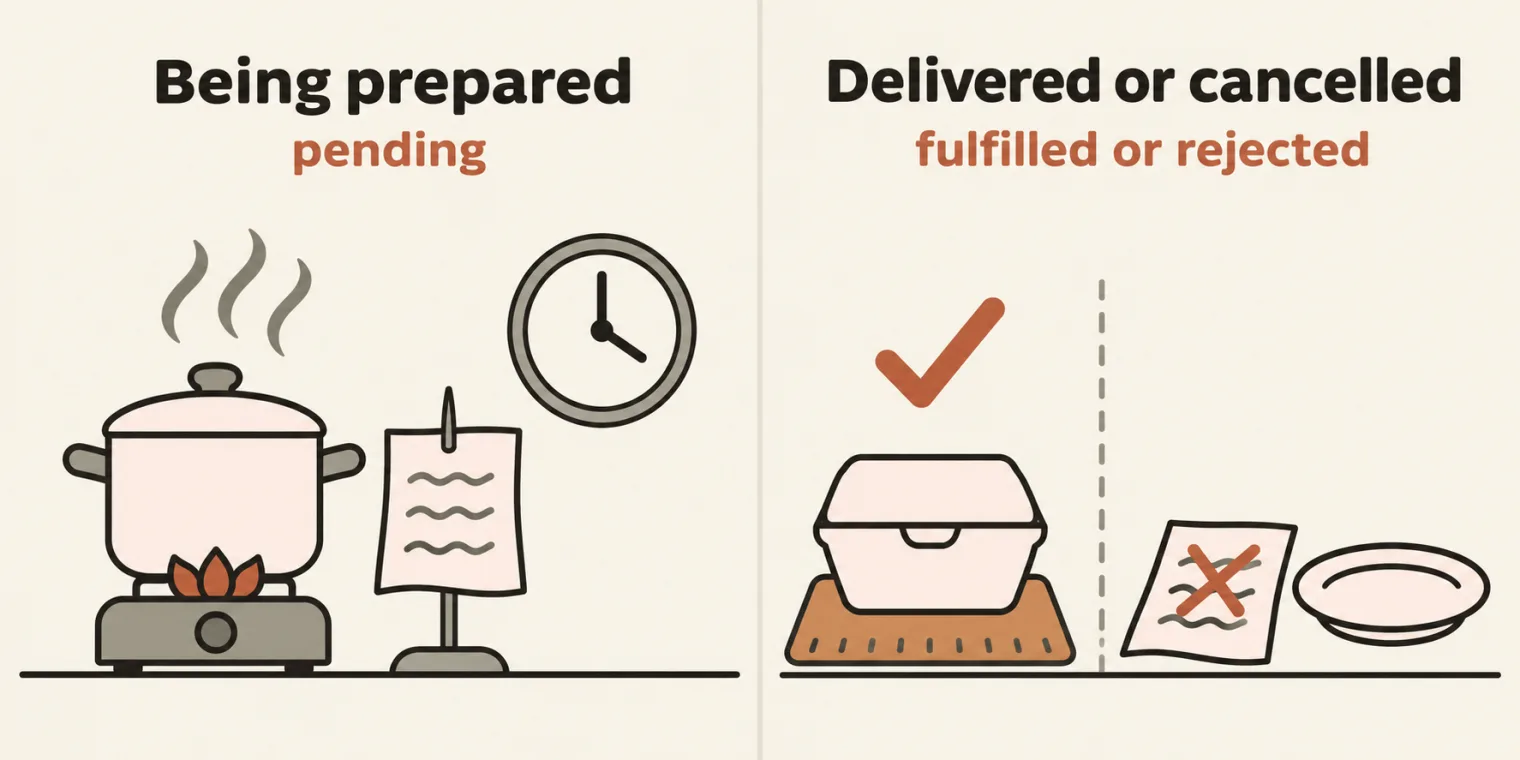
To overcome this, a new concept was introduced: the promise. A promise is JavaScript's way of saying: I will give you the result later, and either it will succeed or it will fail. That is the deck's line, and the instructor's.
The real-time analogy is a Zomato or Swiggy order, the instructor said. The order is a promise, and it can have three states:
| State | The food order |
|---|---|
| Pending | The food is getting prepared |
| Fulfilled | The food is delivered |
| Rejected | The order is cancelled |
then, catch and finally
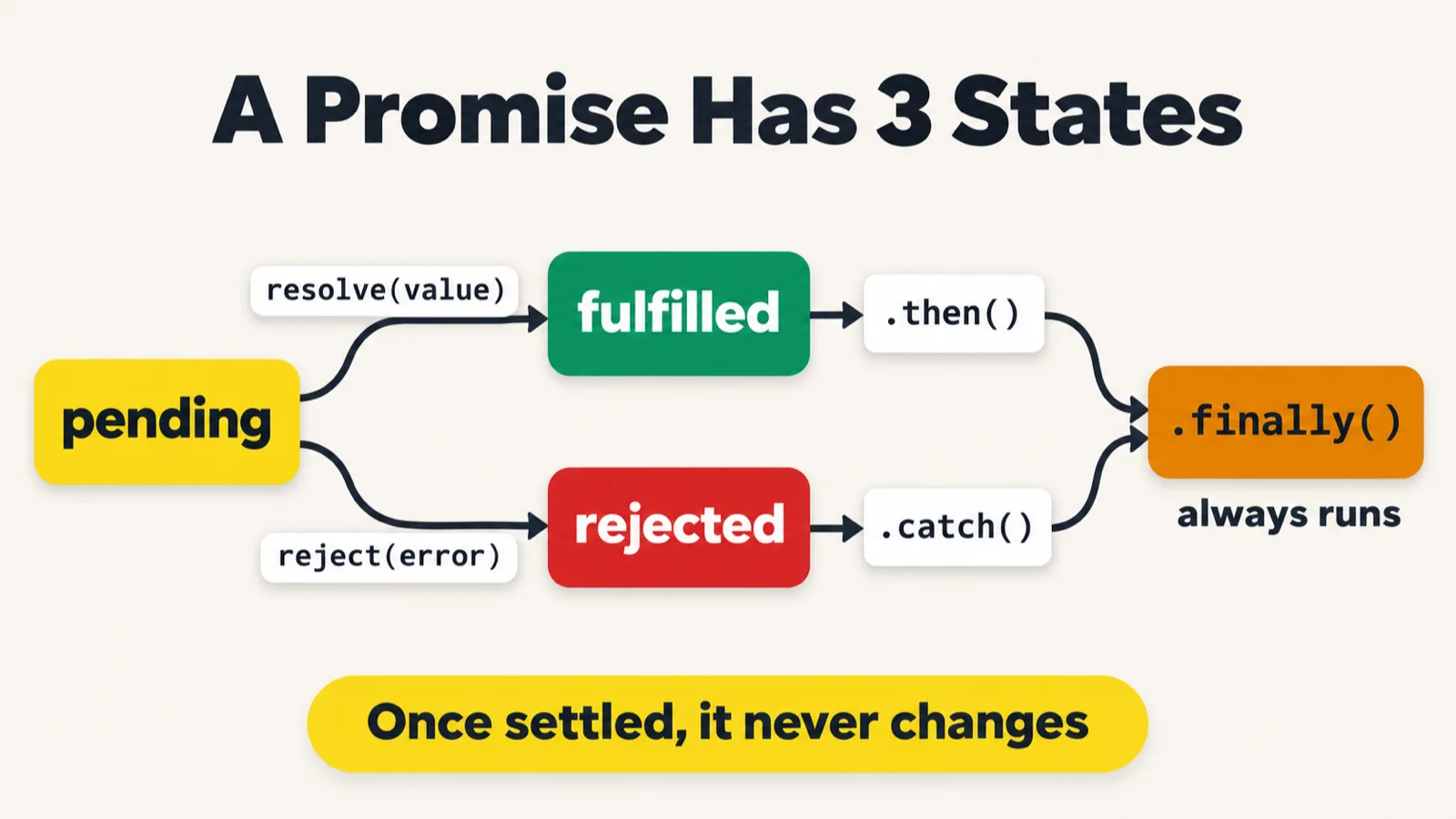
resolve goes to then, reject goes to catch, and finally always runs.File 155 is an API call as a promise. new Promise gives you two functions: it can resolve, or it can reject.
let apiCall = new Promise(function(resolve,reject){
           resolve({status : 200, body : "User Data"});
});


apiCall.then(function(response){
    console.log(response);
});


let testRun = new Promise(function (resolve, reject) {
    reject("Assertion Failed");
});

testRun.then(function (data) { // Resolve
    console.log(data);
}).catch(function (error) { // Reject
    console.log(error);
});
{ status: 200, body: 'User Data' }
Assertion Failed
Line 2 resolves, so the object goes to then at line 6. Instead of the callback we use then, the instructor said: when this is done, call the function, and you get the response automatically. then basically means resolve. Line 12 rejects. Will that come in then? No, the instructor said, it will come in catch, like a try catch. catch basically means reject.
Each promise holds its state. Log both at the end of the file, and Node shows it:
console.log(apiCall);
console.log(testRun);
Promise { { status: 200, body: 'User Data' } }
Promise { <rejected> 'Assertion Failed' }
{ status: 200, body: 'User Data' }
Assertion Failed
A fulfilled promise shows its value, and a rejected one shows <rejected>. Those two lines print first, even though then comes earlier in the file: the handlers run only after the file's own lines have finished. Run 20 times, the order never changed.
Why does this exist? Whenever we talk about web fundamentals, HTTP and web pages, the instructor said, they will always be asynchronous in nature: they do something later, not right now, and then there are only two outcomes, resolve or reject. The instructor's own example was this course: the promise made before it began was that the course would be finished and you would learn Playwright, or you could reject it completely. You were not given the whole course at the same time, so it was either going to succeed or fail, but later.
In Playwright, everything is later. Open the browser, and either the page will load or it will not. Enter the username and password, click the sign in button, and either it will resolve or it will be rejected. That is why everything is actually going to be a promise, the instructor said, and the repo's README agrees: every Playwright action, such as page.goto(), returns a promise.
finally comes with them. Its code will always be executed, the instructor said, no matter whether you reject or resolve; it is taken from try, catch, finally.
let apiCall = new Promise(function(resolve,reject){
    // resolve({ status: 200});
    reject("error");

})


apiCall.then(function(data){
    console.log(data);
}).catch(function(error){
    console.log(error);
}).finally(function(){
    // Always Executed!
     console.log("I will be executed anyhow!!");
});
error
I will be executed anyhow!!
As pushed, line 3 rejects. Switch to line 2, and it resolves:
resolve({ status: 200});
// reject("error");
{ status: 200 }
I will be executed anyhow!!
| Line switched on | What runs | Prints |
|---|---|---|
Line 3, reject("error"), as pushed |
catch, then finally |
error, then I will be executed anyhow!! |
Line 2, resolve({ status: 200}) |
then, then finally |
{ status: 200 }, then I will be executed anyhow!! |
Chaining: the login flow again
Promises improve the callback flow, the instructor said. File 157 is the same login flow: instead of taking a callback, each function returns a promise, and the promise resolves.
function openBrowser(){
    return new Promise(function(resolve){
        resolve("Browser has been opened!");
    })
}

function goToLogin() {
    return new Promise(function (resolve) {
        resolve("Login page loaded");
    });
}

function enterCredentials() {
    return new Promise(function (resolve) {
        resolve("Credentials entered");
    });
}

function clickLogin() {
    return new Promise(function (resolve) {
        resolve("Logged in successfully");
    });
}

openBrowser()
    .then(function (msg) {
        console.log("Step 1", msg);
        return goToLogin();
    }).then(function (msg) {
        console.log("Step 2 :", msg);
        return enterCredentials();
    }).then(function (msg) {
        console.log("Step 3 :", msg);
        return clickLogin();
    }).then(function (msg) {
        console.log("Step 4 :", msg);
    }).catch(function (error) {
        console.log("Error:", error);
    }).finally(function () {
        console.log("Done execution!");
    });
Step 1 Browser has been opened!
Step 2 : Login page loaded
Step 3 : Credentials entered
Step 4 : Logged in successfully
Done execution!
then basically means: when it is done, call the next one. Each then returns the next promise, and the next then receives its value:
| At line | Receives | Prints | Returns |
|---|---|---|---|
| 26 | "Browser has been opened!" |
Step 1 Browser has been opened! |
goToLogin() |
| 29 | "Login page loaded" |
Step 2 : Login page loaded |
enterCredentials() |
| 32 | "Credentials entered" |
Step 3 : Credentials entered |
clickLogin() |
| 35 | "Logged in successfully" |
Step 4 : Logged in successfully |
Nothing |
39, finally |
Done execution! |
This looks much cleaner compared to the callbacks, the instructor said: whatever you did with callbacks can be done with promises too, using .then, .then, .then. Syntax-wise, you need to understand it.
No promise rejects in this file, so the catch at line 37 never runs. Make step 3 reject:
return new Promise(function (resolve, reject) {
    reject("Credentials rejected");
Step 1 Browser has been opened!
Step 2 : Login page loaded
Error: Credentials rejected
Done execution!
The later steps are skipped, catch handles the rejection, and finally still runs: the "one catch for all" on the cheat sheet in the callback hell section. This file has no setTimeout, so unlike file 151 it finishes straight away.
Promise.all and allSettled
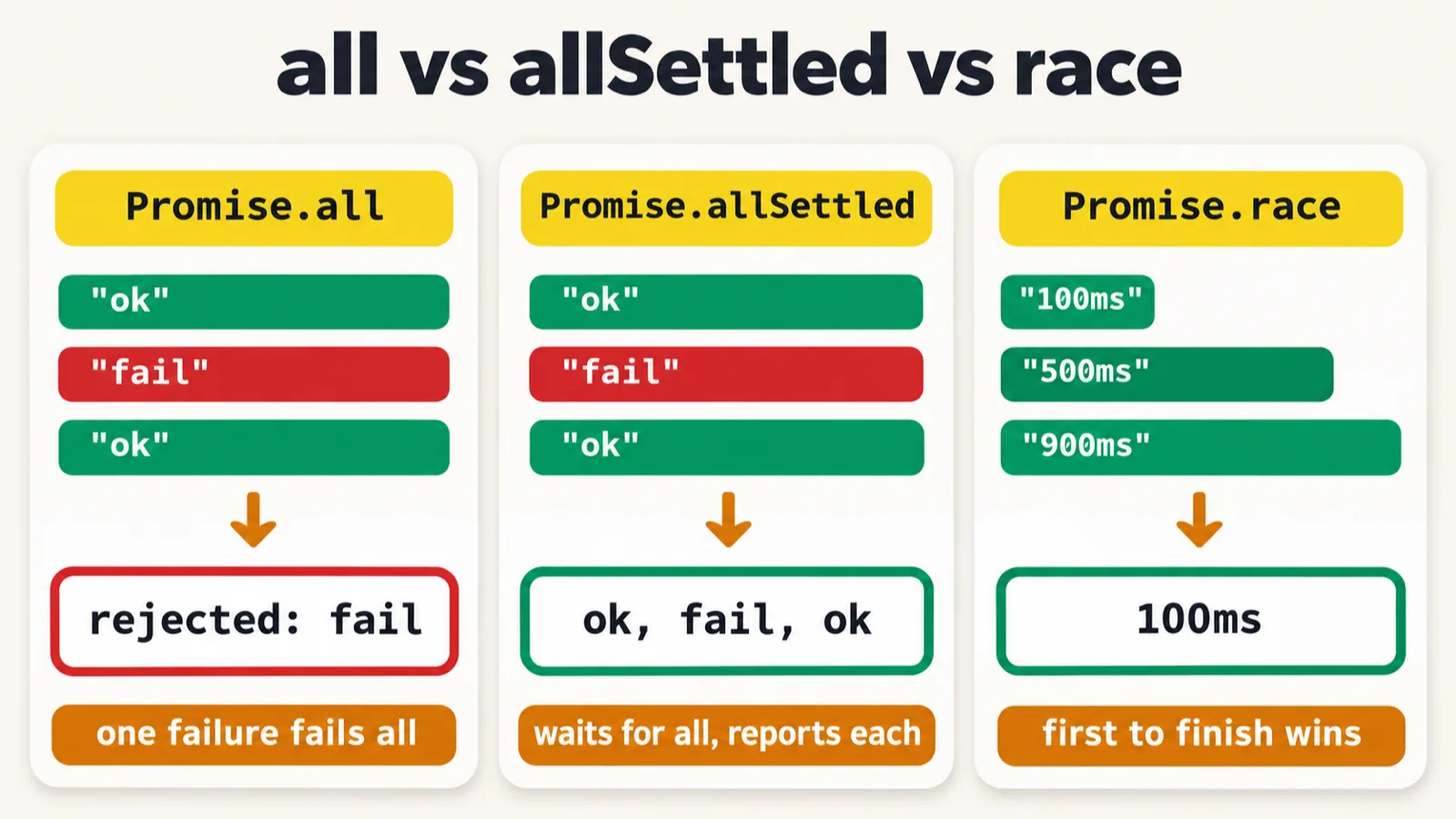
We can have multiple promises in one go, the instructor said, and without the new keyword: Promise.resolve and Promise.reject. You can make sure all the promises are done, and only then will the result be printed; if any of them is rejected, it fails and goes to catch.
let checkAuth = Promise.resolve("Auth Ok");
let checkDB = Promise.resolve("DB OK");
let checkCache = Promise.resolve("Cache OK");


Promise.all([checkAuth, checkDB, checkCache]).then(function (results) {
    console.log("All checks:", results);
})


Promise.all([
    Promise.resolve("OK"),
    Promise.reject("DB DOWN"),
    Promise.resolve("OK")
])
    .then(function (r) { console.log(r); })
    .catch(function (err) { console.log("Failed:", err); });
All checks: [ 'Auth Ok', 'DB OK', 'Cache OK' ]
Failed: DB DOWN
On line 6, all three resolve, so then runs, with the results in the order given. On lines 11 to 15, one is rejected: then is skipped, and catch prints Failed: DB DOWN. All of them should be passed, as the instructor put it. Run 20 times, the two lines came in this order every time.
Promise.allSettled reports all of them instead, pass or fail. It creates a promise that is resolved with an array of results, the instructor said, and file 159 gets one fulfilled, one rejected and one fulfilled:
Promise.allSettled([
    Promise.resolve("Test A Passed!"),
    Promise.reject("Test B failed"),
    Promise.resolve("Test C passed")
]).then(function (results) {
    results.forEach(function (r, i) {
        console.log("Test " + (i + 1) + ":", r.status, "-", r.value || r.reason);
    });
})
Test 1: fulfilled - Test A Passed!
Test 2: rejected - Test B failed
Test 3: fulfilled - Test C passed
Log results at the start of the callback to see that array:
console.log(results);
[
  { status: 'fulfilled', value: 'Test A Passed!' },
  { status: 'rejected', reason: 'Test B failed' },
  { status: 'fulfilled', value: 'Test C passed' }
]
Test 1: fulfilled - Test A Passed!
Test 2: rejected - Test B failed
Test 3: fulfilled - Test C passed
A fulfilled result has a value and a rejected one a reason, which is why line 7 prints r.value || r.reason. The repo's README adds a caution: a falsy value such as 0 would print undefined here, so check r.status when values can be falsy.
Promise.race and a misplaced bracket
Winner: Fast 100ms, is the same; the reason is not.With Promise.race, whichever comes first gives the answer, the instructor said. File 160 has a fast server and a slow server, and in class the winner was the fast one:
let fastServer = new Promise(function (resolve) {
    setTimeout(function () {
        resolve("Fast 100ms")
    }), 100
});

let slowServer = new Promise(function (resolve) {
    setTimeout(function () {
        resolve("Fast 500ms")
    }), 500
});

Promise.race([fastServer, slowServer]).then(function (winner) {
    console.log("Winner:", winner);
})
Winner: Fast 100ms
The delay never reaches setTimeout. On lines 4 and 10 the bracket closes too early: setTimeout(function () { ... }), 100. setTimeout receives only the function, and the 100 is left over as a separate value that does nothing. So both timers fire within a few ms, and the first one created wins. The repo's README points this out too. Line 9's string also says Fast 500ms, for the slow server.
The same file, with each setTimeout logged, then changed in two ways:
| Run | Delays received | Timers fire | Winner |
|---|---|---|---|
| As pushed | none, none | both within a few ms | Fast 100ms |
As pushed, slowServer created first |
none, none | both within a few ms | Fast 500ms |
| Fixed | 100, 500 | about 100 ms and about 500 ms | Fast 100ms |
Fixed, slowServer created first |
500, 100 | about 100 ms and about 500 ms | Fast 100ms |
Here is the second row, the file as pushed with the slow server created first. Run 20 times, it won every time:
let slowServer = new Promise(function (resolve) {
    setTimeout(function () {
        resolve("Fast 500ms")
    }), 500
});

let fastServer = new Promise(function (resolve) {
    setTimeout(function () {
        resolve("Fast 100ms")
    }), 100
});
Winner: Fast 500ms
The fix puts the delay inside the brackets. The corrected file, with line 9's string changed to match its server:
let fastServer = new Promise(function (resolve) {
    setTimeout(function () {
        resolve("Fast 100ms")
    }, 100);
});

let slowServer = new Promise(function (resolve) {
    setTimeout(function () {
        resolve("Slow 500ms")
    }, 500);
});

Promise.race([fastServer, slowServer]).then(function (winner) {
    console.log("Winner:", winner);
})
Winner: Fast 100ms
The output is the same as the file as pushed, and now it is true: the fast server wins because it is faster, even when it is created second. Race does not wait for the slow one. Log both promises before the race, and again inside then:
console.log(fastServer, slowServer);

Promise.race([fastServer, slowServer]).then(function (winner) {
    console.log("Winner:", winner);
    console.log(fastServer, slowServer);
})
Promise { <pending> } Promise { <pending> }
Winner: Fast 100ms
Promise { 'Fast 100ms' } Promise { <pending> }
There are the states again: both pending at the start, and at the moment of winning, the slow server is still pending.
Interview drills on promises
Now the interview questions, the instructor said: what will the output be? File 161 holds six. In the repo only the last one is live and the first five are commented out, so each one is shown here switched on, with the line numbers it has in the file. Switch on one at a time: drills 1 to 3 each declare let p, and together they stop with a SyntaxError. Try each one before you read its output.
Drill 1: a promise that resolves.
let p = new Promise(function (resolve, reject) {
    resolve(42);
});
p.then(function (value) {
    console.log("Answer:", value);
});
Answer: 42
It resolves with 42, so then gets 42.
Drill 2: a promise that rejects.
let p = new Promise(function (resolve, reject) {
    reject("Something broke");
});

p.catch(function (err) {
    console.log("Caught:", err);
});
Caught: Something broke
If you reject the promise, the instructor said, catch will be called.
Drill 3: a value passed down.
let p = Promise.resolve(5);

p.then(function (val) {
    return val * 10;
}).then(function (val) {
    console.log("Result:", val);
});
Result: 50
The first then multiplies 5 by 10 and returns it, and the next one prints it.
Drill 4: three steps in a chain.
Promise.resolve(1)
    .then(function (val) {
        console.log(val);
        return val + 1;
    })
    .then(function (val) {
        console.log(val);
        return val + 1;
    })
    .then(function (val) {
        console.log(val);
    });
1
2
3
1 goes to the first then, which prints it and returns 2. 2 goes to the next one, which returns 3, and the last one prints 3.
Drill 5: a throw in the middle.
Promise.resolve("start")
    .then(function (val) {
        console.log(val);
        throw new Error("Broke at step 2");
    })
    .then(function () {
        console.log("This will NOT run");
    })
    .catch(function (err) {
        console.log("Caught:", err.message);
    });
start
Caught: Broke at step 2
If you throw something, catch will be called, automatically, the instructor said. The then in between is skipped, so This will NOT run never prints.
Drill 6: reject, catch and finally. This one is live in the repo.
Promise.reject("Test failed")
    .then(function (data) {
        console.log("Data:", data);
    })
    .catch(function (err) {
        console.log("Error:", err);
    })
    .finally(function () {
        console.log("Cleanup done");
    });
Error: Test failed
Cleanup done
Rejecting skips then and calls catch. Cleanup is always called, the instructor said, because it is a finally.
What did we learn? There are two ways to do an asynchronous task in JavaScript, the instructor said: callbacks, or promises.
A first look at async and await
So which one is better? These are concepts of JavaScript, the instructor said, and Playwright has adopted something called async and await. Promises and callbacks are a little crazy, in the instructor's words: they give a lot of confusion, with a lot of resolve and reject. The class will see async and await in the next class. The instructor could skip callbacks and promises too, but the interview questions will come from here.
As one example, to be explained properly next class, the instructor took a function that returns something later, such as getting a test result. The code below is rebuilt from the recording, because the repo does not have it. What we used to do is return a new promise:
function getTestResult() {
    return new Promise(function (resolve, reject) {
        resolve("Pass");
    });
}

getTestResult().then(function (result) {
    console.log(result);
});
Pass
Do not do all this, the instructor said: if the function returns something later, simply make it an async function, and it will give you the result later. Then you can use it with then:
async function getTestResult() {
    return "Pass";
}

getTestResult().then(function (result) {
    console.log(result);
});
Pass
They have made our life a little easier, the instructor said. File 162 holds only two notes so far, and prints nothing:
// An async function always returns a promise.
// await reads the resolved value inside another async function.
Its first note is easy to check, with the async function above:
console.log(getTestResult());
Promise { 'Pass' }
Why interviews still ask
Do we use callbacks and promises in projects? Mostly no, the instructor said, mostly very rare. Promises you are going to use in Playwright, and promises we can use, but callbacks we will try to avoid.
If we are not using them in projects, a learner asked, why are interviewers asking? Because interviewers are crazy, in the instructor's words: we do not know what an interviewer is going to ask. They will just check your concept, and right now this is a filtration process also. Earlier, asked whether an interview can ask about callbacks, the instructor had said absolutely yes, definitely they are going to ask; later, it was sometimes an interview question.
To make the point, the instructor asked anyone who had given an interview in the last few weeks or the last month: are you still given a notepad to write code on, or Cursor, Antigravity or Visual Studio Code with GitHub Copilot? The chat came back notepad, notepad, notepad. Asked who had been allowed Cursor or GitHub Copilot, most said no; only one, the instructor thought, had. Others said an online JavaScript compiler, and one said they will mostly give you online compilers. One learner had been given the interviewers' laptop to fix their framework and run the scripts, without GitHub Copilot or Claude, which the instructor called very difficult. So that is why it is important to learn, the instructor said, and why callbacks and promises need to be seen and researched.
Tasks and announcements
- Today's task: research callback versus promise in JavaScript. The instructor wants all of you to research it, and asked the TA to add it as a task for today.
- Read the Mozilla docs, if possible, the instructor said: Callback function and Promise. The instructor opened both at the end of the class: a callback is a function passed to another function as an argument, and a promise has three stages, pending, fulfilled and rejected, and can be chained. The deck links the same two pages.
- Finish the pattern task from the last class. The instructor thinks a lot of people have not done it, and said to please complete it today. The three patterns are in the 2 November notes.
- Doubts: the doubt thread for this class is already created.
- The code is pushed: files 147 to 162 are in the repo's 19_Callback, 20_Promise and 21_Async_Await folders.
- Next class: async and await, explained properly, the instructor said. The repo's README lists chapter 21 as continuing, then TypeScript, then Playwright.
- DOM manipulation was on the instructor's opening list and in the deck's agenda, but the class did not reach it.
- What this batch covers: in the last minutes, the instructor said the focus here will be more on Playwright: Playwright automation, Playwright AI agents, Playwright MCP and the Playwright CLI part, mostly. There will be a project in this course as well, with a couple of small agents, and self-healing with Playwright will come.
Task. Research callback versus promise in JavaScript, and read the two Mozilla pages above, if possible.
Interview questions. The instructor's drills: what does each block of file 161 print?
Also worth revising from today: what is a callback? Is the callback in forEach synchronous or asynchronous, and the one in setTimeout? What is callback hell, and why is it called the pyramid of doom? What are the three states of a promise? Where do a rejected promise and a thrown error land, and what does finally do? What does each of Promise.all, allSettled and race give you?
Show the answer
Answer. The drills print Answer: 42; Caught: Something broke; Result: 50; 1, 2, 3; start, then Caught: Broke at step 2; and Error: Test failed, then Cleanup done. A callback is a function you give to another function, which calls it when its work is done. The one in forEach is synchronous: it finishes before the next line. The one in setTimeout is asynchronous: it runs later, and the next line carries on. Callback hell is one callback nested in another for every step, as in files 151, 152 and 154: the code drifts to the right in the shape of a pyramid, it is very hard to read, and error handling is a nightmare, with a check at every level in file 152. A promise is pending, then fulfilled by resolve or rejected by reject. A rejection and a thrown error both land in catch, and finally always runs. Promise.all gives every result in order, or fails if any one rejects; allSettled gives every result with its status; race gives whichever finishes first.