What this class covered
- Why n8n and Langflow are not finished until you add RAG and MCP
- The three limits every language model has: knowledge cutoff, hallucination, no private data
- Two ways to give a model your company knowledge: fine-tuning, and why it was ruled out
- What RAG stands for, and the two phases: ingestion, then retrieval, augmentation, generation
- Vector databases, what counts as a document, and where embeddings are used
- A Langflow RAG pipeline walked through over 500 test cases
- The kinds of RAG, and which three this course will cover
- How a RAG pipeline is tested: DeepEval and Ragas
- The RAG Explorer application, built after the session and deployed
Where this sits
Two tools are behind the batch now, n8n and Langflow, and both can build a working agent. The framing for today was that neither is finished until you add two more things.
The line the session was built around. "n8n and Langflow will only be completed when you add RAG, and when you know how to use MCP." Both are the difference between an agent that demos well and an agent that knows anything about your company. RAG is today. MCP comes back after it, this time wired into n8n.
Before that, the room shared what it had shipped in a fortnight: an n8n agent that builds load scripts from a HAR file, a Chrome extension that converts recordings into Gherkin, a screenshot-to-bug reporter, a meeting-intelligence flow, and two people reporting LinkedIn posts at 100k and 11.5k impressions. Several learners have bug triage and RCA agents ready to demo to their management.
The push, stated bluntly. Three agents are worth building and showing: bug triaging, RCA, and a flaky test finder. Across five batches, the people who demoed one of these to their management are the ones who got the visible outcomes. The warning attached: if you do not build it, somebody else on your team will, and the visibility goes to them.
The three things a language model cannot do
Every model, whichever vendor and whichever version, has the same three gaps. Nothing in this list is a bug to be patched, they are properties of how the thing was made.
| Limit | What it means |
|---|---|
| Knowledge cutoff | It was trained up to a date. Anything after that date, it has not seen. Ask any model its cutoff and it will tell you. |
| Hallucination | When it does not know, it does not say so. It produces a confident answer anyway. |
| No access to private data | It has never seen your Jira, your Confluence, your test plans or your repository. |
The analogy used for hallucination, which lands better than the word does. A viva, where a student who does not know the answer invents one on the spot and delivers it with total confidence. The failure is not that the answer is missing. It is that the answer arrives and looks exactly like a real one.
The third limit is the one that matters for testing, and it is the reason so much AI-generated test work is shallow. A model asked to write test cases from a Jira ID is working from what it learned during training plus the few lines you pasted. It has no idea what your product does.
Two ways to fix it, and only one is affordable
If you want a model to know your company, there are exactly two routes.
| RAG | Fine-tuning | |
|---|---|---|
| What happens | Retrieves data from an external store at query time | Retrains the model on your data |
| Freshness | Always the latest | A snapshot, goes stale |
| Infrastructure | Medium | High: GPUs |
| Complexity | Medium | High |
| Cost | Cheap | Expensive |
The property that gets underrated. With RAG you own the data and rent the intelligence. If your vendor becomes a problem, you swap the model and keep everything else: OpenAI to Claude, Claude to Grok, or to a local model through Ollama. Your Jira content never moved. With fine-tuning, the knowledge is baked into somebody else's weights.
And what "company data" actually means, because it was asked twice: not your production database. It is your information: Jira tickets, Confluence pages, test cases, test plans, PDFs, Figma copy, and your GitHub repositories. Source code counts, because source code is text.
RAG in one sentence, then in two phases
Retrieval, Augmentation, Generation. Search a knowledge base for the relevant pieces, staple them to the user's question, and let the model answer from both.
The two analogies that did the work. First: two people sit the same exam, one from memory alone and one with a cheat sheet. The second scores higher, and here the cheat sheet is allowed. Second, and the better one: a library of 50,000 books. Hunting it yourself is hopeless. Ask the librarian and the right book arrives in a moment. RAG is the librarian, not the library.
Every RAG system has two phases, and confusing them is where most people get lost.
Phase one, ingestion. Also called feeding. Take your documents, run them through an embedding model, split them into chunks, and store them in a vector database. Nothing can be retrieved that was not ingested first.
Phase two, the RAG itself. A user asks a question. The question goes to the vector database, which returns the top K matching chunks. Those chunks plus the original question are handed to the model, which generates the answer.
The detail that was repeated twice, so it matters. The embedding model is needed on both sides. It encodes the documents going in, and it encodes the query coming back out, because the query has to be in the same form as the stored chunks for a comparison to mean anything.
Asked in class, and a good interview question in reverse. "If the model already has its own vector database, why does it need RAG?" It does not have one. A model has weights, which encode what it learned during training. That is a different thing from a searchable store of your documents. And the deciding point: the weights belong to the vendor, the vector database belongs to you. You cannot put your company's data into the first one, but you can let the model borrow from the second.
Why it is called a pipeline
Not decoration. The word carries a requirement.
Your company data changes constantly. A ticket is written, a test case is edited, a spec is updated. If ingestion is something you ran once by hand, your library is out of date by the end of the week and the answers quietly get worse. A pipeline means ingestion is wired to run again on a trigger or a cron schedule, so a new Jira ticket becomes retrievable without anyone remembering to do it.
Vector databases, and what counts as a document
The store is not MySQL, Postgres or Mongo in the usual sense. Those match on exact values. A vector database matches on similarity, which is what lets a model ask "give me the things related to this" rather than "give me the rows where id equals this".
| Vector database | Note |
|---|---|
| Chroma | open source, used in the class demo |
| Qdrant | open source |
| PGVector | open source, Postgres extension |
| Pinecone | paid, with a free tier |
| Mongo vector search | Mongo has vector capability too |
What can be ingested: anything that is text. Jira, Confluence, PDFs, Markdown, JavaScript, TypeScript, Python, Swagger and Postman collections, URLs, API documentation, Figma copy exported as text, and your repository itself.
Images and video, asked every single time. Yes, supported, but only through paid embedding models. Free embeddings are text only. The honest addition from class: you do not need it yet. Watching a full video and generating test cases from it is not something to build a process on today.
The Langflow pipeline, walked through
The demo was an existing flow over a CSV of 500 test cases, and the first question asked about it is the right one.
Why not just paste all 500 test cases into the prompt? Two reasons. First, you have handed your company's entire test inventory to a third-party model. Second, and the one people forget: the context window is finite. It will not hold 500 test cases, and even where it fits, quality degrades long before the limit. Retrieval gives the model the ten that matter instead of the five hundred that do not.
The ingestion side of the flow:
Read file (CSV, 500 test cases)
    -> Parser
    -> Splitter            chunks the parsed text
    -> OpenAI embeddings
    -> Chroma DB           the collection is named here
And the retrieval side:
User query
    -> Chroma DB (similarity search, Top K = 10)
    -> top 10 matching test cases
    -> combined with the user query        augmentation
    -> OpenAI                              generation
    -> answer
So asking "give me the test cases for the login page" pulls the ten most similar out of the five hundred, hands those ten plus the question to the model, and the answer comes back grounded in test cases your team actually wrote.
Top K is a dial, not a constant. K is just how many matches to return. Three, five, ten, whichever suits the question. In the demo flow it sits under the retriever's controls and was set to 10.
The kinds of RAG, and which ones this course covers
Named on a slide, and deliberately not explained yet, because the instruction was to not jump ahead:
naive, advanced, modular, graph, agentic, self, corrective, hybrid, multimodal and contextual RAG.
The course will cover naive RAG, advanced RAG and hybrid RAG, chosen by what a QA team actually needs. One aside worth keeping: a knowledge-graph tool someone in the room was already using for their framework is graph RAG wearing a different name.
"How do you test a RAG pipeline?" was asked, and it is a real interview question now. With an evaluation framework, not by eyeballing answers. DeepEval is the one to learn, and Ragas is the alternative. Both are open source. This batch has already seen DeepEval in the 3x track, and it comes back here in a few weeks.
The self-healing locator aside
Shown briefly, because it is on the roadmap for the advanced Playwright framework rather than for Langflow.
The idea: when a locator fails, do not fail the test immediately. Hand the DOM to a model and let it try to re-identify the element, falling back through id, class, name, data-qa and placeholder.
The numbers quoted, and where they came from. On a suite of around 12,000 tests, roughly 300 to 400 failures per run were down to locator changes rather than real defects. Adding a self-healing retry recovered about 60% of those on rerun. These are the instructor's figures from production work, not a benchmark, and they were given as a sense of scale rather than a promise.
The RAG Explorer: open it and watch the pipeline happen
Everything above is the diagram. This is the same pipeline as a running application, and it is the thing to actually spend an hour with.
rag-explorer-tta.vercel.app is live, needs no install, and every number it shows you is genuinely computed in your browser rather than faked for the demo. The source is in the batch repository under chapter_10_RAG_Basics/01_RAG_Explorer/.
How it came to exist, in the instructor's own words. The brief written into the batch notes before building it: "I have a confidential product requirement document. I want you to build a very simple RAG which will take this PDF document. You have to show me in the UI how this document has been converted into chunks. Whenever I search, show me how the top three results are coming up." Which is worth noticing as a method: the tool exists because a concept needed to be made visible, not the other way round.
The three tabs, and why each one is separate
| Tab | What it shows | Why it is its own tab |
|---|---|---|
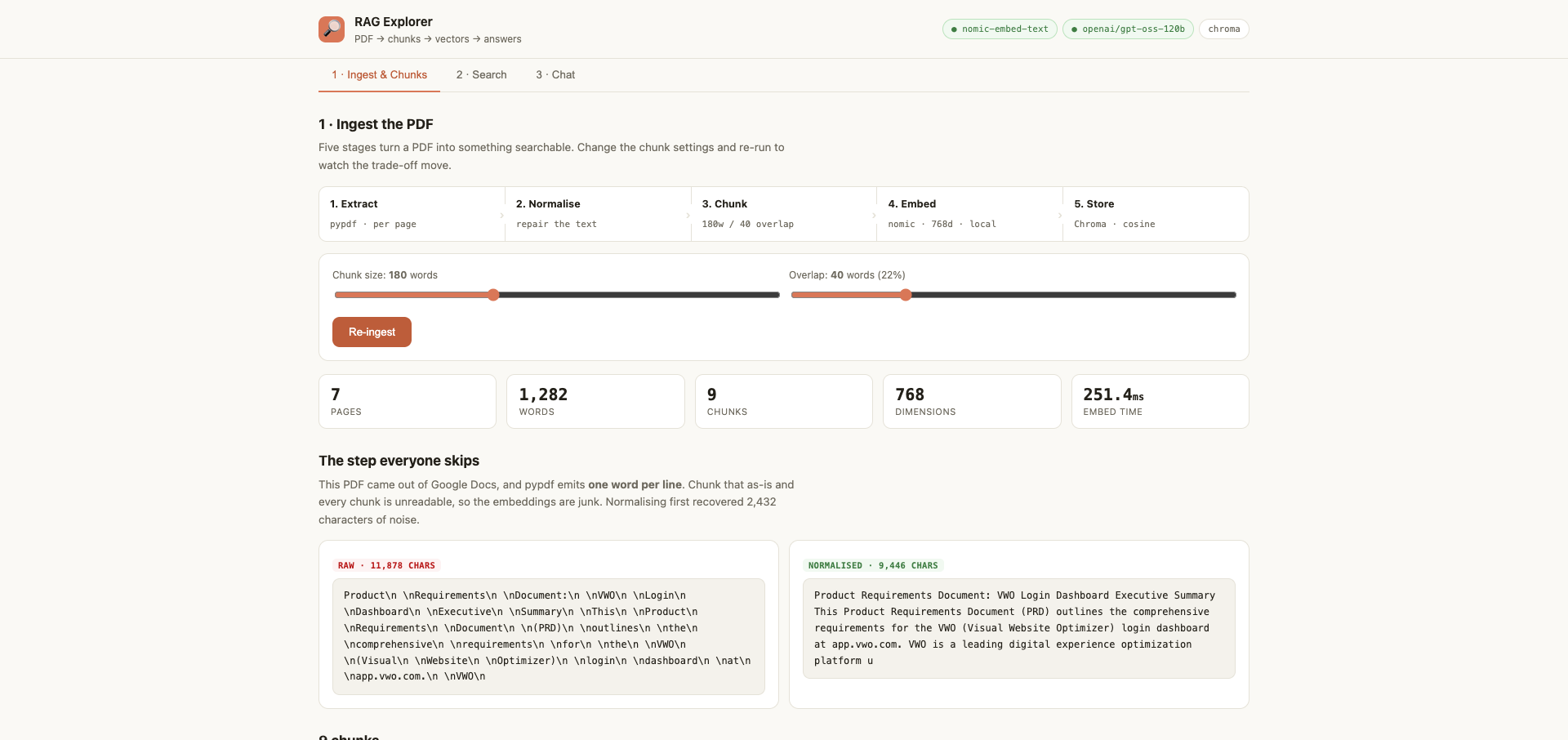
| 1. Ingest and Chunks | the raw PDF text, the repaired text, then every chunk with a preview of its vector | chunking is a decision, and you should see its effect before anything else happens |
| 2. Search | your question against the corpus, top 3 by cosine similarity, with the scores | no model is involved. This is the tab that proves retrieval is vector arithmetic and not intelligence |
| 3. Chat | the same retrieval, then the chunks pasted into a prompt and sent to the model | you see the token counts, the 3 chunks it was given, and the verbatim prompt |
Tab 2 is the one to show a sceptical colleague. Search "how do users sign in" and the top chunk talks about authentication, a phrase sharing no word with the query. That is the whole case for embeddings over keyword search, demonstrated in about four seconds, with the similarity scores visible next to it.
The numbers, read from the running build
The bundled corpus is a 7-page product requirements document for the VWO login dashboard.
| Measure | Value |
|---|---|
| Document | 7 pages, 1,282 words |
| Raw extracted text | 11,878 characters |
| After normalisation | 9,446 characters, so 2,432 characters of junk removed |
| Chunk configurations | 6, from 60 words up to 400 |
| Vectors in the hosted index | 79 across all six configurations |
| Hosted embedding model | MiniLM, 384 dimensions |
| Local embedding model | nomic-embed-text via Ollama, 768 dimensions |
At the default setting of 180-word windows with 40 overlap, the document becomes 9 chunks, each window advancing 140 words. Turn the slider down to 60 words and you get 32 chunks; push it to 400 and you get 4.
The step nobody teaches, and it is the one that breaks demos
The PRD was exported from Google Docs, and the PDF extractor returns one word per line:
Product

Requirements

Document:

VWO

Login

Dashboard
Chunk that as-is and every chunk is a column of disconnected words. It embeds into noise, retrieval returns nothing useful, and there is no error message anywhere to tell you why.
The fix is unglamorous: detect the pattern (more than 60% of lines holding a single token) and rejoin the text. The explorer shows the before and after side by side, which is the point of putting it in the UI rather than hiding it in a function.
This is the most valuable thing on this page for real work. Everyone's first company RAG underperforms, and the instinct is to blame the embedding model or the chunk size. Far more often the extraction was mangled and nobody looked at the text. Print your chunks before you tune anything.
Reading the similarity scores correctly
Similarity is 1 minus cosine distance. And the number that surprises people:
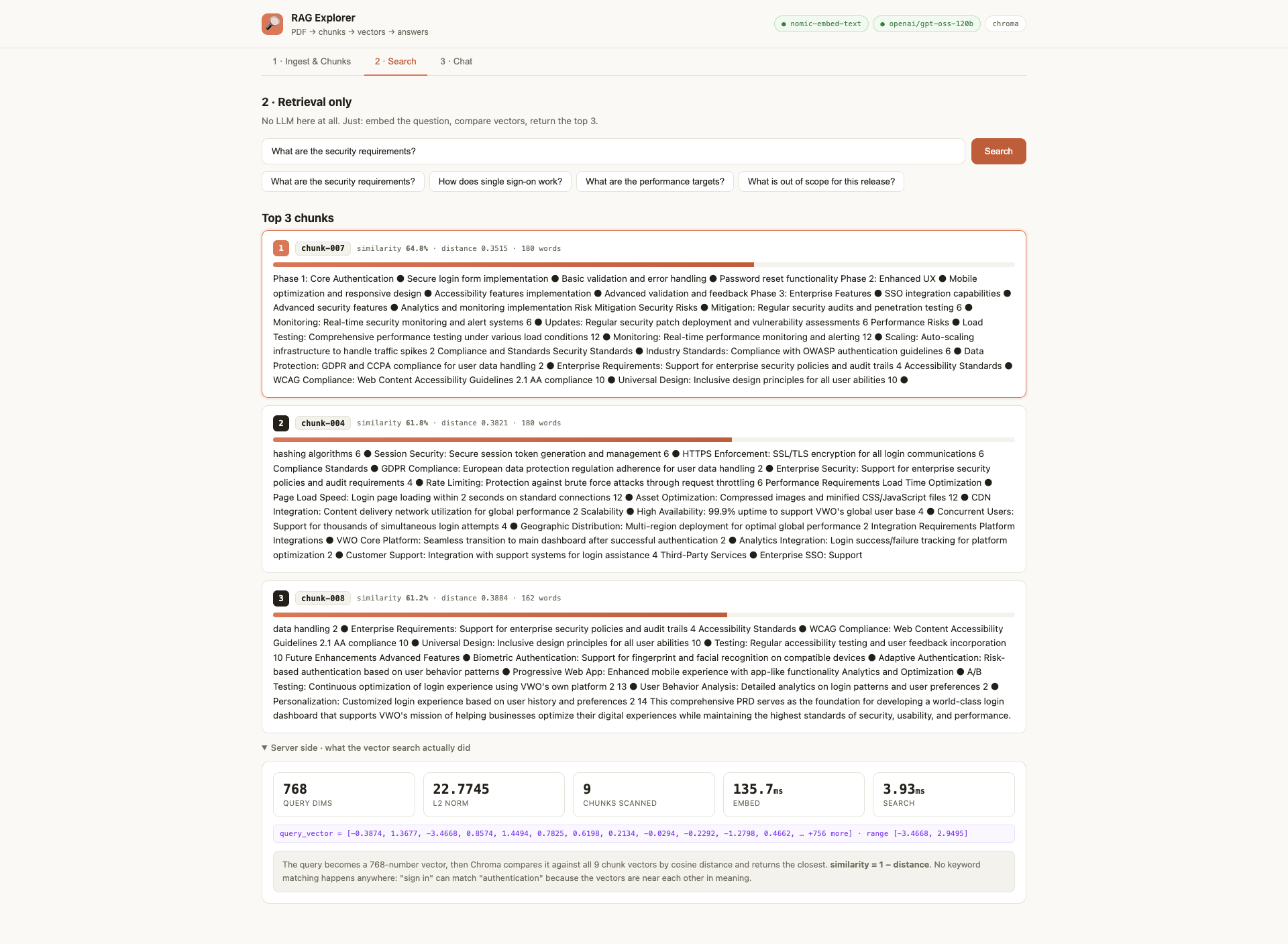
60% similarity is a good match here, not a poor one. These embeddings on ordinary prose rarely exceed about 0.7 for a short question against a 180-word chunk. Judge retrieved hits by their ranking relative to each other, never against an absolute bar you invented. A team that sets "reject anything under 0.8" will reject everything and conclude RAG does not work.
Timings, which settle an argument before it starts:
embed the query      59 to 136 ms     (251 ms for the whole document at ingest)
vector search         3.7 to 3.9 ms
the model answers   1623 ms
Those are the numbers on the three screenshots above, not estimates.
Retrieval is not your bottleneck. The model is. Optimising your vector search before you have a latency problem is wasted effort.
Two modes, one explorer
The lesson hiding in the right-hand box, and it is the same one the 3x batch met the same week. A vector database is not a requirement of RAG, it is a performance choice that arrives with scale. At 79 chunks, cosine similarity in plain JavaScript is instant. At 20 test cases, it is a numpy array. Reach for Chroma or Qdrant when the corpus outgrows memory, and not one day earlier.
Grounding is a prompt, not a personality
Ask the explorer something the document does not cover, such as the pricing, and it says it does not know instead of inventing a figure. That behaviour is engineered, and this is the whole of it:
You answer questions about a Product Requirements Document using ONLY the
numbered context chunks provided.
Rules:

- If the chunks do not contain the answer, say so plainly. Do not use outside
  knowledge and do not guess.
- Cite the chunks you used as [chunk N] inline.
- Be concise and concrete. Quote exact figures and names from the context.
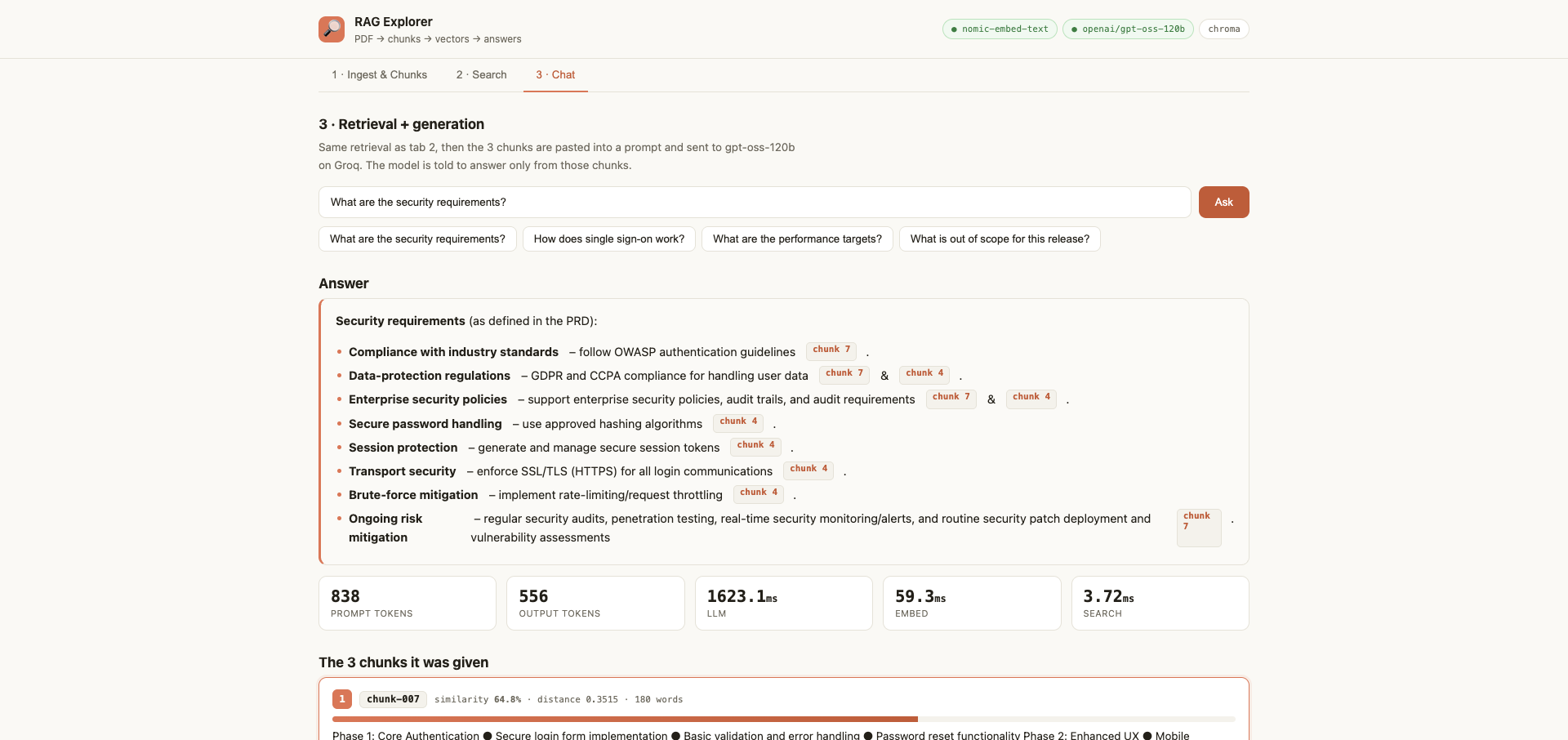
Worth copying into your own work, and worth saying in an interview. Three things make grounding hold: only the provided context, an explicit instruction to admit ignorance, and a citation requirement. The citation rule does more than it looks: an answer that has to name its chunk is much harder to fabricate.
Try these three things
- Drop the chunk size to 60 words. More chunks, sharper similarity scores, and answers that get truncated mid-thought. Then push it to 400: each chunk carries full context but retrieval goes vague, because one vector is now averaging too many ideas. That trade-off is the single most important tuning decision in RAG and you can feel it in about a minute.
- Search something with no shared vocabulary. "How do users sign in" against a document that says authentication.
- Ask for something that is not in the document, and watch it decline.
Tasks and announcements
- Build the flaky test case finder in Langflow. This was set previously and most of the room has not done it. Read the two input files, work out which tests are passing, which are failing and which are genuinely flaky. Share a screenshot and a GitHub link. Langflow specifically, not n8n.
- Research RAG before the next class, properly. The next session is the hands-on build, and it will go faster for anyone who arrives already knowing what an embedding is. The fastest way to do that research is the explorer above: twenty minutes with the sliders teaches more than an hour of reading.
- Pick one agent to show your management: bug triaging, RCA or the flaky test finder. One demo is enough to change how you are seen.
- The BrowserStack AI Leadership Summit is free and open to register with a work email.
- Nothing to install for next class beyond Langflow, which everyone already has running.
What the next class does. The naive RAG built live end to end, in Langflow and in code, over the 500 test cases: chunking, the embedding, storing to the vector database, retrieval, and then the scheduling that keeps it current. Embeddings and the vector database types get their proper explanation there, and both were explicitly deferred out of this session to keep the concept clean.
And what already exists, before that class runs. The RAG Explorer is built, deployed and in the batch repository as chapter 10. Nothing on this page is theory waiting for a tool. Open it, change the chunk size, and watch the retrieval change. Arriving at the next session having done that is the difference between following the build and watching it.