What this class covered
- Why CrewAI: the third way to build agents
- Crews, flows and orchestration
- Agent, task and crew
- A drafter and a reviewer
- Setup: Python, a virtual environment and CrewAI
- The analyst agent, test_01
- Four errors, fixed live
- The run, and why the answer repeats
- The same agent under pytest, test_02
- Tasks and announcements: the setup and the first agent working, five more agents tomorrow
- CrewAI is a Python framework for orchestrating role-based LLM agents: crews are teams of agents with autonomy, and flows are event-driven paths you control.
- An agent has a role, a goal, a backstory, optional tools and an LLM as its brain. A task has a description, an expected output, the agent that does it, and optional context.
- A crew binds the agents and the tasks. Nothing calls the model until
crew.kickoff(). - CrewAI 1.15.44 supports Python 3.10 up to 3.13, not 3.14.
uv runruns a file in the project's own environment, whichever venv is active. - Keyword names are strict:
description,agents=,tasks=. A slip fails pydantic validation before any model is called. - CrewAI drops a leading
openai/from the model name, so Groq'sopenai/gpt-oss-120bis writtenopenai/openai/gpt-oss-120b. - For pytest,
kickoff()goes inside atest_function, and-sshows what the agent prints.
Why CrewAI: the third way to build agents
Last class finished the batch's Python, with exceptions, the os module, packages, uv and the first pytest tests. Today, the instructor said, the AI journey restarts, with four important topics: CrewAI, LangChain, LangGraph and the DeepEval framework, after almost 2 to 3 weeks of Python. It is now time to start with CrewAI: how to create production-ready AI agents.
Is CrewAI useful, and is it similar to LangChain or LangGraph? Absolutely yes to both, the instructor said: it is used in many companies, and how you create an agent is the same; the difference is in how you want to use it. Whichever you want to use, you are free to use.
There are three ways to create an AI agent, as the instructor reminded the class. The first was vibe coding, where you just vibe code and do not understand anything at all. The second was n8n and Langflow, already covered. Now comes the third way, with three tools which are very, very popular: LangChain, LangGraph and CrewAI.
LangChain and LangGraph differ very little, the instructor said: LangGraph does the same thing as LangChain, and the only difference is that it has state management, which the course will cover too. So in reality there are only two major tools, CrewAI and Lang, since LangChain and LangGraph are almost similar, LangGraph adding flows; you can consider LangGraph a big brother of LangChain.
Why learn CrewAI? Most of the companies the instructor has seen, especially in the banking and insurance domains, started using it, because it was a leading open source framework. You can create an AI agent with any of today's big models, the instructor said, but will such agents survive in production, 24/7? No: vibe-coded and low-code solutions are good for POCs, and for a very limited task. When one agent finishes and the next one starts, and has to share information with it, as in a multi-agent system, that is where CrewAI comes in. Its official definition, which the instructor read out, calls it enterprise AI agent building and runtime for your business, and it is used by very big players, the instructor said, pointing to names on screen such as IBM and PepsiCo.
The instructor's prediction: the most important skill will be evals, and every QA team is going to build its own AI agents, with RAG and MCPs. Learners in the chat had started with POCs, test case generation with skill.md files, vibe-coded solutions and generated Playwright scripts: all at beginner level, the instructor said, and it is time to start implementing AI agents in your automation and your manual testing. We can use them with manual testing too, a learner said, and yes, the instructor said: with manual testing as well as automation.
Crews, flows and orchestration
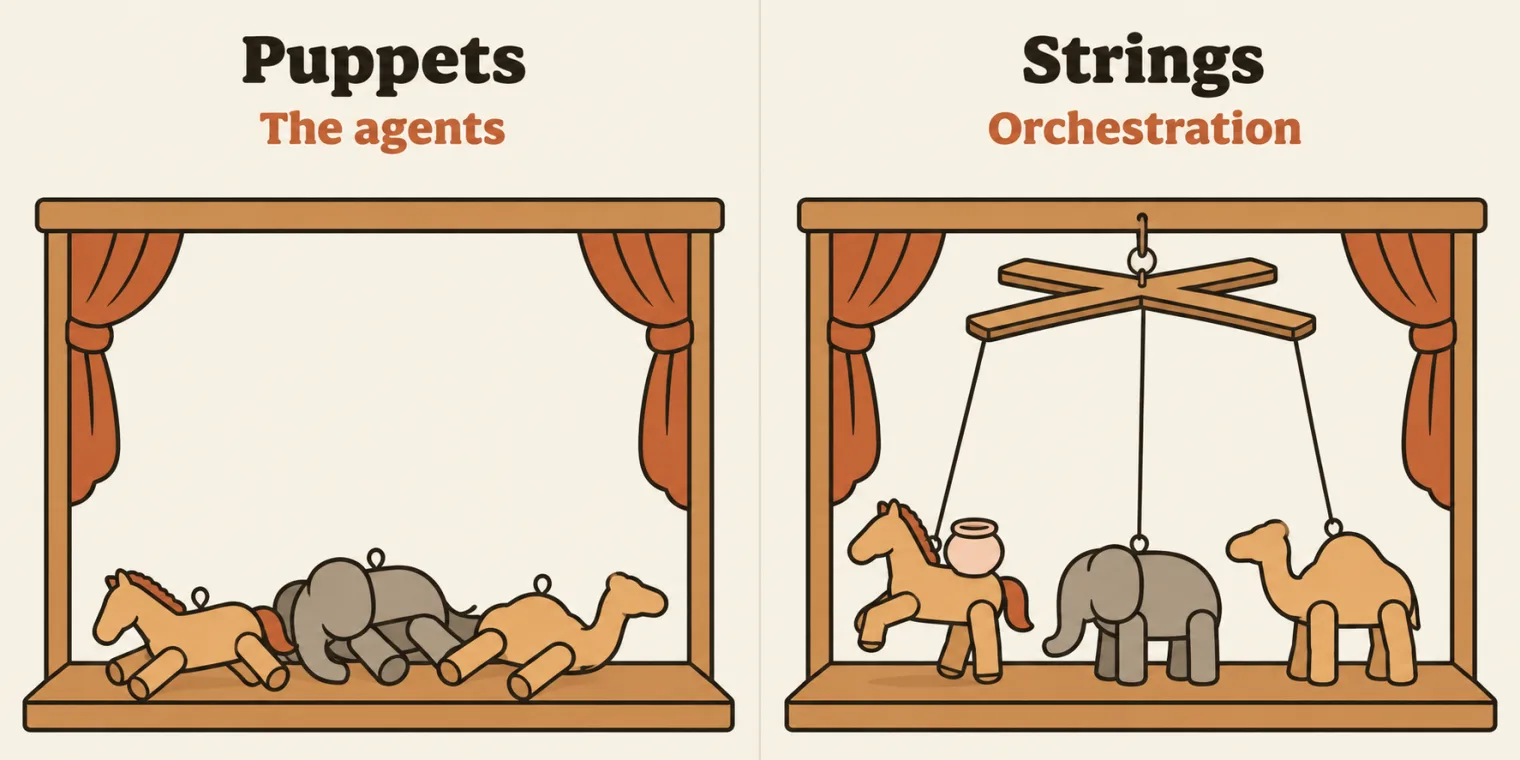
CrewAI is a Python framework for orchestrating role-based AI agents, the instructor said, with two approaches to remember. The deck has it:
CrewAI is a Python framework for orchestrating role-based LLM agents.
Crews (teams of agents with autonomy, collaborating through role-based delegation).
Flows (event-driven workflows that give precise control over execution paths).
A crew means a team, the instructor said: a team of AI agents with autonomy, which can collaborate with each other and delegate to each other. Flows are event-driven workflows, which means we can control the path. As a tester, you can use crews or flows, whichever you want, to build AI agents; the deck adds that you will eventually be asked to test systems built this way too.
Question. What do you mean by orchestration?
Worth practising too: what is the difference between a crew and a flow?
Show the answer
Answer. A puppet show, the instructor answered a learner. The puppet is the AI agent; the one above them, a human, is the orchestrator, because the orchestrator controls everything; and orchestration means controlling the workflow, and you can have multiple puppets too. Previously, we used to do the task ourselves; now humans are the orchestrators. It means controlling which task runs first, which tools will be used, and how the result will be, and connecting the flow between two agents or more; a learner who answered so was right, the instructor said. A crew is a team of agents with autonomy that collaborate and delegate; a flow is an event-driven workflow in which you control the path.
The puppet carries the rest of the analogy too, the instructor said. Its role, probably a dancer; its backstory, that it dances for fun, to make people happy, not for money; its goal, to do a particular task, or to entertain; and its tool, probably a pot it sometimes picks up: just an analogy, the instructor said. The puppets do not have a brain: the brain comes from the orchestrator, and it can be added separately.
A supervisor is different, the instructor added: a supervisor only supervises, and has permissions and a lot of things, while an orchestrator creates the AI agents, manages them and controls the flow. In this context the two look similar, but a supervisor is different.
CrewAI is very easy to use and super simple to deploy, the instructor said: it can work 24/7, on a company laptop, a VPS, AWS, GCP or whichever cloud system you use.
Agent, task and crew
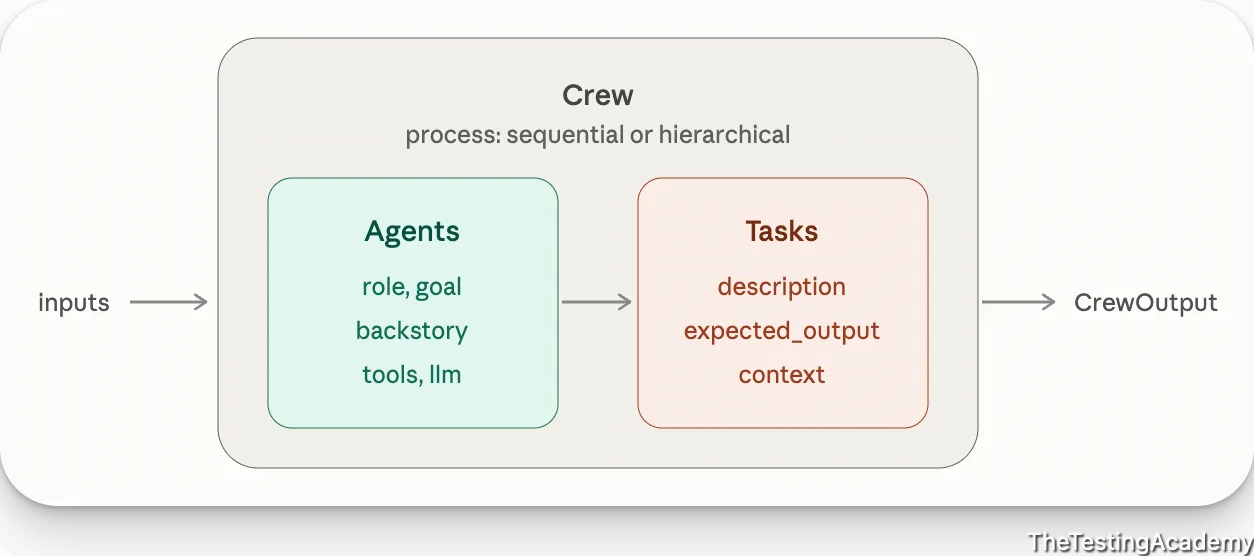
CrewAI has two important parts, an input and an output, and every agent you build has an agent as well as a task, the instructor said. The agent has a role, a goal, a backstory, tools and access to a brain, the LLM. The task has a description, an expected output, and a context to go with it. If you remember it in a simple way, the instructor said, remember this: an input, an agent, a task, and an output. The repo also keeps a hand-drawn sketch of the same parts, chapter 16's image.png.
CrewAI coordinates a task, the instructor said, and agents use an LLM and optional tools: remember this word, coordinate. The architecture sheet in the next section has the same idea as its subtitle, with a crew coordinating tasks.
Interview question. What are the core building blocks of CrewAI?
Show the answer
Answer. If somebody asks you this in an interview, the instructor said: the LLM, the large language model; the agent, where you give the role, goal, capabilities and backstory; the task, its instructions and expected output; the crew, which sometimes holds only one agent, while you can also have multiple agents in multiple crews; the process, the execution strategy; and the tools, which are outside tools. The table on the repo's architecture sheet, crew-arch.png, lists the same six, with the crew as agents plus tasks, and tools as optional external actions.
Question. Which tools can we connect with CrewAI?
Show the answer
Answer. Jira, of course, the instructor said, and Postman, Selenium, Playwright MCP, GitHub, Azure DevOps, SQL if the MCP is available, test management tools like Bugzilla, Google Sheets, SharePoint, and Outlook through APIs, which has an MCP too: whoever has an MCP, we can connect. PyCharm, no: why do you want to connect PyCharm, the instructor asked.
A drafter and a reviewer
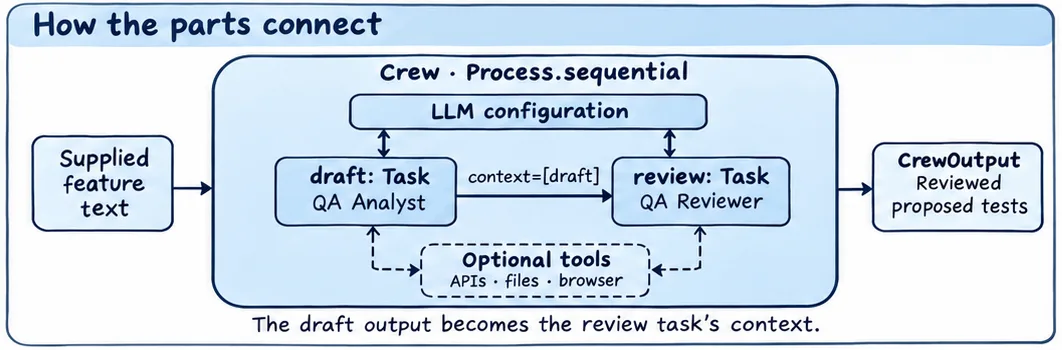
The architecture sheet looks difficult, but it is not, the instructor said. You supply some text, a feature, and there is an LLM configuration: for learning, the class uses Groq, spelled G-R-O-Q, because open source models are available there. One task drafts something and the next reviews it, and both have optional access to tools. Here the drafter drafts a critical login test case and the reviewer, a QA reviewer, checks the coverage and priority; the context line on the sheet, context=[draft], passes the draft on. It takes a requirement, drafts the test cases, reviews them and proposes them: a real AI agent, the instructor said.
Step by step: you build an agent, with its role, goal, backstory and LLM; you give it a task, with its description, expected output, the agent doing it and a context; then you bind the agent and the task together, kick off, and print the result.
Question. Is there any human interaction, a human review, in this?
Show the answer
Answer. Not as of now, the instructor answered a learner: here we do not have a human in the loop. If you want, we can have one.
Setup: Python, a virtual environment and CrewAI
Before you even use CrewAI, the instructor said, do the setup, or you might face some issues. Use Python 3.10 or greater: in the instructor's experience, CrewAI works very well in this range, and you are free to use whatever is greater than 3.10. The instructor's own system Python was 3.12. On CrewAI's installation page, the instructor pointed out, CrewAI requires a Python greater than one version and less than another, which means 3.15 is right now not properly supported; and even with 3.15 there is no problem, because a virtual environment can use 3.14, or another version.
Question. What is the reason for the virtual environment?
Show the answer
Answer. To isolate the environment, as learners answered and the instructor confirmed: the folder uses its own version of Python, whatever the system has.
The deck's commands for macOS, run in chapter 16; here Python 3.14 was already installed, so uv says so instead of downloading it. The last line, uv run python --version, is not the deck's: it is added here to show which Python uv run uses.
cd chapter_16_AI_Agent_Crew_AI
# Install Python 3.14 if needed
uv python install 3.14

# Create virtual environment with Python 3.14
uv venv --python 3.14

# Activate
source .venv/bin/activate

# Verify
python --version

uv run python --version
Python 3.14 is already installed
Using CPython 3.14.10
Creating virtual environment at: .venv
Python 3.14.10
warning: `VIRTUAL_ENV=.venv` does not match the project environment path `<repo>/.venv` and will be ignored; use `--active` to target the active environment instead
Python 3.13.14
<repo> stands for the repository's folder. The activated venv is 3.14.10, and uv run ignores it, with a warning, and runs the project's own environment, Python 3.13.14, because the repo pins Python 3.13 in .python-version.
3.14 is past CrewAI's range too. The installation page the deck links says CrewAI requires Python >=3.10 and <3.14, and CrewAI 1.15.44, the version in the class's lockfile, declares the same, <3.14,>=3.10. So 3.14 is outside it as well as 3.15, while the deck's setup line reads Python 3.10 to 3.16. The class's agent ran through uv run, in the project's Python 3.13 environment, which is inside the range.
The deck's steps for Windows, in PowerShell, after installing uv as last class did (not run here, on a Mac):
uv python install 3.14
uv venv --python 3.14
.venv\Scripts\Activate.ps1
python --version
uv pip install pytest playwright
Question. Can we keep multiple Python versions?
Show the answer
Answer. Yes, the instructor answered a learner: we are keeping them right now. The system has one version, and the folder's virtual environment another, as the run above shows: 3.14.10 in the activated venv, 3.13.14 through uv run.
The first command an AI assistant suggested for the venv works only if that Python is already installed, the instructor noticed; uv python install installs it. Then CrewAI itself. The commands are pip install crewai and the tools package, the instructor said, and since the class uses uv, uv add crewai; and after a search of the installation page, only one command is needed:
uv tool install crewai
That is the deck's command too. On the class's machine, it answered that CrewAI is already installed. Its own documentation also gives a command to start a project, with a folder structure, but the class did not use it: we will create our own structure first, to understand, the instructor said. Asked whether to install through Claude or any LLM, or by hand, most of the class said manually, so the setup was done by hand.
uv tool install gives you the command, not the import. CrewAI's installation page calls what it installs the crewai CLI, and uv puts a tool in an environment of its own. The class's code imports CrewAI from the project's environment, which uv add crewai fills, and that, as the errors below show, failed at first.
The analyst agent, test_01
kickoff() runs.Project 1 is a test analyst agent. Suppose a team does not have an analyst as of now, the instructor's problem statement went: can an AI agent do the job, and give at least 60 to 70 percent of the initial analysis, if it has access to all your RAG, MCPs and everything? Generally, you get a feature as a Jira ticket, such as VWO-140 in the deck's copy of the file's opening comment, and a senior analyst with almost 15 years of experience reads the requirement and suggests 5 to 10 test cases. Very basic, the instructor said, but it shows how CrewAI creates something.
There is only a five-step process to follow, the instructor's own, as the instructor put it: set up the brain, which means the LLM; define the identity of the AI agent; define the task; bind them together with CrewAI; kick off; and get the output. The deck numbers them from 0:
Step 0 - Set up the Brain(LLM)
Step 1. - Define the Agent (identity)
Step 2. - Give the Task to the Agent
Step 3. Add them to the Crew
Step 4. Kick Off Agent.
Step 5. Get the Output.
The file, as pushed, with the same steps in its comments:
# Test Ananlyst Agent
#
# a senior QA with 15 years (JIRA MD)
#  of experience. Based on the feature,
# it will just analyze the requirement
# and suggest a 5-10 testcases(p0 testcases).

from crewai import Agent, Task, Crew
from crewai import LLM
from dotenv import load_dotenv
import os

# Step 0 - Set up the Brain (Groq LLM)
load_dotenv()  # reads the .env file in this folder
groq_llm = LLM(
    model=f"openai/{os.getenv('GROQ_MODEL')}",
    api_key=os.getenv("GROQ_API_KEY"),
    base_url=os.getenv("GROQ_BASE_URL"),
)


# Step 1. - Define the Agent (identity)
qa_agent = Agent(
    role="QA Enginner",
    goal="Analyse the feature or the requirements, and create 5-10 test cases out of it.",
    backstory="You are a senior QA engineer with 15 years of experience in test planning and testcases creation",
    llm=groq_llm,
    verbose=True,
)

# Step 2 - Give the Task to the Agent
test_case_create = Task(
    description="Create 5-10 Testcase",
    expected_output="A numbered list of 5-10 test cases with brief descriptions for a app.vwo.com Login page with the username, password and submit button with remember me functionality",
    agent=qa_agent,
)

# Step 3. Add them to the Crew
crew = Crew(agents=[qa_agent], tasks=[test_case_create], verbose=True)


if __name__ == "__main__":
    result = crew.kickoff()
    print(result)
Step 0, the brain: lines 8 to 19. Lines 8 and 9 import Agent, Task, Crew and the LLM from CrewAI, and line 10 load_dotenv, which will load your environment file, the instructor said. The class's .env holds the Groq key, model and base URL, plus places for Jira and DeepSeek settings, for later. Line 14 reads it, and lines 15 to 19 take the three Groq values with os.getenv(), from the os module of last class. LLM is a class, the instructor said: this calls its constructor, with the model you want to run, your API key and the base URL.
groq_llm is not a tuple. In class it was called a tuple first, then a class whose constructor is called, which is right. LLM(...) returns one object, and with this model string CrewAI 1.15.44 builds its OpenAI-compatible LLM, an OpenAICompletion; isinstance(groq_llm, tuple) is False, as an import of the class's file shows. A trailing comma after the closing bracket would make it a tuple.
The class created a Groq API key on screen for its .env; its value is not on this page. Jira keys and everything can be added later, the instructor said, since the class is not working with Jira as of now, nor with DeepSeek.
Question. Do we need to add the API key to .gitignore?
Show the answer
Answer. No, the instructor answered a learner: .gitignore will not have any kind of API key. The key goes in .env, and the repo's .gitignore lists .env, so the file itself is never pushed.
Step 1, the identity: lines 22 to 29. The Agent class also takes multiple things, the instructor said: your role, your goal, your backstory, which LLM you are using, Groq here, and verbose, for the logging. Verbose basically means screaming, the instructor said: True means everything will be printed. The role is a QA engineer (line 24 spells it Enginner, and the run prints it that way); the goal, to analyse the feature or the requirements and create 5 to 10 test cases; the backstory, a senior QA engineer with 15 years of experience in test planning.
Step 2, the task: lines 31 to 36. The task has a description, create 5 to 10 test cases; an expected output, a numbered list of test cases with brief descriptions; and the agent it is allocated to. So the task and the agent are now mapped, the instructor said: this is a part of a mapping.
Question. We did not give the requirement anywhere?
Show the answer
Answer. It is there, the instructor answered a learner: the goal says to analyse the feature or the requirement and create test cases out of it, and the requirement itself sits in the expected output, line 34: an app.vwo.com login page with a username, a password, a submit button and remember me.
Step 3, the crew: lines 38 and 39. Add them to the crew: which agents, which tasks, and verbose True, so everything is printed.
Question. What is this line, if __name__ == "__main__":?
Show the answer
Answer. The Python way of calling a main method, the instructor said, like the main function in Java; even without it, the file works. The real code starts from here, at the kickoff function: everything above it is just configuration. The kickoff takes the agent, the agent takes its configuration, the task is added, and then it is called.
Four errors, fixed live
Live fixing, happening right now, the instructor said. CrewAI's documentation gives crewai run to run a crew, and here it gave an error: it expects the structure that crewai create crew makes, with its own files, the instructor said, and this file is a simple pytest-style one, not a CrewAI folder structure. Can we run it like this? Yes, the instructor said, and it ran, but stopped with no module named crewai: an installation problem, not a code problem.
1. The openai pin. Adding CrewAI through uv again failed: failed to add the dependency, no solution found. The project's pyproject.toml, from last class, pinned openai>=3.51.0, and CrewAI depends on openai below 3: the parent pyproject.toml was creating an issue, the instructor read out from the AI assistant's answer, and its fix lowered the openai pin. Re-created here from the project as it stood before the class, offline from uv's cache, uv add crewai prints 83 lines. The first two:
uv add crewai
error: Failed to add dependencies
  cause: No solution found when resolving dependencies
and the last lines:
         And because your project depends on crewai and openai>=3.51.0, we can conclude that your project's requirements are unsatisfiable.

hint: If you want to add the package regardless of the failed resolution, provide the `--frozen` flag to skip locking and syncing
The pushed pyproject.toml adds CrewAI and pins openai below 3, because every CrewAI release needs openai<3, as the class's commit message says:
dependencies = [
    "crewai",
    "openai>=2.30.0,<3",
    "playwright>=1.65.2",
    "pytest>=9.2.0",
    "selenium>=4.52.0",
]
2. A spelling mistake. The next run stopped with an error the instructor read out as: failed requirement, type is missing, input description. A spelling mistake, the instructor said, is also a next level problem, and it happens when you do it manually. The repo's learnings note spells the slip descritpion, and names the next one too. With both back in the file, lines 32 to 33 and 39 read:
test_case_create = Task(
    descritpion="Create 5-10 Testcase",
crew = Crew(agent=[qa_agent], task=[test_case_create], verbose=True)
uv run python test_01_analyst_Agent.py
Traceback (most recent call last):
  File "chapter_16_AI_Agent_Crew_AI/test_01_analyst_Agent.py", line 32, in <module>
    test_case_create = Task(
        descritpion="Create 5-10 Testcase",
        expected_output="A numbered list of 5-10 test cases with brief descriptions for a app.vwo.com Login page with the username, password and submit button with remember me functionality",
        agent=qa_agent,
    )
  File ".venv/lib/python3.13/site-packages/pydantic/main.py", line 250, in __init__
    validated_self = self.__pydantic_validator__.validate_python(data, self_instance=self)
pydantic_core._pydantic_core.ValidationError: 1 validation error for Task
description
  Field required [type=missing, input_value={'descritpion': 'Create 5...and testcases creation)}, input_type=dict]
    For further information visit https://errors.pydantic.dev/2.12/v/missing
Python builds the Task on line 32 first, so its error comes first, and the Crew on line 39 never runs.
3. agents and tasks, plural. With line 33 fixed, the next error: one validation error, agents and tasks need to be set or configured. Role, goal, backstory, LLM, verbose, description and expected output were all there, the instructor checked, and a learner spotted it: change agent and task to their plural forms. CrewAI's message ends with or 'config', which the recording hears as configured.
Traceback (most recent call last):
  File "chapter_16_AI_Agent_Crew_AI/test_01_analyst_Agent.py", line 39, in <module>
    crew = Crew(agent=[qa_agent], task=[test_case_create], verbose=True)
  File ".venv/lib/python3.13/site-packages/pydantic/main.py", line 250, in __init__
    validated_self = self.__pydantic_validator__.validate_python(data, self_instance=self)
pydantic_core._pydantic_core.ValidationError: 1 validation error for Crew
  Either 'agents' and 'tasks' need to be set or 'config'. [type=missing_keys, input_value={'agent': [Agent(role=QA ...lity)], 'verbose': True}, input_type=dict]
4. The model name. Then: GPT, this is not found. I know this problem, the instructor said: it is a problem with Groq, and you need to append openai, sometimes. The repo's README and learnings note explain it. The class's .env sets GROQ_MODEL=openai/gpt-oss-120b; CrewAI strips a leading openai/ from the model name, and Groq answered 404, model_not_found, for the gpt-oss-120b left over. The pushed line 16 adds one more openai/, so openai/gpt-oss-120b is what is left. Checked here by importing the class's own file with each value, calling no model:
| GROQ_MODEL | Line 16 | It sends |
|---|---|---|
openai/gpt-oss-120b |
os.getenv(...), the first run |
gpt-oss-120b |
openai/gpt-oss-120b |
f"openai/{...}", as pushed |
openai/gpt-oss-120b |
gpt-oss:20b, the stand-in |
f"openai/{...}", as pushed |
gpt-oss:20b |
Question. How did you fix the last issue?
Worth practising too: the repo's learnings note names a second fix, LLM(..., provider="openai"). Which model name does LLM(model="openai/gpt-oss-120b", provider="openai", ...) send?
Show the answer
Answer. You have to append openai, the instructor answered: when you are using Groq, you append openai, a known issue from before. The figure at the top of this section shows why. With provider="openai" given, CrewAI keeps the whole string, and sends openai/gpt-oss-120b.
The run, and why the answer repeats

Then comes the answer: the crew started, the task started, the agent started, and the test cases came. The first manual way of creating our AI agent, the instructor said, pointing out the execution traces too.
The class ran it on Groq. These notes run the pushed file unchanged, in the class's toolchain, against a local open model, gpt-oss:20b, served by Ollama on the same machine. The three values the code reads are set in the run's environment, with no .env file: GROQ_MODEL=gpt-oss:20b, GROQ_BASE_URL=http://127.0.0.1:11434/v1, Ollama's OpenAI-compatible address, and a placeholder where the key goes. Its answer is the stand-in's, not Groq's, and it changes from run to run:
cd chapter_16_AI_Agent_Crew_AI
uv run python test_01_analyst_Agent.py
╭───────────────────────── 🚀 Crew Execution Started ──────────────────────────╮
│                                                                              │
│  Crew Execution Started                                                      │
│  Name: crew                                                                  │
│  ID: d1ee2fae-f143-476e-9ebb-4c07a668c9f6                                    │
│                                                                              │
│                                                                              │
╰──────────────────────────────────────────────────────────────────────────────╯

╭────────────────────────────── 📋 Task Started ───────────────────────────────╮
│                                                                              │
│  Task Started                                                                │
│  Name: Create 5-10 Testcase                                                  │
│  ID: 289beac3-046f-42f9-a139-30582fc02cab                                    │
│                                                                              │
│                                                                              │
╰──────────────────────────────────────────────────────────────────────────────╯

╭────────────────────────────── 🤖 Agent Started ──────────────────────────────╮
│                                                                              │
│  Agent: QA Enginner                                                          │
│                                                                              │
│  Task: Create 5-10 Testcase                                                  │
│                                                                              │
╰──────────────────────────────────────────────────────────────────────────────╯

Using an approximate input token count for model 'gpt-oss:20b': assuming one token per four characters because a native token count is unavailable.
[Finalize] todos_count=0, todos_with_results=0
╭─────────────────────────── ✅ Agent Final Answer ────────────────────────────╮
│                                                                              │
│  Agent: QA Enginner                                                          │
│                                                                              │
│  Final Answer:                                                               │
│  1. **Valid credential login** – Enter a correct username and password,      │
│  click Submit, verify successful authentication and redirection to the       │
│  dashboard.                                                                  │
│  2. **Invalid password rejected** – Input a registered username with an      │
│  incorrect password, submit, and confirm that an error message “Incorrect    │
│  username or password” appears without granting access.                      │
│  3. **Blank username field** – Leave the username empty, enter a valid       │
│  password, hit Submit, and ensure the system returns the notice “Username    │
│  is required.”                                                               │
│  4. **Blank password field** – Provide a valid username, leave the password  │
│  blank, submit, and verify that the response is “Password is required.”      │
│  5. **Both fields empty** – Attempt to submit with both username and         │
│  password left blank; confirm that both validation messages are shown        │
│  simultaneously.                                                             │
│  6. **Excessively long username** – Enter more characters than the maximum   │
│  allowed (e.g., >50 chars) in the username field, submit, and check for a    │
│  “Username exceeds maximum length” prompt.                                   │
│  7. **Special‑character password acceptance** – Use a password containing    │
│  special symbols (`!@#$%^&*()`) along with letters and numbers, submit, and  │
│  confirm login success (or correct validation).                              │
│  8. **Remember‑me persistent login** – Select the “Remember Me” checkbox     │
│  before logging in; close the browser, reopen app.vwo.com, and verify that   │
│  the user remains logged in or is redirected to the default page without     │
│  re-entering credentials.                                                    │
│                                                                              │
╰──────────────────────────────────────────────────────────────────────────────╯

╭───────────────────────────── 📋 Task Completion ─────────────────────────────╮
│                                                                              │
│  Task Completed                                                              │
│  Name: Create 5-10 Testcase                                                  │
│  Agent: QA Enginner                                                          │
│                                                                              │
│                                                                              │
╰──────────────────────────────────────────────────────────────────────────────╯

╭────────────────────────────── Crew Completion ───────────────────────────────╮
│                                                                              │
│  Crew Execution Completed                                                    │
│  Name: crew                                                                  │
│  ID: d1ee2fae-f143-476e-9ebb-4c07a668c9f6                                    │
│  Final Output: 1. **Valid credential login** – Enter a correct username and  │
│  password, click Submit, verify successful authentication and redirection    │
│  to the dashboard.                                                           │
│  2. **Invalid password rejected** – Input a registered username with an      │
│  incorrect password, submit, and confirm that an error message “Incorrect    │
│  username or password” appears without granting access.                      │
│  3. **Blank username field** – Leave the username empty, enter a valid       │
│  password, hit Submit, and ensure the system returns the notice “Username    │
│  is required.”                                                               │
│  4. **Blank password field** – Provide a valid username, leave the password  │
│  blank, submit, and verify that the response is “Password is required.”      │
│  5. **Both fields empty** – Attempt to submit with both username and         │
│  password left blank; confirm that both validation messages are shown        │
│  simultaneously.                                                             │
│  6. **Excessively long username** – Enter more characters than the maximum   │
│  allowed (e.g., >50 chars) in the username field, submit, and check for a    │
│  “Username exceeds maximum length” prompt.                                   │
│  7. **Special‑character password acceptance** – Use a password containing    │
│  special symbols (`!@#$%^&*()`) along with letters and numbers, submit, and  │
│  confirm login success (or correct validation).                              │
│  8. **Remember‑me persistent login** – Select the “Remember Me” checkbox     │
│  before logging in; close the browser, reopen app.vwo.com, and verify that   │
│  the user remains logged in or is redirected to the default page without     │
│  re-entering credentials.                                                    │
│                                                                              │
│                                                                              │
╰──────────────────────────────────────────────────────────────────────────────╯

1. **Valid credential login** – Enter a correct username and password, click Submit, verify successful authentication and redirection to the dashboard.
2. **Invalid password rejected** – Input a registered username with an incorrect password, submit, and confirm that an error message “Incorrect username or password” appears without granting access.
3. **Blank username field** – Leave the username empty, enter a valid password, hit Submit, and ensure the system returns the notice “Username is required.”
4. **Blank password field** – Provide a valid username, leave the password blank, submit, and verify that the response is “Password is required.”
5. **Both fields empty** – Attempt to submit with both username and password left blank; confirm that both validation messages are shown simultaneously.
6. **Excessively long username** – Enter more characters than the maximum allowed (e.g., >50 chars) in the username field, submit, and check for a “Username exceeds maximum length” prompt.
7. **Special‑character password acceptance** – Use a password containing special symbols (`!@#$%^&*()`) along with letters and numbers, submit, and confirm login success (or correct validation).
8. **Remember‑me persistent login** – Select the “Remember Me” checkbox before logging in; close the browser, reopen app.vwo.com, and verify that the user remains logged in or is redirected to the default page without re-entering credentials.
The answer appears three times: in the Agent Final Answer panel, in Crew Completion's Final Output, and once more from print(result) on line 44.
If you see duplicate output, it is not duplicate output, the instructor said: it is because of verbose. Run again here with verbose=False on line 28 and line 39, the same file printed no panels at all: only CrewAI's note about the token count, and then the answer, once.
This is a basic LLM agent, the instructor said: it does not have tools, and it does not fetch from Jira. It has nothing as of now. A learner asked to write the goal in detail, like what to do in a skill: we will write it, the instructor answered, but first, let's finish this.
Question. Can we give input via a CLI option?
Show the answer
Answer. I think yes, we can, the instructor answered. The file has no CLI input as pushed: the requirement is typed into the task, on line 34.
The same agent under pytest, test_02
The file's name starts with test_ because it is going to be a pytest test, the instructor said. Asked to run it with pytest, the AI assistant found a minor issue: the current file has no test function. pytest imports the file, which runs lines 1 to 39, finds no test_ function, and collects nothing; kickoff(), under __main__, never runs, and the guard logged no request to the model:
cd chapter_16_AI_Agent_Crew_AI
uv run pytest test_01_analyst_Agent.py
============================= test session starts ==============================
platform darwin -- Python 3.13.14, pytest-9.2.0, pluggy-1.7.0
rootdir: .
configfile: pyproject.toml
collected 0 items

=============================== warnings summary ===============================
../.venv/lib/python3.13/site-packages/crewai/agent/core.py:461
  .venv/lib/python3.13/site-packages/crewai/agent/core.py:461: DeprecationWarning: function_calling_llm is deprecated and will be removed in a future release.
    if self.function_calling_llm and not isinstance(

../.venv/lib/python3.13/site-packages/crewai/agent/core.py:469
  .venv/lib/python3.13/site-packages/crewai/agent/core.py:469: DeprecationWarning: deprecated
    if self.allow_code_execution:

../.venv/lib/python3.13/site-packages/crewai/agent/core.py:480
  .venv/lib/python3.13/site-packages/crewai/agent/core.py:480: DeprecationWarning: deprecated
    if self.reasoning and self.planning_config is None:

../.venv/lib/python3.13/site-packages/crewai/crew.py:665
  .venv/lib/python3.13/site-packages/crewai/crew.py:665: DeprecationWarning: function_calling_llm is deprecated and will be removed in a future release.
    if self.function_calling_llm and not isinstance(self.function_calling_llm, LLM):

-- Docs: https://docs.pytest.org/en/stable/how-to/capture-warnings.html
============================= 4 warnings in 2.04s ==============================
The 4 warnings come from CrewAI's own code. pytest's exit code here is 5, which means no tests were collected.
Question. Why are we adding test to the name?
Worth practising too: why does pytest collect nothing from test_01_analyst_Agent.py?
Show the answer
Answer. Because it is going to be a pytest test, the instructor said: pytest has a rule that we name everything from test. A test_ file is not enough, though: pytest runs test_ functions, and test_01 has none, so collected 0 items, and its kickoff() sits under __main__, which an import never runs.
In pytest, the instructor said, the major change is that the code becomes part of a function, with any name; you can mark it, pytest.mark.agent; and of course you import pytest. That part only changes, and the rest is the same. The pushed file:
# Test Ananlyst Agent
#
# a senior QA with 15 years (JIRA MD)
#  of experience. Based on the feature,
# it will just analyze the requirement
# and suggest a 5-10 testcases(p0 testcases).

from crewai import Agent, Task, Crew
from crewai import LLM
from dotenv import load_dotenv
import os
import pytest

# Step 0 - Set up the Brain (Groq LLM)
load_dotenv()  # reads the .env file in this folder
groq_llm = LLM(
    model=f"openai/{os.getenv('GROQ_MODEL')}",
    api_key=os.getenv("GROQ_API_KEY"),
    base_url=os.getenv("GROQ_BASE_URL"),
)


# Step 1. - Define the Agent (identity)
qa_agent = Agent(
    role="QA Enginner",
    goal="Analyse the feature or the requirements, and create 5-10 test cases out of it.",
    backstory="You are a senior QA engineer with 15 years of experience in test planning and testcases creation",
    llm=groq_llm,
    verbose=True,
)


# Step 2 - Give the Task to the Agent
test_case_create = Task(
    description="Create 5-10 Testcase",
    expected_output="A numbered list of 5-10 test cases with brief descriptions for a app.vwo.com Login page with the username, password and submit button with remember me functionality",
    agent=qa_agent,
)

# Step 3. Add them to the Crew
crew = Crew(agents=[qa_agent], tasks=[test_case_create], verbose=True)

@pytest.mark.agent
def test_crewrunAgent():
    result = crew.kickoff()
    print(result)
The kickoff moves into test_crewrunAgent(), on lines 43 to 46, so pytest collects one test. On the stand-in:
cd chapter_16_AI_Agent_Crew_AI
uv run pytest test_02_analyst_Agent_pytest.py
============================= test session starts ==============================
platform darwin -- Python 3.13.14, pytest-9.2.0, pluggy-1.7.0
rootdir: .
configfile: pyproject.toml
collected 1 item

test_02_analyst_Agent_pytest.py .                                        [100%]

=============================== warnings summary ===============================
../.venv/lib/python3.13/site-packages/crewai/agent/core.py:461
  .venv/lib/python3.13/site-packages/crewai/agent/core.py:461: DeprecationWarning: function_calling_llm is deprecated and will be removed in a future release.
    if self.function_calling_llm and not isinstance(

../.venv/lib/python3.13/site-packages/crewai/agent/core.py:469
  .venv/lib/python3.13/site-packages/crewai/agent/core.py:469: DeprecationWarning: deprecated
    if self.allow_code_execution:

../.venv/lib/python3.13/site-packages/crewai/agent/core.py:480
  .venv/lib/python3.13/site-packages/crewai/agent/core.py:480: DeprecationWarning: deprecated
    if self.reasoning and self.planning_config is None:

../.venv/lib/python3.13/site-packages/crewai/crew.py:665
chapter_16_AI_Agent_Crew_AI/test_02_analyst_Agent_pytest.py::test_crewrunAgent
chapter_16_AI_Agent_Crew_AI/test_02_analyst_Agent_pytest.py::test_crewrunAgent
  .venv/lib/python3.13/site-packages/crewai/crew.py:665: DeprecationWarning: function_calling_llm is deprecated and will be removed in a future release.
    if self.function_calling_llm and not isinstance(self.function_calling_llm, LLM):

test_02_analyst_Agent_pytest.py:43
  chapter_16_AI_Agent_Crew_AI/test_02_analyst_Agent_pytest.py:43: PytestUnknownMarkWarning: Unknown pytest.mark.agent - is this a typo?  You can register custom marks to avoid this warning - for details, see https://docs.pytest.org/en/stable/how-to/mark.html
    @pytest.mark.agent

chapter_16_AI_Agent_Crew_AI/test_02_analyst_Agent_pytest.py::test_crewrunAgent
  .venv/lib/python3.13/site-packages/crewai/crews/utils.py:372: DeprecationWarning: function_calling_llm is deprecated and will be removed in a future release.
    crew.function_calling_llm,

chapter_16_AI_Agent_Crew_AI/test_02_analyst_Agent_pytest.py::test_crewrunAgent
  .venv/lib/python3.13/site-packages/crewai/crews/utils.py:87: DeprecationWarning: function_calling_llm is deprecated and will be removed in a future release.
    if not agent.function_calling_llm:  # type: ignore[attr-defined]

chapter_16_AI_Agent_Crew_AI/test_02_analyst_Agent_pytest.py::test_crewrunAgent
  .venv/lib/python3.13/site-packages/crewai/agent/core.py:1403: DeprecationWarning: function_calling_llm is deprecated and will be removed in a future release.
    function_calling_llm=self.function_calling_llm,

chapter_16_AI_Agent_Crew_AI/test_02_analyst_Agent_pytest.py::test_crewrunAgent
chapter_16_AI_Agent_Crew_AI/test_02_analyst_Agent_pytest.py::test_crewrunAgent
  .venv/lib/python3.13/site-packages/crewai/crew.py:1694: DeprecationWarning: deprecated
    if hasattr(agent, "allow_code_execution") and getattr(

chapter_16_AI_Agent_Crew_AI/test_02_analyst_Agent_pytest.py::test_crewrunAgent
  .venv/lib/python3.13/site-packages/crewai/crew.py:1701: DeprecationWarning: deprecated
    and hasattr(agent, "multimodal")

chapter_16_AI_Agent_Crew_AI/test_02_analyst_Agent_pytest.py::test_crewrunAgent
  .venv/lib/python3.13/site-packages/crewai/crew.py:1702: DeprecationWarning: deprecated
    and getattr(agent, "multimodal", False)

-- Docs: https://docs.pytest.org/en/stable/how-to/capture-warnings.html
======================= 1 passed, 14 warnings in 12.66s ========================
One test, one dot, 1 passed. Of the 14 warnings, one is the agent marker, which pytest does not know until it is registered, as with reg last class; the rest come from CrewAI's own code.
The test has no assert, and its output is captured. test_crewrunAgent() passes whenever kickoff() returns, whatever the test cases say: there is nothing to compare yet. pytest captures what the test prints; with -s, as the repo's learnings note runs it, the same run printed the panels and the answer before 1 passed.
Tasks and announcements
- Today's task: the setup and this agent, working. Today's task is very important, the instructor said: everyone should be ready with the setup tomorrow. Make sure this minimum is working for you: if it is working, everything will work for the rest of the five AI agents.
- Tomorrow: five more agents. A research and write AI agent, a QA bug triaging agent, production ready, and an ultimate QA pipeline in the end. Can we use CrewAI with Playwright MCP too, a learner asked? Yes, the instructor answered, and will show how to use Playwright with CrewAI.
- The code is already pushed. Chapter 16 of the batch repository holds both files.
- RAG, MCP and tools. Can we integrate RAG, a learner asked? Yes, the instructor said: you can add MCP, RAG, tools, anything to CrewAI, and you can fetch from Jira too. As a rough example, the instructor sketched a function, fetch from Jira, that returns the Jira info and injects it into the task, in place of the requirement typed in today.
- Pasting the Jira description. Can just pasting the Jira description be achieved, a learner asked? Yes, that can also be achieved, the instructor said, but you can fetch it too.
- By hand first. The instructor showed the best part, how to run it manually; it could be shown through Claude or Codex too, but that will be not helpful, the instructor said.
Task: the setup and the first agent. Have the setup ready, and the first agent working, before tomorrow's class.
Show the answer
Answer. The setup section has the commands and the check of which Python runs, and the analyst agent's section the file. When your run ends with a numbered list of test cases, the minimum is working, and, the instructor said, everything will work for the next five agents.