What this class covered
- Exceptions, and the errors of files 159 to 164
- try, except and finally, files 165 to 169
- Catch order and custom exceptions, files 170 to 172
- Reading a file, file 173
- The os module, files 174 and 175
- Environment variables, file 176
- Packages, file 177
- pip and uv
- pytest basics, test_178 and test_179
- Tasks and announcements: exercises up to 179 on your GitHub, CrewAI with pytest next week, a hackathon
- In Python, an exception is an error that happens while the program runs: Python makes no difference between an error and an exception, while Java does.
- Put only the lines that can fail inside
try, and catch an error by its class: oneexceptper error, or a tuple of them.finallyruns every time. - Python takes the first
exceptthat matches, so the biggest one,except Exception, goes last. raisethrows an error yourself, and a custom exception is a class that inheritsException.- The
osmodule talks to the operating system:getcwd(),listdir(),makedirs(..., exist_ok=True),remove(),path.join(),path.exists().os.getenv()givesNonefor a variable that is not set. - A folder with
__init__.pyis a package you can import from. pip installs packages; uv does it much faster, afteruv init. - pytest runs the
test_functions intest_files: eachassertcompares expected with actual, a dot is a pass andFa failure.
Exceptions: files 159 to 164
__bases__ gives it, and each error is the one the named file raises or catches when it runs.Last class covered inheritance, polymorphism, abstraction and static, files 139 to 158. Today, the instructor said, the class would complete its Python topics: exceptions, the os module, file I/O and a couple of important concepts of pytest. Exceptions are very, very important if you come from a Java background, and important for AI agents, MCPs and RAG too, the instructor said. The deck's definition, which the instructor read out almost word for word:
Exceptions in Python are events that occur during the execution of a program that disrupt the normal flow of instructions.
a way to handle errors and unexpected situations gracefully.
An exception is an error that happens while a program is running, the instructor said, and this is the biggest difference from Java: in Java, an error is different and an exception is different, while in Python there is no differentiation between the two. If it is not handled, the program stops, or creates a problem. It is a runtime problem, not a syntax problem.
Python's list of exceptions is huge, the instructor said: there are base exceptions, then keyboard exceptions, and we are more interested in Exception; then there are AttributeError and ArithmeticError. The figure shows the part of that tree this class used, as Python itself has it. The common built-in ones, which are very popular, the instructor listed: ValueError, TypeError, ZeroDivisionError, IndexError, KeyError and FileNotFoundError.
One line, one error: files 159 to 163. If you try to use something which does not exist, a NameError comes, the instructor said: the simplest one. Each file keeps its error in a comment, and each run stops with it.
print(a)
# NameError: name 'a' is not defined
Traceback (most recent call last):
  File "chapter_15_Python_PyTest/ex_18_OOPs_Python/09_Exceptions/159_Exceptions.py", line 1, in <module>
    print(a)
          ^
NameError: name 'a' is not defined
Question, file 160. If I do 10 divided by 0, is this correct syntax-wise?
Show the answer
Answer. Absolutely correct, the instructor said, but you will get a ZeroDivisionError, because you cannot divide by 0. The line is valid Python, and it fails only when it runs, as the output below shows.
print(10/0)
# ZeroDivisionError
Traceback (most recent call last):
  File "chapter_15_Python_PyTest/ex_18_OOPs_Python/09_Exceptions/160_E1.py", line 1, in <module>
    print(10/0)
          ~~^~
ZeroDivisionError: division by zero
Question, file 161. What happens when you try to concatenate an integer with a string?
Show the answer
Answer. Run it, and you will see a TypeError, the instructor said: not an arithmetic exception, as a learner suggested, but a type error, because an integer and a string cannot be added. Line 1 stops with TypeError: unsupported operand type(s) for +: 'int' and 'str'.
print( 1 + "1")
# TypeError: unsupported operand type(s) for +: 'int' and 'str'
Traceback (most recent call last):
  File "chapter_15_Python_PyTest/ex_18_OOPs_Python/09_Exceptions/161_Ex.py", line 1, in <module>
    print( 1 + "1")
           ~~^~~~~
TypeError: unsupported operand type(s) for +: 'int' and 'str'
Converting the letter a to an integer does not make sense, so you get a ValueError:
print(int("a"))
# ValueError: invalid literal for int() with base 10: 'a'
Traceback (most recent call last):
  File "chapter_15_Python_PyTest/ex_18_OOPs_Python/09_Exceptions/162.py", line 1, in <module>
    print(int("a"))
          ^^^^^^^^
ValueError: invalid literal for int() with base 10: 'a'
The list has three elements, and line 2 asks for index 4: you get an IndexError, automatically.
my_list = [1, 2, 3]
print(my_list[4])
# IndexError: list index out of range
Traceback (most recent call last):
  File "chapter_15_Python_PyTest/ex_18_OOPs_Python/09_Exceptions/163.py", line 2, in <module>
    print(my_list[4])
          ~~~~~~~^^^
IndexError: list index out of range
A syntax error: file 164. This one is invalid syntax, the instructor said: you cannot have a syntax like this, while True and a print, in a single line.
while True print("Hello World!")
SyntaxError: invalid syntax
  File "chapter_15_Python_PyTest/ex_18_OOPs_Python/09_Exceptions/164.py", line 1
    while True print("Hello World!")
               ^^^^^
SyntaxError: invalid syntax
There is no Traceback line this time: Python reads the whole file before it runs any of it, finds line 1 invalid and stops, so line 2, the message pasted without a #, is never reached. A SyntaxError cannot be caught at all, as the README notes point out, because the file never starts.
Question. What is the difference between an error and an exception?
Show the answer
Answer. In Python, there is no difference, the instructor answered a learner, and it was the first thing taught in this class: Python does not differentiate between an error and an exception. In Java, an error is one thing and an exception another.
try, except and finally: files 165 to 169
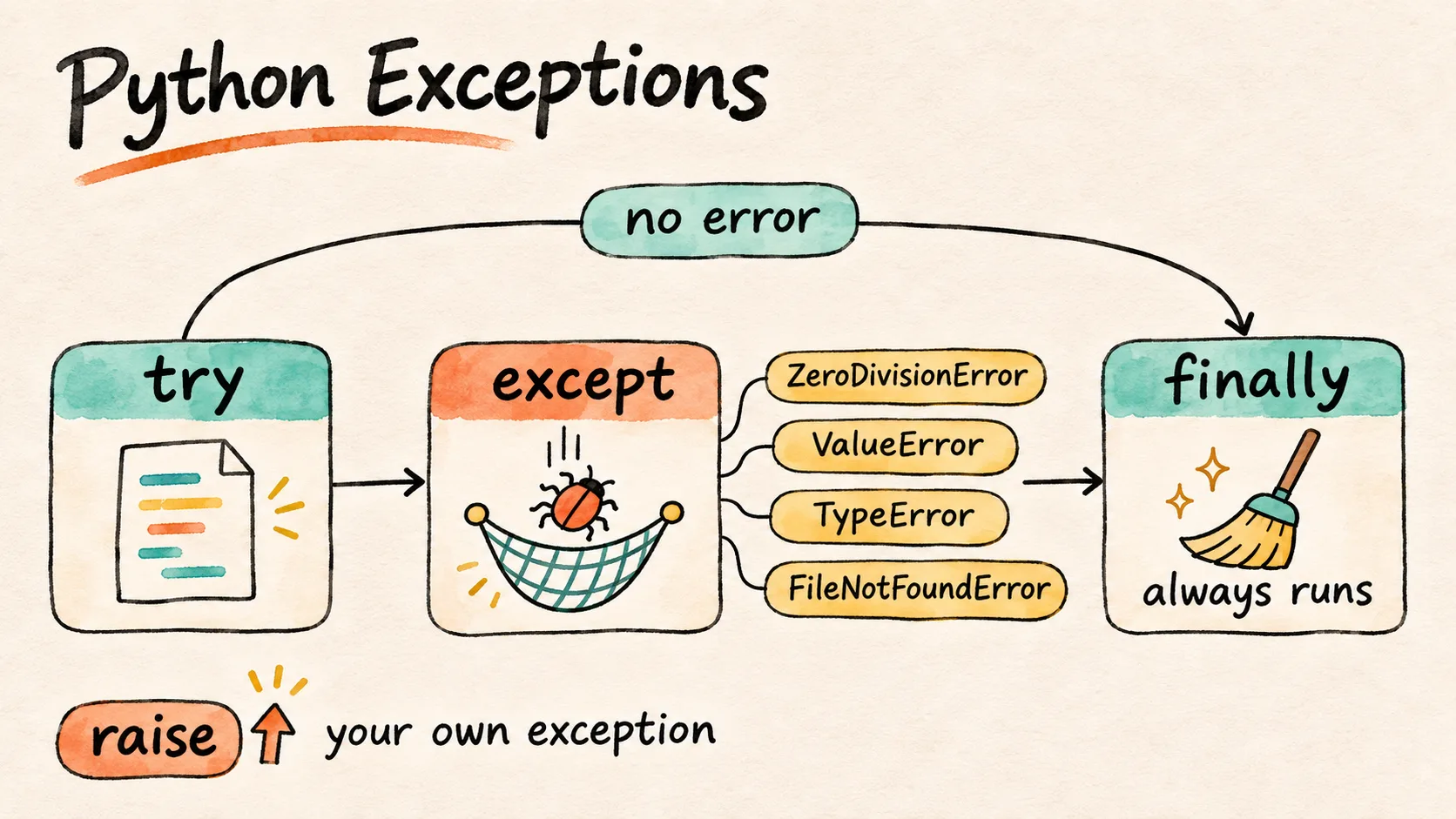
The basic way to handle an exception is try and except, and this is very, very different from Java, the instructor said: Java has try, catch and finally, while Python has try and, instead of catch, except. Like multiple catches in Java, you can have multiple excepts, and you can raise a custom exception with the raise keyword. There is a finally too, plus one more block that a lot of people have difficulty digesting: else. Try this; if it does not work, except is called; if it works, else is executed; and finally is always called. This is like a tree, the instructor said: a very strange syntax, but a useful and meaningful one. None of this class's files uses else.
The instructor's best practices: catch a specific exception, not the base one; keep the try block small; log or print helpful messages; use finally for cleanup; raise clear exceptions; do not hide a real bug silently; and avoid except Exception: pass.
The program: file 165. This program looks absolutely fine, the instructor said: it reads two numbers and divides them. Run in a terminal with 10 and 10, then with 10 and 0, it prints the two outputs below. The prompts have no space after them, so what you type runs straight on: Enter num 1, then 10.
a = int(input("Enter num 1"))
b = int(input("Enter num 2"))
c = a/b
print(c)
# ZeroDivisionError: division by zero
Enter num 110
Enter num 210
1.0
Enter num 110
Enter num 20
Traceback (most recent call last):
  File "chapter_15_Python_PyTest/ex_18_OOPs_Python/09_Exceptions/165.py", line 3, in <module>
    c = a/b
        ~^~
ZeroDivisionError: division by zero
Question, file 165. Which line number has a problem?
Show the answer
Answer. The third line, the instructor said: c = a/b stops with a ZeroDivisionError when the second number is 0, as the second run shows. So that is the line to put in try.
Only the vulnerable line: file 166. Whichever code is vulnerable, only that goes into try, the instructor said: do not put everything into try, that is a bad practice, and generally, this is a difference between you and a good tester. The lines that cannot give a ZeroDivisionError stay outside, lines 1 and 2 here. Runs with 10 and 0, with 10 and 10, where 1.0 comes, a floating-point number, and with a word instead of a number:
a = int(input("Enter num 1"))
b = int(input("Enter num 2"))
try:
    c = a/b
    print(c)
except ZeroDivisionError:
    print("Error bue to ZDE")
Enter num 110
Enter num 20
Error bue to ZDE
Enter num 110
Enter num 210
1.0
Enter num 1abc
Traceback (most recent call last):
  File "chapter_15_Python_PyTest/ex_18_OOPs_Python/09_Exceptions/166_Fix.py", line 1, in <module>
    a = int(input("Enter num 1"))
        ^^^^^^^^^^^^^^^^^^^^^^^^^
ValueError: invalid literal for int() with base 10: 'abc'
Question, file 166. What if I enter a name instead of a number?
Show the answer
Answer. Then we get a ValueError, the instructor said, which means these lines are vulnerable too. In file 166 they sit outside try, so the third run above stops at line 1, before the division is ever reached.
A tuple of errors: file 167. So the class added one more fix: the input lines go inside try too, and the except takes the errors comma separated. If there is a TypeError or a NameError as well, you can add that too, the instructor said: whatever errors you know. Runs with a word, then with 10 and 0:
try:
    a = int(input("Enter num 1"))
    b = int(input("Enter num 2"))
    c = a/b
    print(c)
except (ZeroDivisionError, ValueError, TypeError, NameError):
    print("Error bue to ZDE or Value")
Enter num 1abc
Error bue to ZDE or Value
Enter num 110
Enter num 20
Error bue to ZDE or Value
The file's name has no dot before py: it ends in Fix2py, not .py. Python runs it all the same when you give its name in full, as the runs above do.
One except per error: file 168. Or there is another fix, the instructor said: multiple excepts, first the ValueError, then the ZeroDivisionError. Runs with a word, then with 10 and 0:
try:
    a = int(input("Enter num 1"))
    b = int(input("Enter num 2"))
    c = a / b
    print(c)
except ValueError:
    print("Value Error")
except ZeroDivisionError:
    print("Div Error")
Enter num 1abc
Value Error
Enter num 110
Enter num 20
Div Error
finally: file 169. finally means it will always be executed, the instructor said: it does not matter whether the program ran properly or there was a ValueError, finally has to execute. The class's run, with 10 and 34:
try:
    a = int(input("Enter num 1"))
    b = int(input("Enter num 2"))
    c = a / b
    print(c)
except ValueError:
    print("Value Error")
except ZeroDivisionError:
    print("Div Error")
finally:
    print("I will always execute!")
Enter num 110
Enter num 234
0.29411764705882354
I will always execute!
Three runs, one for each way through:
| You type | What runs | It prints |
|---|---|---|
10, then 34 |
all of try, then finally |
0.29411764705882354, then I will always execute! |
abc |
except ValueError, then finally |
Value Error, then I will always execute! |
10, then 0 |
except ZeroDivisionError, then finally |
Div Error, then I will always execute! |
Catch order and custom exceptions: files 170 to 172

A real example: file 170. When we work with an API, there is a module named requests which helps you make an API request, the instructor said. The file reads a URL from the user, calls it with requests.get() and prints the status code. There can be a connection error, and there can be a timeout too, and we do not know which one it will be. So the last except is the biggest one, Exception, kept as e and printed. The deck holds the same code.
import requests

try:
    url = input("Enter the url")
    response = requests.get(url=url)
    print(response.status_code)
except requests.exceptions.ConnectionError:
    print("Exception due to connection error")
except requests.exceptions.Timeout:
    print("Exception due to connection error")
except Exception as e:
    print(e)
Run here only against this machine: a small web server started for the run, a port where nothing listens, and a URL with no http://. The address typed in class was not run.
| You type | Where it goes | It prints |
|---|---|---|
http://127.0.0.1:8731/, a web server on this machine |
no except: the request works | 200 |
http://127.0.0.1:1, a port where nothing listens |
the ConnectionError except, line 7 |
Exception due to connection error |
abc, with no http:// |
except Exception as e, line 11 |
Invalid URL 'abc': No scheme supplied. Perhaps you meant https://abc? |
Question, file 170. If you see the diagram of exceptions, who is the parent, the super of every exception?
Worth practising too: move except Exception as e: and its print to the top, above line 7. What does the closed port print then?
Show the answer
Answer. Exception is the parent, the instructor said, as the figure at the top of the exceptions section shows too. So the connection error is tried first, then the timeout, and if both miss, the biggest one catches it, as a last resort: it is like the biggest bucket. You should not have the biggest first: it would catch all the exceptions, and the excepts below it would be redundant code, a total waste. The biggest exceptions always go last, and this is asked in interviews too. Moved to the top, Exception catches the closed port before line 7 can, and prints the raw error, as the run below shows.
import requests

try:
    url = input("Enter the url")
    response = requests.get(url=url)
    print(response.status_code)
except Exception as e:
    print(e)
except requests.exceptions.ConnectionError:
    print("Exception due to connection error")
except requests.exceptions.Timeout:
    print("Exception due to connection error")
Enter the urlhttp://127.0.0.1:1
HTTPConnectionPool(host='127.0.0.1', port=1): Max retries exceeded with url: / (Caused by NewConnectionError("HTTPConnection(host='127.0.0.1', port=1): Failed to establish a new connection: [Errno 61] Connection refused"))
The deck's P.S. says the same as the instructor:
Biggest exceptions are always in the last. We will always start from the lower exceptions to the higher exception at the end
ValueError and ZeroDivisionError are siblings. In file 168, either order works: neither class is the other's parent, as the figure at the top of the exceptions section shows, and issubclass() gives False both ways round. The order matters when one except names a parent of another, as Exception is to every error in file 170.
Lines 8 and 10 print the same text. The timeout's except, line 10, prints Exception due to connection error, the text of line 8, so a caught Timeout would read like a connection error. Line 10 needs a message of its own, such as Exception due to timeout.
raise: file 171. We can also raise a custom exception directly, the instructor said, with raise. Here a vwo_login() function raises an exception when the user is not admin, not authorized, and otherwise returns a welcome. The deck holds the same code.
def vwo_login(user):
    if user!= "admin":
        raise Exception("You are not admin, not auth.")
    return "Welcome Admin"

# print(vwo_login("pramod"))
print(vwo_login("admin"))
Welcome Admin
The class's first run called it with another name, line 6, which is not admin, so the custom exception came:
def vwo_login(user):
    if user!= "admin":
        raise Exception("You are not admin, not auth.")
    return "Welcome Admin"

print(vwo_login("pramod"))
# print(vwo_login("admin"))
Traceback (most recent call last):
  File "chapter_15_Python_PyTest/ex_18_OOPs_Python/09_Exceptions/171_Custom_Exception.py", line 6, in <module>
    print(vwo_login("pramod"))
          ^^^^^^^^^^^^^^^^^^^
  File "chapter_15_Python_PyTest/ex_18_OOPs_Python/09_Exceptions/171_Custom_Exception.py", line 3, in vwo_login
    raise Exception("You are not admin, not auth.")
Exception: You are not admin, not auth.
Your own exception class: file 172. You can also raise a custom exception by creating a class, the instructor said: InvalidAgeException inherits from Exception, which is single inheritance, and pass means it is an incomplete class, with nothing written in it. Line 8 raises it when the age is less than 18. With 25, nothing was printed at first, because there was no else, the instructor said, so the class added one, line 9, to print it.
# Create a Class for the Custom Exception

class InvalidAgeException(Exception):
    pass

def can_you_drink(age):
    if age < 18:
        raise InvalidAgeException("You can't drink!")
    else:
        print("You can drink!")

# can_you_drink(17)
can_you_drink(25)
You can drink!
With line 12 switched on and line 13 off, the age is 17:
# Create a Class for the Custom Exception

class InvalidAgeException(Exception):
    pass

def can_you_drink(age):
    if age < 18:
        raise InvalidAgeException("You can't drink!")
    else:
        print("You can drink!")

can_you_drink(17)
# can_you_drink(25)
Traceback (most recent call last):
  File "chapter_15_Python_PyTest/ex_18_OOPs_Python/09_Exceptions/172_Exceptions.py", line 12, in <module>
    can_you_drink(17)
  File "chapter_15_Python_PyTest/ex_18_OOPs_Python/09_Exceptions/172_Exceptions.py", line 8, in can_you_drink
    raise InvalidAgeException("You can't drink!")
InvalidAgeException: You can't drink!
As the instructor traced it, the invalid age exception leads to Exception, Exception to the base exception, and the base exception gives you the error. Python's own order, printed at the end of the file, is ['InvalidAgeException', 'Exception', 'BaseException', 'object'].
Question, file 172. Can you drink, based on your age: at 17, and at 25?
Show the answer
Answer. At 17, you get an error, the instructor said: line 8 raises InvalidAgeException with You can't drink!, as the run with line 12 switched on shows. At 25, you can: the else on line 9 prints You can drink!.
Reading a file: file 173
In Python, it is very easy to open a file, the instructor said. A small file, test.json, holds only one thing, a name:
{
    "name" : "PrrammodDutta"
}
open() opens the file and read() reads it, the instructor said. The first run found no such file, though test.json was there, so the instructor gave the path from the chapter folder, and the file was read. If the path is wrong, there will be an exception, a FileNotFoundError, so the open went into try, with except FileNotFoundError as fnf, fnf as a short name for it.
try:
    data = open("09_Exceptions/test.json").read()
    print(data)
except FileNotFoundError as fnf:
    print(fnf)
The path on line 2 is relative: Python looks for it from the folder you run in, so run the file from ex_18_OOPs_Python, as the README notes point out, or you get the FileNotFoundError it is there to catch. From ex_18_OOPs_Python:
cd chapter_15_Python_PyTest/ex_18_OOPs_Python
python3 09_Exceptions/173_FIO.py
{
    "name" : "PrrammodDutta"
}
From the file's own folder, 09_Exceptions:
cd chapter_15_Python_PyTest/ex_18_OOPs_Python/09_Exceptions
python3 173_FIO.py
[Errno 2] No such file or directory: '09_Exceptions/test.json'
Question, file 173. If the path is wrong, what will happen, and what do we need to do to fix it?
Show the answer
Answer. There will be an exception, a FileNotFoundError, the instructor said, so we need to add it into try and except. From 09_Exceptions, the path 09_Exceptions/test.json does not exist, and line 5 prints the error instead of stopping the program.
A learner had expected the class to import pandas. Pandas is required when you want heavy file loading or a heavy Excel file, the instructor said; for us, it is very easy to just use open().
The os module: files 174 and 175
10_OS_Module.While doing exceptions, we also have to learn one more concept, the instructor said: the os module, the operating system module, which will be used a lot of the time, everywhere in AI projects and in CrewAI too. The deck's heading calls it operating system interactions. Any kind of activity related to the operating system, copying a file, finding a directory, moving a file, the os module can be used for directly. It has so many functions, and we are interested in a few of them.
During the class, the instructor asked for a list of the common os functions as a .md file in the learnings folder, and toured it; the repo received it in the last minutes of the class, as learnings/python-os-module-cheatsheet.md. It closes with a top ten:
1. `os.getcwd()`
2. `os.listdir()`
3. `os.makedirs(path, exist_ok=True)`
4. `os.remove()`
5. `os.rename()`
6. `os.walk()`
7. `os.path.join()`
8. `os.path.exists()`
9. `os.path.abspath(__file__)` + `os.path.dirname()`
10. `os.getenv()` / `os.environ`
The top ones you need to remember, the instructor said: get the current directory, list a directory, make a directory, remove, walk, path join, exists, the absolute path and get the environment variable. chmod, in the cheat sheet too, is short for change mode, the permissions, the instructor answered a learner.
First steps: file 174. os.name, the current folder, and what is in it:
import os
print(os.name)
print(os.getcwd())
# print(os.mkdir("AI"))
print(os.listdir())

print(os.remove("AI.txt"))
print(os.rename("AI.txt","testdata.txt"))
Run from its own folder, it prints posix, the folder and its three files, and stops at line 7. os.getcwd() prints the full path of the folder; on this page, every path starts at the repository, and the part before it, which differs on every machine, is left out.
cd chapter_15_Python_PyTest/ex_18_OOPs_Python/10_OS_Module
python3 174_OS.py
posix
chapter_15_Python_PyTest/ex_18_OOPs_Python/10_OS_Module
['174_OS.py', '175.py', '176_Env.py']
Traceback (most recent call last):
  File "chapter_15_Python_PyTest/ex_18_OOPs_Python/10_OS_Module/174_OS.py", line 7, in <module>
    print(os.remove("AI.txt"))
          ^^^^^^^^^^^^^^^^^^^
FileNotFoundError: [Errno 2] No such file or directory: 'AI.txt'
Question, file 174. Can you run this code and tell me what os.name gives you?
Show the answer
Answer. posix on the instructor's Mac, which means Unix, and posix in the run above too. For Windows, the instructor first guessed win, then said nt, a short form for Windows NT; the cheat sheet has the same: posix for macOS and Linux, nt for Windows.
Line 7 stops the run: you will get an error, the instructor said, because there is no file. Line 4 is switched off: run, os.mkdir("AI") printed None and created a folder named AI, and since it already existed, the class took the line out. The line on its own, run twice:
cd chapter_15_Python_PyTest/ex_18_OOPs_Python/10_OS_Module
python3 -c 'import os; print(os.mkdir("AI"))'
python3 -c 'import os; print(os.mkdir("AI"))'
None
Traceback (most recent call last):
  File "<string>", line 1, in <module>
FileExistsError: [Errno 17] File exists: 'AI'
Lines 7 and 8 cannot both work. Line 7 removes AI.txt, and line 8 renames the same AI.txt. With an empty AI.txt in the folder, line 7 removes it and prints None, and line 8 then finds no file to rename, as the run below shows. os.remove() or os.rename() on a file that is not there raises FileNotFoundError, as the README notes point out, so run one of the two at a time.
cd chapter_15_Python_PyTest/ex_18_OOPs_Python/10_OS_Module
touch AI.txt
python3 174_OS.py
posix
chapter_15_Python_PyTest/ex_18_OOPs_Python/10_OS_Module
['174_OS.py', '175.py', 'AI.txt', '176_Env.py']
None
Traceback (most recent call last):
  File "chapter_15_Python_PyTest/ex_18_OOPs_Python/10_OS_Module/174_OS.py", line 8, in <module>
    print(os.rename("AI.txt","testdata.txt"))
          ^^^^^^^^^^^^^^^^^^^^^^^^^^^^^^^^^^
FileNotFoundError: [Errno 2] No such file or directory: 'AI.txt' -> 'testdata.txt'
Make, write, check, clean up: file 175. Let me show you something interesting, the instructor said: file 175, the same code as the deck's os module section.
import os

print("CWD:", os.getcwd())
print("OS:", os.name)

folder = os.path.join(os.getcwd(), "demo_output")
print(folder)

os.makedirs(folder, exist_ok=True)

file_path = os.path.join(folder, "hello.txt")
with open(file_path, "w") as f:
    f.write("Hello from the os module")


print("Exists?", os.path.exists(file_path))
print("Size:", os.path.getsize(file_path), "bytes")
print("Files:", os.listdir(folder))

os.remove(file_path)
os.rmdir(folder)
print("Cleaned up:", not os.path.exists(folder))
CWD: chapter_15_Python_PyTest/ex_18_OOPs_Python/10_OS_Module
OS: posix
chapter_15_Python_PyTest/ex_18_OOPs_Python/10_OS_Module/demo_output
Exists? True
Size: 24 bytes
Files: ['hello.txt']
Cleaned up: True
Line 6 joins the current folder and demo_output: a separate folder, outside, not inside, the instructor said. Line 9 creates it, and exist_ok=True means that if it already exists, do not create it again and do not give an error, the instructor said. Lines 11 to 13 write Hello from the os module into hello.txt, and the next three lines check it: it exists, its size is 24 bytes, and it is the only file in the folder. Then the file is removed, then the folder, and line 22 prints True, which means it is gone. First we got the current working directory, created a directory, created a file, checked the files and the bytes, and then removed it, the instructor summed up: this gives all the examples of os. With demo_output already there before the run, line 9 gives no error, and the file prints the same seven lines:
cd chapter_15_Python_PyTest/ex_18_OOPs_Python/10_OS_Module
mkdir demo_output
python3 175.py
CWD: chapter_15_Python_PyTest/ex_18_OOPs_Python/10_OS_Module
OS: posix
chapter_15_Python_PyTest/ex_18_OOPs_Python/10_OS_Module/demo_output
Exists? True
Size: 24 bytes
Files: ['hello.txt']
Cleaned up: True
Environment variables: file 176
One more is very important, the instructor said: getting an environment variable, and setting one. Environment variables are variables available in your operating system: where your Java is present, where your Jenkins is, where Zoom is installed. To set one, you use export, for example export abc=xyz, and os.getenv() reads it. The class read abc and got xyz; a variable that was not set gave None, until it was exported too. You can set your API URL this way, and store secret values, such as a token. The pushed file reads TOKEN:
import os
print( os.getenv("TOKEN"))
Run before and after an export, in one terminal, with a dummy value:
cd chapter_15_Python_PyTest/ex_18_OOPs_Python/10_OS_Module
python3 176_Env.py
export TOKEN=dummy-value
python3 176_Env.py
None
dummy-value
Question. Where is an environment variable stored by default?
Worth practising too: export TOKEN in one terminal, then run file 176 in a second terminal. What does it print?
Show the answer
Answer. At runtime, at the operating system level, the instructor answered a learner. The second terminal prints None: an export reaches the programs started from its own terminal, and a terminal opened afterwards does not have it, as the figure at the top of this section shows.
export is for Mac and Linux terminals. The class ran it on a Mac, where os.name printed posix. On Windows, the Command Prompt and PowerShell set a variable with commands of their own.
Packages: file 177
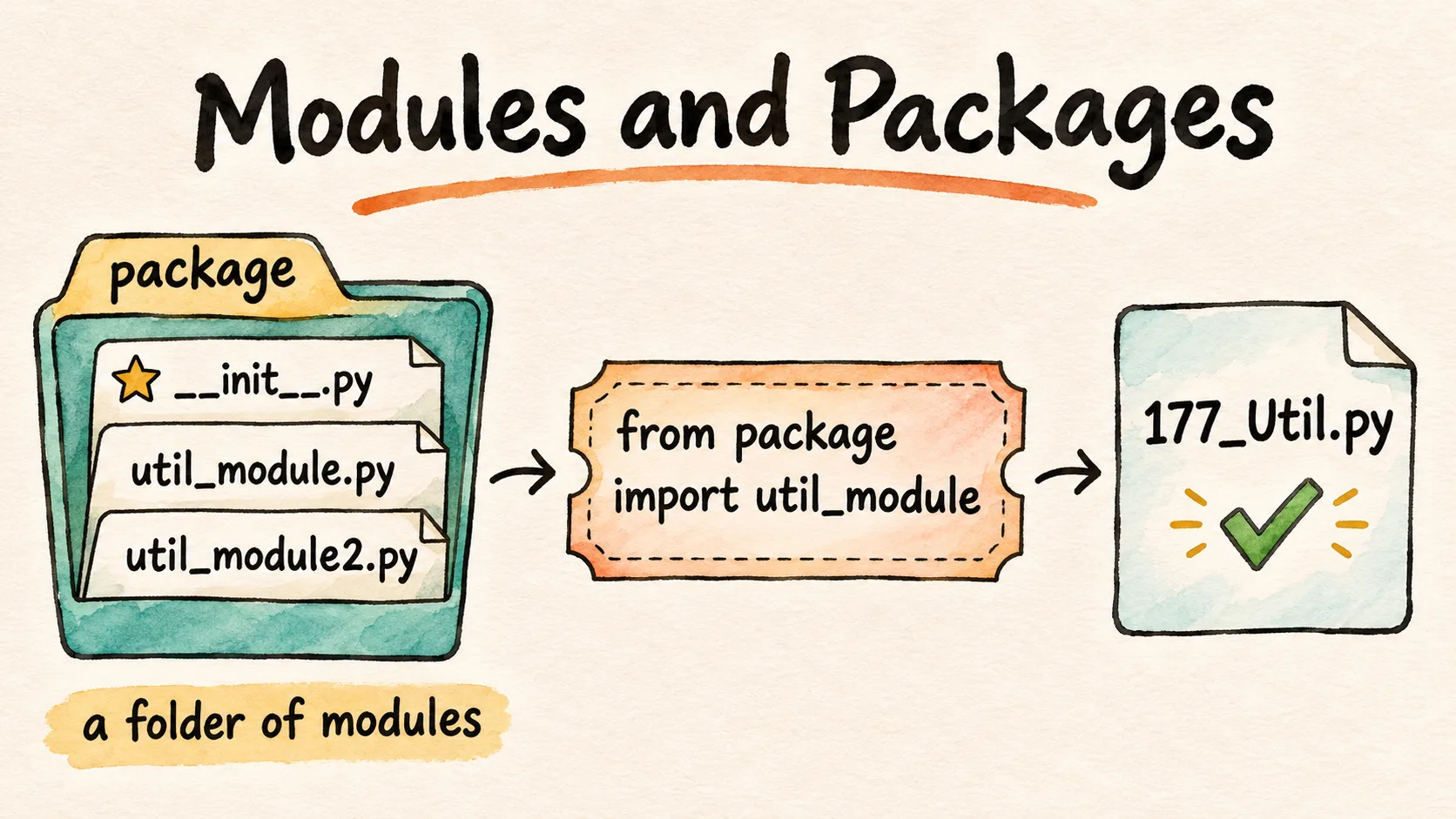
Before pip, the instructor explained folders and packages: in Python, a normal directory is just a folder, but a package has an __init__.py file in it, and the advantage of a package is that you can import it. Python recognizes a folder as a package when it has this file. The deck says a folder is promoted to a package when it contains the special file __init__.py, and that Python recognizes it as a package.
You can create your own package too. In 11_Package, the folder named package holds an empty __init__.py, which makes it a package, and two utility modules with one function each:
def blah(name):
    print(name)
def blahblah(name):
    print(name)
File 177 imports both from the package folder and calls a function from each. It will run absolutely fine, the instructor said.
from package import util_module,util_module2

util_module2.blahblah("das")
util_module.blah("das")
das
das
Very simple: it is just borrowing, the instructor said. If something is not working, we can borrow from our neighbour, and in the same way, from the package folder you can borrow directly.
But if it is a normal folder, like normal_dir next to it, this one cannot be used, the instructor said: ideally, py packages with __init__ in them are the easy way of importing, because Python recognizes them.
A plain folder imports too. normal_dir has no __init__.py, and its one file, util_normal.py, is empty. The deck's note says Python does not import a plain folder, but the README notes add that Python 3 can still import it, as a namespace package. Three lines added at the end of 177 show both kinds:
from package import util_module,util_module2

util_module2.blahblah("das")
util_module.blah("das")

import package, normal_dir
print(package)
print(normal_dir)
das
das
<module 'package' from 'chapter_15_Python_PyTest/ex_18_OOPs_Python/11_Package/package/__init__.py'>
<module 'normal_dir' (namespace) from ['chapter_15_Python_PyTest/ex_18_OOPs_Python/11_Package/normal_dir']>
package loads from its __init__.py; normal_dir has none, so Python marks it namespace, and there is nothing in it to call. __init__.py is what makes package a regular package, the kind the class used.
Question, normal_dir. Suppose this is a normal folder, a normal utility: can we use it?
Worth practising too: run file 177 from the repository's top folder. Does the import still work?
Show the answer
Answer. No, the instructor answered: ideally, py packages with __init__ are the easy way of importing. Python 3 does load normal_dir, as the README notes and the run above show, but only as a namespace package, while package, with its __init__.py, is a regular one. Run from the top folder, 177 still prints das twice: Python looks for package in the folder of the script you run, as the README notes explain, so 177 finds it from any folder.
pip and uv
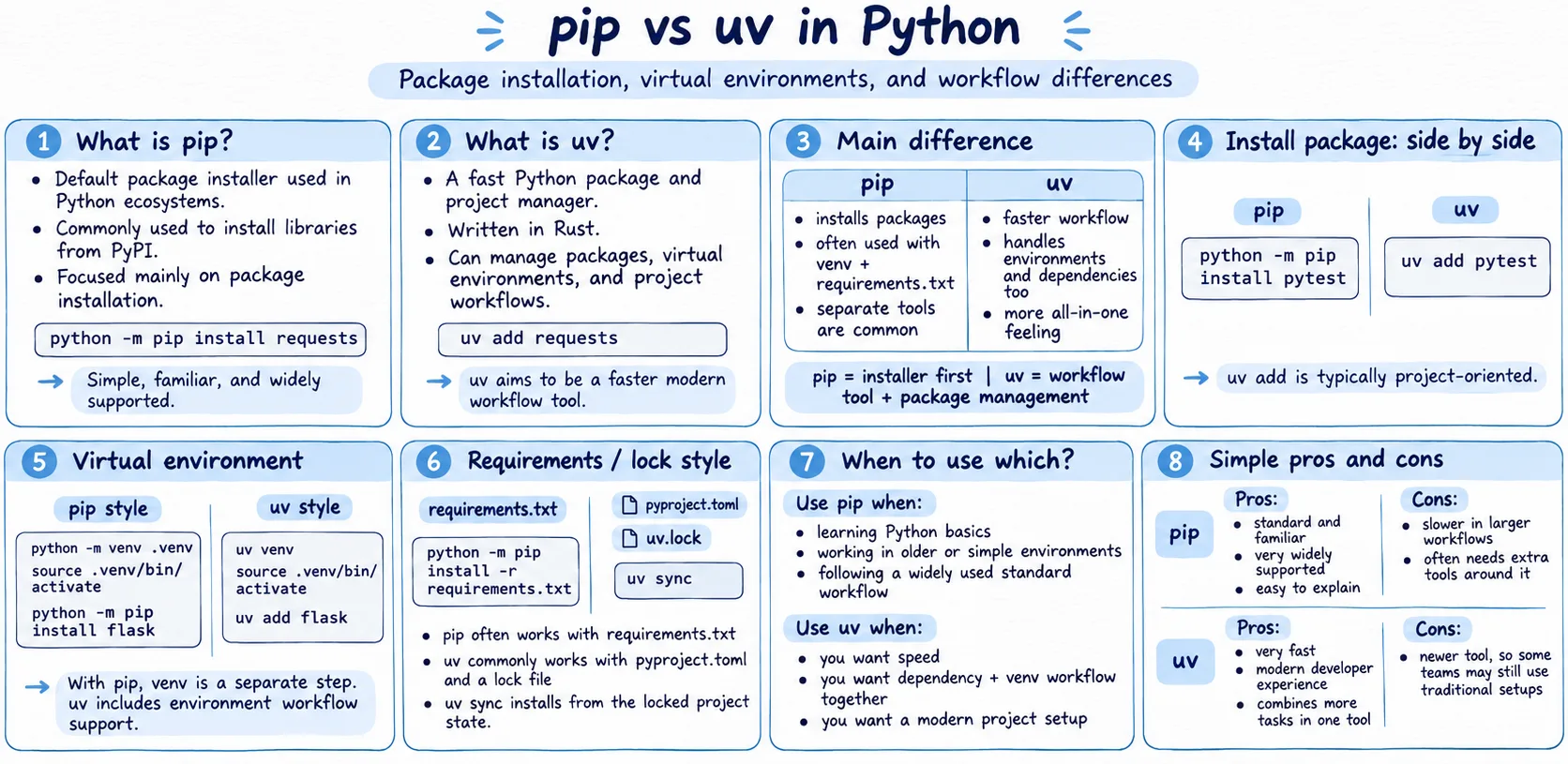
Before pytest, one more concept, the instructor said: pip, the Python package manager, which is how the deck has it too. pip is an installer very similar to npm: it helps you install and upgrade Python libraries, and we need it because we want to install third-party libraries. You can check the pip version, install a package, uninstall one, check the list, and upgrade. A requirements.txt file holds the versions of the libraries you want, and with a virtual environment, you create it, activate it, install the package and use it directly. pip install selenium, for example, installs Selenium into the project. The sheet at the top of this section is the image the instructor added in class, 13_PIP/image.png.
Then uv. pip was a little slow, so people created their own version, uv, the instructor said: pip is the default package manager, but uv is a fast one, written in Rust, because Rust is a very fast programming language, and it is all in one. The commands are similar; on the class's sheet, uv venv, uv add flask and uv sync. Whichever of the two you want to use, you are free to use, the instructor said; we will always prefer pip as of now.
First, you need to install uv, the instructor said, and pip install uv also works. On Windows, you run one PowerShell command, which installs uv for you; the deck links uv's installation guide, which gives it as:
powershell -ExecutionPolicy ByPass -c "irm https://astral.sh/uv/install.ps1 | iex"
Then uv init first, and uv add, as the deck has it:
uv init
uv add selenium
The class first ran uv add without uv init, and there was no project toml file, hmm, strange, the instructor said. Both commands, run here in an empty folder named like the class's project, with the network switched off, in the order the class met them:
uv add selenium
error: No `pyproject.toml` found in current directory or any parent directory
uv init
Initialized project `aitesterblueprin4x`
uv add downloads the package, so it was not run here. In class, Selenium installed, a little fast, then Playwright, super fast, then the OpenAI library, super fast: that is why people prefer to use uv, the instructor said. Installed with pip, it will be very slow, the instructor said, adding that Playwright was already installed on that machine.
The repo is now a uv project, as the README notes say: .python-version pins Python 3.13, and pyproject.toml lists the four libraries the class added.
3.13
requires-python = ">=3.13"
dependencies = [
    "openai>=3.51.0",
    "playwright>=1.65.2",
    "pytest>=9.2.0",
    "selenium>=4.52.0",
]
pytest basics: test_178 and test_179
pytest test_179.py, from its own folder.Now the last and the most important concept, the instructor said: pytest. We will not be able to learn the DeepEval framework and CrewAI until we know pytest. It is a Python testing framework, very similar to TestNG, which allows you to have a test run. The deck:
A quick reference for pytest, the most popular Python testing framework.
Question. What is a test?
Show the answer
Answer. Whenever we want to check that the expected result is equal to the actual result, the instructor said: whatever the agent has given, the expected result should be equal to the actual result. In pytest, that is what we are testing, nothing else. The deck puts it as ER == AR.
pip install pytest is the easy way, the instructor said, or uv add pytest if you want it fast: both of them work. On the class's machine, it said requirement already satisfied. The cheat sheet the instructor added to 12_PyTest lists the commands the class read through:
pip install pytest

pytest                          # run all tests in current dir
pytest test_180.py              # run one file
pytest -k "smoke"               # run tests matching keyword (name or marker)
pytest -m smoke                 # run tests with marker @pytest.mark.smoke
pytest -v                       # verbose output (shows each test name)
pytest -s                       # show print() output (disables capture)
pytest -v -s                    # combine both
pytest --maxfail=2              # stop after 2 failures
pytest -x                       # stop at first failure
pytest --lf                     # rerun only last failed tests
pytest --co                     # collect only (dry run, no execution)
test_ first: test_178. Every pytest file is created with test_ at the start of its name, test_178.py: remember this, it is very, very important, the instructor said. Import pytest, write a function, and assert. If you want, you can mark it: the instructor marked it as regression, and the file marks it reg. To run it, go to the terminal and type pytest and the file.
import pytest

@pytest.mark.reg
def test_check():
    assert 3 == 4
cd chapter_15_Python_PyTest/ex_18_OOPs_Python/12_PyTest
pytest test_178.py
============================= test session starts ==============================
platform darwin -- Python 3.12.7, pytest-9.1.1, pluggy-1.6.0
rootdir: .
configfile: pyproject.toml
collected 1 item

test_178.py F                                                            [100%]

=================================== FAILURES ===================================
__________________________________ test_check __________________________________

    @pytest.mark.reg
    def test_check():
>       assert 3 == 4
E       assert 3 == 4

test_178.py:5: AssertionError
=============================== warnings summary ===============================
test_178.py:3
  chapter_15_Python_PyTest/ex_18_OOPs_Python/12_PyTest/test_178.py:3: PytestUnknownMarkWarning: Unknown pytest.mark.reg - is this a typo?  You can register custom marks to avoid this warning - for details, see https://docs.pytest.org/en/stable/how-to/mark.html
    @pytest.mark.reg

-- Docs: https://docs.pytest.org/en/stable/how-to/capture-warnings.html
=========================== short test summary info ============================
FAILED test_178.py::test_check - assert 3 == 4
========================= 1 failed, 1 warning in 0.01s =========================
The class's first run asserted 3 == 3, and the dot means it passed:
import pytest

@pytest.mark.reg
def test_check():
    assert 3 == 3
cd chapter_15_Python_PyTest/ex_18_OOPs_Python/12_PyTest
pytest test_178.py
============================= test session starts ==============================
platform darwin -- Python 3.12.7, pytest-9.1.1, pluggy-1.6.0
rootdir: .
configfile: pyproject.toml
collected 1 item

test_178.py .                                                            [100%]

=============================== warnings summary ===============================
test_178.py:3
  chapter_15_Python_PyTest/ex_18_OOPs_Python/12_PyTest/test_178.py:3: PytestUnknownMarkWarning: Unknown pytest.mark.reg - is this a typo?  You can register custom marks to avoid this warning - for details, see https://docs.pytest.org/en/stable/how-to/mark.html
    @pytest.mark.reg

-- Docs: https://docs.pytest.org/en/stable/how-to/capture-warnings.html
========================= 1 passed, 1 warning in 0.00s =========================
Question, test_178. If I say 4, what will happen?
Show the answer
Answer. False, because 3 is not equal to 4, the instructor said: pytest prints F instead of the dot, and FAILURES shows the line, assert 3 == 4. In pytest, everything is a function, and in it you check the assertion.
The warning is about the marker. pytest does not know reg until it is registered, so it adds a PytestUnknownMarkWarning, as the README notes point out; the cheat sheet registers markers in a pytest.ini. What a marker means comes later, with CrewAI.
Two dots and an F: test_179. One more example, the instructor said, with three test functions:
import pytest

def test_positive():
    assert 4 != 5


def test_positive2():
    assert 4 != 5

def test_negative():
    assert 4 == 5
cd chapter_15_Python_PyTest/ex_18_OOPs_Python/12_PyTest
pytest test_179.py
============================= test session starts ==============================
platform darwin -- Python 3.12.7, pytest-9.1.1, pluggy-1.6.0
rootdir: .
configfile: pyproject.toml
collected 3 items

test_179.py ..F                                                          [100%]

=================================== FAILURES ===================================
________________________________ test_negative _________________________________

    def test_negative():
>       assert 4 == 5
E       assert 4 == 5

test_179.py:11: AssertionError
=========================== short test summary info ============================
FAILED test_179.py::test_negative - assert 4 == 5
========================= 1 failed, 2 passed in 0.01s ==========================
Dot means pass, and F means failure, the instructor said: two dots and one F, two passed and one failed. assert is a hard assertion, the instructor said: it stops the execution, as the figure at the top of this section shows for test_negative().
Tasks and announcements
- Exercises up to 179, on your GitHub. The code is already posted, the instructor said: do the practice. Meeti, the TA, was asked to add this, the exercises up to 179: everyone has to do them and upload them to their own GitHub repository.
- Previous projects too. Is it OK to upload the previous projects now, a learner asked? Yes, you can, the instructor said.
- Next week: CrewAI with pytest. Next week covers the important concepts of CrewAI with pytest, the instructor said, because CrewAI uses pytest. Markers, xfail and skip, priority and grouping as in TestNG, and parallel and sequential runs come there, slowly, with CrewAI. The pytest cheat sheet the instructor added in class is in the repo.
- Four topics left. Today we will complete Python, I think, the instructor said at the start: I hope so. The four topics remaining are CrewAI, LangChain, DeepEval and LangGraph, starting with CrewAI next week. When file I/O came up at the end: it was already covered, the instructor said, in the operating system part, and with CrewAI and DeepEval it will come automatically.
- pip, for now. The class will always prefer pip as of now, the instructor said; uv is there if you want it.
- A hackathon is coming. Probably next to next week or so, the instructor said: be prepared, and start your preparations. The details will follow.
- The notes as a PDF. Can the notes be downloaded, a learner asked? Yes, you can, the instructor said, adding I hope so: there is a way to export them. In the end, the instructor generally shares the exported version with everyone, and said the overall documented PDF will be given in the end: a final PDF with all the diagrams, if you want it. Remind the instructor in the end.
- Regex. The regex notes are there; a small video on regex is still to be made, and the instructor said it will be created soon.
Task: exercises up to 179. Do every exercise up to 179 and upload them to your own GitHub repository.
Show the answer
Answer. Files 159 to 179 are all on this page, each with what it prints. Write each one yourself, run it, compare your output with the page, then push them to your own repository.