What this class covered
- MCP Inspector versus an agent, and the Skill Finder MCP used from GitHub Copilot
- Why Python is both compiled and interpreted: source code, bytecode and machine code
- Setting up: Python, VS Code and the Code Runner extension
- Comments, print, and print's sep and end options
- Variables and literals, no semicolons, and strict indentation
- Dynamic typing and type()
- Keywords and the rules for identifiers
- Interview questions: reassignment, BODMAS, multiple assignment, and joining text with a number
- Tasks: the hello world screenshot, Wednesday's QA battle, Friday's MCP session and the hackathon
MCP Inspector versus an agent
The recording picks up at the end of the MCP part of the class, so this is the class's recap. MCP Inspector is a way to see and debug what an MCP server offers, whether it runs locally or over streamable HTTP: its tools, resources and prompts. It is for people. An AI agent does not need it; the agent connects to the MCP server directly. One server can offer any number of tools, resources and prompts.
The MCP Inspector session itself came earlier in the class and is not in the recording. The batch repo's MCP Inspector notes cover it.
The Skill Finder MCP, from GitHub Copilot
The Skill Finder MCP came out of the previous class: an MCP server over a library of 100 QA skills, one SKILL.md each, covering the STLC phases, Playwright, API testing, company data and more. The demo showed that an agent uses it with no MCP Inspector in sight:
The connection details for VS Code, from the server's README:
{ "servers": { "testskill-finder": { "type": "http", "url": "http://127.0.0.1:8110/mcp" } } }
- Ask the agent for the connection details and add them to VS Code.
- In GitHub Copilot, running DeepSeek V4 Flash, ask: connect with this MCP and tell me about the tools, resources and prompts it offers. The agent connected by itself and reported 13 or more tools, a couple of resources, 3 prompts and 100 skills.
- Ask for skills related to Playwright. It found 11.
- Ask which skill is best for API testing with Playwright. It picked Playwright API tester, the highest score, and offered to help write a test for the endpoint.
The skills are mostly read, but the server can change them too: two of its tools write.
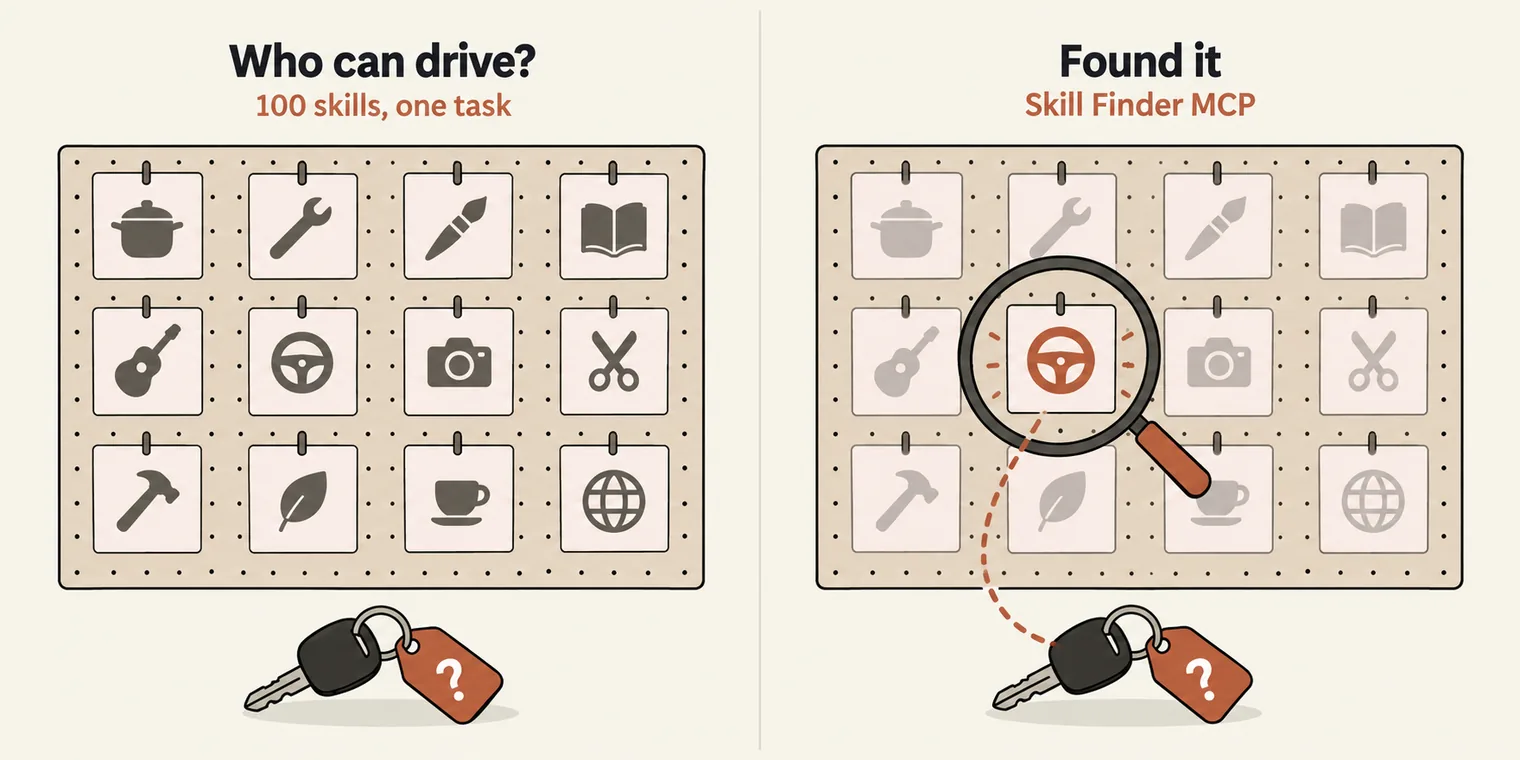
A few people were still unsure what the server is for, so the class used a family: everyone knows how to do something, and you need to find out who can drive. The Skill Finder does that for skills. You describe the task, it finds the one that fits.
Python is both compiled and interpreted
Python is one of the easiest languages to start with, and the reason to learn it now is practical: with Python you can read and write the code behind LangChain, LangGraph, CrewAI and DeepEval, and build your own agents and MCP servers. It dates from about 1990, older than Java, and it is a human-friendly, high-level language.
Interview question: is Python compiled or interpreted? Both.
The class's picture: two people who do not share a language need a translator, and so do people and a computer, since a CPU does not understand English. A translator can work in two ways: line by line, which is interpretation, or everything in one go, which is compilation.
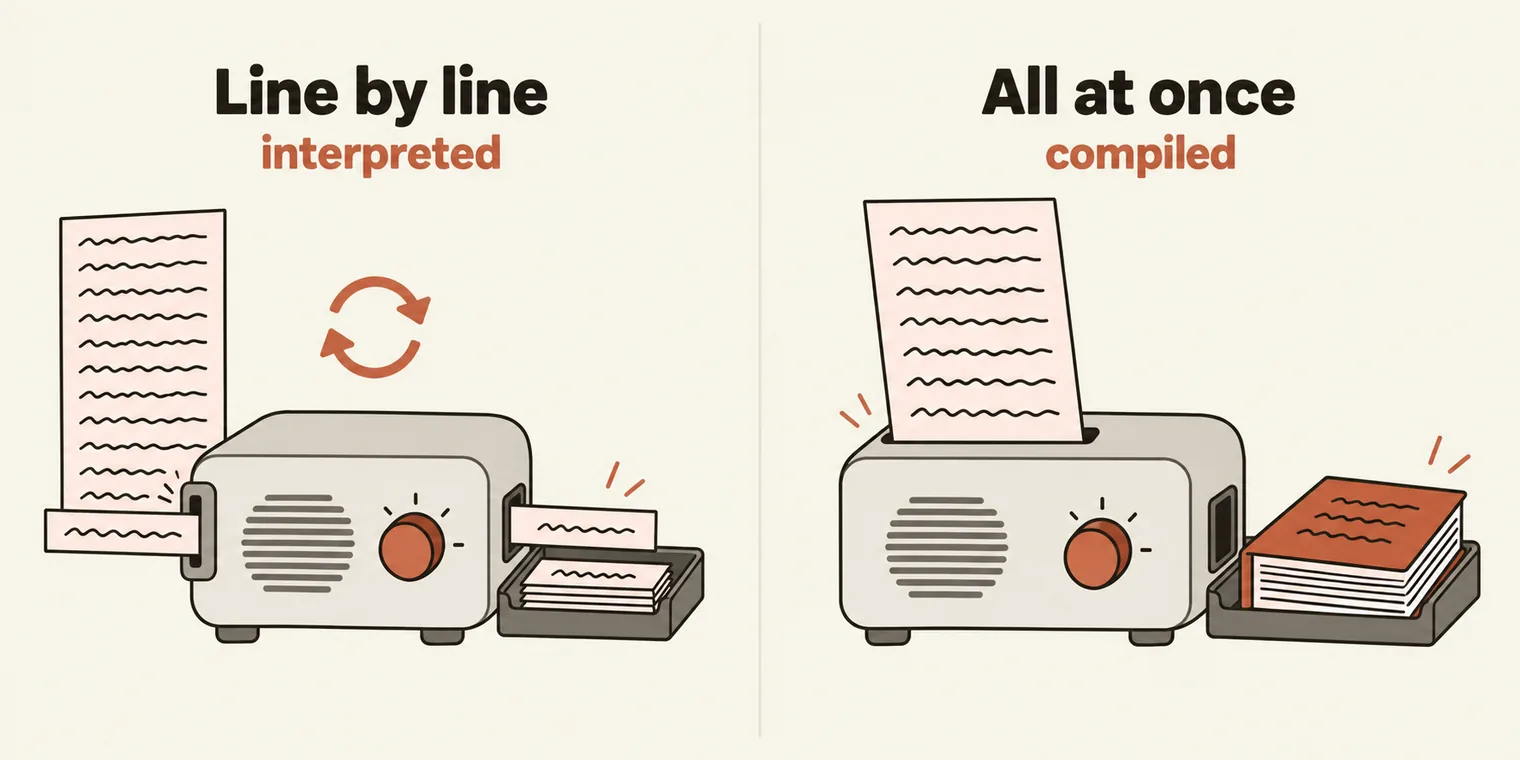
Python uses both, one after the other:
- Source code is what you write in a
.pyfile. People can read it; the CPU cannot. - Bytecode is an in-between code. Python compiles your whole file into bytecode first. You never see it while running a file.
- Machine code, also called native code, is what the CPU runs. The Python Virtual Machine works through the bytecode one instruction at a time, which is the interpreted part.
In class, hello.py was described as becoming hello.pyc. Python does compile every file to bytecode, but it only saves a .pyc file for modules that get imported. Run hello.py directly and nothing is written; import it from another file and Python saves __pycache__/hello.cpython-312.pyc, where 312 is the Python version.
Setting up: Python, VS Code and Code Runner
- Install Python. Download the latest release, Python 3.15.0, from python.org. Any 3.x version works; the class machine had 3.13. Check it in a terminal with
python --version(python3 --versionon a Mac). - Use VS Code, which supports Python out of the box.
- Install the Code Runner extension. Search for it under Extensions and install it. It adds a Run button, with no environment variables to set.
- Or run from the terminal:
pythonfollowed by the file name.
print("Hello TheTestingAcademy")
Hello TheTestingAcademy
Comments and print
A line that starts with # is a comment: Python skips it. Comment out a print and nothing is printed.
# print("Hello TheTestingAcademy")

# This is Comment
# This code will not be executed.
#
print(2 + 2)
print(2, 3, 4)
print("Hello", True, "PrrammodDutta", 12342)
4
2 3 4
Hello True PrrammodDutta 12342
print can take a calculation, or any number of comma-separated values of any type. Hover over print in VS Code and the signature starts with *values: the star means any number of values.
Two options control the layout:
- sep is what goes between the values. The default is a space; the class used
*,__and-. - end is what goes after the last value. The default is a new line,
\n. Withend="\t", the nextprintcontinues on the same line after a tab.
print("Hello", "World")
print("Hello", "World", "TheTestingAcademy", sep="*")
print("Hello", "World", "TheTestingAcademy", sep="__")


print("*", "*", sep="-", end="\t")
print("*", "*", sep="_")
Hello World
Hello*World*TheTestingAcademy
Hello__World__TheTestingAcademy
*-* *_*
\n and \t are escape characters, a backslash followed by a letter: a new line and a tab.
Variables, literals and dynamic typing
A variable is a container that holds a value. In a = 10, the name a is the identifier, and 10 is the value, also called the literal. You can change the value later.
- No semicolons. Python statements end at the end of the line.
- Indentation is strict. Wrong spaces or tabs and the program will not run; it fails with an indentation error. Right-click and choose Format Document to tidy it.
- No data type is written. Python works it out from the value.
Python is dynamically typed: the same name can hold a number now and a string later, and the interpreter adjusts. The class contrasted this with Java, where it is not allowed.
age = 65
age = "Pramod"
# Dynamic Typed Language. - It can understand you are doing, want.
print(age)
pi = 3.14
name = "Pramod"
name = "Pramod"
name = "Pramod"
name = "Pramod"
name = "Pramod"
name = "Dutta"
print(name)
Pramod
Dutta
# Dynamically typed

age = 98
print(type(age))
age = "Pramod"
print(type(age))
age = True
print(type(age))
<class 'int'>
<class 'str'>
<class 'bool'>
type() tells you what Python decided. It uses short names: str for strings, float, bool. Python also has complex numbers, written with j; the class showed them for completeness, and they are not used in automation or AI work.
_pramod = "amit"
_abc = 23
pi = 3.14
name = "Pramod"
isMale = True

# Type
print(type(_pramod))
print(type(pi))
print(type(isMale))

complex_number = 2 + 3j
print(complex_number)
print(complex_number.real)
print(complex_number.imag)
print(type(complex_number))
<class 'str'>
<class 'float'>
<class 'bool'>
(2+3j)
2.0
3.0
<class 'complex'>
The data types Python offers, as listed in class:
| Group | Types |
|---|---|
| Numbers | int, float, complex, and bool for True and False |
| Text | str, a bunch of characters |
| Collections | list, tuple, set, frozenset, dict |
| Binary | bytes and related types |
Python has no "map": its key-value type is the dictionary, dict.
Keywords
A keyword is a reserved word with a fixed meaning, so you cannot use it as a variable name: class = 10 fails with SyntaxError: invalid syntax. To list them, import the keyword module and print keyword.kwlist:
a = 10
a = 4.5
a = "pramod"

# print()
# class
# None
# break

import keyword
print(keyword.kwlist)
['False', 'None', 'True', 'and', 'as', 'assert', 'async', 'await', 'break', 'class', 'continue', 'def', 'del', 'elif', 'else', 'except', 'finally', 'for', 'from', 'global', 'if', 'import', 'in', 'is', 'lambda', 'nonlocal', 'not', 'or', 'pass', 'raise', 'return', 'try', 'while', 'with', 'yield']
That is 35 keywords. Python is case-sensitive, keywords included: print works and Print fails with NameError: name 'Print' is not defined. Only False, None and True start with a capital letter.
In class, function = 10 was called invalid alongside class = 10. It is valid: function is not a Python keyword, as the list above shows. Python defines functions with def, and def = 10 would fail. Running function = 10; print(function) prints 10.
Rules for identifiers
age = 65
_age = 65
print(age)
print(_age)

_ = 12
print(_)
_ = _ + 1
print(_)

# 123abc = 90
abc123 = "abc123"
print(abc123)
65
65
12
13
abc123
long_var_name_is_created_here = "Hello"
print(long_var_name_is_created_here)
Hello
The rules, from the class's rules file:
| Rule | Valid | Invalid |
|---|---|---|
| Letters, digits and underscores only | first_name, abc123 |
first-name, first name, total$ |
| Cannot start with a digit | abc123 |
123abc |
| Cannot be a keyword | class_name |
class, for |
| Case-sensitive | age and Age are two names |
|
| No length limit | long_var_name_is_created_here |
|
| A single underscore is a name | _ = 12 |
|
| Avoid built-in names | items = [1, 2, 3] |
list = [1, 2, 3] works, then list() breaks |
Interview questions
1. What does this print? c is set to a + b, then reassigned.
a = 10
b = 10
c = a + b
print(c)
c = c - 10
print(c)
20
10
2. What is 10 + 34 * 3 - 1? Apply BODMAS: multiplication before addition and subtraction, so 34 * 3 = 102, then 10 + 102 - 1 = 111.
a = 10 + 34 * 3 - 1
print(a)


# BODMAS
#
# BODMAS is an acronym that helps remember the order of operations in mathematics:
# B: Brackets
# O: Order of powers or roots
# D: Division
# M: Multiplication
# A: Addition
# S: Subtraction
111
3. Can you assign several variables in one line? Yes. Each name takes the value in the same position.
a, b, c = 45, 5.4, "pramod"
print(a)
print(b)
print(c)
45
5.4
pramod
4. Can you join a string and a number? Not in Python. Two strings join with +, but a string plus a number is an error. Java and JavaScript would turn the number into text; Python refuses.
print("Amit", "Teja", "Tushar")

print("PRAMOD" + "DUTTA")

# Detonation between the string and integer is not allowed in
print("PRAMOD" + 10 + 20)
Amit Teja Tushar
PRAMODDUTTA
Traceback (most recent call last):
  File "chapter_15_Python_PyTest/ex_02_Keywords_Identifier_Literals/013_MathIQ.py", line 6, in <module>
    print("PRAMOD" + 10 + 20)
          ~~~~~~~~~^~~~
TypeError: can only concatenate str (not "int") to str
The fix is to convert the number yourself with str():
# print("Hello" + 15)
print("Hello" + str(15))
Hello15
max() and min() are built-in functions that take any number of arguments:
result = max(3, 4, 5, 100, 101)
print(result)


result_min = min(3, 4)
print(result_min)


result = max(3, 4, 67, -1, 190, 999, 100000, 9899, -1)
print(result)
101
3
100000
Tasks and announcements
- This week stays slow so the basics settle; Python picks up speed next week.
- Wednesday: a QA battle, or a test. It opens at 7 AM and closes at 7 PM, or around 10 PM: 12 hours to finish. It covers what has been taught so far: RAG, MCP, LLM basics, n8n and Langflow.
- Friday evening: an advanced MCP session, with certification. Details are coming; plan to join.
- A hackathon this month. Build a QA solution with RAG, MCP, AI agents, n8n or Langflow, aiming at open-source tools for testers. The prize money has gone up, as far as your full fee back, and everyone who takes part gets a certificate. A teaser is on its way.
Task 1, hello world. Install Python and Code Runner, run a hello world program, and post a screenshot of it running in the SDET Club chat, in the same comment thread.
Task 2, Wednesday's QA battle. Finish it within the 12 hours.