What this class covered
- Strings are immutable
- length and index, and charAt versus at
- Keeping AI answers in a learning folder
- Searching, and regex for a separate video
- Extracting: slice, substring and substr
- Case, spaces, padding and replacing
- Rarely used string methods
- Interview traps with strings
- Objects: key-value pairs, dot and bracket, case-sensitive keys
- Copy by reference, and the ELI5 skill
- Nested objects, methods and config objects
- Call by value and call by reference
- Shallow copy and deep copy
- Tasks: five string problems, and what comes next
- Strings are immutable:
s[0] = "z"changes nothing, and a method such astoUpperCase()returns a new string. at()takes a negative index; past the end,charAt()gives""andat()givesundefined.- Use
slice()to extract: it counts a negative index from the end, whilesubstring()treats it as 0. replace()changes only the first match andreplaceAll()every one;includes()is case-sensitive."10" < "9"istrue: strings are compared character by character, by character code.- Primitives are copied by value. For an object,
let b = acopies the reference: one object, two names. { ...a }is a shallow copy that still shares the nested objects;structuredClone(a)is a deep copy.
Strings are immutable
The last class created strings and covered their properties, character access, template literals, replace and split (the 28 October notes); today the instructor went through the string methods one by one, from the deck.
The first point is a very important interview question: strings are immutable. Once a string is created, it stays exactly as it is. From the deck:
let s = "abc";
s[0] = "z";
console.log(s);   // 'abc'  ← silently unchanged
abc
Writing to index 0 does nothing: there is no error, and s is still abc. The deck puts the rule in one line: every method returns a new string. So toUpperCase() gives you a new string and leaves the old one alone:
let s = "abc";
let upper = s.toUpperCase();
console.log(upper);
console.log(s);
ABC
abc
length and index, charAt versus at
at() takes a negative index, and past the end charAt() gives "" where at() gives undefined."Playwright".length is 10. The instructor's warning: length starts from 1, and an index starts from 0, a confusion that, as the instructor put it, can make your interview go away. So the ten characters of "Playwright" sit at indexes 0 to 9, and charAt(4) is w. When a learner asked how 4 gives w, the instructor counted it out: 0, 1, 2, 3, 4.
charAt(i), brackets [i] and at(i) all read one character. The class named two differences between charAt and at:
at()also takes a negative index and counts back from the end. For a negative index,charAt()gives an empty string.- Out of range,
charAt()gives an empty string andat()givesundefined.
The learning note the class saved on the two, lines 33 to 36:
const s = "abc";
console.log(s.charAt(0), s.at(0));     // a a
console.log(s.charAt(-1), s.at(-1));   // "" c
console.log(s.charAt(5), s.at(5));     // "" undefined
a a
 c
 undefined
An empty string prints as nothing, which is why the second and third lines of the output start with a space: charAt(-1) and charAt(5) gave "".
charCodeAt(), from the last class, gives a character's code, and codePointAt() gives the full code point of an emoji, so "😀".codePointAt(0) is 128512. The instructor marked codePointAt() as rarely used: generally, you will not need it.
Keeping AI answers in a learning folder
The instructor's habit with a question like this one: ask your AI for the difference as a table, then have the answer saved as an .md file in a learning folder. In the batch repo that folder is 00_learning, and today's note is chatAt_vs_At_string.md. The note itself flags the typo in its name: there is no chatAt method, and "abc".chatAt(0) throws TypeError: "abc".chatAt is not a function.
Whenever something you learn looks like an interview question, it goes into that folder, and the folder becomes your own interview preparation guide. As the instructor put it, that is how AI should be used: for reminding, not to create something blindly.
Searching, and regex for a separate video
indexOf, lastIndexOf, includes, startsWith and endsWith came up in the last class: indexOf gives the first index, or -1 when the text is not there. Two things are new. All of these methods are case-sensitive, and three more search with a regular expression (regex), a pattern to look for: search() gives the index of the first match, match() the match itself, and matchAll() every match. The deck's examples, printed:
console.log("Login Successful".includes("login"));
console.log("Order #10245".search(/\d+/));
console.log("Order #10245".match(/#(\d+)/));
console.log("abc".match(/\d/));
console.log([..."a1b2".matchAll(/([a-z])(\d)/g)].map(m => m[0]));
false
7
[
  '#10245',
  '10245',
  index: 6,
  input: 'Order #10245',
  groups: undefined
]
null
[ 'a1', 'b2' ]
includes("login") is false because the text has a capital L. In /\d+/, \d stands for a digit, so the search finds the order number at index 7. match() returns the match, with the digits from inside the brackets, or null when nothing matches, and matchAll() finds every letter-and-digit pair.
A regex finds a pattern in a long string: the class's example was a long message from which you would want the email ID, and the number of hours too, found with patterns. How such a pattern is built is a big topic of its own, so it moves to a separate video of around 10 minutes. For learning it, the instructor named the regex101 website.
Asked whether regex is used in automation, the instructor said absolutely: in Playwright, in a lot of ways. The deck lists what it is used to verify: your title, your elements, your email IDs, your personal information, your order IDs, toasts and calendar views. Asked whether a regex also trims text, the instructor said no: it only finds patterns.
Extracting: slice, substring and substr
There are three methods for cutting out part of a string. From the deck, every example run:
| Method | Negative index | Start after end | Example | Result |
|---|---|---|---|---|
slice(start, end) |
counts from the end | gives '' |
"JavaScript".slice(-6) |
'Script' |
substring(start, end) |
treated as 0 |
swaps them | "JavaScript".substring(-6) |
'JavaScript' |
substr(start, length), deprecated |
counts from the end | the second number is a length | "JavaScript".substr(4, 6) |
'Script' |
The deck's examples of a start that comes after the end:
"JavaScript".slice(0, 4);       // 'Java'
"JavaScript".slice(4, 0);       // ''          ← end < start
"JavaScript".substring(4, 0);   // 'Java'      ← args swapped silently
These lines work out values without printing them. Printed, they give:
Java

Java
The middle line is the empty string: slice(4, 0) gives nothing back when the end comes before the start, while substring(4, 0) quietly swaps the two. The instructor's rule: all three exist, but mostly slice() is used, so remember only slice.
Case, spaces, padding and replacing
| Call | Result |
|---|---|
"qa".toUpperCase() |
'QA' |
"QA".toLowerCase() |
'qa' |
"i".toLocaleUpperCase("tr-TR") |
'İ' |
"i".toUpperCase() |
'I' |
" QA ".trim() |
'QA' |
" QA ".trimStart() |
'QA ' |
" QA ".trimEnd() |
' QA' |
toUpperCase()andtoLowerCase()change the case. Asked what a locale is, the instructor took Turkish (tr) as the example: Turkish writes the uppercase ofidifferently from us, and our own locale is India (in). The locale versions are very rarely used, the instructor said, and the instructor has never seen people use them.trim()removes the spaces at both ends, which a learner had asked about, andtrimStart()andtrimEnd()trim one end.
Padding, repeating and joining, from the deck:
"7".padStart(3, "0");        // '007'         ← zero-pad IDs
"Name".padEnd(10, ".");      // 'Name......'  ← align console output
"abcdef".padStart(3, "0");   // 'abcdef'      ← no-op if already long enough
"ab".repeat(3);              // 'ababab'
"ab".repeat(0);              // ''
"a".concat("b", "c");        // 'abc'         ← `+` is clearer
Printed:
007
Name......
abcdef
ababab

abc
padStart(3, "0") adds two zeros in front of the 7, padEnd(10, ".") fills up with dots, and repeat(0) gives an empty string, the blank line.
Replacing. replace() changes only the first match. To change every one, use replaceAll(), or a regex with the g flag:
| Call | Replaces | Result |
|---|---|---|
"banana".replace("a", "X") |
the first match only | 'bXnana' |
"banana".replace(/a/g, "X") |
all, with the g flag |
'bXnXnX' |
"banana".replaceAll("a", "X") |
all | 'bXnXnX' |
Template literals, next on the cheat sheet, the class already knew from the last class.
Rarely used string methods
The rest of the cheat sheet the instructor called rarely used. The static methods and conversions, printed:
console.log(String.fromCharCode(72, 105));
console.log(String.fromCodePoint(128512));
console.log(String.raw`C:\new\test`);
console.log((255).toString(16));
Hi
😀
C:\new\test
ff
These are never used in automation, in the instructor's words, and the one the instructor sometimes uses is String.raw, which, in the deck's words, ignores escape sequences: the \n in the path stays a backslash and an n.
Then the deck's list of rarely needed methods: isWellFormed(), toWellFormed(), normalize(), valueOf() and toString(), and old HTML wrappers such as bold() and link(), which the deck says never to use. The instructor's suggestion was to keep them in an .md file in the learning folder, with one example each, and the repo now has that file, rarely_needed_string_methods.md. Two of its examples, for two methods the class looked at. With isWellFormed(): an emoji is stored as two units, so slicing it in half leaves a broken string.
const broken = "😀".slice(0, 1);       // only the first half of the emoji

console.log("Hello 😀".isWellFormed());  // true
console.log(broken.isWellFormed());      // false
true
false
With normalize(): an accented letter can be stored in two ways that look the same but are not equal.
const composed   = "caf\u00e9";    // é as one character
const decomposed = "cafe\u0301";   // e + combining accent

console.log(composed, decomposed);                     // café café
console.log(composed === decomposed);                  // false
console.log(composed.length, decomposed.length);       // 4 5
console.log(composed.normalize("NFC") === decomposed.normalize("NFC"));   // true
café café
false
4 5
true
The instructor's verdict on this group: a one-time watch, not useful. The real traps come next.
Interview traps with strings
The trap questions the instructor collected, from the deck's gotcha summary, every row run:
| Trap | Result | Why |
|---|---|---|
s[0] = "z" |
s stays 'abc' |
silently does nothing: strings are immutable |
"banana".replace("a", "X") |
'bXnana' |
first match only; use replaceAll or /g |
"Login Successful".includes("login") |
false |
case-sensitive |
"JavaScript".substring(-6) |
'JavaScript' |
clamps to 0; use .slice(-6) |
"10" < "9" |
true |
string comparison, not numeric |
["b", "a", "C"].sort() |
[ 'C', 'a', 'b' ] |
use localeCompare |
"abc".match(/\d/) |
null |
returns null, not [] |
Number("12px") |
NaN |
use parseInt |
Number("") |
0 |
not NaN |
"5" + 3 |
'53' |
+ joins; every other operator coerces to number |
"😀".split("") |
[ '\ud83d', '\ude00' ] |
splits the surrogate pair; use [...str] |
"abc".charAt(99) |
'' |
where .at(99) gives undefined |
Why "10" < "9" is true. Both sides are strings, so this is a string comparison, not a numeric one: the strings are compared character by character from the left, and the first characters already decide it. One of the students was asked this question in an interview. The character codes show why:
console.log("10" < "9");
console.log(10 < 9);
console.log("1".charCodeAt(0), "9".charCodeAt(0));
true
false
49 57
"1" is 49 and "9" is 57, so "10" comes first and "10" < "9" is true. As numbers, 10 < 9 is false.
Why sorting puts C first. Capital letters come before small letters in the character codes, so the default sort puts C before a and b:
console.log(["b", "a", "C"].sort());
console.log("C".charCodeAt(0), "a".charCodeAt(0), "b".charCodeAt(0));
console.log(["b", "a", "C"].sort((x, y) => x.localeCompare(y)));
[ 'C', 'a', 'b' ]
67 97 98
[ 'a', 'b', 'C' ]
localeCompare is the fix, not the cause. In class, the order was put down to sort using a locale compare. It is the other way round: the default sort() compares character codes, C (67) before a (97), and localeCompare, the deck's fix, puts the words in dictionary order. The 21 October notes cover both, with arrays.
The rest of the table, in short: match() with no match gives null, Number() of text that is not a number gives NaN but of an empty string gives 0, "5" + 3 joins the two into "53", and split("") cuts an emoji into its two halves. The instructor kept the cheat sheet in the deck for the class as a quick summary.
Objects: keys and values
![A cheat sheet titled Anatomy of an Object. On the left, the code let user = { name : "Pramod", address: { city: "Delhi" }, printName() { return this.name; } }; with four labels: key points at name, value at "Pramod", nested object at the address object, and method at printName. On the right, three lookups: user.name gives "Pramod", user["name"] gives "Pramod", and user.address.city gives "Delhi". A banner at the bottom reads: Keys are case-sensitive.](/class/images/javascript-string-methods-objects-shallow-deep-copy-anatomy.webp)
From strings the class moved to objects, chapter 17 in the repo, from lab 132. In JavaScript an object is simply key-value pairs, not the object of object-oriented programming, which comes later in the course. If you know Java, it is very similar to a HashMap; a learner compared it with a Python dictionary, and the instructor agreed: every programming language has key-value pairs.
From the deck: an object's keys are written without double quotes, while keys in double quotes are JSON (JavaScript Object Notation), which you should not confuse with an object.
let student1 = { name: "Amit", age: 65 };
let student2 = { name: "Pramod" };
let student3 = { name: "Pramod", age: 87, phone: 987654320 };
// Key will not be in the doubt quotes
// below key in doubt is actually **JSON**
let JSON_student4 = { "name": "Pramod", "age": 87, "phone": 987654320 };
JSON is text. In a .js file, the second block is still an ordinary object, because JavaScript allows keys in quotes. JSON is the text form, such as the string JSON.stringify makes, and that always has the keys in double quotes. The class's point stands: an object and JSON look alike, but they are not the same thing.
Run after the two blocks above:
console.log(typeof JSON_student4);
console.log(JSON.stringify(student2));
object
{"name":"Pramod"}
Lab 132:
let a1 = {
    name : "Pramod"
};


let a = { status: "pass" };
console.log(a.status);
console.log(a["status"]);

// keys are case sensitive.
let a22 = { status: "pass", Status: "fail" };
console.log(a22["status"]);
console.log(a22["Status"]);
pass
pass
pass
fail
Lines 7 and 8 read the same value in two ways: dot notation, a.status, and bracket notation, a["status"]. The instructor preferred the brackets, calling them better and the most widely used, because sometimes keys are not proper names. The repo's README gives the everyday rule: dot notation by default, and brackets when the key is stored in a variable or is not a valid name, because a.key looks for a key literally called key:
let a = { status: "pass" };
let key = "status";
console.log(a[key]);
console.log(a.key);
pass
undefined
Keys are case-sensitive: status and Status in a22 are two different keys, so lines 12 and 13 print pass and fail.
Copy by reference

let b = a points to the same box, and a spread copy builds a new one.Lab 133:
let a = { status: "pass" };
let b = a;  //Copy the reference
b.status = "fail";
console.log(a.status);
fail
Only b was changed, never a, yet a.status is now fail. The instructor's explanation: in memory, { status: "pass" } is created once, and a points to it. let b = a does not make a second object: b points to the same one. So changing b.status changes the one object both names point to. That is copy by reference: two names with the same reference.
The same file, with a log after every line:
| Line | Code | Read through a | Read through b | Same object? |
|---|---|---|---|---|
| 1 | let a = { status: "pass" }; |
pass |
not declared yet | not yet |
| 2 | let b = a; |
pass |
pass |
true |
| 3 | b.status = "fail"; |
fail |
fail |
true |
To explain it again, the instructor used the ELI5 (explain like I'm five) skill. The instructor pasted its install command, a git clone and a copy, into Claude Code's chat, then asked it to explain the selected code with an HTML diagram and to save the page in the learning folder. The page is in the repo as object_reference_copy_eli5.html; GitHub shows it as source, so download it and open it in a browser. The skill is not mandatory, but it is good practice, and in the instructor's view it helps you learn and remember a concept. It works with Codex, Cursor, Windsurf, Gemini and GitHub Copilot as well as Claude Code, the instructor said. Once it is installed, you call it by putting its keyword in your request.
The page tells the toy box story, which the instructor read out: one box with a note inside that says pass. let b = a does not build a second box; it points to the same box, so a change made through b is there when you look through a. For a real copy, a new box, the story says to use the spread operator, { ...a }; there are two ways, the instructor added, spread or structuredClone(a). As a tester you will see test cases change a field such as user.role, and the advice, as the page puts it, is to always use a spread or structuredClone there.
Nested objects, methods and config objects
The instructor's point: in automation you will see complex objects. Lab 134 is a 170-line test-data object for one user (its first line says every detail in it is fictional), with objects inside objects, arrays, arrays of objects, and functions. The address, an object with another object inside it:
    address: {
        houseNumber: "42B",
        street: "MG Road",
        landmark: "Near Central Park",
        city: "Bengaluru",
        state: "Karnataka",
        postalCode: "560001",
        country: "India",
        coordinates: {
            latitude: 12.9716,
            longitude: 77.5946,
        },
    },
And the end of the file: two functions inside the object, then the three lines that print.
    getIntroduction() {
        return `Hi, I am ${this.fullName}, a ${this.employment.jobTitle} from ${this.address.city}.`;
    },

    getFullAddress() {
        return `${this.address.houseNumber}, ${this.address.street}, ${this.address.city}, ${this.address.state} - ${this.address.postalCode}`;
    },
};

console.log(user);
console.log(user.getIntroduction());
console.log(user.getFullAddress());
console.log(user) prints the whole object, so the output runs to 130 lines, and each function shows up as a value. The last five lines:
  getIntroduction: [Function: getIntroduction],
  getFullAddress: [Function: getFullAddress]
}
Hi, I am Pramod Dutta, a Senior QA Architect from Bengaluru.
42B, MG Road, Bengaluru, Karnataka - 560001
A function stored in an object is a method. Inside it, this means the object it was called on, so this.fullName reads the user's own fullName. Lab 135 is the short version:
const user = {
    name : "Pramod",
    printName(){
        return this.name;
    }
}
It prints nothing: it only defines user. With console.log(user.printName()); added at the end:
Pramod
Properties and behaviour together: when a learner said this looks like a class, the instructor agreed. In JavaScript, objects are used like classes, with properties and methods, and object-oriented programming is introduced properly by TypeScript.
JavaScript has classes too. In class, object-oriented programming was described as something JavaScript does not have. Plain JavaScript has a class keyword: the 28 October notes used one, class User, in their hoisting table. The course takes up classes properly with TypeScript.
Lab 136, an ordinary object:
const user = {
    name: "John",
    age: 30,
    email: "john@example.com"
};

console.log(user);

// Accessing properties
console.log(user.name);
console.log(user["age"]);

// Adding/modifying properties
user.city = "NYC";
user.age = 31;

console.log(user);
{ name: 'John', age: 30, email: 'john@example.com' }
John
30
{ name: 'John', age: 31, email: 'john@example.com', city: 'NYC' }
You can print an object, read its properties and change them: user.city = "NYC" adds a key that was not there, and user.age = 31 changes one that was.
Where are objects like this used? Mostly in configurations, the instructor said, and showed a configuration file from the Advanced Playwright 3x framework, key after key, as a close example, though not exactly the same thing. Lab 137 builds a config object one key at a time:
let config = {};
config.browser = "Chrome";
config.timeout = 3000;
config.timeout = 5000; // latest
console.log(config);
delete config.browser;
console.log(config);
{ browser: 'Chrome', timeout: 5000 }
{ timeout: 5000 }
timeout is set twice and keeps the latest value, 5000, as the comment on line 4 says, and delete removes the browser key completely.
Call by value and call by reference
let b = a copies the value. For an object it copies the reference: two names, one object, which is why obj1.val prints 99.The instructor called this a very important interview question, asked recently in an interview too: even with GitHub Copilot and Claude Code around, the question still exists in the QA market. Lab 138:
// Primitive data types - call by value
// Primitive, number, string, boolean, null, undefined

// Primitive, number, string, boolean, null, undefined
let a = 10;
let b = a;
b = 99;
console.log(a);
console.log(b);

console.log("-----")

// Objects - the reference value is copied, so both variables point to the same object.
// Reference - object, array, function
let obj1 = { val: 10 };
let obj2 = obj1;
obj2.val = 99;
console.log(obj1.val);
10
99
-----
99
- Primitives, the number, string, boolean, null and undefined of line 2, are copied by value:
let b = agivesbits own copy of 10, so settingbto 99 leavesaat 10. That is call by value. - Objects, and arrays and functions too, as line 14 lists, behave differently. Line 13's comment says exactly what happens: the reference value is copied, so both variables point to the same object, and
obj1.valprints 99. That is call by reference.
A learner summed up call by reference as the same address under a different name, and the instructor agreed. Asked whether call by reference and value are useful for automation too, the instructor said: sometimes, yes.
Shallow copy and deep copy
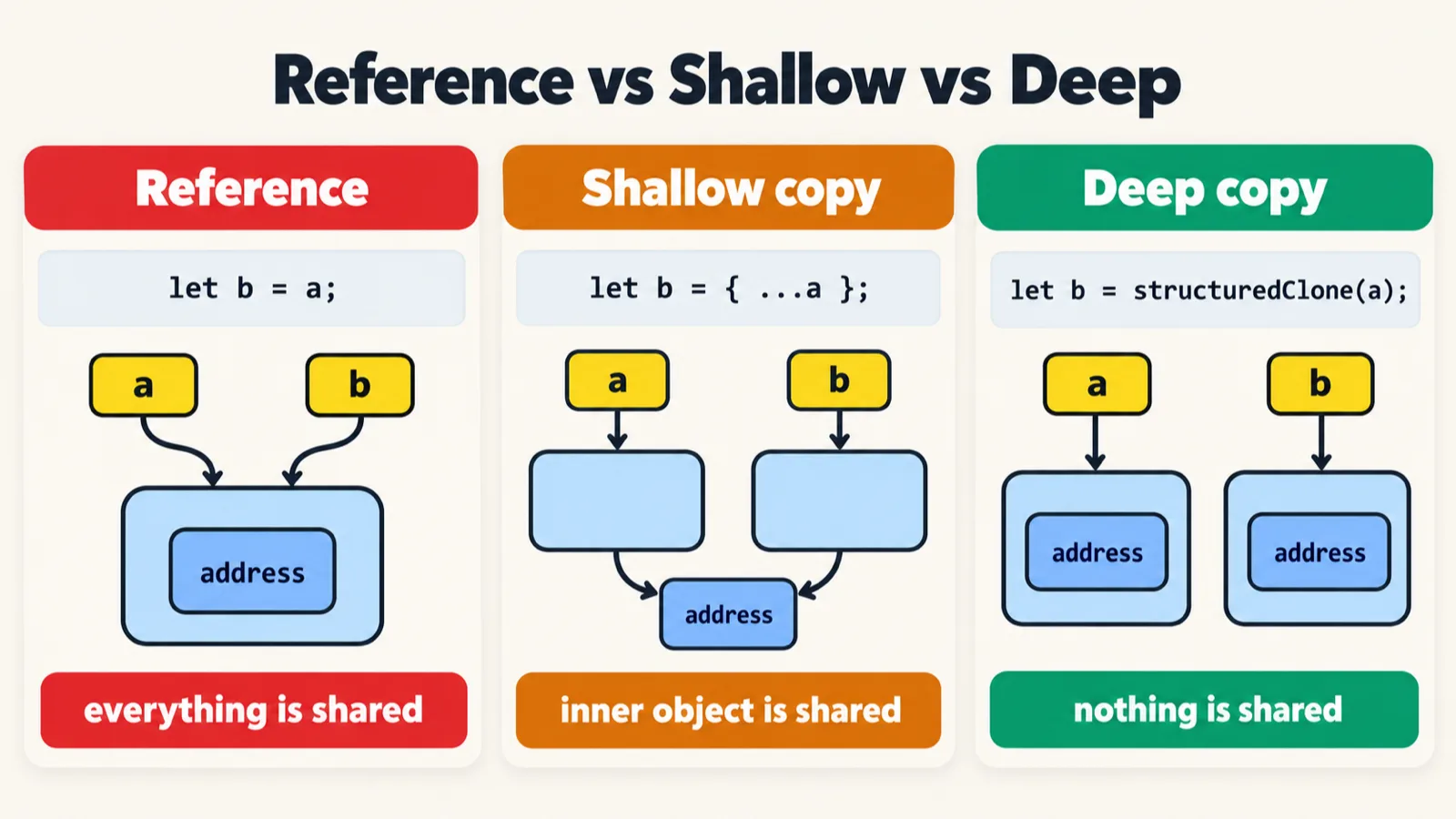
Spread and structuredClone both make a new outer object; they differ one level down, in the nested objects. When the AI's first example for this came out too complex, the instructor asked it to make one very simple and short, then walked through the short version, lab 139:
// 1. Call by reference: one object, two names
let a = { status: "pass" };
let b = a;
b.status = "fail";
console.log(a.status);            // fail   (a changed too!)


// 2. Shallow copy (...spread): new object, but the inner object is shared
let user1 = { name: "Pramod", address: { city: "Delhi" } };
let copy1 = { ...user1 };
copy1.name = "Amit";
copy1.address.city = "Mumbai";
console.log(user1.name);          // Pramod  (safe)
console.log(user1.address.city);  // Mumbai  (changed!)


// 3. Deep copy (structuredClone): everything is new
let user2 = { name: "Pramod", address: { city: "Delhi" } };
let copy2 = structuredClone(user2);
copy2.name = "Amit";
copy2.address.city = "Mumbai";
console.log(user2.name);          // Pramod  (safe)
console.log(user2.address.city);  // Delhi   (safe)
fail
Pramod
Mumbai
Pramod
Delhi
The comments give the answers, and the run agrees. The same file, with the objects compared after each copy:
| Copy made with | Same outer object | Same address object | The original afterwards |
|---|---|---|---|
let b = a (line 3) |
true |
no address in a |
a.status is fail |
{ ...user1 } (line 10) |
false |
true |
user1.name is Pramod, user1.address.city is Mumbai |
structuredClone(user2) (line 19) |
false |
false |
user2.name is Pramod, user2.address.city is Delhi |
let b = ais no copy at all: one object with two names, soachanges too.- A shallow copy,
{ ...user1 }, makes a new outer object, so changingcopy1.nameleavesuser1.nameasPramod. But both still hold the sameaddressobject, socopy1.address.city = "Mumbai"changesuser1as well. In the instructor's words: the top level is safe, and the inner object is shared. - A deep copy,
structuredClone(user2), copies the nested objects too, souser2keepsDelhi. To safeguard the nested objects, usestructuredClone.
structuredClone and methods. From the repo's README: structuredClone cannot copy functions. Called on the user of lab 134 or lab 135, both of which have methods, it throws a DataCloneError instead of returning a copy.
Tasks and announcements
- Practice: the five string problems below, on the coding practice page of the student platform at app.thetestingacademy.com, with the strings filter. Do at least these five over Saturday and Sunday, and take out some time today too. The instructor asked Meeti to take a screenshot of the five.
- The regex video: a separate video of around 10 minutes, on how regex patterns are built, will be added, probably on Saturday or Sunday. The instructor asked Meeti to note it down.
- The learning notes are in the repo's
00_learningfolder: charAt versus at, the rarely used string methods with one example each, and the ELI5 page. Today's code is pushed. - Strings are not finished: they will come back again and again, in TypeScript and in Playwright.
- Still unclear? Rewatch the recording, as the instructor told a learner at the end. Asked about the last class's recording, the instructor said it should be available, and the class confirmed it is.
- Doubts go in the doubt thread, which is already created; the instructor answers them one by one.
- Next class: multidimensional arrays, two- and three-dimensional (one-dimensional arrays are done). Then come the advanced topics, which the deck lists as callback functions, callback hell and the pyramid of doom, DOM manipulation, promises, and sync and async.
Task. Solve at least these five string problems on the coding practice page: count the vowels and consonants in a string (the word programming has 3 vowels and 8 consonants); check whether a string is a palindrome; reverse a string; remove duplicate characters; and check whether two strings are anagrams, the same characters in a different order, like silent and listen. The instructor called the anagram the most important of the five, a question the instructor was once asked in an interview, and a favourite of interviewers.
Interview questions. Are strings mutable? Where do length and index start counting? What are the two differences between charAt and at? What does replace change, and what does replaceAll change? Is includes case-sensitive? Why use slice rather than substring? Is "10" < "9" true or false, and why? What is call by value, and what is call by reference?
Also worth revising from today: what is the difference between a shallow copy and a deep copy?
Show the answer
Answer. No: strings are immutable, so s[0] = "z" changes nothing, and methods return a new string. Length counts from 1 and indexes from 0, so "Playwright".length is 10 and its last index is 9. at() takes a negative index and counts back from the end, and past the end it gives undefined; charAt() gives an empty string in both cases. replace() changes the first match only, and replaceAll() every match. Yes, includes() is case-sensitive. slice() counts a negative index from the end, while substring() treats it as 0. "10" < "9" is true: two strings are compared character by character, and "1" (49) comes before "9" (57). Call by value: a primitive is copied, so changing b leaves a alone. Call by reference: for an object the reference is copied, so both names reach the same object. A shallow copy, { ...obj }, is a new outer object that shares the nested objects; a deep copy, structuredClone(obj), copies every level.