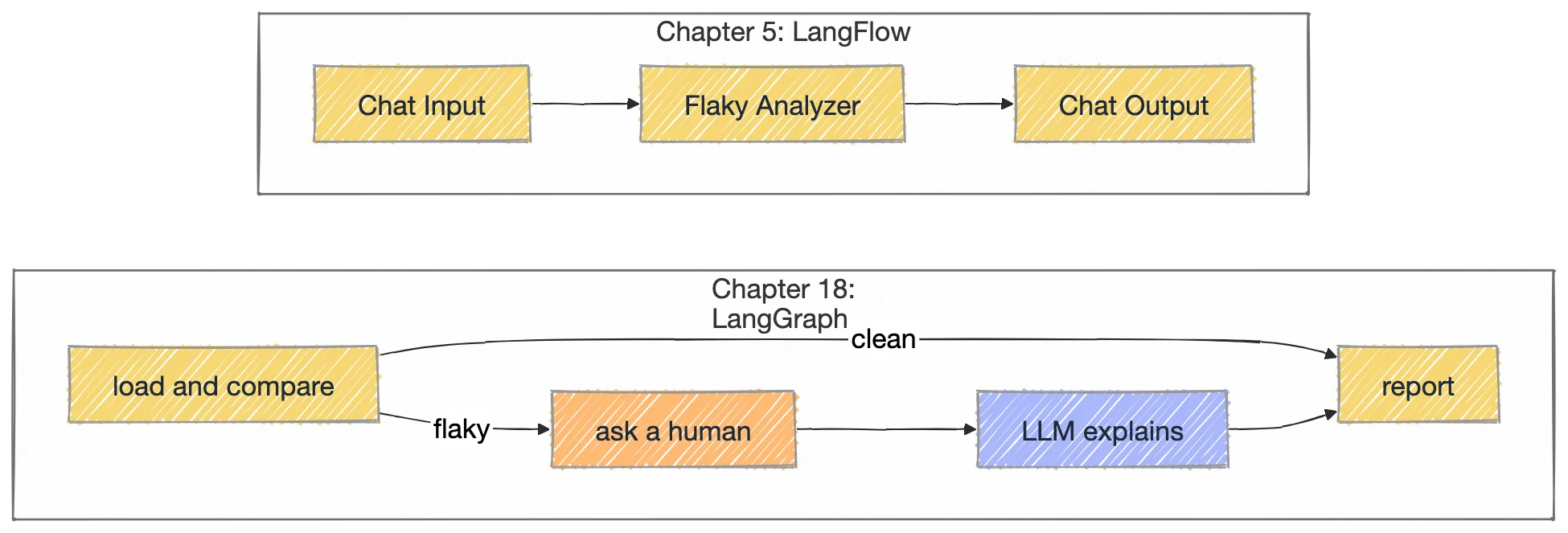
Chapter 5 . Agents and workflows . LangFlow agents
LangFlow: every flow is an API
LangFlow lets you wire components on a canvas and then call the whole flow over HTTP. This chapter builds a flaky test analyzer twice: once with a model reading two Playwright reports, once as plain Python whose count can gate CI. It adds a Jira bug triage flow, an API contract check, and scripts that run LangFlow in Docker.
FLAKY TEST COUNT: 1 and 2 consistent failures across 50 tests; chapter 18 gets the same answer.
8
Cases in test_flow.py
Six fixtures with known answers plus two error paths, run against a freshly imported copy of the flow.
22,737
Tokens for the LLM version
Recorded run on deepseek/deepseek-v4-pro: 40.9 s for the same verdict.
1.12.3
LangFlow image
Pinned in langflow-up.sh; most flows in the chapter were exported from 1.10.0.
01Why a tester cares
A red build is either a real bug or a flaky test, and the two need opposite actions: a bug goes to engineering, a flaky test goes to quarantine and a rerun. Telling them apart by hand means opening two reports and comparing test by test. This chapter turns that comparison into a LangFlow flow and then calls it like any other HTTP API, from a React UI, from a script or from CI.
LangFlow is a visual builder: you drop components (models, prompts, file readers, parsers, your own Python) on a canvas and connect their ports. The point for testers is what happens next: every saved flow gets a REST endpoint, POST /api/v1/run/{flowId}, so the flow you prototyped is already the service your tests call.
Flow or file
Components (as wired in the JSON)
What it does
Project/AI3X_001_HelloWorld.json
Chat Input, Groq (llama-3.1-8b-instant, key from the global variable GROQ_API_KEY), Chat Output
Proves the canvas and your Groq key work.
Project/Hello_AIAgent.json
Chat Input, Ollama (qwen3.5:4b at http://localhost:11434), Chat Output
The same check against a local model, no key.
Project/AI3X_002_Flaky_Test_AIAgent.json
Two Read File nodes, a Prompt Template with {file1} and {file2}, OpenRouter (deepseek/deepseek-v4-pro), Chat Output
The LLM flaky analyzer. The React UI in ui/ uploads two reports and renders its Markdown answer.
The flaky analyzer, built twice. The LLM flow reasons over both files; the deterministic flow computes the count with Python and never calls a model.
02Flaky or broken: the rule the analyzer applies
The deterministic component works in three steps, and the order matters.
Collapse retries. A test can have several results in one run (Playwright retries). They become one verdict per run: passed, failed, skipped, or flaky-in-run when one run saw both a pass and a failure.
Compare the two runs. A test is flaky if its verdict differs between the runs (in either direction), or if Playwright already caught it flaky on retry. It is a consistent failure if it failed in both runs: a real, reproducible bug.
Report. A test present in only one run is not comparable and never counted as flaky.
def_verdict(self, statuses):
"""Collapse Playwright retries into one verdict per test."""ifnot statuses:
return SKIPPED
bad = {"failed", "timedOut", "interrupted"}
had_pass = any(s == "passed"for s in statuses)
had_fail = any(s in bad for s in statuses)
if had_pass and had_fail:
return FLAKY_IN_RUN # Playwright's own retry already proved instabilityif had_pass:
return PASSED
if had_fail:
return FAILED
return SKIPPED
shared = set(run_a) & set(run_b)
only_a = sorted(set(run_a) - set(run_b))
only_b = sorted(set(run_b) - set(run_a))
# Flaky = same test, different verdict across the two runs,# plus anything Playwright already flagged flaky via retries.
flipped = sorted(t for t in shared if run_a[t] != run_b[t])
retry_flaky = sorted(
t for t in shared
if FLAKY_IN_RUN in (run_a[t], run_b[t]) and t notin flipped
)
flaky = flipped + retry_flaky
consistent_fail = sorted(
t for t in shared if run_a[t] == FAILED and run_b[t] == FAILED
)
On the chapter's two real reports (50 tests each, Playwright 1.60.0, 8 workers) run 1 has 3 failures and run 2 has 2. The two failures are shared and exactly one test recovered, so the count is 1, not 3 and not 2:
report: result1.json vs result2.json
FLAKY TEST COUNT: 1

Run A: result1.json  (50 tests)
Run B: result2.json  (50 tests)
Compared: 50 tests present in both runs

## FLAKY_TESTS (1)
- [failed -> passed] loginTests/auth.spec.ts > loginTests/auth.spec.ts > @P0 Login > redirects to dashboard after successful login

## CONSISTENT_FAILURES (2)
- dashboardTests/dashboard.spec.ts > dashboardTests/dashboard.spec.ts > @P0 Dashboard > renders revenue chart with correct totals
- loginTests/auth.spec.ts > loginTests/auth.spec.ts > @P0 Login > rejects login with expired session token

## RERUN_RECOMMENDATION
Quarantine and rerun the 1 flaky test(s) above; they changed verdict between identical runs, so they are unreliable signals.
The 2 consistent failure(s) are real bugs, not flakiness. Fix them.

## RAW_STATS
- result1.json: {"startTime": "2026-06-18T02:44:27.764Z", "duration": 41666.884, "expected": 47, "skipped": 0, "unexpected": 3, "flaky": 0}
- result2.json: {"startTime": "2026-06-18T02:44:27.764Z", "duration": 39509.619, "expected": 48, "skipped": 0, "unexpected": 2, "flaky": 0}
The output of the component's analyze() on the bundled files, run offline for this page. Each key repeats the file name because the top-level suite title is the file and the spec's file field is added again; the flow README shows a shorter form. Chapter 18 rebuilds the same analyzer as a LangGraph graph and gets the same count: lesson 10, flaky test analyzer.
03Live demo: flaky or broken?
The table holds the test titles and statuses of the chapter's real result files and fixture folders; the report on the right is the component's exact output format, recomputed in your browser. Click any status to change it (passed, failed, failed then passed on retry, skipped, not in the run) and watch the count. Below the table you can see the REST call that would send the same folder to the published flow.
Flaky or broken? Compare two Playwright runsNo API key needed
POST /api/v1/files/upload/{flowId}
x-api-key: <your LangFlow key>
Content-Type: multipart/form-data
file = result1.json

HTTP/1.1 200 OK
{ "file_path": "<server path, used as file_path A>" }
Call 2: run with the two paths as tweaks
POST /api/v1/run/{flowId}?stream=false
Content-Type: application/json
x-api-key: <your LangFlow key>

{
  "output_type": "chat",
  "input_type": "text",
  "input_value": "Analyze these two Playwright runs and tell me which build has the most failing/flaky test.",
  "session_id": "<stable id>",
  "tweaks": {
    "File-daKW7": { "path": ["<file_path A>"] },
    "File-IKmcY": { "path": ["<file_path B>"] }
  }
}
Prompt Template inside the flow (verbatim)
You are a senior test reliability engineer. You are given a comparison of two Playwright runs (Build 1 and Build 2) of the same suite.


COMPARISON REPORT:
{file1} - Build 1 JSON
{file2} - Build 2JSON

Definitions you MUST follow:
- FLAKY = non-deterministic result: passed in one build and failed in the other, OR passed only after a retry. Flaky tests need a rerun / quarantine, not a code fix.
- CONSISTENT FAILURE = failed in BOTH builds. A real, reproducible bug, NOT flaky. Needs a fix.

Produce:
1. FLAKY_TESTS - names + one-line hypothesis of flake cause (timing, data, parallelism, network...).
2. CONSISTENT_FAILURES - tests failing in both builds, each with a probable root cause.
3. RERUN_RECOMMENDATION - which to rerun (flaky) vs send to engineering (bugs).
4. SUMMARY - counts + one sentence on suite health.

Base everything only on the comparison data. Do not invent test names.
Recorded run (the chapter's PDF print of the UI): deepseek/deepseek-v4-pro, 19,482 tokens in and 3,255 out (22,737), 40.9 s. Same verdict as the component: 1 flaky test and 2 consistent failures, plus a suggested cause for each (a navigation timeout, a 500 where a 401 was expected, $0 where $48,250 was expected). The model's wording differs on every run; only the counts are comparable.
Try these. In stable, flip one result in Run B: one changed verdict is enough to count as flaky. In retry_flaky, the test that failed then passed inside run 1 shows as [flaky-in-run -> passed]. In ui/samples, a test that was skipped in run 2 counts as flaky too: decide whether your team agrees with that rule.
04Call a published flow over REST
Every flow answers POST /api/v1/run/{flowId}?stream=false. The body carries input_value (what a Chat Input receives), input_type, output_type, an optional session_id and tweaks: overrides for any component field, keyed by component id. The report text comes back at outputs[0].outputs[0].results.message.text.
The LLM flow takes files, so the React UI makes two kinds of call: it uploads each report to get a server file_path, then runs the flow with both paths as tweaks on the two Read File components.
sequenceDiagram
  participant B as React UI (port 5173)
  participant V as Vite proxy
  participant L as LangFlow
  B->>V: POST /api/v1/files/upload/flowId with result1.json
  V->>L: same request, same origin for the browser
  L-->>B: file_path A
  B->>V: POST /api/v1/files/upload/flowId with result2.json
  V->>L: forward
  L-->>B: file_path B
  B->>V: POST /api/v1/run/flowId?stream=false, paths as tweaks
  V->>L: forward
  L-->>B: outputs, report text inside
Two uploads, one run. The browser only ever talks to its own origin; Vite forwards to LangFlow.
flaky_test_analyzer_ai_Agent/ui/src/lib/api.js
// Uploads one file and returns the server-relative path to feed into tweaks.exportasyncfunctionuploadFile({ apiBase, apiKey, flowId }, file) {
const form = newFormData()
form.append('file', file)
const res = awaitfetch(`${trimBase(apiBase)}/api/v1/files/upload/${flowId}`, {
method: 'POST',
headers: { 'x-api-key': apiKey },
body: form,
})
if (!res.ok) thrownewError(`Upload failed for "${file.name}": ${await readError(res)}`)
const data = await res.json()
if (!data?.file_path) thrownewError(`Upload of "${file.name}" returned no file_path`)
return data.file_path
}
// Runs the flow with the two uploaded paths and a prompt. Returns the raw response.exportasyncfunctionrunFlow(cfg, { pathA, pathB, prompt, sessionId }) {
const { apiBase, apiKey, flowId, fileIdA, fileIdB } = cfg
const res = awaitfetch(`${trimBase(apiBase)}/api/v1/run/${flowId}?stream=false`, {
method: 'POST',
headers: { 'Content-Type': 'application/json', 'x-api-key': apiKey },
body: JSON.stringify({
output_type: 'chat',
input_type: 'text',
input_value: prompt,
session_id: sessionId,
tweaks: {
[fileIdA]: { path: [pathA] },
[fileIdB]: { path: [pathB] },
},
}),
})
if (!res.ok) thrownewError(`Analysis failed: ${await readError(res)}`)
return res.json()
}
Why the proxy. LangFlow's upload endpoint does not answer the browser's CORS preflight (OPTIONS returns 422), so a direct upload from the page fails with "Failed to fetch". The UI keeps apiBase blank and lets Vite forward /api:
flaky_test_analyzer_ai_Agent/ui/vite.config.js
import { defineConfig } from'vite'import react from'@vitejs/plugin-react'// LangFlow's file-upload endpoint does NOT answer the browser's CORS preflight// (OPTIONS -> 422), so calling it cross-origin from the browser fails with// "Failed to fetch". We sidestep CORS entirely by proxying same-origin /api// requests through Vite to the LangFlow server. Override the target with// LANGFLOW_URL if LangFlow runs elsewhere.const LANGFLOW_URL = process.env.LANGFLOW_URL || 'http://localhost:7861'exportdefaultdefineConfig({
plugins: [react()],
server: {
port: 5173,
strictPort: false,
open: false,
proxy: {
'/api': {
target: LANGFLOW_URL,
changeOrigin: true,
},
},
},
})
Auth. Since LangFlow 1.5 the /run endpoint needs an x-api-key even with auto-login. Create one under Settings, API Keys, or do what test_flow.py does:
flaky_test_analyzer_ai_Agent/flow/test_flow.py
defbootstrap():
"""Auto-login, then mint an API key (run endpoints require one since v1.5)."""
st, out = _call("/api/v1/auto_login")
if st != 200:
sys.exit(f"Langflow not reachable at {BASE} (auto_login -> {st})")
bearer = {"Authorization": "Bearer " + out["access_token"]}
st, out = _call("/api/v1/api_key/", {"name": "flaky-flow-test"}, headers=bearer)
if st notin (200, 201):
sys.exit(f"could not create api key: {st} {out}")
return bearer, (out.get("api_key") or out.get("key"))
defrun_flow(flow_id, key, folder):
st, out = _call(
f"/api/v1/run/{flow_id}?stream=false",
{"output_type": "chat", "input_type": "chat", "input_value": folder},
headers={"x-api-key": key},
)
if st != 200:
return st, str(out)
try:
return200, out["outputs"][0]["outputs"][0]["results"]["message"]["text"]
except (KeyError, IndexError, TypeError):
return200, json.dumps(out)
The same call from a terminal, from the flow README:
Two scripts run LangFlow in Docker on macOS with Docker Desktop. langflow-up.sh starts Docker, reuses or creates a container named langflow from the pinned image, and polls /health every 3 seconds until it answers 200.
langflow-up.sh
# Create container if missing (first run / after prune), else just start it.if"$DOCKER" ps -a --format '{{.Names}}' | grep -qx "$NAME"; then echo"==> Starting existing '$NAME' container...""$DOCKER" start "$NAME" >/dev/null
else echo"==> Container '$NAME' not found. Creating with persistent volume...""$DOCKER" run -d --name "$NAME" \
-p 7860:7860 \
-v "$DATA":/app/langflow-data \
-v "$CHAPTER":/test-results:ro \
-e LANGFLOW_CONFIG_DIR=/app/langflow-data \
-e LANGFLOW_SAVE_DB_IN_CONFIG_DIR=true \
-e LANGFLOW_AUTO_LOGIN=true \
"$IMAGE" >/dev/null
fiecho"==> Waiting for Langflow to be ready..."for i in $(seq 160); do code=$(curl -s -o /dev/null -w '%{http_code}'"$URL/health"2>/dev/null || echo000)
if [ "$code" = "200" ]; thenecho" READY (~$((i*3))s)"; break; fi sleep3doneecho"==> Langflow: $URL""$DOCKER" ps --filter "name=$NAME" --format ' {{.Names}} | {{.Status}} | {{.Ports}}'
langflow-down.sh
#!/usr/bin/env bash# Stop Langflow container and quit Docker Desktop.set -euo pipefail
DOCKER="/Applications/Docker.app/Contents/Resources/bin/docker"NAME="langflow"if"$DOCKER" info >/dev/null 2>&1; then echo"==> Stopping '$NAME'...""$DOCKER" stop "$NAME" >/dev/null 2>&1 || echo" (not running)" echo"==> Quitting Docker Desktop..." osascript -e 'quit app "Docker Desktop"' >/dev/null 2>&1 || true sleep3fiif pgrep -f "Docker Desktop" >/dev/null; then echo" Docker still running (force-quit if needed)."else echo"==> Docker Desktop quit. All stopped."fi
Edit two paths first.DATA and CHAPTER at the top of langflow-up.sh are absolute paths on the author's machine. Point them at your own checkout: DATA holds the LangFlow database, CHAPTER is mounted read-only at /test-results so flows can read the result files.
What the container settings are for, from the chapter's learning notes:
Persistence. A host bind mount plus LANGFLOW_CONFIG_DIR and LANGFLOW_SAVE_DB_IN_CONFIG_DIR=true. Without the last one the SQLite database stays inside the image and your flows vanish with the container.
Auto-login. LangFlow 1.12 switched the auto-login default off; the script sets LANGFLOW_AUTO_LOGIN=true explicitly.
A pinned image.langflowai/langflow:1.12.3, not latest: a new version migrates the database in place on boot, so back up the data folder before you change the tag.
terminal
./chapter_05_AI_Agents_LangFlow/langflow-up.sh # prints http://localhost:7860 when ready# the deterministic flow: import flow/Flaky_Test_Analyzer.json in the UI, or test it end to endcd chapter_05_AI_Agents_LangFlow/flaky_test_analyzer_ai_Agent/flow
python3 test_flow.py # needs LangFlow on :7860# the React UI for the LLM flow (Node.js 20+); the proxy defaults to port 7861cd ../ui && npm install
LANGFLOW_URL=http://localhost:7860 npm run dev # http://localhost:5173
Keys by name only: the model nodes read the LangFlow global variables GROQ_API_KEY and OPENROUTER_API_KEY; the UI reads its LangFlow key from the Connection panel or VITE_API_KEY; the curl example uses LANGFLOW_API_KEY.
06Bug triage and the API contract check
Bug triage flow
AI3X_003_Bug_Triage_AI_Agent.json is a straight line: an API Request component GETs one Jira issue over REST, a Parser turns the response into text (pattern {result}), a Prompt Template drops it into {issue}, and OpenRouter (deepseek/deepseek-v4-flash, temperature 0.7) answers in a Chat Output. The prompt asks a senior triage engineer for five things: severity (Blocker to Trivial), priority (P0 to P4), impact areas, a root-cause hypothesis and a one- or two-sentence justification, based only on the issue and without inventing logs or stack traces.
Two notes before you reuse it. The flow's own note says it uses Groq and returns strict JSON; the wired model is OpenRouter and the prompt never asks for JSON, so expect labelled prose. The issue key is fixed in the request URL: feed it from a Chat Input or a tweak instead, and read the Jira token from a LangFlow global variable the way the model nodes read theirs, because an exported flow carries every field value with it.
API contract validator (spec only)
Project/AI3X_004_API_Contract_Validator.md describes a flow you build yourself: an API Request component calls GET https://gorest.co.in/public/v2/users, and an OpenRouter model (DeepSeek V4 Flash) compares the live response with a JSON Schema and reports drift: missing fields, wrong types, extra keys. The README's expected verdict is a PASS: all 10 objects have an integer id and string name, email, gender and status.
The start of the spec's schema: the first of ten identical item schemas.
A schema gotcha worth a test. The spec writes "items": [ ... ], the tuple form: one schema per array position, so it only describes the first 10 users and says nothing about an eleventh. The README shows "items": { ... }, one schema for every item. Use the README form for a list endpoint.
07LangFlow, LangGraph or LangSmith?
LangFlow vs LangGraph vs LangSmith.md compares the three tools on fourteen dimensions. In short: LangFlow builds it visually, LangGraph builds it in code with full control, LangSmith watches, debugs and grades whatever you built. They stack rather than compete.
LangFlow (this chapter)
LangGraph (chapter 18)
LangSmith
What it is
A visual builder; every flow is also a REST API
A code framework for stateful graphs
Tracing and evaluation for any LLM app
You work in
A canvas of components and edges
Python or JavaScript
A web dashboard plus an SDK
Best at
Building and changing a flow quickly
Loops, branches, retries, human approval
Knowing why an app behaved the way it did
Weak at
Deep custom logic, version control
Quick prototypes
Building anything: it only observes
For a tester
Reproduce a flow visually before writing the eval
Deterministic seams to test against
Eval datasets are the test suite
Same answer, two tools. Chapter 18 rebuilds this analyzer as a graph that can branch, wait for a person and explain.
Next step: LangGraph lesson 10 keeps the count in plain Python, pauses for approval before quarantining, and only then lets a model add notes.
08What to watch
7860 or 7861.langflow-up.sh publishes port 7860, but the UI's proxy defaults to 7861. Start the UI with LANGFLOW_URL=http://localhost:7860.
The UI's instruction reaches no component. The exported LLM flow has no Chat Input, so the input_value the UI sends is not wired anywhere; the Prompt Template's fixed text drives the analysis.
Three sections or four.PROMPTS.md says the agent returns three sections; the template asks for four, adding SUMMARY.
The container sees only what you mount. Paths must be under /test-results; anything else fails with Folder not found inside the Langflow container. The component remaps one host path to that mount.
Match on the title, not the key. Report keys repeat the file name (loginTests/auth.spec.ts > loginTests/auth.spec.ts > ...), unlike the shorter form in the flow README.
A skip is a flip. Any verdict change counts, so [passed -> skipped] is flaky under this rule. Decide whether that is what your team wants before the number gates CI.
RAW_STATS is Playwright's count. The component echoes each file's stats block; it does not recompute it.
Test the exported file.test_flow.py imports the JSON fresh, runs eight cases and deletes the copy, so it proves the file you ship, not whatever is loaded in the UI.
DDrills for the chapter
Code drills use chapter_05_AI_Agents_LangFlow; the fixture answers below come from the component's own code. Playwright drills target the live demo on the Page tab; turn on Show locator badges to see every data-testid.
One extra test
Fixture uneven: run 1 has t1 to t3 passing, run 2 has the same plus a failing t_new. What is the flaky count?
Expected result
0.t_new is listed under NOT_COMPARABLE (1) as only in result2.json, never as flaky.
Both directions
Fixture two_way: which tests are flaky, in which direction, and how many consistent failures are there?
Expected result
t7 [passed -> failed] and t8 [failed -> passed]: 2 flaky. t9 and t10 failed in both runs: 2 consistent failures (t10 is listed first because keys are sorted as text).
Is a skip flaky?
In ui/samples, "guest checkout works" passed in run one and was skipped in run two. What does the component report, and do you agree?
Expected result
It is flaky, [passed -> skipped], so the total is 3. Under the current rule any verdict change counts. Many teams would treat a skip separately; that is a one-line change in the comparison.
Write the run body
Write the JSON body that runs the LLM flow on two uploaded files.
You set the UI's base URL to http://localhost:7860 and every upload fails with "Failed to fetch". Why, and what is the fix?
Expected result
The upload endpoint fails the browser's CORS preflight (OPTIONS returns 422). Leave the base URL blank so calls stay same-origin and the Vite /api proxy forwards them; set LANGFLOW_URL for the proxy target.
Make the triage flow reusable
Name two changes that make the Bug Triage flow safe to share and reuse.
Expected result
Take the issue key from a Chat Input or a tweak instead of a fixed URL, and read the Jira credentials from a LangFlow global variable instead of a component field, so an exported JSON carries no secret.
Assert the bundled countPlaywright
Write a Playwright test that opens the demo and asserts the count and the one flaky line for the bundled runs.
lf-flaky-count is 1, lf-consistent-count is 2, and lf-report contains - [failed -> passed] loginTests/auth.spec.ts > loginTests/auth.spec.ts > @P0 Login > redirects to dashboard after successful login.
Make a stable suite flakyPlaywright
Select the stable preset, click Run B for t3 once, and assert the report. Click it again and assert the new label.
Hint
Each status is a button named Run A: <title> or Run B: <title>, so getByRole('button', { name: 'Run B: t3' }) finds it.
Expected result
First click: - [passed -> failed] suite.spec.ts > suite.spec.ts > t3 and a count of 1. Second click (failed, then passed on retry): [passed -> flaky-in-run], still 1.
Read the requestPlaywright
Select the uneven preset and assert what the deterministic flow would receive, then switch to the LLM flow and assert its tweaks.
The Playwright spec passes against this page as written. The other tabs hold the analyzer component, its end-to-end test and the LLM flow's prompt, from the course repo.
tests/langflow-agents-demo.spec.ts
import { test, expect } from'@playwright/test';
const URL = 'https://app.thetestingacademy.com/ai/blueprint/learn/langflow-agents.html';
test('the bundled runs give FLAKY TEST COUNT: 1', async ({ page }) => {
await page.goto(URL);
awaitexpect(page.getByTestId('lf-flaky-count')).toHaveText('1');
awaitexpect(page.getByTestId('lf-consistent-count')).toHaveText('2');
awaitexpect(page.getByTestId('lf-report')).toContainText('FLAKY TEST COUNT: 1');
awaitexpect(page.getByTestId('lf-report')).toContainText(
'- [failed -> passed] loginTests/auth.spec.ts > loginTests/auth.spec.ts > @P0 Login > redirects to dashboard after successful login');
});
test('one changed result turns a stable suite flaky', async ({ page }) => {
await page.goto(URL);
await page.getByTestId('lf-preset').selectOption('stable');
awaitexpect(page.getByTestId('lf-flaky-count')).toHaveText('0');
await page.getByRole('button', { name: 'Run B: t3' }).click(); // passed -> failedawaitexpect(page.getByTestId('lf-flaky-count')).toHaveText('1');
awaitexpect(page.getByTestId('lf-report')).toContainText('- [passed -> failed] suite.spec.ts > suite.spec.ts > t3');
await page.getByRole('button', { name: 'Run B: t3' }).click(); // failed, then passed on retryawaitexpect(page.getByTestId('lf-report')).toContainText('[passed -> flaky-in-run]');
});
test('a test in only one run is not comparable, and the REST body carries the folder', async ({ page }) => {
await page.goto(URL);
await page.getByTestId('lf-preset').selectOption('uneven');
awaitexpect(page.getByTestId('lf-nc-count')).toHaveText('1');
awaitexpect(page.getByTestId('lf-report')).toContainText('- only in result2.json: suite.spec.ts > suite.spec.ts > t_new');
awaitexpect(page.getByTestId('lf-request')).toContainText('"input_value": "/test-results/flaky_test_analyzer_ai_Agent/flow/tests/uneven"');
await page.getByTestId('lf-api-llm').click();
awaitexpect(page.getByTestId('lf-llm-run')).toBeVisible();
awaitexpect(page.getByTestId('lf-llm-run')).toContainText('"File-daKW7": { "path": ["<file_path A>"] }');
});
flow/flaky_analyzer_component.py
PASSED, FAILED, SKIPPED, FLAKY_IN_RUN = "passed", "failed", "skipped", "flaky-in-run"classFlakyTestAnalyzer(Component):
display_name = "Flaky Test Analyzer"
description = "Read two Playwright results.json files from a folder and report flaky tests."
icon = "activity"
name = "FlakyTestAnalyzer"
inputs = [
MessageTextInput(
name="folder",
display_name="Results Folder",
info="Folder holding result1.json and result2.json (host or container path).",
value="/test-results/flaky_test_analyzer_ai_Agent",
),
]
outputs = [Output(display_name="Report", name="report", method="analyze")]
# ---------- path handling ----------def_resolve(self, raw: str) -> Path:
text = (raw or"").strip().strip('"').strip("'")
ifnot text:
text = "/test-results/flaky_test_analyzer_ai_Agent"for host, container in HOST_TO_CONTAINER.items():
if text == host:
text = container
elif text.startswith(host + "/"):
text = container + text[len(host):]
returnPath(text)
def_find_pair(self, folder: Path):
ifnot folder.exists():
raiseValueError(f"Folder not found inside the Langflow container: {folder}")
ifnot folder.is_dir():
raiseValueError(f"Not a folder: {folder}")
first = folder / "result1.json"
second = folder / "result2.json"if first.exists() and second.exists():
return first, second
candidates = sorted(p for p in folder.glob("*.json") if p.is_file())
iflen(candidates) < 2:
raiseValueError(
f"Need two Playwright JSON reports in {folder}, found {len(candidates)}."
)
return candidates[0], candidates[1]
# ---------- playwright parsing ----------def_walk(self, node, trail, out):
for suite in node.get("suites") or []:
self._walk(suite, trail + [suite.get("title", "")], out)
for spec in node.get("specs") or []:
parts = [p for p in trail if p]
key = f"{spec.get('file', '')} > {' > '.join(parts)} > {spec.get('title', '')}"
statuses = []
for test in spec.get("tests") or []:
for result in test.get("results") or []:
statuses.append(result.get("status"))
out[key] = statuses
def_verdict(self, statuses):
"""Collapse Playwright retries into one verdict per test."""ifnot statuses:
return SKIPPED
bad = {"failed", "timedOut", "interrupted"}
had_pass = any(s == "passed"for s in statuses)
had_fail = any(s in bad for s in statuses)
if had_pass and had_fail:
return FLAKY_IN_RUN # Playwright's own retry already proved instabilityif had_pass:
return PASSED
if had_fail:
return FAILED
return SKIPPED
def_parse(self, path: Path):
try:
data = json.loads(path.read_text(encoding="utf-8"))
except json.JSONDecodeError as exc:
raiseValueError(f"{path.name} is not valid JSON: {exc}") from exc
if"suites"notin data:
raiseValueError(f"{path.name} does not look like a Playwright JSON report.")
raw = {}
for suite in data.get("suites") or []:
self._walk(suite, [suite.get("title", "")], raw)
return {k: self._verdict(v) for k, v in raw.items()}, data.get("stats", {})
# ---------- main ----------defanalyze(self) -> Message:
folder = self._resolve(self.folder)
file_a, file_b = self._find_pair(folder)
run_a, stats_a = self._parse(file_a)
run_b, stats_b = self._parse(file_b)
shared = set(run_a) & set(run_b)
only_a = sorted(set(run_a) - set(run_b))
only_b = sorted(set(run_b) - set(run_a))
# Flaky = same test, different verdict across the two runs,# plus anything Playwright already flagged flaky via retries.
flipped = sorted(t for t in shared if run_a[t] != run_b[t])
retry_flaky = sorted(
t for t in shared
if FLAKY_IN_RUN in (run_a[t], run_b[t]) and t notin flipped
)
flaky = flipped + retry_flaky
consistent_fail = sorted(
t for t in shared if run_a[t] == FAILED and run_b[t] == FAILED
)
lines = []
lines.append(f"FLAKY TEST COUNT: {len(flaky)}")
lines.append("")
lines.append(f"Run A: {file_a.name} ({len(run_a)} tests)")
lines.append(f"Run B: {file_b.name} ({len(run_b)} tests)")
lines.append(f"Compared: {len(shared)} tests present in both runs")
lines.append("")
lines.append(f"## FLAKY_TESTS ({len(flaky)})")
if flaky:
for t in flipped:
lines.append(f"- [{run_a[t]} -> {run_b[t]}] {t}")
for t in retry_flaky:
lines.append(f"- [flaky on retry within a run] {t}")
else:
lines.append("- none")
lines.append("")
lines.append(f"## CONSISTENT_FAILURES ({len(consistent_fail)})")
if consistent_fail:
for t in consistent_fail:
lines.append(f"- {t}")
else:
lines.append("- none")
lines.append("")
if only_a or only_b:
lines.append(f"## NOT_COMPARABLE ({len(only_a) + len(only_b)})")
for t in only_a:
lines.append(f"- only in {file_a.name}: {t}")
for t in only_b:
lines.append(f"- only in {file_b.name}: {t}")
lines.append("")
lines.append("## RERUN_RECOMMENDATION")
if flaky:
lines.append(
f"Quarantine and rerun the {len(flaky)} flaky test(s) above; ""they changed verdict between identical runs, so they are unreliable signals."
)
else:
lines.append("No verdict changed between runs. Nothing to quarantine.")
if consistent_fail:
lines.append(
f"The {len(consistent_fail)} consistent failure(s) are real bugs, not flakiness. Fix them."
)
lines.append("")
lines.append("## RAW_STATS")
lines.append(f"- {file_a.name}: {json.dumps(stats_a)}")
lines.append(f"- {file_b.name}: {json.dumps(stats_b)}")
report = "\n".join(lines)
self.status = f"{len(flaky)} flaky, {len(consistent_fail)} consistent failures"returnMessage(text=report)
Lines 13 to 185. Lines 1 to 12 are the imports and a host-to-container path map that holds the author's local path.
flow/test_flow.py
#!/usr/bin/env python3"""
Test the Flaky Test Analyzer Langflow flow end to end.
Imports Flaky_Test_Analyzer.json into a running Langflow, runs it against
fixture folders with known answers, then deletes the imported copy.
python3 test_flow.py # needs Langflow on :7860
LANGFLOW_URL=... python3 test_flow.py
"""import gzip
import json
import os
import re
import sys
import urllib.error
import urllib.request
BASE = os.environ.get("LANGFLOW_URL", "http://localhost:7860")
HERE = os.path.dirname(os.path.abspath(__file__))
FLOW_FILE = os.path.join(HERE, "Flaky_Test_Analyzer.json")
# Folder as seen from INSIDE the container (mounted by langflow-up.sh).
ROOT = "/test-results/flaky_test_analyzer_ai_Agent"def_call(path, data=None, headers=None, method=None):
body = json.dumps(data).encode() if data isnotNoneelseNone
req = urllib.request.Request(
BASE + path, data=body, method=method or ("POST"if data isnotNoneelse"GET")
)
req.add_header("Content-Type", "application/json")
for k, v in (headers or {}).items():
req.add_header(k, v)
try:
with urllib.request.urlopen(req, timeout=300) as resp:
raw = resp.read()
if resp.headers.get("Content-Encoding") == "gzip":
raw = gzip.decompress(raw)
text = raw.decode()
try:
return resp.status, json.loads(text)
except json.JSONDecodeError:
return resp.status, text
except urllib.error.HTTPError as e:
raw = e.read()
if e.headers.get("Content-Encoding") == "gzip":
raw = gzip.decompress(raw)
return e.code, raw.decode()[:2000]
defbootstrap():
"""Auto-login, then mint an API key (run endpoints require one since v1.5)."""
st, out = _call("/api/v1/auto_login")
if st != 200:
sys.exit(f"Langflow not reachable at {BASE} (auto_login -> {st})")
bearer = {"Authorization": "Bearer " + out["access_token"]}
st, out = _call("/api/v1/api_key/", {"name": "flaky-flow-test"}, headers=bearer)
if st notin (200, 201):
sys.exit(f"could not create api key: {st} {out}")
return bearer, (out.get("api_key") or out.get("key"))
defrun_flow(flow_id, key, folder):
st, out = _call(
f"/api/v1/run/{flow_id}?stream=false",
{"output_type": "chat", "input_type": "chat", "input_value": folder},
headers={"x-api-key": key},
)
if st != 200:
return st, str(out)
try:
return200, out["outputs"][0]["outputs"][0]["results"]["message"]["text"]
except (KeyError, IndexError, TypeError):
return200, json.dumps(out)
defnum(pattern, text):
m = re.search(pattern, text)
returnint(m.group(1)) if m elseNone
flow/test_flow.py (continued)
ERROR_CASES = [
    ("missing folder",         "/test-results/does_not_exist"),
    ("folder with no reports", "/test-results"),
]


def main():
    bearer, key = bootstrap()

    flow = json.load(open(FLOW_FILE))
    flow.pop("id", None)
    flow["name"] = "ZZ_flaky_flow_undertest"
    st, created = _call("/api/v1/flows/", flow, headers=bearer)
    if st not in (200, 201):
        sys.exit(f"import of {os.path.basename(FLOW_FILE)} failed: {st} {created}")
    flow_id = created["id"]
    print(f"imported {os.path.basename(FLOW_FILE)} -> {flow_id}\n")

    passed = failed = 0
    try:
        for name, folder, want_f, want_c in CASES:
            st, text = run_flow(flow_id, key, folder)
            got_f = num(r"FLAKY TEST COUNT:\s*(\d+)", text) if st == 200 else None
            got_c = num(r"## CONSISTENT_FAILURES \((\d+)\)", text) if st == 200 else None
            ok = st == 200 and got_f == want_f and got_c == want_c
            print(f"[{'PASS' if ok else 'FAIL'}] {name}")
            print(f"       flaky {got_f}/{want_f}  consistent {got_c}/{want_c}")
            if not ok:
                print("       " + text[:300].replace("\n", "\n       "))
            passed += ok
            failed += not ok

        print()
        for name, folder in ERROR_CASES:
            st, text = run_flow(flow_id, key, folder)
            low = text.lower()
            ok = st != 200 or "not found" in low or "need two" in low or "error" in low
            print(f"[{'PASS' if ok else 'FAIL'}] {name} raises instead of answering wrongly")
            passed += ok
            failed += not ok
    finally:
        _call(f"/api/v1/flows/{flow_id}", headers=bearer, method="DELETE")
        print(f"\ncleaned up {flow_id}")

    print(f"\n{passed} passed, {failed} failed")
    return 1 if failed else 0


if __name__ == "__main__":
    sys.exit(main())
Lines 82 to 93 list the six fixture cases with their expected counts (real data 1 and 2, host path 1 and 2, two_way 2 and 2, stable 0 and 0, retry_flaky 1 and 0, uneven 0 and 0); they are left out because one holds the author's local path.
You are a senior test reliability engineer. You are given a comparison of two Playwright runs (Build 1 and Build 2) of the same suite.


COMPARISON REPORT:
{file1} - Build 1 JSON
{file2} - Build 2JSON

Definitions you MUST follow:
- FLAKY = non-deterministic result: passed in one build and failed in the other, OR passed only after a retry. Flaky tests need a rerun / quarantine, not a code fix.
- CONSISTENT FAILURE = failed in BOTH builds. A real, reproducible bug, NOT flaky. Needs a fix.

Produce:
1. FLAKY_TESTS - names + one-line hypothesis of flake cause (timing, data, parallelism, network...).
2. CONSISTENT_FAILURES - tests failing in both builds, each with a probable root cause.
3. RERUN_RECOMMENDATION - which to rerun (flaky) vs send to engineering (bugs).
4. SUMMARY - counts + one sentence on suite health.

Base everything only on the comparison data. Do not invent test names.
The template field of the Prompt Template component, decoded from the exported flow.