What this class covered
- Tuples, continued: indexes, slices, membership and unpacking, files 101 and 102
- Sets: unique items and no order, files 103 to 105
- Union, intersection and difference, file 106
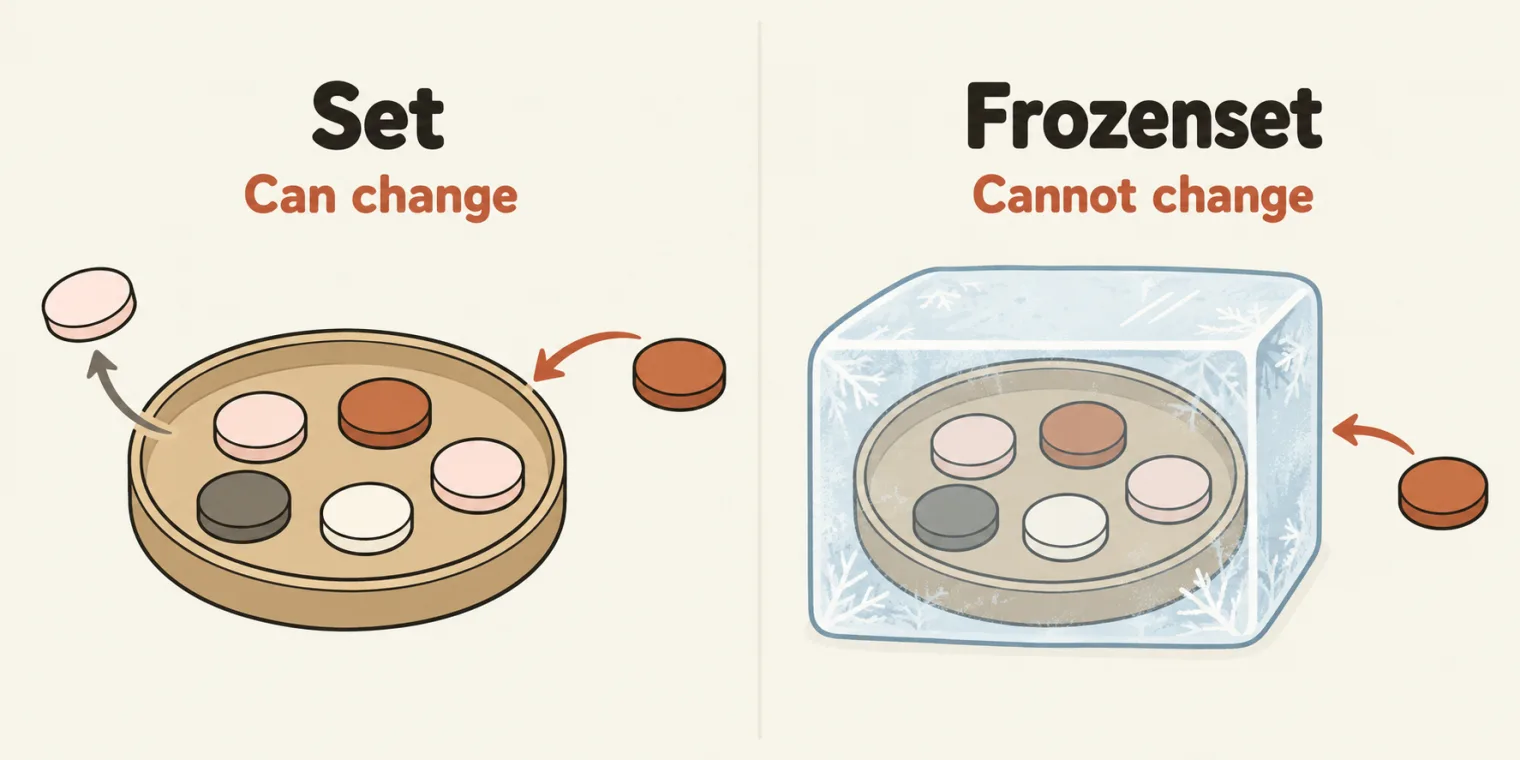
- Two set interview questions and frozenset, files 107 to 109
- map and filter, with named functions and lambdas, files 110 to 115
- Dictionaries: keys and values, a list of dicts, zip, files 116 to 120
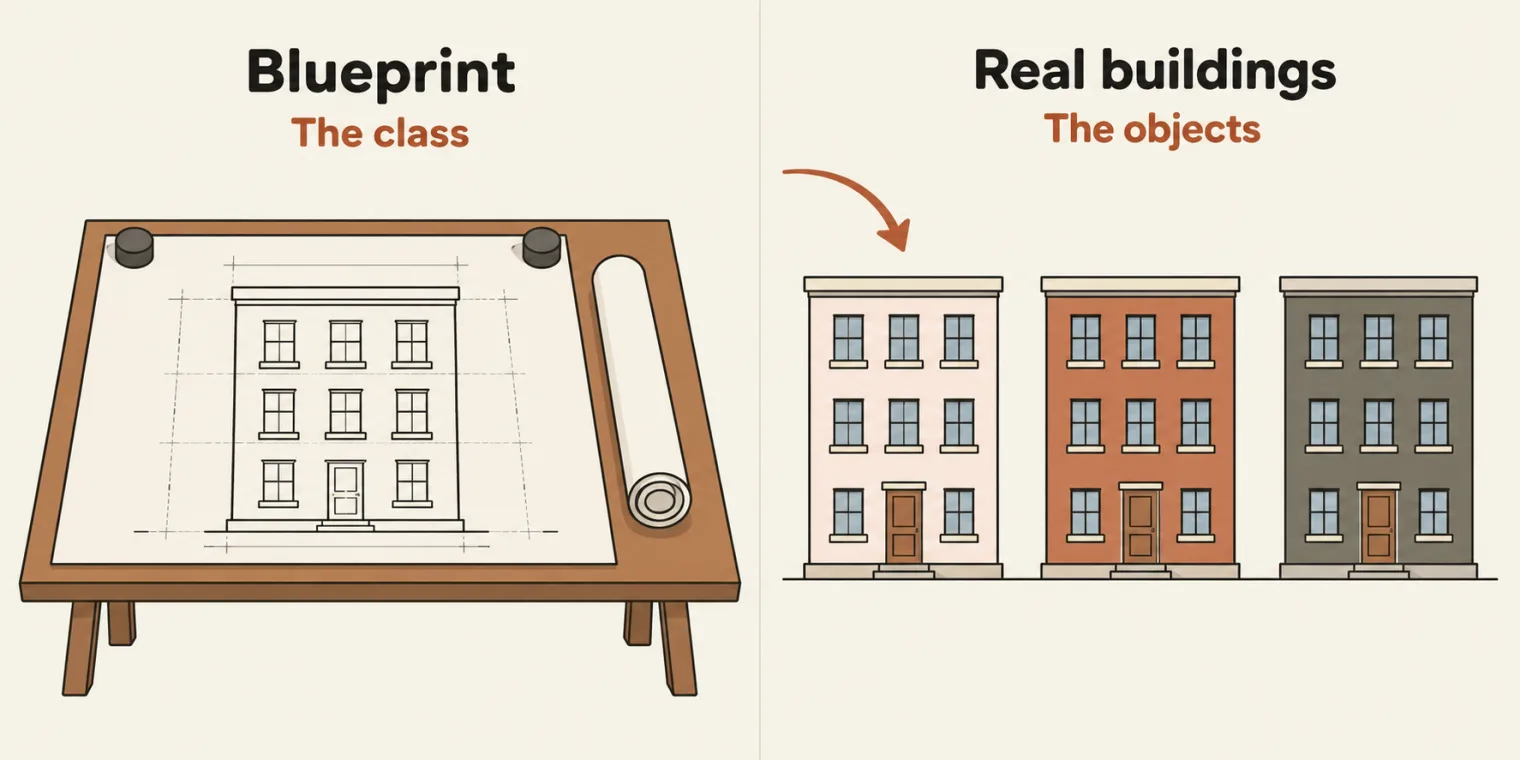
- Why object-oriented programming: a class is a blueprint, and CAB
- A class and its objects, and object versus reference, files 121 and 122
- Tasks and announcements: exercises to 122, the next class and the hackathon
- A tuple reads like a list: indexes, slices,
in,lenand a for loop all work. It just cannot change, andlist()turns it into a list that can. - A set keeps one of each item and promises no order:
{1, 2, 3, 3}prints{1, 2, 3}, and a set of strings can print in a different order on every run. a | bis the union,a & bthe intersection, anda - bwhat is inabut not inb. A frozenset is a set that cannot change.map(fn, items)appliesfnto every item;filter(fn, items)keeps the items wherefngives True. Wrap both inlist()to get a list.- A dictionary maps keys to values: read or change a value by its key,
delremoves a pair, and.items()loops over both. A repeated key keeps its last value. zip(keys, values)pairs two lists and stops at the shorter one, and two dictionaries with the same pairs are equal in any order.- A class is a blueprint with attributes and behaviour (CAB), and each
Dog()call builds an object. Inchow = Dog(),Dog()is the object andchowthe reference.
Tuples: files 101 and 102
Yesterday's class ended on tuples, files 98 to 100, and this class picked them up again. The deck's definition:
A tuple is a collection of ordered and immutable (unchangeable) items.
Ordered, so each item has a fixed position; immutable, so it cannot be changed after it is created; and duplicates are allowed. A list without change, as the instructor put it.
What a tuple can do. The class then went through a page of tuple features on screen. Most of them work exactly as they do on a list:
- A tuple can mix types or be empty, and a tuple of one item needs its comma: a single item in brackets is not a tuple, as yesterday's file 99 showed.
- Indexes start at 0, and -1 is the last item. A slice takes a range, and
[::-1]reverses the tuple. inchecks membership: is 20 in the tuple? True.len,min,max,sumandsortedare the same functions as for a list, and a tuple hascountandindextoo.- Unpacking gives each item a name:
name, age, roletakes a three-item tuple apart, one value per name. With a star, the first name takes the first item and the starred name takes the rest. - A function can return a tuple.
- The tuple's slots are fixed, but a list inside a tuple can still change.
- A for loop walks a tuple directly, such as a tuple of test cases.
Does the star create a list, a learner asked? Yes, the instructor said: the rest arrive as a list. A small reconstruction, with the 20 and 30 the class read out:
first, *rest = (10, 20, 30)
print(first)
print(rest)
10
[20, 30]
Is this a tuple? File 101. That was the instructor's question about the file's second collection, and it is. Line 1 is a list, in square brackets; line 4 is a tuple, in round ones. Then list() converts the tuple:
shopping_list_wife = ["bread", "butter", "paneer"]


my_tuple = ("tta.com", "sdet.live")
print(my_tuple)
my_api_list = list(my_tuple)
print(my_api_list)
('tta.com', 'sdet.live')
['tta.com', 'sdet.live']
Line 7 prints square brackets: my_api_list is a list now. Conversion can happen, as the class put it, and yesterday's file 100 does the same.
len, in and a loop: file 102. A tuple of cities, and a tuple of API URLs:
cities = ("London", "Paris", "Los Angeles", "Tokyo")
print(len(cities))

print("Paris" in cities)
print("New Delhi" in cities)


ENV_API_URLS = tuple(["abc.com/get", "xyz.com/post", "qwe.com/put"])
print(ENV_API_URLS)


colors = ("red", "green", "blue")
for c in colors:
    print(c)
4
True
False
('abc.com/get', 'xyz.com/post', 'qwe.com/put')
red
green
blue
len(cities)is 4: a length counts from 1, not from 0, as the class answered.inis a membership operator: "Paris" is in the tuple, True; "New Delhi" is not, False.- Line 8 builds a tuple from a list with
tuple(), the other way round fromlist(), and printing it prints every item: no problem in printing, as the instructor said. - Lines 13 to 15 iterate over the tuple directly, with nothing else needed: for tuples, direct iteration is allowed.
Sets: files 103 to 105
Then the set, something everyone should know and will use, as the instructor said. The deck:
a Set is an unordered collection of data types that is iterable, mutable and has no duplicate elements. It does not allow duplicates and is mainly used for membership testing, removing duplicates, and mathematical set operations.
Two conditions, the class said: a set does not allow duplicates, and it is unordered, so the order can come out completely different. It is written in curly braces. The deck lists the rest of its four rules: a collection of unique items, {}, no order, and unindexed, so a set has no index. To remember the brackets, the figure at the top of the page: a tuple is round brackets, a list square brackets and a set curly braces.
my_set = {1, 2, 3}
print(my_set)


my_set_2 = {1, 2, 3, 3}
print(my_set_2)
{1, 2, 3}
{1, 2, 3}
Line 5 has 3 twice, and line 6 prints it once. No error, as the class said: the set just does not take the duplicate.
A set from a list: file 104.
# # SET
# # Collection of Unique
# # {} - parenthesis

list_of_unique_items = {1, 2, 3, 4, 4, 5, 5}
print(list_of_unique_items)


list1 = [45.2, 33, 33, 45, 21]
set1 = set(list1)
print(set1)
{1, 2, 3, 4, 5}
{33, 21, 45, 45.2}
- Line 5's 4 and 5 appear once each.
set(list1)makes a set from a list, and drops the second 33.- The order is not the list's: 45.2 came first in the list and prints last. Order will be random, the instructor said: there is no way to say what it will be, because a set is unordered.
Curly braces, not parenthesis. The comment on line 3 calls {} parenthesis. They are curly braces, as the class said and the deck's heading shows: set -> {}. And {} on its own is an empty dict, the README warns, which is why file 105 makes an empty set with set().
One run, one order. Each set file ran 60 times for this page. The number sets in files 103, 104, 106, 108 and 109 printed the same every time, though Python promises no order for them either. The string sets in files 105 and 107 did not: their order changed from run to run. So the output of those two files below is one real run, and yours may list the strings in another order.
An interview question, file 105. A very famous one, the instructor said. Work it out before you open the answer:
Interview question, file 105. With t = ("TheTestingAcademy", "for", "TheTestingAcademy"), how many items does set(t) have?
Show the answer
Answer. Two: 'TheTestingAcademy' and 'for'. The tuple has three items, but a set keeps one of each, so the second "TheTestingAcademy" is dropped. Line 3 prints both, in an order that can change from run to run.
t = ("TheTestingAcademy", "for", "TheTestingAcademy")
print(t)
print(set(t))

empty = set()
print(type(empty))


mixed = {1, "QA", True, 3.5}
for item in mixed:
    print(item)

mixed.add(10)
print(mixed)
mixed.remove(10)
print(mixed)
('TheTestingAcademy', 'for', 'TheTestingAcademy')
{'for', 'TheTestingAcademy'}
<class 'set'>
1
3.5
QA
{1, 10, 3.5, 'QA'}
{1, 3.5, 'QA'}
- Normally three items, as the instructor said, but as a set, two: that is the advantage of a set.
set()with nothing inside makes an empty set (line 5).- Lines 9 to 11 loop over the set directly: you can iterate directly over a list, a tuple or a set.
- Modification is allowed, the same as on a list:
addputs 10 in (line 13), andremovetakes it out (line 15).
Where did True go? Line 9 puts four items in mixed, but the loop prints three. In Python True == 1, so the set treats True as a duplicate of 1 and keeps the 1.
The README makes the same point in two lines:
mixed = {1, "QA", True, 3.5}
print(len(mixed))                      # 3: True == 1, so True counts as a duplicate
3
Union, intersection and difference: file 106
Sets have functions such as union and intersection. The instructor recalled them as a Venn diagram, from mathematics in engineering days, and explained it with two sets, s1 = {1, 2, 3, 4} and s2 = {2, 4, 6}. Their union came to 1, 2, 3, 4 and 6, with the duplicate 2 and 4 removed, and their intersection, the common part, to 2 and 4. The same two sets, run:
s1 = {1, 2, 3, 4}
s2 = {2, 4, 6}
print(s1 | s2)
print(s1 & s2)
print(s1 - s2)
print(s2 - s1)
{1, 2, 3, 4, 6}
{2, 4}
{1, 3}
{6}
The last two lines are the sides that are not common: 1 and 3 only in s1, and 6 only in s2.
File 106 does the same with a = {1, 2, 3} and b = {3, 4, 5}:
a = {1, 2, 3}
b = {3, 4, 5}

print(a | b)
print(a.union(b))

print(a & b)            # {3}
print(a.intersection(b))


print(a - b)
{1, 2, 3, 4, 5}
{1, 2, 3, 4, 5}
{3}
{3}
{1, 2}
- Union,
a | bora.union(b): 1 to 5. You can write the union with a single character,|. - Intersection,
a & bora.intersection(b): the common part, only 3. - Difference,
a - b: remove the common elements and keep what is left of the first set, 1 and 2.
And B minus A? The instructor pointed to the other side of the diagram: what is in b but not in a.
a = {1, 2, 3}
b = {3, 4, 5}
print(b - a)
{4, 5}
Set interview questions and frozenset: files 107 to 109
The length of the set, file 107. Now an interview question, the instructor said:
Interview question, file 107. set1 = set(["TheTestingAcademy", "For", "TheTestingAcademy."]). What does len(set1) print?
Show the answer
Answer. 3. The last string ends with a dot, so "TheTestingAcademy." is a different string from "TheTestingAcademy", and nothing is a duplicate.
set1 = set(["TheTestingAcademy", "For", "TheTestingAcademy."])
print(set1)
print(len(set1))


for i in set1:
    print(i)
{'TheTestingAcademy.', 'For', 'TheTestingAcademy'}
3
TheTestingAcademy.
For
TheTestingAcademy
The answers in class said 2, and the instructor pointed to the dot: you are QA, so how can you forget that a dot makes a unique element? That is why interview questions are important.
Line 3 prints 3 in every run; the order of the strings is what changes. In 60 runs, line 2 came out in all six possible orders, and the loop on lines 6 and 7 always followed the same order as line 2:
| What line 2 printed | Runs |
|---|---|
{'TheTestingAcademy', 'For', 'TheTestingAcademy.'} |
14 |
{'TheTestingAcademy', 'TheTestingAcademy.', 'For'} |
11 |
{'TheTestingAcademy.', 'TheTestingAcademy', 'For'} |
11 |
{'For', 'TheTestingAcademy.', 'TheTestingAcademy'} |
10 |
{'TheTestingAcademy.', 'For', 'TheTestingAcademy'} |
8 |
{'For', 'TheTestingAcademy', 'TheTestingAcademy.'} |
6 |
A set in one line, file 108. One more the instructor did not want to show, but showed anyway, so that you do not panic when you see one:
Interview question, file 108. What does print({x ** 2 for x in range(5)}) print?
Show the answer
Answer. {0, 1, 4, 9, 16}. range(5) runs from 0 to 4: it starts at 0 when no start is given, and stops before 5. Each x goes in squared, and 0 squared is 0.
squares = {x ** 2 for x in range(5)}
print(squares)
{0, 1, 4, 9, 16}
The instructor first read it as 1, 4, 9 and 16, then corrected it, saying a learner was right: 0 is counted too, because without a start the range begins at 0, and it stops at 4, since the end is always n minus 1. Each value and what goes in:
| Each value | Squared |
|---|---|
| 0 | 0 |
| 1 | 1 |
| 2 | 4 |
| 3 | 9 |
| 4 | 16 |
A comprehension, not a lambda. The class called this a lambda kind of expression. It is a set comprehension, as the README names it, and there is no lambda in it. Read it as: for each x in range(5), put x ** 2 in the set.
Frozenset, file 109. Another topic that can come up as an interview question, the instructor said:
Interview question: frozenset. What is a frozenset, and what happens when you call add() on one?
Show the answer
Answer. A set that cannot be changed after it is created. add() fails with AttributeError: 'frozenset' object has no attribute 'add', as the comment on line 5 of file 109 says; switched on, the file stops at that line.
# Frozen Set (Immutable Set)
# A frozenset cannot be changed after creation.
my_list = [1, 2, 3, 3]
fset = frozenset(my_list)
# fset.add(4) AttributeError: 'frozenset' object has no attribute 'add'

print(fset)
frozenset({1, 2, 3})
Frozen means frozen: once it is made, you cannot change it. A frozenset is used in automation or in the AI world when you do not want any value to change, as the instructor put it. Line 5 holds both the call and the error it gives, so to switch it on, keep only the call:
# Frozen Set (Immutable Set)
# A frozenset cannot be changed after creation.
my_list = [1, 2, 3, 3]
fset = frozenset(my_list)
fset.add(4)

print(fset)
Traceback (most recent call last):
  File "chapter_15_Python_PyTest/ex_15_SET/109_FrozenSET.py", line 5, in <module>
    fset.add(4)
    ^^^^^^^^
AttributeError: 'frozenset' object has no attribute 'add'
The class closed sets with a summary from the notes: a set is unordered, holds unique items with no duplicates, and is mutable, so it can be changed, while a tuple and a frozenset cannot. Its operations are union, intersection, difference and symmetric difference. It cannot be accessed by index, membership checks are fast, and its common methods are add, update, remove, discard and pop, much the same functions as a list's.
map and filter: files 110 to 115
map and filter are very, very important to learn, the instructor said, and you will use them a lot. The deck:
map(function, iterable) → Applies a function to each item in a list (or any iterable) and returns a map object (iterator).
filter(function, iterable) → Filters elements of an iterable using a condition (returns only those that match True).
map: file 110, in the new folder ex_16_Map_Filters.
numbers = [1, 2, 3, 4, 5]
def sq(x):
    return x**2

# for n in numbers:
#     print(sq(n))

all_sq = list(map(sq, numbers))
print(all_sq)
[1, 4, 9, 16, 25]
The long way first: lines 5 and 6, commented out, loop over the numbers and call sq on each one. Switched on, they print the squares one by one before the list:
numbers = [1, 2, 3, 4, 5]
def sq(x):
    return x**2

for n in numbers:
    print(sq(n))

all_sq = list(map(sq, numbers))
print(all_sq)
1
4
9
16
25
[1, 4, 9, 16, 25]
Line 8 needs no loop. map takes the function first and the list second, picks one item at a time and applies sq to it, and list() stores the results: 1, 4, 9, 16 and 25.
A learner asked how it behaves without list(). It will not be a list, the instructor said, so better to convert it into a list. Printed as it is, line 8 without list() gives a map object; the hex number is a memory address, and it changes from run to run:
numbers = [1, 2, 3, 4, 5]
def sq(x):
    return x**2

# for n in numbers:
#     print(sq(n))

all_sq = map(sq, numbers)
print(all_sq)
<map object at 0x1048bdfc0>
A for loop over that object would hand out the squares one at a time, and list() collects them all, which is why every file in this folder wraps map and filter in list().
- Will it work only on a list, a learner asked? Mostly on a list, the instructor said, and on a tuple and a set too.
- Can it take a function with more than one parameter, a learner asked? That can be done too, the instructor said, and it comes later.
Upper case: file 111.
Interview question, file 111. With name = ["pramod", "dutta", "qa", "lucky"], what does list(map(upper_case, name)) print?
Show the answer
Answer. ['PRAMOD', 'DUTTA', 'QA', 'LUCKY']. upper_case returns each string in capitals, and map applies it to every item in the list.
name = ["pramod", "dutta", "qa", "lucky"]

def upper_case(string):
    return string.upper()


upper_name_list = list(map(upper_case, name))
print(upper_name_list)
['PRAMOD', 'DUTTA', 'QA', 'LUCKY']
upper() is a ready-made string function. The first argument of map is the function, and the second is the list.
Milliseconds to seconds: file 112.
Interview question, file 112. An API test gives response_times_ms = [1200, 1500, 1800]. Convert them to seconds with map and a lambda: what prints?
Show the answer
Answer. [1.2, 1.5, 1.8]. lambda x:x/1000 divides each time by 1000, and list() collects the results.
response_times_ms = [1200, 1500, 1800]

# def mil_sec(x):
#     return x / 1000
# response_times_ms_list = list(map(mil_sec, response_times_ms))

response_times_ms_list = list(map(lambda x:x/1000, response_times_ms))
print(response_times_ms_list)
[1.2, 1.5, 1.8]
Lines 3 to 5, commented out, do it with a named function, mil_sec. That function can also be a lambda, as the class converted it on line 7: the argument, then what it returns. Switched on, the named version gives the same list.
filter: file 113. Filter reduces the list, as the class put it: it keeps only the items that give True.
nums = [1, 2, 3, 4, 5, 6]


def even_num(x):
    return x%2==0

print(list(filter(even_num, nums)))
[2, 4, 6]
even_num returns True for an even number. 1 is odd, so it is filtered out, and only 2, 4 and 6 stay.
Passed tests: file 114, a real example:
test_results = ["PASS", "FAIL", "PASS", "SKIP", "FAIL"]

pass_give = list(filter(lambda x: x == "PASS", test_results))
print(pass_give)
['PASS', 'PASS']
Only two test cases passed, and the lambda keeps just those, the results equal to "PASS". This is something the batch will use in future, the instructor said.
Empty names: file 115, another real example, introduced with a note that you will see the instructor use filter a lot in the AI code:
Interview question, file 115. What does the filter keep from names = ["QA", "", "Automation", "", "Tester"]?
Show the answer
Answer. ['QA', 'Automation', 'Tester']. non_empty returns True for a name that is not empty and None for an empty one, and filter keeps only the items where the function's answer counts as true.
names = ["QA", "", "Automation", "", "Tester"]

def non_empty(x):
    if x != "":
        return True
    return None


non_empty = list(filter(non_empty, names))  # removes empty strings
print(non_empty)
['QA', 'Automation', 'Tester']
Two details in file 115. filter treats None as false, which is why return None drops the empty strings; return False says it more plainly, as the README notes. And line 9 stores the result under the function's own name, non_empty. That works, because filter already has the function, but after line 9 the name means the list: calling non_empty("QA") then fails with TypeError: 'list' object is not callable.
With any function you write, you can filter a list, and map and filter are what you will be using a lot in your automation code, as the instructor said.
Dictionaries: files 116 to 120
Then the instructor's favourite topic, the dictionary: a key-value pair. The deck:
A dictionary is an unordered, mutable, and indexed collection of key-value pairs in Python.
It uses curly braces and looks just like JSON, the class said, and it is used with JSON; the deck names API automation as where it will be used. For anyone from a Java background, it is the same as a HashMap or a Map.
You can also create one with the dict keyword. Written the normal way, the keys need double quotes; with the keyword, they need none. The deck's line, with a print:
student_infor2 = dict(name="Pramod", age=67, address="KA")
print(student_infor2)
{'name': 'Pramod', 'age': 67, 'address': 'KA'}
Single quotes also work, the instructor said, but are not advisable from the instructor's side: try to use double quotes. Python itself prints a dictionary with single quotes, as every output on this page shows.
Read, change, delete and loop: file 116.
my_dict = {
    "name": "Aman",
    "age": 34,
    "role": "SDET",
    "exp": 3
}

print(my_dict)
print(my_dict["age"])
print(my_dict["role"])

my_dict["role"] = "Manual Tester"
print(my_dict)

del my_dict["age"]
print(my_dict)


for key, value in my_dict.items():
    print(key, value)

print("age" in my_dict)
print("role" in my_dict)
{'name': 'Aman', 'age': 34, 'role': 'SDET', 'exp': 3}
34
SDET
{'name': 'Aman', 'age': 34, 'role': 'Manual Tester', 'exp': 3}
{'name': 'Aman', 'role': 'Manual Tester', 'exp': 3}
name Aman
role Manual Tester
exp 3
False
True
| Line | What runs | Prints |
|---|---|---|
| 8 | print(my_dict) |
{'name': 'Aman', 'age': 34, 'role': 'SDET', 'exp': 3} |
| 9 | print(my_dict["age"]) |
34 |
| 10 | print(my_dict["role"]) |
SDET |
| 13 | print(my_dict), after line 12 changes the role |
{'name': 'Aman', 'age': 34, 'role': 'Manual Tester', 'exp': 3} |
| 16 | print(my_dict), after line 15 deletes age |
{'name': 'Aman', 'role': 'Manual Tester', 'exp': 3} |
| 19, 20 | the loop over my_dict.items() |
name Aman / role Manual Tester / exp 3 |
| 22 | print("age" in my_dict) |
False |
| 23 | print("role" in my_dict) |
True |
- Read a value by its key: age is 34 and role is SDET.
- A dictionary is mutable: line 12 changes a value. Deletion is allowed too, as the instructor said:
delremoves the key and its value. - To loop, use
for key, value in my_dict.items(): in a dictionary, the for loop changes a little, as the class said. inchecks the keys: after thedel,"age"is gone.
Is there anything like a LinkedHashMap, a learner asked? Not that much, the instructor said: Python is very simple. And when a learner asked about a HashMap or a TreeMap: Python does not support those, the instructor said, those are Java concepts.
What unordered means here. Order does not count when two dictionaries are compared: file 120 shows that two with the same pairs in a different order are equal. But Python keeps the keys in the order you added them: in 60 runs, file 116 printed name, age, role and exp in that order every time.
Duplicate keys: file 117. Can a dictionary have duplicate keys? No duplicate keys are allowed, the instructor said: the latest one is used. Keys cannot repeat; values can. File 117 keeps a second age, 65, commented out on line 3:
student_infor = {
    "name": "Pramod",
    # "age": 65,
    "age": 67,
    "address": "KA"
}

print(student_infor)

print(student_infor["name"])
print(student_infor["age"])

print(student_infor["address"])
student_infor["age"] = 100
print(student_infor)
{'name': 'Pramod', 'age': 67, 'address': 'KA'}
Pramod
67
KA
{'name': 'Pramod', 'age': 100, 'address': 'KA'}
Lines 10 and 11, which the class was asked about, print Pramod and 67. Line 14 changes the age to 100. Switch line 3 on and the output does not change: both ages are in the dictionary as written, and the later one, 67, wins.
{'name': 'Pramod', 'age': 67, 'address': 'KA'}
Pramod
67
KA
{'name': 'Pramod', 'age': 100, 'address': 'KA'}
A list of dictionaries: file 118. Two dictionaries, each with a dictionary inside, combined as a list:
student_infor1 = {
    "name": "Pramod",
    "age": 67,
    "address": {
        "home_address": "ND",
        "office_address": "KA"
    }
}
student_infor2 = {
    "name": "Amit",
    "age": 69,
    "address": {
        "home_address": "GOA",
        "office_address": "KA"
    }
}


student_list = [student_infor1,student_infor2]
print(student_list)
print(student_list[0])
print(student_list[0]["name"])
print(student_list[0]["address"]["office_address"])
[{'name': 'Pramod', 'age': 67, 'address': {'home_address': 'ND', 'office_address': 'KA'}}, {'name': 'Amit', 'age': 69, 'address': {'home_address': 'GOA', 'office_address': 'KA'}}]
{'name': 'Pramod', 'age': 67, 'address': {'home_address': 'ND', 'office_address': 'KA'}}
Pramod
KA
Index 0 is the whole first dictionary. From there, ["address"]["office_address"] goes one level further down and reaches KA, as the figure at the top of this section traces.
Three of them: file 119.
student_infor1 = {
    "name": "Pramod",
    # "age": 65,
    "age": 67,
    "address": {
        "home_address": "ND",
        "office_address": "KA"
    }
}

student_infor2 = {
    "name": "Amit",
    # "age": 65,
    "age": 69,
    "address": {
        "home_address": "GOA",
        "office_address": "KA"
    }
}

student_infor3 = {
    "name": "Murthy",
    # "age": 65,
    "age": 120,
    "address": {
        "home_address": "PODI",
        "office_address": "vizag"
    }
}

student_list = [student_infor1,student_infor2,student_infor3]
print(student_list)
print(student_list[2]["address"]["office_address"])
[{'name': 'Pramod', 'age': 67, 'address': {'home_address': 'ND', 'office_address': 'KA'}}, {'name': 'Amit', 'age': 69, 'address': {'home_address': 'GOA', 'office_address': 'KA'}}, {'name': 'Murthy', 'age': 120, 'address': {'home_address': 'PODI', 'office_address': 'vizag'}}]
vizag
Three dictionaries in the list work the same way: index 2 is the third, and its office address is vizag.
zip, and comparing dictionaries: file 120.
keys = ["name", "role", "experience", "abc"]
values = ["Aman", "SDET", 3, 67,90]
# values = ["Aman", "SDET"]

my_dict = dict(zip(keys, values))
print(my_dict)

dict1 = {"a": 1, "b": 2}
dict2 = {"b": 2, "a": 1}

print(dict1 == dict2)
{'name': 'Aman', 'role': 'SDET', 'experience': 3, 'abc': 67}
True
zip pairs each key with a value, and dict() turns the pairs into a dictionary. It stops when one list runs out: there are four keys and five values, so 90 is not zipped.
| Key | Value | In the dictionary |
|---|---|---|
'name' |
'Aman' |
'name': 'Aman' |
'role' |
'SDET' |
'role': 'SDET' |
'experience' |
3 |
'experience': 3 |
'abc' |
67 |
'abc': 67 |
| no key left | 90 |
not zipped |
With only the two values on line 3, only the matching keys get one: name and role. Line 3 switched on:
{'name': 'Aman', 'role': 'SDET'}
True
Lines 8 to 11 compare two dictionaries with the same pairs in a different order, and the answer is True. Order does not matter in a dictionary, the instructor said: the key-value pairs matter. A very important concept to remember.
After the break, the notes on screen summed up dictionaries: reading, adding, updating and removing entries, looping with .items(), merging, and nested dictionaries, with some common mistakes. Two of the notes' examples:
- The
|operator merges two dictionaries. Where both have the same key, as both had environment, the later value is used. - A dictionary of squares built in one line, each key a number and each value its square. The class called it a lambda expression again; like file 108, it is a comprehension.
When do we use lists, sets, dictionaries and tuples, a learner asked? In DeepEval, CrewAI, LangChain and LangGraph, the instructor said: the batch will use all of them there.
Why OOP: a class is a blueprint
Then object-oriented programming. The deck lists six concepts: object, class, encapsulation, abstraction, inheritance and polymorphism. This class covered the first two.
Why OOP was introduced. Before it came procedural programming, where everything is a function. From the deck: a program is divided into functions, most things focus on the functions, C and Basic work this way, the emphasis is on doing things, and productivity is low. Not a great approach, the instructor said, because it does not take care of objects and classes.
The deck's definition of OOP:
Object-Oriented Programming is a methodology or paradigm to design a program using classes and objects.
It divides the program into classes and objects, puts the emphasis on data, and productivity is high. It is widely used in Python and Java, the instructor said, and in JavaScript with TypeScript.
A class is a blueprint. From the deck:
Class is a user-defined data type which defines its properties and its methods.
Attributes are also called properties or data variables. Behaviour is the methods, also called functions, data members or member functions.
The instructor's favourite example is the blueprint of a building. Is it a real building? No, it is just a blueprint, and that is the class. When builders use a blueprint to put up real buildings, those real things are the objects. They actually take memory; the class does not, as the instructor said, because it is just a blueprint.
Objects. The deck:
Object is a run-time entity. It is an instance of the class. An object can represent a person, place or any other item. All data members and member functions of the class can be accessed with the help of objects.
A dog class, for example, can give three different dogs: three objects, made from the same blueprint.
CAB. One rule to remember: Class has Attributes and Behaviour. The deck's example is the batch's own students: attributes such as name, id, age and address, and behaviour such as walk, talk, learn, practice and attend class. Creating a person works the same way: attributes such as name, age, gender and occupation, and behaviour such as walk, eat and sleep.
Method or function. In Python a method is a function in a class. Inside the class it is called a method; outside the class, a function. Remember this rule, the instructor said.
Classes, objects and references: files 121 and 122
Person() or Dog() call builds an object. The names on the left of = are references, not the objects themselves.A class and three objects: file 121, in the new folder ex_18_OOPs_Python/01_Class_Python. The class keyword, then the name, Person, with no brackets:
class Person:
    # Attributes
    name = None
    id = None
    age = None
    email = None
    height = None
    gender = None
    phone_no = None
    address = None


    # Behavriour
    def talk(self):  # self - this , self will be first argument in every behaviour.
        print("I can Talk")

    def sleep(self, name):  # Arg with No Return
        print("I am a Method!!")
        print("Sleep", name)

    def sleep2(self, name):  # Arg with Return
        print("I am a Method!!")
        return None

    def walk(self):
        print("I am walking")

    def method_walk_return(self):  # No Arg with Return
        return "I am walking"


def function_outside():
    print("Outside")


geeta = Person()
amit = Person()
navita = Person()
It prints nothing: the file defines the class and builds three objects, but calls no method.
- The attributes start as
None, which means no value. Is None similar to null, a learner asked? There is no concept of null in Python, the instructor said: that is why there is None. - The behaviour is the methods:
talk,sleep,sleep2,walkandmethod_walk_return.function_outside, on line 33, is outside the class, so it is a function. - Every method takes
selffirst, as the comment on line 14 says. Ignore the self for now, the instructor said: it comes later. - Lines 37 to 39 build three objects, with the references geeta, amit and navita. Is memory allocated when you create a class? No, the instructor said: it is just a blueprint. Each
Person()creates a new object. - There is no
newkeyword in Python. In Java you writenew; here you just call the class. - Is the object a blueprint of the class, a learner asked? No: the class is the blueprint, and the object is an instance of the class.
Object or reference: file 122.
class Dog:
    # A
    name = None
    breed = None
    height = None
    weight = None
    # B
    def bark(self):
        print("Barking")
        # print(name)
        print(self.name)

    def talk(self):
        print("Talking")


chow = Dog()

# Dog() - Object
# chow -> Object Ref
This file prints nothing either. A dog has attributes, under # A: name, breed, height and weight; and behaviour, under # B: bark and talk.
Interview question, file 122. In chow = Dog(), which one is the object?
Show the answer
Answer. Dog() builds the object, in memory, and chow is a reference to it. The file's last two lines say so: # Dog() - Object and # chow -> Object Ref.
Some people call chow the object and get rejected in interviews, the instructor warned, having seen two or three people rejected for it. chow is not an object; it is a reference.
Tasks and announcements
- Exercises up to 122. Practise every exercise up to 122, and all the videos, and push the exercises to your GitHub repository before the next class, on Saturday. The instructor will check every learner's repository, with an agent built to do that, and asked Meeti to post the task with a screenshot.
- Doubts. Today's doubt thread is already up: add your doubts there.
- No extra time. A learner asked for more practice time because of Diwali. No, the instructor said: only the Diwali leave.
- Next class, on Saturday, Chhoti Diwali: completing OOP, with constructors, instance variables, polymorphism, inheritance and more. Right after Chhoti Diwali, the batch starts CrewAI, LangChain and LangGraph.
- Diwali. There will be a Diwali holiday; Diwali is on Sunday, the instructor thought. More on Diwali will follow.
- Hackathon. After Diwali, once Python is complete: probably around 10 November, for one or two days. The exact date and the details will follow. The first prize is double your fees back, with about 50k in prizes, as the instructor put it. The instructions are ready, and the batch will be guided on the topic.
- Maybe an extra session. Probably this Friday or so there may be extra sessions, perhaps on AI certifications, and you will be invited if there are.
Task: exercises up to 122. Finish every exercise up to file 122, and the videos, and push them to your GitHub repository before Saturday's class.