What this class covered
- Decorators: what they are, and their main use, steps before and after a function
- A decorator on a scooter ride and on a UI test, files 84 and 85, and the error when the wrapper is not returned
- The same steps without a decorator, file 86
- A timing decorator, epoch time and two decorators stacked, files 87 and 88
- The ELI5 skill, and its answer: a decorator is gift wrap for a function
- Type conversion, file 89
- Lambda expressions, with user input, files 90 to 92
- Lists: indexing and changing items, files 93 and 94
- The list methods, and an interview question, files 95 to 97
- Tuples, and when to choose one over a list, files 98 to 100
- Tasks and announcements: the Python fundamentals test, two QA battles, and the next class
- A decorator is a function that takes a function, wraps it in
wrapperand returnswrapper: steps run before and after, and the original function never changes. @before_after_ui_testabovedef test_ui()is short fortest_ui = before_after_ui_test(test_ui). If the outer function does not returnwrapper, the call fails with'NoneType' object is not callable.- The wrapper decides whether the function runs at all: if it never calls
func(), the function does not run. - Stacked decorators run from the top: the top
@line is the outer wrapper, so its before step runs first and its after step last. - A lambda is a function with no name, on one line:
lambda arguments: expression, and the expression is what it returns. - A list is ordered, allows duplicates and can change.
appendadds one item,extendadds each item of another list, andpopremoves by index whileremoveremoves by value. - A tuple is ordered and allows duplicates, but cannot change: assigning to an item raises
TypeError. Keep fixed values, such as API URLs, in a tuple.
Decorators: steps before and after a function
test_ui, builds wrapper around it and hands it back under the same name, so one call prints three lines. test_ui itself never changed.The last class reached functions. Today's plan: decorators first, "very, very important" as the instructor put it, then lists, tuples, dictionaries and sets, and object-oriented programming, with a test today. Decorators, lists and tuples were covered; dictionaries, sets and OOPS are the next class.
A learner asked whether the same Python carries over to a Python framework. Absolutely, the answer went: Python is the same, whether you use it in a Playwright framework or anywhere else.
A quick recap first: a function is a reusable block of code that performs a task, and you can call it any number of times. The deck's definition of a decorator:
Decorators in Python are a way to modify the behavior of a function or class without changing its source code. They are a powerful tool that allows you to wrap another function and extend its functionality, while keeping the original function's code unchanged.
Decorators are not new, the instructor said: you must have seen them in other programming languages.
The main use: before, after and logging. Take a function you do not want to change. A decorator runs code before it and code after it, so it extends the function without editing it. Its most common use, from class, is logging: a start-of-log line before the function and an end-of-log line after it, added to any test or function without changing it. For anyone from TestNG, it is very similar, as the class put it, to a before each, before test or after test: a kind of hook.
A plain function first. File 83 opens the new folder, ex_12_Decorator_TypeConversion:
def sayGreeting():
    print("Hi")


sayGreeting()
Hi
The plan is to extend sayGreeting() without changing it. The benefits, from the deck, which the class named in the same order:
- Code Reusability: Decorators allow you to reuse the same functionality across multiple functions without duplicating code.
- Separation of Concerns: They help in separating the core logic of functions from auxiliary concerns like logging, access control, etc.
- Enhanced Readability: Using decorators can make your code more readable and maintainable by clearly separating different aspects of functionality.
On separation, the class added that you can keep a normal function and a decorated one side by side.
Writing a decorator: files 84 and 85
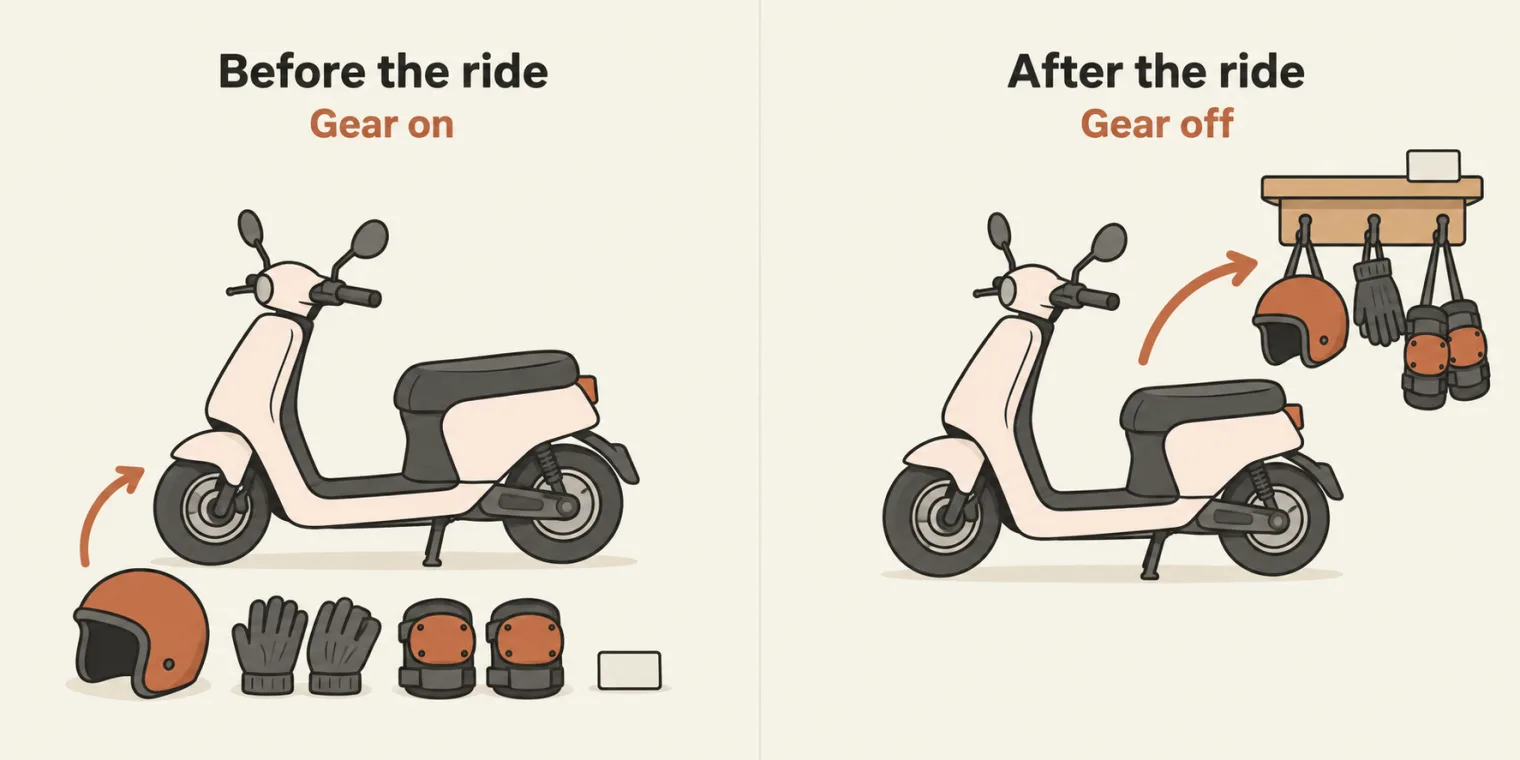
add_security: the gear goes on before the ride and comes off after it, and the ride itself never changes.The scooter. The class's first decorator: before you ride a scooter, you put on safety gear. The decorator is another function, which takes the function as its argument and has a wrapper inside it. File 84:
def add_security(func):
    def wrapper():
        print("1.Before the function is called.")
        print("2.Add Helmet, Dashcash, gloves, knee guards, License")
        func()
        print("3.After the function is called.")
        print("4.Secure Driving, Leave all the items")

    return wrapper


@add_security
def drive_ola_scooter():
    print("I am driving ola scooter")


drive_ola_scooter()
1.Before the function is called.
2.Add Helmet, Dashcash, gloves, knee guards, License
I am driving ola scooter
3.After the function is called.
4.Secure Driving, Leave all the items
One call to drive_ola_scooter() runs five lines. First the wrapper's before lines, then the normal function, then the after lines, as the class traced it:
| Order | Line | Where it runs | Prints |
|---|---|---|---|
| 1 | 3 | wrapper, before func() |
1.Before the function is called. |
| 2 | 4 | wrapper, before func() |
2.Add Helmet, Dashcash, gloves, knee guards, License |
| 3 | 5, then 14 | func(): the original drive_ola_scooter |
I am driving ola scooter |
| 4 | 6 | wrapper, after func() |
3.After the function is called. |
| 5 | 7 | wrapper, after func() |
4.Secure Driving, Leave all the items |
Take the decorator off. Remove the @add_security line and it is a normal function again, as the class said:
I am driving ola scooter
The pattern, as the class summed it up: the decorator has a name, takes a function, and calls it in between, with a before step and an after step around it.
The UI test. File 85, "a new example" in class: a normal function that does the UI testing, with steps before and after it:
def before_after_ui_test(func):
    def wrapper():
          print("Before the TC code execute!")
          func()
          print("After the TC Done")
    return wrapper

# func == test_ui

@before_after_ui_test
def test_ui():
     print("Hi, I am testing a UI Test")

test_ui()
Before the TC code execute!
Hi, I am testing a UI Test
After the TC Done
The diagram at the top of the page traces this one call.
The first run failed. In class, the first run of file 85 failed with a NoneType error: None is not callable. The class fixed it by returning wrapper and correcting the indentation, and the commit message says the pushed file "now returns wrapper from the outer function, fixing the NoneType error". Reconstructed with return wrapper indented one level too far, into wrapper, the file fails the same way:
def before_after_ui_test(func):
    def wrapper():
          print("Before the TC code execute!")
          func()
          print("After the TC Done")
          return wrapper

# func == test_ui

@before_after_ui_test
def test_ui():
     print("Hi, I am testing a UI Test")

test_ui()
Traceback (most recent call last):
  File "chapter_15_Python_PyTest/ex_12_Decorator_TypeConversion/85_Dec_New.py", line 14, in <module>
    test_ui()
TypeError: 'NoneType' object is not callable
Why None. With the return inside wrapper, it only runs when wrapper runs, so before_after_ui_test itself returns nothing, which is None. The @ line then sets test_ui to None, and test_ui() tries to call None. return wrapper belongs to the outer function, with no brackets after wrapper; the repo's README says the same.
What if the wrapper never calls func()? A learner asked. The answer: then the function does not run. File 85 with line 4, func(), taken out:
Before the TC code execute!
After the TC Done
Only the before and after lines: test_ui's own line never prints. And is wrapper also a function, a learner checked? Yes.
func is test_ui. Line 8 of file 85 says it: # func == test_ui. When you call test_ui(), the original function is what arrives in the decorator as func, as the instructor explained. You can also call the decorator directly, the instructor said when the ELI5 page came up: the @ line does exactly that, and without it file 85 needs one more line, and prints the same:
def before_after_ui_test(func):
    def wrapper():
          print("Before the TC code execute!")
          func()
          print("After the TC Done")
    return wrapper

# func == test_ui

def test_ui():
     print("Hi, I am testing a UI Test")

test_ui = before_after_ui_test(test_ui)
test_ui()
Before the TC code execute!
Hi, I am testing a UI Test
After the TC Done
The same steps without a decorator
File 86 gets the same result by hand: a start() function, an end() function, and the three calls in order, without changing test_ui():
def start():
    print("Before the running UI TC")
    print("Start the Browser ")

def end():
    print("End the running UI TC")
    print("Quit the Browser ")

def test_ui():
    print("I will Test the UI")


start()
test_ui()
end()
Before the running UI TC
Start the Browser
I will Test the UI
End the running UI TC
Quit the Browser
Some people will say this achieves the same thing, the class said, and it does. Later a learner asked it directly: instead of a decorator, can we write separate functions for before and after, and call them? Yes, the instructor said: without a decorator you can do the same thing. A decorator is one of the utilities Python gives you, and whether you use it is up to you.
Timing, logging and stacked decorators: files 87 and 88
@ line is the outer wrapper. Its before step runs first and its after step runs last, as the real output of file 87 shows.Two decorators on one test. File 87 has two UI tests. The first gets two decorators: print_logs, which prints a log line before and after, and time_decorator, which times it. The second gets none:
import time
# https://www.epochconverter.com/
def time_decorator(func):
    def wrapper():
        start_time = time.time()
        print(start_time)
        func()
        end_time = time.time()
        print(end_time)
        print("Total Time Take by Func -> ", end_time - start_time)
    return wrapper

def print_logs(func):
    def wrapper():
        print("Start the logs")
        func()
        print("End of the log")
    return wrapper


@time_decorator
@print_logs
def test_ui_1():
    print("Add a function, time taken by this function 1")
    time.sleep(2)


def test_ui_2():
    print("Add a function, time taken by this function 2")
    time.sleep(5)

print(" -----  ")

#with decor
test_ui_1()

print(" -----  ")
# without the decor
test_ui_2()
 -----
1793435955.9393952
Start the logs
Add a function, time taken by this function 1
End of the log
1793435957.949643
Total Time Take by Func ->  2.0102477073669434
 -----
Add a function, time taken by this function 2
Each decorator has the same shape: it takes a function, has a wrapper that calls it, and returns the wrapper. time_decorator reads time.time() for the start time, calls the function, reads the end time, and prints the difference as the total time. The first test prints its times; the second, without decorators, prints only its own line, because it is not extended. The lines from the first test, in order:
| Order | Printed by | What it prints |
|---|---|---|
| 1 | time_decorator's wrapper, before func() |
the start time, 1793435955.9393952 |
| 2 | print_logs's wrapper, before func() |
Start the logs |
| 3 | test_ui_1 itself, which then sleeps 2 seconds |
Add a function, time taken by this function 1 |
| 4 | print_logs's wrapper, after func() |
End of the log |
| 5 | time_decorator's wrapper, after func() |
the end time, 1793435957.949643 |
| 6 | time_decorator's wrapper |
Total Time Take by Func -> 2.0102477073669434 |
The total is a little over 2 seconds: the time.sleep(2) in the test, plus what print_logs does around it, because the timer is the outer wrapper.
Epoch time. time.time() does not count minutes: it gives epoch time, a single number of seconds, and a unique time, as the class put it. To read it as a clock time, paste it into an epoch converter, such as the site in the comment on line 2. In class the number converted to 8:58 AM.
Which decorator runs first? File 88 stacks two more:
def decorator1(func):
    def wrapper():
        print("Decorator 1")
        func()
    return wrapper

def decorator2(func):
    def wrapper():
        print("Decorator 2")
        func()
    return wrapper


@decorator1
@decorator2
def say_hello():
    print("Hello!")


say_hello()
Decorator 1
Decorator 2
Hello!
Multiple decorators are supported, as many as you like: an "unlimited number", in the class's words. Asked which decorator will be called, the instructor answered: first, then second, in sequence. Swap the two @ lines and the order follows the lines, not the names:
Decorator 2
Decorator 1
Hello!
The top @ line is the outer wrapper, so its before step runs first. File 87 shows the other half: the inner wrapper's after step, End of the log, prints before the outer one's end time.
The ELI5 skill and the gift wrap
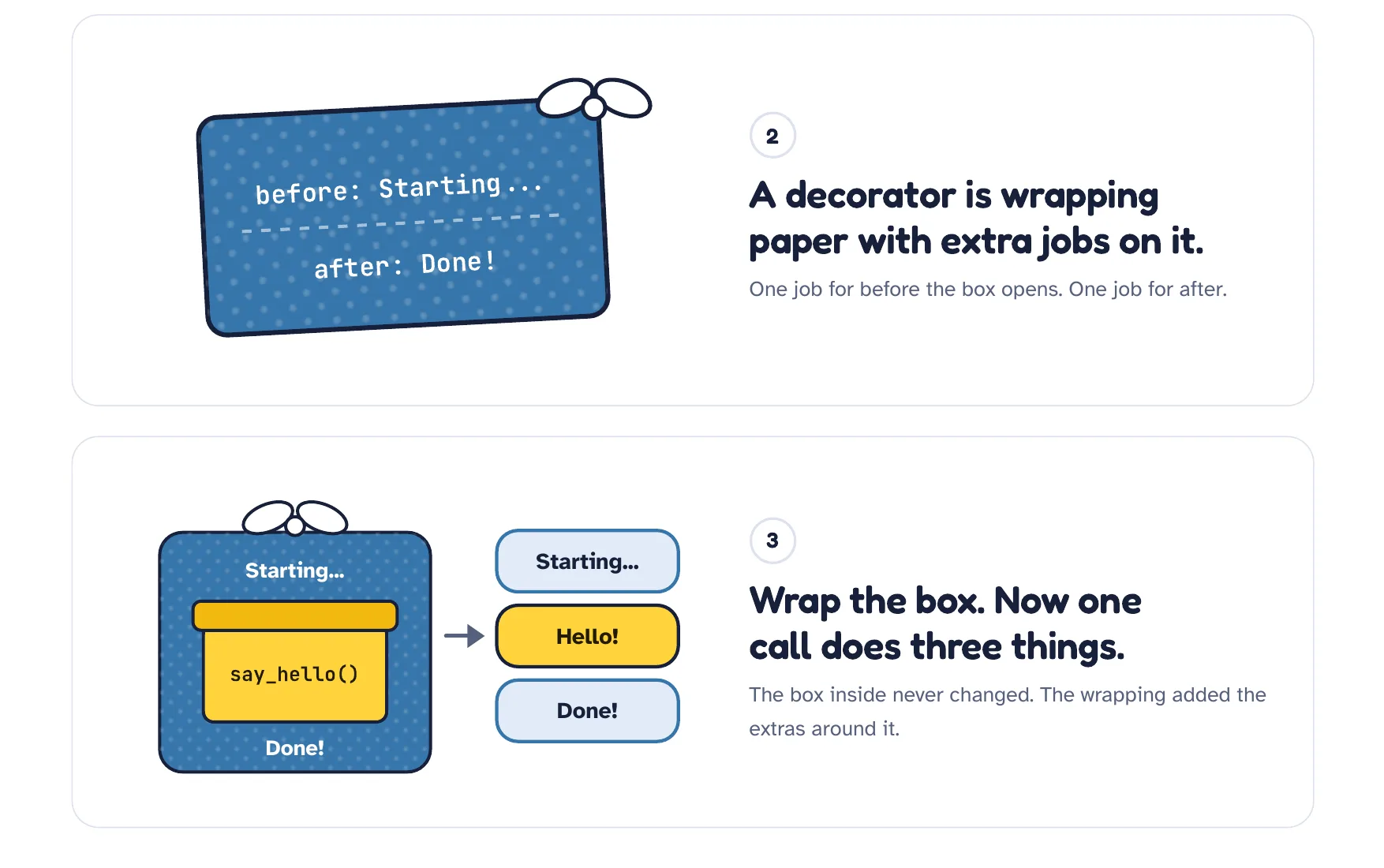
Decorators as Gift Wrap.pdf, the ELI5 page from class. Blue is the decorator, the wrap; yellow is your function, the gift.To explain decorators, the instructor also showed a skill: ELI5, "explain like I'm five", by DreambigOu, a creator's name, as the class said when a learner asked about it. The instructor is a fan of it: the point is to teach you how to fish, so that with it you can learn any concept in future.
- In Claude: ask Claude to clone the skill's repository, github.com/DreambigOu/ELI5, and it installs the skill into your local Claude.
- In Codex, Cursor, Windsurf or another tool: ask it to change the skill accordingly, or copy the skill file, SKILL.md, and use it directly.
Then call it with its command and a question. The class asked it to explain the decorator in Python with a simple example, and later used it for type conversion and for append versus extend. Does it take a lot of time and tokens, a learner asked? Yes: it takes a lot of tokens.
The answer: gift wrap. The skill answered with a page, which the instructor exported as a PDF into the repo: Decorators as Gift Wrap.pdf. Its one line: a decorator is gift wrap for a function. Blue is the decorator, the wrap; yellow is your function, the gift. A function is a box that does one job; a decorator is wrapping paper with extra jobs on it, so one call now does three things, Starting..., Hello! and Done!
The page uses a decorator called announce, with the same shape as file 85. Write the wrap once and use it everywhere, on any number of test cases. And pytest, if you work with it, has a lot of decorators ready to use.
A learner asked whether, as with TestNG, there is an XML file to use. No: the alternative to TestNG is pytest, and it comes later.
Type conversion: file 89
Type conversion changes a value from one type to another by calling a function: int() turns the string "10" into the number 10. File 89, the last in the decorator folder:
a = "10"
print(type(a))
a = int(a)
print(type(a))

# int(), str(), float(),
# bool(), list(), tuple(),set(), dict(),
# complex()
<class 'str'>
<class 'int'>
The functions the class listed: string, integer, float, bool, list, tuple, dictionary and complex. The comment at the end of the file writes them as int(), str(), float(), bool(), list(), tuple(), set(), dict() and complex().
Later, the class looked at the ELI5 page on type conversion. Two of its points: combine a whole number and a float, and Python quietly turns the whole number into 10.0, so that the math works; add a string and an integer with +, and Python gives a concatenation error, because a string cannot be added to an integer, which the class had seen before. The repo's README puts both side by side:
# implicit vs explicit: Python mixes numbers for you, never text and numbers
print(10 + 2.5)         # 12.5, the 10 becomes 10.0 on its own
# print("10" + 5)       # TypeError: can only concatenate str (not "int") to str
print(int("10") + 5)    # 15
12.5
15
Switch on its commented line and the run stops there, after the first print:
12.5
Traceback (most recent call last):
  File "<string>", line 3, in <module>
TypeError: can only concatenate str (not "int") to str
Lambda expressions: files 90 to 92
triple_number twice. The lambda keeps only the argument and the expression; the name comes from the variable it is stored in.A lambda, in the deck's words, is an anonymous function that returns some form of data. Its shape, also from the deck: lambda arguments: expression. File 90, in the new folder ex_13_Lambda_Exp, writes the same function both ways:
def triple_number(num):
    return num*3

print(triple_number(3))

result = lambda num: num*3
print(result(3))
9
9
triple_number(3) returns 3 times 3: 9. The lambda does the same in one line, with no function to write out, as the class put it: the keyword lambda, the argument, and after the colon the expression that return used to give back. result holds the lambda, and result(3) calls it.
A ternary? A learner said it looks just like a ternary. It looks like one, the instructor said, but it is not a ternary operator.
More arguments, file 91:
def mul(a, b):
    return a * b

mul_l = lambda a, b: a * b
print(mul_l(3, 4))

def sum_three_num(a, b, c):
    return a + b + c


op_f = lambda a, b, c: a + b + c
print(op_f(3, 4, 5))
12
12
3 times 4 is 12, and 3 + 4 + 5 is 12 too. The two def functions are there to compare with; the file never calls them.
With user input, file 92. The lambda answers Even if the number divides by 2, and Odd if it does not. A program that reads input runs from the terminal, not the run button, as the instructor reminded the class:
user_input = int(input("Enter the number"))
check_even_odd_f = lambda num: "Even" if num % 2 == 0 else "Odd"
result = check_even_odd_f(user_input)
print(result)

# Alternate in one line
print((lambda num: "Even" if num % 2 == 0 else "Odd")(int(input("Enter the number: "))))


import math
op2 = lambda: math.pow(int(input("Enter the number")), 2)
print(op2())
python3 chapter_15_Python_PyTest/ex_13_Lambda_Exp/92_UI_Lambda.py
The file asks three times. Typing 90, as in class, then 7, then 5:
Enter the number90
Even
Enter the number: 7
Odd
Enter the number5
25.0
- Line 2 is the lambda, and line 3 calls it with what you typed. The value passed in the call becomes the lambda's
num, which is how, a learner asked, the number is mapped to the user input. - Line 7 does it all in one line: the lambda in brackets is called on the spot with the
input(). Perfectly valid, the instructor said, but do not use it: it will confuse a lot of people. - Line 12, the class's power example, is a lambda with no arguments that squares the number with
math.pow.math.powreturns a float, so 5 gives 25.0.
Even and odd numbers, zero and a negative number, each typed at all three prompts:
| You type | Line 4 prints | Line 7 prints | Line 13 prints |
|---|---|---|---|
| 90 | Even |
Even |
8100.0 |
| 7 | Odd |
Odd |
49.0 |
| 0 | Even |
Even |
0.0 |
| -3 | Odd |
Odd |
9.0 |
Lists: indexing and changing items
The deck's definition: a list is an ordered collection that allows duplicates and supports modification. In Python we have a list instead of an array, as the instructor said, and lists come with ready-made functions such as append, extend, insert and remove.
File 93 opens the new folder, ex_14_LIST_TUPLE:
# List - Collection  of items
# grocery List - butter, bread, banana, paneer.
# 10th marks - 90,91,92, 78, 56

my_list = [1, 2, 3]  # Same type of data (int)
my_list2 = [1, True, "Pramod", 12.34]

print(my_list)
print(type(my_list)) # <class 'list'> , []
print(len(my_list))
print(my_list[0])
print(my_list[2])
# print(my_list[6]) # IndexError: list index out of range
[1, 2, 3]
<class 'list'>
3
1
3
A list can hold one type of data, like my_list, or mixed types, like my_list2: both work in Python. type() says list, len() counts 3 items, and indexes start at 0, so index 2 is the third item. Go beyond the last index and it fails. Line 13 switched on:
[1, 2, 3]
<class 'list'>
3
1
3
Traceback (most recent call last):
  File "chapter_15_Python_PyTest/ex_14_LIST_TUPLE/93_List.py", line 13, in <module>
    print(my_list[6]) # IndexError: list index out of range
          ~~~~~~~^^^
IndexError: list index out of range
Lists can change. Can we modify a list? Yes: 100% mutable, as the class said. File 94:
my_list = [1, 2, 3]

my_list[0] = "Pramod"
my_list[1] = "Dutta"
my_list[1] = "Dutta"

print(my_list)

for element in my_list:
    print(element)


# range() this also return the list
for i in range(1, 5):  # 1,2,3,4
    print(i)
['Pramod', 'Dutta', 3]
Pramod
Dutta
3
1
2
3
4
Index 1 is set twice to the same value, and only the latest value remains. Then two loops: over the list itself, and over range(1, 5), 1 to 4.
range() is not a list. The comment on line 13 says range() also returns a list. It returns a range object, which a for loop walks the same way; list() turns it into a list. The repo's README says so too.
print(range(1, 5))
print(type(range(1, 5)))
print(list(range(1, 5)))
range(1, 5)
<class 'range'>
[1, 2, 3, 4]
The list methods: files 95 to 97
File 95 goes through them one by one:
my_list = [1, 2, 3]
# Indexing
print("element at the index 0 - ", my_list[0])
print("element at the index 1 - ", my_list[1])
print("element at the index 2 - ", my_list[2])

my_list.append(4)
print(my_list)


my_list.append(5)
print(my_list)


# extend() - Append a new list
my_list.extend([7, 8, 10, 9])
print(my_list)


# insert()
my_list.insert(1,"Dutta")
print(my_list)
print(len(my_list))

my_list.insert(0, 0)
print(my_list)

my_list[1] = "Amit"
print(my_list)

my_list.remove("Amit")
print(my_list)

my_copy_list = my_list.copy()
print(my_list)
print(my_copy_list)

my_copy_list.remove("Dutta")

print(my_list)
print(my_copy_list)
element at the index 0 -  1
element at the index 1 -  2
element at the index 2 -  3
[1, 2, 3, 4]
[1, 2, 3, 4, 5]
[1, 2, 3, 4, 5, 7, 8, 10, 9]
[1, 'Dutta', 2, 3, 4, 5, 7, 8, 10, 9]
10
[0, 1, 'Dutta', 2, 3, 4, 5, 7, 8, 10, 9]
[0, 'Amit', 'Dutta', 2, 3, 4, 5, 7, 8, 10, 9]
[0, 'Dutta', 2, 3, 4, 5, 7, 8, 10, 9]
[0, 'Dutta', 2, 3, 4, 5, 7, 8, 10, 9]
[0, 'Dutta', 2, 3, 4, 5, 7, 8, 10, 9]
[0, 'Dutta', 2, 3, 4, 5, 7, 8, 10, 9]
[0, 2, 3, 4, 5, 7, 8, 10, 9]
| Line | Call | The list after it |
|---|---|---|
| 7 | my_list.append(4) |
[1, 2, 3, 4] |
| 11 | my_list.append(5) |
[1, 2, 3, 4, 5] |
| 16 | my_list.extend([7, 8, 10, 9]) |
[1, 2, 3, 4, 5, 7, 8, 10, 9] |
| 21 | my_list.insert(1,"Dutta") |
[1, 'Dutta', 2, 3, 4, 5, 7, 8, 10, 9], length 10 |
| 25 | my_list.insert(0, 0) |
[0, 1, 'Dutta', 2, 3, 4, 5, 7, 8, 10, 9] |
| 28 | my_list[1] = "Amit" |
[0, 'Amit', 'Dutta', 2, 3, 4, 5, 7, 8, 10, 9] |
| 31 | my_list.remove("Amit") |
[0, 'Dutta', 2, 3, 4, 5, 7, 8, 10, 9] |
| 34 | my_copy_list = my_list.copy() |
two equal lists, [0, 'Dutta', 2, 3, 4, 5, 7, 8, 10, 9] |
| 38 | my_copy_list.remove("Dutta") |
my_list keeps it; the copy is [0, 2, 3, 4, 5, 7, 8, 10, 9] |
appendadds one item at the end: 4, then 5.extendadds every item of another list, one by one.insert(1,"Dutta")puts"Dutta"at index 1 and moves the rest along, so the length is now 10. A learner asked which argument is the index: the first one; the second is the value.my_list[1] = "Amit"replaces the item at index 1, andremove("Amit")takes that value out again.copy()makes a second list: removing"Dutta"from the copy leavesmy_listalone, as the last two lines show.
The comment on line 15 calls extend() "Append a new list", but the output shows it adds the items one by one, not the list as one item. That difference came up in class.
append versus extend. A learner asked about it, and the class put the question to the ELI5 skill. Its answer: append adds one thing, extend adds each thing. From the list 1, 2, 3, append 7 and 8 and they land at the end in one row; extend them and they go in individually:
append adds one thing, extend adds each thing.my_list = [1, 2, 3]
my_list.append([7, 8])
print(my_list, len(my_list))
my_list = [1, 2, 3]
my_list.extend([7, 8])
print(my_list, len(my_list))
[1, 2, 3, [7, 8]] 4
[1, 2, 3, 7, 8] 5
Whenever you want to add individual elements, you have to use extend, as the class put it.
Sorting. The deck's example, with index, count and both sort orders:
numbers = [10, 20, 30, 20, 40]
print(numbers.index(20))

print(numbers.count(20))

numbers.sort()
print(numbers)

numbers.sort(reverse=True)
print(numbers)
1
2
[10, 20, 20, 30, 40]
[40, 30, 20, 20, 10]
sort() sorts the list in place, smallest first, and sort(reverse=True) largest first. Will sorting work on a mixed list, a learner asked? No, the instructor said: it will only work for normal data types, not mixed ones. The mixed list from file 93 shows it:
my_list2 = [1, True, "Pramod", 12.34]
my_list2.sort()
Traceback (most recent call last):
  File "<string>", line 2, in <module>
TypeError: '<' not supported between instances of 'str' and 'bool'
pop and clear, file 96:
squares = [1, 4, 9, 16, 25]

print(squares)
print(squares.pop()) # Remove and return item at index (default last)

print(squares)
print(squares.pop(1))
print(squares)

squares.clear()
print(squares)
[1, 4, 9, 16, 25]
25
[1, 4, 9, 16]
4
[1, 9, 16]
[]
pop() removes and returns the item at an index, by default the last one, so it prints 25. pop(1) removes the item at index 1, which is 4. clear() empties the list.
pop takes an index, remove takes a value. squares.pop(1) removed 4, the item at index 1, not the number 1. To remove by value, use remove(), as file 95 does with remove("Amit").
An interview question, from file 97. Work it out before you open the answer:
Interview question, file 97. With numbers = [10, 20, 30, 20, 40], what do numbers.index(20) and numbers.count(20) print?
Show the answer
Answer. 1 and 2. index(20) gives the position of the first 20, which is index 1; count(20) counts how many 20s there are: two.
File 97:
numbers = [10, 20, 30, 20, 40]
print(numbers.index(20))
print(numbers.count(20))

# Nested Lists
matrix = [[1,2,3], [4,5,6], [7,8,9]]
print(matrix[1][2])

# max() / min() / sum() Works for numerical lists.
print(max(numbers))  # 40
print(min(numbers))  # 10
print(sum(numbers))  # 120
1
2
6
40
10
120
Hover over count in VS Code and it tells you what it does, as the class showed. A list inside a list is a nested list: matrix[1][2] takes row 1, then position 2 in that row, which is 6. And max(), min() and sum() work on a list of numbers: 40, 10 and 120.
Tuples: files 98 to 100
The deck: a tuple is a collection of ordered and immutable (unchangeable) items. Its elements have a fixed position, cannot be changed after creation, and may repeat. A tuple is also a collection, as the class put it, but immutable: it allows duplicates, but its items cannot change. It is written in round brackets. File 98 tries to change one:
my_tuple = (1, 2, 3)
print(my_tuple)
my_tuple[0] = 12
print(my_tuple)
(1, 2, 3)
Traceback (most recent call last):
  File "chapter_15_Python_PyTest/ex_14_LIST_TUPLE/98_Tuple.py", line 3, in <module>
    my_tuple[0] = 12
    ~~~~~~~~^^^
TypeError: 'tuple' object does not support item assignment
The tuple will not allow it, and the file stops at line 3. As a list, with square brackets, the same change is allowed, as the class showed:
[1, 2, 3]
[12, 2, 3]
That is the only difference, the instructor said when a learner asked why we need tuples: a tuple does not allow change.
File 99: a tuple can mix types, and a tuple with one element needs a comma:
info = ("Pramod", 34, True, 9.8)
print(info)

#Tuple with One Element
single=  (3,)
print(type(single))
('Pramod', 34, True, 9.8)
<class 'tuple'>
The comma is what makes it a tuple. Without it, (3) is just the number 3 in brackets, as the repo's README warns:
print(type((3)))
print(type((3,)))
<class 'int'>
<class 'tuple'>
Where to use a tuple. File 100, which got a congratulations in class for being lab 100:
# Real case, where we Tuples
API_URLSs = ("https://sdet.live/python0x", "https://awesomeqa.com", "https://thetestingacademy.com")
print(API_URLSs[0])
print(API_URLSs[1])

# Real of Tuples
my_tuple = ("tta.com", "sdet.live")
print(my_tuple)
my_api_list = list(my_tuple)


shopping_list_wife = ["bread", "butter", "paneer"]
shopping_list_wife[2] = "milk"
print(shopping_list_wife)


t = tuple()
print(t)

l = list()
print(l)
https://sdet.live/python0x
https://awesomeqa.com
('tta.com', 'sdet.live')
['bread', 'butter', 'milk']
()
[]
- API URLs that do not change go in a tuple,
API_URLSs, as the class said. - A shopping list goes in a list, because it keeps changing: line 13 swaps paneer for milk.
list(my_tuple)converts a tuple into a list, andtuple()andlist()with nothing inside make empty ones.
Tuple interview question, file 100. Where would you use a tuple and not a list?
Show the answer
Answer. For values that must not change, such as the API URLs in file 100: a tuple refuses any change, as file 98 shows. Data that keeps changing, such as the shopping list, belongs in a list.
Tasks and announcements
- A mandatory Python test, in class. The class ended with a live test: the Python fundamentals test, 45 minutes, which everyone had to do right then, in the session; it could not be skipped. After the test come two QA battles: the first is a login battle, 5 minutes at most, and the second is about testing a RAG pipeline, with three questions. The battles need a LinkedIn login.
- Where to find them. The test link and the instructions, with both battle links, were shared during the class. When you are done, post your scores, as the instructor asked.
- Next class, tomorrow, Sunday 1 November: dictionaries, sets and object-oriented programming (OOPS) in Python, and finishing Python.
The Python fundamentals test. 45 minutes, mandatory, done in the class itself, before the two battles.
QA battle 1, the login battle. 5 minutes at most. You sign in with LinkedIn.
QA battle 2, RAG pipeline testing. Three questions. Then post your scores.