What this class covered
- Defining and calling a function, and parameters versus arguments
- The four types of functions
- return versus console.log
- Template literals inside a function
- Function expressions
- Arrow functions
- A real example: checking a status code
- The IIFE
- Rest and spread with functions
- Several returns, and a function that only logs
- var versus let versus const
- Tasks, and what comes next
What a function is
Arrays are done: the last class reached lab 100. Today's chapter is functions, and with it a promise kept, the difference between var, let and const.
A function is a reusable block of code that performs a specific task. Instead of repeating the logic, you define it once and call it whenever it is needed. Functions exist in most programming languages, and JavaScript, as the class put it, is all about functions. The kinds on the list: built-in and user-defined, the four types of user-defined function, default parameters, anonymous functions, arrow functions, the IIFE, higher-order functions and recursive functions. Today covers most of them.
Two things to remember: you define a function, then you call it.
- The definition: the
functionkeyword, a name, the parameters in brackets, and the code to run in curly braces. - The call: the name with the arguments in brackets. A function either returns a value or does not.
Lab 101:
// Fn Defination
function greet(){
    console.log("Hi");
}

// Fn Calling
greet();
Hi
A definition on its own does nothing: take away the call, and nothing prints. The class tried the call above the definition too, and it still works:
greet();

function greet(){
    console.log("Hi");
}
Hi
JavaScript is lenient about this, as the class put it. A function declaration is set up before any line runs, which is called hoisting, one of next class's topics.
Two questions came up. Can a function be called from another file? Yes, by exporting it, which comes later. Is a JavaScript function the same as a Java method? Not exactly: a function is standalone code. That difference comes later too.
Parameters and arguments
The names in the definition are parameters. The values in the call are arguments. Some people use the two words for the same thing. They are not: parameter when you define, argument when you call. It is an interview question.
The four types
User-defined functions come in four types, from two questions: does the function take parameters, and does it return a value?
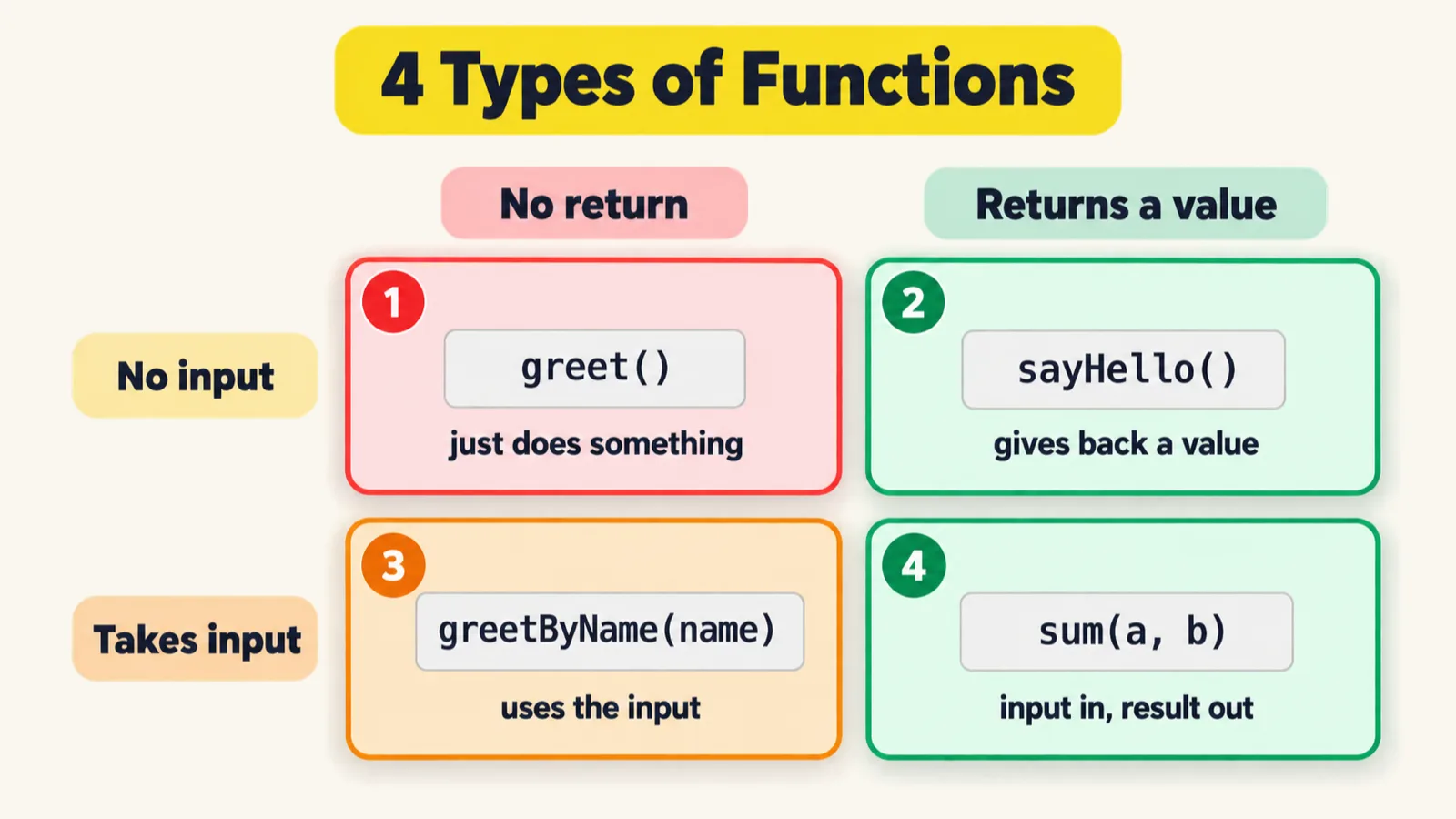
| Type | Parameters | Return | File |
|---|---|---|---|
| 1 | none | none | 102 |
| 2 | none | a value | 103 |
| 3 | yes | none | 104 |
| 4 | yes | a value | 105 |
90% of the time you will use type 3 and type 4, the instructor said.
Type 1, no parameters and no return. Lab 102:
// Type 1 - No param / argument, No Return -> final retunr undefined.


// Fn Define
function greet(){
  console.log("Hello, TheTesting Academy");
}

// Fn Calling
greet()


greet()
greet()
greet()


function openBrowser(){
    console.log("Open Browser");
    // open the brower
}

openBrowser();


let msg = greet(); // undefined there is not return.
console.log(msg);
Hello, TheTesting Academy
Hello, TheTesting Academy
Hello, TheTesting Academy
Hello, TheTesting Academy
Open Browser
Hello, TheTesting Academy
undefined
greet() is called four times and prints four times: that is reusability. openBrowser() is the same idea with an automation name. The last line stores the result of a call to a type 1 function, and prints undefined, because greet returns nothing.
Type 2, no parameters but a return. Lab 103:
// Type 2 Functions

// So no argument/parameter but return type.

function sayHello(){
    return "Hello";
}

let msg = sayHello();
console.log(msg);
Hello
return "Hello" sends the value back to the line that called the function, so msg holds Hello.
Type 3, parameters but no return. Lab 104, with the names passed in shown as placeholders:
// Type 3 =  with argument/parameter but no return type.

function greetByName(name){
    console.log("Hi", name);
}

greetByName("Pramod");
greetByName("studentA");
greetByName("Meeti");
greetByName("studentB");

let name1 = greetByName("studentC");
console.log(name1);
Hi Pramod
Hi studentA
Hi Meeti
Hi studentB
Hi studentC
undefined
Each call passes a different name and the function prints it. It returns nothing, so name1 is undefined.
Type 4, parameters and a return. Lab 105:
// Type 4 - With arg/ With return

function sumOfTwoNumbers(a,b){
    return a+b;
}

let c = sumOfTwoNumbers(4,5);
console.log(c);
console.log(sumOfTwoNumbers(4,5));
9
9
4 goes to a, 5 goes to b, a+b is 9, and the 9 comes back into c. The last line prints the call directly, without storing it first: the same 9.
return versus console.log
A common confusion, the class said: console.log only prints a message to the terminal. return sends a value back to the line that called the function. A function that only prints gives back nothing, and the variable that stores its result holds undefined, as in labs 102 and 104.
return carries the result back. Without a return, the call gives undefined.Template literals inside a function
Template literals, from an earlier class, work inside a function too. Lab 106:
function greet(name){
    return `Hello, ${name}`;
}

let op = greet('Alice');
console.log(op);
Hello, Alice
The backticks and ${name} put the argument straight into the returned string.
Function expressions
Now a function without a name, an anonymous function, assigned to a variable. That is a function expression. Lab 107, with the name passed in shown as a placeholder:
// Function as Expression

function greet(name){
    return `Hello, ${name}`;
}

// Anonymous Fn - Fn without name.
const greet1 = function (name){
    return `Hello, ${name}`;
}

console.log(greet1("studentD"));
console.log(greet("studentD"));
Hello, studentD
Hello, studentD
The two functions do the same thing. The name moved: from after function to the variable on the left. It can be const, let or var. In class the file first printed nothing, because the calls were not inside console.log: a function that returns a value still needs printing.
Arrow functions
The arrow function shortens it again. From the comment in lab 108: remove the keyword function, remove the keyword return, remove the curly braces, and use the arrow, =>.
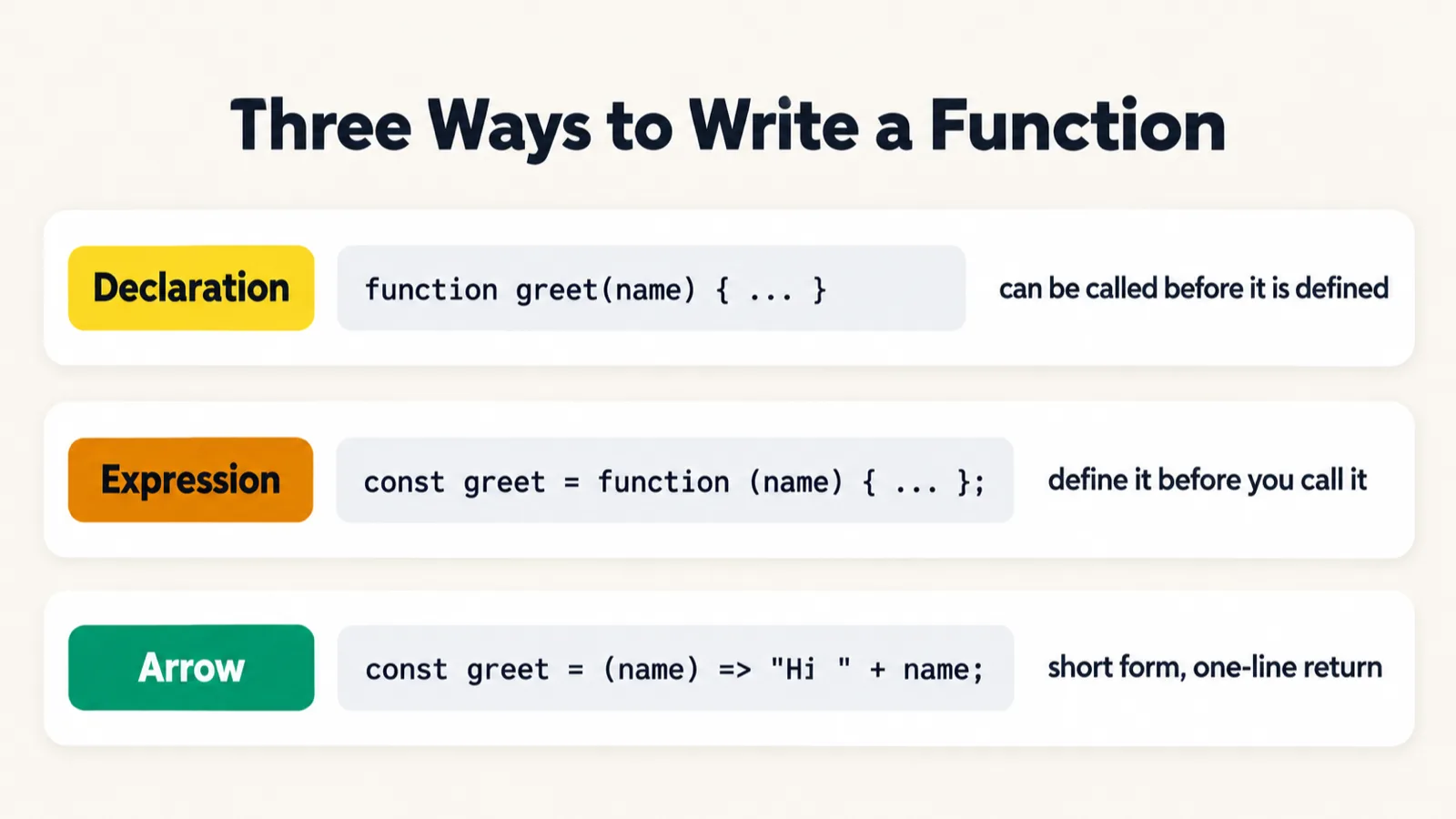
function greet(name){
    return `Hello, ${name}`;
}

const greet1 = function(name){
    return `Hello, ${name}`;
}

// Arrow Fn
const greet2 = (name2) => `Hello, ${name2}`;
// If you want to make a normal function to arrow function.
// Remove the keyword function, remove the keyword return, remove the curly braces, and use the =>
All three are the same function, written three ways. Lab 108 and lab 109 only define them, so neither prints anything. The brackets around a single parameter are optional.
The class converted one more, doubleMe, in lab 110_Fn:
function doubleMe(a){
    return a*2;
}

const doubleMeA = (a) => a*2;

doubleMe(2)
doubleMeA(2);
It prints nothing: both calls work out 4 and throw it away. With the two calls wrapped in console.log:
console.log(doubleMe(2));
console.log(doubleMeA(2));
4
4
Several lines. An arrow function with more than one line keeps its curly braces, and then it needs return. Lab 110_Arrow_Multiple:
//Mutiline
const getResult = (score) => {
    if(score > 70) return "Pass";
    return "fail";
}


console.log(getResult(78));
console.log(getResult(43));
Pass
fail
78 is above 70, so Pass; 43 is not, so fail.
Why three ways to write one function? The instructor's answers: to cut the number of lines, and because AI coding agents such as Claude Code mostly write the short forms, the arrow above all, since shorter code means fewer tokens. You will read all three, so learn all three.
A real example: checking a status code
In API testing you check the status code of a response. Lab 112 writes the same check three ways: a normal function, a function expression and an arrow function.
function validateStatusCode(status){
    if(status >= 200 && status <=300){
        console.log("Request is fine!");
    }
}
const validateStatusCode_Exp = function(status){
    if(status >= 200 && status <=300){
        console.log("Request is fine!");
    }
}
const validateStatusCode_Arrow = (status) => {
     if (status >= 200 && status <= 300) {
        console.log("Request is fine!");
    }
}
validateStatusCode(200);
validateStatusCode_Exp(200);
validateStatusCode_Arrow(200);
Request is fine!
Request is fine!
Request is fine!
All three accept 200. Run the check at the edges of the range and one value is off:
| Status | Lab 112, status <=300 |
With status < 300 |
|---|---|---|
| 199 | nothing | nothing |
| 200 | Request is fine! |
Request is fine! |
| 299 | Request is fine! |
Request is fine! |
| 300 | Request is fine! |
nothing |
| 301 | nothing | nothing |
300 is not a success. Success codes are 200 to 299; 300 starts the redirect range. status <=300 lets 300 through, and the repo's README points this out too. Lab 115, from the same class, writes the range as code >= 200 && code < 300, which is right.
The IIFE: a function that runs itself
An IIFE, an immediately invoked function expression, needs no separate call. Wrap an anonymous function in brackets, then add () straight after: it runs as soon as it is defined. Lab 113:
//Immediately Invoked Function Expression (IIFE)
//They don't need to be called.


// function name1() {
//     console.log("Hi")
// }
// name1();


// (function(){
//     console.log("Anonymous Fn");
// })();

// (function () {
//     console.log("Staging")
// })();


(() => {
    console.log("Setup complete");
})();
Setup complete
The arrow version is the one switched on. The class first wrote a normal function, then the same idea with function. With every commented block switched on:
Hi
Anonymous Fn
Staging
Setup complete
The function has no name, yet it runs itself. It looks scary, the class admitted, but it saves code. Sometimes it is useful, as for one-time setup code like Setup complete, and sometimes it is not.
Rest and spread with functions
hasError takes any number of codes. some stops at the first match.The class recalled spread, the three dots that unpack an array. The first example in lab 114 passes an array to a function with three parameters:
// function add(a, b, c) {
//     return a + b + c;
// }

// let num = [1, 2, 3, 5];
// console.log(add(...num));
Switched on, it prints:
6
...num turns [1, 2, 3, 5] into four arguments, and add takes the first three: 1 + 2 + 3 is 6. The 5 is ignored.
The live part of the file:
function hasError(...codes) {
    return codes.some(c => c >= 400);
}

let responseCodes = [200, 201, 404];
let responseCodes2 = [200, 201, 404, 500];
hasError(...responseCodes);
As pushed it prints nothing: the result of hasError is never printed. With both arrays printed:
console.log(hasError(...responseCodes));
console.log(hasError(...responseCodes2));
true
true
Pass three codes and it works with three; pass four and it works with four. some, from the arrays chapter, answers true when at least one item passes the test. Logged to show each check:
function hasError(...codes) {
    console.log(codes);
    return codes.some(c => {
        console.log(c, c >= 400);
        return c >= 400;
    });
}

console.log(hasError(...[200, 201, 404]));
[ 200, 201, 404 ]
200 false
201 false
404 true
true
| Code | The test | What some does |
|---|---|---|
| 200 | 200 >= 400 is false |
keep looking |
| 201 | 201 >= 400 is false |
keep looking |
| 404 | 404 >= 400 is true |
found one: some stops and returns true |
Rest in the definition, spread at the call. The class called both spread. In the call, hasError(...responseCodes) spreads the array into separate arguments. In the definition, ...codes does the opposite job: it is a rest parameter, and collects whatever arrives into one array, which is why console.log(codes) prints an array. The repo's README names them the same way, and the last class's page has the same pair in destructuring.
So many kinds of function: how do you remember them all? The answer from class: practise, and put your code on your GitHub profile.
Several returns, and a function that only logs
A function can have several return statements, one per branch. Lab 115:
function getStatus(code) {
    if (code >= 200 && code < 300) {
        return "Success";
    } else if (code >= 400 && code < 500) {
        return "client error";
    } else if (code >= 500) {
        return "server error";
    } else {
        return "unknown";
    }
}

console.log(getStatus(200));
console.log(getStatus(404));
console.log(getStatus(500));
Success
client error
server error
The first return that runs ends the function. In class the three calls first sat on their own lines and printed nothing: calling a function does not print its result. console.log is what prints.
A function can also exist only to log. Lab 116:
// Returns nothing → undefined
function logTest(name) {
    console.log(`Running: ${name}`);
    // no return statement
}


logTest("open Browser!!");
//....
logTest("do something Browser!!");
//....
logTest("closing Browser!!");
Running: open Browser!!
Running: do something Browser!!
Running: closing Browser!!
It returns nothing, so a stored result would be undefined, and that is fine: its job is the log line for each step, open the browser, do something, close it. A proper logger, Winston from npm, comes with the framework.
var, let and const
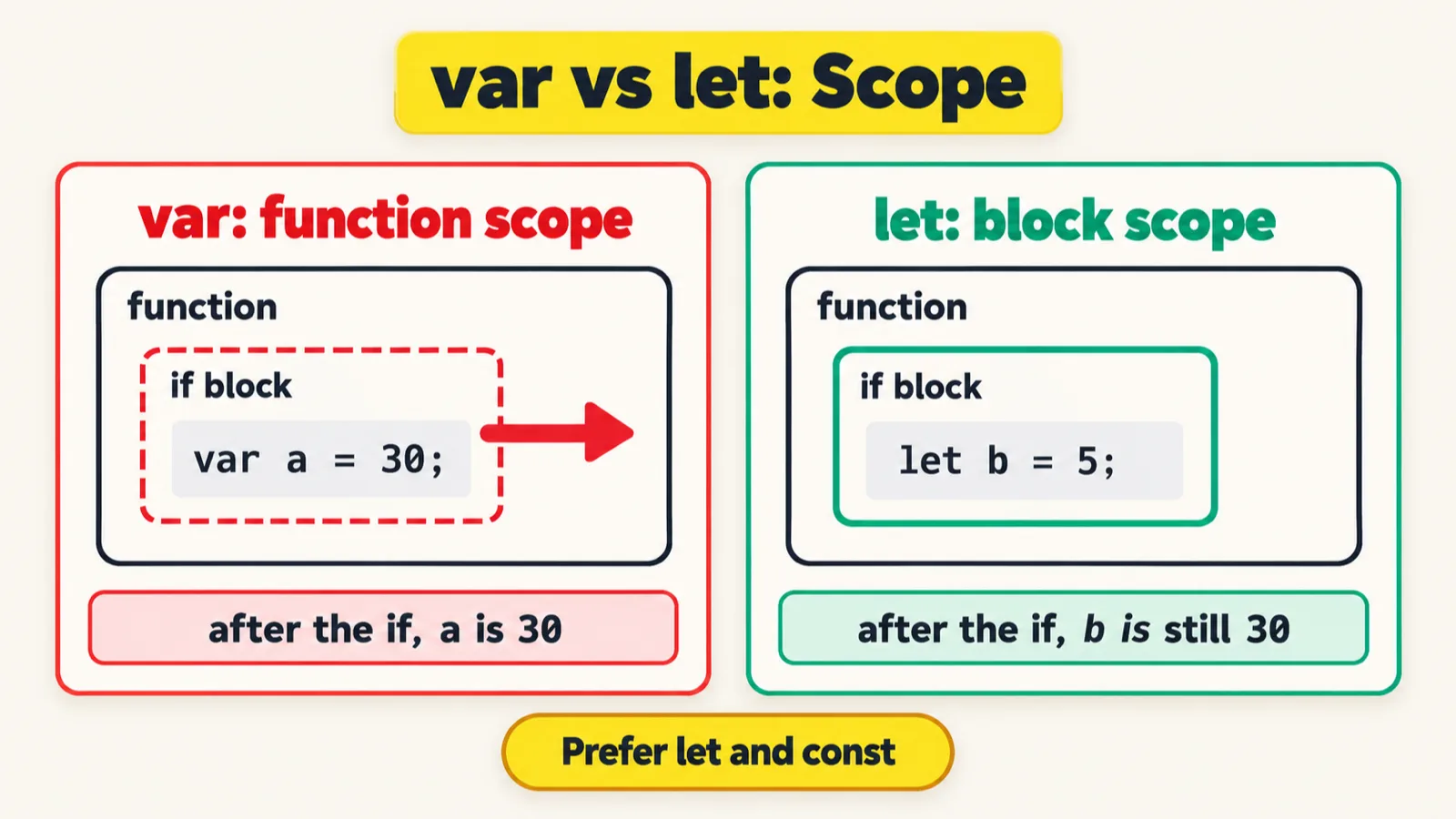
The question the batch has asked since day one. Lab 117 opens chapter 14:
var a = 10;
let l = 10;
const c = 10;

console.log(a);
console.log(l);
console.log(c);
10
10
10
Used like this, the three look the same. The difference shows inside functions and blocks. The class's line to remember: var is a traitor, a cheater; let is a sincere person; const is just constant, it will not change.

var declared inside an if block slips out of the block into the whole function; a let stays inside the block.var is function-scoped. Lab 118:
// var is actual traitor - cheator
// let is sincere person
// const is just const which will not change.

// VARIABLE - Fn Scoped

var a = 10;
console.log(a); // 10
function printHello() {
    console.log("Hello TheTestingAcademy");
    var a = 20;
    console.log(a);
    if (true) {
        var a = 30;
        console.log(a);
    }
    console.log(a);
}

printHello();
10
Hello TheTestingAcademy
20
30
30
The class expected the last line to print 20: the 30 was set inside the if block, so it should have stayed there. It prints 30. A var ignores blocks: the var a = 30 inside the if is the same a as the function's var a = 20, so the change leaks out of the block. That is the cheating.
A learner then asked what a holds after the call, and the class left it to try. With console.log(a) added after printHello():
10
Hello TheTestingAcademy
20
30
30
10
10: the global a was never touched. The function's var a is the function's own, so var leaks out of a block, but not out of a function.
| Line | Code | Which variable | Prints |
|---|---|---|---|
| 7 and 8 | var a = 10; then console.log(a) |
the global a |
10 |
| 10 | console.log("Hello TheTestingAcademy") |
none | Hello TheTestingAcademy |
| 11 and 12 | var a = 20; |
a new a, the function's own |
20 |
| 14 and 15 | var a = 30;, inside the if |
the function's a again: var ignores the block |
30 |
| 17 | console.log(a), after the if |
the function's a, now 30 |
30 |
| added | console.log(a), after the call |
the global a, never touched |
10 |
let is block-scoped. Lab 119, the same shape with let:
let b = 20; // Global Scope
console.log(b); //  20

function printHello(){
        console.log("Hello TheTestingAcademy!");
        let b = 30; // Local Scope
        console.log(b); // 30
        if(true){
            let b = 5;
            console.log(b); // 5
        }
        console.log("let ->",b);   // 30
}

printHello();
20
Hello TheTestingAcademy!
30
5
let -> 30
The let b = 5 inside the if is a new b that exists only inside that block. When the block ends it is gone, and the function's b is still 30. With console.log(b) added after the call, the last line is the global b:
20
Hello TheTestingAcademy!
30
5
let -> 30
20
| Line | Code | Which variable | Prints |
|---|---|---|---|
| 1 and 2 | let b = 20; |
the global b |
20 |
| 5 | console.log("Hello TheTestingAcademy!") |
none | Hello TheTestingAcademy! |
| 6 and 7 | let b = 30; |
a new b, the function's own |
30 |
| 9 and 10 | let b = 5;, inside the if |
a new b, only inside the if |
5 |
| 12 | console.log("let ->", b), after the if |
the function's b, still 30 |
let -> 30 |
| added | console.log(b), after the call |
the global b, never touched |
20 |
var ignores the if block, so its a = 30 overwrites the function's a. let makes a new b for the block. Neither leaks out of the function.const cannot be reassigned. Lab 120:
const pi = 3.14;
console.log(pi);

// pi = 3.14159;
3.14
Switch on the commented line and the file stops at it:
3.14
120_Const.js:5
pi = 3.14159;
   ^

TypeError: Assignment to constant variable.
Once assigned, a const cannot be given a new value. The rule from class: never use var. Use let, and const for values that never change.
In the recording, var often comes out as "where" or "variable": both mean the keyword var.
Tasks and announcements
- Today's task: practise every exercise up to 120. Meeti adds the task.
- The coding exercises: finish the pending array exercises too. The instructor will take those questions together in a later class.
- Recordings and email notifications are late. The plan on the video platform was paid a week ago but has not been renewed by the provider yet. The videos are intact, the class link stays the same, and today's recording follows once it is fixed, in a few hours.
- Doubts go in the doubt thread.
- Next class: higher-order functions, callbacks, recursion, hoisting and the temporal dead zone (TDZ), the items marked red on the instructor's functions diagram. Then multi-dimensional arrays.
- The push. Files 101 to 120 and three cheat-sheet images went up to the batch repo as the class ended.
Task. Practise every exercise up to 120, and put them on your GitHub profile.
Interview questions. What is the difference between a parameter and an argument? What does a function without return give back? Convert function doubleMe(a) { return a*2; } to an arrow function. Why does lab 118 print 30 after the if block, and what would let print there?