What this class covered
- What an array is: ordered, zero-indexed, mutable, dynamic, and an object to typeof
- Indexes and at(): negative indexes, and undefined instead of an error
- Four ways to create an array, and the one used 90% of the time
- Reading and changing items by index
- push and pop, unshift and shift
- splice: remove, insert and replace anywhere
- A real example: a browser list
- Searching: indexOf, lastIndexOf and includes
- find, findIndex, findLast and findLastIndex, and a first look at the arrow
- Five ways to loop over an array, and the two the batch will use
- map and filter
- Tasks: research map versus filter
What an array is
What is an array? The answers in chat: it stores the same type of data, a collection of similar items, homogeneous data. That is the picture from languages like Java. JavaScript's arrays are looser. From the class notes:
- Arrays are ordered collections of values.
- JavaScript arrays are dynamic and can hold mixed types.
- An ordered, zero-indexed, mutable collection.
typeof []is"object": useArray.isArray()to check.
The first example, the same in the notes and the repo:
const browsers = ["chrome", "firefox", "webkit"];
console.log(browsers[0]);          // chrome
console.log(browsers.at(-1));      // webkit  (negative index)
console.log(browsers.length);      // 3
chrome
webkit
3
Index 0 is the first item, at(-1) is the last one, and length counts the items: 3.
const or let? The class reached for const so that the values would not change, then added that arrays are mutable and that let works just as well. Both are right, once you know what const fixes: the variable, not the array. A const array can never be swapped for a different array, but its items can still change, as the repo's README notes.
Mixed types are fine. And JavaScript has no separate list type: a list is a Python idea.
let testResults = ["pass", "fail", "pass", "skip"];
let mixed = [1, "hello", true, null];
It prints nothing. It only shows that one array can hold a number, a string, true and null side by side.
Indexes and at(): negative indexes and undefined
let fruits = [];
console.log(typeof fruits);

let browsers = ["chrome", "firefox", "webkit"];
console.log(browsers.length);

// console.log(browsers.at(0));
console.log(browsers[0]);
// console.log(browsers[-1]);

console.log(browsers.at(-1));
object
3
chrome
webkit
An empty array is still an object to typeof. Switch on the two commented lines and run it again:
object
3
chrome
chrome
undefined
webkit
browsers.at(0) is chrome, the same as browsers[0]. But browsers[-1] is undefined: square brackets do not count from the end. Only at() supports a negative index. Remember it, because it is an interview question. Why have negative indexes at all? Another language, Python, has them, so JavaScript added them too, through at().
Past the end:
let arr = [10,20,30,40];
console.log(arr.length);

console.log(arr[4]);
console.log(arr.at(4));
4
undefined
undefined
The array has 4 items, at indexes 0 to 3. Index 4 holds nothing, so both arr[4] and arr.at(4) give undefined. No exception, no error: just undefined.
at() also counts from the end. A position with nothing in it gives undefined, never an error.Four ways to create an array
let browsers = ["Chrome", "Firefox", "Safari"];

let scores = new Array(3);  // creates [empty x 3]
scores[0] = "1";

let scores2 = new Array(1, 2, 3);

let numbers = new Array(100, 200, 300, 400);


let test = Array.of(10, 20, 30, 40, 50);
console.log(test.length);

// Array.from()
let chars = Array.from("hello");
// ["h", "e", "l", "l", "o"]
5
Only one value is printed: Array.of(10, 20, 30, 40, 50) holds 5 items. The four ways in the file:
- The literal,
["Chrome", "Firefox", "Safari"]. The most famous way, used 90% of the time. - new Array(...). With one number, the number is the length:
new Array(3)makes an array of 3 empty slots, as the comment says. ("What is the 3?" was a question in class: the length.) With several values, as innew Array(1, 2, 3), you get those values. - Array.of(...) holds exactly the values you pass.
- Array.from(...), which the class used to turn a string into an array of its characters:
Array.from("hello")gives h, e, l, l, o. The repo's README adds that it takes anything iterable.
The verdict: the literal, almost always. The others are rarely used.
Reading and changing items
// Accessing & Modifying

let statuses = ["pass", "fail", "skip"];

console.log(statuses[0]);
console.log(statuses[2]);

console.log(statuses.at(-1));
console.log(statuses.at(-2));
console.log(statuses.at(-4));

// Modify
statuses[1] = "blocked";
console.log(statuses);

console.log(statuses.length);
pass
skip
skip
fail
undefined
[ 'pass', 'blocked', 'skip' ]
3
| Expression | Gives |
|---|---|
statuses[0] |
pass |
statuses[2] |
skip |
statuses.at(-1) |
skip |
statuses.at(-2) |
fail |
statuses.at(-4) |
undefined |
statuses, after statuses[1] = "blocked" |
[ 'pass', 'blocked', 'skip' ] |
statuses.length |
3 |
statuses[1] = "blocked" changes the array in place: fail is gone, and the length is still 3. That is what mutable means: the values can be changed.
An array's length is not fixed. Asked whether you could create an empty array and put a value at index 4, the class answered no: an array has a fixed size, and a new length needs a new array. That is true in Java, not in JavaScript. JavaScript arrays are dynamic, as the class notes say and as push shows in the next section. let arr = []; arr[4] = "x"; works: the length becomes 5, and the four slots in front of the value stay empty. Node prints the array as [ <4 empty items>, 'x' ].
push and pop, unshift and shift
Arrays come with methods for adding and removing items. The first part of file 84:
let arr = [1,2,3];
console.log(arr);

// Add to END
arr.push(4);
console.log(arr);

// Remove from END
arr.pop();
console.log(arr);

arr.push(5, 6);
console.log(arr);

// Add to BEGINNING
arr.unshift(0);
console.log(arr);

// Remove from BEGINNING
arr.shift();
console.log(arr);
The first six lines of its output:
[ 1, 2, 3 ]
[ 1, 2, 3, 4 ]
[ 1, 2, 3 ]
[ 1, 2, 3, 5, 6 ]
[ 0, 1, 2, 3, 5, 6 ]
[ 1, 2, 3, 5, 6 ]
| Line | What it does | The array after it |
|---|---|---|
let arr = [1,2,3]; |
creates the array | [ 1, 2, 3 ] |
arr.push(4); |
adds 4 to the end | [ 1, 2, 3, 4 ] |
arr.pop(); |
removes the last item, the 4 | [ 1, 2, 3 ] |
arr.push(5, 6); |
adds 5 and 6 to the end | [ 1, 2, 3, 5, 6 ] |
arr.unshift(0); |
adds 0 at the beginning | [ 0, 1, 2, 3, 5, 6 ] |
arr.shift(); |
removes the first item, the 0 | [ 1, 2, 3, 5, 6 ] |
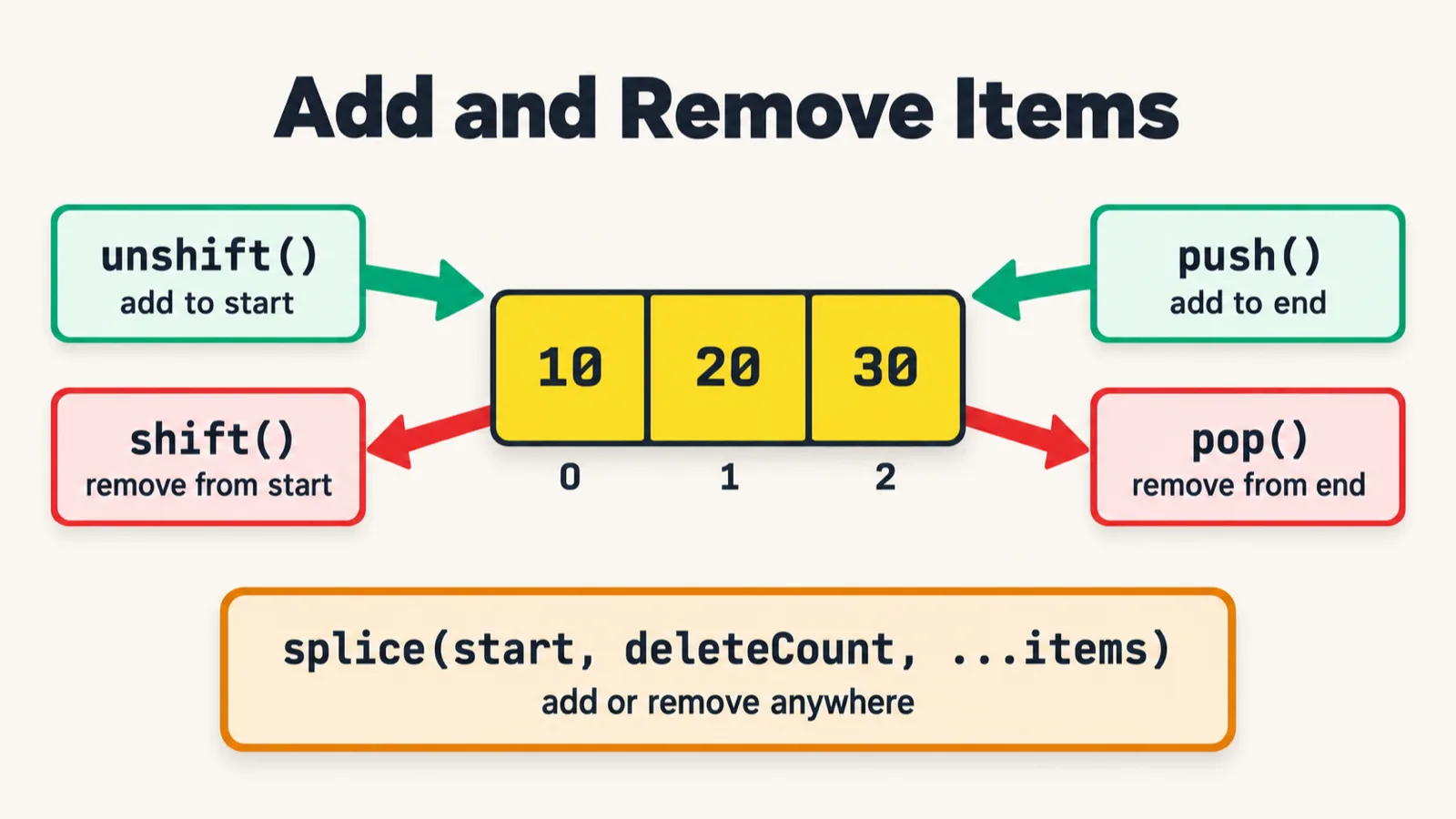
- push adds to the end. Hover over it in VS Code and the description says it appends new elements to the end of an array and returns the new length. You can push several items at once, as in
push(5, 6). - pop removes from the end. On an empty array it returns
undefined. - unshift adds to the beginning.
- shift removes from the beginning, and returns the item it removed.
All four change the same array in place. (In class, push was described as making a new array behind the scenes. It does not: it changes the existing array and returns its new length.) So is a JavaScript array dynamic? Yes, by default: push and pop change its length.
splice: remove, insert and replace
Then splice, which looks like slice but is something else. Hover over it and the description says: it removes elements from an array and, if necessary, inserts new elements in their place, returning the deleted elements. Its parameters are start, the index to start at; deleteCount, how many items to remove; and then any items to insert.
// [ 1, 2, 3, 5, 6 ]
arr.splice(2,1);
console.log(arr);

arr.splice(2, 0, 99);
// arr.splice(2, 1, 99);
// arr.splice(2, 2, 99);
console.log(arr);

// [ 1, 2, 99, 5, 6 ]
arr.splice(1, 2, 10, 20);
console.log(arr);
The rest of the output:
[ 1, 2, 5, 6 ]
[ 1, 2, 99, 5, 6 ]
[ 1, 10, 20, 5, 6 ]
| Call | Start at | Removes | Inserts | The array after it |
|---|---|---|---|---|
arr.splice(2,1); |
2 | 3 |
nothing | [ 1, 2, 5, 6 ] |
arr.splice(2, 0, 99); |
2 | nothing | 99 |
[ 1, 2, 99, 5, 6 ] |
arr.splice(1, 2, 10, 20); |
1 | 2, 99 |
10, 20 |
[ 1, 10, 20, 5, 6 ] |
- splice(2,1): what sits at index 2? The 3. Remove 1 item there, and the array is 1, 2, 5, 6.
- splice(2, 0, 99): does it replace or insert? It inserts. A delete count of 0 removes nothing, so 99 goes in at index 2 and the rest moves along.
- splice(1, 2, 10, 20): start at index 1, take out two items, the 2 and the 99, and put 10 and 20 in their place.
The two commented lines are the other cases, for you to try. Switched on in place of line 27:
| In place of line 27 | The array after it |
|---|---|
arr.splice(2, 1, 99); |
[ 1, 2, 99, 6 ] |
arr.splice(2, 2, 99); |
[ 1, 2, 99 ] |
A delete count of 1 replaces the 5 with 99. A delete count of 2 removes two items, the 5 and the 6, and inserts only one. splice sometimes comes up in interviews too.
splice(start, deleteCount, ...items): where to start, how many to remove, and what to put in their place. The bottom row is the two commented lines in the file, switched on.A real example: a browser list
let browser = ['chrome', 'firefox', 'safari', 'opera', 'edge'];
console.log(browser.length);

browser.pop();
console.log(browser);

let removed = browser.shift();
console.log(removed);

console.log(browser);

for (let i = 0; i < browser.length; i++) {
    console.log(browser[i]);
    if (browser[i] === "opera") {
        console.log("Opera doesn't support Automation Now!");
    }
}
5
[ 'chrome', 'firefox', 'safari', 'opera' ]
chrome
[ 'firefox', 'safari', 'opera' ]
firefox
safari
opera
Opera doesn't support Automation Now!
Five browsers. pop removes the last one, 'edge'. shift removes the first one, 'chrome', and returns it, so removed holds it. Then a for loop from the last class walks what is left, prints each name, and uses an if to flag opera.
Searching: indexOf, lastIndexOf and includes
let results = ["pass", "fail", "pass", "error", "fail"];

results.indexOf("fail"); //1
results.indexOf("skip");  // -1

// lastIndexOf - searches from the end
results.lastIndexOf("fail");

// includes - returns boolean
results.includes("error"); // true
Run it, and it prints nothing.
Worked out, but never printed. Each line calls a method and throws the answer away, so node prints nothing. The answers given in class, and in the comments, are what each call returns. The repo's README shows the file with console.log added, and so does the version below. That is the only change:
let results = ["pass", "fail", "pass", "error", "fail"];

console.log(results.indexOf("fail")); //1
console.log(results.indexOf("skip"));  // -1

// lastIndexOf - searches from the end
console.log(results.lastIndexOf("fail"));

// includes - returns boolean
console.log(results.includes("error")); // true
1
-1
4
true
- indexOf returns the index of the first occurrence: the first
"fail"is at 1. When the value is not there, it returns -1, as for"skip". - lastIndexOf searches from the end: the last
"fail"is at 4. - includes returns
trueorfalse: there is an"error", sotrue.
find, findIndex, findLast and findLastIndex
Searching by a rule instead of an exact value. This is where JavaScript starts to get out of hand, the instructor said, but the idea is simple:
let nums = [10,25,30,45];
let result = nums.find(temp => temp > 20);
console.log(result);

// findIndex
let index = nums.findIndex(n => n > 20);
console.log(index);

nums.findLast(n => n > 20); //  45
nums.findLastIndex(n => n > 20); // 3
25
1
temp => temp > 20 is the rule. temp is a temporary variable that takes the elements one by one, and => is the arrow symbol, which comes back later in the course. find returns the value of the first element for which the rule is true: one value, not all of them.
| Index | Element | Check | Result |
|---|---|---|---|
| 0 | 10 | 10 > 20: false |
find keeps looking |
| 1 | 25 | 25 > 20: true |
find stops here and gives 25; findIndex gives 1 |
| 2 | 30 | 30 > 20: true |
not reached by either search |
| 3 | 45 | 45 > 20: true |
findLast starts at the end and stops here: 45; findLastIndex gives 3 |
findIndex returns the index of that first match instead: 1. The last two lines of the file search from the end, but like file 86 they print nothing. With console.log added:
let nums = [10,25,30,45];
let result = nums.find(temp => temp > 20);
console.log(result);

// findIndex
let index = nums.findIndex(n => n > 20);
console.log(index);

console.log(nums.findLast(n => n > 20)); //  45
console.log(nums.findLastIndex(n => n > 20)); // 3
25
1
45
3
findLast gives the last element that matches, 45, and findLastIndex gives its index, 3.
Five ways to loop over an array
How do you go through every item? With a for loop, straight away. File 88 then adds four more ways:
let tests = ["login", "checkout", "search"];

for (let i = 0; i < tests.length; i++) {
    console.log(i, tests[i]);
}
console.log( " ------------------------");
// for...of (cleanest for values)
for (let test of tests) {
    console.log(test) // value
}
console.log("----");


console.log( " -------forEach Below -----------------");

// forEach (no return value)
tests.forEach((test, index) => {

    console.log(`${index}: ${test}`);
});

console.log( " ------------------------");


// entries() - index + value

for (let [i, test] of tests.entries()) {
    console.log(i, test);
}


let students = ["studentA", "studentB", "studentC", "studentD"];

for (let student in students) {
    console.log(student, " -> ", students[student]); // index = in
}
0 login
1 checkout
2 search
 ------------------------
login
checkout
search
----
 -------forEach Below -----------------
0: login
1: checkout
2: search
 ------------------------
0 login
1 checkout
2 search
0  ->  studentA
1  ->  studentB
2  ->  studentC
3  ->  studentD
- The classic for loop, with an index from 0 up to
length - 1:tests[i]is each item. The instructor's own preference: the simple version withi. - for...of hands you each value directly.
testis the item, and the name can be anything. - forEach takes a function with two parameters, the item and its index. The arrow makes it look complex if you are new to programming.
- entries() in a for...of gives you the index and the value together.
- for...in gives the index, not the value (the comment says
index = in), so the file reads each value asstudents[student]. The repo's README adds that the index arrives as a string, and that for...in is meant for objects.
Same task, five ways: JavaScript is a funny language. Why so many? The instructor's answer: if Air India exists, why does IndiGo exist, or SpiceJet, or Akasa? Competition, and several versions of the same thing; they have no special use cases. In this batch you will mostly see the classic for loop and for...of, and sometimes forEach. for...in is a matter of choice.

map and filter
map transforms an array. From the class notes: map is used whenever you want to transform the array into a new array of the same size.
let scores = [45, 82, 91, 60, 73];

let grades = scores.map(i => i > 70 ? "Pass" : "Fail");
console.log(grades);


// Filter
let passing = scores.filter(s => s >= 70);
console.log(passing);
[ 'Fail', 'Pass', 'Pass', 'Fail', 'Pass' ]
[ 82, 91, 73 ]
| Score | map gives | filter keeps it? |
|---|---|---|
| 45 | 45 > 70 is false: "Fail" |
45 >= 70 is false: dropped |
| 82 | 82 > 70 is true: "Pass" |
82 >= 70 is true: kept |
| 91 | 91 > 70 is true: "Pass" |
91 >= 70 is true: kept |
| 60 | 60 > 70 is false: "Fail" |
60 >= 70 is false: dropped |
| 73 | 73 > 70 is true: "Pass" |
73 >= 70 is true: kept |
- map takes the items one by one, applies some logic, here a ternary, and puts each result into a new array of the same size: five scores in, five grades out. Map is like a mapper. A learner pointed out that it is very similar to streams in Java, and it is.
- filter keeps only the items that pass a check and drops the rest: three of the five scores.
Filter is for filtering items out; map gives you the same number of items with some logic applied. Working out that difference properly is today's task.
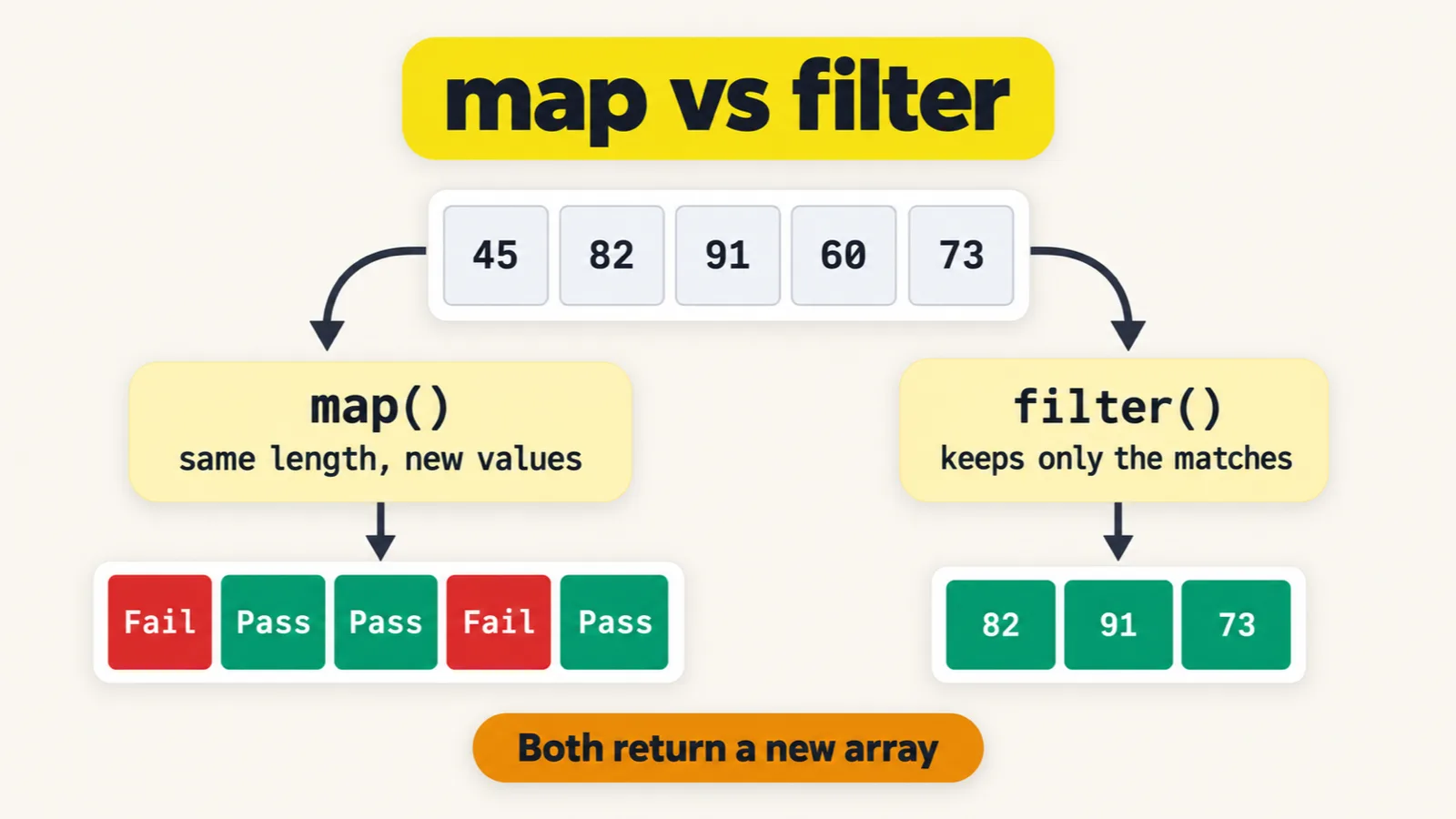
The two rules disagree at exactly 70. map says Pass only above 70 (i > 70), while filter keeps 70 and up (s >= 70). None of the class's scores is 70, so the two outputs agree. Add a 70 to scores and run it again:
[ 'Fail', 'Pass', 'Pass', 'Fail', 'Pass', 'Fail' ]
[ 82, 91, 73, 70 ]
map labels 70 "Fail", while filter counts it as passing. The repo's README points this out too: keep the two rules in sync.
Tasks and announcements
- Today's task: research map versus filter. Find the difference between them for yourself, starting from the scores example. Meeti adds the task.
- Coming up next class: the items marked red in the class notes: slice, sort, reduce, the spread operator (
...), and some and every from the searching family. - Doubts go in today's doubt thread, arrays and functions, which had more than 17 questions by the end of class. The instructor answers them one by one.
- The push. Files 78 to 89 and two cheat-sheet images went up to the batch repo that evening, after the class.
Task, map versus filter. Research the difference between map and filter, starting from the scores example in file 89.