1What Playwright is
An open source browser automation library and test runner from Microsoft. One API drives three engines, and it ships its own driver, so there is no WebDriver and no separate server to install.
- Library plus runner.
playwright-coredrives the browser.@playwright/testadds the runner: projects, workers, fixtures, retries, tracing and the HTML report. In this curriculum you use both. - Three engines, one script. Chromium, Firefox and WebKit. Playwright ships and patches its own builds, so the same test runs on all three without changing a line.
- Actionability built in.
click()waits until the element is visible, stable, enabled and receives events.expect()retries until the assertion passes or the timeout runs out. - Official bindings. TypeScript and JavaScript, Python, Java and .NET. The Node.js driver underneath is the same for all of them, which is the subject of section 3.
2The architecture, step by step
Press Play, or click any panel. Each stage highlights on the map and shows the command or code that belongs to it.
3How the test talks to the browser
The part every architecture diagram draws and few explain. Your code never touches the browser directly. It talks to the Playwright driver, and the driver talks to each engine in that engine's own language.
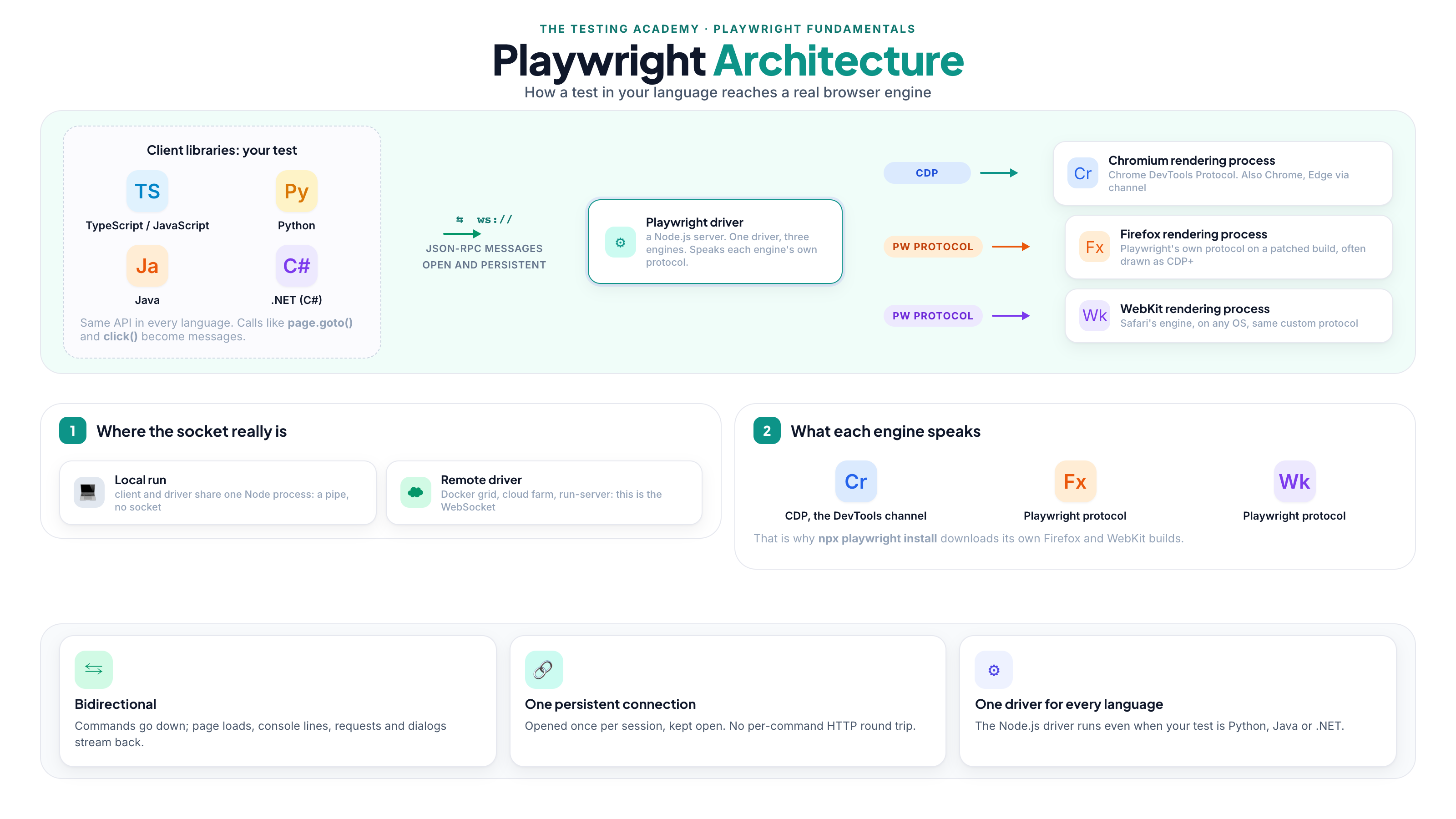
- Bidirectional and persistent. The channel opens once per session and stays open. Commands go down
(
goto,click,fill); responses and events come back (page loaded, console message, network request, dialog opened). That is why Playwright can react to the page instead of polling it. - Pipe locally, WebSocket remotely. In a TypeScript or JavaScript project the client and the driver live in the same
Node.js process, and the driver launches Chromium with
--remote-debugging-pipe. The WebSocket appears the moment the driver is somewhere else:browserType.launchServer()exposes awsEndpoint(),browserType.connect(wsEndpoint)attaches to it,npx playwright run-serverruns a standalone driver, andconnectOverCDP()attaches to a Chromium that is already running. Docker grids and cloud device farms use this path. - CDP is Chromium only. The Chrome DevTools Protocol is the same channel DevTools itself uses, which is why Chrome, Edge and
Brave all work through
channelorexecutablePath. Firefox and WebKit have no CDP; Playwright drives them with its own protocol over builds it patches and ships. Some diagrams label that "CDP+". Read the plus as "not CDP".
4Browser, context, page: what is shared and what is fresh
The one sentence from the diagram that decides how your tests behave, and the one interviewers ask about.
| Object | What it is | Across two tests in one worker |
|---|---|---|
browser | One engine instance per configured project | Same object, reused |
context | An isolated session: cookies, storage, permissions, viewport | New object every test |
page | One tab inside that context | New object every test |
That table is not quoted from documentation. It was measured: two tests in a serial block captured their fixtures, and the
second test asserted expect(seen[0].browser).toBe(seen[1].browser) and
expect(seen[0].context).not.toBe(seen[1].context). Both passed on Playwright 1.62 with Chromium 151.
- Why the browser is reused: launching an engine costs seconds; a context costs milliseconds. One browser per worker gives you isolation without paying the launch price on every test.
- Why the context is fresh: nothing leaks between tests. A login in test one is gone in test two unless you save and reuse storage state on purpose.
- More workers, more browsers. Each worker process starts its own browser, which is what parallel execution means here.