The Testing Academy · Masterclass · Hermes Agent
Hermes Agent: the always-on operator for QA.
Hermes Agent: an open-source, always-on agent. It watches your nightly suites, messages your phone, remembers your product, and dispatches Claude Code, Codex, or OpenCode as workers. Every card below opens a step-by-step lesson.
Part 1 · The operator
Part 2 · Install & VPS
Part 3 · Your QA day
Lessons · 22, step by step
01
~ part one ~
The Always-On QA Operator
7 modules · what Hermes is, why QA needs it, how it differs from a coding CLI.
1.1Agent vs Chatbot vs CLI
- A chatbot answers, then forgets everything
- A coding CLI works one session, then exits
- An agent acts: always-on, remembers, follows up
1.2What Hermes Actually Is
- Self-improving open source agent from Nous Research
- Learning loop turns experience into reusable skills
- Its identity lives in SOUL.md inside ~/.hermes
1.3Why QA Needs One
- Watches nightly regression runs while you sleep
- Morning triage summary lands on your phone
- Recalls past failures across every session
1.4One Brain, Every Interface
- Gateway speaks Telegram, Discord, Slack, WhatsApp, Signal, Email
- Same memory and skills behind every channel
- Message from anywhere, it works on the box
1.5Your Second QA Brain
- Searches its own past conversations on demand
- Builds a working model of you over time
- Product quirks and flaky suites stay remembered
1.6Runs Anywhere You Want
- Laptop, Docker, SSH, or a $5 VPS
- Serverless backends hibernate when idle, wake on ping
- Six terminal backends, one config in ~/.hermes
1.7Operator + Coding Workers
- Dispatches claude-code, codex, or opencode as workers
- Phone message -> worker fixes a broken locator
- Workers code, the operator reports back to you
try it · 60 seconds
# install on Linux / macOS / WSL2 / Termux
curl -fsSL https://hermes-agent.nousresearch.com/install.sh | bash
source ~/.bashrc
hermes            # start chatting
hermes doctor     # diagnose the install
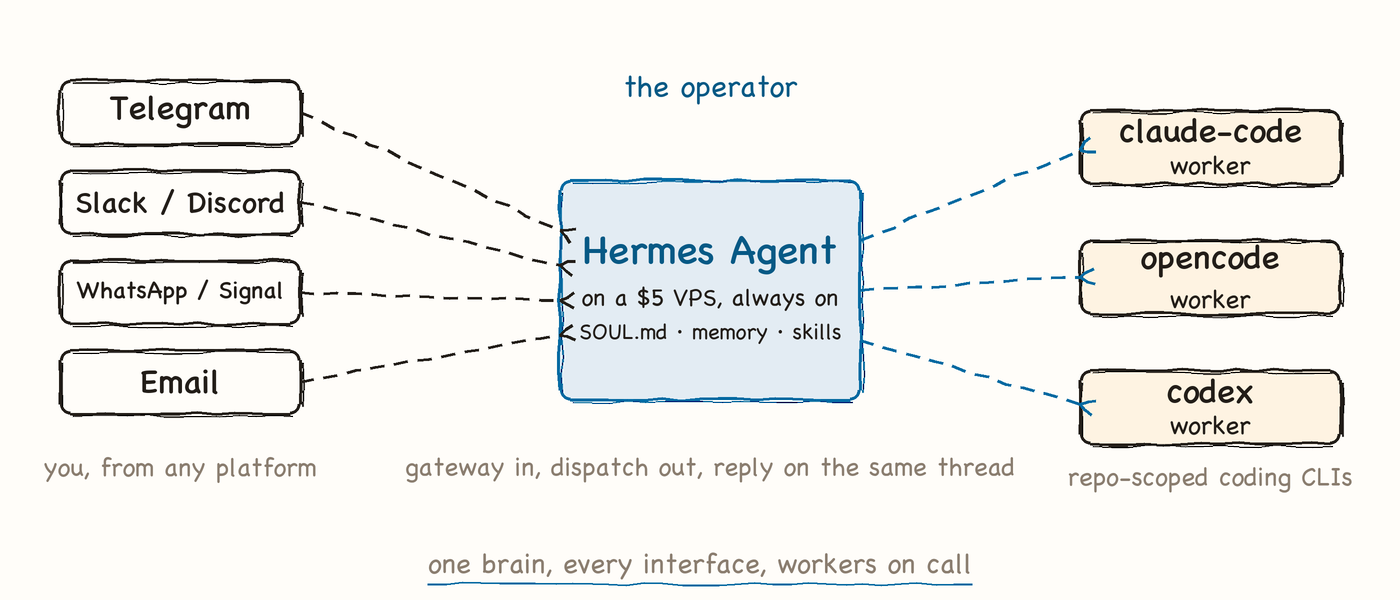
Why it mattersOne always-on operator replaces a stack of manual checks.
02
~ part two ~
Install It: Laptop to VPS
7 modules · from a curl one-liner to a reboot-proof always-on box.
2.1One Line, Full Toolchain
- curl the script, pipe to bash, done
- Bundles uv, Python 3.11, Node.js, ripgrep, ffmpeg
- Same command on Linux, macOS, WSL2, Termux
2.2Windows Without Admin Rights
- One iex (irm ...) line in PowerShell
- Ships portable MinGit, so git just works
- Zero admin prompts at any step
2.3First Run and Wizard
- source ~/.bashrc, then type hermes to chat
- hermes setup opens the full interactive wizard
- One guided pass configures the whole agent
2.4Models, Keys, or Portal
- hermes model picks, hermes login authenticates providers
- hermes setup --portal: one OAuth, 300+ models
- Portal adds web search, image gen, cloud browser
2.5Health and Home Directory
- hermes doctor diagnoses, hermes status reports components
- hermes update upgrades in place, no reinstall
- ~/.hermes holds config.yaml, SOUL.md, skills, sessions
2.6The Cheap VPS Move
- gateway setup wires Telegram, Slack, Discord, WhatsApp, Email
- install --system makes it survive every reboot
- Message it from your phone while it works
2.7Backup, Import, Docker
- hermes backup zips your entire ~/.hermes brain
- hermes import restores it on the new box
- Docker is one of six terminal backends
local install · one line
# Linux / macOS / WSL2
curl -fsSL https://hermes-agent.nousresearch.com/install.sh | bash
# Windows native (PowerShell, no admin)
iex (irm https://hermes-agent.nousresearch.com/install.ps1)
source ~/.bashrc
hermes            # start chatting
hermes doctor     # confirm every component is healthy
vps · always on
hermes gateway setup              # connect Telegram / Slack / Discord
hermes gateway start              # messaging gateway goes live
hermes gateway install --system   # system service, survives reboot
# moving house: laptop -> VPS
hermes backup                     # zip of ~/.hermes on the laptop
hermes import                     # restore it on the new box
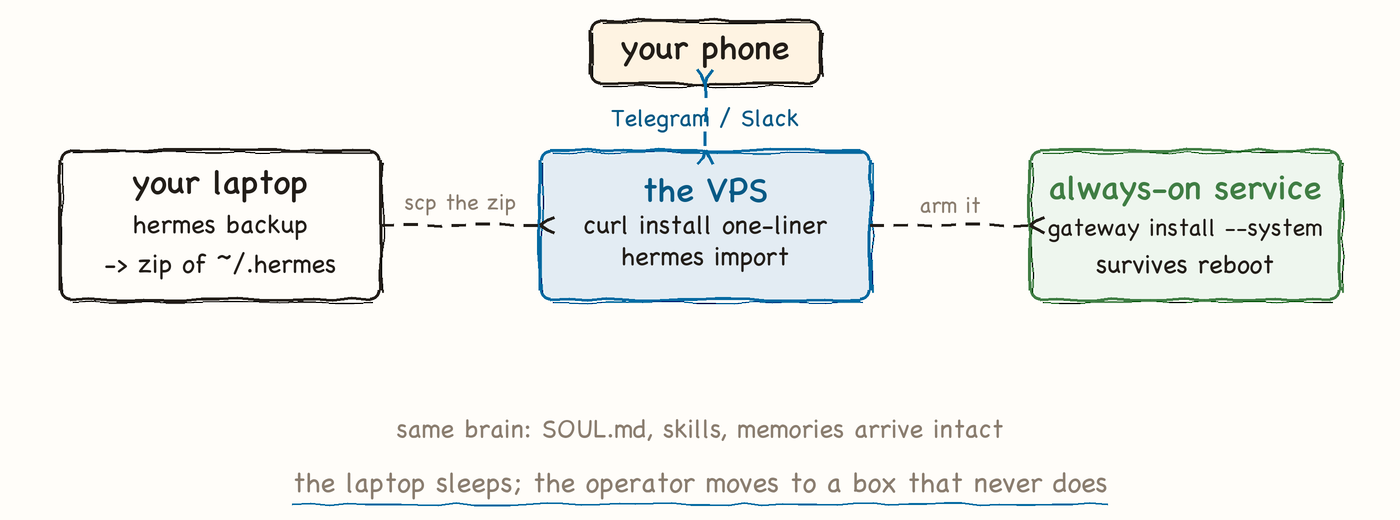
Why it mattersInstall is one line; always-on is two more.
03
~ part three ~
Run Your QA Day on It
8 modules · cron mornings, watchdogs, the QA skill suite, and coding agents on call.
3.1The Scheduled QA Morning
- One command: natural intervals like "every 1h" or full cron syntax
- Gateway ticks every 60s, jobs fire in isolated sessions
- Each run starts fresh, so the prompt carries all context
3.2Zero-Token Watchdogs
- Point a script at your flaky-test logs, schedule it
- Stdout is delivered verbatim: no model call, no tokens
- Quiet nights cost nothing, loud nights ping your phone
3.3Chained Triage Pipelines
- context_from pipes one job's output into the next
- Pattern: suite run -> failure triage -> Slack summary
- Scheduled sessions cannot spawn new cron jobs, by design
3.4Drive It From Chat
- /model swaps the brain, /compress trims a long session
- /usage and /insights show what your agent is burning
- /skills lists everything installed, /<skill-name> fires one directly
3.5Kanban for QA Work
- hermes kanban: a multi-profile board for shared tasks
- Cards carry links and comments, not chat scrollback
- Track bug intake, retests, and triage in columns
3.6Install the QA Skill Suite
- hermes skills searches, installs, and manages the catalog
- Drop the TTA 36-skill suite into ~/.hermes/skills/
- SKILL.md format, and hermes curator sharpens them over time
3.7Dispatch a Coding Agent
- claude-code, codex, and opencode ship as built-in skills
- One phone message starts a locator fix on the box
- Hermes reports back on the platform you messaged from
3.8The Wider Surface
- hermes mcp plugs MCP servers into the agent
- hermes acp: drive Hermes from ACP clients like Zed
- hermes send pushes CI script results into your chat
a QA day, scheduled
# weekday morning: smoke run before standup
hermes cron create "0 7 * * 1-5" "run the smoke suite and summarize failures by area"

# hourly pipeline glance, natural interval
hermes cron create "every 1h" "check CI for new red builds and name likely suspects"

# one-shot delay: verify a hotfix after the deploy settles
hermes cron create "30m" "re-run the checkout specs and confirm the fix held"
dispatch a coding agent from chat
(from your phone, on any connected platform)

/skills
-> claude-code · codex · opencode · test-plan-generator · bug-reporter ...

/opencode fix the stale submit-button locator in login.spec.ts,
run the auth suite, and report the pass count when green

-> Hermes dispatches OpenCode on the box, then replies
   in this same chat once the suite is green
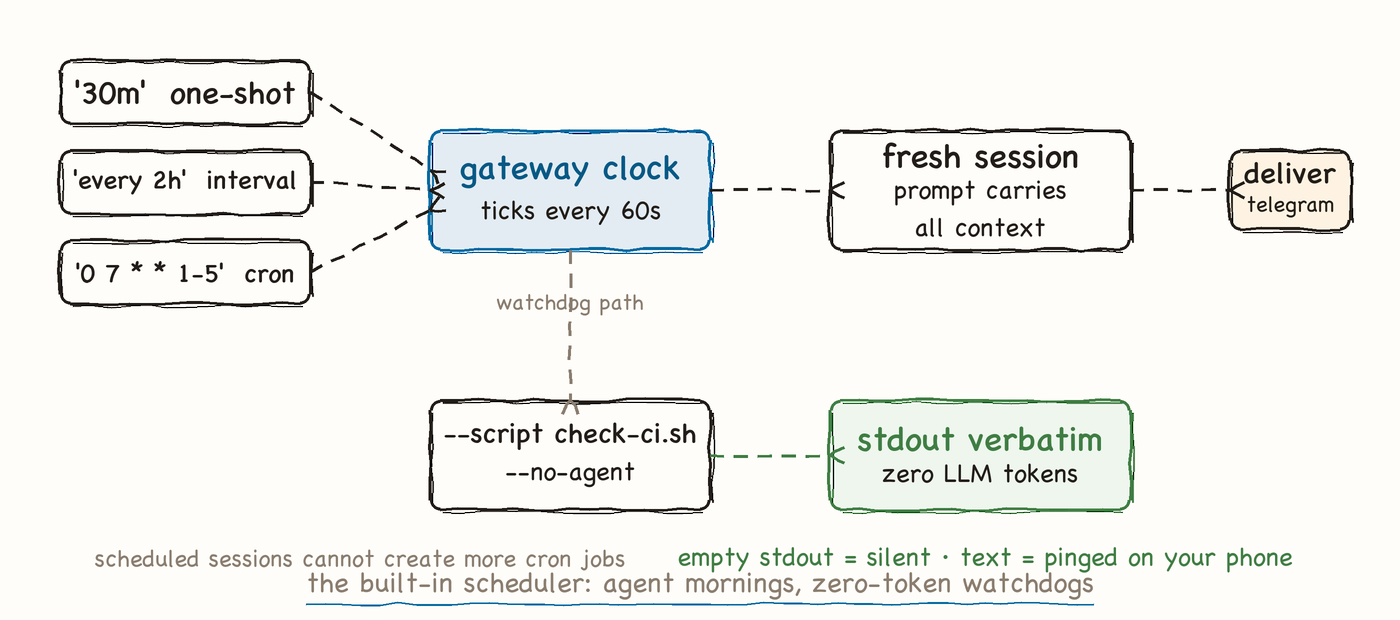
Why it mattersMornings scheduled, watchdogs silent, workers on call, all from your phone.
Field notes · pin this
The Hermes loop, in one line
install.sh→
hermes setup→
gateway --system→
cron the mornings→
install skills→
dispatch workers