The Testing Academy · Masterclass · Hermes Agent
Hermes Agent Masterclass for QA.
Every module from the Hermes Agent overview, expanded into a full lesson: why it matters for QA, numbered instructions, the exact commands, and a drill to run right now.
The Always-On QA Operator
Concepts first, commands as proof. Back to the Part 1 overview.
Agent vs Chatbot vs CLI
A ten-second test to classify any AI tool as chatbot, coding CLI, or agent.
- Start with the chatbot. Note it waits, answers, forgets, and cannot run tools or tests.
- Add the coding CLI. Use Claude Code or Codex for one repo, one session, no persistence.
- Now the agent. Run Hermes always-on: it schedules jobs, remembers, and messages you on any platform.
- Apply the 2 a.m. test. Ask which tool flags a red nightly build while you sleep: only the agent.
QA drill: List your three most repetitive QA chores and mark which fail the 2 a.m. test.
What Hermes Actually Is
Hermes is Nous Research's open-source, always-on, self-improving agent; this lesson installs and verifies it.
- Install with one line. Run the curl installer below; on Windows PowerShell use
iex (irm https://hermes-agent.nousresearch.com/install.ps1). - Start chatting. Run
source ~/.bashrc, thenhermes. - Run the wizard. Use
hermes setup(orhermes setup --portal), then pick a model withhermes model. - Health-check like a tester. Run
hermes doctor, checkhermes status, upgrade withhermes update.
# Linux / macOS / WSL2 / Termux
curl -fsSL https://hermes-agent.nousresearch.com/install.sh | bash
source ~/.bashrc
hermes            # start chatting
hermes doctor     # diagnose the install
hermes status     # component status
QA drill: Install Hermes, run hermes doctor, and screenshot the output as environment-ready evidence.
Why QA Needs One
Maps your repetitive QA checks onto the four leverage patterns Hermes gives a tester.
- Pattern one: the always-on operator. Run Hermes on a VPS to send morning triage summaries to Slack or Telegram.
- Pattern two: the watchdog. Schedule zero-token scripts that deliver stdout verbatim and stay silent when empty.
- Pattern three: the second brain. Let Hermes remember suites and failures, then search its history for repeat bugs.
- Pattern four: the dispatcher. Message Hermes to run claude-code or opencode fixes and report back.
# morning triage, scheduled (full build comes later in the course)
hermes cron create "0 7 * * *" "Read the newest Playwright report in ~/reports, group failures by suite, flag known flaky tests, send a 5-line summary"
# each run is a fresh session: the prompt must carry all context
QA drill: List one day's repeated checks and tag each as operator, watchdog, second brain, or dispatcher.
One Brain, Every Interface
One agent, one memory, reachable from terminal, Telegram, Slack, Discord, WhatsApp, Signal, or Email.
- Configure the gateway. Run
hermes gateway setupand connect the platforms you want. - Start it. Run
hermes gateway start(on WSL, Docker, Termux:hermes gateway run), confirm withhermes gateway status. - Prove it is the same brain. Run
/status,/platforms,/skills,/model provider:model, or/newfrom any platform: same memory. - Push from CI without an LLM. Use
hermes sendto push messages from scripts with no LLM call.
hermes gateway setup           # connect Telegram / Slack / Discord...
hermes gateway start
hermes gateway status
# from a CI step, no LLM involved:
hermes send "Nightly smoke suite is RED on staging" -t slack:#qa
hermes send "Build passed, 0 flaky" -t telegram
QA drill: Connect one platform and send Hermes a fake bug report from your phone.
Your Second QA Brain
Hermes stores its identity, memory, and skills under ~/.hermes; shape and back it up.
- Tour the brain. Run
ls ~/.hermes: config.yaml, SOUL.md, skills/, sessions, memories, cron, logs. - Shape SOUL.md. Edit
~/.hermes/SOUL.mdto make Hermes a reproducibility-first QA operator. - Feed it product knowledge. Tell Hermes your suites and flaky specs, then check
/insightsfor what stuck. - Back up the brain. Run
hermes backupto zip~/.hermes; restore withhermes import.
ls ~/.hermes                 # config.yaml SOUL.md skills/ sessions memories cron logs
cat ~/.hermes/SOUL.md        # the agent's identity, edit it for QA
hermes backup                # zip of ~/.hermes
hermes import                # restore on a new box
QA drill: Tell Hermes about one flaky test today, then ask about it in a fresh session tomorrow.
Runs Anywhere You Want
Hermes runs on six backends; a cheap VPS keeps your QA operator always on.
- Know the six backends. Run local, Docker, SSH, Singularity, Modal, or Daytona; a Dockerfile ships in the repo.
- Make the VPS move. Put Hermes on a cheap VPS so CI watching survives your laptop lid.
- Migrate with backup/import. Run
hermes backupon the laptop, copy the zip, thenhermes importon the VPS. - Survive reboots. Run
hermes gateway installfor user level,hermes gateway install --systemto survive reboot.
# on the laptop
hermes backup                          # produces a zip of ~/.hermes
# on the VPS
curl -fsSL https://hermes-agent.nousresearch.com/install.sh | bash
hermes import                          # restore the brain
hermes gateway install --system        # survives reboot
hermes gateway status
QA drill: Run hermes backup now and confirm the zip exists.
Operator + Coding Workers
Hermes drives Claude Code, Codex, or OpenCode as workers you dispatch from any platform.
- See the roster. Run
hermes skills listor type/skills: findclaude-code,codex,opencode,hermes-agent. - Inspect a worker. Run
hermes skills inspect claude-code, thenhermes skills auditfor a supply-chain check. - Dispatch a QA job. From any platform, invoke
/<skill-name>or ask for a fix, rerun, and summary. - Add your own workers. Drop SKILL.md skills into
~/.hermes/skills/;hermes curatormaintains them.
hermes skills list                    # roster, note autonomous-ai-agents
hermes skills search opencode         # search registries (skills.sh, GitHub, ClawHub...)
hermes skills inspect claude-code     # read before you run
hermes skills audit                   # supply-chain check
# in chat, on any platform:
/skills                               # list
# then dispatch: "use claude-code to fix the flaky checkout spec and rerun it"
QA drill: Inspect the claude-code skill and draft the dispatch message you would send during an incident.
One Line, Full Toolchain
One curl command installs Hermes plus uv, Python, Node.js, ripgrep, and ffmpeg.
- Run the installer. Paste
curl -fsSL https://hermes-agent.nousresearch.com/install.sh | bashinto any Linux, macOS, WSL2, or Termux shell. - Reload your shell. Run
source ~/.bashrcso the PATH change takes effect. - Launch. Type
hermesto drop straight into chat. - Verify the tools. Check that
rg --versionandffmpeg -versionrespond.
# one line, whole toolchain (Linux / macOS / WSL2 / Termux)
curl -fsSL https://hermes-agent.nousresearch.com/install.sh | bash

# reload the shell so PATH picks it up
source ~/.bashrc

# start chatting
hermes

# spot-check the bundled tools
rg --version
ffmpeg -version
QA drill: On a clean VM, time the path from paste to first reply and record the reported tool versions.
Windows Without Admin Rights
Installs Hermes, plus a portable MinGit, entirely in your user profile without elevation.
- Open plain PowerShell. Use a normal window, not "Run as administrator".
- Run the one-liner. Execute
iex (irm https://hermes-agent.nousresearch.com/install.ps1), user space only. - Start Hermes. Open a fresh terminal and run
hermes. - Or use WSL2. Run the bash installer from 2.1 inside your distro instead.
# PowerShell, normal user, no elevation
iex (irm https://hermes-agent.nousresearch.com/install.ps1)

# alternative: inside WSL2, use the bash installer instead
curl -fsSL https://hermes-agent.nousresearch.com/install.sh | bash
QA drill: Install with zero elevation prompts, then list what landed in %LOCALAPPDATA%\hermes, including MinGit.
First Run and Wizard
hermes starts chat instantly; hermes setup runs the guided configuration wizard.
- Enter chat. Type
hermesand ask one question to confirm a round trip. - Run the wizard. Exit and run
hermes setupfor guided model and provider configuration. - Inspect the output. Open
~/.hermes/config.yamlto read what the wizard wrote. - Learn chat commands. Use
/status,/model provider:model, and/newinside any session.
hermes          # front door 1: straight into chat
hermes setup    # front door 2: full interactive wizard

# then, inside a chat session:
#   /status                 current state
#   /model provider:model   switch models
#   /new                    fresh conversation
QA drill: Trace each wizard answer to the line it produced in ~/.hermes/config.yaml.
Models, Keys, or Portal
Supplies a model via your own provider key or one Nous Portal subscription.
- Pick a model. Run
hermes modelto choose provider and model. - Authenticate. Run
hermes loginfor the bring-your-own-key route. - Or use Portal. Run
hermes setup --portalfor 300+ models plus the Tool Gateway. - Verify and switch. Check
hermes portal info, then swap models mid-chat with/model provider:model.
# route 1: your own provider and key
hermes model            # pick provider and model
hermes login            # authenticate that provider

# route 2: one subscription, 300+ models plus the Tool Gateway
hermes setup --portal   # Nous Portal OAuth flow
hermes portal info      # confirm what the Portal unlocks
QA drill: Feed one failing-test stack trace to two models via /model provider:model and compare the root-cause hypotheses.
Health and Home Directory
Three maintenance commands plus ~/.hermes, the one directory holding all agent state.
- Diagnose. Run
hermes doctorwhenever anything feels off. - Check and update. Use
hermes statusfor a pulse check andhermes updateto upgrade. - Tour
~/.hermes. Findconfig.yaml,SOUL.md,skills/, plus sessions, memories, cron, and logs. - Read
SOUL.md. Open the file that defines the agent's personality and identity.
hermes doctor    # diagnose the install
hermes status    # component status at a glance
hermes update    # upgrade in place

ls ~/.hermes     # config.yaml  SOUL.md  skills/  sessions  memories  cron  logs
QA drill: After one short chat, match the log entries under ~/.hermes to what you saw in the session.
The Cheap VPS Move
Runs Hermes always-on on a server, reachable from Telegram or Slack.
- Install on the server. SSH in, run the 2.1 one-liner, then
source ~/.bashrc. - Wire up messaging. Run
hermes gateway setupto connect Telegram, Discord, Slack, WhatsApp, Signal, or Email. - Run it. Use
hermes gateway runin the foreground orhermes gateway startin the background. - Survive reboots. Install a service with
hermes gateway install --system, then checkhermes gateway status.
# same installer, new machine
curl -fsSL https://hermes-agent.nousresearch.com/install.sh | bash
source ~/.bashrc

hermes gateway setup             # connect Telegram, Slack, Discord...
hermes gateway run               # foreground: watch it connect (WSL/Docker/Termux)
hermes gateway start             # background: shell stays yours
hermes gateway install --system  # system service, survives reboot
hermes gateway status            # confirm it is alive
QA drill: Reboot the VPS and confirm Hermes answers a Telegram message without you touching SSH.
Backup, Import, Docker
Migrates the agent by zipping ~/.hermes and restoring it on the new machine.
- Back up. Run
hermes backupto zip~/.hermesinto one file. - Restore in order. Copy the zip over, run the installer, then
hermes import. - Verify. Run
hermes doctorandhermes status, then redo the 2.6 gateway steps. - Pick a backend. Choose Docker, local, SSH, Singularity, Modal, or Daytona as the terminal backend.
# 1. on the laptop
hermes backup                       # zip of ~/.hermes

# 2. ship it
scp your-backup.zip user@vps:~/     # use the path hermes backup printed

# 3. on the VPS: install, then restore
curl -fsSL https://hermes-agent.nousresearch.com/install.sh | bash
source ~/.bashrc
hermes import                       # restore the brain
hermes doctor                       # verify before going live
QA drill: Migrate to a second environment, then ask the restored Hermes about a pre-backup memory.
Run Your QA Day on It
Schedules, skills, and dispatch. Back to the Part 3 overview.
The Scheduled QA Morning
Hermes cron runs scheduled agent jobs in fresh isolated sessions and delivers results to chat.
- Pick a schedule form. Use
'30m'once,'every 2h'for intervals, or cron like'0 7 * * 1-5'. - Write a self-contained prompt. Include the report path, suites, and what counts as a new failure.
- Create the job. Add
--name,--deliver telegram, and--workdirfor project context. - Manage the fleet. Use
hermes cron list,pause, orrunto inspect, silence, or fire jobs.
# weekday morning triage, delivered to Telegram
hermes cron create "0 7 * * 1-5" \
  "Read the newest Playwright report in ./reports. List new failures vs known flaky, then end with a 3-line summary." \
  --name qa-morning --deliver telegram --workdir /home/qa/web-suite

# interval and one-shot forms
hermes cron create "every 2h" "Check ./reports for fresh failures and summarize" --name suite-watch
hermes cron create "30m" "Re-check the PROJ-142 repro after the deploy finishes"

# manage
hermes cron list
hermes cron run qa-morning      # fire now instead of waiting for 7am
hermes cron pause qa-morning
QA drill: Create a '30m' one-shot with --deliver telegram, then fire it early with hermes cron run.
Zero-Token Watchdogs
Scheduled scripts run without an LLM: stdout delivers verbatim, empty stdout means silence.
- Write the script. Put
check-ci.shunder~/.hermes/scripts/, printing only when something is wrong. - Honor the silence contract. Print nothing on green, print an alert line on red.
- Wire it in. Schedule it with
--script check-ci.sh --no-agentso stdout delivers verbatim. - Test both paths. Run it by hand for the alert case, confirm silence on green.
# ~/.hermes/scripts/check-ci.sh : print ONLY when something is wrong
#!/usr/bin/env bash
fails=$(grep -c "FAILED" /var/log/ci/latest.log)
flaky=$(grep -c "Retry #2" /var/log/ci/latest.log)
if [ "$fails" -gt 0 ]; then echo "CI red: $fails failed specs"; fi
if [ "$flaky" -gt 3 ]; then echo "Flaky spike: $flaky second retries"; fi
# empty stdout = Hermes stays silent, and no LLM tokens are spent

hermes cron create "every 10m" --script check-ci.sh --no-agent \
  --name ci-watch --deliver telegram
QA drill: Schedule flaky-watch.sh with --no-agent to alert past a retry threshold, and verify silence on green.
Chained Triage Pipelines
Default --script mode injects script stdout into the agent prompt for automated triage.
- Script the suite run. Make
run-smoke.shprint the result tail, failures first. - Write the triage prompt. Tell the agent to group failures, flag flaky, propose next actions.
- Create the chained job. Schedule it before standup and route with
--deliver slack:#qa-triage. - Chain and push. Pipe job output onward with context_from, or push ad hoc with
hermes send.
# default --script mode: stdout is injected into the agent prompt
hermes cron create "0 6 * * 1-5" \
  "You are triaging smoke suite output. Group failures by feature area, flag new vs known flaky, propose one next action per failure, keep it under 15 lines." \
  --script run-smoke.sh --name smoke-triage \
  --workdir /home/qa/web-suite --deliver slack:#qa-triage

# manual push from any script or CI step, no LLM call
hermes send "Smoke triage posted, 2 new failures in checkout" -t slack:#qa-triage
QA drill: Chain your smoke script into a triage prompt that must name the worst failing spec file.
Drive It From Chat
The same slash commands work identically in the CLI and every messaging platform.
- Keep sessions clean. Use
/newbetween unrelated bug hunts. - Manage long threads. Shrink with
/compressand check token spend with/usage. - Switch models and skills. Use
/model provider:modelto swap models and/<skill-name>to invoke skills. - Recover and reflect. Re-run the last answer with
/retryand review learnings with/insights.
# these behave identically in the CLI and in messaging chats
/model               # pick provider:model for this session
/skills              # list installed skills
/test-plan-generator PROJ-142    # invoke a skill by name
/usage               # token spend for the current thread
/compress            # shrink a long triage thread, keep the facts
/retry               # take another run at the last answer
/insights            # what Hermes has learned across sessions
/new                 # clean slate before the next bug
QA drill: From your phone, run /usage, /compress, then one installed QA skill in the same thread.
Kanban for QA Work
hermes kanban gives a durable SQLite board shared across profiles with atomic task claims.
- Initialize the board. Run
hermes kanban initso every profile sees the same tasks. - Feed the intake. Add one card per finding with
hermes kanban create, prefixing titles by lane. - Claim, comment, complete. Claim atomically, record repro notes with
comment, thencompletethe card. - Watch the flow. Use
list,show,watch, andstatsto monitor the queue.
hermes kanban init                    # durable SQLite board, shared across profiles
hermes kanban create "intake: checkout suite red on Chrome"
hermes kanban create "retest: PROJ-198 after the hotfix"
hermes kanban create "triage: login flake, 3 retries this week"
hermes kanban list                    # the whole queue at a glance
hermes kanban claim 2                 # atomic claim, no double-work
hermes kanban comment 2 "Repro confirmed on staging, trace attached"
hermes kanban complete 2
QA drill: Init a board, create a card per failed spec, then claim, comment, and complete one.
Install the QA Skill Suite
Skills are SKILL.md packages in ~/.hermes/skills/ that add QA powers to every device.
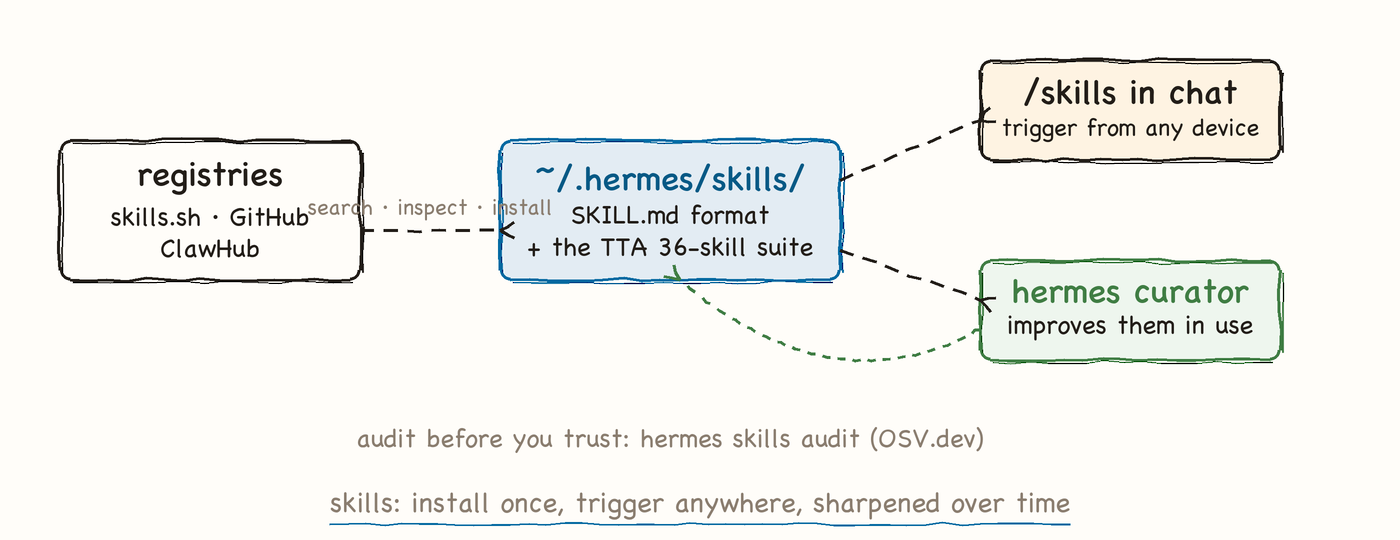
- Search the registries. Run
hermes skills search bug-reportacross skills.sh, GitHub, and ClawHub. - Inspect, install, audit. Read with
hermes skills inspect, theninstall, thenauditfor supply-chain hygiene. - Drop in the TTA suite. Unzip the 36-skill QA suite into
~/.hermes/skills/. - Let the curator work. Run
hermes curatorfor background skill maintenance.
hermes skills search bug-report      # registries: skills.sh, GitHub, ClawHub
hermes skills inspect bug-reporter   # read the SKILL.md before trusting it
hermes skills install bug-reporter
hermes skills audit                  # supply-chain check on what you installed
hermes skills list

# drop the TTA 36-skill QA suite in one move
unzip tta-qa-skills.zip -d ~/.hermes/skills/
hermes skills list                   # test-plan-generator, bug-reporter, ...
hermes curator                       # background maintenance improves skills over time
QA drill: Search, inspect, and install a bug-report skill, then trigger it from chat with /<skill-name>.
Dispatch a Coding Agent
Built-in skills dispatch claude-code, codex, or opencode as workers, reporting back to your chat.
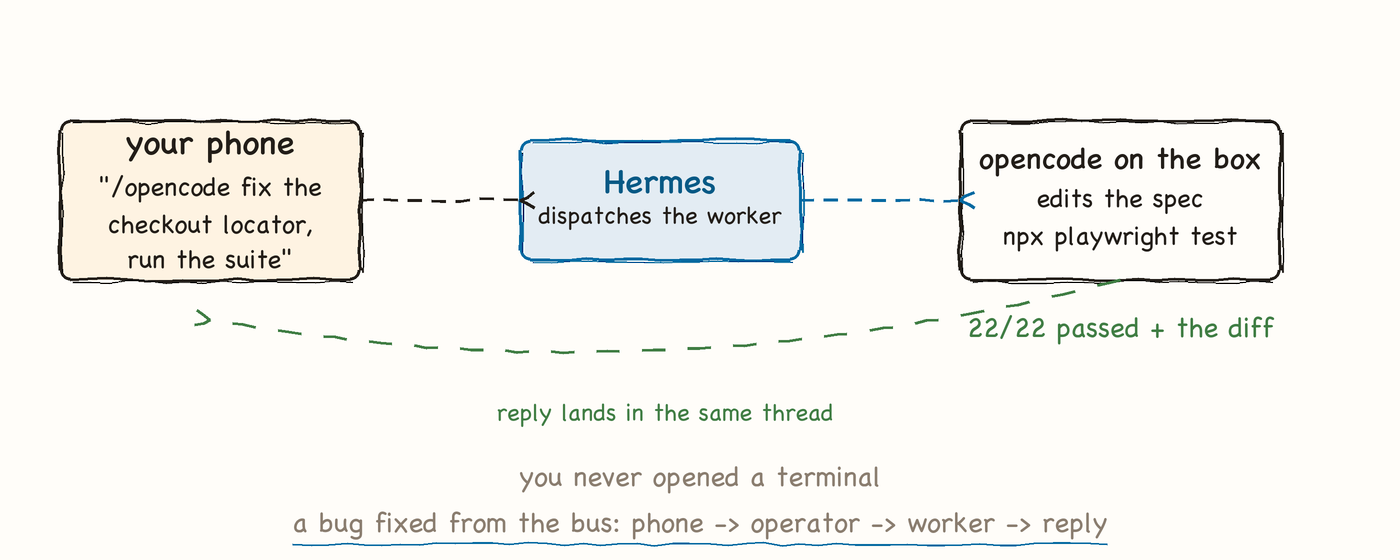
- Confirm the built-ins. Check
/skillsfor claude-code, codex, and opencode. - Write the task like a bug report. Give repo path, failing spec, error, and definition of done.
- Dispatch from anywhere. Message
/opencodewith the task from any connected platform. - Demand verification. Require a suite run after the fix with the exact pass count.
# from Telegram on your phone, gateway running on the VPS
/opencode In /home/qa/web-suite, tests/checkout.spec.ts fails on
  page.locator('#pay-btn'). Find the current selector, fix the locator,
  run "npx playwright test tests/checkout.spec.ts", then reply with
  the pass count and the diff.

# same pattern with the other built-in workers
/claude-code Run the smoke suite in /home/qa/web-suite and summarize failures
/codex Add a data-testid to the coupon input and update the page object
QA drill: Dispatch /opencode to fix one broken locator and require the exact pass count in the reply.
The Wider Surface
Integration commands connect Hermes to your editor, CI, security audits, and MCP tools.
- Plug in tools with MCP. Manage external tool servers with
hermes mcp. - Reach it from your editor. Connect ACP clients like Zed via
hermes acp. - Ping from CI. Push messages or piped stdin with
hermes send, no LLM needed. - Audit and accept events. Run
hermes securityfor OSV.dev audits andhermes webhookfor inbound hooks.
hermes mcp                       # manage MCP servers (external tool surfaces)
hermes acp                       # ACP adapter: clients like the Zed editor

# CI failure path: instant ping, no LLM call
hermes send "suite red: 7 failed on main" -t telegram
npx playwright test | tail -20 | hermes send -t slack:#qa-alerts

hermes security                  # OSV.dev supply-chain audit
hermes webhook                   # inbound hooks from external systems
QA drill: Add hermes send "suite red" -t telegram to your CI failure path and confirm the ping.