What this class covered
- Three kinds of prompt, and plan before you generate
- STAR: situation, task, action, result
- Prompts kept as .md files, on the way to skills
- The STAR test plan for the app.vwo.com login page
- CLEAR, and the five-minute exercise
- CRISP: a bug report with strong task control
- Which framework, when
- Six reusable test case templates
- Your top 10 QA tasks, as templates
- More templates in the deck: bug reports and APIs
- Context files: a knowledge base
- The pizza base: context, templates and skills
- Tasks, certifications and Tester Town
- Pick the kind of prompt for the problem: direct, contextual or step-by-step. For a big task, plan first, approve or modify, then generate.
- Keep reusable prompts as .md files, written in a framework: those can grow into skills and agents, and normal prompts cannot.
- STAR gives a structured answer, CLEAR adds a review of the output, and CRISP gives strong task control.
- Use STAR, CLEAR or CRISP for daily tasks, and RICE-POT for complex ones.
- Tell the model what to write when information is missing, then still review what it wrote.
- Fill the context files once and stack them above any template: no parsing the requirements again for every task.
- Turn your daily QA tasks into generic templates: replace the hard-coded values with placeholders.
Three kinds of prompt, and plan before you generate
The last class ended with the anti-hallucination rules. This one added the frameworks that were still remaining, especially for QA, starting with a repeat. Prompts fall into three categories, in the deck's words:
- Direct prompts explicitly state what you want the AI to do. These are the ones everyone uses daily, the instructor said: write a summary, do this, design something.
- Contextual prompts provide background information or context.
- Step-by-step prompts break the task down into smaller steps.
Which do you use in GitHub Copilot, Claude Code or Cursor? Direct prompts, 90% of the time, the instructor said. Contextual prompts are for when you want to create or replicate something, and step-by-step prompts for when you start something from scratch. So when a problem is given to you, check first which of the three it needs.
Plan first. For any big task, such as a test plan, test cases, a test report or a bug report, never ask for the result directly, the instructor said. Use the flow from the deck: plan, approve or modify, code or generate, approve or modify again, then the final output. Every agent has a plan mode: type /plan, or just say plan right now, do not code. Most companies prefer this way, in the instructor's words, and do not use the number of prompts that we use. So do not fight with Claude Code or GitHub Copilot: always use this flow.
STAR: situation, task, action, result
The first of the frameworks, which the instructor wants you to use always, from today. Once you use these frameworks, writing a test plan, test cases, a bug report, a Jira report or a test strategy becomes easy, the instructor said.
STAR is useful when you want a structured answer. Where does a QA need one? The chat's answers: test plans, test cases, bug reports, Jira and defect creation, proposals, understanding the flows, root cause analysis, scripting and BRD analysis. The instructor's rule: whenever you give the output to another person, it is always a structured answer, because you cannot hand an unstructured one to another person. STAR suits interview-style reasoning and step-by-step responses too.
- S, situation: the context or background. What is happening?
- T, task: the task or goal you want to achieve. What needs to be done?
- A, action: what the model should do.
- R, result: what the final output should look like. The result is very important, the instructor said.
A small example from the class: the situation, I am a QA engineer preparing for an interview; the task, explain API testing; the action, give me simple answers with examples; the result, a bullet-point response in English.
Why always a framework? Because of the ladder the instructor has shown before. A prompt written in a framework can be converted into a skill, a level one skill in the end. A normal prompt is not good for creating skills: normal prompts cannot be used for agent skills in the future. When the class reaches level two, it needs instructions written in proper prompt frameworks.
In which scenarios do we want a structured output, especially for QA?
Worth practising too: What do the four letters of STAR stand for, and which part did the instructor call very important?
Show the answer
Answer. Test plans, test cases, bug reports, Jira and defect creation, root cause analysis: whenever you give the output to another person, it should be a structured answer. STAR stands for situation, task, action and result, and the result, what the final output should look like, is the part the instructor called very important.
Prompts kept as .md files, on the way to skills
Before writing the STAR prompt, the instructor asked the class: do I type it here? No. Why? Because of reusability, as a learner answered: the prompt goes into a normal .md file, structured, so that it can be converted into a skill in future. As a QA, make everything you do reusable, from day one.
The instructor's example, with a let's suppose. You give GitHub Copilot or Claude Code around a hundred prompts a day, and 20 to 30 of them are repetitive. Why not keep those as .md files, for reuse? Of the 30, 10 will eventually become skills you use daily. Of the 10, five will be skills used by everyone in your company, and of those five, three will become AI agents. Then your task reduces: you call the skills and the AI agents directly.
A learner asked whether a STAR file is the same as a SKILL.md file. No: STAR is a prompt framework, and a skill is different, a structured way of prompting plus extra things, which come later. Another asked which is better, since the class made a test plan with a skill earlier: STAR can also be converted into a skill, the instructor said.
Later in the class came the difference between an agent and a skill. A learner's answer, which the instructor confirmed: agents are the superior version that manage skills, several of them, in sequence and in parallel. The instructor added: an agent has a brain and can do multiple things, and a skill is just a file with a limited job.
Isn't the STAR file the same as a SKILL.md file?
Worth practising too: What is the difference between a skill and an agent?
Show the answer
Answer. No. STAR is a prompt framework, kept in a .md file so that you can reuse it. A skill is a structured way of prompting plus extra things, and a STAR prompt can be converted into one. A skill is a file with a limited job; an agent has a brain, does multiple things, and can run several skills in sequence or in parallel.
The STAR test plan for the app.vwo.com login page
The exercise, done live: a functional test plan for the login page of app.vwo.com, the demo target. The instructor made a new chapter in the repository, Chapter_03_Prompt_Engineering_QA, and a STAR file in it. The situation gives the approved requirements, and the exact error message for an invalid login. The task asks for a test plan that uses the template file in the same folder. The action is what a junior tester would do: objectives, scope, the testing approach, valid and invalid scenarios, the environment, test data and risks. The result lists what the plan must contain. The file, as pushed:
# STAR

Situation :
I am a QA engineer preparing to test the login page at https://app.vwo.com/. For this exercise, assume the approved requirements are:

- Registered users can log in with valid credentials.
- Invalid credentials must not grant access and give error.
- Email and password are mandatory.
- Successful login opens the authenticated dashboard.
- Invalid login gives error message "Your email, password, IP address or location did not match"


Task
Create a functional test plan for the login module use the template
here - Chapter_03_Prompt_Engineering_QA/Template.md


Action
Define the objectives, scope, and testing approach.

Cover valid login, invalid credentials, empty fields, and access to the dashboard after login.

Include positive, negative, and boundary scenarios where the supplied requirements support them.

Define test environment needs, test data, entry criteria, exit criteria, deliverables, and risks.

Mark unspecified behavior as “Requires clarification.” Do not invent password rules, exact error messages, or session timeouts.

Result
Return a test plan containing:

Test Plan ID and Title
Objective
In Scope and Out of Scope
Test Approach
Test Scenarios
Environment and Test Data
Entry and Exit Criteria
Deliverables
Risks and Open Questions

Use clear language and tables where useful. Label any proposed criteria as recommendations.
The template. If you have no test plan template, give one. The class copied the template from the test plan folder the deck links, asked ChatGPT to make it into proper bullet points, and saved it as Template.md: ten headings, from Test Plan to Approvals. You can paste a template into the prompt or give its path; both work, the instructor said, and a separate folder for templates is fine too. Is a .md file compulsory for STAR? Not compulsory: a text message works as well.
The run. Then the instructor pointed the AI at the file. The prompt, as the deck records it:
@Chapter_03_Prompt_Engineering_QA/STAR.md Use this prompt and give me the output docs in the same folder output, so that i can review and edit.
The first run wrote the plan only in Markdown, so the instructor asked for a Word copy too, and the assistant used a skill for Word documents to make one. Both are in the repo's output folder: VWO_Login_Test_Plan.md and its Word copy. You can review it and edit it, the instructor said, and when everything is fine, make a final copy and send it out.
Earlier, this took five to ten conversations; now one conversation does everything, the instructor said. A much more optimized approach, token-optimized too, and a little part of a harness: you tell the AI to follow certain rules and give you the output, instead of letting it go out and do hundreds of things. The conversations are reduced; the tokens stay almost similar, but properly optimized.
What came back. The plan, counted for these notes:
| Part | What the plan holds |
|---|---|
| Approved requirements | 5, REQ-01 to REQ-05; the last one is the exact error message |
| Scope | 6 areas in scope, and 8 out, such as sign-up, password reset, SSO and session timeout |
| Test data | 7 IDs, TD-01 to TD-07, and no real credentials: the plan says to keep them in a secrets store |
| Scenarios | 16: 3 positive, 7 negative, 3 negative and boundary, 3 boundary |
| Requires clarification | in the expected result of 11 of the 16 scenarios |
| Risks | 6, R-01 to R-06 |
| Open questions | 11, Q-01 to Q-11, for the Product Owner |
It follows the ten headings of Template.md in order, and adds an eleventh, Open Questions, which STAR's result asked for. Because the situation supplied the error message, its wrong-password scenario expects that exact text. The README's advice for all three frameworks: read the "Requires clarification" markers first, because they are the questions to take to the Product Owner. A review would also catch one slip, found by a check made for these notes: the plan's traceability table lists TS-16 under REQ-05, while that scenario's own row cites only REQ-02.
CLEAR, and the five-minute exercise
The second framework, which the class did practically: CLEAR. It is another brother of RICE-POT, useful when you want a complete prompt with context boundaries and clear expectations.
- C, context: the background information.
- L, limits: the constraints or boundaries.
- E, examples: show the style.
- A, action: the task to perform.
- R, review: ask the model to review its output as well.
The review is the new thing, the instructor said: at the end, you ask the model to check whether its output is proper or not, and this is why it gives you a better answer. The example: I am creating a LinkedIn post for testers (context); keep it under 120 words (limit); use a friendly expert tone (the style); write a post on Playwright fixtures (action); check the grammar and improve the quality (review).
The exercise. Five minutes: write a CLEAR prompt for test cases for the app.vwo.com login page, in any file you can write Markdown in, such as one in Visual Studio Code, then paste it in the thread for the instructor to review. Try to write it by yourself, and avoid using AI for now, if possible. It is just a login page, with a username, a password and a submit button, and no login details are needed: you are only writing the prompt that asks the AI for valid and invalid login test cases. When a learner posted test cases instead, the instructor said: we want the prompt, not the output. Others could be more descriptive, or more in depth. The exercise is mandatory, not optional: with practice, using these frameworks becomes a habit.
A learner who is the only QA in the team asked whether to make these files at all. It is not about being a single QA, the instructor said: you also do repetitive tasks, and when the prompts and skills are ready, your productivity increases. Do it for other people, and do it for yourself.
The instructor's CLEAR.md. Its limits are exactly 10 test cases, only the supplied requirements, placeholders for credentials, no invented messages or password rules, and every status Not Run. One filled test case is the example, and the review checks the output before naming the columns to return. As pushed:
**Context:**
I need functional test cases for https://app.vwo.com/. For this exercise, the approved requirements state:
- Valid registered credentials allow login.
- Invalid credentials are rejected.
- Email and password are mandatory.
- Successful login opens the authenticated dashboard.

**Limits:**
- Create exactly 10 test cases.
- Use only the requirements supplied above.
- Use placeholders for credentials; never include real passwords.
- Do not invent exact validation messages or password policies.
- Set execution status to “Not Run.”
- If an expected result depends on missing requirements, mark it “Requires clarification.”

**Examples:**
Use this filled example as the format:

Test Case ID: VWO-LOGIN-TC-001
Summary: Verify login with valid registered credentials
Preconditions: An active registered test account is available; the user is logged out.
Test Data: <registered_email>, <valid_password>
Steps:
1. Open https://app.vwo.com/.
2. Enter the registered email.
3. Enter the valid password.
4. Submit the login form.
Expected Result: Login succeeds and the authenticated dashboard opens.
Priority: High
Test Type: Positive
Status: Not Run

**Action:**
Generate 10 distinct test cases covering valid login, incorrect password, unregistered email, empty fields, and access control before and after login. Write numbered steps and observable expected results.

**Review:**
Check that:
- Every test case traces to a supplied requirement.
- Test cases are distinct.
- Expected results describe observable behavior.
- No test is marked Passed or Failed without execution.
- Unknown behavior is clearly identified.

Return a table using these columns:
Test Case ID, Requirement, Summary, Preconditions, Test Data, Steps, Expected Result, Priority, Test Type, Status.

Treat this as a Jira-style table. Exact import compatibility requires the Jira project and test-management app’s field mapping.
Run the same way, it gave VWO_Login_Test_Cases.docx. The ten cases, from the Word file:
| Test case | Summary | Requirement | Type | Priority |
|---|---|---|---|---|
| TC-001 | Verify login with valid registered credentials | REQ-01, REQ-04 | Positive | High |
| TC-002 | Verify login is rejected with an incorrect password | REQ-02 | Negative | High |
| TC-003 | Verify login is rejected with an unregistered email | REQ-02 | Negative | High |
| TC-004 | Verify login is rejected when a registered email is used with another account's valid password | REQ-02 | Negative | Medium |
| TC-005 | Verify login is blocked when the email field is empty | REQ-03 | Negative | High |
| TC-006 | Verify login is blocked when the password field is empty | REQ-03 | Negative | High |
| TC-007 | Verify login is blocked when both email and password are empty | REQ-03 | Negative | Medium |
| TC-008 | Verify the dashboard cannot be accessed before login | REQ-04 | Negative | High |
| TC-009 | Verify the authenticated dashboard remains accessible after login | REQ-01, REQ-04 | Positive | Medium |
| TC-010 | Verify a valid login succeeds after one rejected attempt | REQ-01, REQ-02 | Positive | Medium |
This prompt gave no error message, so the three cases with wrong credentials say "Exact error message text: Requires clarification", and the three empty-field cases say the same of the validation message. Compare the STAR plan, whose situation supplied the message. The Word file ends with the review checklist, answered: every case traces to a requirement, all ten are Not Run, and the unknowns are marked.
Task. In five minutes, write a CLEAR prompt (context, limits, examples, action, review) for test cases for the app.vwo.com login page, by yourself, avoiding AI if possible.
Show the answer
Answer. There is no single answer to copy. The instructor's version is CLEAR.md above: compare yours with it. A context with the requirements; limits such as the number of cases, only the supplied requirements and no invented messages; one filled example; the action; and a review step. Post the prompt, not the test cases it produces.
CRISP: a bug report with strong task control
One more, very popular: CRISP, which the instructor uses very frequently when not using RICE-POT. It is useful when you want concise, direct prompts with strong task control, so that the AI does not wander around or give you random outputs.
- C, context: the background.
- R, role: what the model should act as.
- I, instructions: what exactly should be done.
- S, style: the tone and the formatting.
- P, parameters: the length and the other limits.
The example: I am teaching automation testing as a senior QA mentor; explain page objects; use simple bullet points and friendly language; give me only six points, short, no jargon.
The instructor's CRISP.md writes a defect report: for a training exercise, a defect observed on the login page (context); you are a QA (role); create a bug report (instructions); factual (style); and one report, under 500 words, with placeholders and the attachments marked (parameters). As pushed:
**Context:**
For a training exercise, assume I observed the following defect at https://app.vwo.com/:

- Requirement: Email and password are mandatory.
- Starting state: The user is logged out.
- Action: Enter a registered test email, leave the password empty, and submit the login form.
- Observation: The form submits, but no visible validation feedback appears.
- Reproducibility: 3 out of 3 attempts.
- Browser/version, operating system, build, and execution time: Not supplied.
- Screenshots, video, and logs: Not supplied.

This is a hypothetical defect, not a confirmed issue in VWO.

**Role:**
Act as a senior QA engineer writing a clear, reproducible bug report.

**Instructions:**
Create a bug report with:
1. Title
2. Environment
3. Preconditions
4. Test Data
5. Steps to Reproduce
6. Expected Result
7. Actual Result
8. Reproducibility
9. Suggested Severity and rationale
10. Attachments

Base the expected result on the mandatory-password requirement. Do not invent the exact validation text. Distinguish observed behavior from assumptions. Label severity as provisional.

**Style:**
Use concise, factual language and numbered reproduction steps. Write for a developer who has not seen the issue.

**Parameters:**
- Produce one bug report.
- Keep it under 500 words.
- Use placeholders for account details.
- Mark missing environment details as “Not supplied.”
- Mark attachments as “Not provided.”
- Clearly label the report “Hypothetical training example.”
Run the same way, it gave VWO_Login_Bug_Report.docx, labelled a hypothetical training example. It is not a confirmed issue, the instructor said, just an example: details need to be added, and a human review will definitely be required. The report keeps what was seen apart from what was not:
| Type | Detail |
|---|---|
| Observed | The form submits. |
| Observed | No visible validation feedback appears. |
| Not observed | Whether the user was logged in or stayed on the login page. |
| Not observed | Whether a login request was sent to the server, and any console errors. |
Its Word file runs to 323 words, under the 500 the parameters set. The suggested severity is "Medium (Provisional)", with a note to raise it to Critical if the submission logs the user in. That is the README's own check for this prompt: the observation never says whether the user ended up logged in, so a good answer must not assume it either way.
Which framework, when
Which one do we use? The instructor answered it more than once: after STAR, when a lot of people were confused, and again after CRISP.
RICE-POT and its smaller brothers. You learned RICE-POT in an earlier class: role, instructions, context, examples, parameters, output and tone, with the safety guardrails at the end. STAR, CLEAR and CRISP are its smaller brothers, because you do not want to use RICE-POT everywhere. RICE-POT is for complex tasks: if nothing works and you are not getting the perfect answer, RICE-POT will do everything, and it will definitely take a lot of time too. When you create a SKILL.md file, RICE-POT is what is used in it. For daily purposes, use STAR or the other methods.
A learner asked whether RICE-POT takes more tokens than STAR. If it takes more tokens, it gives you a better reply too, the instructor said: as of now, we want quality, not a saving in tokens, though we are also optimizing, and should know different frameworks. Which framework to use depends on your experience and your knowledge.
The choice. STAR, CLEAR and CRISP are for daily problems, and RICE-POT for complex ones. Pick whichever of the three you are more comfortable with: your life, your choice, in the instructor's words. Most of the time the instructor uses CLEAR, because it ends with a review. There are more frameworks: RACE (role, action, context, expectation), CRAFT (context, requirement, audience, formatting and tone), the prompt sandwich, and chain of thought and ReAct, which are generally not used. You can go through them once more. But the instructor's suggestion is these: CLEAR, or sometimes STAR, and RICE-POT. They are more than enough, every problem can be solved with them, and you have to master them first.
Which framework do we have to use? And does RICE-POT take more tokens than STAR?
Show the answer
Answer. STAR, CLEAR or CRISP for daily problems, whichever you are comfortable with, and RICE-POT for complex ones, or when nothing else gives the answer; the instructor's suggestion is to master CLEAR, sometimes STAR, and RICE-POT. RICE-POT can take more tokens, and then it gives a better reply: for now, quality comes before tokens.
Six reusable test case templates
After the break, ready-made templates, so that you do not do everything from scratch. Your task, in the end, is to convert them into skill files or AI agents. Keep them in a folder of reusable templates in your company's repository, as the class did: the six are in 01_reuse-templates in the repo. They are 100% free, the instructor said: take them into your company, or, if you are not working, into your own GitHub repository, and modify them to your needs. You can share them with other people too, and they will increase your productivity.
Template 1 has the shape the instructor called the RTCFR format: role, task, constraints, format and requirements, and the README notes that all six keep it. Template 1, as pushed:
ROLE - You are a Senior QA Engineer.

TASK - Generate [NUMBER] test cases for [FEATURE].

CONSTRAINTS

- Use ONLY the provided requirements
- Do NOT assume undocumented behavior
- If information is missing, state "Not specified"
```
FORMAT:
| Test ID | Description | Pre-conditions | Steps | Expected Result | Priority |
```
```
REQUIREMENTS:
[PASTE REQUIREMENTS HERE]
```
The six, with the job each is for, from the instructor's quick reference, and what each file adds:
| # | Template | Use it for | What the file adds |
|---|---|---|---|
| 1 | Basic TC Gen | quick test cases | the shape above: "Not specified" for missing information, and a six-column table |
| 2 | PRD to test cases, comprehensive | a new feature's PRD | coverage: functional, negative, boundary and edge cases; unclear items marked "Needs clarification" |
| 3 | API test case generation | API tests | coverage, and the exact status codes from the API docs |
| 4 | Negative test cases only | error handling | focus areas: invalid inputs, boundary violations, missing fields, unauthorized access, malformed data |
| 5 | Security test cases | security | security areas, OWASP Top 10, and no actual malicious payloads |
| 6 | Regression test suite | release regression | priorities, data setup, and an estimated execution time per test |
Template 2 is very comprehensive, and one the instructor uses very extensively: paste your SRS, PRD, requirement document, Jira ID or Confluence page into its slot. These are examples: modify them and make them better, with the RICE-POT method too. "I have now given you how to fish," the instructor said. A learner asked how to use CLEAR with them; do not get confused, the instructor said: these are just templates that help you learn the concepts. The README's Q&A puts it this way: a template for quick, repeatable jobs, and the full frameworks when the output is a document others will sign off.
The gap the README points out. Only Templates 1 to 3 tell the model what to do when information is missing; Templates 4 to 6 do not. The README's fix is a "Not specified" line in their constraints, or the anti-hallucination rules pasted above them. Its sample is Template 4 filled in for the VWO login page with that line added, and its check: the requirements give no message for empty fields, so the empty-email and empty-password rows should say "Not specified".
Your top 10 QA tasks, as templates
Then the task, practical, as the whole course is. Figure out the top 10 tasks you do as a QA every day. The class's list: requirement analysis, test case design, bug reports, test case execution, new functionality testing, defect tracking, the requirement traceability matrix, smoke and sanity testing, bug triaging, regression, notes from the daily scrum calls (the calls themselves cannot be automated), gap analysis, UI or API testing, status reports, code reviews, automation code, PR merges or reviews, and test coverage.
Every one of these should become a proper prompt, using RICE-POT, CLEAR, CRISP or STAR, and then, slowly, a skill file. For now:
- Note down the top 10 tasks you do as a QA.
- Write a proper prompt for each, with one of the frameworks.
- Turn the prompts into prompt templates, and keep them in a GitHub repo, in your company, or anywhere if you are not working.
- Share them with your QA team.
- Review all the prompts and make them generic if possible: remove the hard-coded values and put a placeholder in their place, such as one for the URL.
Do at least five, and give the instructor a GitHub repository with your top five tasks converted into prompts, as .md files. Name them like the class's: reusable templates, Template 1, 2, 3, 4 and 5, with a proper underscored naming convention. It will make your life very easy, and your manager will love it, the instructor said. How to convert them into SKILL.md files, the instructor will show.
More templates in the deck: bug reports and APIs
The deck holds more templates, which the instructor shared in the notes: the same framework, for bug reports and for APIs. They are not in the repo; copy them from the deck's 14 November section.
- Bug reports. 1, a basic bug report from evidence: only what the screenshots or logs show, with unknowns marked "[UNKNOWN]". 2, bug classification, for people who do bug triaging. 3, bug analysis, step by step, separating the facts from the hypotheses. 4, a bug report review, with a six-point checklist and a completeness score. 5, notes to a bug report: the instructor sometimes writes notes and has them converted into a bug report. Then an anti-hallucination reminder, an extra layer to add whenever it is required.
- APIs. Six more, the framework the same: a REST API test suite, validation tests, authentication tests, contract testing, performance test scenarios (baseline, load, stress, spike and endurance, with the user counts based on the metrics you provide and clear pass or fail criteria) and error handling tests. Use the one for the work allocated to you.
The instructor showed one in use, in a ChatGPT conversation the deck links: Template 1 with a screenshot and a console error as the evidence, then Template 4 reviewing the report it wrote, which scored it 4 out of 6 and listed what was missing, then the report recreated with every review comment handled. A proper example of how to make a proper conversation, and the output better, in the instructor's words.
Can we make templates for performance testing too?
Show the answer
Answer. Of course, the instructor said. The deck's API set already has one, Template 5, API Performance Test Scenarios: baseline, load, stress, spike and endurance tests, with the user counts based on the metrics you provide and clear pass or fail criteria.
Context files: a knowledge base
Last came templates for context, not content: templates for LinkedIn content come later, the instructor said. Sometimes you have to generate a context. For a project: what is the application, what tech stack do you use, the environment, and the key constraints. That goes into a file such as context_project.md, in a new folder for context. In the repo the folder for VWO is 00_context-vwo, numbered zero zero, and the templates' folder became 01_reuse-templates: the commit message says this puts the context files first, in the order they are pasted. Then a file for the feature you are working on, one for testing, and a fourth: the instructor's spoken example was a bug report context, and the repo's fourth, as in the deck, is context_constraints.md, its anti-hallucination context. These are empty templates for now: you fill them.
Why? Because every time, the agent has to learn this, the instructor said: you are building a knowledge base. Then, when you say "this is the context, now create a test plan", it creates a better test plan or test cases. And everyone is concerned about tokens: the context files are a minimized version, so test plans, test cases, test reports and bug reports come out with the minimum number of tokens. Do you have to parse the PDF again, or the requirement, again and again? No: you did it once, as a one-time activity, and now it is your knowledge base. So create these files in your projects, in your company, and keep them.
context_project.md, as pushed:
# Project Context

## Application
- **Name:** [Application Name]
- **Type:** [Web / Mobile / API / Desktop]
- **Domain:** [E-commerce / Banking / Healthcare / etc.]

## Tech Stack
- **Frontend:** [React / Angular / Vue / etc.]
- **Backend:** [Node.js / Java / Python / etc.]
- **Database:** [PostgreSQL / MongoDB / etc.]
- **API Type:** [REST / GraphQL / SOAP]

## Environment
- **Dev URL:** [URL]
- **Staging URL:** [URL]
- **Prod URL:** [URL]

## Key Constraints
- [Constraint 1]
- [Constraint 2]
And context_constraints.md, the one file the README marks ready to use:
# Constraints & Rules

## MUST Follow
- Use ONLY information from provided documents
- Do NOT assume undocumented features
- Mark uncertainties as "[NEEDS CLARIFICATION]"
- If missing info, state "Not specified in requirements"

## MUST NOT Do
- Invent error codes or messages
- Assume validation rules not documented
- Create fictional API endpoints
- Guess system behavior

## Output Rules
- Use specified format exactly
- Include all required fields
- Mark assumptions with "[ASSUMPTION]"
The README's gotcha: three of the four files are still blank templates, and their sample rows look real, such as the email rule "Valid format required" and a sample test address. Delete any row you did not fill, or the model will treat it as a requirement.
Why are we creating these context files?
Worth practising too: What goes into context_project.md, and what does the README say to do with the sample rows you did not fill?
Show the answer
Answer. Because every time, the agent has to learn the project. Filled once, the files are a knowledge base: you do not parse the PDF or the requirement again, and the test plan or test cases come out better, in fewer tokens. context_project.md holds the application's name, type and domain, the tech stack, the dev, staging and prod URLs, and the key constraints. Delete any sample row you did not fill, or the model will treat it as a requirement.
The pizza base: context, templates and skills
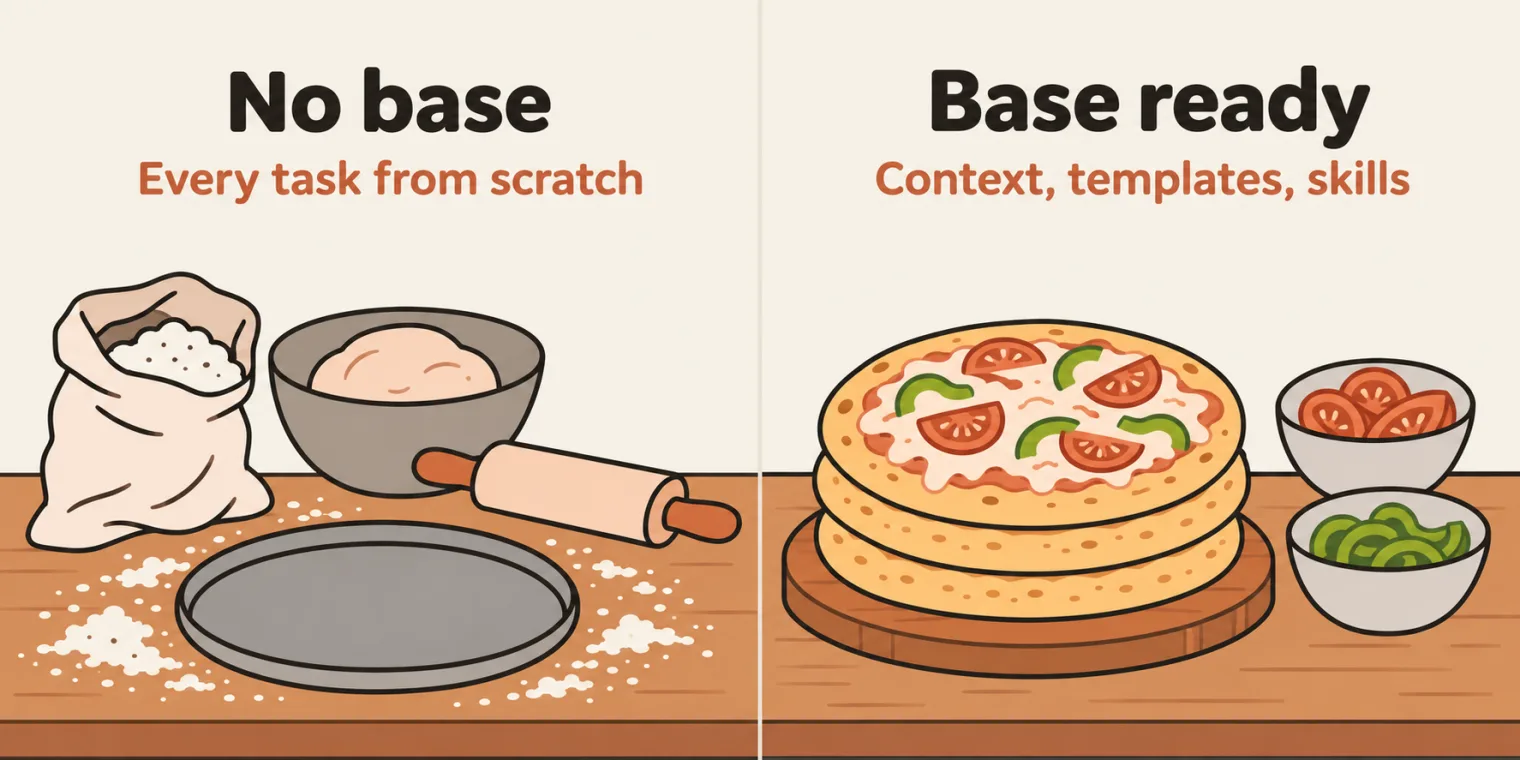
Two things are sorted now, the instructor said: the context of your company is ready as .md files, and the prompt templates are ready too. Where you had hundreds of conversations a day, you will now have only 10 to 20, and your productivity as a QA increases automatically: that is the difference between a normal QA and an AI architect QA, in the instructor's words. Say you spend 8 hours on these tasks now: you can do the same in half the time, 4 hours.
The instructor's analogy: a pizza base. If the base is ready, making a pizza is very fast: you just add the cheese and vegetables. Without the base, you struggle. Base ready means the context is ready, the prompts, frameworks and templates are ready, and, third, the skills are ready too. With all of that, it is very easy to prepare any kind of pizza: whatever task comes, use the same context and templates, and do it very fast.
The session was heavy for some people, the instructor knows: rewatch the videos.
Tasks and announcements
- AI Fluency, right after the class. This week's certification target is AI Fluency: Framework & Foundations, a free course and a small one, about 54 minutes. The instructor asked everyone to take it straight after the session, get the certificate at the end, and post it in the 5x group. Meeti posts the link with the details, and the group gets a certification thread. The certification sheet from the 7 November section of the deck lists it on its first tab, with a recording.
- Claude 101, set in an earlier class, is still not done by a lot of learners: watch the two videos, part 1 and part 2, get the certificate, and post it on LinkedIn too. The deck's 14 November section opens with its link. The instructor highly recommends finishing it.
- Next certification: agent skills, probably next week, the instructor thinks; the class will also see how to use the agent skill.
- Tester Town: a new chat community, very similar to Slack or Teams but public, because learners wanted to chat with each other and with the instructor. Ask unlimited questions there, 24 by 7, and discuss answers, interview questions and repositories. The batch has a private group in it, AI Tester 5x, and most of you are already in it. Switch to game mode to roam around: there are activities, bugs to find, cafes and QA job boards, and more activities are coming. Its exploration held an interview question: what causes a stale element error, and how do you avoid it? A DOM refresh or DOM change, handled with a wait mechanism. Meeti helps with moderation. If you have no access yet, you will be invited after the class; for access issues, use the support number shared in class.
- Doubts: the doubt thread is already open.
- The files: chapter 03 of the batch repository, with a README section for each part.
- Next class: tomorrow, Sunday 15 November, at the same time: AI agents, and part of how to prepare the context for your company. The deck's agenda lists the live classes on Saturdays and Sundays.
Task. Find the top 10 tasks you do as a QA, write proper prompts for them with RICE-POT, CLEAR, CRISP or STAR, turn at least five into generic prompt templates (.md files), and push them to a GitHub repository.
Show the answer
Answer. There is no single answer to copy. Start from the class's list, write each prompt in a framework, then make it generic: replace the hard-coded values, such as the URL, with placeholders. Name the files in order, as the class did with Template1_Basic_TC_Gen.md, add a line that says what to write when information is missing, as Templates 1 to 3 have, and share the repository with your QA team.