What this class covered
- A literal is the value:
a = 10, and the literal types Python has - Multi-line comments with triple quotes
- Built-in functions: type(), max(), min(), pow() and abs()
- User input with input(), and why 10 and 30 printed 1030
- String literals: quotes, len(), upper() and lower(), converting and joining
- More literals: number bases, escape sequences and raw strings
- The seven kinds of operators, and the AND and OR gates
- Operators in code: arithmetic, comparison and logical, power and floor division
- No ++ or --: the assignment operators instead
- The one-line if/else, and why to avoid it
- in and not in, and the math module
- Conditions with if, else and elif, on three problems
- Tasks and announcements: two input tasks, the grade exercise, a one-hour test and the schedule
Literals, and the multi-line comment
The class picked up from the first Python class: compiled and interpreted, source code and bytecode, setting up, comments, variables, keywords, data types and identifiers. Next on the list were literals and operators. From the class notes:
a = 10
a -> variable name
= -> operator
10 -> literal
A literal is a value written straight into the code. The first file of the class, 16, has three of them:
age = 20
name = "Pramod"
b = True
It prints nothing, because it only assigns. 20 is an integer literal, "Pramod" a string literal, and True, with a capital T, a Boolean literal.
The literal types Python has, as listed in class: string, integer, float and complex; Boolean; the special literal None; list, tuple, dictionary and set literals; and bytes, which you will almost never use. Tuples and sets get their own class later.
The first list on screen was JavaScript's: null, BigInt, arrays, objects, regular expressions and template literals. The class then pulled up the Python list above, with a warning not to mix the two languages up. Python's "no value" literal is None.
The multi-line comment. A # comments out one line. For several lines, put them between triple quotes, and none of it runs, code included:
# This is comment

"""
This is Multiple Line Comment
Here the code you write will not be executed
Why this is Used?
age = 65
print(type(age))

"""

# This is single comment
print("Hi")
Hi
age = 65 and print(type(age)) sit inside the triple quotes, so the only output is Hi. File 18 uses one as a note at the top of a file, and the question in class was what it prints:
age = 65  # int
"""
This is multi comment
1. Author- Pramod Dutta
2. Information
3. Print the age of pramod
"""
print(age)
65
65: the note is skipped and print(age) runs. Strictly, the triple-quoted block is a string that Python reads and throws away, which is why it works as a comment.
Built-in functions
What type is 18.45? A float. And max() and min() pick the largest and the smallest of what you give them:
gst = 18.45
print(type(gst))

result = max(45, 65)
result_min = min(45, 65)
print(result)
print(result_min)
<class 'float'>
65
45
These are built-in functions: they come with Python, ready to use without importing anything. Two more:
# Built In - Functions
# Pre defind given by the Python guys to you to use it.

# max()
# min()
# print()
print(pow(2, 3))
b = abs(-10)  # Return the absolute value of the argument.
print(b)
8
10
pow(2, 3) is 2 to the power 3, and abs(-10) is the absolute value, 10. Python has about 70 of them, all listed in the Python documentation. The common ones named in class: print(), input(), type(), len(), int(), float(), str(), bool(), list(), tuple(), round(), pow(), sorted(), reversed(), enumerate(), zip(), isinstance(), all() and any(). Each gets its own example as the batch goes on.
User input with input()
From the class notes: input() takes the text you want to ask the user, and it returns a string.
name = input("Enter your name")
print(name)
Run a file like this from a terminal, with python 21_UI.py (python3 21_UI.py on a Mac), rather than with the Run button: the Run button's output panel does not take typing. Typing Pramod and pressing Enter:
Enter your namePramod
Pramod
The prompt has no space at the end, so what you type runs straight on from it.
Interview question: the sum of two numbers. The first version read two numbers and added them. It is reconstructed here from the recording, since the saved file has the fix:
num1 = input("Enter num 1 -> ")
num2 = input("Enter num 2 -> ")
print(num1+num2)
Typing 10 and 30:
Enter num 1 -> 10
Enter num 2 -> 30
1030
1030, not 40. input() always returns a string, and + between two strings joins them. Wrap each input() in int() and you get numbers. The saved file:
num1 = int(input("Enter num 1 -> "))
num2 = int(input("Enter num 2 -> "))
print(num1+num2)
Enter num 1 -> 10
Enter num 2 -> 20
30
You can also convert at the end instead, with print(int(num1) + int(num2)): both work.
input() always returns a string, so + joins the two answers; int() turns each answer into a number first.String literals
A string can use single or double quotes, and Python does not mind which:
# Strings
name = "Pramod"
c = "C"
c1 = 'C'
print(type(c))
print(type(c1))

# <class 'str'>
# <class 'str'>

print(len(name))
print(name.upper())
print(name.lower())
<class 'str'>
<class 'str'>
6
PRAMOD
pramod
Both are str. len() counts the characters in "Pramod": six. upper() and lower() change the case. String functions get a class of their own later. A question from class: does an index start at 0 or at 1? Always at 0.
A string of digits is still a string until you convert it:
age = "90"
print(type(age))

age = int(age)
print(type(age))
<class 'str'>
<class 'int'>
Then the interview question: does this print Pramod Dutta, or stop with an error?
first_name = "Pramod"
last_name = "Dutta"
full_name = first_name + " " + last_name
print(full_name)
print(type(full_name))
Pramod Dutta
<class 'str'>
No error: + joins two strings, and the result is a string. It is a string plus a number that fails, as the last class showed.
More literals: number bases, escape sequences and raw strings
# decimal system ->  base  -> 10
age = 89

# binary - base system ->  2
binary_number = 0b1010 # -> # 10 decimal system

# Octal  -> base 8
o = 0o130

# Hex  -> base 16
d = 0x12c

pi = 3.14  # float

# String , str
name = "Pramod"

is_pramod_married = True  # bool

# complex
complex_number = 1 + 7j
Another file that only assigns, so it prints nothing. A whole number can be written in four bases: decimal as usual, binary with 0b, octal with 0o and hexadecimal with 0x. Print them and Python shows decimal: binary_number is 10, o is 88 and d is 300. Floats, strings, Booleans and complex numbers are literals too, and complex numbers are never used in automation.
An escape sequence is a backslash and a letter inside a string: \n for a new line, \t for a tab and \b for a backspace.
# Escape Sequence
# \n -> new line
# \t -> tab
# \b -> backspace (1 char backspace)

print("Hello\nWorld")
print("Hello\tWorld")
print("Hello\bWorld")
Hello
World
Hello   World
HellWorld
The backspace steps back one place, so the W of World lands on the o of Hello. Escape sequences are rarely needed, but they do get used.
Single or double quotes make no difference. What does make a difference is an r in front of the string, which makes it a raw string:
c = 'C'
c1 = "C"
print(c)
print(c1)

# dir = 'C:\pramod\n.txt'
dir = r"C:\pramod\n.txt" # raw - it will print as it is (ignore the escape seq.)
print(dir)
C
C
C:\pramod\n.txt
With r, Python prints the string as it is and ignores escape sequences. Without it, the \n in the path turns into a new line. That is the commented-out line: move the # to the raw line and run it again.
chapter_15_Python_PyTest/ex_04_Literals_DT_UI_BF/28_String.py:6: SyntaxWarning: invalid escape sequence '\p'
  dir = 'C:\pramod\n.txt'
C
C
C:\pramod
.txt
The path splits in two at \n. And \p is not an escape sequence Python knows, so Python 3.12 and later warn about it as well. Whenever a string holds a directory path, write it as a raw string.
r in front of the string and Python leaves every backslash alone, which is why Windows paths are written as raw strings.The seven kinds of operators
From the class notes: operators are special symbols that perform operations on variables and values, like addition, comparison, logical tests and more. In age = 96, age is the identifier, = the operator and 96 the literal; = is also the operator you have seen most often. The seven kinds covered in class:
| Kind | Operators | What they do |
|---|---|---|
| Arithmetic | + - * / // % ** |
Add, subtract, multiply, divide, floor division, modulus (the remainder) and the power |
| Comparison | == != > < >= <= |
Compare two values and give True or False |
| Logical | and or not |
Combine True and False values |
| Assignment | = += -= *= /= %= **= //= |
Assign a value, or update one in place: x += 1 is x = x + 1 |
| Bitwise | & | ^ ~ << >> |
Work on the bits of a number; never used in automation or AI |
| Membership | in not in |
Is one value inside another? 'a' in 'apple' is True |
| Identity | is is not |
x is y is True when both names refer to the same object |
The logical operators work like the AND and OR gates from school electronics. and is True only when both sides are True; or is False only when both sides are False; and not flips a value, so not True is False. The truth table:
| Left | Right | Left and right | Left or right |
|---|---|---|---|
True |
True |
True |
True |
True |
False |
False |
True |
False |
True |
False |
True |
False |
False |
False |
False |
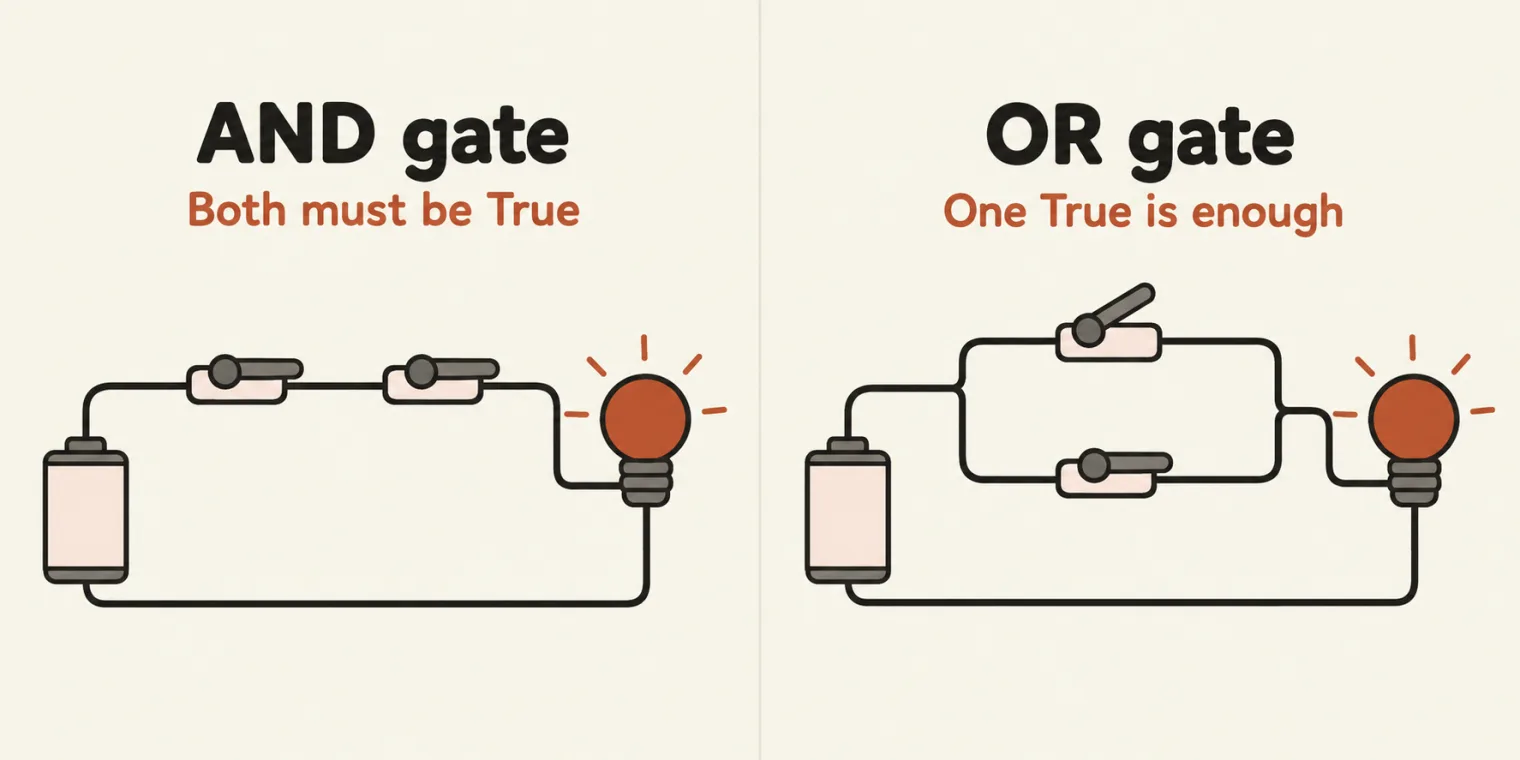
and lights the bulb only when both switches are on; or lights it when either one is.Python also has its own version of the ternary operator, a if condition else b, which is really an if/else written on one line. More on that below. The identity operators were covered in the table only; their examples come later.
Arithmetic operators, power and floor division
File 31 as saved. The arithmetic demo is the commented block in the middle; the lines that run are the unary operators at the end:
# a = 10;
# # Assignment Operator - Assign the value of the right-hand side to the left-hand side.

# # Arthematic

# # +, - , * , /
# print(2+2)
# print(2-2)
# print(2/2) # float
# print(2*2)


# a, b = 10, 3
# print(a + b)  # 13
# print(a - b)  # 7
# print(a * b)  # 30
# print(a / b)  # 3.3333
# print(a // b) # 3 - R
# print(a % b)  # 1 - Q
# print(a ** b) # 1000


age = +65
age2 = -65
print(age)
print(age2)

how_many_lambo_pramod = -1
how_many_lambo_pramod = how_many_lambo_pramod + 1
print(how_many_lambo_pramod)
As saved, it prints:
65
-65
0
+65 and -65 are the unary plus and minus, with one value each. how_many_lambo_pramod + 1 is how you add one in Python, because there is no ++. With the # signs taken off, the arithmetic block prints:
13
7
30
3.3333333333333335
3
1
1000
The comments on // and % are swapped. File 31 marks a // b as 3 - R and a % b as 1 - Q, and in class floor division was also described as giving the remainder. It is the other way round: // gives the quotient, the number of whole times 3 goes into 10, and % gives the remainder, what is left over. The outputs, 3 and 1, are right; only the labels are crossed.
% what is left over.** is the power operator:
print(2 ** 2)  # ** - power
print(2 ** 3)  # ** - power
print(2 ** 4)  # ** - power
4
8
16
And file 35, the question on the two kinds of division:
print(5//2)
print(5/2)
2
2.5
5 // 2 is floor division: with two whole numbers it gives a whole number, the 2.5 cut down to 2. 5 / 2 is ordinary division, 2.5.
Comparison and logical operators
A comparison gives True or False:
x, y = 10, 20
print(x == y)  # False
print(x != y)  # True
print(x > y)   # False
print(x < y)   # True
False
True
False
True
#  ==  Compare Operator ( True or False )
print(2 == 2)
print(2 == 3)
True
False
Python has no ===. Use == to compare, and != for "not equal":
x = 10
y = 20
result = (x != y)
print(result)
True
The logical operators combine conditions:
a, b = 5, 10
print(a > 0 and b > 0)  # True
print(a > 0 or b < 0)   # True
print(not (a > 0))      # False
True
True
False
f = False
t = True
print(f or t)
print(f and t)
True
False
False or True is True, because one side is enough. False and True is False, because and needs both. File 37 mixes the two kinds:
is_pramod_married = True
print(not is_pramod_married)
print(is_pramod_married)

# Logical Operator -> bool
# > , <  >= <=
x = 10
y = 20
print(x > y)
print(x < y)

print(" --- ")

a = 10
b = 10
print(a == b)
print(a >= b) # 10 > 10 or 10 = 10
False
True
False
True
 ---
True
True
not flips True to False. Its comment calls >, <, >= and <= logical operators; they are the comparison operators from file 32, and the logical ones are and, or and not. The last line is the one to remember: 10 >= 10 is True, because >= means greater than or equal.
No ++ or --: the assignment operators instead
Python has no increment or decrement operator. Instead, there are the compound assignment operators:
# Increment (++) / Decrement (--) Operators
# Good news - Doesn't have ++, -- operator

x = 5
x += 1
print(x)

x -= 1  # x= x-1
print(x)

x *= 3  # x= x*1
print(x)
6
5
15
x += 1 adds one, and x -= 1 takes it away. x *= 3 multiplies by 3: 5 times 3 is 15. (Its comment says x*1; it should say x*3.)
The one-line if/else
It looks like a ternary operator, but in class it was called a scam: it is just if/else written on one line.
# Ternary Operator:  if-else statement.
x = 10
y = 20

print("x is greater than y" if x > y else "x is less than y")

# if x > y:
#     print("x is grater")
# else:
#     print("y is greater")
x is less than y
If x > y is true, the value before if is printed; otherwise the one after else. That leaves no answer for equal values: with x = 10 and y = 10, it still prints x is less than y. The commented lines below it make the same decision as a full if/else, with their own messages. The same idea with user input:
user_age = int(input("Enter your age\n"))

if user_age >= 18:
    print("Yes You can go to GOA and vote")
else:
    print("Not you can't go and can't vote")

# print("Yes You can go to GOA and vote" if user_age >= 18 else "Not you can't go and can't vote")
Typing 65:
Enter your age
65
Yes You can go to GOA and vote
The check is >= 18, so 18 gets the yes and 17 the no. The commented last line does the whole decision in one line, and it works. The advice from class: do not write it that way. Juniors on the team will not be able to read it; in the instructor's own frameworks and AI projects, one-liners like this confused people. Write it out in full, as above, unless one line is really needed.
in and not in, and the math module
result = 'a' in 'apple'
result2 = 'b' in 'apple'
result3 = 'b' not in 'apple'
print(result)
print(result2)
print(result3)

import math

print(math.pi)
print(math.pow(2, 2))
print(math.sin(90))
print(math.cos(90))
print(math.tan(90))
True
False
True
3.141592653589793
4.0
0.8939966636005579
-0.4480736161291702
-1.995200412208242
'a' in 'apple' is True because the letter a is in the word, and 'b' in 'apple' is False. not in asks the opposite question, so 'b' not in 'apple' is True.
The second half uses the math module: pi, pow(), and the trigonometry functions sine, cosine and tangent. A module has to be imported first. Leave out import math and the file stops at the first math. line with NameError: name 'math' is not defined. Did you forget to import 'math'? Notice too that math.pow(2, 2) gives 4.0, a float, where 2 ** 2 gave 4.
math.sin(90) is not 1. The trigonometry functions in math take the angle in radians, not degrees, so math.sin(90) is the sine of 90 radians, 0.8939966636005579. For 90 degrees, convert first: math.sin(math.radians(90)) prints 1.0.
Conditions with if, else and elif
From the class notes: conditional statements are for decision making, used when you want to run certain parts of code only if a specific condition is true.
if condition:
    # block of code
elif another_condition:
    # block of code
else:
    # block of code
Three rules from the examples that follow. The if, elif and else lines end with a colon, not a semicolon. There are no brackets around the condition and no curly braces around the block: the indented lines are the block. And Python spells else-if as elif.
The club rule: 21 or older can go in.
age = int(input("Enter your age"))

if age >=21:
    print("You can go to the club!")
else:
    print("Not Allowed!")
Typing 89, then running it again with 17:
Enter your age89
You can go to the club!
Enter your age17
Not Allowed!
The rule has one boundary, 21, so test it and the values next to it:
| Age | The rule says | File 44 prints | |
|---|---|---|---|
| 17 | Not Allowed! |
Not Allowed! |
✓ |
| 20 | Not Allowed! |
Not Allowed! |
✓ |
| 21 | You can go to the club! |
You can go to the club! |
✓ |
| 22 | You can go to the club! |
You can go to the club! |
✓ |
| 89 | You can go to the club! |
You can go to the club! |
✓ |
Even, odd or negative
The problem: find whether a positive number is even or odd.
# Find the positive number is even or odd

num = int(input("Enter a numner").strip())

if  num>=0:
    if num%2 ==0:
        print("Even")
    else:
        print("Odd")
else:
    print("Negative Number!")
Typing 80:
Enter a numner80
Even
The first if checks the sign; the if inside it checks whether the number divides by 2 exactly (num % 2 == 0). This is an if inside an if: a negative number never reaches the even-or-odd check. strip() removes spaces at either end of what was typed, so 80 followed by spaces still reads as 80. Every value typed in class, and the ones at the edge:
| You type | File 45 prints |
|---|---|
| -34 | Negative Number! |
| -1 | Negative Number! |
| 0 | Even |
| 1 | Odd |
| 2 | Even |
| 80 | Even |
| 89 | Odd |
| 80, then four spaces | Even |
Where 0 goes. In class, the first check was described as "greater than zero", but the code says num>=0. So 0 passes it and prints Even, which is correct as far as it goes, since 0 divides by 2 exactly, but 0 is not a positive number. When a problem says "positive", 0 is the value to ask about.
>= 0, so 0 takes the even branch.The biggest of three numbers
The problem: find the largest of three numbers. The easiest answer is the built-in max(), which is in the file as a comment. The class also solved it with if, elif and else:
# Problem  Find the Max between 3 numbers

# User inputs - num1, num2, num3 -> int
# O/p -> int or String with max number

num1 = int(input("Enter the num1\n"))  # 5 , # 10
num2 = int(input("Enter the num2\n"))  # 3 , # 12
num3 = int(input("Enter the num3\n"))  # 2 , # 11

# result = max(num1,num2,num3)
# print(result)

if num1 >= num2 and num1>=num3:
    print(num1)
elif num2>=num3 and num2>=num1:
    print(num2)
else:
    print(num3)
Typing 90, 89 and 67:
Enter the num1
90
Enter the num2
89
Enter the num3
67
90
If num1 is at least as big as both others, it is the answer. If not, and num2 is at least as big as both others, num2 is. Otherwise it must be num3. The edge cases for this problem are ties and order, so the class's code was run with every order of 90, 89 and 67, with each kind of tie, and checked against max():
| Numbers | Largest | File 46 prints | |
|---|---|---|---|
| 90, 89, 67 | 90 | 90 | ✓ |
| 90, 67, 89 | 90 | 90 | ✓ |
| 89, 90, 67 | 90 | 90 | ✓ |
| 67, 90, 89 | 90 | 90 | ✓ |
| 89, 67, 90 | 90 | 90 | ✓ |
| 67, 89, 90 | 90 | 90 | ✓ |
| 90, 90, 67 | 90 | 90 | ✓ |
| 90, 67, 90 | 90 | 90 | ✓ |
| 67, 90, 90 | 90 | 90 | ✓ |
| 5, 5, 5 | 5 | 5 | ✓ |
| -3, -1, -2 | -1 | -1 | ✓ |
It prints the right number every time. A wider sweep agrees too: every combination of three numbers from -3 to 3, 343 of them, gives the same answer as max().
Tasks and announcements
- Two tasks from class, written into files 29 and 30: three numbers, and the quotient and remainder.
- The grade exercise. In the dashboard's coding practice, under Python: a score from the user turns into a grade, A for 90 to 100, B for 80 to 89, and so on down to F. Solve it with if, elif and else and submit it for 10 points. Meeti adds it to the dashboard, with the other practice exercises. FizzBuzz waits, because it needs a for loop, and loops have not been covered yet.
- A one-hour test on RAG and MCP, sent out right after class. Everyone takes it.
- Schedule: classes pause for the rest of this week and resume next week.
- Coming up: the last of the Python basics, then CrewAI, LangChain, LangGraph and DeepEval, with the aim of finishing them in October. Multi-agent systems are part of both CrewAI and LangChain.
- Extra classes and certifications continue, with invitations sent separately.
Saved for later classes: tuples and sets, functions versus methods, string functions, and loops.
Task 1, three numbers. Take three numbers from the user and print their sum, subtraction, multiplication and division.
Task 2, quotient and remainder. Take two numbers from the user and print the quotient and the remainder: 15 and 2 give a quotient of 7 and a remainder of 1. Find the built-in function that does it, and do it with modulus as well.
Task 3, the grade exercise. Solve the score-to-grade problem in the dashboard's coding practice and submit it. Before you do, try the scores where one grade meets the next.
The test. Finish the one-hour RAG and MCP test.