What this class covered
- The MCP Inspector homework, and building your profile on LinkedIn
- MCP revision: three phases, and tools, resources and prompts
- Moving towards an AI architect role, and why QA should build its own tools
- MCP versus RAG: a pipe to many tools against a database of top results
- Two ways to build an MCP server: vibe coding, or Python with FastMCP
- Building the TestCreator MCP: objective first, then a plan, then the build
- The TestCreator MCP, run for real
- The TestSkill Finder MCP: 100 skills, set as a goal
- Lessons from the build, and what comes next: two weeks of Python
Homework and branding
The task from the last class was to explore an MCP server with MCP Inspector. Many did it; the rest are to finish it this week. The instructor's reason: the more you do it yourself, the more you understand.
Then LinkedIn. Two posts from the batch were shown as examples: one about the QABuddy.ai project with about 20,000 impressions, and one past 100 likes. The target for everyone: at least four to five posts a month that reach 100 or more likes. That is how HR, colleagues and QA managers come to know you. It is not luck; it is consistency: the people getting results post almost every day. Share any post that crosses 100 likes, so others can learn from it.
MCP revision: three phases, and three things a server offers
- An MCP session has three phases: the handshake (initialization), the conversation (operations) and goodbye (shutdown).
- An AI client, such as GitHub Copilot, talks to an external server through the MCP's capabilities, then closes the connection.
- MCP is not an API. Only AI agents call an MCP server.
A server can offer three kinds of thing:
- Tools are actions the agent runs. This is how a coding agent gets at Playwright, for example. They do most of the work.
- Resources are read-only data: a static PDF, or a company database.
- Prompts are ready-made recipes kept on the server, such as "give me the top 10 employees by salary".
Resources and prompts exist but are used much less than tools.
QA as an AI architect
The class's career point: testers with three or more years of experience, manual testers included, are increasingly expected to move towards an AI architect role. That means setting up RAG, LLM evaluation, MCP servers and AI agents, and knowing LangChain, LangGraph, Langflow, n8n and DeepEval.
Two consequences follow:
- Programming is required. The people building agents, MCP servers and RAG pipelines today all write real code. GitHub Copilot does not remove that.
- QA should build its own tools. A developer does not know the regression suite, the test cases or the test repositories. You do, so you build the tools and give them to your team.
MCP versus RAG
The use case that motivates a QA MCP server: a developer asks for the regression test cases. Today you send them a CSV of 15,000 tests. Instead, give them an MCP server they can use from GitHub Copilot: the top 10 tests, the smoke tests, a test by ID, without asking you each time. The same idea works for test results: a QA MCP over Jenkins logs, screenshots and old reports can answer "how many tests failed in the last 7 days, and which are flaky?" Developers and project managers reach it through their own LLM, since only agents call an MCP server.
Why not just use the RAG built in the earlier chapters? Because they do different jobs. The class's picture: an MCP is a pipe, a connector with a set of tools, each one a function; a RAG is a database that answers a question with its top results, the closest chunks, and nothing else.
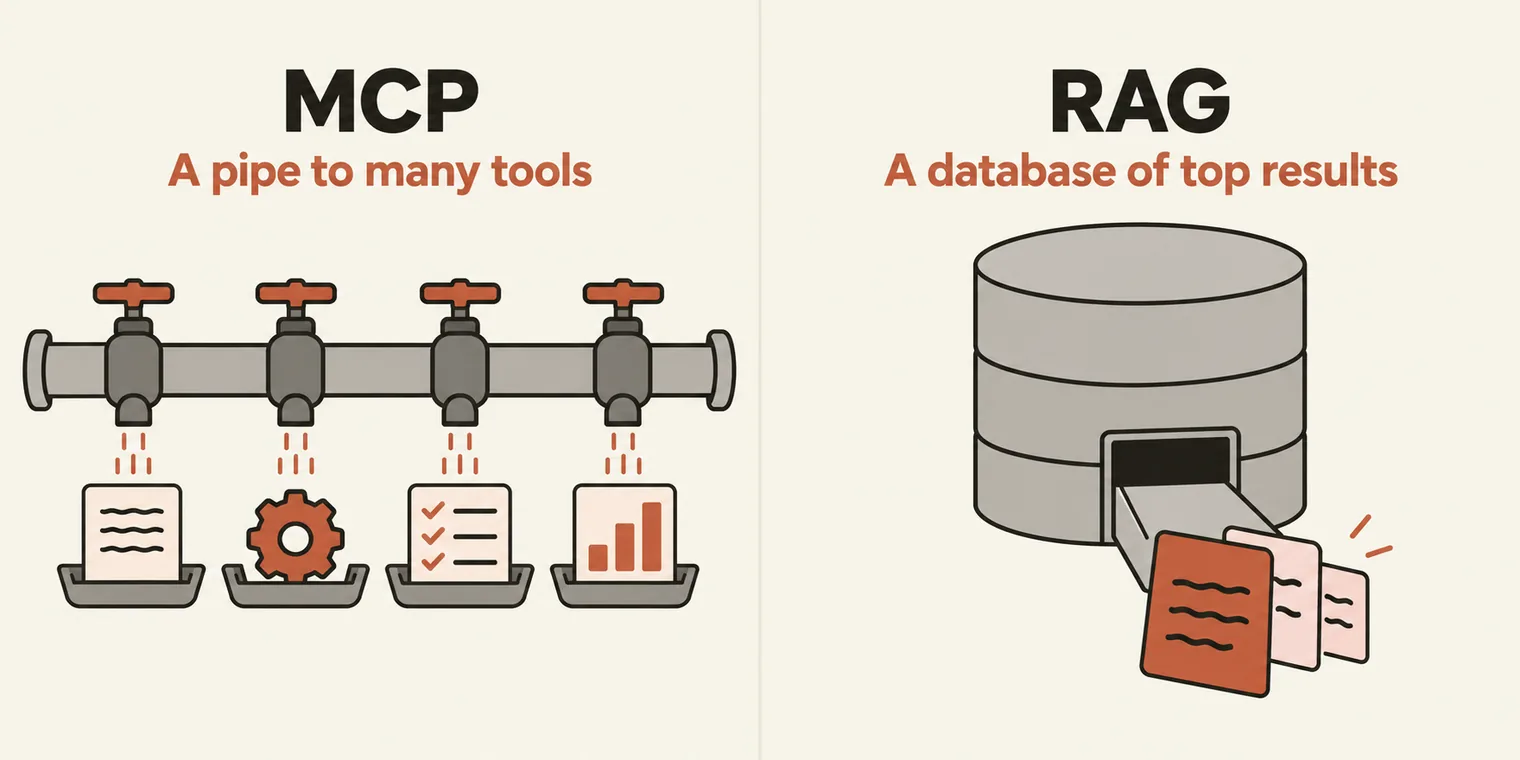
- You can combine them. An MCP server can sit in front of a RAG, or in front of a database.
- Both have a ceiling. A model's context window is limited; the class's figure was about a million tokens. A tool that returns more than that loses the context, and the model starts to hallucinate.
- Neither is "better". The approach decides. The instructor's team moved from an MCP to a RAG for finding test cases and regression numbers, and uses MCP for quick analysis.
Two ways to build an MCP server
- Vibe coding: describe the server in prompts and let an agent write it.
- Proper code: Python, with a library such as FastMCP.
This class did the first, using FastMCP as the library. FastMCP is a Python library that builds an MCP server in a few lines: create a FastMCP object, decorate a function, and the function becomes a tool. The example shown in class, from the FastMCP site:
from fastmcp import FastMCP

mcp = FastMCP("Demo")

@mcp.tool
def add(a: int, b: int) -> int:
    """Add two numbers"""
    return a + b

if __name__ == "__main__":
    mcp.run()
Called through an MCP client, with FastMCP 4.1:
fastmcp 4.1.0 | tools: ['add'] | add(2, 3) -> 5
Writing servers by hand needs Python, which is why the next two weeks cover Python and pytest. They are the base for what follows: CrewAI, LangChain, DeepEval, and LangGraph, which the class called the big daddy.
Building the TestCreator MCP
Objective first. If you are not clear on what the server should do, there is nothing to build. The class's objective file:
We have a list of vwo_5000_test_cases. Our task is to give them this test case as a tool. The tools that we are going to develop will be available in this CSV, which we are going to read. We are going to give them access so they can get the test case by:

- priority
- module
- maximum and minimum limitations
They can find the top test cases that have to be executed for a particular module, right? I want you to build a lot of tools that can be helpful for us as a test creator MCP.
The data is a CSV of 5,000 VWO test cases, in data/vwo_5000_test_cases.csv. The goal is a TestCreator MCP (TC MCP) that any QA or developer can connect to and ask for tests.
Plan before code. In vibe coding, the first job is the plan. The first prompt, as typed, from the repo's record of the session:
@chapter_14_MCP_Create_VIBE/data/vwo_5000_test_cases.csv Lets discuss don't code, we want to build a TestCreator MCP (TC MCP), which we can share with the other QA or Dev if required. lets create a Plan how this is going to created and also we will use the FastMCP for the same, tools also, give me the list of tools which we should give them by reading it and also prepare a 01_TestCreatorMCP.plan.md
Before suggesting tools, the agent profiled all 5,000 rows:
- 17 modules, 72 features, 4 priorities, 9 test types, 4 browsers and 4 devices;
- only 1,520 unique scenarios, plus 466 exact duplicate rows;
- 415 deprecated tests;
- a broken A/B Testing label and a doubled regression label.
The plan proposed 21 tools in 6 groups. In class, the first tool ideas were search a test case, get a test case, tests by status, and review a test case. A learner added that each tool needs a clear schema, stable test IDs, pagination and clear priorities, and the instructor agreed. The recording stops here, at the break.
After the break, the repo's prompt record shows how the server was finished:
| Prompt | What happened |
|---|---|
2. Build it in testcase-creator-mcp, and give the connection string |
Built on FastMCP 4.1 (the current release, checked first; it does not install on Python 3.15 yet): 21 tools, 4 resources, 3 prompts, write tools hidden, edits kept in a separate file. 33 tests |
| 3 and 4. Updates, then restart MCP Inspector on this server | The Inspector, pointed at the new server, listed and called the tools |
| 5. Host it for students for a while | A temporary public tunnel, checked as read-only first |
| 6. A student's error: "Missing session ID" | About 20 students had opened the MCP URL in a browser. Fixed with stateless HTTP and a browser help page |
| 7. Stop the public MCP now | The tunnel closed; the server stayed local |
| 8 and 9. Record the prompts, then document and push | The prompt record, a README section, and the push |
The TestCreator MCP, run for real
Its test suite:
33 passed in 3.64s
Asked through an MCP client, the way an agent would ask, it lists 19 tools: the 21 minus the two write tools, which stay hidden unless writes are switched on. Then the class's core request, the top tests to run for a module. A short script with FastMCP's client does the asking:
import asyncio
from fastmcp import Client
from tc_mcp.server import create_server

async def main():
    async with Client(create_server()) as client:
        tools = await client.list_tools()
        print(f"{len(tools)} tools visible to a read-only client")
        r = await client.call_tool("get_top_tests_for_module", {"module": "Funnels", "count": 3})
        d = r.structured_content
        print(f"\nget_top_tests_for_module(module='Funnels', count=3): "
              f"{d['returned']} of {d['candidates_considered']} candidates")
        for t in d["results"]:
            print(f"  {t['rank']}. {t['key']}  {t['summary']}")
            print(f"     {t['rank_reason']}")

asyncio.run(main())
19 tools visible to a read-only client

get_top_tests_for_module(module='Funnels', count=3): 3 of 208 candidates
  1. VWO-2453  [Funnels] Functional: ensure segment comparison
     Highest · Ready · Functional (score 56); 1st pick for feature 'segment comparison'
  2. VWO-5140  [Funnels] Negative: prevent misuse of step drop-off
     Highest · Ready · Negative (score 55); 1st pick for feature 'step drop-off'
  3. VWO-1628  [Funnels] Regression: re-verify funnel builder
     Highest · Ready · Regression (score 54); 1st pick for feature 'funnel builder'
The ranking spreads its picks across features, so the top 3 are not three browser variants of one scenario, and every pick says why it was chosen. To connect from Cursor, Claude Desktop or VS Code, the repo's README gives this entry (VS Code uses the key servers):
{
  "mcpServers": {
    "tc-mcp": {
      "command": "uv",
      "args": ["run", "--directory", "/ABS/PATH/chapter_14_MCP_Create_VIBE/testcase-creator-mcp", "tc-mcp"],
      "env": { "TC_MCP_ALLOW_WRITE": "false" }
    }
  }
}
The TestSkill Finder MCP
The second server was set as a goal: keep working until it is done. The prompt, as typed:
usins this https://github.com/PramodDutta/skillmasterclass/tree/main/skillmasterclass/skills, in the folder of the testskill-finder-mcp,

your task is to create a test skill finder MCP which can download all these skills and put them into the folder for the test skill finder MCP. In the skill folder, you can add all the skills.

You create a local MCP or streamable MCP which can be connected by any LLM to find the skill based on the keyword. For example, if somebody wants to find a skill related to Playwright, he can find it. If he wants to find a skill related to Playwright API, he will be able to find it. If he wants to find a skill related to test case creator, test plan creator, test bugs strategy, and everything, he will be able to find it.

Your task is to add the basic skill in the same format as the skill. A total of 50 skills should be present there. The user should have the ability in the MCP to create multiple tools to allow them to find, search, and do many more things, and also use prompts and resources for that skill. The source of truth is nothing but a /skill folder where you have 50+ skills available.
Two follow-up prompts raised the target from 50 to 100 skills: STLC, Playwright, Selenium, API testing and Cypress, then performance, security, LLM evaluation, agents and MCP. The result: 36 skills synced from the skillmasterclass repo, plus 64 written for this server in the same format, every one passing the server's own validator. The search understands variations: creator, generator and writer match, and pw means Playwright.
Its test suite, then the question from the prompt, asked through an MCP client:
42 passed in 1.37s
find_skill_for_task(task='API testing with Playwright')
  1. pw-api-tester  (Playwright, score 153.82)
     Designs and generates API tests using Playwright's request context.
  2. graphql-api-tester  (API Testing, score 86.37)
     Tests GraphQL APIs: queries, mutations, variables, the errors array, auth, depth and complexity limits, and introspection settings.
  3. pw-network-mocker  (Playwright, score 52.32)
     Designs Playwright route interception and mocking.

Call get_skill('pw-api-tester') for the full workflow, or use the 'pw-api-tester' prompt.
It offers 13 tools to a read-only client (two more write), 103 prompts (one per skill, plus three workflow prompts) and 7 resources. The next class used it from GitHub Copilot: see that page.
Lessons from the build
The repo's own summary of the session, worth keeping for any vibe-coded tool:
- Plan before you build. "Don't code" in the first prompt meant the data was profiled first, and the duplicates and broken labels shaped the tools.
- One clear outcome per prompt: a plan file, a connection string, a running Inspector, a public URL.
- Paste errors exactly as you see them. The raw "Missing session ID" text was enough to find the cause.
- Keep a stop switch for anything public. One line shut the public server down.
- Make the goal checkable. The example searches in the goal prompt became tests, so "done" could be proven.
Tasks and announcements
- Next two weeks: Python and pytest, the base for CrewAI, LangChain, DeepEval and LangGraph.
Task 1, MCP Inspector. If you have not done it yet, finish the MCP Inspector task this week.
Task 2, LinkedIn. Aim for four to five posts a month that reach 100 or more likes, and share any post that crosses 100 likes with the batch.