The Testing Academy · Masterclass · Agent Skills
Skills Masterclass: how to create agent skills that actually work.
An Agent Skill is a folder with a SKILL.md that teaches Claude Code or GitHub Copilot a repeatable workflow, loaded only when it applies. This masterclass covers what skills are, how they load, and a ready-to-use 36-skill suite mapped to the seven STLC phases with Playwright and Selenium packs, all downloadable as a bundle.
What Agent Skills Are
The problem skills solve, the anatomy of a SKILL.md file, how progressive disclosure keeps dozens of them nearly free, and why organizing them by the testing life cycle is the move.
Concept · the problem
A skill is a runbook your agent loads on demand.
Base models are generalists. Real QA work needs your procedures, your conventions, your gates.
Every prior way to give an agent that knowledge had a failure mode: stuffing it in the system prompt bloats context, re-pasting it each session is inconsistent, and fine-tuning is slow and opaque. An Agent Skill fixes all of that: a folder with a SKILL.md (YAML frontmatter plus Markdown instructions), optionally with references/, scripts/ and assets/. It loads only when the task matches, so you can install dozens with almost no overhead. Think man pages and team runbooks, pulled into working memory only when the task demands them.
Explain what a Claude Agent Skill is and when I would use one instead of a long system prompt. Show me the folder layout of a SKILL.md.
Why it mattersSkills turn "re-explain the process every time" into an auditable, versioned workflow. Write the test-plan procedure once and every session runs it the same way.
Concept · anatomy
Anatomy of a SKILL.md.
The frontmatter is the routing contract. The body is the procedure. Guardrails keep it honest.
The name must match the folder, and the description is the only thing the agent sees before deciding to load the skill, so it must say what the skill does and when to use it, with the trigger phrases a user would actually say. The body then carries a clear "When to use", an ordered workflow, an output shape, and guardrails. Every skill in this suite also ends at a human-review gate and refuses to fabricate data, the two rules that make an AI-drafted artifact safe to ship.
---
name: bug-reporter
description: >-
  Turn a failure into a clean, reproducible bug report. Use when a tester
  says "file a bug for this", "write up this defect", or describes
  something broken and wants it documented properly. Produces a structured
  report ... ready to paste into the tracker after a human confirms it.
license: MIT
metadata:
  author: TheTestingAcademy
  stlc-phase: Defect Management
  version: 1.0.0
---

# Bug Reporter
## When to use ...
## Workflow  (collect facts -> title -> repro -> rate -> evidence)
## Output shape  (the exact report skeleton)
## Guardrails  (never fabricate a repro step, log line, or evidence link)
# --- HUMAN REVIEW GATE --- (draft until a human confirms and files it)
Create a new agent skill called bug-reporter. Write the SKILL.md: frontmatter (name plus a description with trigger phrases), a When-to-use section, an ordered workflow, an output shape, guardrails, and a mandatory human-review gate.
Why it mattersIf a skill will not trigger, the description is wrong 95% of the time, not the body. Nail what plus when plus trigger phrases and the agent reaches for the right skill on its own.
Concept · progressive disclosure
How a skill loads: three layers, just in time.
Only the frontmatter is always in context. The body loads on match; files load on demand.
This is the architectural core and why bundled content has no practical limit. At startup only each skill's name and description (about 100 tokens) are injected, so the agent knows it exists and when it applies. When your request matches, the full SKILL.md body loads. Only then, and only if a step calls for it, does the agent open a file in references/ or run a script in scripts/, which can execute without its source ever entering context. Tokens are scarce; files are cheap.
 animated
Refactor my skill so the heavy detail lives in references/ and scripts/ instead of the SKILL.md body, and the description stays under about 100 tokens. Show me the new folder layout.
Why it mattersInstall the whole 36-skill suite and pay almost nothing until you use one. Progressive disclosure is what makes a large, well-organized skill library practical.
Concept · organizing principle
Map the skills to the STLC.
One skill, one concern. Numbered by the life cycle, they hand off the way testing actually flows.
The suite is organized by the Software Testing Life Cycle so you read and run it in order: requirement, plan, design, cases, execute, defects, closure. Fourteen skills cover the seven phases, and two framework packs (Playwright, Selenium) plug into execution. Each skill does exactly one job and composes with the next, and every one stops at a human-review gate and never fabricates a result. That "one skill, one concern" discipline is what keeps a large library maintainable instead of turning into a single unusable mega-prompt.
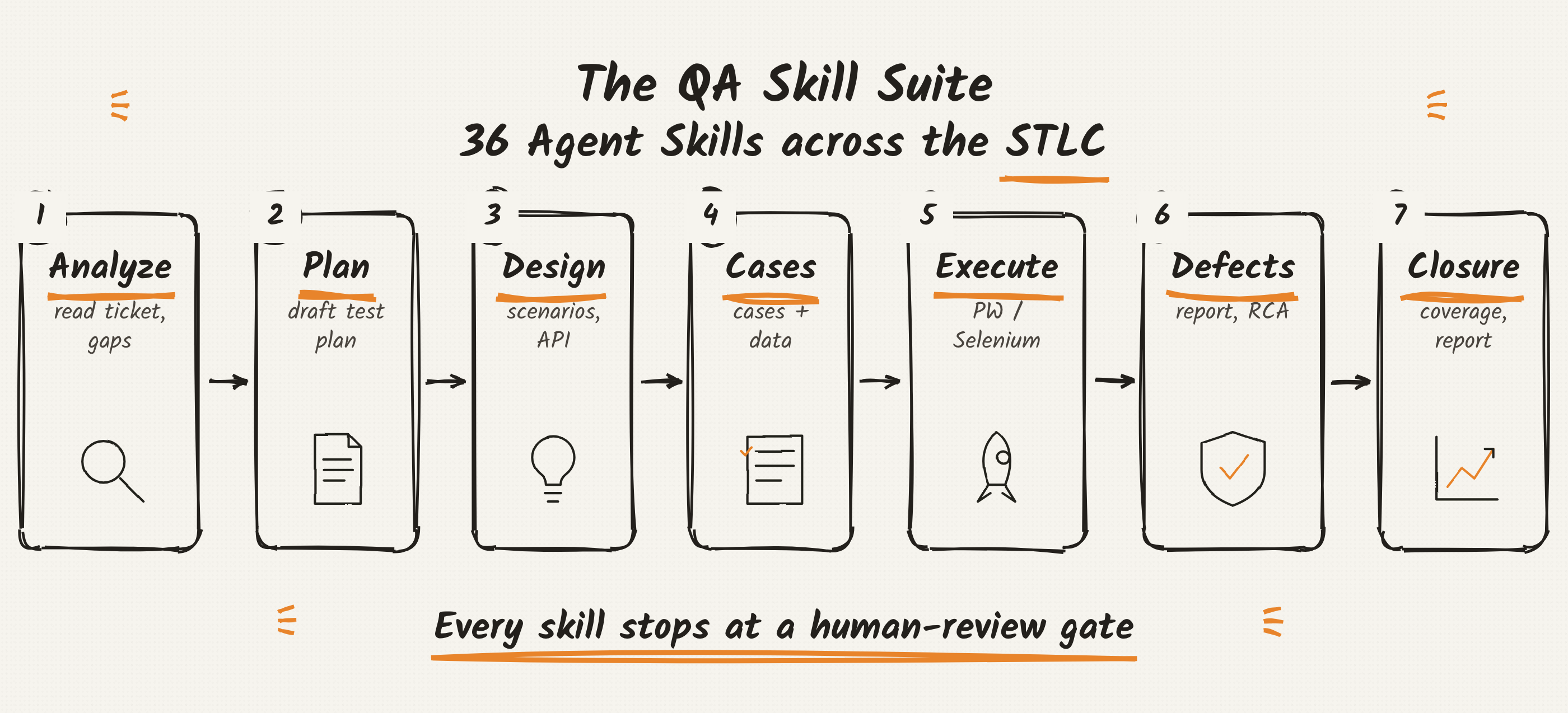
Design a set of agent skills covering the 7 STLC phases. For each phase, give me the skill name, a one-line description, and the trigger phrases a tester would say.
Why it mattersThe life cycle is the natural index. A tester already thinks in phases, so the skill they need is exactly where they would look for it.
Interactive · browse the suite
Explore all 36 skills.
Pick any skill from the collapsible panel. Each one gets a diagram of its shape and a ready-to-copy prompt.
The left panel groups every skill by its STLC phase and framework pack, collapse a group or the whole panel to focus. Select a skill to see what it takes in, what it does, what it hands back, and a prompt you can paste straight into Claude Code or GitHub Copilot to trigger it.
Why it mattersCopy the prompt, run the skill, review the draft. The explorer is the fastest way to find the right skill and trigger it correctly on the first try.
The STLC Skill Suite
Fourteen skills across the seven phases, each drafting the artifact a human then approves: from analyzing a ticket to writing the closure report.
Phase 1-2 · requirement & planning
Analyze the ticket, then plan the testing.
Turn a JIRA story into a gap list and a review-ready test plan before a single case is written.
jira-requirement-analyzer reads a ticket and surfaces the ambiguities, missing acceptance criteria and undefined edge cases, the questions a tester should ask before the bug ships. test-plan-generator (the fully worked example, shipping with a checklist, a template, a fetch_jira.sh script and a Copilot prompt file) then fills the standard plan: scope, a "Gaps & Questions" section, P0/P1/P2 scenarios traced to acceptance criteria, data, risks and entry/exit criteria. It fetches the real ticket or asks you to paste it, never inventing content, and stops for sign-off.
> write a test plan for VOC-1234

# the skill fetches the ticket, runs the gap checklist, then drafts:
##  Test Plan - VOC-1234: <title>
   1. Scope & Objectives
   2. Gaps & Questions for the author   # the highest-value part
   3. Test Scenarios (P0/P1/P2)
   4. Test Data & Environment
   5. Risks & Assumptions
   --- HUMAN REVIEW GATE ---            # stops for your sign-off
Write a test plan for JIRA-1234. Flag any missing acceptance criteria and edge cases before drafting scenarios.
Why it mattersA tester's leverage is asking the question before code ships. These two skills front-load the gap analysis that catches defects at the cheapest possible moment.
Phase 3-4 · design & cases
Design scenarios, then write cases and data.
From approved scope to concrete, traceable test cases with realistic, non-PII data.
Test design turns the plan into coverage: test-scenario-designer derives positive, negative, boundary and cross-role scenarios, while api-test-designer covers the contract, status codes, schema and auth for a service. Then case development makes them executable: test-case-writer produces step-by-step cases with preconditions and expected results traced back to an acceptance criterion, and test-data-generator builds valid, boundary and negative datasets with faker-style values, never real PII. Each keeps the through-line so coverage stays auditable.
Design test scenarios for this feature's acceptance criteria, tag each by risk, then expand the P0 scenarios into detailed test cases with the test data they need.
Why it mattersTraceability is the whole game. Every scenario maps to an acceptance criterion or a gap, so coverage is a fact you can point at, not a feeling.
Phase 5 · execution
Execute: automate, track, and pick the regression set.
Turn cases into runnable specs, track the run, and choose the smallest safe regression suite.
automation-script-generator converts an approved case into a draft spec (handing off to the Playwright or Selenium pack for the framework detail), test-execution-tracker records pass, fail, blocked and skipped against the plan with a run summary, and regression-suite-selector uses the change set and risk to recommend which tests to re-run rather than blindly running everything. Every generated script is a draft the engineer runs, with guessed selectors flagged and no fabricated results.
Automate this approved test case as a Playwright test using role and testid locators, then tell me which regression tests to run for the change.
Why it mattersRunning everything is slow; running nothing is dangerous. Risk-based selection is how execution stays both fast and safe.
Phase 6-7 · defects & closure
File clean defects, then close the cycle.
A reproducible bug report, sound triage, real root cause, and a closure report backed by numbers.
Defect management is three skills: bug-reporter writes a report a developer can reproduce on the first read (title, environment, steps, expected vs actual, evidence), bug-triage-assistant proposes severity (impact) and priority (urgency) with justification, and rca-analyzer runs a disciplined 5-Whys or fishbone, labeling hypothesis versus evidence. Closure then reports honestly: test-coverage-analyzer distinguishes covered from covered-and-passing, and test-closure-reporter produces an advisory go / no-go with real denominators. None of them invents a repro step, a metric, or a verdict.
File a reproducible bug report for this failure, propose severity and priority with a one-line justification, then run a 5-whys RCA on the root cause.
Why it mattersA bug report with no evidence is noise; a closure report with no denominator is spin. These skills bake the honesty in.
Framework Packs & Download
Twenty-two automation skills for Playwright and Selenium that plug into execution, how to install any skill in one command, and the whole suite to download as a bundle.
Pack · Playwright (TypeScript)
The Playwright pack: 11 skills.
Web-first, role and testid locators, no hard waits. The pack that turns a scenario into a resilient spec.
Eleven cross-cutting skills for Playwright + TypeScript, each preaching getByRole / getByLabel / getByTestId and auto-retrying assertions, never waitForTimeout, networkidle or XPath. Generate specs and page objects, design fixtures, mock the network, tame flakiness, read traces, run visual and accessibility checks, and wire CI. Every generated test is a draft the engineer runs, with guessed selectors marked // TODO: confirm.
import { test, expect } from '@playwright/test';

test('completes purchase with a valid card', async ({ page }) => {
  await page.goto('/cart');
  await page.getByRole('button', { name: 'Checkout' }).click();
  await page.getByLabel('Card number').fill('4111111111111111');
  await page.getByRole('button', { name: 'Pay now' }).click();
  await expect(page.getByTestId('order-confirmation')).toBeVisible();
});
Write a Playwright test for the checkout flow using getByRole and getByTestId locators and web-first assertions, and mark any guessed selector with a TODO.
Why it mattersLocators from the accessibility tree do not rot. The pack encodes the practices that keep a Playwright suite green as the UI shifts.
Pack · Selenium (Java)
The Selenium pack: 11 skills.
Selenium 4 and TestNG, explicit waits, stable locators, Selenium Manager for drivers. No Thread.sleep.
Eleven skills for Selenium 4 + Java + TestNG, built on WebDriverWait with ExpectedConditions (never Thread.sleep), Selenium Manager for driver resolution, relative locators, @DataProvider for data-driven tests, and Grid 4 for parallel and cross-browser runs. Scaffold a framework, build page objects, generate tests, fix flaky waits and locators, configure the grid, run cross-browser, drive data-driven suites, and integrate Allure or Extent reporting.
WebDriverWait wait = new WebDriverWait(driver, Duration.ofSeconds(10));

// wait for the real condition, not a fixed guess:
wait.until(ExpectedConditions.elementToBeClickable(By.id("checkout")))
    .click();
wait.until(ExpectedConditions.textToBePresentInElement(
    total, "$"));   // real method, not the shorthand name
Replace the Thread.sleep calls in LoginTest.java with explicit WebDriverWait conditions, and flag any brittle XPath to stabilize.
Why it mattersMost Selenium flake is a hidden Thread.sleep or a brittle XPath. The pack replaces both with explicit waits and a stable-locator ladder.
Setup · install
Install a skill in one command.
Drop a folder into your skills directory for Claude Code, or convert it to a prompt file for Copilot.
A skill is just a folder, so installing one is a copy. For Claude Code, drop it into ~/.claude/skills/ and it is discovered at the next session start; copy a whole phase or a whole pack the same way. For GitHub Copilot, convert a skill body into a .github/prompts/*.prompt.md file (the flagship test-plan-generator ships one you can copy). No build step, no registry.
# one skill (Claude Code)
cp -r ./skills/02-test-planning/test-plan-generator ~/.claude/skills/

# a whole STLC phase
cp -r ./skills/05-test-execution/* ~/.claude/skills/

# a whole framework pack
cp -r ./skills/framework-packs/playwright-pack/* ~/.claude/skills/

# GitHub Copilot: use the bundled prompt file
cp ./skills/02-test-planning/test-plan-generator/copilot/test-plan.prompt.md \
   .github/prompts/
Set up my repo to use these skills: create the ~/.claude/skills layout for Claude Code and a .github/prompts prompt file for GitHub Copilot.
Why it mattersZero infrastructure to adopt. Onboarding a new SDET to your conventions becomes one line in a README instead of tribal knowledge.
Download · the suite
Download the whole suite, or a pack.
Every skill, reviewed and ready to drop into your skills directory. Grab the full bundle or just what you need.
All 36 skills are packaged as zips: the complete suite (with the README and the flagship's references, script and Copilot prompt), the 14 STLC-phase skills on their own, and each framework pack separately. Unzip, then copy the folders you want into ~/.claude/skills/ as shown above.
I downloaded the QA skill suite. Help me pick which skills to install first for a team doing manual plus Playwright testing, and show the copy commands.
Why it mattersThese are the reviewed source files, not screenshots. Download, install, and your agent runs the same QA workflow this masterclass describes.