The Testing Academy · Masterclass · QA Automation
Kiro for QA.
Turn requirements into designs, tasks, example tests, correctness properties, and enforced evidence without confusing generated documents with verified quality.
Before you begin
Bring one behavior worth specifying.
Use a small synthetic project with a versioned requirement and a runnable test command. The capstone uses login lockout so every artifact has an observable security outcome.
Open the first lesson- Workspace
- A current Kiro installation and a disposable Git branch.
- Automation
- Node.js 20+, Playwright, and a focused auth test command.
- Analysis
- Basic requirements, boundary analysis, and Git review skills.
- Safety
- Synthetic accounts, reviewed permissions, and constrained MCP tools.
Part 1 · Foundations
Specify Quality Before Code
Use steering and observable requirements to define the behavior, constraints, and evidence path before implementation tasks begin.
Kiro's Spec-Driven QA Model
Choose feature spec, bugfix spec, Quick Plan, or investigation by risk.
1.2Workspace Setup, Privacy, and Trust Boundaries
Review file, command, network, credential, hook, and MCP authority.
1.3Steering Files and AGENTS.md for Test Standards
Scope durable test guidance with steering inclusion modes and owners.
1.4EARS Requirements With Observable Acceptance
Turn vague behavior into trigger, response, boundary, and oracle.
The operating map
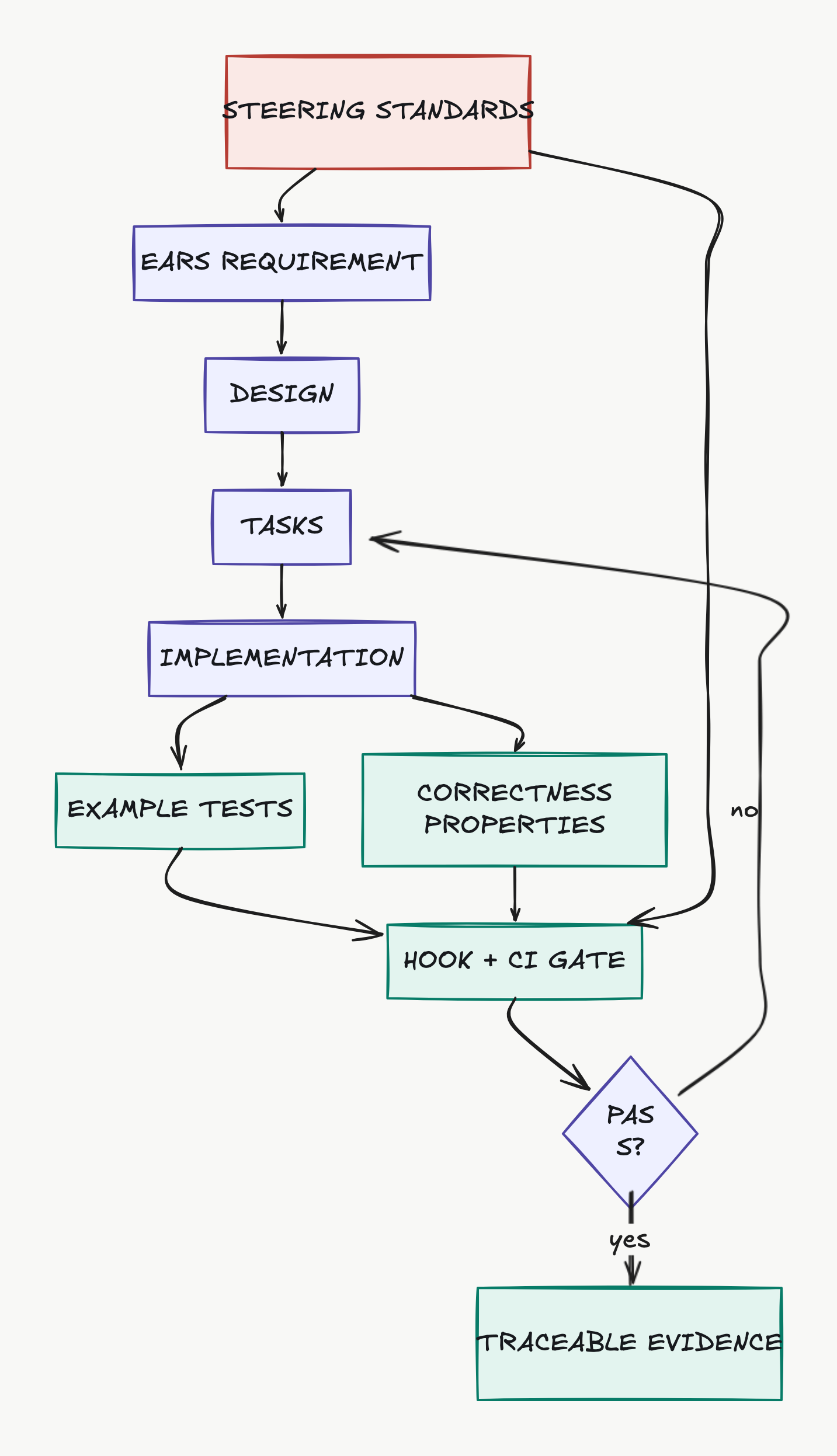
A specification should end in evidence.
Steering shapes standards. EARS requirements drive design and tasks. Example tests and correctness properties converge at a deterministic hook or CI gate before evidence is accepted.
Part 2 · Traceability
Turn Specs Into Test Evidence
Review the requirement-design-task chain, add example and property tests, and keep proof linked to the exact behavior and revision.
Feature Specs: Requirements, Design, and Tasks
Review every requirement-design-task transition for testability and evidence.
2.2Bugfix Specs: Current, Expected, and Unchanged Behavior
Anchor a repair in reproduced current, expected, and unchanged behavior.
2.3Traceability From Task to Playwright Evidence
Connect requirement IDs, tasks, tests, reports, commands, and commits.
2.4Correctness Properties and Property-Based Testing
Pair named examples with reproducible properties and counterexamples.
Completion evidence
Finish with artifacts another SDET can audit.
Completion means the requirement, design, tasks, automated checks, hook result, and residual-risk review agree. A checked task box alone is not evidence.
{
  "course": "kiro-masterclass",
  "artifacts": 4,
  "deterministic_check": true,
  "human_review": "required"
}Part 3 · Automation and governance
Enforce and Integrate
Use hooks, browser tools, reusable Powers, and explicit permissions to make quality checks repeatable while keeping high-impact actions human-owned.
Hooks That Run Tests and Block Unsafe Work
Use versioned command hooks and distinguish reporting from blocking.
3.2Playwright MCP With a Constrained Browser Target
Explore a synthetic UI, then convert observations into durable tests.
3.3Powers, Tool Authority, and Supervised Execution
Package a narrow QA capability with reviewed tools, hooks, and ownership.
3.4Capstone: Specify and Verify Login Lockout
Prove a security behavior from EARS requirement to reproducible evidence.
Source of truth
Current product behavior, not remembered shortcuts.
The curriculum was checked against official documentation and current source code where available. The lessons page contains the complete source list and implementation caveats.
Open all primary sources- Kiro Documentation
- Current product surfaces, concepts, and getting started.
- Web Specs
- Feature specs, bugfix specs, and Quick Plan.
- CLI V3 Specs
- Requirements, design, tasks, and CLI spec execution.
- Quick Plan
- Lightweight planning and when to use it.