Build a 100% Local MCP Server and Client
Build a secure local MCP workflow that keeps your data on your own machine. We’ll start with a simple FastMCP server, connect a local client using mcp-use and Ollama, then extend the setup into real browser automation with Stagehand.
- A simple MCP server with one tool
- A local MCP client powered by local LLMs
- A Streamlit wrapper for easier interaction
- A Stagehand MCP server for browser automation
- Python + FastMCP
- mcp-use
- Ollama / local models
- Streamlit
- Stagehand for browser automation
1 Why Local MCP Matters
Claude Desktop and Cursor often rely on external LLM providers to use MCP. That is convenient, but for enterprise-grade automation, privacy and infrastructure control can matter more than convenience.
Keep prompts, intermediate tool outputs, and browser automation commands on your own machine or private infrastructure.
A local client reduces exposure when your MCP tools can access internal apps, databases, or private browser sessions.
You can pair any compatible local model with any MCP server and tailor the workflow for QA, scraping, or ops automation.
2 MCP Client-Server Architecture
MCP follows a host-client-server model. The host runs the MCP client, and the MCP client talks to one or more MCP servers that expose tools.
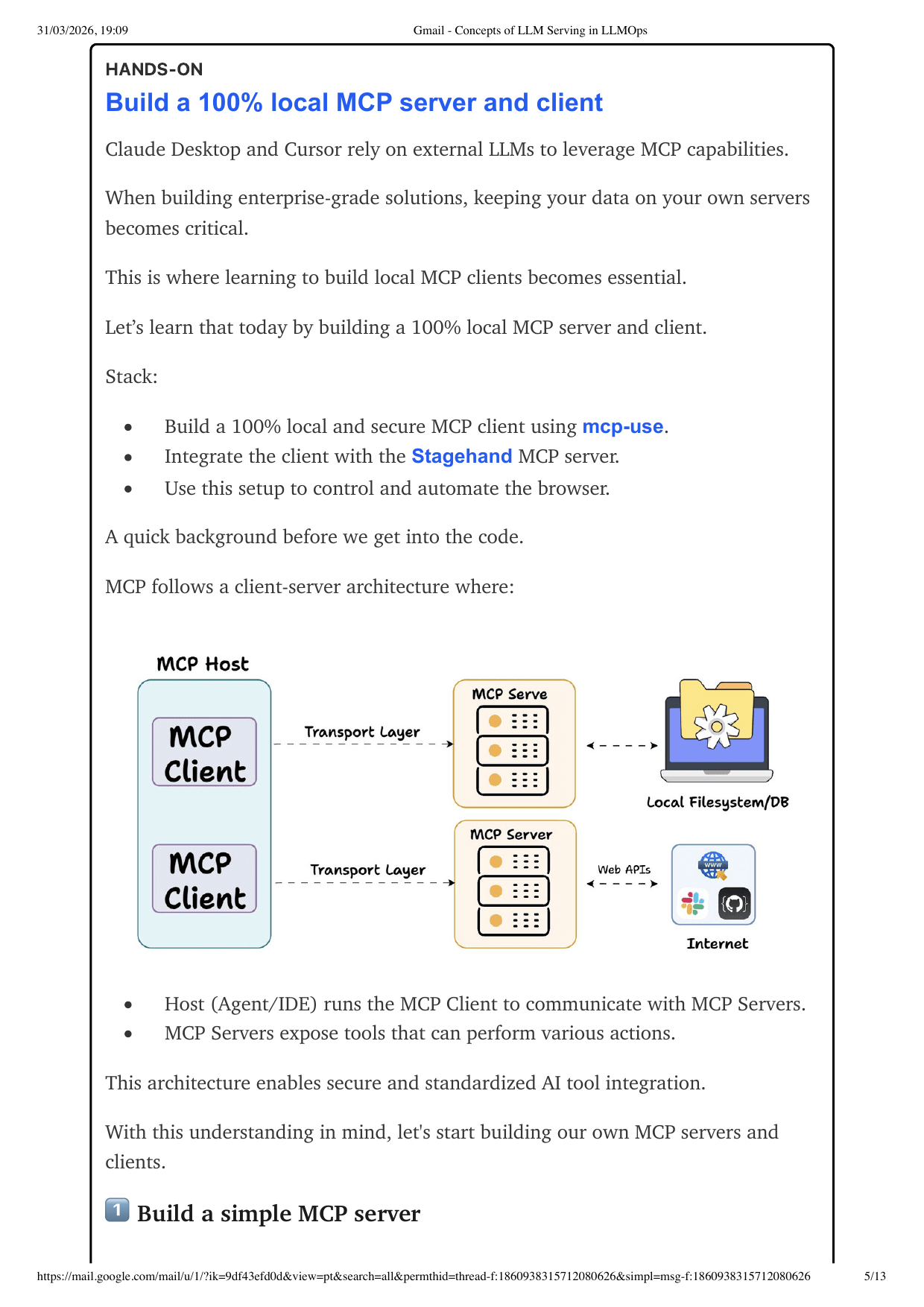
| Layer | Role | Example Here |
|---|---|---|
| Host | Runs the app or IDE that orchestrates the interaction | Your local Python app or Streamlit interface |
| MCP Client | Connects to one or more MCP servers using a transport protocol | mcp-use |
| MCP Server | Exposes tools the model can invoke | FastMCP server or Stagehand MCP server |
| LLM | Plans tool usage and turns tool results into responses | Ollama-backed local model |
3 Build a Simple MCP Server
Start with a didactic server so you understand the mechanics before jumping to browser automation. The simplest useful pattern is one tool with a clear docstring and strongly named arguments.
- Create a FastMCP app
- Decorate the tool method
- Use a clear docstring so the client understands intent
- Return a deterministic result
This helps you separate MCP plumbing from business logic. If the local client cannot successfully call an add-two-numbers tool, it definitely will not succeed on browser automation.
from fastmcp import FastMCP

mcp = FastMCP("Add Numbers")

@mcp.tool()
def add_numbers(a: float, b: float) -> float:
    """Add two numbers together.

    Args:
        a: First number
        b: Second number
    """
    return a + b

if __name__ == "__main__":
    mcp.run()
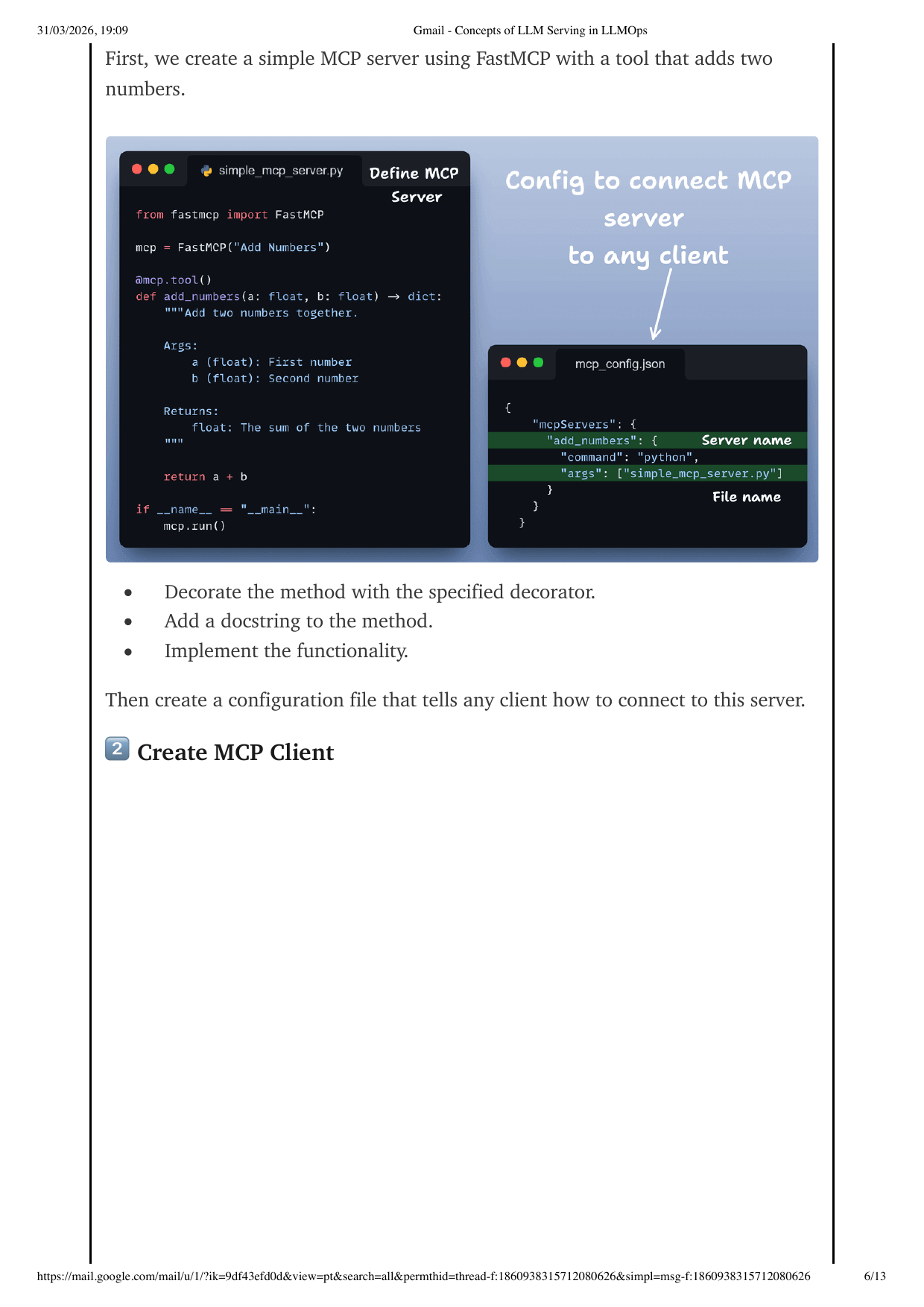
4 Create the MCP Config File
The config file is the contract between your local client and your MCP server process. It tells the client which command to run and what arguments to pass.
{
  "mcpServers": {
    "add_numbers": {
      "command": "python",
      "args": ["simple_mcp_server.py"]
    }
  }
}
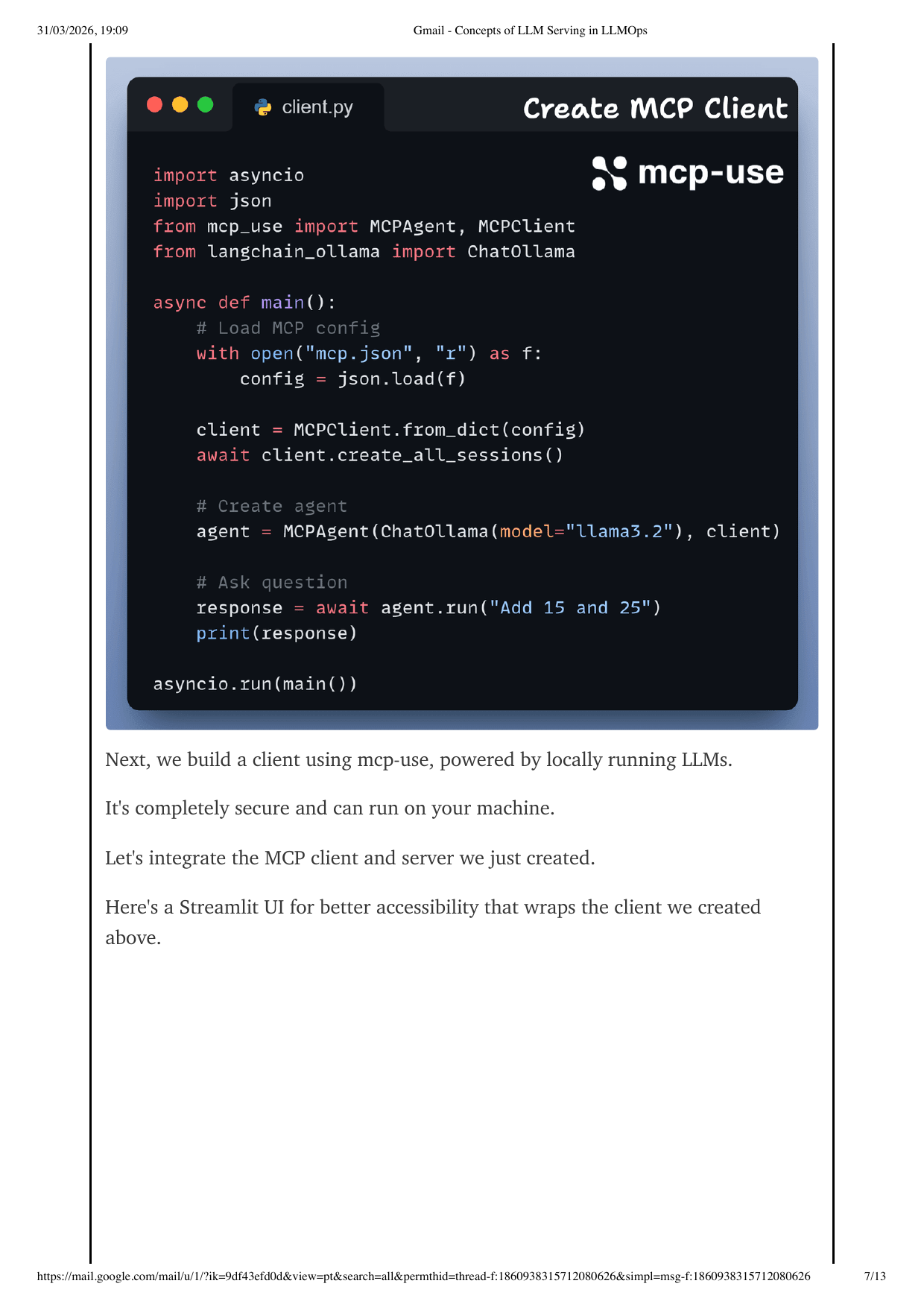
5 Build the Local MCP Client
The client is where the local model and the MCP server meet. Here we use mcp-use plus a local Ollama model so the whole interaction stays on your machine.
import asyncio
import json

from mcp_use import MCPAgent, MCPClient
from langchain_ollama import ChatOllama


async def main():
    with open("mcp.json", "r") as f:
        config = json.load(f)

    client = MCPClient.from_dict(config)
    await client.create_all_sessions()

    agent = MCPAgent(ChatOllama(model="llama3.2"), client)
    response = await agent.run("Add 15 and 25")
    print(response)


asyncio.run(main())
6 Wrap It with a Streamlit UI
The source material suggests adding a Streamlit wrapper for accessibility. That gives you a simple chat-like interface around the same local MCP client logic.
- Quick local UI without frontend scaffolding
- Easier demo experience for stakeholders
- Good for showing tool results, logs, and prompts side by side
- Text input for user instruction
- Async response area for the agent output
- Status panel for active MCP sessions
- Optional debug section for tool calls and errors
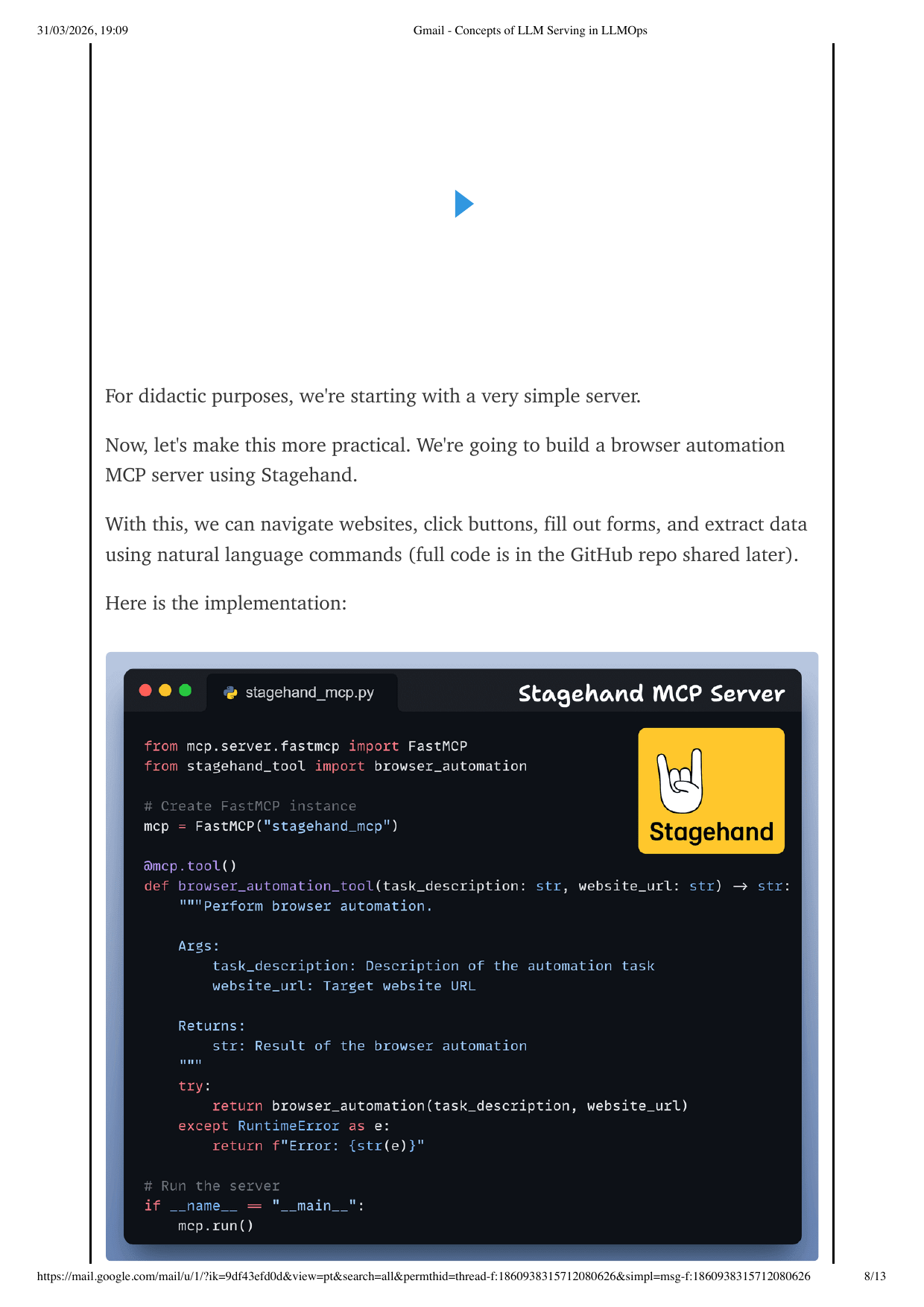
7 Make It Real with a Stagehand MCP Server
Once the simple tool flow works, switch to a browser automation MCP server. That lets natural-language instructions trigger real browser actions like navigation, clicking, typing, and scraping.
from mcp.server.fastmcp import FastMCP
from stagehand_tool import browser_automation

mcp = FastMCP("stagehand_mcp")

@mcp.tool()
def browser_automation_tool(task_description: str, website_url: str) -> str:
    """Perform browser automation."""
    try:
        return browser_automation(task_description, website_url)
    except RuntimeError as error:
        return f"Error: {error}"

if __name__ == "__main__":
    mcp.run()
8 Browser Automation Flow
In the example workflow, the agent is asked to find the cheapest flight between cities. Under the hood, the MCP-enabled browser server performs the steps and returns results to the agent.
- The user issues a high-level task
- The local model decides to use the Stagehand tool
- The MCP server automates the browser
- The result flows back to the agent for the final response
- Natural-language browser automation demos
- Local-first secure prototyping
- MCP-based tool integration for test assistants
- Repeatable pattern for internal enterprise tools
9 Best Practices for Local MCP Systems
Local does not automatically mean production-ready. Treat the setup like a small distributed system: model, host, client, server, browser, and tool execution all need guardrails.
- Start with one tool and one server before composing multiple services
- Use explicit docstrings and stable argument names
- Log tool inputs, outputs, and errors for debugging
- Keep local model selection explicit and reproducible
- Add retries and timeout handling around browser automation
- Giving the model unrestricted file or browser access without intent checks
- Skipping config validation
- Starting with a complex multi-server topology
- Assuming local execution removes the need for observability
- Letting browser automation fail silently without surfacing the tool error
10 Interview Q&A
These are the practical questions people will ask when you present this architecture as part of an MCP, local AI, or browser automation project.