What this class covered
- Literals: the value you assign, and the kinds JavaScript has
- typeof, and what it reports for strings, numbers, booleans, null and undefined
- null versus undefined, and why typeof null is "object"
- Number literals: decimal, binary, octal and hex, floats and exponents
- Numeric separators and BigInt
- Special number values: Infinity, -Infinity and NaN
- Three interview questions: the non-literal, the mixed-base sum, the array with holes
- Primitive and non-primitive data types
- Operators and operands, and the groups of operators
- Assignment and arithmetic operators, including % and **
- Comparison operators: == versus ===, != versus !==
- Logical operators and their truth table
- Confusing comparisons, part 1: "" == 0, "0" == 0 and "" == "0"
- Tasks: attendance, 25 exercises on GitHub, and Sunday's test
Literals: the value you assign
In let a = 10;, the literal is 10: the value written straight into the code and assigned to the variable. That one line is the class's first file:
let a = 10;
JavaScript has several kinds of literal: number, string, boolean, null, BigInt, array, object and regular expression (regex). This class covered the first five; arrays, objects and regex come later. Small questions like "which part is the literal?" turn up in interviews, so they are worth getting exactly right.
typeof, and the first literals
let age =  "pramod"; // String literal.
let age2 =  'pramod';

let isStudent = true;
 // This is a boolean literal assigned to the variable 'isStudent'.

 let pi = 3.14;


 let nullValue = null; // This is a null literal assigned to the variable 'nullValue'.

 let undefinedValue;

 // Numric Literal - Numeric
// 1. int
// 2. float

// // typeof - operatr - It will tell you what is a data type that it has.
console.log(typeof age);
console.log(typeof age2);
console.log(typeof pi);
console.log(typeof isStudent);
console.log(typeof nullValue); // object
console.log(typeof undefinedValue);
string
string
number
boolean
object
undefined
- Strings take double quotes or single quotes:
"pramod"and'pramod'are the same string. The class will come back to the difference. - Booleans are
trueorfalse. - Numbers have no separate int, float or double. If you come from Java:
3.14is not a float, it is a number, and so is42. - typeof is an operator that tells you the type of a value, as a string. Two of its answers catch people out:
typeof nullis"object", and a variable that was never given a value is"undefined".
null versus undefined
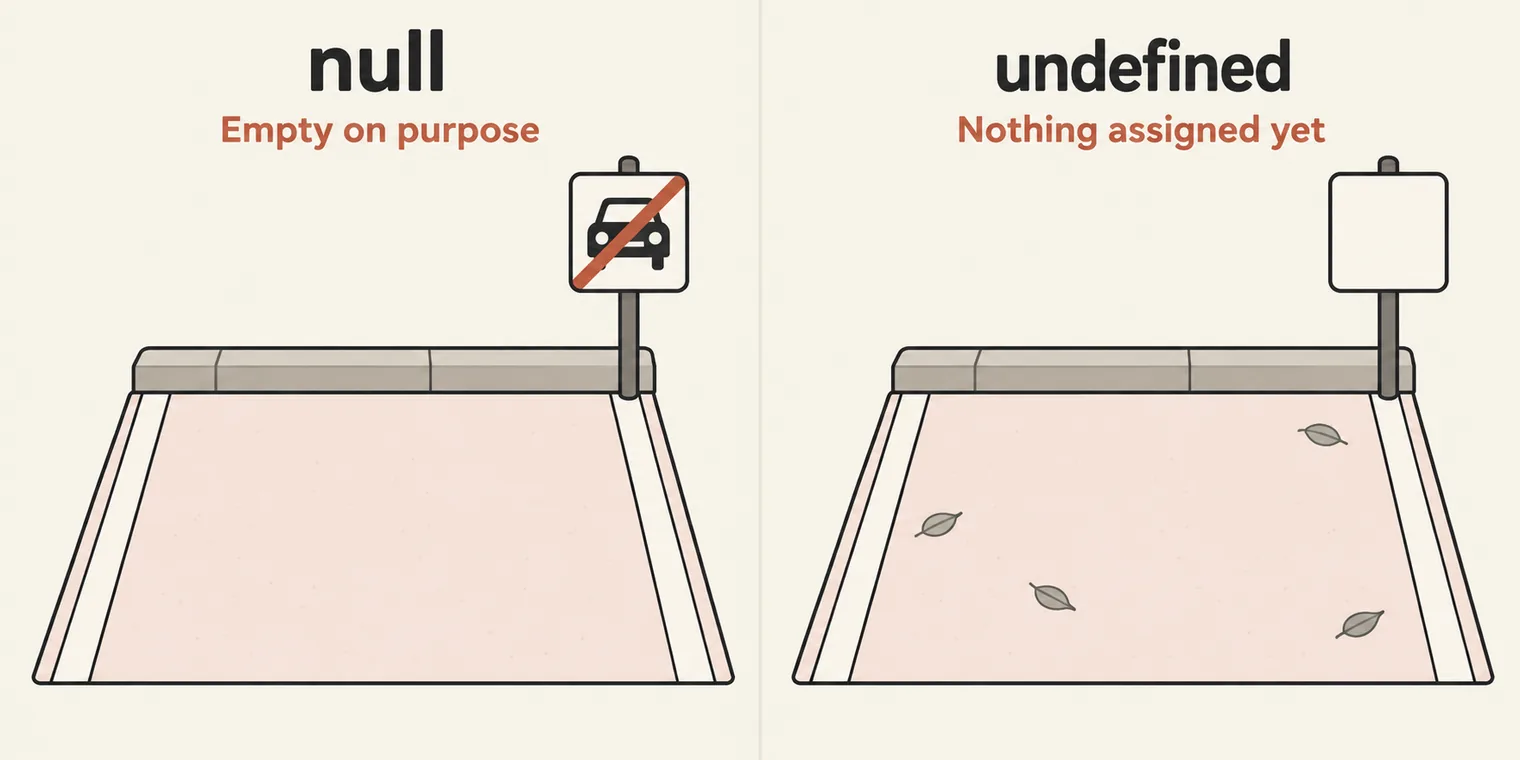
The class's question: how many Defender cars does Pramod sir have? The answer is null. Not 0: zero is a value, a count somebody took. null means there is no value, and someone said so on purpose.
// ============================================================
// Topic: null vs undefined in JavaScript
// ============================================================

/*
  SIMPLE DEFINITIONS:

  undefined  ->  A variable exists, but it has not been assigned any value yet.
                 JavaScript itself sets this automatically.

  null       ->  A variable exists, but the developer explicitly assigns
                "no value" or "empty".
                 It is intentional absence of any value.
*/

// var x;
// console.log(x);

// var audi = null;
// console.log(audi);

// --------------------------------------------------------
// 1. undefined
// --------------------------------------------------------

let userName; // declared but not assigned
console.log(userName);
console.log(typeof userName);

// function greet() {
//     // no return statement
// }
// console.log(greet());

let x;
x = 10;
console.log(x);

// --------------------------------------------------------
// 2. null
// --------------------------------------------------------
let profilePicture = null;
console.log(profilePicture);
console.log(typeof profilePicture); // "object"   <-- known JS quirk!

/*
  | Feature              | undefined                     | null                           |
  |----------------------|-------------------------------|--------------------------------|
  | Meaning              | Not assigned yet              | Intentionally empty            |
  | Who sets it?         | JavaScript automatically      | Developer manually             |
  | Type                 | undefined                     | object (historical bug in JS)  |
  | ==  comparison        | null == undefined  -> true    |                                |
  | === comparison       | null === undefined -> false   |                                |
*/
undefined
undefined
10
null
object
- undefined: the variable exists but was never given a value, so JavaScript fills in
undefinedby itself.let userName;printsundefined, andtypeof userNameis"undefined"as well. - null: the variable exists and the developer deliberately assigned "no value". You always write
nullyourself. - A function that returns nothing gives undefined. The file has this example commented out; uncommented,
console.log(greet())printsundefined. Functions come in a later class, but this one is a common interview question.
| Value | Meaning | Who sets it | typeof gives |
|---|---|---|---|
undefined |
Not assigned yet | JavaScript, automatically | "undefined" |
null |
Intentionally empty | The developer, by hand | "object" |
Compared with each other, null == undefined is true and null === undefined is false. The difference between the two operators comes later in the class; the shorthand from class for now: double equals is the fake equal, triple equals is the real one.
Why typeof null is "object". The file's comment calls it a historical bug, and that is the accurate version. The first JavaScript engine stored a type tag with every value, and null ended up with the same tag as objects. Fixing it now would break old websites, so it stays. null is still a primitive value, not an object. For interviews, remember the answer: typeof null is "object".
The class's version of the car joke, as a variable name:
let no_audi_pramod_sir_has = null;
let u;
Number literals: four bases, floats and exponents
let count = 42;
let negative = -100;
let zero = 0;

let h = 0xFF;
console.log(typeof h);
let color_hex = 0xFF0000;

let octal = 0o77; //base
let million = 1e6;
let tiny = 1.5e-4;
number
All of these are one type. 42, -100 and 0 are numbers, negative numbers need nothing special, and the hexadecimal 0xFF is a number too, which is why typeof h prints number. The next file goes through each form:
// ============================================================
// Topic: All Number Types in JavaScript
/*
  In JavaScript, numbers are ALWAYS of type "number" (except BigInt).
  There is no separate int, float, double, etc.
*/

// --------------------------------------------------------
// 1. INTEGER LITERALS
// --------------------------------------------------------

// Decimal (Base 10) - most common
let decimal = 42;
console.log("Decimal:", decimal); // 42

// Binary (Base 2) - starts with 0b or 0B
let binary = 0b1010; // 10 in decimal
console.log("Binary 0b1010:", binary); // 10

// Octal (Base 8) - starts with 0o or 0O
let octal = 0o52; // 42 in decimal
console.log("Octal 0o52:", octal); // 42

// Hexadecimal (Base 16) - starts with 0x or 0X
let hex = 0x2A; // 42 in decimal
console.log("Hexadecimal 0x2A:", hex); // 42

// --------------------------------------------------------
// 2. FLOATING-POINT LITERALS
// --------------------------------------------------------

let float1 = 3.14;
let float2 = -0.5;
let float3 = .5;    // valid, but avoid for readability
let float4 = 5.;    // valid, but avoid for readability

console.log("Float 3.14:", float1);
console.log("Float -0.5:", float2);
console.log("Float .5:", float3);
console.log("Float 5.:", float4);


// Exponential notation
let exp1 = 1.5e3;   // 1.5 * 10^3 = 1500
let exp2 = 1.5e-3;  // 1.5 * 10^-3 = 0.0015
let exp3 = 2E10;    // 2 * 10^10 = 20000000000

console.log("Exponential 1.5e3:", exp1);   // 1500
console.log("Exponential 1.5e-3:", exp2);  // 0.0015
console.log("Exponential 2E10:", exp3);    // 20000000000
Decimal: 42
Binary 0b1010: 10
Octal 0o52: 42
Hexadecimal 0x2A: 42
Float 3.14: 3.14
Float -0.5: -0.5
Float .5: 0.5
Float 5.: 5
Exponential 1.5e3: 1500
Exponential 1.5e-3: 0.0015
Exponential 2E10: 20000000000
- Integers in four bases. Decimal (base 10) needs no prefix. Binary (base 2) starts with
0b, octal (base 8) with0o, and hexadecimal (base 16) with0x; capital letters work too. Converting between bases is outside this course; an online converter such as RapidTables does it for you. - Floats.
3.14and-0.5are ordinary..5and5.are valid too, and JavaScript fills in the missing zero, but write0.5and5: they are easier to read. - Exponents.
1.5e3is 1.5 × 1000 = 1500,1.5e-3is 0.0015, and a capitalEworks as well.
Numeric separators and BigInt
// --------------------------------------------------------
// 3. NUMERIC SEPARATORS (ES2021+)
// --------------------------------------------------------


let million = 1_000_000;
let binarySep = 0b1010_0001;
let hexSep = 0xFF_FF;


// --------------------------------------------------------
// 4. BIGINT - For arbitrarily large integers
// --------------------------------------------------------

let big = 123456789012345678901234567890n;
let big2 = BigInt("123456789012345678901234567890");
let bigFromNum = BigInt(42);

console.log("BigInt literal:", big);
console.log("BigInt from string:", big2);
console.log("BigInt from number:", bigFromNum);
console.log("typeof BigInt:", typeof big); // "bigint"
BigInt literal: 123456789012345678901234567890n
BigInt from string: 123456789012345678901234567890n
BigInt from number: 42n
typeof BigInt: bigint
- Numeric separators.
1_000_000is one million. The underscores are only for your eyes; JavaScript ignores them, and they work in binary and hex too (0b1010_0001,0xFF_FF). - BigInt is for whole numbers too big for a normal number. Write one as a literal by adding
nat the end, or callBigInt()with a string or a number, in which case there is nonto add.typeofgives"bigint".
BigInt(42) is the number 42 turned into a BigInt, 42n; it is not a limit of 42 digits. A BigInt has no fixed size, which makes it closer to Java's BigInteger than to long. The limit belongs to plain numbers: above Number.MAX_SAFE_INTEGER, which is 9007199254740991, they stop being exact. That is the problem BigInt solves.
One past the limit, in Node:
> 9007199254740993
9007199254740992
> 9007199254740993n
9007199254740993n
Infinity, -Infinity and NaN
// --------------------------------------------------------
// 5. SPECIAL NUMERIC VALUES
// --------------------------------------------------------

// Infinity
console.log("Infinity:", Infinity);           // Infinity
console.log("1 / 0:", 1 / 0);                 // Infinity
console.log("-1 / 0:", -1 / 0);               // -Infinity
console.log("typeof Infinity:", typeof Infinity); // "number"

// -Infinity
console.log("-Infinity:", -Infinity);

// NaN (Not a Number) - result of invalid math
console.log("NaN:", NaN);                     // NaN
console.log("0 / 0:", 0 / 0);                 // NaN
console.log("'hello' * 2:", "hello" * 2);     // NaN
console.log("typeof NaN:", typeof NaN);       // "number" (quirky!)
Infinity: Infinity
1 / 0: Infinity
-1 / 0: -Infinity
typeof Infinity: number
-Infinity: -Infinity
NaN: NaN
0 / 0: NaN
'hello' * 2: NaN
typeof NaN: number
- Infinity.
1 / 0isInfinity, and-1 / 0is-Infinity. - NaN, "not a number", is the result of maths that has no numeric answer:
0 / 0, or"hello" * 2. - Both are numbers.
typeof Infinityandtypeof NaNare both"number".
The class filed "why is typeof NaN a number?" next to the chicken and the egg, as an unsolved mystery. This one has an answer: JavaScript numbers follow the IEEE 754 floating-point standard, and that standard defines Infinity, -Infinity and NaN as number values. So "not a number" is, technically, a number.
Three interview questions
1. Which of these is not a literal in JavaScript? The trap answer is undefined. A literal is a value you write and assign, and let u; assigns nothing. The word undefined is the name of a read-only property of the global object, not literal syntax. null, on the other hand, is a literal: you write it and assign it.
The same reasoning covers NaN and Infinity: they are read-only global properties too, which is why the literal family diagram above leaves them out.
2. What does 0b1010 + 0o10 + 0xA give? Not NaN: every part is a number. Read each prefix, convert, then add.
| Literal | Base | Value |
|---|---|---|
0b1010 |
Binary, base 2 | 10 |
0o10 |
Octal, base 8 | 8 |
0xA |
Hexadecimal, base 16 | 10 |
| Total | 28 |
Read the prefix before the digits: 0o10 is 8, not 10, and not the 2 that 0b10 would be.
3. How many elements does [1, , 3, ] have? Three, not four.
The empty slot between two commas is a hole, and it counts as an element. The comma at the very end is a trailing comma, which JavaScript ignores. The class's shortcut, "count the commas", works here because the array ends with a comma; without one, the length is the number of commas plus one:
[1, , 3, ].length     3
[1, , 3].length       3
[1, , 3, ,].length    4
Primitive and non-primitive data types
The literals so far add up to JavaScript's primitive data types: string, number, BigInt, boolean, undefined and null, plus symbol, which comes later and rarely matters in automation. A primitive is a single value that cannot be broken down further, the same idea as the primitive types in Java.
Non-primitive types are built from other values: arrays, functions and objects. An array is a collection of elements, so it can be broken into its parts. These come in later classes, along with topics such as hoisting and callbacks, once the basics are in place.
Operators and operands
An operator is a symbol that performs an operation on values, which are called operands. In 10 + 3, + is the operator, and 10 and 3 are the operands.
let a = 10+3;
// 2 operator

// Data Type in the JS

// string, number, boolean, bigInt, undefined, null, Symbol
// array, NaN, Inifity
let a = 10 + 3; uses two operators: + adds, and = assigns the result. The comment lists the data types; the NaN and Infinity on its second line are values of the number type, not types of their own, as typeof showed above.
JavaScript groups its operators into families:
| Group | Examples | When |
|---|---|---|
| Arithmetic | + - * / % ** |
Today |
| Assignment | = |
Today |
| Comparison | == === != !== < > <= >= |
Today |
| Logical | && || ! |
Today |
| Type | typeof |
Used today |
| String | + on strings |
Later |
| Ternary | ? : |
Later |
| Nullish | ?? |
Later |
Assignment and arithmetic operators
let x = 10;
x = "PrrammodDutta";
console.log(x);

let x1 = 10;
x1  = x1 +5;
console.log(x1);
PrrammodDutta
15
= puts the value on its right into the variable on its left, and a new assignment replaces the old value, even with a value of another type: x starts as 10 and ends as a string. x1 = x1 + 5 reads the current value, adds 5 and stores the result: 15.
// +,-,*, /,

// Assignment Operator

let a = 10;
let b = 3;

// Arithmetic Operators
let sum = a + b;
let sub = a - b;
let mul = a * b;
let div = a / b;

console.log(sum);
console.log(sub);
console.log(mul);
console.log(div);


// Modulus -> % -> It will give you remainder
console.log(a % b);
console.log(13 % 7);


console.log(101 % 2);
console.log(100 % 2);

//  n%2 == 1 - odd number, [ n%2 == 0 , even]


// Exponential **, power 2^3 -> 8
console.log(2 ** 3);
console.log(a ** b); // 10^3 -> 1000
13
7
30
3.3333333333333335
1
6
1
0
8
1000
+,-,*and/work as in school, except that/never rounds to a whole number:10 / 3is3.3333333333333335. The 5 at the end comes from how computers store decimals.%, modulus, gives the remainder.10 % 3is1: 3 goes into 10 three times, making 9, with 1 left over.13 % 7is6.- Even or odd: a number
% 2gives0when it is even and1when it is odd, which is why101 % 2is1and100 % 2is0. **is the power operator:2 ** 3is 8, anda ** b, 10 to the power 3, is 1000.
The even-or-odd check has one trap: for a negative odd number the remainder is negative. -7 % 2 is -1, not 1, so n % 2 === 1 is false for -7. Test for odd with n % 2 !== 0 instead.
Comparison operators: == versus ===
A comparison always produces a boolean, true or false. First, the mistake many beginners make: a single = is not a comparison. It is the assignment operator. The comparison operators are:
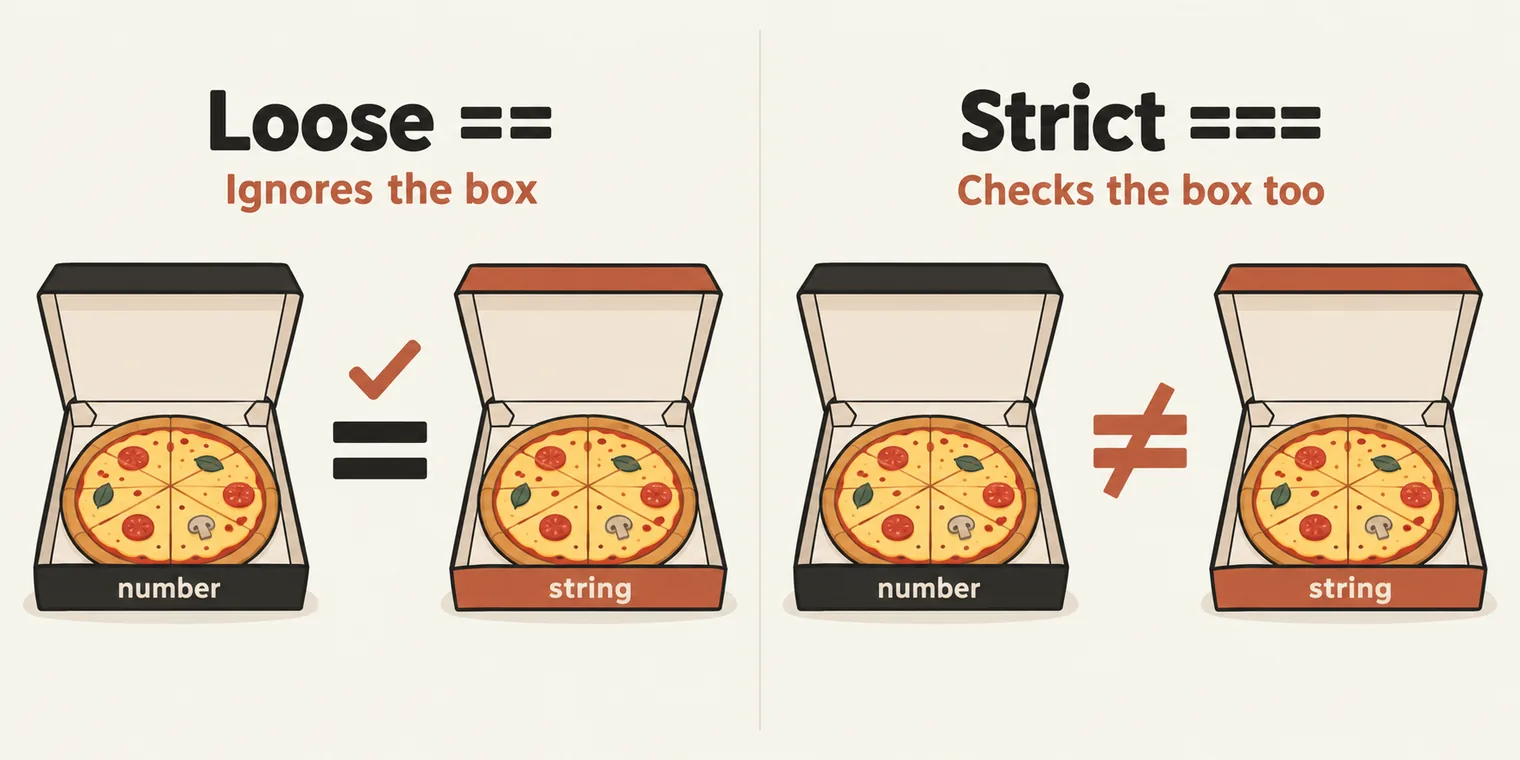
==, loose equality: if the two sides have different types, JavaScript converts one of them first, then compares the values.===, strict equality: the type and the value must both match. Nothing is converted.!=and!==, their opposites:!=is loose not-equal,!==is strict not-equal.<,>,<=and>=, the ones you use when you compare your salary with someone else's.
The class's picture: pizza is pizza, so loosely, two pizzas are equal. Compare strictly and a Domino's pizza and a Pizza Hut pizza are not the same, because the brand counts too. Likewise a Xiaomi phone and an iPhone: loosely, both are phones; strictly, they are different. In 5 == "5", the pizza is the value 5 and the box is the type, number or string.
The class's file, from the comparison lines on (its opening comments are left out here):
// > , < , >= , <=


// console.log(3 > 4);
// console.log(3 < 4);
// console.log(4 >= 4); // (4 > 4 or 4 == 4, or gate)

console.log(5 == "5"); // lose couple comparsion , value
console.log(5 === "5"); // stict not allowed - valeu + datatype both

// === Strict check we will check for both the datatype and value
// == Lose check we will check either value or data type.

// ! -> not char
console.log(5 != "5"); // value
console.log(5 !== "5"); // (with !, == actuall ===) !===


console.log(5 === 5);
true
false
false
true
true
| Comparison | Result | Why |
|---|---|---|
5 == "5" |
true |
Loose: the string "5" becomes the number 5 |
5 === "5" |
false |
Strict: a number and a string |
5 != "5" |
false |
The opposite of 5 == "5" |
5 !== "5" |
true |
The opposite of 5 === "5" |
5 === 5 |
true |
Same type, same value |
Logical operators
&& (AND), || (OR) and ! (NOT) work like the AND and OR gates from school or engineering:
| Left | Right | Left && Right | Left || Right |
|---|---|---|---|
true |
true |
true |
true |
true |
false |
false |
true |
false |
true |
false |
true |
false |
false |
false |
false |
The rule of thumb from class: OR is lenient, true unless both sides are false; AND is strict, false unless both sides are true. ! flips a boolean.
// && -> AND Gate
// || -> OR Gate

let a = true;
let b = false;

console.log(a && b);
console.log(a || b);
console.log(!a);
false
true
false
With a = true and b = false: AND gives false, OR gives true, and !a gives false.
Confusing comparisons, part 1
The class saved the strangest part for last:
// Rule of thumb:
//   ==   → loose equality  (does type coercion, surprising)
//   ===  → strict equality (no coercion, what you usually want)

// ---------- 1. Empty string vs 0 vs "0"  (transitivity broken) ----------

console.log("" == 0); // // true, "" coerced to Number → 0
console.log("0" == 0);  // true, "0" coerced to Number → 0
console.log("" == "0"); // false, both strings, compared as-is
// (transitivity broken) -> coerced


// === fixes it
console.log("" === 0);       // false
console.log("0" === 0);      // false
console.log("" === "0");     // false
true
true
false
false
false
false
| Comparison | Same type? | What happens | Result |
|---|---|---|---|
"" == 0 |
No | "" becomes the number 0, then 0 is compared with 0 |
true |
"0" == 0 |
No | "0" becomes the number 0, then 0 is compared with 0 |
true |
"" == "0" |
Yes, two strings | Nothing is converted: an empty string is not the string "0" |
false |
The same three with === |
Different types, or different strings | false |
So "" equals 0 and "0" equals 0, yet "" does not equal "0". In maths, if A equals C and B equals C, then A equals B; that property is called transitivity, and == breaks it. The cause is type coercion, the automatic conversion that == does and === never does.
The one rule for automation: always use ===. Part 2 of the confusing comparisons comes in the next class.
And in TypeScript? The class's answer: the same, because TypeScript is JavaScript with types. At runtime that holds exactly. The compiler adds one guard on top: compare a value typed as a number with one typed as a string, and the code does not compile.
const n: number = 5;
const s: string = "5";
console.log(n == s);
error TS2367: This comparison appears to be unintentional because the types 'number' and 'string' have no overlap.
Values typed any or unknown get no such check, so the rule stands: use ===.
Tasks and announcements
- Sunday's test. A live MCQ test on Sunday, 11 October, 7 to 8 AM IST: one hour on everything so far, identifiers, keywords, literals and operators. Instructions come before the test.
- The weekly rhythm for the next 90 to 100 days: classes on Monday, Wednesday and Friday, tasks or extra sessions on Tuesday and Thursday, and a test on Sunday, all at 7 AM.
- Notes and recordings are in the batch group.
- Questions go in the day's doubt thread.
- Access problems, such as no access to Playwright 4x or a bonus course that is missing, go to the support contacts shared in the group.
- Next class: Monday. Operators are not finished: more of them come next, including the ternary operator, along with confusing comparisons part 2.
Task 1, attendance. Mark today's attendance.
Task 2, the 25 exercises. Push all the exercises so far, files 01 to 25, to your GitHub repository this week, and post the repository link, not just your name, in the group. Every repository is checked.
Task 3, research. Check the trick answers for yourself: why undefined is not a literal, and why [1, , 3, ] has three elements. The instructor's advice: as QA, never trust anyone, him included.