What this class covered
- Rule zero: you are the learner; learn, implement, teach, and post about it
- Where everything lives: recordings, attendance, the private community, class timings and live tests
- The sequence for the next 90 days, the tools earlier batches built, and the hackathon
- Bonus courses, and the required access form
- Mindset: keep calm and keep learning, four rules, and money first
- Laptop configuration
- Prompt versus skill, and why repeated prompts belong in skill files
- Finding skill ideas in your own work: an API response validator and Jira bug triage
- Markdown and .md files
- VS Code, GitHub Copilot and the batch folder structure
- What goes in a basic SKILL.md, and what advanced skills add
- Building a test plan creator skill from the qaskills.sh template
- Running it in GitHub Copilot on a VWO login PRD
- Why LLM basics and prompt engineering come next
- Tasks
Rule zero: you are the learner
The batch began with one rule, written in the notes as LLL: lifelong learner. The instructor guides; you do the learning, and whatever you learn, you share. The cycle he took from his own mentor: learn something, implement it, teach it, and repeat.
Teaching starts on day one, as branding. Take a 100-day challenge: post what you learn on LinkedIn, and on Medium if you can, at least three times a week. Four or five times a week, or daily, is better; three is the minimum that has worked for earlier students. The more people see your name, the more chances come your way.
The course itself runs the same way: as community learning, not a recorded course you watch alone. Once you finish, you help the next batch, which is how you keep learning. Deepak and Meeti, from earlier batches, help with access and basic doubts; they do not take sessions.
Where everything lives
Recordings are on courses.thetestingacademy.com. Your registration is already done: reset your password once, then open My Courses. Live classes appear under AI Tester Blueprint 5x, today's included, with lifetime access, and the bonus courses are on the same site. The course is three months long, and the request is to finish every video within four months: given more time, people do not finish. Binge-watching is fine. A two-minute video shows how to reach the recordings and bonus courses: How to Access Your Courses.
Attendance is on app.thetestingacademy.com. Create a free account (Google sign-in works) and, under My progress, add an entry for what you learned, such as "skill basics, plus the setup and intro". At least one entry a week is expected; daily entries are welcome. The same site holds the curriculum and roadmap, the AI agent and AI testing tool lists, live tests, coding practice (the batch learns Python), recommended books and a leaderboard.
Doubts and tasks go in the private 5x space on SDET Club. The invitation comes by email; it is one per person, and sharing it removes your access. Everyone in the space is from this batch, tasks and doubt threads are posted by date, and there is no limit on questions. An introduction thread is being added.
Live classes run on Saturday and Sunday, 11 AM to 1 PM IST. An optional extra class runs every two weeks on a Friday or Tuesday evening, at 8 or 9 PM IST, on AI topics outside the curriculum: certifications, and masterclasses such as Codex, Cursor and Windsurf. The extra classes continue for six months, past the end of the 90 days, and they are recorded.
Live tests are timed MCQ tests on app.thetestingacademy.com. Each opens on a Wednesday at 9 AM IST and closes at 9 PM the same day, so you can take it at any point in those 12 hours. The first one comes in the week after next. For anything else, the support address is contact@thetestingacademy.com.
The sequence for the next 90 days
The order is fixed, and the class went through it stop by stop. It is the path to what the instructor calls the AI architect level, as shown in the webinar, with a few additions. The full roadmap is on the AI Tester Blueprint page. No knowledge of Playwright or Selenium is needed for it, as the notes say.
What each stop holds, as the class described it:
- Skill basics come first, today, because they are something you can use at work this week. LLM basics start from scratch in the next class, then prompt engineering: what a prompt is, zero-shot prompting and the rest.
- Generative AI means mastering GitHub Copilot and Claude Code, with Command Code and OpenCode as other options. The instructor will also say which subscription to take.
- AI agents are built three ways: by vibe coding, in n8n and in Langflow. CrewAI and LangGraph, for multi-agent systems, need Python, so they wait for it.
- RAG, retrieval-augmented generation: more than ten types, built in Langflow, in n8n and by vibe coding, ending in two production-ready RAGs, QA Buddy AI, that you can use at work.
- MCP: using existing servers for Jira, Playwright, Selenium, APIs and GitHub, building your own (with FastMCP), debugging one, and combining automation with AI, ending in one production-ready MCP for your company.
- Python basics and pytest were added to the list in class, because the agent frameworks and the evaluation framework need them.
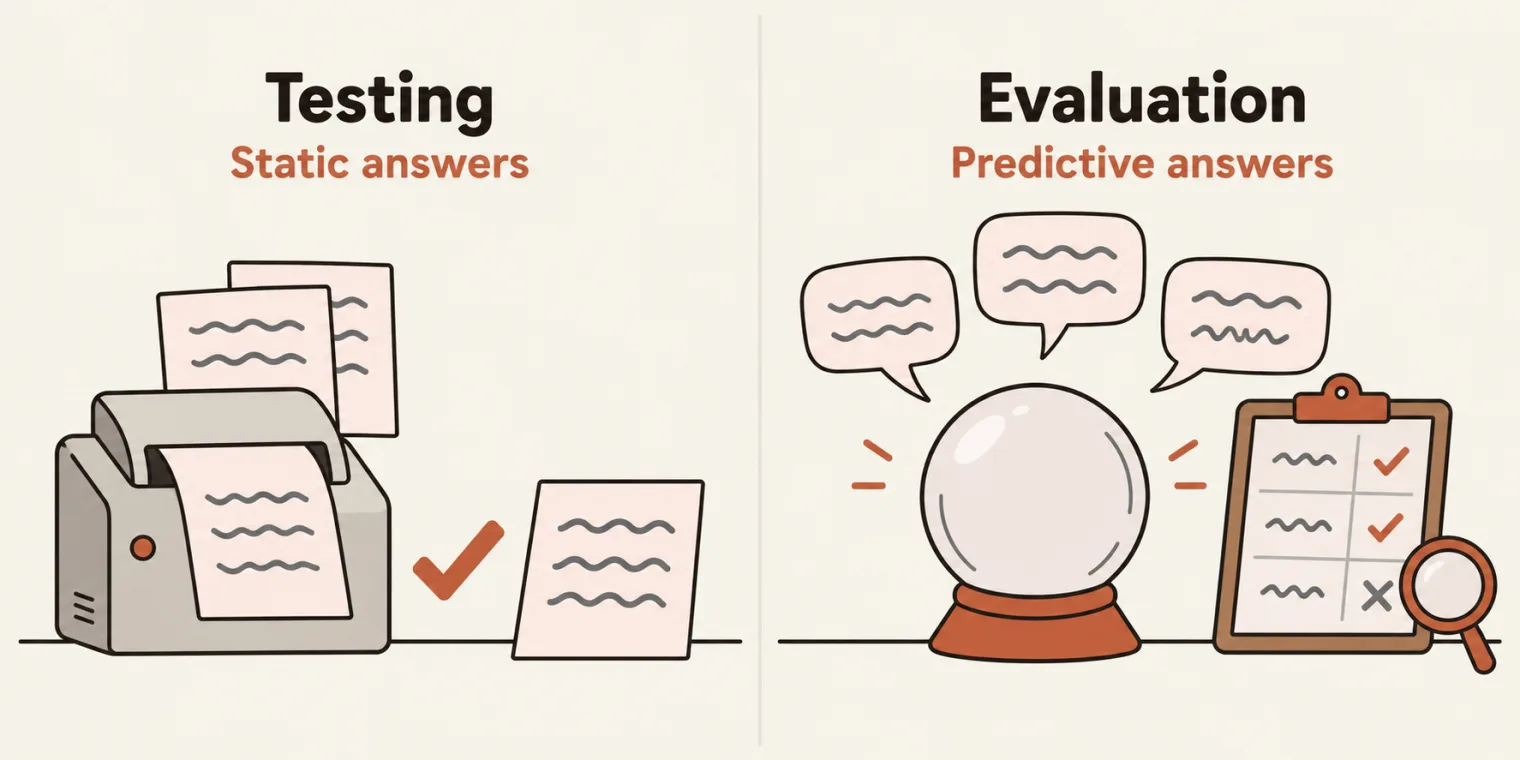
- LLM evaluation, the stop the instructor called the most important. He framed it from day one: there is no AI testing, only evaluation. Testing expects a static answer. An AI's answers are predictive, so you cannot test them; you can only evaluate them. His comparison: if a person keeps giving you wrong or random answers, you cannot test that person, only judge whether each answer is right. The tool is DeepEval: its basics first, then a framework of your own in Python to test a chatbot, AI agents and a RAG. Promptfoo, for evaluating prompts, OpenEvals and Ragas also come up, but in his words DeepEval is the one ruling the market, and learning it is enough.
- Agentic QA, new in this batch: a multi-agent system in LangChain, "full agentic QA", and production-ready agentic QA projects in LangGraph. LangSmith is not covered.
- AI testing tools: you build your own. Earlier AI batches built BrowserBash, QABattle and QASkills, a Selenium-to-Playwright converter, and Snap Locator, a browser extension that picks a locator and suggests fallbacks, built entirely by vibe coding. The 41 entries from the 3x batch's hackathon, 33 of them with a live demo and a public repository, are on the hackathon page.
- Deployment: putting AI agents on a VPS or in the cloud, CI/CD, a small part on Jenkins, and using AI in automation.
- Across all of it, more than 35 projects: AI agents, MCP servers, RAGs, evaluations and testing tools.
The hackathon. The 4x batch has its hackathon this month. The 5x hackathon is at the end of November, with prizes of 15,000, 10,000 and 5,000 rupees, and a small amount, about 1,000 rupees, for everyone who submits a project.
Bonus courses and the required access form
Five bonus courses come with the batch, on the courses site:
- Claude 101
- GitHub Copilot for QA
- E2E testing of chatbots, AI agents, RAG and MCP servers with the DeepEval framework
- Building agentic AI and multi-agent systems for software testing, with CrewAI and LangChain
- AI automation with n8n, which the instructor called the most important of the five
If one is missing, fill in the required access form: choose AI Tester Blueprint, name the course you do not have, say whether you have SDET Club access and whether the email invitation arrived, and add your phone number. Access is granted the same day. If you already have everything, do not fill it in. The form link was shared in the class chat and is in the notes deck.
Mindset: keep calm, keep learning, and four rules
Before the skills half, the instructor ran his usual five-minute mindset session: rules he learned from his mentor and teaches at the start of every batch.
Crises keep coming. Over the next 100 to 120 days something will go wrong: pressure at work, a problem at home, a lost job. That never stops, so the one rule to remember is keep calm and keep learning. In his words, a boring life is the best life.
To make it stick, everyone typed the consequence into the chat: if I do not learn AI in the next 90 days, someone else will, and they will get the promotion, the salary hike and a safer career, and I will not. Knowing the consequence is what makes you act, a technique he credited to Tony Robbins.
The four rules of life:
- 100% focus on one thing: becoming an AI-ready tester. Effort is limited; spread it everywhere and it reaches nothing. Decide to be the one in your company who builds the proofs of concept, adds the skills and sets up LLM evaluation.
- 5% planning, 95% execution. Most people run it the other way round. Try, fail, and try again. His own example: his first RAG proof of concept at work did not go well; six months later he built the same POC again, and more than 50 people at his company use it now.
- 50 to 60% ready is perfect; 100% is failure. You will never be 100% ready with AI. Start showing your work, and applying for jobs, when you are around half ready. In his count, more than 25,000 companies hire testers.
- What worked in the past will not work in the future. New results need new skills.
Under all four sit discipline, consistency, focus and practice, for at least four hours a week. The instructor's view of the market: of ten testers, three or four will stay in demand, the ones who reach the AI architect level, and the target is to get there in these 90 days.
Money first. You cannot learn on an empty stomach, so keep an emergency fund (with expenses of 50,000 rupees a month, that means 3 lakh, six months' worth), take health and term insurance, and keep investing if you are working. The book he recommended, also listed on the dashboard: The Psychology of Money.
Laptop configuration
A personal laptop is recommended: 8 to 16 GB of RAM and a 256 GB disk, Mac or Windows. An office laptop can be used, but it is not recommended: office machines are tracked and locked down for security and compliance, and things such as a local LLM usually will not run on them. Build on your own machine, record a demo, and show it to your manager. If you need a laptop, the instructor's suggestion, not a requirement, is a refurbished older MacBook Air, at around 40,000 rupees.
The deck's agenda also lists setting up a local LLM, Groq for cloud models, Langflow and n8n. Those were not reached in this class.
Prompt versus skill
The second half opened with the difference to learn even before LLMs: prompt versus skill.
A prompt is a single instruction typed into a chat to get a result: "create a test plan" in ChatGPT, or the same request as a comment for GitHub Copilot. That is fine for a one-off answer. The trouble comes after: a prompt cannot be replicated, it is unstructured, and it is neither reusable, maintainable nor scalable. One tester types "create a test plan", another types "create a test plan for XYZ" plus a paragraph more, and they get different results.
A skill is also a set of instructions for a large language model, but reusable, generic and tailored to your company, saved in a file named SKILL.md. Companies run on repetitive tasks, so the rule is: anything you repeat at work, move from a prompt into a skill file. The file is written for the AI coding agent, not for people: Windsurf, Cursor, Antigravity, VS Code with GitHub Copilot and others read it.
Skills come in two levels. This class covered the basic level: one folder, one SKILL.md. Advanced skills, also called agent skills, follow the agentskills.io format and come after LLM basics.
Finding skill ideas in your own work
The first homework: find five to seven tasks you repeat at work that could become skills. Not test plans and not test cases: everyone will build those. Start from the problem, then write down the steps you follow every time. Two examples from class:
- An API response validator. Every automation run returns results, say a JSON response from an API, and you check it the same way each time. Put those steps in a
SKILL.md, step one, step two, step three, ending with an HTML report, and all 30 testers on your team follow the same approach. - Jira bug triage, for manual testers. For every new bug ticket you set the severity (minor, major), the priority (P0, P1, P2), and add a comment with the risk and how to test it. The steps never change, so they can become a skill. Even creating or updating a Jira ticket can be one.
A question from the room: if everything becomes a skill, will fewer testers be needed? The instructor's answer was yes, for structured work. Human review will always be needed, but a task that took ten people may need three or four who can orchestrate it. That is the reason to be the one who writes the skills: choose the five problems, build the skills, and demo them to your team yourself.
Markdown and .md files
A skill is written in Markdown: plain text with formatting. To try it, open StackEdit and start writing. The formatting shown in class:
| You type | You get |
|---|---|
# Title |
a heading, like H1 in HTML |
## Section |
a second-level heading |
### Part |
a third-level heading |
**bold** |
bold text |
*italic* |
italic text |
~~cut~~ |
struck-through text |
- item |
a list item |
- [ ] task |
a checklist item |
[text](url) and  |
a link, and an image from a URL |
Tables work too. A Markdown file is saved with the extension .md, as in filename.md.
VS Code, GitHub Copilot and the batch folder
VS Code is the editor for the whole course: free, with GitHub Copilot built in on a free tier with limits; the button at the top opens it. IntelliJ, PyCharm and Eclipse are not used.
Every skill lives in a folder structure that stays the same all course. In VS Code, open a new folder in Documents named AITesterBlueprint5x, and inside it make one folder per chapter: Chapter_00_SKILL_Basics for today, Chapter_01_LLM_Basics for the next class, Chapter_02_Prompt_Engineering after it. The point is organisation: anyone who looks, a colleague or HR, can find things. Chapter 00 gets a skills folder with one folder per skill, and each skill folder holds a file named SKILL.md, with SKILL in capitals and .md in lower case. The class's folder at the end of the session:
AITesterBlueprint5x/
├── Chapter_00_SKILL_Basics/
│   ├── output/
│   └── skills/
│       ├── apitestcase-response-validator-skill/
│       │   └── SKILL.md
│       ├── testcase-creator-skill/
│       │   └── SKILL.md
│       └── testplan-creator-skill/
│           └── SKILL.md
├── Chapter_01_LLM_Basics/
├── Chapter_02_Prompt_Engineering/
└── output/
    ├── VWO_Login_Dashboard_Test_Plan.html
    └── VWO_Login_Dashboard_Test_Plan.pdf
The two empty files are placeholders for the next skills: a test case creator, and the API response validator from the ideas above. Both output folders come up in the run below.
What goes in a basic SKILL.md
From the class notes, a basic skill has up to ten parts:
- name: what the skill is called.
- description: what it does.
- license: who may use it.
- metadata: such as the version and the author.
- title and information: the heading and the task.
- when to use: the trigger point, the request that should make the agent use this skill.
- workflow: the steps in order, for example fetch the Jira ticket, then create the test plan. This is the advanced part.
- output shape: the format you want back.
- guardrails and safety: what it must never do, such as share, create or take personal information, or delete things.
- when not to use: the cases the skill is not for.
That is level one. Level two, advanced skills, adds folders beside the SKILL.md, such as scripts, references and assets, and comes after LLM basics.
Building the test plan creator
The class built its first skill from a template. Create a free account on qaskills.sh (GitHub sign-in works), open the dashboard, choose Create, and copy the starter template from the editor. It is generic: the same skeleton works for performance, accessibility, end-to-end, manual or API testing, and you can edit it.
The starter template has frontmatter between two --- lines, then a title and three sections, Core Principles, When to Use and Example, filled in for writing Playwright tests (its first principle is "Write reliable tests"). The class kept six of the frontmatter fields and the three sections, and replaced what was in them. Only two fields are required, the name and the description; version, author, license and tags are optional. The license here is MIT: free and open source, so anyone can use it.
The skill is a test plan creator: it writes a test plan in your company's own format, here for a team working on VWO. Its first 23 lines, as saved in class. The text was dictated by voice, typos and all, and the class left spelling for later, when the skill is tested:
---
name: "test plan creator"
description: "Based on my template, which I am going to give him, it is going to create a test plan according to my company. VWO.com "
version: "1.0.0"
author: "Pramod"
license: "MIT"
tags:
  - testplan
---

# Test Plan Creator
Your task is to create a test plan based on the knowledge shared by the user, Make sure that you use proper templates that we have mentioned in the below comments. .


## Core Principles

1. Use Information with is present or given by User Only.
2. Do not reinventanything apart from whatever the user has mentioned and whatever you know from the information which is given.

## When to Use

- Whenever somebody has given you a PRD (which is a product requirement document) or has given you a trigger to create a test plan for this requirement, use this skill.
- create a test plan for x.
- Core Principles keep the agent to what the user gives it. Why? "So that it does not hallucinate": use only the information given, and do not invent or reinvent anything.
- When to Use is the trigger: someone hands over a PRD, or asks to create a test plan for X. A Jira ticket works as input too.
The Example section is the company's test plan template, pasted in whole: the test plan template shared in class, a filled-in plan for the Restful Booker API. It runs from line 25 to line 477, about 450 of the file's 484 lines. It starts with the template's contents list:
## Example


Test Plan   1
Objective   2
Scope   2
Inclusions  4
Test Environments   6
Defect Reporting Procedure  7
Test Strategy   8
Test Schedule   9
Test Deliverables.  10
Entry and Exit Criteria 10
Entry Criteria: 10
Exit Criteria:  11
Test Execution  11
Entry Criteria: 11
Exit Criteria:  11
Test Closure    11
Entry Criteria: 11
Exit Criteria:  11
Tools   11
Risks and Mitigations   11
Approvals   12
The last lines, Output and Security and Safety, were typed while Copilot was already working on the run below, as the class talked them through; the file was saved for the last time at 12:57 IST, just after the run finished:
Output:

- Should be in PDF OR dOCS, html

Secutirty and Safety:

1. Make sure that the output does not have the personal information or any risk-related things.
Running it in GitHub Copilot
The steps from class:
- Create an
outputfolder. - In the GitHub Copilot chat, attach the skill: type
@and pick theSKILL.md, or drag the file into the chat. Both work. - Ask Copilot to create a test plan using that skill, paste the requirement, here a PRD for the VWO login dashboard, and say where the result goes: the
/outputfolder, as an HTML or PDF file. - Choose Allow all, and let it work.
Copilot read the skill and produced VWO_Login_Dashboard_Test_Plan.html, 30 KB, and the same plan as an 11-page PDF. It put both in a new output folder at the root of the project: it took /output to mean the project root, so the output folder made inside chapter 00 stayed empty. The plan's headings, from the HTML file:
Test Plan: VWO Login Dashboard

1. Objective
2. Scope
3. Inclusions
4. Test Environments
5. Defect Reporting Procedure
6. Test Strategy
7. Test Schedule
8. Test Deliverables
9. Entry and Exit Criteria
10. Test Execution
11. Test Closure
12. Tools
13. Risks and Mitigations
14. Approvals
Those are the template's sections, in the template's order, and the facts inside them come from the PRD. The template's objective, line 64 of the skill:
The goal of this test plan is to ensure the quality, functionality, and reliability of the Restful Booker API hosted at https://restful-booker.herokuapp.com.
And the generated plan's:
The goal of this test plan is to ensure the quality, functionality, security, accessibility, and reliability of the VWO Login Dashboard hosted at app.vwo.com.
One slip, against the skill's own first rule. The plan's facts come from the PRD, as the core principles ask, but its defect process table names three people as the contacts for frontend, backend and DevOps. They are the three contacts in the template's example, copied in as if they were the VWO project's team; the PRD names nobody. A skill's example is read as part of its instructions, and the agent reused a detail from it. Testing a skill means checking its output line by line like this, the step the class left for later.
Run twice more through the GitHub Copilot CLI, the same skill and PRD gave a plan under the template's headings but with no contacts table, and a leading slash in /output sent the agent looking at the root of the disk: say exactly which folder you mean. Same skill, same input, a different plan, which is why the course evaluates AI output rather than testing it.
Will the same file work in Cursor? Yes: a SKILL.md is plain Markdown, the format is universal, and the same file works in Cursor, Windsurf, GitHub Copilot or any other AI coding agent.
Why LLM basics and prompt engineering come next
The demo works, and it leaves the real questions open, which was the point. Which prompt goes into a skill? How do you write a master prompt that gives dependable results? How should the core principles, the guardrails and the output format be written? Answering those takes LLM basics and prompt engineering, the RICE POT framework included, which is why the course teaches them before advanced skills. The instructor called this first skill a glimpse, and it is revisited from the next class.
Tasks and announcements
- Task 1: create a free account on app.thetestingacademy.com and add your first entry under My progress.
- Task 2: create accounts on GitHub, Medium (free, for branding) and LinkedIn if you do not have them, and install VS Code.
- Task 3: find five to seven repetitive tasks from your own work that could become skills, leaving out test plans and test cases. Then build two skills this week, a test plan creator and a test case creator, each in its own folder with a
SKILL.md, and show them at work. Meeti posts the tasks in the batch space. - The required access form: only if a bonus course or SDET Club access is missing.
- Introduce yourself in the introduction thread in the 5x space.
- Next class, Saturday: LLM basics from scratch, which subscriptions to buy, and the skill revisited. Q&A sessions start from the next class.
- Live tests start the week after next, and the 5x hackathon is at the end of November.
- Notes: the 5x Eraser deck has the agenda, the links, the rules and the skill notes from this class.
Task 3, your first skills. List five to seven repetitive tasks from your own work that a skill could handle, not test plans or test cases. Then build a test plan creator and a test case creator, each as its own folder with a SKILL.md, and show them at work this week.