What this class covered
- Why skills come before LLM basics, and a target of 50 skills at work
- Recap: a prompt goes to an AI agent; a skill is a reusable set of instructions
- Skill ideas for every stage of the STLC, and for automation
- The basic SKILL.md from the kickoff, and three edits
- Basic versus advanced skills: the agentskills.io folder pattern
- The routine the first advanced skill automates: Jira ticket to draft test plan
- Why one skill beats a chain of prompts, tokens included
- Writing the advanced SKILL.md, section by section
- The references and misc files: a template, a checklist, company details and a logo
- Fetching the ticket: a practice Jira site, the REST API, a script from Claude Code and the .env file
- Running the skill on VWO-49
- Human review: from draft to v2 to the final plan
- Pushing your skills to GitHub, on a personal account
- The 36-skill suite to adapt for your company
- Questions from the class
- Tasks
Why skills come before LLM basics
Next come LLM basics and prompt engineering frameworks, and after them MCP, agents, RAG and LLM evaluation; the kickoff page has the full 90-day sequence. Before any of that, the instructor wants everyone to master skills, or agent skills: the two names mean the same thing. Skills are the building block for what follows, and they are what companies are putting in place right now. Everyone uses prompts at work; very few have moved them into skill files. A poll in the chat bore that out: most people had built none.
On the ladder from the webinar, skills sit on the first rung, with prompting in GitHub Copilot. Agents in n8n and Langflow come next, then LLM evaluation, RAG and MCP, the level this batch is aiming for, with Python, LangChain, LangGraph and CrewAI at the top.
The target: if you are working, add at least 50 skills to your company, starting within 15 days and over the next one to two months, for STLC work and for automation. If you are not working, build them anyway and put them on GitHub. That takes two things, both covered today: how to build a skill, and how to put it in a GitHub repository.
Recap: prompt, skill and the basic SKILL.md
A prompt is an instruction to an AI agent. Why an agent and not a large language model? An LLM has no memory and no access to tools; in the instructor's words, it has only a brain. The agent around it supplies the rest, so a prompt is always an instruction to the agent.
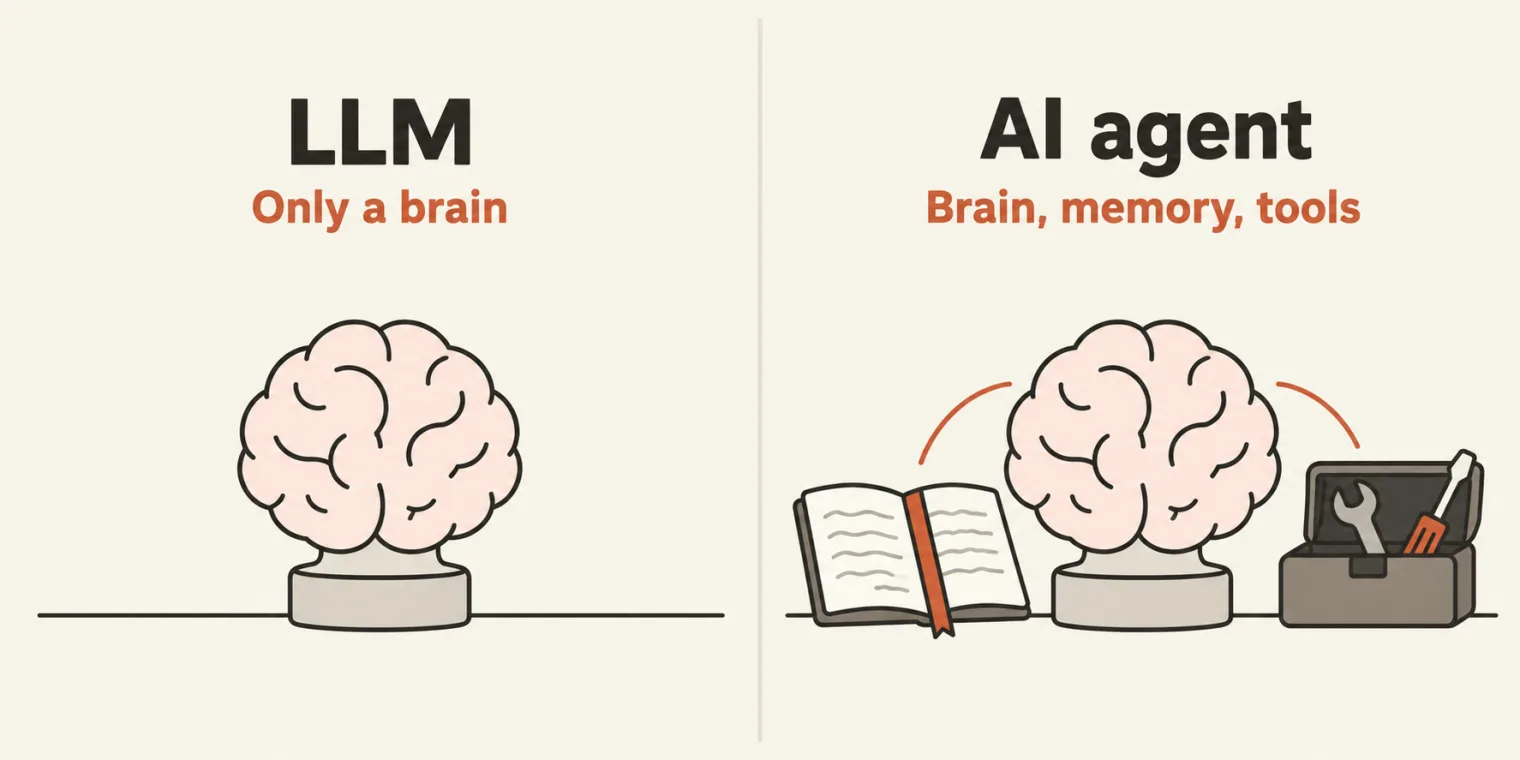
A skill is also a set of instructions for an AI agent, with three things added: it is reusable, it has a standard input and output, and it can be generic or follow the way your company does the job. Is it time to switch from prompts to skills at work? The instructor's answer: yes, and it is no longer optional.
Can ChatGPT write your skills? It can write one, but it does not know your process, your template, your company's data or your guardrails. Your skills are your own.
The basic skill from the kickoff, one folder with one SKILL.md, was recapped part by part: name, description, license, title and information, when to use, core principles, output, guardrails and security, and when not to use. Anti-hallucination rules came later in this class. The kickoff page covers that file in full, and the qaskills.sh starter template it describes is still a good place to start. The file as pushed today differs from the version quoted there in three lines: the name now uses hyphens, the author line changed, and the output asks for a PDF only.
--- kickoff page, 18 October
+++ pushed, 25 October
@@ -2 +2 @@
-name: "test plan creator"
+name: "test-plan-creator"
@@ -5 +5 @@
-author: "Pramod"
+author: "Prrammod Dutta"
@@ -481 +481 @@
-- Should be in PDF OR dOCS, html
+- Should be in PDF
Skill ideas for every stage of the STLC
What to convert, stage by stage, from the instructor's list:
- Requirement analysis: a Jira requirement analyzer.
- Test planning.
- Test design: test scenarios and test cases.
- Defect management: creating and updating bugs, bug triage, root cause analysis.
- Test execution.
- Test closure: reports and metrics for the QA lead, defect metrics, regression analysis.
For automation: skills for Playwright, Selenium, test automation coverage, API testing and Cucumber, and beyond those, mobile, security and performance testing. Keep them in one GitHub repository named after your company, such as yourcompany.skills. If your company does not allow personal repositories, ask your manager for one.
Basic versus advanced skills
A basic skill is a folder with one file. An advanced skill, the kind companies use, is a folder that follows the pattern published at agentskills.io: the SKILL.md, plus optional folders beside it.
scripts/: executable code the agent runs. Here, a script that fetches the Jira ticket.references/: your company's reference material. Here, a test plan template and a requirement checklist.assets/: optional, for templates and other resources.- Any other folder you need. The class added
misc/, for company details and a logo.
Only SKILL.md is required. The rest is optional, "but ideally it should have" them, in the instructor's words, and the 50 skills for work should all be advanced ones.
In the project, the kickoff's skills moved into 00_basics_skills, numbered so it sorts first, and the new skill went into 01_advance-skills, in a folder named testplan-creator-skill_a: _a for advanced. Chapter 00 as pushed:
Chapter_00_SKILL_Basics/
├── 00_basics_skills/
│   ├── apitestcase-response-validator-skill/
│   │   └── SKILL.md
│   ├── testcase-creator-skill/
│   │   └── SKILL.md
│   └── testplan-creator-skill/
│       └── SKILL.md
├── 01_advance-skills/
│   └── testplan-creator-skill_a/
│       ├── SKILL.md
│       ├── misc/
│       │   ├── company.png
│       │   ├── figma-desing.fig
│       │   └── mycompanydetails.md
│       ├── output/
│       │   └── VWO-49-test-plan.pdf
│       ├── references/
│       │   ├── requirement-checklist.md
│       │   └── test-plan-template.md
│       └── scripts/
│           └── fetch-jira.sh
└── resources/
    └── VWO-49.doc
- The class also made an
assetsfolder. It stayed empty, and git does not keep empty folders, so it is not in the repository. resources/holds VWO-49, the ticket the skill is tried on, exported from Jira as a Word file.- The two placeholder skills from the kickoff, the test case creator and the API response validator, are still empty files.
- At the top of the repository sit the kickoff's output folder and a learnings note the agent wrote during today's run.
The routine the skill automates
The first advanced skill is a test plan creator. A test plan may sound basic, but this one automates a routine the instructor's team runs every day, done by the QA lead:
- Fetch the Jira ticket, for example VWO-49.
- Analyze it: the acceptance criteria, the risks, and whether the story is complete.
- Find what is missing.
- Draft a test plan from the company's template: a draft, v1, never a final version.
- Pass the draft to a human for the final review.
Your company's routine may differ by a step or two, or use another template: change the steps to match. Then come three questions the agent cannot answer by itself. How does it connect to Jira? How should it analyze the ticket? Which template should it use? The skill is where those answers are written down.
Why one skill beats a chain of prompts
Two questions from the class.
Do references waste tokens? In the instructor's answer, it is not about tokens, it is about structure. A junior tester working by prompts might need 15 instructions and half an hour before the result is right; with a skill it is one instruction and about ten minutes. Even if the skill's run takes 100k tokens, the time saved, and the same result for everyone, matter more. Managing token use, token economics, gets a session of its own.
Why not paste the whole skill as one prompt? Because you are not working alone. A skill is for the team: everyone uses the same version, nobody writes their own prompt for a test plan, and the work becomes systematic. How others get your skills, through GitHub, comes at the end of the class.
Writing the advanced SKILL.md
The file was written in VS Code with the Markdown preview open beside it: right-click the file and choose Open Preview, where ### shows as a level-3 heading. If the preview misbehaves, as it did once in class, paste the file into StackEdit. The frontmatter, as pushed:
---
name: advance-testplan-creator
description: Turn a JIRA ticket into a review-ready test plan. Use when a tester or QA lead says "write a test plan for JIRA-1234", "plan testing for this story", "what
  should we test here", or pastes an acceptance-criteria / user-story ticket.
  Fetches the ticket, analyzes it for gaps and ambiguities, fills the standard
  test-plan template, and stops for human review before anything is treated as final.
license: MIT
metadata:
  author: Prrammod Dutta from TheTestingAcademy
  stlc-phase: Test Planning
  version: 1.0.0
  tag: ["testplan"]
---
- name:
advance-testplan-creator. The word advance marks the advanced version, written for the instructor's company. Put a colon after each key. - description: deliberately long, because it is written for the AI: what the skill does, and the requests that should trigger it.
- license: MIT, named after the Massachusetts Institute of Technology: free and open source, so anyone the skill is shared with may use it. BSD, ISC and Apache are other licences. A company would use a private licence instead, so that nobody outside it may use the skill. The class chose MIT because the skills are shared with the batch. The field is optional.
- metadata: the author, the STLC phase, the version and a tag.
No licence does not mean free. The class said a skill with no licence is free by default. The field is optional as far as the skill working goes, but leaving it out gives nobody permission: without a licence, copyright still applies and others may not copy or reuse the file, as GitHub's licence guide explains. To share a skill, name a licence, as the class did with MIT.
The agentskills.io rules. The specification the class followed sets rules for these fields. Checked with a short script against both of the class's skills:
| Rule from agentskills.io | Advanced skill | Basic skill |
|---|---|---|
name: lowercase letters, digits, single hyphens, up to 64 |
advance-testplan-creator: passes |
test-plan-creator: passes |
name matches the folder name |
fails: testplan-creator-skill_a |
fails: testplan-creator-skill |
description: 1 to 1024 characters |
392 characters: passes | 119 characters: passes |
metadata: string values only |
fails: tag is a list |
no metadata block; version, author and tags sit at the top level |
license: a licence name |
MIT |
MIT |
Both names follow the character rules, and both break the one about folders: a skill's name must match the folder it sits in, and a folder name with an underscore, such as testplan-creator-skill_a, cannot be a name at all. In class the skill was attached to the chat by hand, so the mismatch changed nothing there. To follow the specification, rename the folder or the name so the two agree.
The body starts with the skill's job and its triggers:
# Test Plan Generator

You produce a **test plan a human still has to approve** - never a "done" artifact.

# Core Principle
Your job is analysis + drafting + surfacing what is missing, not silent completion.


## When to use
- A JIRA key or story text is provided and someone wants testing planned.
- Someone asks "what are the risks / edge cases / gaps in this ticket".
- If somebody says, "Create a test plan for this Jira ticket"
- Somebody says, "Test plan for this. ticket"
- Test plan for this.
- "You produce a test plan a human still has to approve" is the line the instructor stressed most, and what makes the skill different: never a "done" artefact. Its job is to analyze, draft and surface what is missing, never to complete things silently. The plan is always a draft; the final version is a person's. A team that takes an AI's test plan as final, in the instructor's words, is being fooled by AI.
- When to use lists the triggers: a Jira key or story text, a question about the risks or gaps in a ticket, or a request for a test plan. Add as many as you like.
The workflow is the part a basic skill does not have. It teaches the agent how to do each step:
## Workflow (follow in order)

### 1. Fetch the ticket
- If a JIRA key is given (e.g. `VWO-49`), fetch it, run `scripts/fetch_jira.sh VWO-49` (needs `JIRA_BASE_URL`,
  `JIRA_EMAIL`, `JIRA_TOKEN` in the .env file). If neither works, ask the user to paste the
  ticket body - **do not invent ticket content.**
- Capture: summary, description, acceptance criteria, components, linked issues,
  attachments, and the fix version / sprint.


### 2. Analyze the Ticekt for acceptance criteria

Run the ticket through `references/requirement-checklist.md`. For every item, mark
✅ present / ⚠️ ambiguous / ❌ missing. Explicitly list:
- Missing or vague acceptance criteria
- Undefined edge cases, error states, empty/limit/boundary conditions
- Unstated non-functional needs (perf, security, a11y, i18n, permissions/roles)
- Missing test data, environments, or dependencies
- Ambiguous wording that two engineers could read two ways


### 3. Find the missing pieces and gaps.
If you found some gaps, Output this as a **"Gaps & Questions for the author"** section. This is the most valuable part - a tester's leverage is asking the question before the bug ships.

### 4. Draft the test plan
Fill `references/test-plan-template.md` completely. Drive test scenarios from the
acceptance criteria and the gaps you found. Cover positive, negative, boundary,
and cross-role/permission paths. Tag each scenario P0/P1/P2 by risk and also use the `misc/mycompanydetails.md` as reference

### 5. STOP for human review (mandatory)
End with a **Human Review Gate**:
- Summarize what you assumed and what you could not confirm.
- List the open questions from step 2 that block sign-off.
- Ask the tester to confirm/edit before the plan is considered approved.
- Do **not** proceed to write test cases or automation until a human approves.
- Fetch: run the fetch script with the ticket key; the credentials come from
.env. If that fails, ask the user to paste the ticket body, and never invent it. The instructor first wrote "prefer the Jira MCP", then took it out, since MCP has not been taught yet; "If neither works" is left over from that wording. - Analyze: mark every row of the requirement checklist present, ambiguous or missing.
- Gaps: output a "Gaps & Questions for the author" section. The file calls it the most valuable part: "a tester's leverage is asking the question before the bug ships."
- Draft: fill the template, drive the scenarios from the acceptance criteria and the gaps, tag each P0, P1 or P2, and use the company details.
- Stop: the Human Review Gate. Summarize the assumptions, list the open questions, and write no test cases or automation until a human approves. Many in the class had seen why this matters: ask an agent for a test plan and it often carries on into test cases, even running them.
Line 69 is the heading Output shape, and under it the file keeps a code fence of its own. Three backticks open and close a code block, and a language name after the first three, such as markdown, js or python, colours the code, as the instructor showed when asked what the backticks are for. Inside: the plan's sections, the gate, and a line asking for the company info and logo.
``` markdown
## Test Plan - <JIRA-KEY>: <title>
1. Scope & Objectives
2. Gaps & Questions for the author   <-- surface missing pieces here
3. Test Scenarios (P0/P1/P2)
4. Test Data & Environment
5. Risks & Assumptions
6. Entry / Exit criteria
--- HUMAN REVIEW GATE ---
Assumptions made / Open questions / "Approve or edit before I continue"
add the comapny info and logo also in the output present in the `misc/company.png`

```
The rest of the file:
## Guardrails and Security
- Never mark the plan "final" - a human owns sign-off.
- Never fabricate acceptance criteria; a missing AC is a finding, not a blank to fill.
- Keep scenarios traceable: each maps to an AC or a gap.


## References
- `references/requirement-checklist.md` - the gap-analysis checklist
- `references/test-plan-template.md` - the plan template to fill
- `scripts/fetch_jira.sh` - pull a ticket over the JIRA REST API
- `copilot/test-plan.prompt.md` - the same skill as a GitHub Copilot prompt file

## Anti Hallucination Rules
- Never assume anything. If you have any doubt or anything, you ask a user.
- Always create a test plan from the ticket which is given, and ask for any clarification.
- Do not invent anything.

## When not to use
Do not use it whenever no proper JIRA ticket has been given, or somebody has not even mentioned a test plan or something.
- Guardrails: never mark the plan final; never fabricate acceptance criteria, because a missing one is a finding; keep every scenario traceable to an acceptance criterion or a gap.
- Anti-hallucination rules: of the three, "Do not invent anything" is the line the instructor called enough on its own.
- When not to use: no proper Jira ticket, or no mention of a test plan.
The instructor said the skill would still need testing once or twice. A first test anyone can run: does every file the SKILL.md names exist in the folder?
| Named in SKILL.md | In the folder |
|---|---|
scripts/fetch_jira.sh |
no: the file is fetch-jira.sh |
references/requirement-checklist.md |
yes |
references/test-plan-template.md |
yes |
misc/mycompanydetails.md |
yes |
misc/company.png |
yes, though it is a WebP image under a .png name |
copilot/test-plan.prompt.md |
no: the skill has no copilot folder |
$ bash scripts/fetch_jira.sh VWO-49
bash: scripts/fetch_jira.sh: No such file or directory
Two names in the file do not match the folder. The workflow and the references call the script fetch_jira.sh, and so do the script's own comments, but the file Claude Code created in class is fetch-jira.sh. The references also list a GitHub Copilot prompt file that is not in the skill. In class, the agent coped: its notes from the run say the file names in the SKILL.md "had drifted from disk", so it trusted the folder listing. An agent that takes the text at its word looks for a file that is not there. Make the names match.
The references and misc files
The test plan template, references/test-plan-template.md, was made from the instructor's company template, kept as an Excel sheet. A plan starts with the Jira key, the title and a DRAFT status, then scope and objectives, gaps and questions, scenarios, data and environment, risks and assumptions, entry and exit criteria, and the human review gate at the end. Sections 7 and 8, resource allocation and timelines with sprint details, were added in class while the room listed what their own companies' plans include; environments, impacted areas, roles and responsibilities, and risk mitigation came up too. Change it to match your company's template. The class kept a generic one.
# Test Plan - <JIRA-KEY>: <title>

> Status: **DRAFT - pending human review.** Not approved until a QA owner signs off.

## 1. Scope & Objectives
- **In scope:**
- **Out of scope:**
- **Objective:** what "tested" means for this ticket.

## 2. Gaps & Questions for the author
| # | Area | Finding (⚠️/❌) | Question to author |
|---|------|----------------|--------------------|
| 1 |      |                |                    |

## 3. Test Scenarios
| ID | Priority | Type (pos/neg/boundary) | Scenario | Maps to (AC / gap) |
|----|----------|-------------------------|----------|--------------------|
| TS-1 | P0 |                       |          |                    |

## 4. Test Data & Environment
- **Data:**
- **Environment / flags:**
- **Roles / permissions:**

## 5. Risks & Assumptions
- **Assumptions made:**
- **Risks:**

## 6. Entry / Exit criteria
- **Entry:**
- **Exit:**

## 7. Resource Allocation

## 8. Timelines, Sprint Details


---
## HUMAN REVIEW GATE
- **I assumed:** …
- **I could not confirm:** …
- **Open questions blocking sign-off:** …
- **Approve, or edit, before I write test cases / automation.**
The requirement checklist, references/requirement-checklist.md, tells the agent how to analyze: mark every row present, ambiguous or missing, and turn every ambiguous or missing row into a question for the ticket's author. Adapt it to your company; the instructor's example of an addition is a check that no personal information leaks.
# Requirement Gap-Analysis Checklist

Score every row: ✅ present · ⚠️ ambiguous · ❌ missing. Every ⚠️/❌ becomes a
question for the ticket author.

## Functional
- [ ] Clear user story / goal ("As a … I want … so that …")
- [ ] Acceptance criteria are testable (observable pass/fail)
- [ ] Happy path fully described
- [ ] Negative / error paths described (bad input, failure responses)
- [ ] Boundary & empty states (0, 1, max, empty list, null)
- [ ] State transitions / workflow steps enumerated

## Data & environment
- [ ] Required test data specified or derivable
- [ ] Environment / config / feature flags named
- [ ] External dependencies & integrations listed
- [ ] Preconditions / setup stated

## Non-functional (often missing)
- [ ] Performance / load expectations
- [ ] Security / authorization (which roles can/can't)
- [ ] Accessibility (a11y) expectations
- [ ] Internationalization / localization
- [ ] Audit / logging / observability

## Cross-cutting
- [ ] Impact on existing features (regression surface)
- [ ] Backward compatibility / migration
- [ ] Mobile / responsive / browser matrix
- [ ] Rollback / feature-flag behavior

## Clarity
- [ ] No ambiguous wording ("should", "etc.", "handle gracefully")
- [ ] Terms defined consistently
- [ ] Mockups / designs linked and match the text
Company details, misc/mycompanydetails.md: a short summary of the company, so that the agent knows where it is working. Optional, but good to have: like a system message, the instructor said, though it is only information. It was dictated by voice and kept as written, so "Bingify" is Wingify, the company behind VWO. VWO's business, A/B testing, means showing two versions of a page, A and B, to different visitors and measuring which works better; it is not alpha and beta testing, as it was called in class.
Short Summary:
I am working right now on vwo.com, which is a Bingify product. Here, we do A/B testing, and this overall company basically performs A/B testing for the websites. Our task mostly is that you are basically present. This company has 5,000 employees, and our main target is to do A/B testing, provide certain features, and everything in detail.
The logo, misc/company.png: the icon from thetestingacademy.com, saved to stand in for a company logo in the generated plan. Despite its name it is a WebP image, 60 by 60 pixels, and the agent's notes say it checked the real type before embedding it. Beside it, figma-desing.fig is an empty file standing in for designs: keep design files in resources/ or misc/, preferably exported as screenshots or a PDF.
Fetching the Jira ticket
A practice Jira site. The instructor's belongs to a dummy company, Bugs, with a VWO project full of tickets. VWO-49 asks for two new sign-in options on the VWO login page, passkey and SSO, and for every Jira ticket the instructor's team writes a test plan. Today's task is to set up your own site, yourname.atlassian.net, with the setup video shared in class (2 to 5 minutes), on a personal account; once it works there, ask your company for access and a token. And the tracker does not matter. Jira, Mantis or Azure DevOps, what the skill needs is the logic of how to fetch.
Two ways to fetch. An agent can reach Jira through an MCP server or through the REST API, with a curl request. MCP comes later in the course, so the class used the API: Jira documents the request that returns an issue as JSON.
.env; what the agent gets back is a short JSON summary of the ticket.A script written by Claude Code. Which language should the script use? It depends on who builds the tool. If you code, Python, Java, TypeScript or Node.js all work; if not, and the class assumed not yet, give an AI agent the curl request and ask for a shell script. The instructor used Claude Code on its $20 plan inside VS Code; GitHub Copilot, Codex, Kiro or Cursor do the same. The request, in substance: here is a curl request that fetches a Jira ticket from my company; create a fetch-jira.sh file in the advanced skill's scripts folder that does this. The result, as pushed:
#!/usr/bin/env bash
# Fetch a JIRA issue as JSON. Usage: ./fetch_jira.sh VOC-1234
# Needs env: JIRA_BASE_URL (e.g. https://yourco.atlassian.net), JIRA_EMAIL, JIRA_TOKEN
# ponytail: curl + jq, no SDK. Add pagination/attachments only if a ticket needs it.
set -euo pipefail

KEY="${1:?usage: fetch_jira.sh <ISSUE-KEY>}"
: "${JIRA_BASE_URL:?set JIRA_BASE_URL}"
: "${JIRA_EMAIL:?set JIRA_EMAIL}"
: "${JIRA_TOKEN:?set JIRA_TOKEN}"

curl -sS -u "${JIRA_EMAIL}:${JIRA_TOKEN}" \
  -H "Accept: application/json" \
  "${JIRA_BASE_URL}/rest/api/3/issue/${KEY}?fields=summary,description,issuetype,priority,components,labels,fixVersions,issuelinks,attachment" \
| jq '{
    key: .key,
    summary: .fields.summary,
    type: .fields.issuetype.name,
    priority: .fields.priority.name,
    components: [.fields.components[]?.name],
    labels: .fields.labels,
    fixVersions: [.fields.fixVersions[]?.name],
    description: .fields.description,
    links: [.fields.issuelinks[]? | {type: .type.name, key: (.outwardIssue.key // .inwardIssue.key)}],
    attachments: [.fields.attachment[]? | .filename]
  }'
Once Python is covered, the class will write its own fetch_jira.py instead.
The script needs three things, all your own: the base URL of your Jira site, your email, and an API token, created on your Atlassian account. Search for "Jira API token"; the page asks for a code sent to your email first, and the Atlassian guide to API tokens shows the steps. The three go in a .env file as JIRA_BASE_URL, JIRA_EMAIL and JIRA_TOKEN, the names the script checks, and the .env file must never be pushed to GitHub.
The dot does not keep .env out of GitHub; .gitignore does. The class said a file whose name starts with a dot is secret. A leading dot only hides a file from a normal folder listing: git commits it like any other file unless .gitignore lists it. The class's commit added the .gitignore below for exactly that, and its message says it "keeps the local .env (Jira credentials) out of the repo".
# Local secrets (Jira credentials used by scripts/fetch-jira.sh)
.env
.env.*
!.env.example

# OS files
.DS_Store
A .sh file is a shell script, run from the command line, and an AI agent can run it by itself. The class said PowerShell can run one too. This script starts with #!/usr/bin/env bash and needs curl and jq, as its comments say, so on Windows it needs a bash shell such as Git Bash or WSL: PowerShell on its own does not run .sh files. On a Mac or Linux it runs as it is.
Running it yourself. With no ticket key the script prints its usage line; with a key and nothing set, it stops at the first check:
$ bash scripts/fetch-jira.sh
scripts/fetch-jira.sh: line 7: 1: usage: fetch_jira.sh <ISSUE-KEY>
$ bash scripts/fetch-jira.sh VWO-49
scripts/fetch-jira.sh: line 8: JIRA_BASE_URL: set JIRA_BASE_URL
The skill says the three values are "in the .env file", but the script never opens that file: it reads environment variables. With a .env in the folder, filled with dummy values, the result is the same:
$ ls -A
.env
SKILL.md
misc
output
references
scripts
$ bash scripts/fetch-jira.sh VWO-49
scripts/fetch-jira.sh: line 8: JIRA_BASE_URL: set JIRA_BASE_URL
The agent in class loaded the file before running the script, and its notes from the run give the line: set -a; source .env; set +a, where set -a exports every variable the file sets. After that the checks pass and the script calls Jira. Here the dummy base URL points at a port on this machine where nothing listens, so curl stops at the connection; with your own site and token, the same command prints the ticket as JSON.
$ set -a; source .env; set +a
$ bash scripts/fetch-jira.sh VWO-49
curl: (7) Failed to connect to 127.0.0.1 port 9 after 0 ms: Couldn't connect to server
The script needs .env loaded first. Nothing in the skill says how the values get from .env to the script. Claude Code worked it out in class; another agent, or you at a terminal, stops at "set JIRA_BASE_URL", as shown earlier. Load the file first, as here, or add that line to the fetch step in the SKILL.md.
Running the skill on VWO-49
To use the skill, attach it in the agent's chat (Add context, then pick the SKILL.md in the advanced skill's folder, or tag it with @), give the ticket key, and say what you want: create the test plan in the output folder, with all information, as a PDF. That is the whole prompt; the skill holds the rest.
The class watched the agent read the skill and the .env file, fetch VWO-49 with the script, run the requirement checklist and draft the plan. The instructor's model was Opus 5.5, and any model works. The agent's notes add two details: Jira returns the ticket's description as nested JSON, in Atlassian's document format, which it flattened to text before the analysis; and it wrote the plan as HTML and printed it to PDF with headless Chrome.
The result is output/VWO-49-test-plan.pdf, in the skill's own folder: 9 pages, opening with the logo from misc/ and a draft badge.

misc/company.png, and the draft badge from the skill's rule that the plan is never final.Each rule in the skill, against the PDF, counted from its text:
| The skill asks for | The class's PDF |
|---|---|
| Mark every checklist row present, ambiguous or missing | all 22 rows: 1 present, 13 ambiguous, 8 missing |
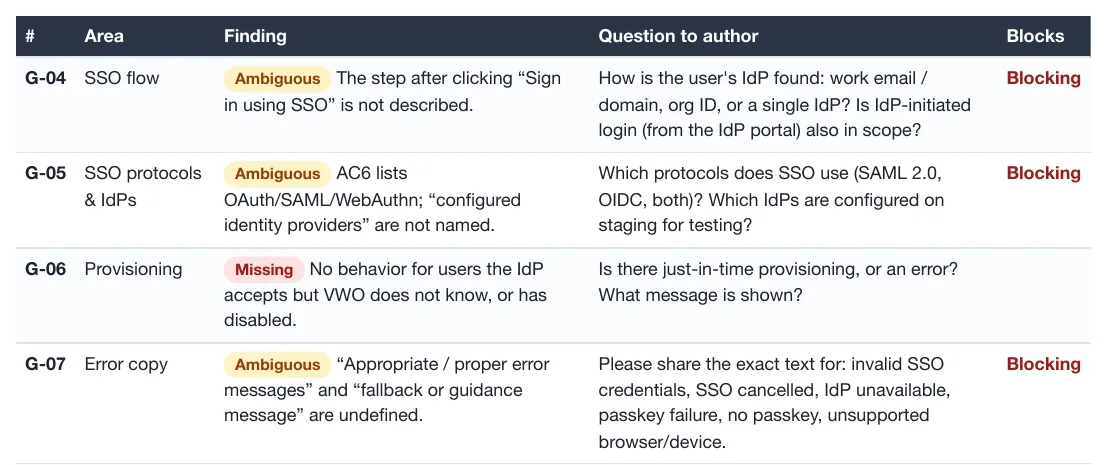
| A Gaps & Questions section for the author | 19 questions, 5 of them marked Blocking |
| Tag each scenario P0, P1 or P2 | 34 scenarios: 10 P0, 15 P1, 9 P2 |
| Map every scenario to an AC or a gap | 34 of 34 mapped |
| Never mark the plan final | "DRAFT, pending human review" on all 9 pages |
| Company info and the logo from misc | VWO, A/B testing, ~5,000 employees, and the logo |
| Stop at a Human Review Gate | the last section, before any test case |
| Never invent what the ticket lacks | resource owners TBD; dates not set |
The analysis found problems in the ticket itself and reported them instead of fixing them: the Jira priority field says Medium while the description says High, the epic is named only in text, and the description ends with leftover text from an AI chat ("If you want, I can also generate test cases..."). Where the ticket says nothing, the plan says so: resources are listed as roles with the owner marked TBD, and the dates wait on two of the questions.
The questions for the author, which the skill calls its most valuable part, look like this in the PDF:
Human review: from draft to final
Is this test plan final? No. The instructor went through it the way a reviewer would. The user story was clear, but the acceptance criteria needed the reviewer's approval, and the draft had flagged what the ticket leaves out: states, error messages, passkey details and ambiguous wording. The reviewer resolves those one by one and answers the open questions, all in one message to the agent: this one is not required, remove it; no test users are needed, that is fine; and so on.
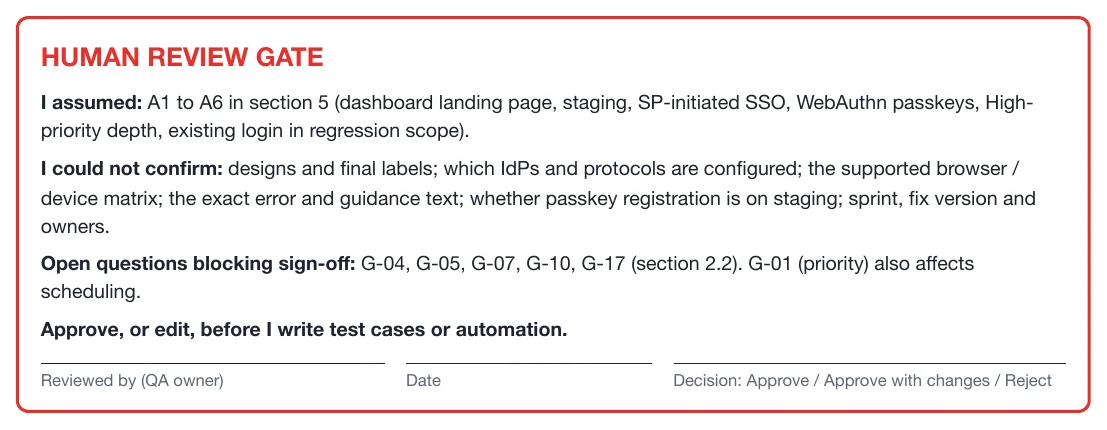
With the answers, the agent produces draft v2, and after that the final version, the one to share with your QA lead. "Now you are leveraging the AI 100%," as the instructor put it: the questions are the ones nobody had answers to yet.
Pushing your skills to GitHub
While the agent worked, the class set up GitHub:
- Create a new public repository named AI Tester Blueprint 5x on your personal account, at github.com/new.
- Create a personal access token (PAT), a classic token, in your GitHub settings; GitHub's guide to tokens shows where.
- Ask your agent, GitHub Copilot or Claude Code, to push the code to that repository, giving it the repository URL, the token and your email.
The instructor's agent pushed the whole project, and the .env file stayed behind because .gitignore lists it. The result is the batch repository, AITesterBlueprint5x, and the skill's folder is free to copy: testplan-creator-skill_a.
Keep class work off company systems. Everything in the learning phase goes to personal accounts: no company repositories, and a personal laptop if possible, since company machines can raise compliance issues. Your skills go to your company once they are ready for people to use.
The 36-skill suite
At the end, the instructor shared one more repository: 36 skills across the STLC, in skillmasterclass. Fourteen cover the STLC stages, from a Jira requirement analyzer and a test plan generator through test design, test cases, execution and defect management to test closure, and 22 are Playwright and Selenium framework skills. The task: modify them for your company, demo them, and use them at work if you can. The same 36 skills, each SKILL.md ready to download, with a GitHub Copilot walkthrough, are in the site's guide Agent Skills for QA Engineers.
The same pattern makes the next skill: the instructor's suggestion was an advanced test case creator.
Questions from the class
- Can the skill ask for the ticket? Yes: tell it to always ask the user for the Jira ticket. The class's skill already falls back to asking for the ticket body.
- Does it read attachments and comments? The instructor said yes. As pushed, though, the script asks Jira for 9 fields, attachment names included but not comments: add
commentto itsfieldslist to read those. - What if the ticket does not have everything? That is what the checklist finds and lists.
- Can it check a GitHub pull request linked to the ticket? Yes: add that to the skill.
- Can it tell whether a ticket already has a plan? Possible, but a separate task.
- Copilot or Claude Code? Whichever your company gives you; if you only have Copilot at work, use Copilot.
- Only IntelliJ with Amazon Q allowed at work? Skills work with any agent.
- Azure DevOps instead of Jira? Find its API and give the agent that instead.
- A Confluence page instead of a Jira ticket? The same steps.
- Product knowledge spread across several services? That needs RAG, later in the course.
- What is the difference between an LLM and an AI agent? It comes in the LLM basics class.
Tasks and announcements
- Task 1, a practice Jira site: set up your own Jira today with the setup video, on a personal account.
- Task 2, GitHub: create a public repository named AI Tester Blueprint 5x on your personal account, and a personal access token.
- Task 3, the advanced skill: build the advanced test plan creator, with its scripts, references and misc folders, try it on a ticket from your Jira, and push it to your repository. Meeti adds this task in the batch space.
- Task 4, the 36 skills: adapt them for your company and show a demo. The longer target stays 50 skills at work.
- Personal accounts only while learning: nothing goes to company repositories.
- Attendance: mark today's on app.thetestingacademy.com with what you learned, such as advanced skills for QA, and your GitHub repository.
- Doubts go in today's doubt thread in the 5x space on SDET Club, not in the Zoom chat. For access problems, use the required access form shared in class.
- The recording arrives by email about one and a half to two hours after class, around 3 PM IST. The Eraser deck link was shared in class.
- Friday evening: an extra session, with the details to follow.
- Token economics gets its own session later.
- Next class, Saturday, 31 October, 11 AM IST: LLM basics: what an LLM is and how to use it, the context window, temperature, a local test case generator, Ollama and Groq.
Task 3, your advanced skill. Build a test plan creator as a folder: a SKILL.md with triggers, a five-step workflow, an output shape, guardrails and a human review gate, plus scripts/, references/ and misc/. Run it on a ticket from your own Jira site, read the gaps it reports, answer them for a v2, and push the skill to your AI Tester Blueprint 5x repository.
Next, on your own. Build an advanced test case creator the same way, then pick the first of your 50 work skills from the STLC list above.