T The Testing Academy · AI Tester Batch
AI Agents Advanced · CrewAI + MCP

CrewAI + Jira MCP: Auto-Generate Test Plans, Test Cases & Playwright Scripts

From a Jira ticket to a complete set of QA deliverables in one command. Four agents, one MCP server, zero custom Jira API code.

Time: 45-60 min Level: Advanced Stack: Python 3.10+ · CrewAI · mcp-atlassian · Groq / OpenAI

1. What we're building

We take the Jira-to-Test-Plan agent you already built and upgrade it from direct REST API calls to MCP (Model Context Protocol). Then we add two more agents to form a complete QA pipeline.

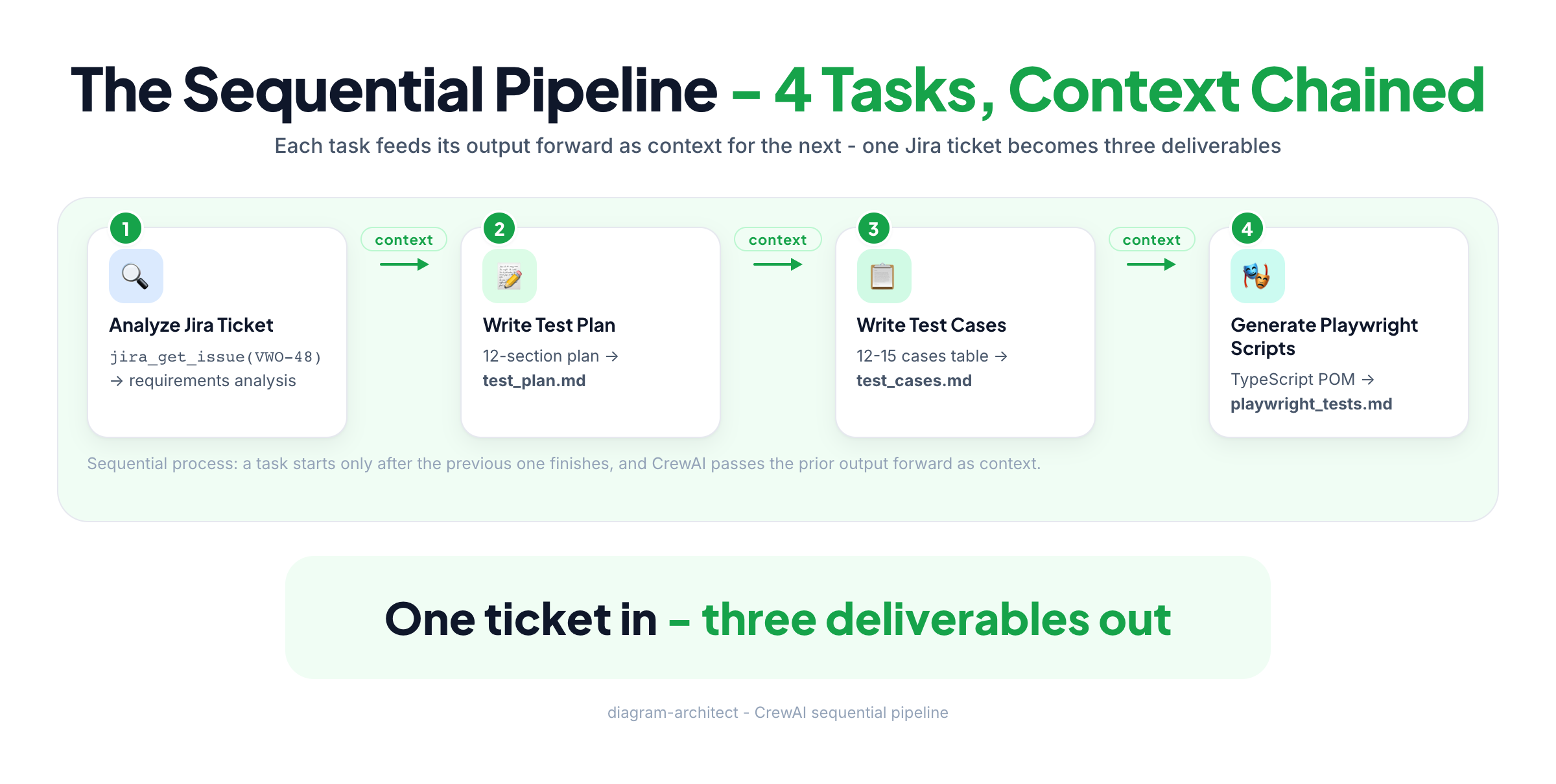
CrewAI crew of four agents fed by a Jira MCP server, producing test plan, test cases and Playwright script files
Input: a Jira ticket ID (e.g. VWO-48). Output: a test plan, detailed test cases, and Playwright automation scripts.
🤖

The four agents

  • Agent 1 - Jira Analyst: fetches the ticket through MCP and extracts every testable requirement.
  • Agent 2 - Test Plan Writer: writes a complete 12-section test plan.
  • Agent 3 - Test Case Writer: designs detailed, executable test cases.
  • Agent 4 - Playwright Coder: generates runnable TypeScript automation scripts.

2. Before vs after: why MCP?

Here's what changed when we swapped a hand-written Jira tool for the MCP server, and why it matters.

AspectBefore (direct REST API)After (Jira MCP)
Jira connectionCustom @tool with requests.get()MCPServerAdapter + mcp-atlassian
AuthenticationManual auth header constructionEnvironment variables, MCP handles it
API parsingManual ADF to text conversion (30+ lines)MCP server does it for you
Available operationsOnly what you coded (1 tool)15+ Jira tools auto-discovered
MaintenanceYou fix Jira API changesCommunity maintains mcp-atlassian
ReusabilityCopy-paste to other projectsSame MCP server works everywhere
Code lines~60 lines for the Jira tool alone0 lines - MCP provides tools
💡
QA analogy. This is like switching from writing raw HTTP requests to test an API, to using Postman or RestAssured. The tool handles the protocol complexity so you focus on the testing logic.

The key change in code

Before - custom tool (60+ lines):

before.py
@tool("JiraTicketFetcher")
def fetch_jira_ticket(ticket_id: str) -> str:
    """Fetches a Jira ticket..."""
    url = f"{JIRA_BASE_URL}/rest/api/3/issue/{ticket_id}"
    r = requests.get(url, auth=(JIRA_EMAIL, JIRA_API_TOKEN))
    r.raise_for_status()
    data = r.json()
    # ... 40 more lines of ADF parsing ...
    return result

ticket_analyst = Agent(
    tools=[fetch_jira_ticket],  # Custom tool
    ...
)

After - MCP adapter (3 lines for the connection):

after.py
from crewai_tools import MCPServerAdapter
from mcp import StdioServerParameters

server_params = StdioServerParameters(
    command="uvx",
    args=["mcp-atlassian"],
    env={...jira_credentials...},
)

with MCPServerAdapter(server_params) as mcp_tools:
    ticket_analyst = Agent(
        tools=mcp_tools,  # 15+ Jira tools auto-loaded!
        ...
    )

That's it. No custom parsing, no API version tracking, no auth header construction. The MCP server handles everything.

3. Architecture

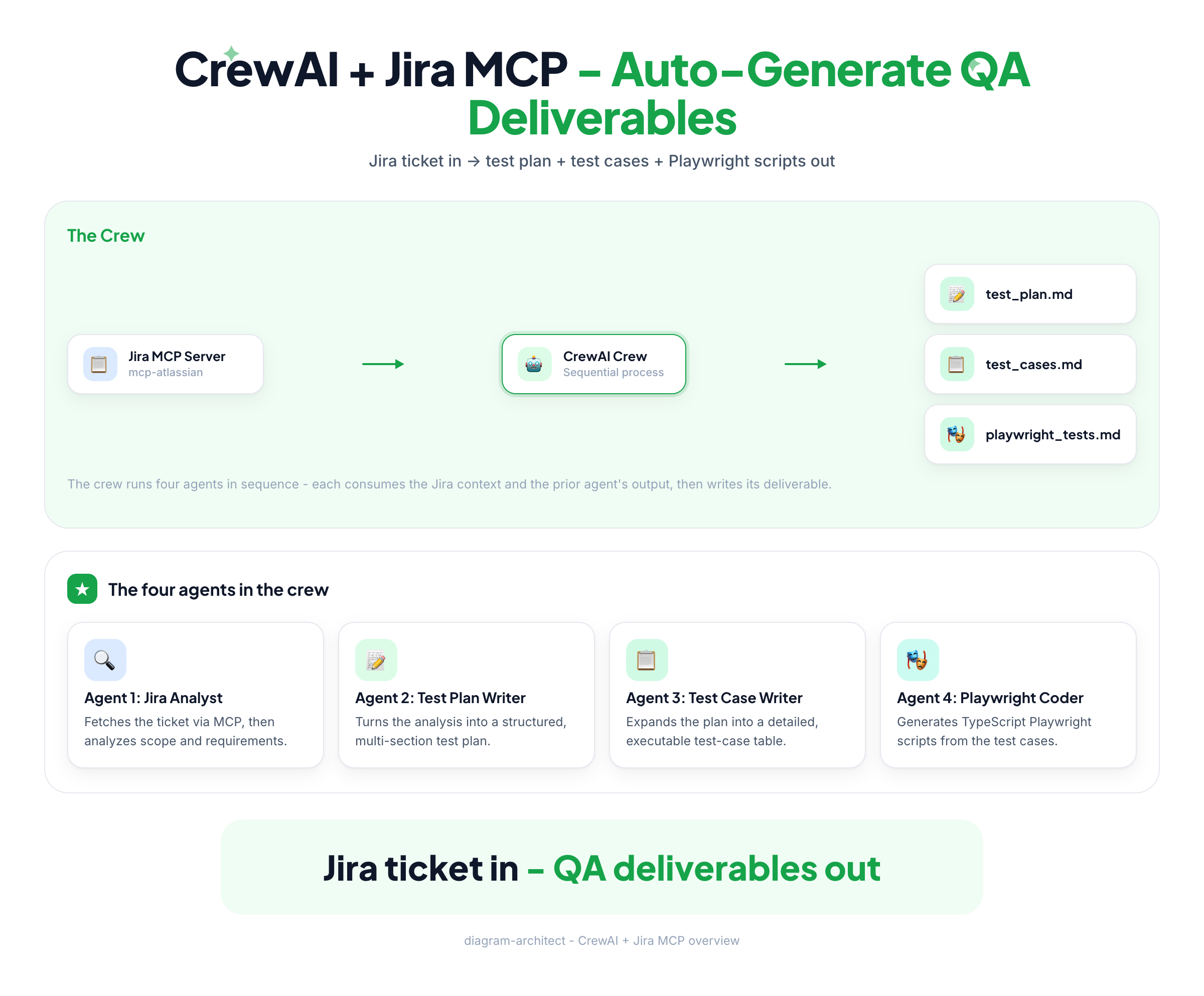
Your Python script talks to agents; the agents reach Jira only through the MCP adapter and the mcp-atlassian server.

Layered architecture: Python script with four agents, MCPServerAdapter over STDIO, mcp-atlassian server, Jira Cloud REST API over HTTPS
The call path: agents to MCPServerAdapter (STDIO) to mcp-atlassian to Jira Cloud (HTTPS).

The sequential pipeline

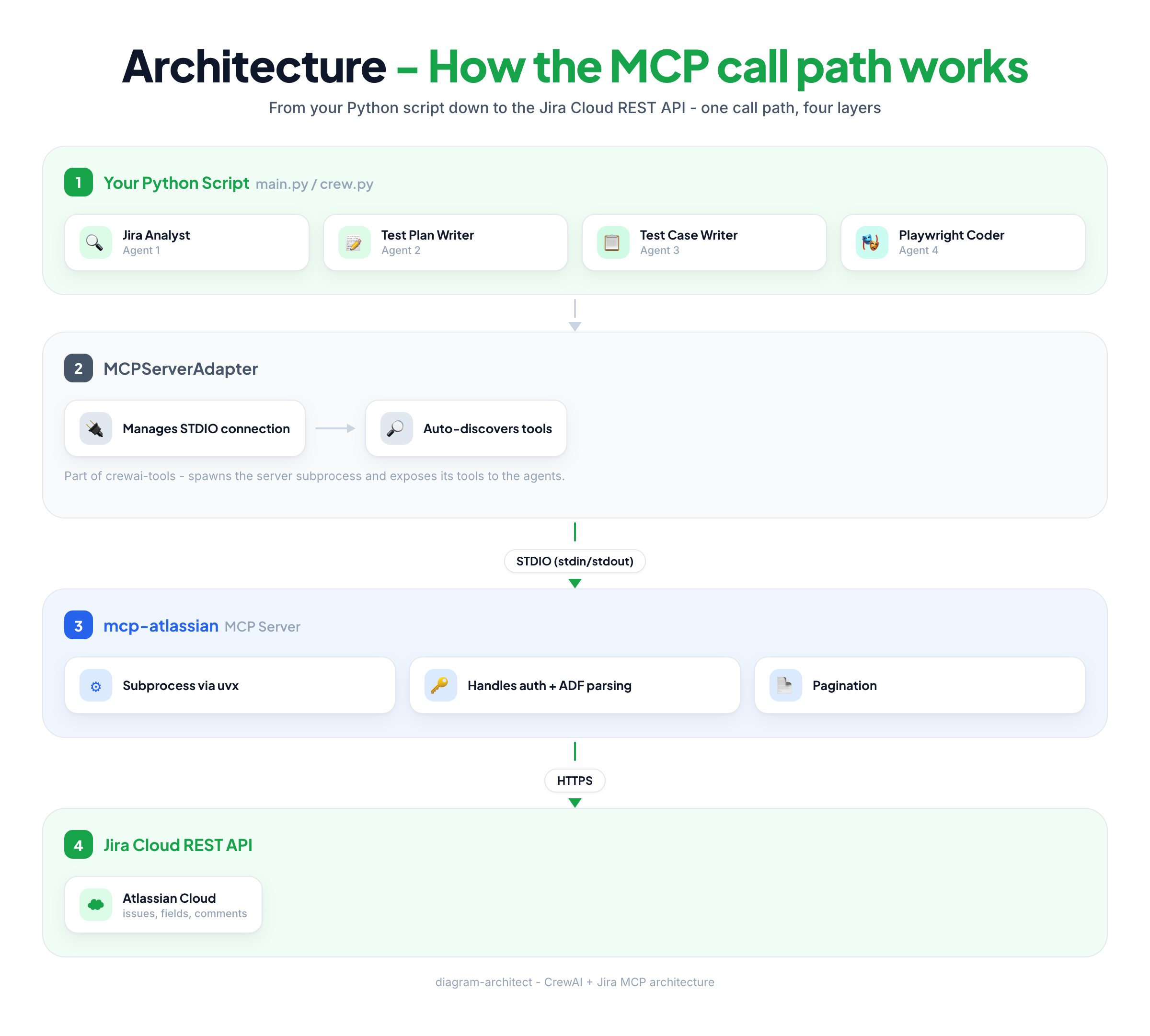
Four-stage sequential pipeline: analyze ticket, write test plan, write test cases, generate Playwright scripts - each passing context to the next
Each task's output becomes the next task's context. Four tasks, four deliverables.
🔗
Reading the diagram. Only Agent 1 touches Jira. Agents 2-4 work purely from the context handed down the pipeline - a deliberate least-privilege design.

4. Prerequisites & setup

4.1 What you need

4.2 Install uv

bash
# macOS / Linux
curl -LsSf https://astral.sh/uv/install.sh | sh

# Windows
powershell -ExecutionPolicy ByPass -c "irm https://astral.sh/uv/install.ps1 | iex"

# Verify
uv --version

4.3 Install Python dependencies

bash
pip install crewai crewai-tools[mcp] mcp python-dotenv litellm

4.4 Get your Jira API token

  1. Go to id.atlassian.com/manage-profile/security/api-tokens
  2. Click Create API token
  3. Give it a label (e.g. "CrewAI MCP")
  4. Copy the token - you'll need it in your .env file

4.5 Verify mcp-atlassian works

bash
# Test that the MCP server can run
uvx mcp-atlassian --help

# If this fails, install it explicitly:
uv tool install mcp-atlassian

5. Project structure

tree
crewai-jira-mcp-testgen/
|-- .env              # Jira + LLM credentials
|-- crew.py           # All agents, tasks, and crew orchestration
|-- main.py           # Entry point - takes Jira ticket ID as input
`-- output/           # Generated files land here
    |-- test_plan.md
    |-- test_cases.md
    `-- playwright_tests.md
📝
Why so few files? We keep it simple. In production you'd split agents.py, tasks.py, crew.py like earlier chapters. For this tutorial everything lives in crew.py so you see the full flow in one place.

6. Step 1: environment configuration

Create a .env file in your project root.

.env
# =====================================================
#  .env - Credentials for CrewAI + Jira MCP
# =====================================================

# -- Jira Cloud Credentials --
# Your Jira site URL (no trailing slash)
JIRA_URL=https://yoursite.atlassian.net

# Your Atlassian account email
[email protected]

# API token from id.atlassian.com/manage-profile/security/api-tokens
JIRA_API_TOKEN=your_jira_api_token_here

# -- LLM Provider --
# Option A: Groq (free tier - recommended for learning)
GROQ_API_KEY=gsk_your_groq_key_here

# Option B: OpenAI (paid)
# OPENAI_API_KEY=sk-your-openai-key-here
Security reminder. Never commit .env files to git. Add .env to your .gitignore immediately.

7. Step 2: the crew - crew.py

The main file. It defines the MCP connection, all four agents, all four tasks, and the crew orchestration.

crew.py
"""
CrewAI + Jira MCP: Auto-Generate Test Plans, Test Cases & Playwright Scripts
Input  : A Jira ticket ID (e.g., VWO-48)
Output : test_plan.md, test_cases.md, playwright_tests.md
Pipeline:
  1. Jira Analyst       -> fetches ticket via MCP, extracts requirements
  2. Test Plan Writer   -> writes complete test plan (12 sections)
  3. Test Case Writer   -> writes detailed test cases table
  4. Playwright Coder   -> generates automation scripts
"""
import os
import datetime
from crewai import Agent, Task, Crew, Process, LLM
from crewai_tools import MCPServerAdapter
from mcp import StdioServerParameters
from dotenv import load_dotenv

load_dotenv()

# ================= LLM SETUP =================
llm = LLM(
    model="groq/llama-3.3-70b-versatile",
    api_key=os.getenv("GROQ_API_KEY"),
    num_retries=5,
    request_timeout=120,
)
# If using OpenAI instead, uncomment:
# llm = LLM(model="openai/gpt-4o-mini", api_key=os.getenv("OPENAI_API_KEY"))

# ============ MCP SERVER CONFIGURATION ============
def get_mcp_server_params() -> StdioServerParameters:
    """
    Configure the mcp-atlassian server connection.
    Launches `uvx mcp-atlassian` as a subprocess and talks over STDIO.
    The MCP server handles: auth, ADF -> text, pagination, retries.
    """
    return StdioServerParameters(
        command="uvx",
        args=["mcp-atlassian"],
        env={
            "JIRA_URL": os.getenv("JIRA_URL"),
            "JIRA_USERNAME": os.getenv("JIRA_USERNAME"),
            "JIRA_API_TOKEN": os.getenv("JIRA_API_TOKEN"),
            "PATH": os.environ.get("PATH", ""),
            "UV_PYTHON": "3.12",
        },
    )

# ============ TEST PLAN TEMPLATE ============
TEST_PLAN_TEMPLATE = """
Follow this EXACT structure for the test plan:
### 1. TEST PLAN OVERVIEW (ID: TP-<JIRA_ID>, project, author, date, version)
### 2. OBJECTIVE        ### 3. SCOPE (in / out)
### 4. TEST STRATEGY (types, approach, tool = Playwright + TypeScript)
### 5. TEST ENVIRONMENT ### 6. ENTRY CRITERIA  ### 7. EXIT CRITERIA
### 8. TEST SCENARIOS (high level)            ### 9. RISK ASSESSMENT
### 10. DEFECT MANAGEMENT ### 11. TEST SCHEDULE ### 12. SIGN-OFF
"""

# ================= AGENTS =================
def create_agents(mcp_tools: list, ticket_id: str):
    """Create all four agents with MCP tools and return them."""

    jira_analyst = Agent(
        role="Senior QA Analyst",
        goal=(
            f"Fetch Jira ticket {ticket_id} using the available Jira tools, "
            "then extract ALL testable requirements, acceptance criteria, "
            "edge cases, and risks."
        ),
        backstory=(
            "You are a senior QA analyst with 12+ years of experience. "
            "You have access to Jira through MCP tools. Fetch the ticket "
            "first, then analyze functional requirements, acceptance "
            "criteria, edge cases, boundary conditions, and risks."
        ),
        tools=mcp_tools,  # <- MCP tools injected here!
        llm=llm,
        verbose=True,
        allow_delegation=False,
        max_iter=10,
    )

    test_plan_writer = Agent(
        role="Test Plan Documentation Specialist",
        goal="Create a comprehensive 12-section test plan document.",
        backstory=(
            f"You are a certified ISTQB test planning expert. "
            f"You MUST follow this template:\n{TEST_PLAN_TEMPLATE}\n"
            f"Today is {datetime.date.today().strftime('%B %d, %Y')}. "
            f"Use professional markdown formatting."
        ),
        llm=llm, verbose=True, allow_delegation=False, max_iter=10,
    )

    test_case_writer = Agent(
        role="Test Case Design Specialist",
        goal="Design detailed, executable test cases (positive, negative, edge, boundary).",
        backstory=(
            "You write test cases so clear that any junior tester can "
            "execute them: TC ID, Title, Preconditions, Steps, Expected "
            "Results, Test Data, Priority. You cover happy path, negative, "
            "edge, boundary, UI validation, and error handling."
        ),
        llm=llm, verbose=True, allow_delegation=False, max_iter=10,
    )

    playwright_coder = Agent(
        role="Playwright Automation Engineer",
        goal="Generate production-ready Playwright tests in TypeScript.",
        backstory=(
            "You are a senior SDET. Your scripts follow best practices: "
            "Page Object Model, data-testid > CSS > XPath locators, "
            "test.describe/test(), expect() assertions, beforeEach/"
            "afterEach, and clear comments. You output COMPLETE, RUNNABLE files."
        ),
        llm=llm, verbose=True, allow_delegation=False, max_iter=10,
    )

    return jira_analyst, test_plan_writer, test_case_writer, playwright_coder

# ================= TASKS =================
def create_tasks(agents: tuple, ticket_id: str):
    """Create all four tasks and wire them together."""
    jira_analyst, test_plan_writer, test_case_writer, playwright_coder = agents

    analysis_task = Task(
        description=(
            f"Fetch Jira ticket {ticket_id} using the Jira MCP tools "
            "(look for jira_get_issue or similar). Then provide a DETAILED "
            "analysis: summary, testable requirements, acceptance criteria, "
            "edge cases, risks, and recommended testing types."
        ),
        expected_output="A detailed analysis report: summary, requirements, AC, edge cases, risks, testing types.",
        agent=jira_analyst,
    )

    test_plan_task = Task(
        description=(
            f"Based on the analysis, create a COMPLETE test plan for {ticket_id}. "
            "Follow the 12-section template EXACTLY. Include high-level scenarios, "
            "3-5 risks, and a test schedule. Clean markdown."
        ),
        expected_output="A complete 12-section test plan in markdown.",
        agent=test_plan_writer,
        context=[analysis_task],
        output_file="output/test_plan.md",
    )

    test_cases_task = Task(
        description=(
            f"Based on the analysis and test plan, create 12-15 DETAILED test "
            "cases for {ticket_id} in a markdown table: TC ID | Title | "
            "Preconditions | Steps | Expected Result | Test Data | Priority. "
            "Cover positive, negative, edge, UI, and API scenarios."
        ),
        expected_output="A markdown document with 12-15 detailed test cases in table format.",
        agent=test_case_writer,
        context=[analysis_task, test_plan_task],
        output_file="output/test_cases.md",
    )

    playwright_task = Task(
        description=(
            f"Based on the test cases, generate COMPLETE Playwright TypeScript "
            "scripts for {ticket_id}: Page Object Model, data-testid locators, "
            "test.describe() groups, expect() assertions, beforeEach setup, "
            "helpful comments. No placeholders or TODOs."
        ),
        expected_output="Complete, copy-paste-ready Playwright TypeScript test files.",
        agent=playwright_coder,
        context=[analysis_task, test_cases_task],
        output_file="output/playwright_tests.md",
    )

    return analysis_task, test_plan_task, test_cases_task, playwright_task

# ============ CREW ORCHESTRATION ============
def run_crew(ticket_id: str):
    """Connect to Jira MCP -> create Crew -> run pipeline."""
    print(f"\n[*] Target Jira Ticket: {ticket_id}")
    os.makedirs("output", exist_ok=True)

    server_params = get_mcp_server_params()
    print("[*] Connecting to Jira MCP server (mcp-atlassian)...")

    with MCPServerAdapter(server_params, connect_timeout=60) as mcp_tools:
        tool_names = [t.name for t in mcp_tools]
        print(f"[+] Connected! Discovered {len(mcp_tools)} Jira tools:")
        for name in tool_names:
            print(f"    - {name}")

        agents = create_agents(mcp_tools, ticket_id)
        tasks = create_tasks(agents, ticket_id)

        crew = Crew(
            agents=list(agents),
            tasks=list(tasks),
            process=Process.sequential,
            verbose=True,
            max_rpm=4,  # Rate limit for Groq free tier
        )

        print(f"\n[*] Starting QA Pipeline for {ticket_id}")
        result = crew.kickoff()
        print("\n[+] QA PIPELINE COMPLETE! Files in ./output/")
        return result
8. Step 3: entry point - main.py

main.py
"""
Entry point for the CrewAI + Jira MCP QA Pipeline.
Usage: python main.py VWO-48
"""
import sys
from dotenv import load_dotenv

load_dotenv()

from crew import run_crew

if __name__ == "__main__":
    ticket_id = sys.argv[1] if len(sys.argv) > 1 else "VWO-48"
    run_crew(ticket_id)

9. How it works: the full flow

Trace what happens when you run python main.py VWO-48.

1

MCP connection

MCPServerAdapter launches uvx mcp-atlassian as a subprocess with your Jira env vars. The server reports its tools over STDIO (jira_get_issue, jira_search, jira_list_projects, ...), and the adapter converts each MCP tool into a CrewAI BaseTool.

2

Agent 1 runs (Jira Analyst)

The agent decides it needs jira_get_issue, calls it with issue_key="VWO-48". The adapter routes the call over STDIO to mcp-atlassian, which calls GET /rest/api/3/issue/VWO-48 and returns title, description, priority, comments. Agent 1 produces requirements, edge cases, risks.

3

Agents 2-4 run sequentially

Agent 2 gets Agent 1's analysis as context, writes test_plan.md. Agent 3 gets analysis + plan, writes test_cases.md. Agent 4 gets analysis + cases, writes playwright_tests.md.

4

Cleanup

The with block ends, MCPServerAdapter.stop() fires automatically, the mcp-atlassian subprocess is terminated - no orphan processes.

10. Running the project

bash
cd crewai-jira-mcp-testgen
cat .env                 # make sure .env is configured
mkdir -p output

python main.py           # run with default ticket
python main.py VWO-48     # run with a specific ticket
python main.py PROJ-123   # a different ticket

Expected console output

console
[*] Target Jira Ticket: VWO-48
[*] Connecting to Jira MCP server (mcp-atlassian)...
[+] Connected! Discovered 16 Jira tools:
    - jira_get_issue
    - jira_search
    - jira_list_projects
    - jira_get_issue_comments
    - ... (more tools)

[*] Starting QA Pipeline for VWO-48
[Agent: Senior QA Analyst] Using tool: jira_get_issue {"issue_key": "VWO-48"}
[Agent: Test Plan Documentation Specialist] -> output/test_plan.md
[Agent: Test Case Design Specialist] -> output/test_cases.md
[Agent: Playwright Automation Engineer] -> output/playwright_tests.md

[+] QA PIPELINE COMPLETE!

11. Understanding the MCP connection

The single most important concept. Think of MCPServerAdapter as a WebDriver factory for MCP tools.

🧩

WebDriver parallel

ChromeDriver needs a browser binary, a driver executable, and capabilities. MCPServerAdapter needs an MCP server binary (mcp-atlassian via uvx), a transport (STDIO), and configuration (Jira credentials in env vars).

mapping.py
server_params = StdioServerParameters(
    command="uvx",                    # <- "chromedriver"
    args=["mcp-atlassian"],           # <- "chrome"
    env={                             # <- "capabilities"
        "JIRA_URL": "https://...",
        "JIRA_USERNAME": "...",
        "JIRA_API_TOKEN": "...",
    },
)

The context manager pattern

This is exactly like a pytest fixture with yield - setup, hand over, auto-cleanup.

pattern.py
# pytest fixture           # MCP equivalent
# @pytest.fixture
# def browser():           with MCPServerAdapter(params) as mcp_tools:
#     d = Chrome()             # mcp_tools = CrewAI-ready tools
#     yield d                  ...use them in agents...
#     d.quit()             # <- auto-cleanup: subprocess killed
🔐
Why only Agent 1 gets MCP tools. Only the Jira Analyst calls external tools. Agents 2-4 work purely from context (the output of previous tasks). Don't give an agent more access than it needs - least privilege.

12. QA analogy map

This project's conceptQA equivalent you already know
mcp-atlassian serverA Selenium Grid server exposing browser capabilities
MCPServerAdapterChromeDriverManager - connects, gets tools
StdioServerParametersDesiredCapabilities - what server, how
MCP tools (jira_get_issue)WebDriver methods (driver.get(), click())
Agent 1 calling jira_get_issueA test calling driver.get("...VWO-48")
with MCPServerAdapter(...)@pytest.fixture with yield auto-cleanup
Task context (output passing)Test data flowing between BDD steps
Process.sequentialA Jenkins pipeline with ordered stages
max_iter=10max_retries in a retry policy
max_rpm=4API rate limiting - don't overwhelm Groq

13. What tools does mcp-atlassian expose?

When CrewAI connects, it auto-discovers these tools.

Tool nameWhat it doesQA use case
jira_get_issueGet full issue details by keyFetch ticket for test plan generation
jira_searchSearch issues using JQLFind all bugs in a sprint
jira_list_projectsList accessible projectsDiscover project structure
jira_get_issue_commentsGet comments on an issueRead QA review notes
jira_create_issueCreate a new issueAuto-create bug reports
jira_update_issueUpdate issue fieldsMark issues as "In QA"
jira_add_commentAdd comment to issuePost test results
jira_get_transitionsGet available status transitionsCheck workflow states
jira_transition_issueMove issue through workflowTransition to "Ready for QA"
jira_get_board_issuesGet issues from a boardSprint-level test planning
📝
Exact tool names vary by mcp-atlassian version. Set verbose=True on your agents to see the exact names discovered.

14. Troubleshooting

ProblemCauseFix
uvx: command not founduv not installedInstall uv (see section 4.2)
Connection timeout after 60sWrong Jira URL or networkVerify JIRA_URL, check connectivity
No tools discoveredInvalid Jira credentialsTest creds with the curl command below
ModuleNotFoundError: mcpMissing dependencypip install mcp crewai-tools[mcp]
Agent stuck in a loopCan't figure out tool namesCheck verbose output, simplify the task
Rate limit exceededToo many LLM callsRaise max_rpm, add delays, or use OpenAI
mcp-atlassian crashesVersion incompatibilityPin a version: uvx [email protected]
Empty output filesAgent didn't match expected formatAlign the task expected_output

Quick diagnostic commands

bash
# Test Jira credentials directly
curl -s -u "[email protected]:your_api_token" \
  "https://yoursite.atlassian.net/rest/api/3/myself" | python -m json.tool

# Test mcp-atlassian can start
uvx mcp-atlassian --help

# Test CrewAI + MCP imports
python -c "from crewai_tools import MCPServerAdapter; from mcp import StdioServerParameters; print('All imports OK!')"

15. Extension ideas

Level 2: add more deliverables

Level 3: multi-source intelligence

Level 4: full CI/CD integration

Run this as a GitHub Action on every new Jira ticket: webhook fires when a ticket moves to "Ready for QA" -> the Action runs the pipeline -> auto-commits the test plan + cases + Playwright tests -> opens a PR -> comments the PR link on the Jira ticket.

16. One-liner summaries

17. Exercises

🧾

Exercise 1: Bug reporter agent (beginner)

Add a 5th agent that reads the test cases and creates a Jira ticket (via jira_create_issue) for any case that sounds like a known bug. Search existing bugs with jira_search first to avoid duplicates.

🧸

Exercise 2: Sprint test plan (intermediate)

Modify main.py to accept a sprint name. Use jira_search with JQL like sprint = "Sprint 5" AND type = Story to fetch all stories, then generate a combined test plan covering them.

🔥

Exercise 3: Self-updating test suite (advanced)

Build a pipeline that fetches a ticket via MCP, generates Playwright tests, saves the .spec.ts files to a real Playwright project, runs npx playwright test, and on failure uses jira_add_comment to post the failure back to the ticket.

🏆
Challenge. Switch the crew to Process.hierarchical. Add a QA Manager agent that delegates based on ticket type (bug vs story vs task) - mirroring how a real QA lead delegates work.

From a Jira ticket to a test plan, test cases, and Playwright scripts - in one command. MCP did the plumbing; you owned the testing logic.

- The Testing Academy, AI Tester Batch